%22%3E%3Cpath%20d%3D%22m-369%200h408v79h-408z%22%20fill%3D%22%237933ff%22%2F%3E%3Cpath%20d%3D%22m-148%200h306v45h-306z%22%20fill%3D%22%23974dff%22%2F%3E%3C%2Fg%3E%3C%2Fsvg%3E)
%22%2F%3E%3C%2FclipPath%3E%3Cg%20clip-path%3D%22url(%23a)%22%3E%3Cpath%20d%3D%22m76%200h484v36h-484z%22%20fill%3D%22%23974dff%22%2F%3E%3Cpath%20d%3D%22m0%200h384v24h-384z%22%20fill%3D%22%2306bdfc%22%20transform%3D%22matrix(1%200%200%20-1%200%2060)%22%2F%3E%3C%2Fg%3E%3C%2Fsvg%3E)
什么是 AWS Multi-Agent Orchestrator?
AWS Multi-Agent Orchestrator 是一个灵活且内置众多工具的框架,旨在管理 AI 智能体并支持复杂的多轮对话。借助其预构建组件,我们可以快速开发与部署,从而专注于业务应用,而无需从零搭建这些基础能力。
AWS Multi-Agent Orchestrator 提供以下特性:
- 智能路由: 动态识别每个查询的最佳智能体。
- 流式与非流式响应:同时支持两种智能体响应方式。
- 上下文管理:在多轮对话中维护连贯性与历史记录。
- 可扩展性:可创建新智能体或修改现有智能体。
- 通用部署:可在 AWS Lambda、本地环境和云平台上运行。
该框架同时支持 Python 和 TypeScript 实现。
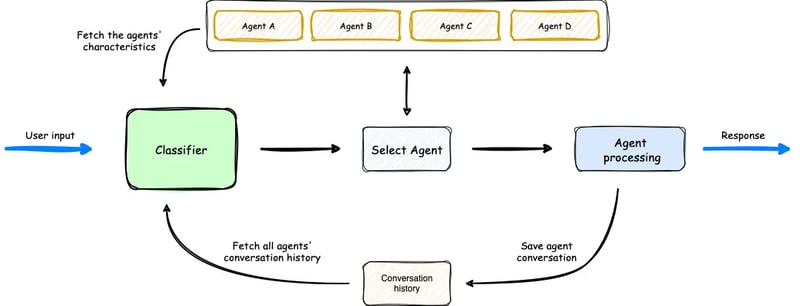
Multi-Agent Orchestrator 的工作方式概览。 (来源)
在上图中,分类器会综合可用的智能体、用户提示以及过往对话历史,选择最合适的智能体处理用户输入。随后,由该智能体处理请求。流程简单而高效。
设置 AWS Multi-Agent Orchestrator
想要快速完成环境搭建,您可以参考文档中的 快速开始指南。
首先,创建一个新文件夹和一个新的 Python 虚拟环境,用于安装所需的库。
mkdir test_multi_agent_orchestrator
cd test_multi_agent_orchestrator
python -m venv venv
source venv/bin/activate # On Windows use venv\\Scripts\\activate激活虚拟环境后,安装库:
pip install multi-agent-orchestrator接下来需要配置 AWS 账户。如果您还没有 AWS 账户,可以注册 免费套餐账户。注册完成后,请 下载 AWS CLI。
还需要对 AWS CLI 进行配置。详细说明请参阅 设置 AWS CLI,也可通过更简单的方式:运行 aws configure 命令并提供 AWS 访问密钥 ID 和私有访问密钥。这些密钥可在您的控制台中新建用户后获取。
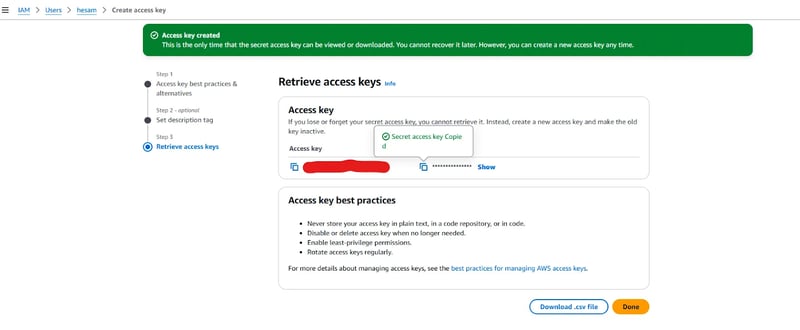
创建新用户时提供的访问密钥。
拿到访问密钥后,运行 aws configure,输入密钥,选择区域名称(完整列表见 此处),请选择离您最近的区域,并将默认输出格式设置为 json。

如果 CLI 配置正确,运行 aws sts get-caller-identity 命令应显示您的 AWS 账户 ID、用户 ID 和 ARN。
完成 AWS CLI 配置后,我们需要在 AWS Bedrock 中开通所需的 LLM 访问权限。Amazon Bedrock 是一项服务,可通过 API 试用和调用基础模型(例如 Llama 3.2 或 Claude 3.5 Sonnet)。Multi-Agent Orchestrator 默认会调用两种模型:
- 将 Claude 3.5 Sonnet 用作分类器
- 将 Claude 3 Haiku 用作智能体
当然,您可以更换这些模型,但这里我们先沿用默认配置。
要开通对这两个模型的访问,请前往 Amazon Bedrock > Model Access,选择“Modify model access”。勾选这两个模型(也可按需选择其他模型)并填写所需信息。界面如下所示:
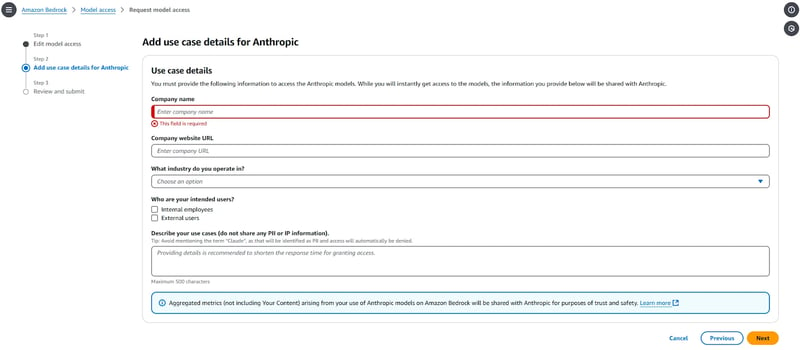
提交申请后,模型通常在 1–2 分钟内可用。获得访问权限后,您会在对应模型前看到 “Access granted”。
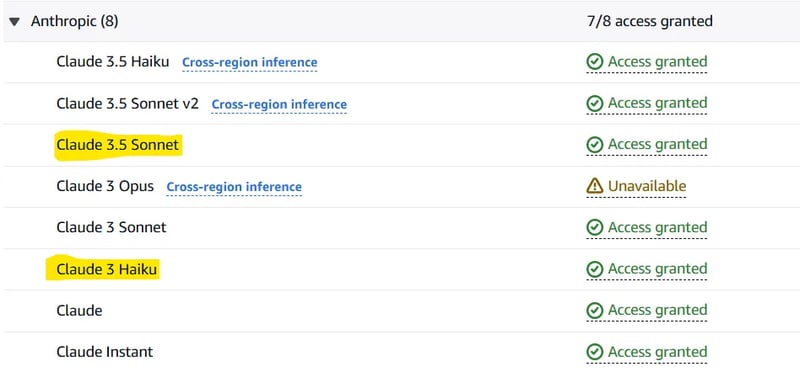
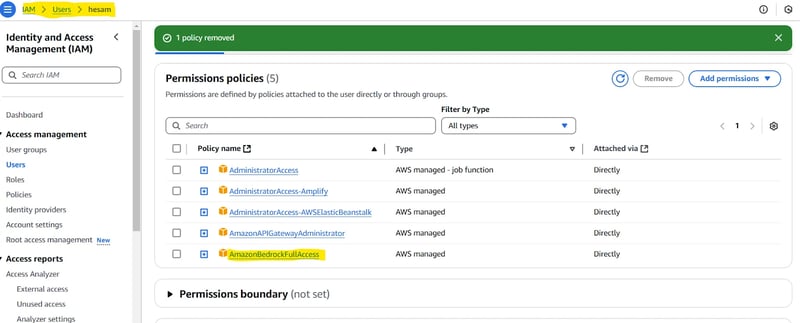
注意: 您可能需要为新建用户分配策略。如果您在下一小节(测试您的设置)中遇到问题,可以先进行验证。如需参考,请查看 此页面。简言之,您需要为该用户授予 AmazonBedrockFullAccess 权限。
测试您的设置
要检查前述步骤是否正确,请使用以下代码:
import uuid
import asyncio
import json
import sys
from typing import Optional, List, Dict, Any
from multi_agent_orchestrator.orchestrator import MultiAgentOrchestrator, OrchestratorConfig
from multi_agent_orchestrator.agents import (
BedrockLLMAgent,
BedrockLLMAgentOptions,
AgentResponse,
AgentCallbacks,
)
from multi_agent_orchestrator.types import ConversationMessage, ParticipantRole
orchestrator = MultiAgentOrchestrator(
options=OrchestratorConfig(
LOG_AGENT_CHAT=True,
LOG_CLASSIFIER_CHAT=True,
LOG_CLASSIFIER_RAW_OUTPUT=True,
LOG_CLASSIFIER_OUTPUT=True,
LOG_EXECUTION_TIMES=True,
MAX_RETRIES=3,
USE_DEFAULT_AGENT_IF_NONE_IDENTIFIED=True,
MAX_MESSAGE_PAIRS_PER_AGENT=10,
)
)
class BedrockLLMAgentCallbacks(AgentCallbacks):
def on_llm_new_token(self, token: str) -> None:
# handle response streaming here
print(token, end="", flush=True)
tech_agent = BedrockLLMAgent(
BedrockLLMAgentOptions(
name="Tech Agent",
streaming=True,
description=(
"Specializes in technology areas including software development, hardware, AI, "
"cybersecurity, blockchain, cloud computing, emerging tech innovations, and pricing/costs "
"related to technology products and services."
),
model_id="anthropic.claude-3-sonnet-20240229-v1:0",
callbacks=BedrockLLMAgentCallbacks(),
)
)
orchestrator.add_agent(tech_agent)
async def handle_request(
_orchestrator: MultiAgentOrchestrator, _user_input: str, _user_id: str, _session_id: str
):
response: AgentResponse = await _orchestrator.route_request(
_user_input, _user_id, _session_id
)
# Print metadata
print("\nMetadata:")
print(f"Selected Agent: {response.metadata.agent_name}")
if response.streaming:
print("Response:", response.output.content[0]["text"])
else:
print("Response:", response.output.content[0]["text"])
if __name__ == "__main__":
USER_ID = "user123"
SESSION_ID = str(uuid.uuid4())
print("Welcome to the interactive Multi-Agent system. Type 'quit' to exit.")
while True:
# Get user input
user_input = input("\nYou: ").strip()
if user_input.lower() == "quit":
print("Exiting the program. Goodbye!")
sys.exit()
# Run the async function
asyncio.run(handle_request(orchestrator, user_input, USER_ID, SESSION_ID))如果您能够输入提示并收到回答,说明一切正常。
使用 AWS Multi-Agent Orchestrator 的演示项目
AWS Multi-Agent Orchestrator 仓库提供了多个 TypeScript 和 Python 示例项目。现在我们将编写一个简化的 Python 应用程序,包含两个智能体:Python 开发者智能体 和 机器学习专家智能体。
我们还将使用 Chainlit(一个开源 Python 包)为应用实现简易 UI。首先安装必要的库:
chainlit==1.2.0
multi_agent_orchestrator==0.0.18下面是演示应用的代码。在给出代码前,我们先做说明:
- 首先导入所需的库。
- 我们使用
“anthropic.claude-3-haiku-20240307-v1:0”作为分类器模型。该分类器会在新用户输入到达时选择使用哪个智能体。 - 将创建好的分类器传入
MultiAgentOrchestrator,并设置一些配置项。 BedrockLLMAgent类用于创建智能体。需要为每个智能体提供name和description。模型可以选择任一已开通访问的模型,甚至可通过 Ollama 在本地运行。设置streaming=True并传入ChainlitAgentCallbacks()作为callback,可让智能体以流式而非一次性完整方式返回响应。最后,将每个智能体添加到 orchestrator 中。- 设置
user_session,并定义处理用户与智能体消息的主体逻辑。
### 1
import uuid
import chainlit as cl
from multi_agent_orchestrator.orchestrator import MultiAgentOrchestrator, OrchestratorConfig
from multi_agent_orchestrator.classifiers import BedrockClassifier, BedrockClassifierOptions
from multi_agent_orchestrator.agents import AgentResponse
from multi_agent_orchestrator.agents import BedrockLLMAgent, BedrockLLMAgentOptions, AgentCallbacks
from multi_agent_orchestrator.orchestrator import MultiAgentOrchestrator
from multi_agent_orchestrator.types import ConversationMessage
import asyncio
import chainlit as cl
class ChainlitAgentCallbacks(AgentCallbacks):
def on_llm_new_token(self, token: str) -> None:
asyncio.run(cl.user_session.get("current_msg").stream_token(token))
### 2
# Initialize the orchestrator & classifier
custom_bedrock_classifier = BedrockClassifier(BedrockClassifierOptions(
model_id='anthropic.claude-3-haiku-20240307-v1:0',
inference_config={
'maxTokens': 500,
'temperature': 0.7,
'topP': 0.9
}
))
### 3
orchestrator = MultiAgentOrchestrator(options=OrchestratorConfig(
LOG_AGENT_CHAT=True,
LOG_CLASSIFIER_CHAT=True,
LOG_CLASSIFIER_RAW_OUTPUT=True,
LOG_CLASSIFIER_OUTPUT=True,
LOG_EXECUTION_TIMES=True,
MAX_RETRIES=3,
USE_DEFAULT_AGENT_IF_NONE_IDENTIFIED=False,
MAX_MESSAGE_PAIRS_PER_AGENT=10,
),
classifier=custom_bedrock_classifier
)
### 4
def create_python_dev():
return BedrockLLMAgent(BedrockLLMAgentOptions(
name="Python Developer Agent",
streaming=True,
description="Experienced Python developer specialized in writing, debugging, and evaluating only Python code.",
model_id="anthropic.claude-3-sonnet-20240229-v1:0",
callbacks=ChainlitAgentCallbacks()
))
def create_ml_expert():
return BedrockLLMAgent(BedrockLLMAgentOptions(
name="Machine Learning Expert",
streaming=True,
description="Expert in areas related to machine learning including deep learning, pytorch, tensorflow, scikit-learn, and large language models.",
model_id="anthropic.claude-3-sonnet-20240229-v1:0",
callbacks=ChainlitAgentCallbacks()
))
# Add agents to the orchestrator
orchestrator.add_agent(create_python_dev())
orchestrator.add_agent(create_ml_expert())
### 5
@cl.on_chat_start
async def start():
cl.user_session.set("user_id", str(uuid.uuid4()))
cl.user_session.set("session_id", str(uuid.uuid4()))
cl.user_session.set("chat_history", [])
@cl.on_message
async def main(message: cl.Message):
user_id = cl.user_session.get("user_id")
session_id = cl.user_session.get("session_id")
msg = cl.Message(content="")
await msg.send() # Send the message immediately to start streaming
cl.user_session.set("current_msg", msg)
response:AgentResponse = await orchestrator.route_request(message.content, user_id, session_id, {})
# Handle non-streaming or problematic responses
if isinstance(response, AgentResponse) and response.streaming is False:
# Handle regular response
if isinstance(response.output, str):
await msg.stream_token(response.output)
elif isinstance(response.output, ConversationMessage):
await msg.stream_token(response.output.content[0].get('text'))
await msg.update()
if __name__ == "__main__":
cl.run()现在可以运行应用了。首先运行 chainlit run [app.py](<http://app.py/>) -w 。随后在浏览器新打开的标签页中测试您的应用。
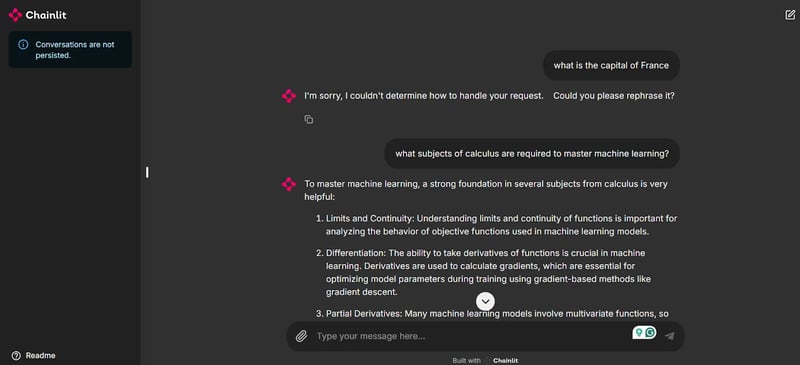
如截图所示,我们现在有了一个用于测试应用并与智能体聊天的 UI。
请注意,由于首个提示 “法国的首都是哪里?” 与我们的任一智能体都无关,系统不会给出答案。这一点对于保持对话相关性、在使用这些模型时避免不必要的额度消耗非常关键。然而,当提出相关问题时,机器学习专家 智能体便会介入并给出回答,这得益于多智能体编排器的智能路由能力。
结语
本文介绍了最新的 AWS Multi-Agent Orchestrator 框架,重点展示了其独特特性,梳理了环境搭建步骤,了解了 Amazon Bedrock 提供的基础模型,并完成了一个演示项目。
在撰写本文时,该框架的文档尚不够全面与细致。若想使用记忆、工具调用等其他功能,您需要阅读代码库,并参考提供的示例项目。
紧跟智能体 AI 框架的迭代是把握这一快速发展领域的明智之举。基于 AWS 服务基础设施构建的 AWS Multi-Agent Orchestrator 颇具潜力,值得持续关注其发展。

人工智能硕士生与 AI 技术写作者。我分享最新的 AI 技术见解,让机器学习研究更易理解,并将复杂的 AI 主题加以简化,助您始终走在前沿。
几乎每周,具身/智能体 AI 领域都会出现新东西。 AWS Multi-Agent Orchestrator(多智能体编排器) 是一个用于管理多个 AI 智能体的全新框架。无论您是在构建客户支持系统还是一个专门的多智能体应用,这个框架都值得一试。
在本教程中,我将介绍 AWS Multi-Agent Orchestrator 的独特之处,手把手带您完成环境搭建,并开发一个演示项目,直观体验该框架的运行方式。