

什么是 Claude Cowork 插件?
Claude Cowork 插件是一个可安装的软件包,打包了让 Claude 以专家方式工作的所有内容。它包含诸如工作流技能、斜杠命令、正确的连接器,以及必要的子代理与钩子等。Anthropic 的发布博文用一句话概括:
“插件让您将任意技能、连接器、斜杠命令和子代理打包在一起,使 Claude 成为适配您角色、团队和公司的专家。”
插件于 2026 年 1 月 30 日在 Cowork 中上线,为付费用户提供研究预览版,同时发布了 11 个由 Anthropic 团队自行构建的开源插件。第二波于 2026 年 2 月 24 日推出,新增人力、设计、工程、运营和财务分析插件,4 个金融服务插件,来自 Slack、S&P Global 与 LSEG 的合作伙伴插件,以及斜杠命令的结构化表单。Cowork 本身结束预览并于2026 年 4 月 9 日面向所有用户正式发布。
插件的运行位置容易让人困惑,这里引用 Anthropic 帮助中心关于插件的最新说明:您添加的插件会保存到您的 Claude 账户中,而不是您的电脑上,所以它会跟随您到网页版聊天、桌面应用、Cowork 和 Claude Code(2.1.273 或更高版本会自动同步)。技能与命令在以上所有位置均可使用,而钩子与子代理仅在 Cowork 与 Claude Code 中运行,并在聊天中呈现灰显。
如果您尚未使用过 Cowork,可阅读我们的 Claude Cowork 教程来了解该应用;Claude Cowork 与 Claude Code 对比解释了为何同一个插件在两者中的能力有所差异。本文不再重复介绍 Cowork。
插件打包了什么
下表列出插件可包含的 5 个组件、各自作用及其触发时机。
|
组件 |
作用 |
触发时机 |
|
Skill(技能) |
一份 |
当 Claude 判断任务与技能描述匹配时自动触发。您也可在输入 |
|
斜杠命令 |
带有独立说明的命名操作,例如 |
在您手动输入时触发。在 Cowork 中,Claude 开始前可先询问一个结构化问题。 |
|
连接器(MCP) |
通过 Model Context Protocol(MCP)连接外部服务:Snowflake、BigQuery、Slack 等数百种 |
在您完成一次服务连接后,当 Claude 调用该服务的某个工具时触发。 |
|
子代理 |
Claude 可委派部分任务给的专家,拥有独立的提示与工具清单 |
当 Claude 决定委派时触发。仅在 Cowork 与 Claude Code 中可用。 |
|
钩子(Hook) |
在会话事件(如调用工具前)运行的脚本或提示 |
在该事件发生时每次触发。仅在 Cowork 与 Claude Code 中可用。 |
技能在 Claude 判断其相关时触发,命令则在您输入 / 时触发。这一区别决定了当插件似乎“没有动作”时该检查什么——我会在验证一节回到这一点。如果您对子代理尚不熟悉,我们的 Introduction to AI Agents 课程无代码讲解了委派模式。
插件 vs. 技能
技能在单个 SKILL.md 文件中教会 Claude 一项任务。插件则打包了一整套岗位职能所需的技能、命令与连接器,因此 Data 插件包含 10 个技能;插件是您安装的单位,而技能是您编辑的单位。若想深入了解技能格式,请参见我们的 Claude Skills 指南。
在哪里找到 Cowork 插件
Cowork 插件主要来自 3 个地方,本文大部分会使用第一个:
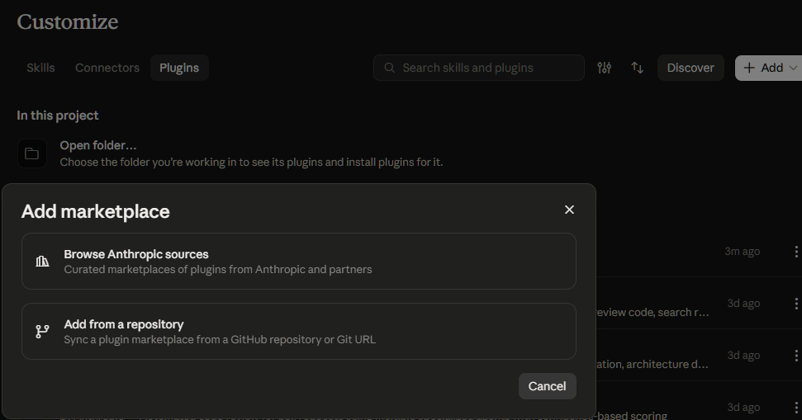
- Cowork 内置的多个市场。Knowledge Work 市场默认添加到每个账号。Anthropic 的生命科学、金融服务与法律市场,可通过 Add、Add marketplace,然后 Browse Anthropic sources 添加。
- claude.com/plugins 目录。收录 300 多个插件,并可筛选其是否适用于 Claude、Claude Code 或二者皆可。
- GitHub 上的 anthropics/knowledge-work-plugins 仓库。这是所有由 Anthropic 构建的岗位插件的 Apache-2.0 开源仓库,本文引用的文件也来自此处。
另外两条安装路径也存在:按 URL 或 owner/repo 速记形式将任意 Git 仓库添加为市场(支持 GitHub、GitHub Enterprise 以及公开的 GitLab、Bitbucket 仓库),或直接上传最大 200 MB 的 .zip 或 .plugin 插件归档。
岗位插件涵盖多种领域:效率、销售、客户支持、产品管理、市场、法务、财务、数据、企业搜索、人力资源、设计、工程、运营、生物科研与中小企业,以及合作伙伴构建的插件。本文不是选品盘点,请直接选择适用于您岗位的插件继续阅读。
Cowork 插件包含什么?
Cowork 插件是一个文件夹,清单位于隐藏子文件夹中,其他文件位于顶层。下面是完整结构,标注了组件及其仅在部分界面加载的情况:
my-plugin/
├── .claude-plugin/
│ └── plugin.json # manifest (required)
├── skills/
│ └── <name>/SKILL.md # skills: auto-triggered knowledge & named actions
├── commands/
│ └── <name>.md # legacy single-file slash commands (still work)
├── agents/
│ └── <name>.md # sub-agents (Cowork and Claude Code only)
├── hooks/
│ └── hooks.json # hooks (Cowork and Claude Code only)
├── .mcp.json # connectors
└── README.md请牢记这棵树,因为在第 4 步我们会逐个文件构建其上半部分。下图将该结构与各组件的运行位置配对,来自 Anthropic 的平台支持表。
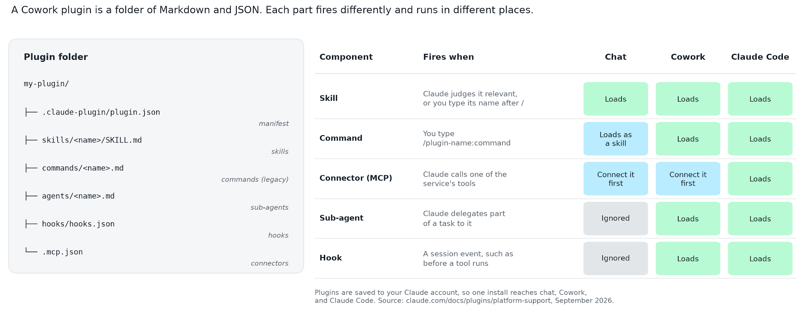
图 1. 左侧为插件文件夹;右侧为各组件的触发时机及其在聊天、Cowork 或 Claude Code 中是否加载。图片作者自制。
清单(manifest)
清单位于 .claude-plugin/plugin.json,其中仅 name 字段必填。以下是从仓库复制的 Anthropic Data 插件的真实清单:
{
"name": "data",
"version": "1.1.0",
"description": "Write SQL, explore datasets, and generate insights faster. Build visualizations and dashboards, and turn raw data into clear stories for stakeholders.",
"author": {
"name": "Anthropic"
}
}需了解的三点:
-
name是插件的永久标识,并会为每个组件加此前缀,因此write-query技能会变为/data:write-query。 -
version字符串是用户看到的插件发行版本号,Anthropic 的构建指南建议每次发布都应提升版本号。 -
可选字段包括
displayName、license、homepage和keywords。
技能与命令
技能位于 skills/<name>/SKILL.md:顶部为 --- 间的简短设置块(YAML frontmatter),其下为给 Claude 的说明。以下是 Data 插件中我在第 2 步运行的 write-query 技能顶部:
---
name: write-query
description: Write optimized SQL for your dialect with best practices. Use when translating a natural-language data need into SQL, building a multi-CTE query with joins and aggregations, optimizing a query against a large partitioned table, or getting dialect-specific syntax for Snowflake, BigQuery, Postgres, etc.
argument-hint: "<description of what data you need>"
---
# /write-query - Write Optimized SQLdescription 是 Claude 用来判断是否加载该技能的依据,而 argument-hint 告诉您该技能期望您输入什么。两个 frontmatter 标志会改变技能的触发方式:
-
user-invocable: false会将技能从/菜单中隐藏,仅供 Claude 自动加载(该插件的sql-queries技能如此设置) -
disable-model-invocation: true则相反,使技能仅在您输入其名称时才运行。
命令是较旧的格式:单个 Markdown 文件位于 commands/<name>.md,其 frontmatter 中含有 description。Anthropic 自家的插件创作技能现已指导 Claude “以 skills/*/SKILL.md 脚手架新插件”,并将 commands/ 文件夹称作旧版,因为 Cowork 的界面将两者统一显示为 Skills 列表。命令仍可在所有位置加载,因此您在旧插件中仍会遇到它们,但第 4 步我们使用技能格式。
连接器
.mcp.json 位于插件根目录,列出插件可访问的外部服务,每个以 MCP 服务器 URL 表示。以下是 Data 插件文件的前三个条目:
{
"mcpServers": {
"snowflake": {
"type": "http",
"url": ""
},
"databricks": {
"type": "http",
"url": ""
},
"bigquery": {
"type": "http",
"url": "https://bigquery.googleapis.com/mcp"
},空 URL 是占位符:Anthropic 提供了 BigQuery 端点,但将 Snowflake 与 Databricks 留给您填入自己的服务器地址。如果您对 MCP 本身不熟悉,我们的 Model Context Protocol 指南将从零开始构建一个服务器。
有个不太显性的约束:Anthropic 的帮助中心写道,“在 Cowork 中,连接器通过 Anthropic 的云访问外部服务,而非通过您的本地网络。”因此自定义连接器必须指向“可通过公网从 Anthropic IP 范围访问”的服务器。处于防火墙或 VPN 后的数据仓库在您的网络团队将 Anthropic 地址加入允许列表之前无法连接。
本地 MCP 服务器(在您机器上启动程序的那类)是个例外:它们能在 Claude Code 以及运行于您电脑上的 Cowork 会话中运行,聊天会忽略它们。
自 2026 年 10 月 6 日起,新的 Pro 与 Max 任务仅在 Anthropic 云中运行,因此本地会话主要面向 Team 与 Enterprise 方案。
步骤 1:安装您的第一个插件
在 Customize 页面安装 Cowork 插件只需 6 个简短步骤,且目录中所有插件的步骤完全相同,因此销售或法务读者可替换为各自的插件。我选用 Data 插件以便在第 2 步设置 SQL 示例。
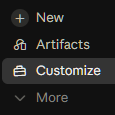
1. 在 Claude 桌面应用左侧边栏打开 Customize。若您的应用仍显示 Cowork 选项卡,请先打开它。
2. 打开 Plugins 选项卡。

3. 确认您拥有 Knowledge Work 市场。点击 + Add,然后 Add marketplace,接着 Browse Anthropic sources。
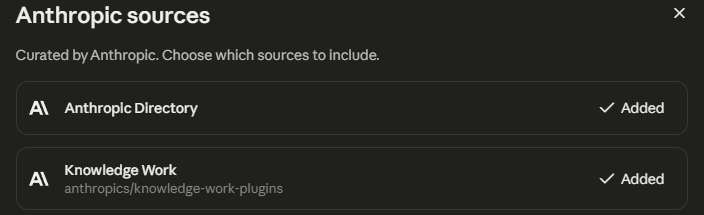
4. 选择并添加 Knowledge Work 插件集。
5. 打开 Discover 选项卡。Knowledge Work 市场应已在此。点击 Code 筛选器。
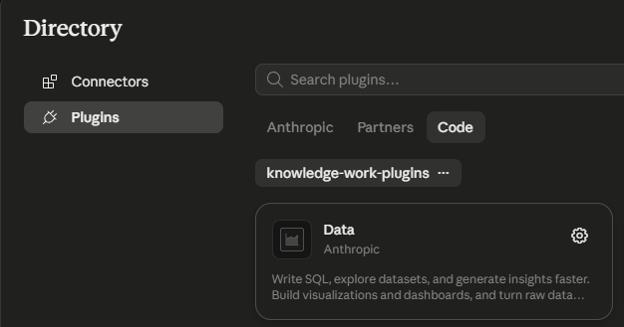
6. 选择 Data,然后点击 Add。一些版本将该按钮标为 Install。
随后插件页面会列出您获得的内容:其 Skills 选项卡显示 10 个技能,其中 7 个可按名称运行(analyze、explore-data、write-query、create-viz、build-dashboard、validate-data 和 data-context-extractor),另有 3 个在后台加载(sql-queries、data-visualization 与 statistical-analysis)。其仓库中的连接器文件列出 Snowflake、Databricks、BigQuery、Definite、Hex、Amplitude(另有 EU 条目)和 Atlassian,但在您登录之前均未连接。截止 2026 年 9 月 28 日,Data 插件目录页显示安装量为 7,655。
如果您熟悉终端,可按仓库 README 用两条命令将同一插件安装到 Claude Code 中:
claude plugin marketplace add anthropics/knowledge-work-plugins
claude plugin install data@knowledge-work-plugins有一点差异很重要:通过 Customize 添加的插件会同步到 Claude Code;但通过命令行安装的插件仅保留在该台机器上,永远不会同步到您的账户。我们的 Claude Code 插件构建指南详细覆盖终端工作流,本文将继续采用桌面路径。
在 Team 与 Enterprise 方案中,所有者可将每个插件设置为四种状态之一:不可用、可安装、默认安装或必装。企业管理员可按用户组覆盖这些设置,因此帮助中心提示“您在目录中看到的插件,可能与其他用户组同事看到的不同”。如果您在 Discover 选项卡中找不到 Data,请先联系所有者,而不是断定市场出故障。
步骤 2:连接数据源并运行斜杠命令
未连接数据仓库的插件只能为您生成 SQL 以供粘贴到别处,因此第一步实操是连接数据源。之后斜杠命令会完成其余工作。
授权连接器
添加插件并不会自动登录任何服务。打开插件的 Connectors 选项卡,每个条目会显示三种状态之一:Connected、Not connected(连接器已在您账户中,但尚未登录)或 Not added。需要时点击 Add,再点 Connect,并在浏览器中完成该服务的登录。
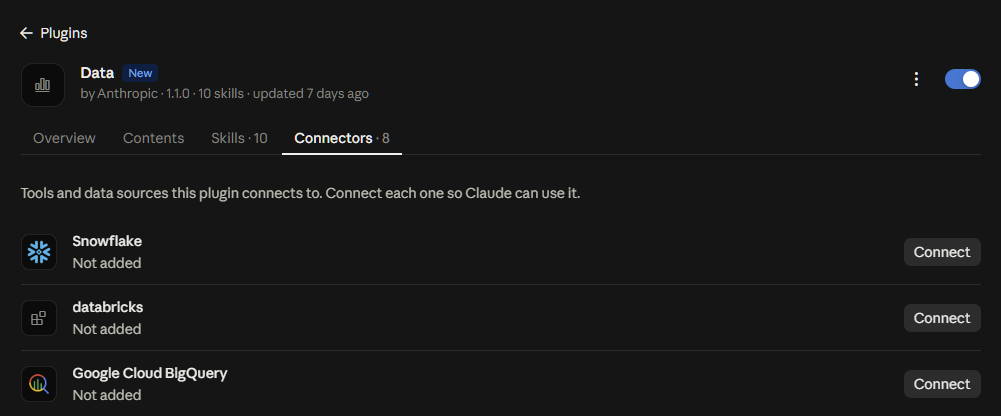
在 Team 与 Enterprise 方案中,所有者会先为组织添加连接器,然后您再用自己的账号进行连接。
请为数据仓库使用只读凭据,因为具备写入能力的连接器会允许 Claude 运行其工具所暴露的任何语句,而在 Cowork 的自动模式下,Claude 会自行判断是否调用它们。这意味着:
-
Snowflake 使用仅具
SELECT权限的角色 -
BigQuery 使用具 Data Viewer 角色的服务账号
-
Databricks 使用限定到只读 SQL warehouse 的 Token
如果您对任一平台是新手,我们的 Snowflake 新手指南 与 BigQuery 教程都能让您在一个下午内跑出第一条查询。
连接会保存在您账户的 Customize > Connectors 下,因此每个服务您只需授权一次,其他列出相同服务器 URL 的插件(如 Finance 插件的 BigQuery 条目)会复用该连接。
运行您的第一个命令
write-query 命令会将自然语言问题转换为您的 SQL 方言,我最希望您关注的就是它,因为验证一节会回到它。
我构建了一个小型 SQLite 数据库 shop.db,包含电商仓库常见的 4 张表以及 2026 年 1 月 5 日至 9 月 27 日的 1,600 笔订单。下表定义了模式;本文中的所有查询均针对该库运行。
|
表 |
列 |
一行代表 |
|
|
|
一名顾客(240 行) |
|
|
|
目录中 5 个类别之一的商品(40 行) |
|
|
|
一笔订单,状态为 completed、refunded 或 canceled(1,600 行) |
|
|
|
订单中的一条商品明细,价格为折扣前(0 到 25% 折扣)(2,647 行) |
要运行命令,请在消息框中输入 / 并从 Data 插件中选择 write-query,或直接输入 /data:write-query。
自 2026 年 2 月 24 日更新以来,输入命令会将其提示文本置入消息框,并且 Claude 可在开始前通过编号选项提出结构化问题,如下方 Anthropic 针对 /dashboard 命令的截图所示。
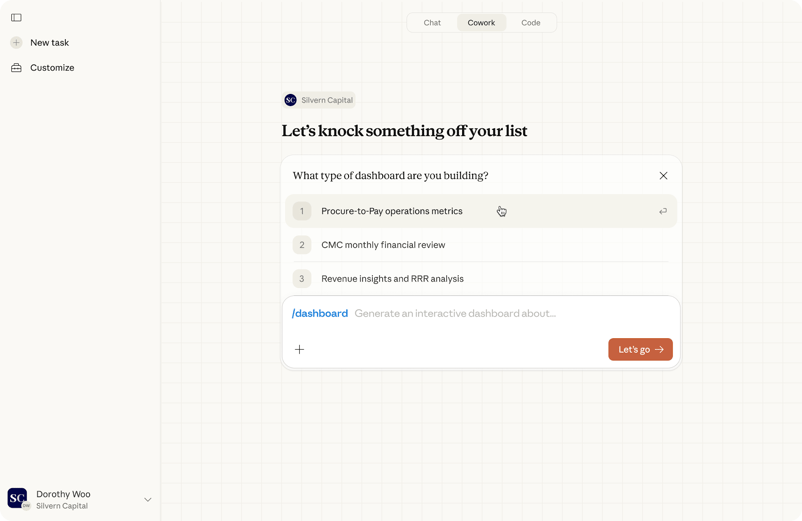
用于启动 Cowork 斜杠命令的结构化表单,图示为 Anthropic 的 /dashboard 命令:命令提示置于消息框中,Claude 在开始前提出带编号选项的问题。图片来源:Anthropic,2026 年 2 月 24 日。
我的请求是:统计过去 8 个完整周内各产品类别的净收入,仅计入完成订单并扣除商品折扣,使用 SQLite,模式(schema)附在下方。
以下为返回的 SQL,原样未改:
-- Net revenue by product category, last 8 complete weeks (Mon–Sun), completed orders only
-- Dialect: SQLite
WITH RECURSIVE
params AS (
SELECT
-- Monday of the current week; 'weekday 0' jumps forward to Sunday, -6 days lands on Monday
date('2026-09-28', 'weekday 0', '-6 days') AS current_week_start, -- 2026-09-28
date('2026-09-28', 'weekday 0', '-6 days', '-56 days') AS range_start -- 2026-08-03
),
-- One row per week, so weeks with no sales still show up
weeks AS (
SELECT range_start AS week_start
FROM params
UNION ALL
SELECT date(w.week_start, '+7 days')
FROM weeks AS w
CROSS JOIN params AS pr
WHERE date(w.week_start, '+7 days') < pr.current_week_start
),
categories AS (
SELECT DISTINCT category
FROM products
),
-- Filter and aggregate at the line-item level before building the grid
weekly_category_revenue AS (
SELECT
date(o.order_date, 'weekday 0', '-6 days') AS week_start,
p.category,
-- discount_pct is stored as 0–25 (a percent), not as a 0–0.25 fraction
SUM(oi.quantity * oi.unit_price * (1 - oi.discount_pct / 100.0)) AS net_revenue
FROM orders AS o
CROSS JOIN params AS pr
INNER JOIN order_items AS oi ON oi.order_id = o.order_id
INNER JOIN products AS p ON p.product_id = oi.product_id
WHERE o.status = 'completed'
-- Plain string comparison, so an index on order_date can be used; works for ISO-8601 dates
AND o.order_date >= pr.range_start
AND o.order_date < pr.current_week_start
GROUP BY 1, 2
)
SELECT
w.week_start,
date(w.week_start, '+6 days') AS week_end,
c.category,
ROUND(COALESCE(r.net_revenue, 0), 2) AS net_revenue
FROM weeks AS w
CROSS JOIN categories AS c
LEFT JOIN weekly_category_revenue AS r
ON r.week_start = w.week_start
AND r.category = c.category
ORDER BY w.week_start, net_revenue DESC, c.category;这段 SQL 比我手写的更长,而这种“更长”正是其价值所在。查询的每个块(称作 CTE,共同表表达式)各司其职:
-
params用一个日期锚定一切,便于重定目标日期。 -
weeks是递归的,能保证即使某周无销售也有一行。 -
weekly_category_revenue仅保留status = 'completed'的记录,并以1 - discount_pct / 100.0应用折扣,因为模式指出该列以 0 到 25 的整数百分比存储。 -
最终的
SELECT用 0 填补空缺,使结果可直接制图。
该技能还在查询下方列出了其假设条件,包括:为使范围过滤生效,order_date 必须是 ISO 8601 文本(YYYY-MM-DD);以及已退款订单会被完全剔除。
我在 shop.db 上运行该查询,得到 40 行结果,每行对应一个周和一个类别。如下将其透视,使每个类别成为一列:
|
周一日期 |
Audio |
Fitness |
Home Office |
Kitchen |
Outdoor |
|
2026-08-03 |
12,714.80 |
9,187.23 |
13,542.08 |
7,925.04 |
7,621.21 |
|
2026-08-10 |
12,017.26 |
6,467.39 |
5,380.54 |
12,444.47 |
6,386.67 |
|
2026-08-17 |
8,808.47 |
4,669.72 |
6,675.32 |
7,513.97 |
4,485.65 |
|
2026-08-24 |
15,634.67 |
8,055.81 |
8,716.85 |
7,730.55 |
7,047.96 |
|
2026-08-31 |
11,402.99 |
11,517.37 |
14,252.59 |
9,954.80 |
7,226.14 |
|
2026-09-07 |
14,853.85 |
5,509.74 |
5,639.71 |
4,926.32 |
4,162.98 |
|
2026-09-14 |
8,780.41 |
4,893.28 |
7,864.22 |
7,344.70 |
6,204.45 |
|
2026-09-21 |
12,937.24 |
4,149.27 |
12,715.72 |
9,618.61 |
7,353.57 |
Audio 在 8 周中的 5 周都是最大类别,且从未低于 8,780。Home Office 波动最大,从 8 月 10 日当周的 5,380 升至 8 月 31 日当周的 14,252。Fitness 在期末降至其最低点 4,149——这是周报应予以标注的变化,而我在第 4 步构建的插件确实如此标注。
下图是相同的 40 个数字,每个类别为一个分面图。
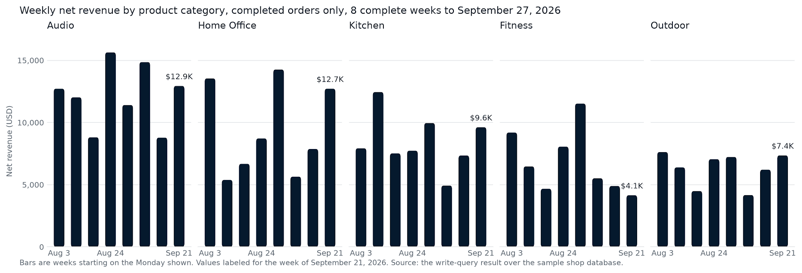
图 2. 截至 2026 年 9 月 27 日的 8 个完整周内,各产品类别的完成订单每周净收入,来自 write-query 结果。图片作者自制。
步骤 3:自定义已安装的插件
安装只需 2 分钟。自定义才是插件发挥价值的地方,因为 Anthropic 的插件按“通用公司”编写,而您的公司并非如此。有两种自定义方式。
使用 Edit with Claude
点击 Edit with Claude 会打开一个 Cowork 任务,让 Claude 与您并肩编辑插件。
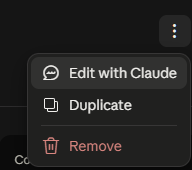
帮助中心仍将该按钮称为 Customize。在当前应用中,打开插件右上角菜单并选择 Edit with Claude,这会“打开一个新的 Cowork 任务,并提示 Claude 自定义您选中的插件”,然后点击 Let's go。其底层运行的是 Anthropic 的 Plugin Management 插件中的 cowork-plugin-customizer 技能。
该技能会先在插件文件中搜索 ~~ 占位符(如 ~~data warehouse),再在已连接的 Slack 或文档工具中查找真实名称,最后就未找到的内容向您提问。
在此可做的一个具体修改是关于表命名:告诉它规范表位于 analytics schema,fct_orders 是唯一可查询的订单表,任何以 stg_ 为前缀的表均不可用。Claude 会将这些规则写入 SQL 技能,并在对话里展示自定义后的插件,您通过该结果上的按钮即可接受修改。
直接编辑文件
第二种方式是直接打开插件文件自行编辑,适合您已知如何编写的更改。三类修改最具价值:
-
为技能添加公司上下文。将您的指标定义、规范表与禁用查询的表追加到
skills/sql-queries/SKILL.md末尾。本文在第 4 步变成独立技能的那段内容有 4 行如下:
- orders: one row per order. status is completed, refunded, or canceled. order_date is ISO 8601 (YYYY-MM-DD).
- order_items: one row per product line. unit_price is the price charged before discount. discount_pct is a whole-number percentage from 0 to 25.
- products: one row per product, with its category.
- Never compute revenue from products.list_price. It is the catalog price, not what the customer paid.-
在
.mcp.json中替换连接器。删除您不使用的服务条目,并将空白的 Snowflake 或 Databricks URL 填为您服务器的地址;或者在 Customize > Connectors 中添加您的数据仓库为自定义连接器。 -
提升版本号。每次编辑后都在 plugin.json 中修改版本号,便于区分您副本与原版。
注意:Anthropic 的 Cowork 插件指南指出 Cowork 会检查市场更新,“如果您在本地编辑了插件文件,Cowork 会检测到更改,并在更新将覆盖它们前发出警告。”由组织管理的插件和同事共享给您的插件不可直接编辑,需先复制成您自己的插件。
另一个 Windows 用户需注意的问题:一条2026 年 9 月 11 日提交的 bug 报告描述了一个自上传插件冻结在首次安装版本的问题:新的上传、卸载与重装都会在重启后恢复原状。该问题在 2026 年 10 月 6 日仍未关闭且无变通方案,因此若您在 Windows 上的修改无法保留,请先查看该讨论帖,而非反复上传。
步骤 4:从零构建自定义插件
当市场中的插件不符合您的工作流时,自定义插件就是答案。我们来做一个示例构建:一个包含 1 个知识技能、1 个命令与 1 个连接器的每周指标报告。
本文会完整展示每个文件,因为整个文件夹就是产品。下图展示您将遵循的循环。
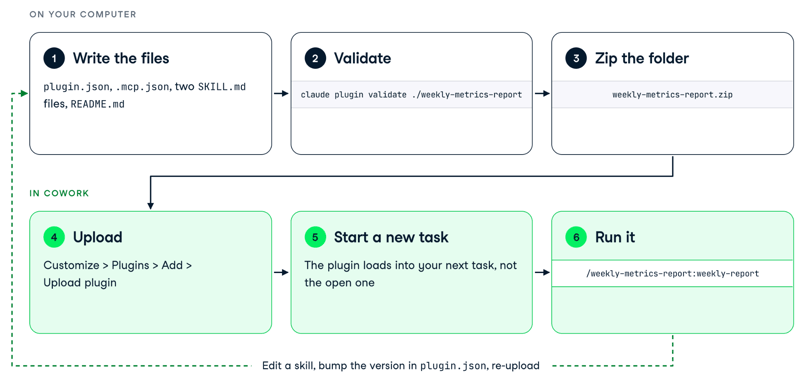
图 3. 构建自定义插件:在本地编写并校验文件、压缩并上传,然后在新任务中运行命令,再回到文件进行修改。图片作者自制。
用 Plugin Create 搭建脚手架
Plugin Create 是 Anthropic 的引导式路径名称,截至 2026 年 9 月位于 Add 菜单中。前往 Customize、Plugins、Add,然后 Create with Claude,这会打开一个已填好请求的 Cowork 任务。
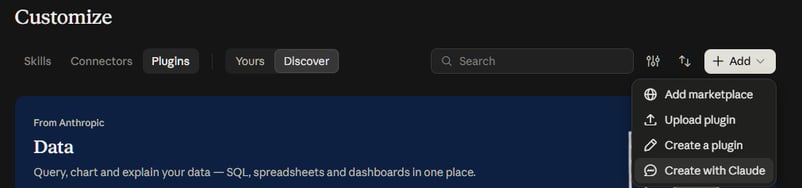
用与同事交流的语言描述工作,回答 Claude 关于要包含哪些连接器的问题,并在其生成的文件卡片上点击 Save plugin。同一菜单还提供 Create a plugin,该表单与编辑器适合已清楚每个文件应写什么的人使用。
针对本文插件,我会输入的简述如下。它明确了一个命令、一个后台技能、一个连接器与相关规则——这些信息原本会在技能的探索式提问中逐一向您获取。
Build me a plugin called Weekly Metrics Report for our online store's data team.
What it does: every Monday, compare the most recent complete week (Monday to Sunday) with the week before it and write a short Markdown report. Keep it to one command, /weekly-report, that runs the whole thing, and one background skill that holds our metric definitions so Claude never guesses them.
The definitions: net revenue is quantity times unit price after the line discount, for completed orders only. Completed orders are counted by distinct order ID. Average order value is net revenue divided by completed orders. Refund rate is refunded orders divided by completed plus refunded orders, as a percentage with one decimal. Cancelled orders never count toward anything.
The data: the canonical tables are orders, order_items, and products in our BigQuery warehouse. Never use products.list_price for revenue; it is the catalog price, not what the customer paid. Bundle the BigQuery connector and nothing else.
The report: a three-sentence summary that names the biggest mover and says whether it went up or down, a table of net revenue by product category (this week, last week, percentage change with one decimal and a sign), a second table with the overall metrics for both weeks, and the SQL at the end so a reader can check it. If either week has fewer than 20 completed orders, say the comparison is noisy.
Do not add agents, hooks, or any other skills.该引导式路径会运行 Knowledge Work 市场中 Plugin Management 插件的 create-cowork-plugin 技能。您也可以安装该插件并按名称运行该技能。它会询问工作、组件与连接器,然后将结果打包为 .plugin 文件。
最终您会得到如下文件夹:
weekly-metrics-report/
├── .claude-plugin/
│ └── plugin.json
├── .mcp.json
├── README.md
└── skills/
├── metric-definitions/
│ └── SKILL.md
└── weekly-report/
└── SKILL.md清单用于命名插件并固定版本:
{
"name": "weekly-metrics-report",
"displayName": "Weekly Metrics Report",
"version": "0.1.0",
"description": "Builds the store's weekly metrics report from the warehouse, using the team's own metric definitions.",
"author": { "name": "Tim Lu" },
"license": "MIT"
}连接器文件仅列出一个服务器,与 Data 插件相同的 BigQuery 端点,因此在第 2 步已连接 BigQuery 的读者无需再次授权:
{
"mcpServers": {
"bigquery": {
"type": "http",
"url": "https://bigquery.googleapis.com/mcp"
}
}
}对于私有插件 README 可选,但若将来提交至目录则必需,因此我现在就写上:
# Weekly Metrics Report
A small Cowork plugin that turns "how did last week go?" into a consistent report. It holds the store's metric definitions in one skill and the report workflow in another, and it bundles the BigQuery connector so Claude can query the warehouse directly.
## Use it
Run /weekly-metrics-report:weekly-report, or ask for the weekly numbers in plain words. Claude compares the most recent complete week with the week before, writes a Markdown report with per-category and overall tables, and includes the SQL it ran.
## Data
The plugin reads the orders, order_items, and products tables through the connector you sign in to. It stores nothing itself.编写技能
该知识技能承载每周一都会被粘贴的上下文。以下为完整的 skills/metric-definitions/SKILL.md:
---
name: metric-definitions
description: The store's definitions of net revenue, completed orders, average order value, and refund rate, plus which warehouse tables are canonical. Use whenever a request involves revenue, sales, orders, refunds, discounts, or which table to query, even if it does not name a metric.
user-invocable: false
---
# Metric definitions for the store warehouse
Follow these definitions whenever you compute or report a store metric. If a request conflicts with them, follow the definitions and say so.
## Canonical tables
- orders: one row per order. status is completed, refunded, or cancelled. order_date is ISO 8601 (YYYY-MM-DD).
- order_items: one row per product line. unit_price is the price charged before discount. discount_pct is a whole-number percentage from 0 to 25.
- products: one row per product, with its category.
- Never compute revenue from products.list_price. It is the catalog price, not what the customer paid.
## Metrics
- Net revenue: SUM(quantity * unit_price * (1 - discount_pct / 100.0)) over order_items, for orders with status = 'completed'.
- Completed orders: COUNT(DISTINCT order_id) where status = 'completed'.
- Average order value: net revenue divided by completed orders.
- Refund rate: refunded orders divided by completed plus refunded orders, as a percentage with one decimal.
- Cancelled orders never count toward revenue, order counts, or the refund rate.
## Weeks
- A week runs Monday to Sunday. Label a week by its Monday.
- "Last week" means the most recent complete week, not the last 7 days.描述是让该技能可靠触发的关键,含糊其辞往往是技能不触发的主因。Claude 在决定加载技能之前只读取 frontmatter,而 Claude Code 技能参考建议将关键用例放在最前。
将描述写成读者所处情境(“请求涉及营收、销售、订单、退款、折扣”)而不是文件摘要,并包含人们会说的用词,因为 Claude 会将他们的消息与您的描述进行匹配。
另外两点是刻意选择:user-invocable: false 让该技能不出现在 / 菜单中,因为没人应当“运行”一套定义。正文以祈使句对 Claude 给出指令(“永远不要用 products.list_price 计算营收”),这是 Anthropic 自家创作技能所建议的风格。表格部分则是您会替换为自身数据仓库命名的部分。
编写命令
命令同样是一个技能文件,因为新插件就是以此定义命名操作。以下为完整的 skills/weekly-report/SKILL.md:
---
name: weekly-report
description: Build the store's weekly metrics report. Use when the user asks for the weekly report, the weekly numbers, week-over-week metrics, or how last week went.
argument-hint: "[a date inside the week to report on]"
---
# Weekly metrics report
Produce a short report comparing the most recent complete week with the week before it, using the definitions in the metric-definitions skill.
## Steps
1. Work out the reporting week. If the user gave a date, use the Monday-to-Sunday week that contains it. Otherwise use the most recent complete week before today.
2. Get the data. If a warehouse connector is connected, query it directly. If not, ask the user for a database file or an export and query that instead. Never estimate a number.
3. For the reporting week and the week before it, compute net revenue, completed orders, average order value, and refund rate, overall and per product category.
4. Write the report to a Markdown file named weekly_report_<week start>.md containing:
- A three-sentence summary that names the biggest mover and says whether it went up or down.
- A table with one row per category: net revenue this week, last week, and the percentage change.
- A second table with the overall metrics for both weeks.
- The SQL you ran, in a code block at the end, so the reader can check it.
5. Show the summary in the conversation and say where the file is.
## Rules
- Follow the metric-definitions skill for every metric. Do not invent new ones.
- Report percentage changes with one decimal place and a sign.
- If either week has fewer than 20 completed orders, say the comparison is noisy.该技能默认可由用户调用,因此会在 / 菜单中显示为 /weekly-metrics-report:weekly-report,而 argument-hint 说明了它接受的唯一参数。
正文两次点名 metric-definitions 技能,一次在开头,一次在规则处,这正是命令调用技能的方式:Claude 因其被点名且其描述匹配一个关于营收的请求而加载该定义。
如果您偏好旧格式,相同正文也可作为 commands/weekly-report.md 使用,只需在其 frontmatter 中保留 description 一行。
安装与测试
上传前,请用 claude plugin validate ./weekly-metrics-report(相对父目录路径)校验文件夹,该命令需要已安装 Claude Code。在我的机器上输出为 ✔ Validation passed,若失败则会指明需修复的字段。
接下来压缩插件文件夹。两种布局均可:以文件夹为归档唯一顶层条目,或直接归档其内容,只要归档中包含一个 .claude-plugin/plugin.json(我的压缩包为 3,067 字节)。然后前往 Customize、Plugins、Add、Upload plugin 并选择该压缩包。
新添加的插件会加载到您的下一个 Cowork 任务中,而非当前任务,因此在查找之前请先开启一个新任务。如果在新任务中仍未出现,请先退出并重开桌面应用,再开始调试文件。
我通过 Claude Code 使用 claude --plugin-dir ./weekly-metrics-report 测试了该插件,连接到 shop.db 后输入 /weekly-metrics-report:weekly-report。Claude 判断 2026 年 9 月 28 日为周一,因此报告了 9 月 21 日当周,并写出了 weekly_report_2026-09-21.md。以下为其原文摘要:
Net revenue rose to $46,774.42, up +33.3% from $35,087.07 the week before. Completed orders went from 61 to 78, and average order value rose slightly to $599.67 (+4.3%).
The biggest mover was Home Office: its net revenue went up +61.7% ($7,864.22 → $12,715.72), the largest gain in both dollars and percent.
Fitness was the only category that fell (-15.2%).
The refund rate rose from 10.3% to 12.4%, and Home Office's refund rate reached 27.6% (8 refunded orders), which is worth a closer look.以下为同一文件中的类别表:
|
类别 |
本周(2026-09-21) |
上周(2026-09-14) |
变化 |
|
Audio |
$12,937.24 |
$8,780.41 |
+47.3% |
|
Fitness |
$4,149.27 |
$4,893.28 |
-15.2% |
|
Home Office |
$12,715.72 |
$7,864.22 |
+61.7% |
|
Kitchen |
$9,618.61 |
$7,344.70 |
+31.0% |
|
Outdoor |
$7,353.57 |
$6,204.45 |
+18.5% |
|
合计 |
$46,774.42 |
$35,087.07 |
+33.3% |
将第 2 步透视表的最后一行与此处“本周”一列对比:两个不同插件得出相同的 5 个数字,因为二者遵循相同的净收入定义。
Claude 还做了两件我未明确要求的事:它指出 5 个类别中的 4 个在至少 1 周“完成订单少于 20”,从而按类别应用了“比较噪声大”的规则;它还指出我的“以百分比报告变化”规则对已是百分比的退款率存在歧义,因此将其变化以百分点(percentage points)呈现。
这两点都是我接下来会对技能进行的修改——这正是图 3 所示的循环:改一行、升版本、再上传。
报告通过后,在任意 Cowork 任务中输入 /schedule 即可让它每周一早上自动运行,因为计划任务会在 Anthropic 云中执行。自 2026 年 10 月 1 日起,在组织允许的前提下,Claude 创建的计划任务默认“Automatically approve”,这也是为何务必保持连接器只读的又一原因。我们的 Cowork Dispatch 教程展示了另一种方式,即用手机触发任务。
与团队共享 Cowork 插件
插件文件夹是分发单位,因此共享取决于您将其放在哪里。将其推送到含有 marketplace.json 的 GitHub 仓库,任何拿到该 URL 的人都可以在 Add > Add marketplace 中添加该仓库。
在 Team 与 Enterprise 方案中,所有者也可以同步私有仓库或上传压缩包到组织市场,并将每个插件设置为可用、默认安装或必装,面向所有人或特定群组。成员可通过插件的三点菜单共享自己构建的插件,或使用 Publish to org 提交,更多细节见帮助中心的 组织插件管理指南。
如何验证插件的输出?
验证插件输出的方法是:先看查询再信图表、限制插件可触达的范围,以及当技能不触发时知道从哪检查。这些都不需要安全团队,而是 5 分钟的习惯。
先读代码再看图表
一个看起来靠谱的查询,可能实际回答的是与您所问略有不同的问题。以下是我为第 2 步同一问题手写的一条查询,它可以无错运行:
SELECT p.category,
ROUND(SUM(oi.quantity * p.list_price), 2) AS revenue
FROM orders AS o
JOIN order_items AS oi ON oi.order_id = o.order_id
JOIN products AS p ON p.product_id = oi.product_id
WHERE o.order_date >= '2026-08-03' AND o.order_date < '2026-09-28'
GROUP BY p.category
ORDER BY p.category;它将每条明细以目录价 list_price 计价,而非实际成交价,忽略折扣,并将退款与取消订单也计入统计,因为没有按 status 过滤。对 shop.db 同时运行这两条查询得到如下汇总,最后一列显示该“捷径”相较净收入的高估幅度。
|
类别 |
插件查询(净额,完成) |
捷径查询(目录价,全部订单) |
高估幅度 |
|
Audio |
97,149.69 |
128,770.97 |
+32.5% |
|
Fitness |
54,449.81 |
71,237.81 |
+30.8% |
|
Home Office |
74,787.03 |
99,157.55 |
+32.6% |
|
Kitchen |
67,458.46 |
83,908.32 |
+24.4% |
|
Outdoor |
50,488.63 |
64,366.84 |
+27.5% |
|
合计 |
344,333.62 |
447,441.49 |
+29.9% |
每个类别都被高估了 24% 到 33%,而两组结果的柱状图看起来同样“合理”。插件查询之所以正确,是因为技能指导其及早过滤并阅读模式信息。
如果阅读一条 50 行查询仍然吃力,我们的 Associate Data Analyst in SQL 学习路径是最快的进阶路线。SQL 查询优化指南解释了 write-query 技能所采用的实践,例如先过滤再连接、避免 SELECT * 等。
保持连接为只读
具备写入能力的数据仓库连接器会让您的表面临两方面风险:Claude 误读请求(“清理测试订单”)为删除指令,以及提示注入(prompt injection),即 Claude 读取的文档或网页中的文本自带指令。在 Team 与 Enterprise 方案中,对写入型连接器工具可跳过逐任务审批的设置默认关闭。
要上硬性护栏,钩子会在 Cowork 与 Claude Code 中每次工具调用前运行,因此“读取连接器的 SQL 并拒绝除 SELECT 之外的任何语句”的钩子是值得采用的模式。我们的 Claude Code 钩子指南展示了如何编写。我未在本文中构建该钩子,因此在依赖之前请先用您的连接器测试。
当技能误触发或不触发时,先检查描述
Claude 基于 frontmatter 作决定,因此打开技能并自问:其描述是否点名了您当时的情境及所用词语?若没有,请补充。
随后用 / 手动触发该技能以确认正文本身有效,检查插件开关是否开启、连接器是否显示“Connected”,并记住新插件会加载到下一个任务而非当前任务。最常见的问题是描述写成了文件摘要,而不是对请求的描述。
了解产品状态
Cowork 自 2026 年 4 月 9 日起已正式可用。插件于 2026 年 1 月 30 日以研究预览形式上线,现已在所有付费方案中可用。2026 年 8 月 11 日,Anthropic 将 Compliance API 覆盖范围扩展至 Cowork 会话(桌面、网页与移动端)。
当前帮助中心仍存在两处空白:本地桌面会话的转录尚无删除端点;OpenTelemetry 监控“不能替代合规目的所需的审计日志”。
如果您的组织在具备 HIPAA 条款的 Enterprise 方案中处理美国健康数据,只有在管理员启用 HIPAA 配置后,Cowork 才受制于您的 BAA;一旦启用,Cowork 将无法在云中运行。若您的数据受监管,请在让插件触达生产表之前获得合规团队的批准。
结语
现在您拥有 3 个插件:您安装的 Data 插件、用自家表名自定义过的副本,以及用 5 个文件从零构建的每周报告。我会保留第三个,因为它承载了过去每周一都会被粘贴的 40 行上下文,而且仅此一处保存。
判断什么值得做成插件的原则很简短:当工作流会重复、上下文相对稳定时,值得构建插件,这描述了周报、合同审查清单或售前电话准备。一次性分析则不需要插件;粘贴上下文即可继续前进。
如果您在权衡公司里哪些重复工作流应当优先这样处理,我们的 Generative AI for Business 课程正是围绕这个问题而设。若想更深入了解背后的模型,请参见 Introduction to Claude Models 课程,涵盖 Claude API 的提示与多轮协作。
Claude Cowork 插件常见问题
什么是 Claude Cowork 插件?
Claude Cowork 插件是可安装的软件包,打包了技能、斜杠命令、连接器,以及(在 Cowork 与 Claude Code 中)子代理与钩子,使 Claude 能像某一岗位的专家一样工作。Anthropic 于 2026 年 1 月 30 日将其加入 Cowork,并提供 11 个开源插件;目前在所有付费方案中均可用。
Claude Cowork 插件与技能有何区别?
技能是教会 Claude 单一任务的一个 SKILL.md 文件,当 Claude 认为其相关时触发。插件则是一整个岗位职能所需的技能、命令与连接器的打包集合,是安装、共享与版本化的单位。
我如何安装 Claude Cowork 插件?
在 Claude 桌面应用左侧边栏打开 Customize,进入 Plugins 选项卡,打开 Discover,选择插件并点击 Add。插件会保存到您的账户中,因此在聊天中同样可见,并在您登录同一账户时同步到 Claude Code。
Cowork 插件是否能在 Claude Code 和聊天中使用?
可以用于技能、命令与连接器,这些会在聊天、Cowork 与 Claude Code 中加载。子代理与钩子仅在 Cowork 与 Claude Code 中运行;本地 MCP 服务器仅在 Claude Code 以及运行于您电脑的 Cowork 会话中运行。
我能否在不写代码的情况下构建 Claude Cowork 插件?
可以。插件是一个 Markdown 与 JSON 的文件夹,Customize > Plugins > Add 下的 Create with Claude 选项会通过对话引导您完成,并将结果保存到您的账户。手写文件仅需一个文本编辑器和压缩工具;本文的 weekly-report 插件整体也只有 5 个短文件。

我是一名数据科学家,擅长空间分析、机器学习和数据管道。曾使用过 GCP、Hadoop、Hive、Snowflake、Airflow 等数据科学/工程相关流程与工具。
每到周一,总有人打开 Claude,粘贴同样关于数据仓库的 40 行上下文,然后请求相同的周报数据。到了周二,这些上下文就不见了,下一位分析师又会粘贴一个略有不同的版本。插件可以让这类任务保持一致且可验证。
在本教程结束时,您将能在 Claude Cowork 中安装一个插件,为自己的表进行定制,并从零开始构建一个可用的插件。
您需要两样东西:一项付费的 Claude 订阅(Pro、Max、Team 或 Enterprise),以及适用于 macOS 或 Windows 的 Claude 桌面应用(截图即来自该应用)。无需使用终端或 Python。我会顺带提及命令行路径,供喜欢该方式的读者参考,但它是可选项。
开始之前先提个醒。2026 年 9 月 16 日,Anthropic 开始将 Chat 与 Cowork 合并为单一的 Claude(适用于 Pro 与 Max 账户),因此您的消息框中可能不再单独显示 Cowork 选项。无论哪种界面,插件所在的 Customize 页面相同,我会在文中逐一指出菜单项的准确名称。
如果您更希望通过引导式练习来实践这些步骤,DataCamp 的 Building Claude Cowork Plugins 课程将带您完成安装、适配与构建自己的插件,且无需编写任何代码。
要点速览