
コース
Claude モデル入門
3時間
14.7K
A Claude Cowork plugin is an installable package that bundles everything Claude needs to work like a specialist. It includes things like workflow skills, the slash commands, proper connectors, and the necessary sub-agents and hooks. Anthropic's launch post puts it in one sentence:
"Plugins let you bundle any skills, connectors, slash commands, and sub-agents together to turn Claude into a specialist for your role, team, and company."
Plugins arrived in Cowork on January 30, 2026, as a research preview for paid users, alongside 11 open-source plugins built by Anthropic's own teams. A second wave on February 24, 2026, added HR, design, engineering, operations, and financial analysis plugins, 4 financial services plugins, partner plugins from Slack, S&P Global, and LSEG, and structured forms for slash commands. Cowork itself left preview and became generally available on April 9, 2026.
Where plugins run trips people up, so here is the current answer from Anthropic's help center article on plugins. A plugin you add is saved to your Claude account, not your computer, so it follows you to chat on the web, the desktop app, Cowork, and Claude Code (version 2.1.273 or later syncs it automatically). Skills and commands work in all of those places, while hooks and sub-agents run in Cowork and Claude Code only, and appear grayed out in chat.
If you have not used Cowork itself yet, our Claude Cowork tutorial walks through the app, and the Claude Cowork versus Claude Code comparison explains why the same plugin can do more in one than the other. I won't re-explain Cowork here.
The table below lists the 5 components a plugin can hold, what each one does, and when it fires.
|
Component |
What it does |
When it fires |
|
Skill |
A |
Automatically, when Claude judges the task matches the skill's description. You can also run it by name after |
|
Slash command |
A named action with its own instructions, such as |
Manually, when you type it. In Cowork, Claude can ask a structured question before it starts. |
|
Connector (MCP) |
A link to an outside service through the Model Context Protocol (MCP): Snowflake, BigQuery, Slack, and hundreds more |
When Claude calls one of the service's tools, after you have connected the service once. |
|
Sub-agent |
A specialist Claude can delegate part of a task to, with its own prompt and tool list |
When Claude decides to delegate. Cowork and Claude Code only. |
|
Hook |
A script or prompt that runs at a session event, such as right before a tool call |
On that event, every time. Cowork and Claude Code only. |
Skills fire when Claude judges them relevant, and commands fire when you type /. That distinction decides what to check when a plugin seems to do nothing, which I come back to in the verification section. If sub-agents are new to you, our Introduction to AI Agents course covers the delegation pattern without any code.
A skill teaches Claude one task in a single SKILL.md file. A plugin is the packaged set of skills, commands, and connectors for a whole job function, so the Data plugin holds 10 skills, and the plugin is the unit you install, while the skill is the unit you edit. Our guide to Claude Skills goes deep on the skill format if you want it.
Cowork plugins come from 3 places, and you will use the first one for most of this article:
Two other install routes exist: add any Git repository as a marketplace by its URL or owner/repo shorthand (GitHub, GitHub Enterprise, and public GitLab and Bitbucket repositories work), or upload a plugin file directly as a .zip or .plugin archive of up to 200 MB.
The role lineup covers anything across many different fields: productivity, sales, customer support, product management, marketing, legal, finance, data, enterprise search, HR, design, engineering, operations, bio-research, and small business, plus partner-built plugins. This article is not a roundup, so pick the one for your job and keep reading.
A Cowork plugin is a folder with a manifest in a hidden subfolder and everything else at the top level. Here is the full layout, with the components, only some surfaces load marked as such:
my-plugin/
├── .claude-plugin/
│   └── plugin.json          # manifest (required)
├── skills/
│   └── <name>/SKILL.md      # skills: auto-triggered knowledge & named actions
├── commands/
│   └── <name>.md            # legacy single-file slash commands (still work)
├── agents/
│   └── <name>.md            # sub-agents (Cowork and Claude Code only)
├── hooks/
│   └── hooks.json           # hooks (Cowork and Claude Code only)
├── .mcp.json                # connectors
└── README.md
Keep this tree in mind, because Step 4 builds the top half of it file by file. The figure below pairs the tree with where each component runs, from Anthropic's platform support table.
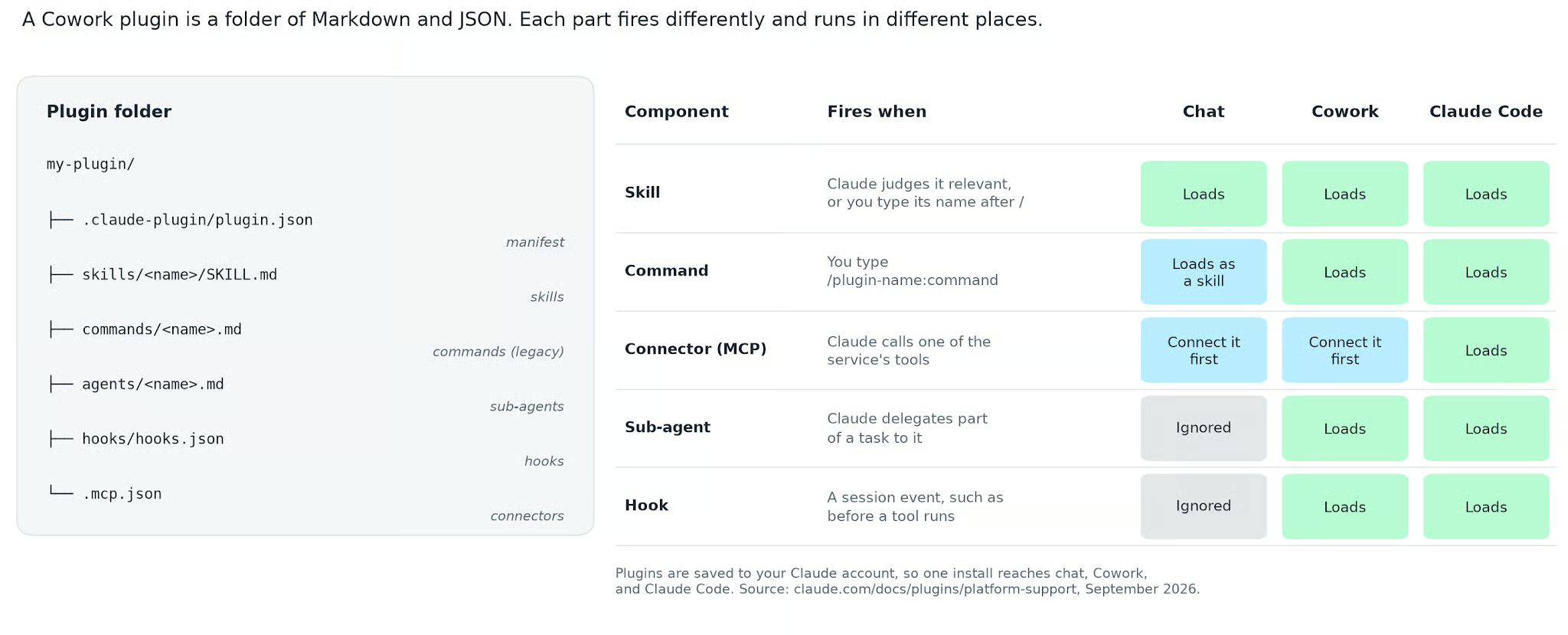
Figure 1. A plugin's folder on the left, and for each component, when it fires, and whether chat, Cowork, or Claude Code loads it. Image by author.
The manifest is .claude-plugin/plugin.json, and name is the only required field. This is the real manifest of Anthropic's Data plugin, copied from the repository:
{
  "name": "data",
  "version": "1.1.0",
  "description": "Write SQL, explore datasets, and generate insights faster. Build visualizations and dashboards, and turn raw data into clear stories for stakeholders.",
  "author": {
    "name": "Anthropic"
  }
}
Three things to know:
The name is the plugin's permanent identity and prefixes every component, so the write-query skill becomes /data:write-query.
The version string is the release number people see for the plugin, and Anthropic's build guide says to raise it on every release.
Optional fields include displayName, license, homepage, and keywords.
A skill lives at skills/<name>/SKILL.md: a short block of settings between --- lines on top (the YAML frontmatter), instructions for Claude below. Here is the top of the Data plugin's write-query skill, the one I run in Step 2:
---
name: write-query
description: Write optimized SQL for your dialect with best practices. Use when translating a natural-language data need into SQL, building a multi-CTE query with joins and aggregations, optimizing a query against a large partitioned table, or getting dialect-specific syntax for Snowflake, BigQuery, Postgres, etc.
argument-hint: "<description of what data you need>"
---

# /write-query - Write Optimized SQL
The description is what Claude reads to decide whether to load the skill, and the argument-hint tells you what the skill expects you to type. Two frontmatter flags change how a skill fires:
user-invocable: false hides it from the / menu so only Claude can load it (the plugin's sql-queries skill is set that way)
disable-model-invocation: true does the reverse, making a skill run only when you type its name.
Commands are the older format: one Markdown file at commands/<name>.md with a description in its frontmatter. Anthropic's own plugin-authoring skill now tells Claude to "scaffold new plugins with skills/*/SKILL.md" and calls the commands/ folder legacy, because Cowork's interface shows both as one Skills list. Commands still load everywhere, so you will keep meeting them in older plugins, but Step 4 uses skills.
The .mcp.json file at the plugin root lists the external services the plugin can reach, each as an MCP server URL. Here are the first 3 entries of the Data plugin's file:
{
  "mcpServers": {
    "snowflake": {
      "type": "http",
      "url": ""
    },
    "databricks": {
      "type": "http",
      "url": ""
    },
    "bigquery": {
      "type": "http",
      "url": "https://bigquery.googleapis.com/mcp"
    },
The empty URLs are placeholders: Anthropic ships the BigQuery endpoint but leaves Snowflake and Databricks for you to fill in with your own server address. If MCP itself is new, our Model Context Protocol guide builds a server from scratch.
One constraint is not obvious: Anthropic's help center states that "in Cowork, connectors reach external services through Anthropic's cloud, not through your local network." A custom connector must therefore point to a server "reachable over the public internet from Anthropic's IP ranges." A warehouse behind a firewall or VPN will not connect until your network team allowlists Anthropic's addresses.
Local MCP servers, the kind that start a program on your machine, are the exception: they run in Claude Code and in Cowork sessions that run on your computer, and chat ignores them.
Since October 6, 2026, new Pro and Max tasks run only in Anthropic's cloud, so local sessions are mainly a Team and Enterprise feature.
Installing a Cowork plugin takes 6 short steps on the Customize page, and the steps are identical for every plugin in the catalog, so readers in sales or legal can substitute their own. I use the Data plugin because it sets up the SQL example in Step 2.
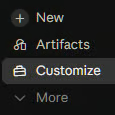
1. Open Customize in the left sidebar of the Claude desktop app. If your app still shows a Cowork tab, open that first.
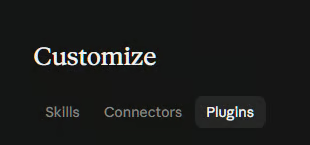
2. Open the Plugins tab.
3. Let's make sure you have the Knowledge Work marketplace. Click + Add, then Add marketplace, then Browse Anthropic sources.
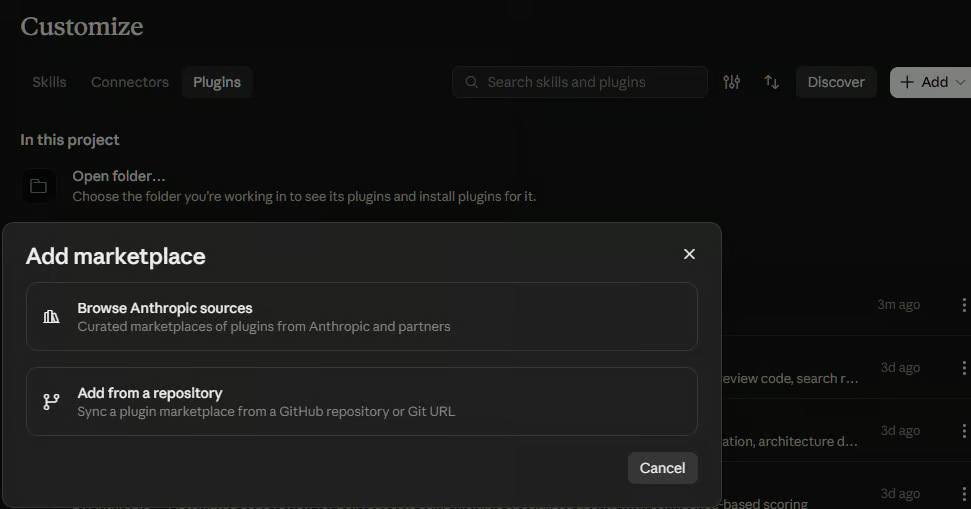
4. Select and add the Knowledge Work plugins.
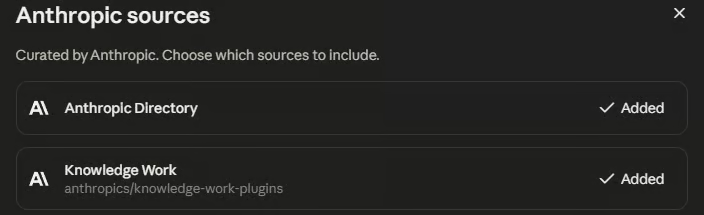
5. Open the Discover tab. The Knowledge Work marketplace should already be there. Click the Code filter.
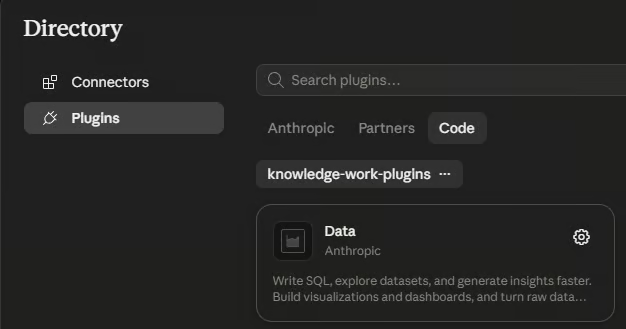
6. Select Data, then click Add. Some builds label the button Install.
The plugin's page then lists what you got: its Skills tab shows 10 skills, 7 of which you can run by name (analyze, explore-data, write-query, create-viz, build-dashboard, validate-data, and data-context-extractor), and 3 that load in the background (sql-queries, data-visualization, and statistical-analysis). Its connector file in the repository lists Snowflake, Databricks, BigQuery, Definite, Hex, Amplitude (with a separate EU entry), and Atlassian, and none of them is connected until you sign in. The Data plugin's directory page showed 7,655 installs on September 28, 2026.
If you are comfortable in a terminal, the same plugin installs into Claude Code with 2 commands from the repository README:
claude plugin marketplace add anthropics/knowledge-work-plugins
claude plugin install data@knowledge-work-plugins
One difference matters: a plugin you add from Customize syncs into Claude Code, but a plugin you install from the command line stays on that machine and never reaches your account. Our guide to building Claude Code plugins covers the terminal workflow in depth, so I stay on the desktop route here.
On Team and Enterprise plans, an owner sets each plugin to one of 4 states: not available, available to install, installed by default, or required. Enterprise admins can override those per group, so the help center warns that "the plugins you see in the catalog may differ from what colleagues in other groups see." If Data is missing from your Discover tab, ask an owner before assuming the marketplace is broken.
A plugin with an unconnected warehouse can only write SQL for you to paste elsewhere, so the first real step is connecting a data source. Then the slash command does the rest.
Adding a plugin does not sign you into anything. Open the plugin's Connectors tab, where each entry shows one of 3 states: Connected, Not connected (the connector is on your account, but you have not signed in), or Not added. Click Add where needed, then Connect, and finish signing in to the service in your browser.
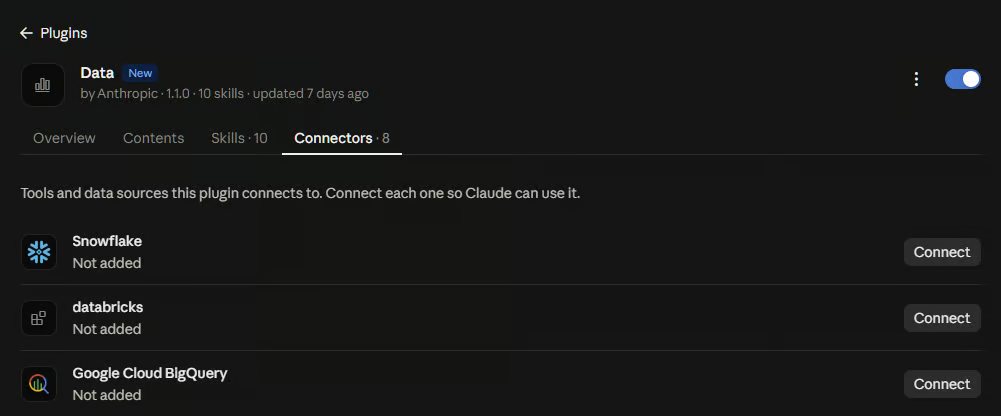
On Team and Enterprise plans, an owner adds the connector for the organization first, and you then connect with your own account.
Use read-only credentials for the warehouse, because a write-capable connector lets Claude run any statement its tools expose, and in Cowork's auto mode, Claude decides for itself whether to call them. That means:
For Snowflake, a role with SELECT only
For BigQuery, a service account with the Data Viewer role
For Databricks, a token scoped to a read-only SQL warehouse
If you are new to either platform, our beginner's guide to Snowflake and BigQuery tutorial both get you to a first query in an afternoon.
The connection lives on your account under Customize and then Connectors, so you authorize each service once, and any other plugin that lists the same server URL, such as the Finance plugin's BigQuery entry, reuses it.
The write-query command turns a plain-language question into SQL for your dialect, and it is the artifact I most want you to look at, because the verification section comes back to it.
I built a small SQLite database, shop.db, with the 4 tables an e-commerce warehouse would have and 1,600 orders from January 5 to September 27, 2026. The table below defines the schema; every query in this article runs against it.
|
Table |
Columns |
One row is |
|
|
|
A customer (240 rows) |
|
|
|
A catalog product in 1 of 5 categories (40 rows) |
|
|
|
An order with status completed, refunded, or canceled (1,600 rows) |
|
|
|
One product line in an order, priced before a 0 to 25% discount (2,647 rows) |
To run the command, type / in the message box and pick write-query from the Data plugin, or type /data:write-query.
Since the February 24, 2026, update, typing a command puts its hint text in the message box, and Claude can ask a structured question with numbered choices before it starts, as Anthropic's screenshot below shows with the /dashboard command.
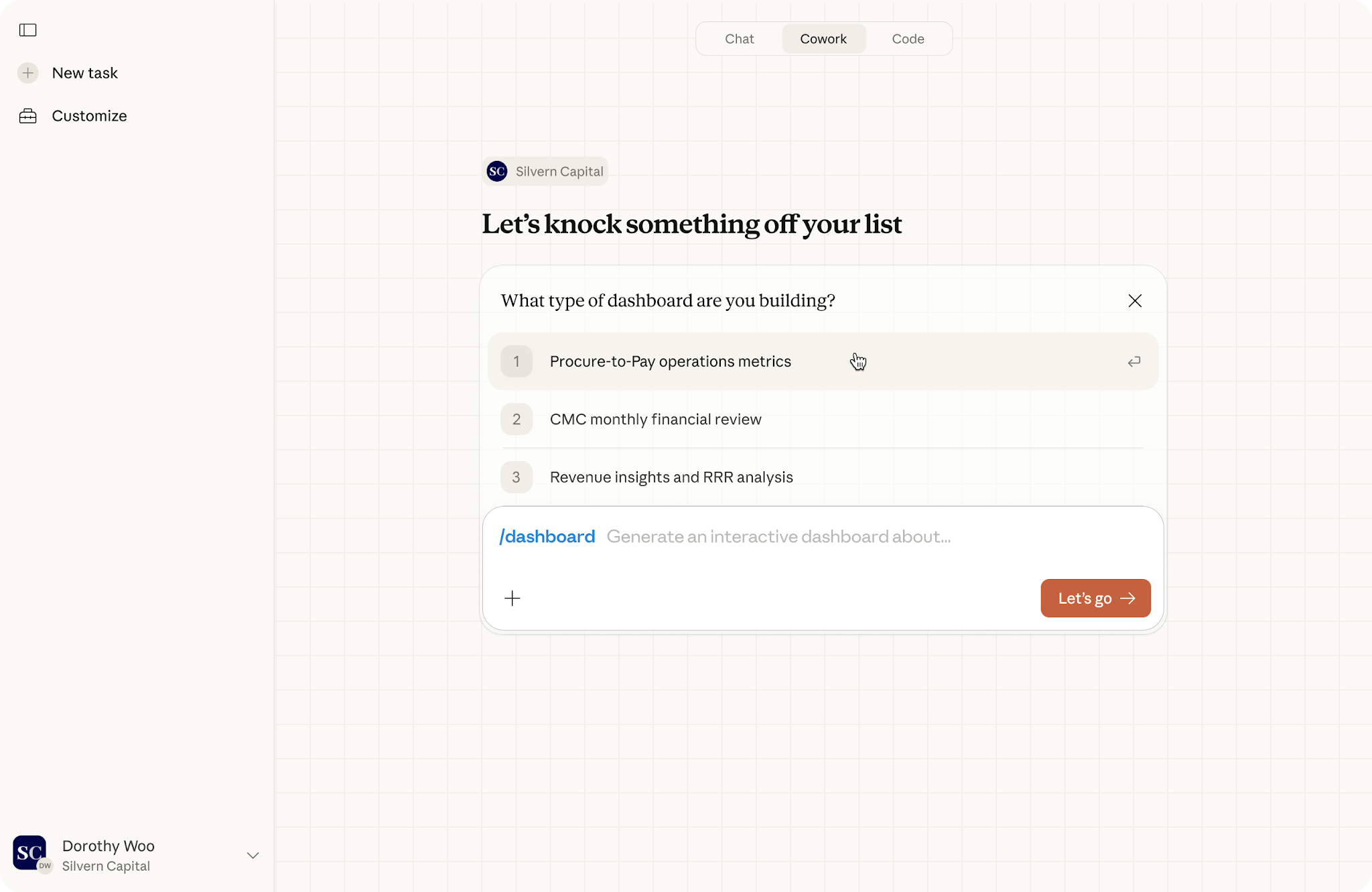
The structured form that launches a slash command in Cowork, shown by Anthropic with the /dashboard command: the command's hint sits in the message box, and Claude asks a question with numbered choices before it starts. Image source: Anthropic, February 24, 2026.
My request was: net revenue by product category for each of the last 8 weeks, counting only completed orders and netting out item discounts, in SQLite, with the schema pasted underneath.
Here is the SQL that came back, unedited:
-- Net revenue by product category, last 8 complete weeks (Mon–Sun), completed orders only
-- Dialect: SQLite
WITH RECURSIVE
params AS (
    SELECT
        -- Monday of the current week; 'weekday 0' jumps forward to Sunday, -6 days lands on Monday
        date('2026-09-28', 'weekday 0', '-6 days')              AS current_week_start,  -- 2026-09-28
        date('2026-09-28', 'weekday 0', '-6 days', '-56 days')  AS range_start          -- 2026-08-03
),

-- One row per week, so weeks with no sales still show up
weeks AS (
    SELECT range_start AS week_start
    FROM params
    UNION ALL
    SELECT date(w.week_start, '+7 days')
    FROM weeks AS w
    CROSS JOIN params AS pr
    WHERE date(w.week_start, '+7 days') < pr.current_week_start
),

categories AS (
    SELECT DISTINCT category
    FROM products
),

-- Filter and aggregate at the line-item level before building the grid
weekly_category_revenue AS (
    SELECT
        date(o.order_date, 'weekday 0', '-6 days')                          AS week_start,
        p.category,
        -- discount_pct is stored as 0–25 (a percent), not as a 0–0.25 fraction
        SUM(oi.quantity * oi.unit_price * (1 - oi.discount_pct / 100.0))    AS net_revenue
    FROM orders AS o
    CROSS JOIN params AS pr
    INNER JOIN order_items AS oi ON oi.order_id = o.order_id
    INNER JOIN products    AS p  ON p.product_id = oi.product_id
    WHERE o.status = 'completed'
      -- Plain string comparison, so an index on order_date can be used; works for ISO-8601 dates
      AND o.order_date >= pr.range_start
      AND o.order_date <  pr.current_week_start
    GROUP BY 1, 2
)

SELECT
    w.week_start,
    date(w.week_start, '+6 days')             AS week_end,
    c.category,
    ROUND(COALESCE(r.net_revenue, 0), 2)      AS net_revenue
FROM weeks AS w
CROSS JOIN categories AS c
LEFT JOIN weekly_category_revenue AS r
       ON r.week_start = w.week_start
      AND r.category   = c.category
ORDER BY w.week_start, net_revenue DESC, c.category;
That is longer than what I would have typed by hand, and the extra length is where the value is. Each block of the query, called a common table expression (CTE), does one job:
params anchors everything to one date, so the query is easy to re-point.
weeks is recursive and guarantees a row for a week with no sales.
weekly_category_revenue keeps only status = 'completed' and applies the discount as 1 - discount_pct / 100.0, because the schema says the column holds whole percentages from 0 to 25.
The final SELECT fills gaps with 0, so the output is ready to chart.
The skill also lists its assumptions under the query, including that order_date must be ISO 8601 text (YYYY-MM-DD) for the range filter to work, and that refunded orders are dropped entirely.
I ran the query against shop.db and got 40 rows, one per week and category. Here it is pivoted so each category is a column:
|
Week starting |
Audio |
Fitness |
Home Office |
Kitchen |
Outdoor |
|
2026-08-03 |
12,714.80 |
9,187.23 |
13,542.08 |
7,925.04 |
7,621.21 |
|
2026-08-10 |
12,017.26 |
6,467.39 |
5,380.54 |
12,444.47 |
6,386.67 |
|
2026-08-17 |
8,808.47 |
4,669.72 |
6,675.32 |
7,513.97 |
4,485.65 |
|
2026-08-24 |
15,634.67 |
8,055.81 |
8,716.85 |
7,730.55 |
7,047.96 |
|
2026-08-31 |
11,402.99 |
11,517.37 |
14,252.59 |
9,954.80 |
7,226.14 |
|
2026-09-07 |
14,853.85 |
5,509.74 |
5,639.71 |
4,926.32 |
4,162.98 |
|
2026-09-14 |
8,780.41 |
4,893.28 |
7,864.22 |
7,344.70 |
6,204.45 |
|
2026-09-21 |
12,937.24 |
4,149.27 |
12,715.72 |
9,618.61 |
7,353.57 |
Audio is the largest category in 5 of the 8 weeks and never drops below 8,780. Home Office swung the most, from 5,380 in the week of August 10 to 14,252 in the week of August 31. Fitness ends the period at its low of 4,149, which is the kind of movement a weekly report should call out, and which the plugin I built in Step 4 does call out.
The chart below is the same 40 numbers, one panel per category.
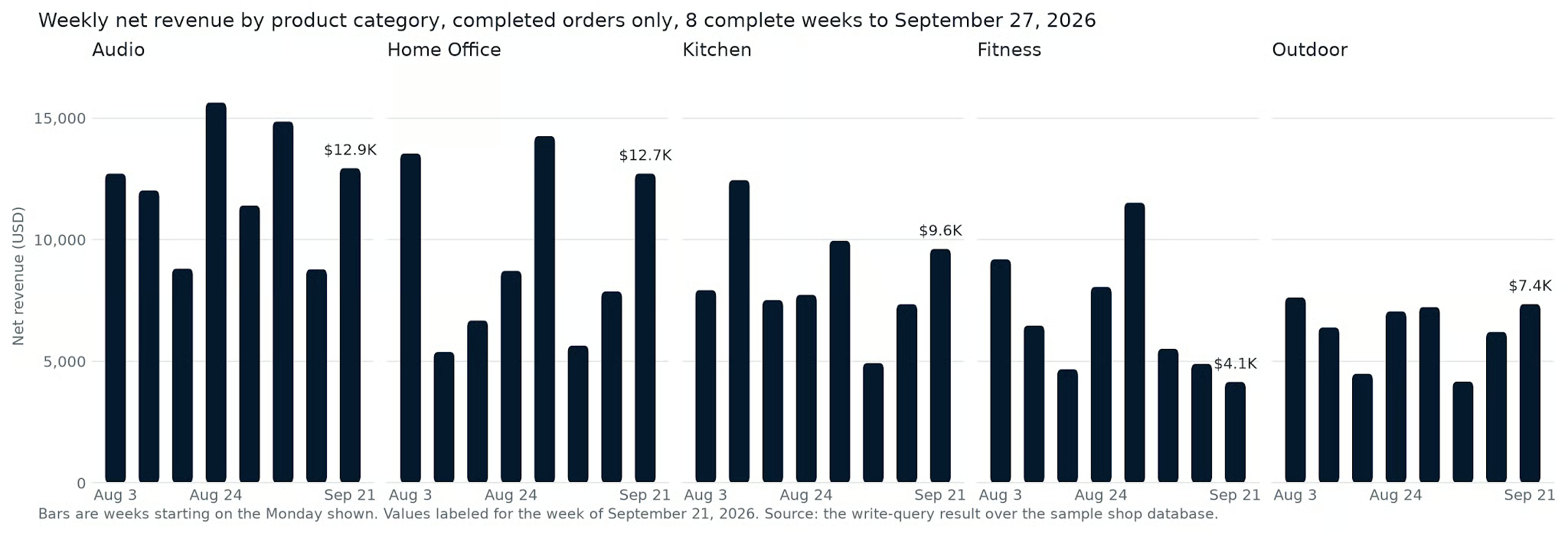
Figure 2. Weekly net revenue for completed orders by product category over the 8 complete weeks ending September 27, 2026, from the write-query result. Image by author.
Installing takes 2 minutes. Customizing is where a plugin starts to earn its place, because Anthropic's plugins are written for a generic company, and yours is not. There are 2 ways to do it.
Clicking Edit with Claude opens a Cowork task in which Claude edits the plugin alongside you.
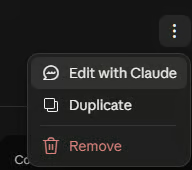
The help center still calls the button Customize. In the current app, open the plugin's menu in the upper right corner and choose Edit with Claude, which "opens a new Cowork task with a prompt asking Claude to customize the plugin you chose," then click Let's go. Under the hood, this runs the cowork-plugin-customizer skill from Anthropic's Plugin Management plugin.
The skill first searches the plugin's files for ~~ placeholders, such as ~~data warehouse, then looks in any connected Slack or document tools for the real names, and finally asks you for anything it could not find.
A concrete edit to make here is your table naming: tell it that canonical tables live in the analytics schema, that fct_orders is the only order table to query, and that anything prefixed stg_ is off limits. Claude writes those rules into the SQL skill and shows you the customized plugin in the conversation, and you accept it with the button on that result.
The second way is to open the plugin's files and edit them yourself, which suits changes you already know how to write. Three edits pay off most:
Add company context to a skill. Append your metric definitions, the canonical tables, and the tables never to query to the bottom of skills/sql-queries/SKILL.md. The block I use is the one that becomes its own skill in Step 4, and 4 of its lines look like this:
- orders: one row per order. status is completed, refunded, or canceled. order_date is ISO 8601 (YYYY-MM-DD).
- order_items: one row per product line. unit_price is the price charged before discount. discount_pct is a whole-number percentage from 0 to 25.
- products: one row per product, with its category.
- Never compute revenue from products.list_price. It is the catalog price, not what the customer paid.
Swap connectors in .mcp.json. Delete the entries for services you don't use, and fill in the empty Snowflake or Databricks URL with your own server's address, or add your warehouse as a custom connector under Customize and then Connectors instead.
Bump the version. Change the version in plugin.json whenever you edit, so you can tell your copy from the original.
One thing to note: Anthropic's Cowork plugin guide says Cowork checks the marketplace for updates, and "if you've edited a plugin's files locally, Cowork detects the change and warns you before an update would overwrite it." Organization-managed plugins and plugins a colleague shared with you cannot be edited at all, so copy them into a plugin of your own first.
Another caveat for Windows users: a bug report filed on September 11, 2026, describes a self-uploaded plugin frozen at its first installed version, with new uploads, uninstalls, and reinstalls all reverting after a restart. It was still open with no workaround on October 6, 2026, so if your edits stop sticking on Windows, check that thread rather than re-uploading in a loop.
A custom plugin is the answer when no marketplace plugin knows your workflow. Let's go through a sample build: a weekly metrics report with 1 knowledge skill, 1 command, and 1 connector.
Every file appears in full, because the folder is the product. The figure shows the loop you will follow.
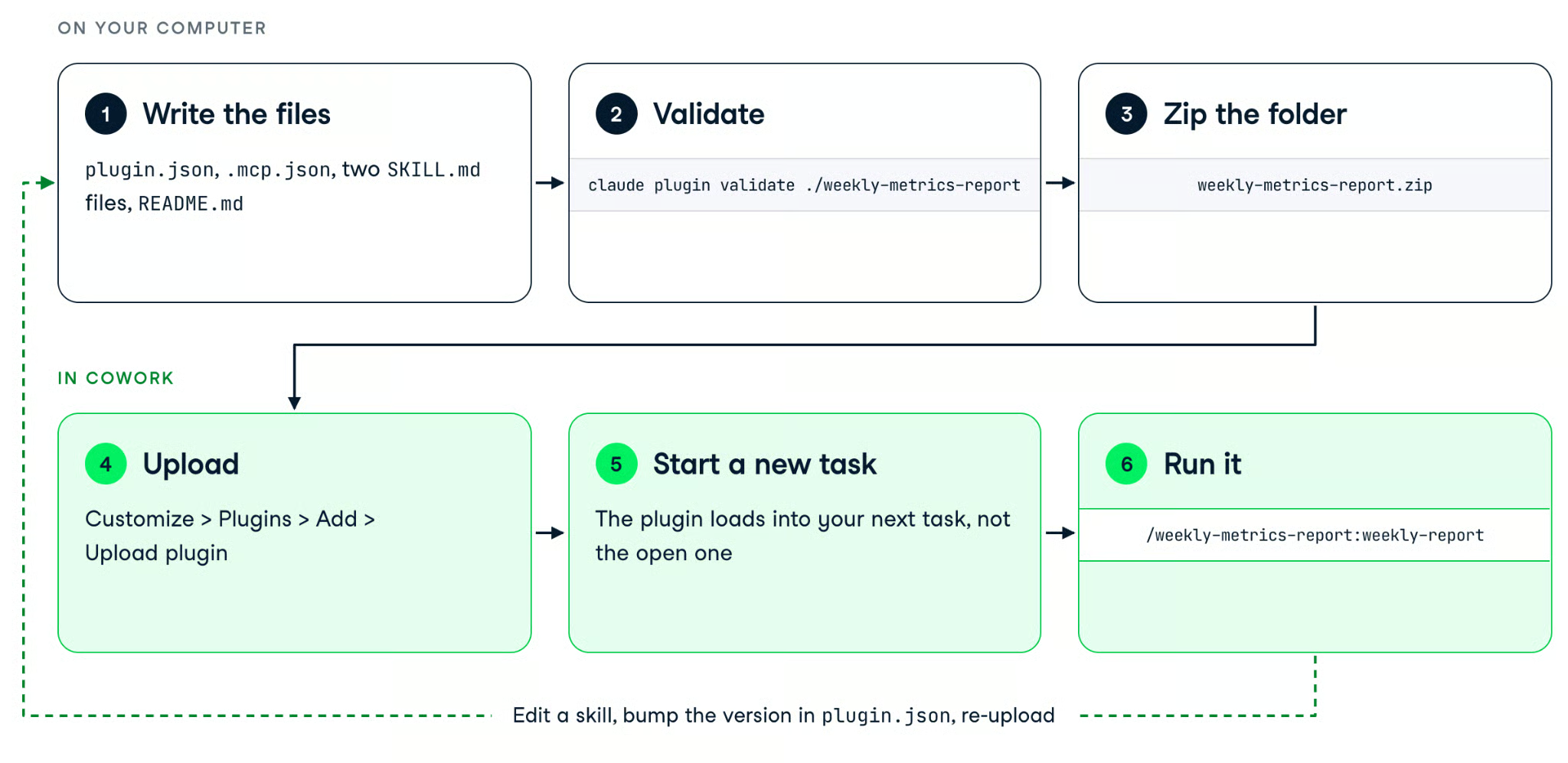
Figure 3. Building a custom plugin: write and validate the files on your computer, zip and upload them, then run the command in a new task, and loop back to the files for changes. Image by author.
Plugin Create is Anthropic's name for the guided route, and in September 2026, it lives in the Add menu. Go to Customize, Plugins, Add, then Create with Claude, which opens a Cowork task with the request already filled in.
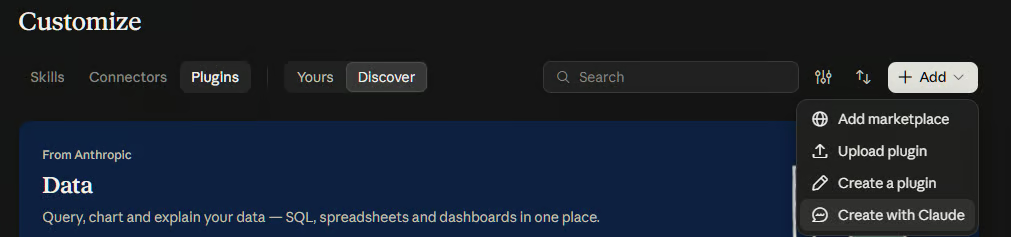
Describe the job in the words you would use with a colleague, answer Claude's questions about which connectors to include, and click Save plugin on the file card it produces. The same menu also offers Create a plugin, a form, and an editor for people who already know what each file should say.
For the plugin in this article, the brief I would type is below. It names the one command, the one background skill, the one connector, and the rules, which is the information the skill's discovery questions would otherwise pull out of you one at a time.
Build me a plugin called Weekly Metrics Report for our online store's data team.

What it does: every Monday, compare the most recent complete week (Monday to Sunday) with the week before it and write a short Markdown report. Keep it to one command, /weekly-report, that runs the whole thing, and one background skill that holds our metric definitions so Claude never guesses them.

The definitions: net revenue is quantity times unit price after the line discount, for completed orders only. Completed orders are counted by distinct order ID. Average order value is net revenue divided by completed orders. Refund rate is refunded orders divided by completed plus refunded orders, as a percentage with one decimal. Cancelled orders never count toward anything.

The data: the canonical tables are orders, order_items, and products in our BigQuery warehouse. Never use products.list_price for revenue; it is the catalog price, not what the customer paid. Bundle the BigQuery connector and nothing else.

The report: a three-sentence summary that names the biggest mover and says whether it went up or down, a table of net revenue by product category (this week, last week, percentage change with one decimal and a sign), a second table with the overall metrics for both weeks, and the SQL at the end so a reader can check it. If either week has fewer than 20 completed orders, say the comparison is noisy.

Do not add agents, hooks, or any other skills.
The guided route runs the create-cowork-plugin skill from the Plugin Management plugin in the Knowledge Work marketplace. You can install that plugin and run the skill by name. It asks about the job, components, and connectors, then packages the result into a .plugin file.
Here is the folder you end up with:
weekly-metrics-report/
├── .claude-plugin/
│   └── plugin.json
├── .mcp.json
├── README.md
└── skills/
    ├── metric-definitions/
    │   └── SKILL.md
    └── weekly-report/
        └── SKILL.md
The manifest names the plugin and pins the version:
{
  "name": "weekly-metrics-report",
  "displayName": "Weekly Metrics Report",
  "version": "0.1.0",
  "description": "Builds the store's weekly metrics report from the warehouse, using the team's own metric definitions.",
  "author": { "name": "Tim Lu" },
  "license": "MIT"
}
The connector file lists one server, the same BigQuery endpoint the Data plugin uses, so a reader who connected BigQuery in Step 2 has nothing new to authorize:
{
  "mcpServers": {
    "bigquery": {
      "type": "http",
      "url": "https://bigquery.googleapis.com/mcp"
    }
  }
}
The README is optional for a private plugin and required if you ever submit to the directory, so I wrote it now:
# Weekly Metrics Report
A small Cowork plugin that turns "how did last week go?" into a consistent report. It holds the store's metric definitions in one skill and the report workflow in another, and it bundles the BigQuery connector so Claude can query the warehouse directly.

## Use it
Run /weekly-metrics-report:weekly-report, or ask for the weekly numbers in plain words. Claude compares the most recent complete week with the week before, writes a Markdown report with per-category and overall tables, and includes the SQL it ran.

## Data
The plugin reads the orders, order_items, and products tables through the connector you sign in to. It stores nothing itself.The knowledge skill holds the context that gets pasted every Monday. Here is skills/metric-definitions/SKILL.md in full:
---
name: metric-definitions
description: The store's definitions of net revenue, completed orders, average order value, and refund rate, plus which warehouse tables are canonical. Use whenever a request involves revenue, sales, orders, refunds, discounts, or which table to query, even if it does not name a metric.
user-invocable: false
---

# Metric definitions for the store warehouse
Follow these definitions whenever you compute or report a store metric. If a request conflicts with them, follow the definitions and say so.

## Canonical tables
- orders: one row per order. status is completed, refunded, or cancelled. order_date is ISO 8601 (YYYY-MM-DD).
- order_items: one row per product line. unit_price is the price charged before discount. discount_pct is a whole-number percentage from 0 to 25.
- products: one row per product, with its category.
- Never compute revenue from products.list_price. It is the catalog price, not what the customer paid.

## Metrics
- Net revenue: SUM(quantity * unit_price * (1 - discount_pct / 100.0)) over order_items, for orders with status = 'completed'.
- Completed orders: COUNT(DISTINCT order_id) where status = 'completed'.
- Average order value: net revenue divided by completed orders.
- Refund rate: refunded orders divided by completed plus refunded orders, as a percentage with one decimal.
- Cancelled orders never count toward revenue, order counts, or the refund rate.

## Weeks
- A week runs Monday to Sunday. Label a week by its Monday.
- "Last week" means the most recent complete week, not the last 7 days.
The description is what makes this skill fire reliably, and a vague one is the usual reason a skill never fires. Claude reads only the frontmatter until it decides to load a skill, and the Claude Code skills reference says to put the key use case first.
Write the description as the situations the reader will be in ("a request involves revenue, sales, orders, refunds, discounts") rather than as a summary of the file, and include the words people say, because Claude is matching your description against their message.
Two more choices are deliberate: user-invocable: false keeps this skill out of the / menu, since nobody should "run" a set of definitions. The body is written as instructions to Claude in the imperative ("Never compute revenue from products.list_price"), which is the style Anthropic's own authoring skill asks for. The tables section is the part you would replace with your own warehouse's names.
The command is also a skill file, because that is how new plugins define named actions. Here is skills/weekly-report/SKILL.md in full:
---
name: weekly-report
description: Build the store's weekly metrics report. Use when the user asks for the weekly report, the weekly numbers, week-over-week metrics, or how last week went.
argument-hint: "[a date inside the week to report on]"
---

# Weekly metrics report

Produce a short report comparing the most recent complete week with the week before it, using the definitions in the metric-definitions skill.

## Steps

1. Work out the reporting week. If the user gave a date, use the Monday-to-Sunday week that contains it. Otherwise use the most recent complete week before today.
2. Get the data. If a warehouse connector is connected, query it directly. If not, ask the user for a database file or an export and query that instead. Never estimate a number.
3. For the reporting week and the week before it, compute net revenue, completed orders, average order value, and refund rate, overall and per product category.
4. Write the report to a Markdown file named weekly_report_<week start>.md containing:
   - A three-sentence summary that names the biggest mover and says whether it went up or down.
   - A table with one row per category: net revenue this week, last week, and the percentage change.
   - A second table with the overall metrics for both weeks.
   - The SQL you ran, in a code block at the end, so the reader can check it.
5. Show the summary in the conversation and say where the file is.

## Rules

- Follow the metric-definitions skill for every metric. Do not invent new ones.
- Report percentage changes with one decimal place and a sign.
- If either week has fewer than 20 completed orders, say the comparison is noisy.
This skill is user-invocable by default, so it appears in the / menu as /weekly-metrics-report:weekly-report, and the argument-hint documents the one argument it takes.
The body names the metric-definitions skill twice, once in the opening line and once in the rules, which is how the command calls the skill: Claude loads the definitions because they are named and because their description matches a request about revenue.
If you prefer the legacy format, the same body works as commands/weekly-report.md with only the description line in its frontmatter.
Before uploading, validate the folder relative to its parent directory with claude plugin validate ./weekly-metrics-report, which requires Claude Code to be installed. On my machine, it printed ✔ Validation passed, and it names the field to fix when it fails.
Next, zip the plugin folder. Either layout works: the folder as the single top-level entry, or its contents directly, as long as the archive contains one .claude-plugin/plugin.json (mine came to 3,067 bytes). Then go to Customize, Plugins, Add, Upload plugin, and select the zip.
A newly added plugin loads into your next Cowork task, not the one you have open, so start a new task before you look for it. If it still does not appear in the new task, quit and reopen the desktop app before you start debugging the files.
I tested the plugin through Claude Code with claude --plugin-dir ./weekly-metrics-report, pointed at shop.db, and typed /weekly-metrics-report:weekly-report. Claude worked out that September 28, 2026, is a Monday, reported the week of September 21, and wrote weekly_report_2026-09-21.md. This is its summary, verbatim:
Net revenue rose to $46,774.42, up +33.3% from $35,087.07 the week before. Completed orders went from 61 to 78, and average order value rose slightly to $599.67 (+4.3%).
The biggest mover was Home Office: its net revenue went up +61.7% ($7,864.22 → $12,715.72), the largest gain in both dollars and percent.
Fitness was the only category that fell (-15.2%).
The refund rate rose from 10.3% to 12.4%, and Home Office's refund rate reached 27.6% (8 refunded orders), which is worth a closer look.
And this is the category table from the same file:
|
Category |
This week (2026-09-21) |
Last week (2026-09-14) |
Change |
|
Audio |
$12,937.24 |
$8,780.41 |
+47.3% |
|
Fitness |
$4,149.27 |
$4,893.28 |
-15.2% |
|
Home Office |
$12,715.72 |
$7,864.22 |
+61.7% |
|
Kitchen |
$9,618.61 |
$7,344.70 |
+31.0% |
|
Outdoor |
$7,353.57 |
$6,204.45 |
+18.5% |
|
Total |
$46,774.42 |
$35,087.07 |
+33.3% |
Compare the last row of the pivot table in Step 2 with the "This week" column here: same 5 numbers, from 2 different plugins, because both followed the same definition of net revenue.
Claude also did 2 things I did not ask for. It flagged that 4 of the 5 categories had fewer than 20 completed orders in at least 1 week, applying my noisy-comparison rule per category. It also pointed out that my "report changes as percentages" rule is ambiguous for the refund rate, which is already a percentage, so it reported that change in percentage points instead.
Both are edits I would make to the skill next, which is the loop in Figure 3: change a line, bump the version, upload again.
Once the report works, type /schedule in any Cowork task to have it run every Monday morning without you, since scheduled tasks run in Anthropic's cloud. Since October 1, 2026, scheduled tasks that Claude creates default to "Automatically approve" when your organization allows it, which is another reason to keep that connector read-only. Our Cowork Dispatch tutorial shows the other option, kicking a task off from your phone.
The plugin folder is the distribution unit, so sharing is a question of where you put it. Push it to a GitHub repository with a marketplace.json that lists it, and anyone you give the URL to can add the repository under Add and then Add marketplace.
On Team and Enterprise plans, an owner can instead sync a private repository or upload zips into an organization marketplace and set each plugin to available, installed by default, or required, for everyone or for specific groups. Members can share a plugin they built from its three-dot menu or submit it with Publish to org, and the help center's organization plugin guide covers the rest.
You verify a plugin's output by reading the query before you trust the chart, by limiting what the plugin can touch, and by knowing where to look when a skill does not fire. None of this needs a security team. It needs 5 minutes of habit.
A plausible-looking query can answer a slightly different question from the one you asked. Here is one I wrote by hand for the same question as Step 2, and it runs without an error:
SELECT p.category,
       ROUND(SUM(oi.quantity * p.list_price), 2) AS revenue
FROM orders AS o
JOIN order_items AS oi ON oi.order_id = o.order_id
JOIN products AS p ON p.product_id = oi.product_id
WHERE o.order_date >= '2026-08-03' AND o.order_date < '2026-09-28'
GROUP BY p.category
ORDER BY p.category;
It prices every line at the catalog list_price instead of the price charged, ignores discounts, and counts refunded and canceled orders because it never filters on status. Running both queries against shop.db yields the totals below, with the last column showing how far the shortcut overstates net revenue.
|
Category |
Plugin query (net, completed) |
Shortcut query (list price, all orders) |
Overstatement |
|
Audio |
97,149.69 |
128,770.97 |
+32.5% |
|
Fitness |
54,449.81 |
71,237.81 |
+30.8% |
|
Home Office |
74,787.03 |
99,157.55 |
+32.6% |
|
Kitchen |
67,458.46 |
83,908.32 |
+24.4% |
|
Outdoor |
50,488.63 |
64,366.84 |
+27.5% |
|
Total |
344,333.62 |
447,441.49 |
+29.9% |
Every category is overstated by 24% to 33%, and a bar chart of either result looks equally reasonable. The plugin's query got this right because the skill told it to filter early and read the schema.
If reading a 50-line query is still slow going, our Associate Data Analyst in SQL track is the fastest route to fluency. The SQL query optimization guide explains the practices the write-query skill follows, such as filtering before joining and avoiding SELECT *.
A write-capable warehouse connector puts your tables at risk from 2 directions: Claude misreading a request ("clean up the test orders") as an instruction to delete, and prompt injection, where text inside a document or web page Claude reads carries instructions of its own. On Team and Enterprise plans, the setting that lets members skip per-task approval for write-capable connector tools is off by default.
For a hard guardrail, hooks run before every tool call in Cowork and Claude Code, so a hook that reads a connector's SQL and rejects anything other than SELECT is the pattern to reach for. Our Claude Code hooks guide shows how to write one. I did not build that hook for this article, so test it with your own connector before relying on it.
Claude decides from the frontmatter, so open the skill and ask whether its description names the situation you were in and the words you used. If it does not, add them.
Then trigger the skill manually with / to confirm the body itself works, check that the plugin's toggle is on and its connector shows “Connected”, and remember that a plugin loads into the next task, not the current one. The most common culprit is a description that summarizes the file instead of describing the request.
Cowork has been generally available since April 9, 2026. Plugins launched as a research preview on January 30, 2026, and are now listed as available on all paid plans. On August 11, 2026, Anthropic extended Compliance API coverage to Cowork sessions on desktop, web, and mobile.
Two gaps remain in the current help center: transcripts of local desktop sessions have no deletion endpoint yet, and OpenTelemetry monitoring "doesn't replace audit logging for compliance purposes."
If your organization handles US health data on a HIPAA-ready Enterprise plan, Cowork is only covered by your Business Associate Agreement after an admin applies the HIPAA configuration, and once that's on, Cowork can't run in the cloud. If your data is regulated, get your compliance team's sign-off before a plugin touches production tables.
You now have 3 plugins: the Data plugin you installed, the copy you customized with your own table names, and the weekly report you built from 5 files. The third one is the one I would keep because it holds the 40 lines of context that used to be pasted every Monday, and it holds them only once.
The principle for deciding what deserves a plugin is short: a plugin is worth building when the workflow repeats, and the context stays stable, which describes a weekly report, a contract review checklist, or sales call prep. A one-off analysis does not need one; paste the context and move on.
And if you are weighing which repeated workflows at your company should get this treatment first, our Generative AI for Business course is built around exactly that question. To go deeper into the model behind all of this, the Introduction to Claude Models course covers prompting and multi-turn work with the Claude API.
Learn AI With DataCamp!
コース
コース
トラック
ブログ
Tom Farnschläder
11 分
ブログ
Abid Ali Awan
9 分
ブログ
Tom Farnschläder
15 分
チュートリアル
Bexruz (Bex) Tuychiev
11 分
チュートリアル
Bexruz (Bex) Tuychiev
9 分
チュートリアル
Abid Ali Awan
9 分