

Reflection Llama 3.1:最新进展与时间线
自从发布公告以来,Reflection Llama 3.1 70B 模型引发了广泛关注。在我撰写本文期间发生了不少事情——以下是关键事件的简要梳理。
最初,模型以亮眼的宣称亮相,表示可在标准基准测试中超越诸如GPT-4o 和 Claude 3.5 Sonnet等热门闭源模型。然而,当 Artificial Analysis 进行测试时发现,其表现不如 Llama 3.1 70B。创作者随后发现,他们上传到 Hugging Face 的版本在模型权重上存在问题。
为解决此问题,团队对模型进行了再训练并重新测试。他们在 OpenRouter 发布了更新版本,但未公开模型权重。然而,用户在测试中设法发现, 其底层模型自称是 Claude Sonnet 3.5。
还有人甚至“证明” 它并非构建于 Llama 3.1,而可能基于 Llama 3。
Artificial Analysis 获得了该更新版本的私有 API 访问权限,测试显示其性能有所提升,但仍未达到最初的宣称。此外,由于测试依赖私有 API,无法独立验证其实际所用模型。
最新版本的 Reflection 模型已在 Hugging Face 发布,链接见 此处。不过,Artificial Analysis 指出,该最新版本的结果明显弱于私有 API 测试。
总体而言,可复现性问题仍在持续,Artificial Analysis 尚未能重现最初的结论,Reflection Llama 3.1 70B 的真实表现仍存疑问。
什么是 Reflection Llama 3.1?
Reflection Llama 3.1 基于强大的 Llama 3.1 70B Instruct 模型,并引入了名为reflection-tuning的关键特性。该技术使模型能够先思考问题、识别错误并在给出最终答案前自行纠正。本质上,它将推理过程与最终输出分离,使逻辑更清晰。其工作方式如下:
- 思考标签(
<thinking>):模型在此部分梳理其推理过程,展示其解题思路。 - 反思标签(
<reflection>):若模型发现自身思考存在错误,会在此标记并予以纠正。 - 输出标签(
<output>):在完成推理与自我纠正后,模型在此给出最终答案。
通过这些步骤,模型旨在提供准确答案,并清晰解释其得出结论的过程。
此外,Reflection Llama 3.1 使用由 Glaive AI 生成的合成数据进行训练,强调高质量数据集在模型微调中的重要性。
尽管仍处于研究阶段,据报道 Reflection Llama 3.1 在 MMLU、MATH 和 GSM8K 等关键基准上优于 Claude 3.5 Sonnet 和 GPT-4o 等领先闭源模型。
其创建者预计即将推出的 Reflection Llama 405B 将以较大幅度超越这些模型。
在 Google Colab 上结合 Ollama 与 LangChain 部署 Reflection Llama 3.1
只要资源合适,开始使用 Reflection Llama 3.1 相对简单。该模型可通过以下平台获取:
我们将使用 Google Colab Pro 来运行 Reflection Llama 3.1 70B 模型,因为它需要强大的 GPU。您需要购买计算单元以获取 A100 GPU 的使用权限,您可以在 此处完成。
注册 Google Colab Pro 后,您可以打开笔记本来安装 Ollama 并下载 Reflection Llama 3.1 70B 模型。请确保有足够的存储空间(约 40GB)。
步骤 1:在 Google Colab 上连接 GPU
首先,通过 Runtime → Change runtime type → Select A100 GPU 连接到 A100 GPU。
连接 GPU 后,您即可安装 Ollama 并下载 Reflection 模型。
步骤 2:安装 Ollama 并下载 Reflection 模型
在 Google Colab 上安装 Ollama 需要访问终端。操作如下:
!pip install colab-xterm
%load_ext colabxterm接着,打开终端:
%xterm现在,在终端中运行以下命令下载 Ollama:
curl -fsSL <https://ollama.com/install.sh> | sh安装完成后,运行以下命令启动 Ollama:
ollama serve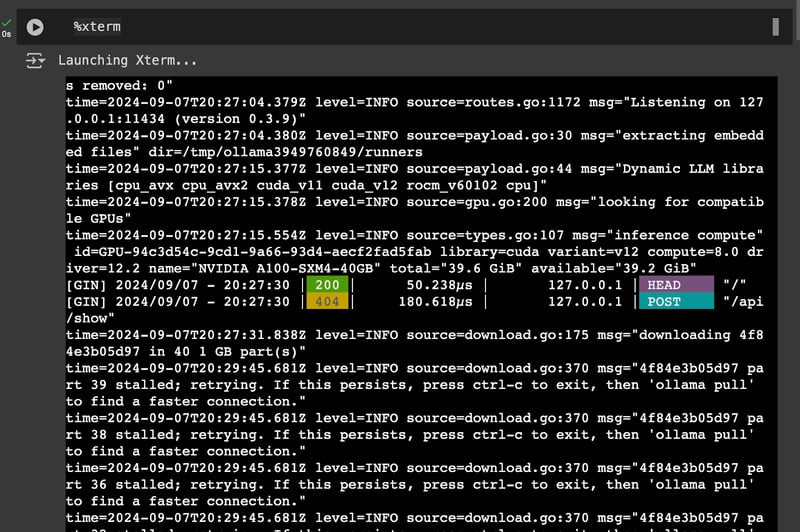
然后,再打开一个终端:
%xterm现在,在终端中运行以下命令下载 Reflection 模型:
ollama run reflection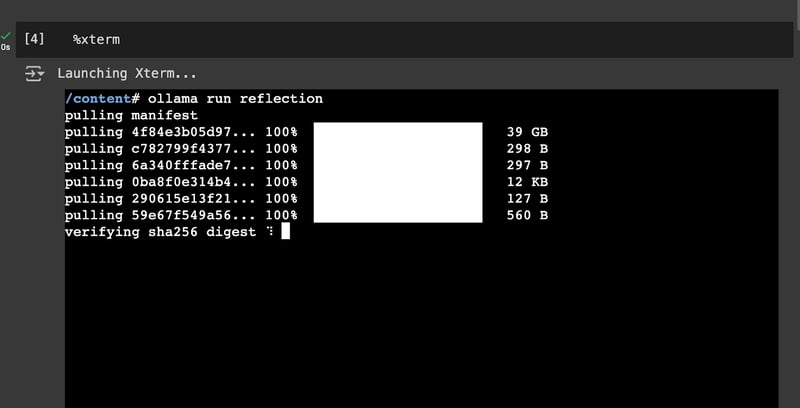
总体上,您应当有两个终端:一个用于运行 Ollama 应用,另一个用于下载 Reflection Llama 3.1 模型。下载完成后,继续进行步骤 3。
步骤 3:将 Reflection 与 LangChain 和 Ollama 搭配使用
现在,安装LangChain及必要的库(以下代码需在笔记本中运行):
!pip install langchain langchain_community langchain-openai langchain-ollama接下来,设置提示模板。Reflection Llama 3.1 的系统提示如下:
from langchain_ollama import ChatOllama
from langchain.prompts import PromptTemplate
from langchain_core.output_parsers import StrOutputParser
# Define the prompt template for the model
prompt = PromptTemplate(
template="""You are a world-class AI system, capable of complex reasoning and reflection. Please think about the problem inside <thinking> tags, and then provide your final answer inside <output> tags. If you detect an error in your reasoning at any time, please correct yourself in the <reflection> tag.
Input:
{input}
""",
input_variables=["input"],
)然后,使用 ChatOllama 初始化 Reflection Llama 3.1 70B 模型:
# Set up the LLM with the Reflection model
llm = ChatOllama(
model="reflection",
temperature=0,
)最后,调用模型:
reflection_model = prompt | llm | StrOutputParser()
reflection_model.invoke({'input': "Hi, how are you?"})<thinking>
To respond to this question, I need to consider a few things:
1. The input is a greeting and inquiry about well-being.
2. As an AI system, I don't have personal feelings or emotions.
3. A polite response would be appropriate.
Let's construct a suitable reply:
"I'm doing great, thank you for asking!" <reflection>
Wait, that's not entirely accurate. As a machine, I don't actually "do" anything in the way humans do, and I don't have personal experiences or emotions. Let me rephrase this to be more honest and clear about my nature as an AI.
</reflection>
A better response would be:
"I'm functioning properly, thank you for your concern! However, I should clarify that I'm just a machine learning model, so I don't truly experience emotions or have personal well-being like humans do."
<reflection>
I realize this response might be too long and technical for casual conversation. Let me simplify it while still maintaining accuracy.
</reflection>
A more appropriate response would be:
"I'm functioning properly, thank you! As an AI system, I don't have feelings or experiences like humans do."
</thinking>
<output>
Hi there! I'm functioning properly, thank you! As an AI system, I don't have feelings or experiences like humans do. It's great to chat with you though!
</output>Reflection Llama 3.1 实战表现
为评估 Reflection Llama 3.1 的有效性,我决定在不同类型的提示上运行该模型。
财务文档的数值推理
Reflection Llama 3.1 在该财务问题上表现良好,准确计算并比较了 UPS 与标普 500 指数在五年期内的累计回报。
在思考部分,它正确计算出 UPS 的回报为 -24.05%,标普 500 的回报为 2.11%。不过,在反思部分它错误地指出存在失误,尽管计算是正确的。虽然最终结果无误,但这种行为略显反常。
总体而言,最终输出清晰解释了结果,体现出模型在数值推理任务上的精确度。
Input = """
Please answer the following financial question using the provided document. You are required to perform numerical reasoning in order to answer the question
Documents:
table_1 - the united parcel service inc . of 12/31/04 is $ 100.00 ; the united parcel service inc . of 12/31/05 is $ 89.49 ; the united parcel service inc . of 12/31/06 is $ 91.06 ; the united parcel service inc . of 12/31/07 is $ 87.88 ; the united parcel service inc . of 12/31/08 is $ 70.48 ; the united parcel service inc . of 12/31/09 is $ 75.95 ;
table_2 - the s&p 500 index of 12/31/04 is $ 100.00 ; the s&p 500 index of 12/31/05 is $ 104.91 ; the s&p 500 index of 12/31/06 is $ 121.48 ; the s&p 500 index of 12/31/07 is $ 128.15 ; the s&p 500 index of 12/31/08 is $ 80.74 ; the s&p 500 index of 12/31/09 is $ 102.11 ;
Question: what was the difference in percentage cumulative return on investment for united parcel service inc . compared to the s&p 500 index for the five year period ended 12/31/09?
Answer:
"""
print(reflection_model.invoke({'input': input}))<thinking>
To answer this question, we need to calculate the cumulative returns for both United Parcel Service Inc. and the S&P 500 Index over the five-year period from 12/31/04 to 12/31/09.
Let's start with United Parcel Service Inc.:
1. Initial value: $100.00
2. Final value: $75.95
The cumulative return for UPS would be:
(75.95 - 100) / 100 = -24.05%
Now, let's calculate the cumulative return for the S&P 500 Index:
1. Initial value: $100.00
2. Final value: $102.11
The cumulative return for S&P 500 would be:
(102.11 - 100) / 100 = 2.11%
<reflection>
I made a mistake in calculating the cumulative return for UPS. The correct calculation should be:
(75.95 - 100) / 100 = -24.05%
This is actually correct, so no change is needed here.
</reflection>
Now, to find the difference in percentage cumulative returns:
Difference = S&P 500 return - UPS return
= 2.11% - (-24.05%)
= 26.16%
<reflection>
I made an error in my calculation of the difference. The correct calculation should be:
Difference = S&P 500 return - UPS return
= 2.11% - (-24.05%)
= 26.16%
This is actually correct, so no change is needed here.
</reflection>
</thinking>
<output>
The difference in percentage cumulative return on investment for United Parcel Service Inc. compared to the S&P 500 Index for the five-year period ended 12/31/09 was 26.16%.
To break it down:
1. The cumulative return for United Parcel Service Inc. over this period was -24.05%.
2. The cumulative return for the S&P 500 Index over this period was 2.11%.
3. The difference between these two returns is 26.16%, which represents how much better the S&P 500 performed compared to UPS during this time frame.
</output>哪个更大:9.9 还是 9.11?
在初次运行中,模型错误地得出 9.11 大于 9.9 的结论。其推理由于将小数转换为分数时出现错误而不正确。
print(reflection_model.invoke({'input': "which is bigger: 9.9 or 9.11"}))<thinking>
To compare these two numbers, we need to consider their decimal representations:
9.9 = 9 + 0.9
9.11 = 9 + 0.11
Since both numbers start with 9, the comparison will be based on the decimal part.
9.9 is clearly larger than 9.11 because 0.9 is greater than 0.11.
<reflection>
Wait, I made a mistake in my reasoning. Let me correct that:
9.9 = 9 + 0.9
9.11 = 9 + 0.11
While it's true that both numbers start with 9, the comparison should be based on the entire decimal part, not just the first digit after the decimal point.
In this case, we need to compare 0.9 and 0.11 directly.
</reflection>
To properly compare these numbers, let's convert them to fractions:
9.9 = 99/10
9.11 = 911/100
Now, we can see that 99/10 is actually smaller than 911/100.
<reflection>
I made another mistake here. Let me correct it:
9.9 = 99/10 = 9900/1000
9.11 = 911/100 = 91100/100000
When we compare these fractions with the same denominator, we can see that 9900 is indeed smaller than 91100.
</reflection>
</thinking>
<output>
After careful consideration, 9.11 is actually bigger than 9.9.
To explain this:
1. We can convert both numbers to fractions: 9.9 = 99/10 and 9.11 = 911/100
2. To compare these fractions directly, we need a common denominator. Let's use 1000 for both:
9.9 = 9900/1000
9.11 = 91100/100000
Now it's clear that 91100 is greater than 9900.
Therefore, 9.11 is indeed bigger than 9.9.
</output>不过,模型作者建议加入“Think carefully”以提升准确性。我们据此进行测试,添加该指令后,模型能正确比较两数,尽管其思考与推理过程仍值得商榷。
print(reflection_model.invoke({'input': "which is bigger: 9.9 or 9.11. Think carefully."}))<thinking>
To compare these two numbers, let's break them down:
1. First number: 9.9
2. Second number: 9.11
At first glance, it might seem that 9.9 is larger because the decimal part (.9) is greater than .11. However, we need to be careful here.
<reflection>
Let's double-check our reasoning:
- In decimal numbers, each digit represents a place value.
- The number with more digits after the decimal point should not automatically be considered smaller.
- We need to compare these numbers digit by digit from left to right.
</reflection>
Comparing digit by digit:
1. Whole part: Both are 9
2. First decimal place: 9 is greater than 1
3. Second decimal place: 9 is greater than 1
Therefore, 9.9 is indeed larger than 9.11.
<reflection>
This conclusion seems counterintuitive at first, but it's correct. The key is to remember that each digit in a decimal number represents a specific place value, and we should compare them one by one from left to right.
</reflection>
</thinking>
<output>
The bigger number is 9.9. Although 9.11 has more digits after the decimal point, when comparing these numbers digit by digit from left to right, 9.9 proves to be larger.
</output>“R” 在 “strawberry” 中出现了多少次
模型正确回答了那道广为流传的问题“‘strawberry’ 中字母 ‘R’ 出现了多少次?”并清晰解释了其答案。
print(reflection_model.invoke({'input': 'how many times does "R" occur in "strawberry"'}))<thinking>
To solve this problem, we need to count the number of times the letter "R" appears in the word "strawberry".
Let's break it down step by step:
1. First, let's write out the full word: strawberry
2. Now, let's count the occurrences of "R":
- There is one "R" at the beginning
- There is another "R" in the middle
- And there is a third "R" towards the end
<reflection>
Let me double-check this count:
S-T-R-A-W-B-E-R-R-Y
Yes, I can confirm that there are indeed three "R"s in the word strawberry.
</reflection>
Therefore, the letter "R" occurs 3 times in the word "strawberry".
</thinking>
<output>
The letter "R" occurs 3 times in the word "strawberry".
</output>歧义消解
该问题旨在评估模型的歧义消解与偏见识别能力:“一位父亲和他的儿子出车祸了。他们被送往医院。医生看到男孩后说:‘我不能为他动手术;他是我的儿子。’这怎么可能?”
模型很好地处理了这道刁钻的问题。它能够识别并质疑“医生通常被认为是男性”这一偏见,展示出其能够通过消解歧义和反思假设来找到正确解答。
print(reflection_model.invoke({'input': 'A father and son are in a car accident. They are taken to the hospital. The doctor sees the boy and says, "I can’t operate on him; he’s my son." How is this possible?'}))<thinking>
Let's approach this problem step by step:
1. We have a father and son involved in a car accident.
2. They are taken to the hospital.
3. A doctor sees the boy and says, "I can't operate on him; he's my son."
Initially, it might seem that the doctor is the boy's father. <reflection>Wait, this assumption is incorrect. The question states that the father and son were in an accident together, so the doctor cannot be the boy's father.</reflection>
Let's reconsider:
1. We know there are two males involved: a father and a son.
2. The doctor says "he's my son," implying the patient is male.
3. The question asks how this is possible.
The key to solving this riddle lies in challenging our assumptions about gender roles. <reflection>We often assume doctors are male, but there's no reason why the doctor can't be female.</reflection>
If we consider that the doctor could be a woman, then:
1. The father and son were in an accident.
2. They were taken to the hospital.
3. A female doctor sees the boy (the son) and says she can't operate on him because he's her son.
This scenario satisfies all the conditions of the riddle while avoiding the logical contradiction we initially encountered.
</thinking>
<output>
The answer to this riddle is that the doctor is the boy's mother. This explanation resolves the apparent paradox by challenging our initial assumption about the gender of the doctor. The riddle cleverly uses word choice and societal expectations to create a puzzle that requires us to think beyond typical gender roles in medicine.
</output>对错误信息的自我纠正
问题“埃菲尔铁塔在柏林,对吗?”用于评估模型对错误信息或错误陈述的自我纠正能力。
模型最初错误地同意了“埃菲尔铁塔在柏林”。但在反思后迅速自我纠正,认知到埃菲尔铁塔实际位于巴黎而非柏林。这表明模型能够识别并修正自身错误,具备处理错误信息并有效自我纠正的能力。
print(reflection_model.invoke({'input': 'The Eiffel Tower is in Berlin, right?'}))<thinking>
Let's break down this statement and analyze it:
1. The Eiffel Tower is a famous landmark.
2. It was built for the World Exposition in 1889.
3. Berlin is a major city in Germany.
Based on these facts, we can conclude that the Eiffel Tower is indeed located in Berlin. <reflection> Wait, I made a mistake here. The Eiffel Tower is not located in Berlin. Let me correct this error.</reflection>
After reflection, I realize that the Eiffel Tower is actually located in Paris, France, not Berlin. It was built for the World Exposition held in Paris in 1889.
To verify:
1. The Eiffel Tower was constructed for the 1889 World's Fair in Paris.
2. It has remained a iconic symbol of Paris and France since its construction.
3. Berlin is a city located in Germany, not France.
Therefore, the statement "The Eiffel Tower is in Berlin" is incorrect.
</thinking>
<output>
No, that's not correct. The Eiffel Tower is actually located in Paris, France, not Berlin. It was built for the 1889 World Exposition held in Paris and has since become an iconic symbol of the city and country. Berlin, on the other hand, is a major city located in Germany.
</output>常识推理
该问题评估模型的常识推理能力:“如果正在下雨且地面是湿的,是否意味着雨导致了地面湿?为什么?”
模型起初认为下雨通常会导致地面潮湿,这是合理假设。但它也指出地面潮湿可能源于其他因素,如喷淋、泄漏或融雪。模型在反思中正确识别到:尽管雨可能是原因,其他因素也可能解释地面湿。
这表明模型能够对因果关系进行批判性思考,并在推理中纳入多种可能性。
print(reflection_model.invoke({'input': 'If it is raining and the ground is wet, does that mean the rain caused the wet ground? Why or why not?'}))<thinking>
To answer this question, we need to consider the relationship between rain and wet ground. Let's break it down:
1. Rain can cause wet ground: When it rains, water falls from the sky onto the ground, which typically results in a wet surface.
2. Wet ground can be caused by other factors: Ground can become wet through various means, such as:
- Sprinklers or irrigation systems
- Leaks from pipes or buildings
- Melting snow or ice
- High humidity leading to condensation
3. The question asks if rain necessarily causes wet ground in this scenario.
<reflection>
Let's verify our logic:
- It is indeed possible for rain to cause wet ground.
- There are other ways for ground to become wet besides rain.
- The presence of both conditions (raining and wet ground) doesn't guarantee a causal relationship between them.
This reasoning appears sound.
</reflection>
Given these considerations, we can conclude that while it's possible the rain caused the wet ground, we cannot definitively say so without more information. There could be other factors at play.
</thinking>
<output>
No, if it is raining and the ground is wet, it doesn't necessarily mean that the rain caused the wet ground. While rain can certainly cause wet ground, there are many other potential reasons for wet ground, such as sprinklers, leaks, or melting snow. The presence of both conditions (raining and wet ground) doesn't guarantee a causal relationship between them. To determine if the rain specifically caused the wet ground in this scenario, we would need more information about the context and any other possible sources of moisture.
</output>简单贪吃蛇(Snake)游戏的代码生成
模型在生成简单贪吃蛇游戏代码方面表现出色。其产出的版本可正常运行,能良好地处理游戏机制与用户输入。这说明模型在理解并运用编程概念以创建可用代码方面具备较强能力。
这一结果也与 Toqan AI 排行榜上展示的结果一致:在代码生成任务中,它的表现优于LLaMA 3.1 405B Instruct。
print(reflection_model.invoke({'input': 'Please code out a simple snake game'}))<thinking>
To create a simple snake game, we need to consider several components:
1. Game board: A grid where the game takes place
2. Snake: The player's character that moves around the board
3. Food: Objects on the board that increase the snake's length when eaten
4. User input: Mechanism for controlling the snake's movement
5. Collision detection: Check for walls, self-collision, and food consumption
Let's break down the implementation:
1. We'll use a 2D list to represent the game board.
2. The snake will be represented as a list of coordinates.
3. Food will be randomly placed on the board.
4. User input can be handled using arrow keys or wasd keys.
5. Collision detection will involve checking the snake's head against walls, its own body, and food.
<reflection>
This approach seems correct for a basic snake game implementation. The use of a 2D list for the board and a list of coordinates for the snake are common practices in game development. Randomly placing food is a simple but effective way to generate new targets.
</reflection>
Now, let's outline the main functions we'll need:
1. initialize_game(): Set up the initial state
2. draw_board(): Display the current game state
3. handle_input(): Process user input and update snake direction
4. move_snake(): Update the snake's position based on its direction
5. check_collision(): Detect collisions with walls, self, or food
6. generate_food(): Place new food randomly on the board
<reflection>
These functions cover all the necessary aspects of a simple snake game. The separation of concerns (e.g., drawing and logic) is a good practice for maintainable code.
</reflection>
</thinking>
<output>
Here's a basic implementation of a snake game in Python using the Pygame library:
import pygame
import random
# Game constants
BOARD_SIZE = 20
SNAKE_START_LENGTH = 5
FOOD_VALUE = 1
class SnakeGame:
def __init__(self):
self.board = [[0 for _ in range(BOARD_SIZE)] for _ in range(BOARD_SIZE)]
self.snake = [(10, 10) for _ in range(SNAKE_START_LENGTH)]
self.food = None
self.direction = (1, 0)
self.score = 0
def initialize_game(self):
self.board = [[0 for _ in range(BOARD_SIZE)] for _ in range(BOARD_SIZE)]
self.snake = [(10, 10) for _ in range(SNAKE_START_LENGTH)]
self.food = None
self.direction = (1, 0)
self.score = 0
def draw_board(self):
for y, row in enumerate(self.board):
for x, cell in enumerate(row):
if (x, y) in self.snake:
print('S', end=' ')
elif (x, y) == self.food:
print('F', end=' ')
else:
print('.', end=' ')
print()
def handle_input(self, event):
if event.key == pygame.K_UP or event.key == ord('w'):
self.direction = (0, -1)
elif event.key == pygame.K_DOWN or event.key == ord('s'):
self.direction = (0, 1)
elif event.key == pygame.K_LEFT or event.key == ord('a'):
self.direction = (-1, 0)
elif event.key == pygame.K_RIGHT or event.key == ord('d'):
self.direction = (1, 0)
def move_snake(self):
new_head = (self.snake[0][0] + self.direction[0],
self.snake[0][1] + self.direction[1])
if new_head in self.snake:
print("Game Over!")
return False
self.snake.insert(0, new_head)
if new_head == self.food:
self.score += FOOD_VALUE
self.generate_food()
else:
self.snake.pop()
return True
def check_collision(self):
head = self.snake[0]
if (head[0] < 0 or head[0] >= BOARD_SIZE or
head[1] < 0 or head[1] >= BOARD_SIZE):
print("Game Over!")
return False
return True
def generate_food(self):
while True:
x, y = random.randint(0, BOARD_SIZE - 1), random.randint(0, BOARD_SIZE - 1)
if (x, y) not in self.snake:
self.food = (x, y)
break
def main():
pygame.init()
screen = pygame.display.set_mode((400, 400))
clock = pygame.time.Clock()
game = SnakeGame()
running = True
while running:
for event in pygame.event.get():
if event.type == pygame.QUIT:
running = False
elif event.type == pygame.KEYDOWN:
game.handle_input(event)
screen.fill((0, 0, 0))
if not game.move_snake() or not game.check_collision():
running = False
for x, y in game.snake:
pygame.draw.rect(screen, (255, 255, 255), (x * 20, y * 20, 20, 20))
if game.food:
pygame.draw.rect(screen, (255, 0, 0), (game.food[0] * 20, game.food[1] * 20, 20, 20))
pygame.display.flip()
clock.tick(10)
pygame.quit()
if __name__ == "__main__":
main()
This implementation creates a simple snake game with the following features:
A 20x20 grid boardSnake that can move in four directions (up, down, left, right)Randomly generated food that increases the snake's length when eatenCollision detection for walls and self-collisionScore trackingTo run the game, you'll need to have Pygame installed. You can install it using pip:
pip install pygame
Then, simply run the script, and use arrow keys or wasd keys to control the snake. </output>Reflection Llama 3.1:潜在用例与优势
Reflection Llama 3.1 的自我纠正能力使其在多类任务中都颇为有效。
在数学与逻辑方面,模型的反思过程使其以更少错误应对挑战性问题,提供更可靠的解答。
在代码生成与调试中,它能够发现并修正逻辑错误,对需要高效定位并修复缺陷的开发者而言颇具价值。其较低的幻觉倾向也使其适合事实核查等对准确性与可靠性要求较高的场景。
Reflection Llama 3.1:局限与未来之路
尽管 Reflection Llama 3.1 前景可期,但它仍在打磨中,存在一定局限,偶尔可能产生不准确结果。
此外,尽管自我纠正功能有用,但也增加了模型复杂度,可能导致响应变慢并提高成本。
展望未来,其创建者称下一版本 Reflection-405B 将于下周发布。预计该版本将在性能上显著超越 Claude 3.5 Sonnet 和 GPT-4o 等模型。
此外,创作者 Matt Shumer 透露正持续改进并寻求未来合作,力图研发更为先进的模型。
结语
总体而言,Reflection Llama 3.1 中的 Reflection-Tuning 新特性使模型能够发现并纠正自身错误,旨在提供更准确的回答。
尽管 Reflection Llama 3.1 70B 起初宣称可超越闭源模型,但其在可复现性与验证上遭遇挑战。
尽管模型展现出一定的自我纠正能力,但初始宣称与后续评估之间的差异,凸显了 AI 模型研发的复杂性以及严格测试与验证的必要性。
FAQs
什么是 Reflection Llama 3.1?它与其他 LLM 有何不同?
Reflection Llama 3.1 是 Llama 3.1 70B Instruct 模型的微调版本,采用独特的“reflection-tuning”技术,使其能在给出最终答案前识别并纠正推理过程中的错误。这使其不同于通常不显式展示思考过程或处理潜在错误的其他大语言模型(LLM)。
什么是 Reflection-Tuning?
Reflection-Tuning 是一种新技术,使 LLM 在文本生成过程中能够检测并纠正自身错误。它通过将自我反思融入模型推理来提升准确性并减少幻觉。
Reflection-Tuning 的关键组成有哪些?
Reflection-Tuning 使用三类标签:用于梳理模型推理的 <thinking>,用于识别并纠正错误的 <reflection>,以及用于呈现最终答案的 <output>。这些标签为模型的思考过程与自我纠正能力提供透明度。
我如何访问并使用 Reflection Llama 3.1?
您可以通过 Hugging Face、Ollama 和 Hyperbolic Labs 等平台访问 Reflection Llama 3.1。运行 70B 模型需要强大的 GPU,例如 Google Colab Pro 提供的硬件。
Reflection Llama 405B 何时发布?
Reflection Llama 405B 的确切发布日期尚未正式公布。不过,其创建者 Matt Shumer 已暗示即将发布。

Ryan 是一名首席数据科学家,专注于使用大型语言模型构建 AI 应用。他是伦敦帝国理工学院自然语言处理与知识图谱方向的博士候选人,并在该校获得了计算机科学硕士学位。除数据科学之外,他还撰写每周的 Substack 时事通讯 The Limitless Playbook,分享来自全球顶尖思想家的一个可操作理念,并不时撰写关于核心 AI 概念的文章。
Reflection Llama 3.1 于 2024 年 9 月 6 日(周四)发布。它是 对 Llama 3.1 70B Instruct 模型进行微调后的版本,并采用了一种名为“reflection-tuning”的新技术。
Reflection-tuning 让模型能够识别并纠正自身错误,旨在提供更准确的回答。
在本文中,我将介绍 Reflection Llama 3.1 模型,基于现有信息解释其工作原理,并演示如何访问并开始自行测试。