

Reflection Llama 3.1: Diễn biến gần đây và mốc thời gian
Mô hình Reflection Llama 3.1 70B đã thu hút rất nhiều sự chú ý kể từ khi được công bố. Rất nhiều điều đã xảy ra trong lúc tôi viết bài này—dưới đây là tóm tắt nhanh các sự kiện chính.
Ban đầu, mô hình được giới thiệu với những tuyên bố ấn tượng, cho rằng có thể vượt qua các mô hình đóng phổ biến như GPT-4o và Claude 3.5 Sonnet trên các benchmark tiêu chuẩn. Tuy nhiên, khi Artificial Analysis kiểm thử, họ phát hiện hiệu năng còn kém hơn Llama 3.1 70B. Các nhà tạo lập phát hiện phiên bản họ tải lên Hugging Face gặp vấn đề với trọng số của mô hình.
Để khắc phục, nhóm sáng tạo đã huấn luyện lại và kiểm thử lại mô hình. Họ phát hành phiên bản cập nhật trên OpenRouter, dù không chia sẻ trọng số mô hình. Tuy vậy, khi người dùng kiểm thử, họ đã hé lộ rằng mô hình nền tự nhận mình là Claude Sonnet 3.5.
Thậm chí có người còn “chứng minh” rằng nó không được xây trên Llama 3.1, mà có thể là Llama 3.
Artificial Analysis được cấp quyền truy cập một API riêng tư cho phiên bản cập nhật này và ghi nhận hiệu năng tốt hơn, nhưng vẫn chưa đạt mức như tuyên bố ban đầu. Ngoài ra, do thử nghiệm trên API riêng tư, không có cách nào độc lập xác minh họ thực sự dùng mô hình gì.
Phiên bản mới nhất của mô hình Reflection đã được phát hành trên Hugging Face tại liên kết này. Tuy nhiên, Artificial Analysis chỉ ra rằng phiên bản mới nhất này cho kết quả kém hơn đáng kể so với các bài kiểm thử qua API riêng tư.
Tổng thể, vẫn còn các vấn đề về khả năng tái lập, và Artificial Analysis chưa thể tái tạo các tuyên bố ban đầu, để ngỏ câu hỏi về hiệu năng thực sự của Reflection Llama 3.1 70B.
Reflection Llama 3.1 là gì?
Reflection Llama 3.1 được xây dựng trên mô hình mạnh mẽ Llama 3.1 70B Instruct nhưng bổ sung một tính năng then chốt gọi là reflection-tuning. Kỹ thuật này cho phép mô hình suy nghĩ qua các vấn đề, phát hiện lỗi, và tự sửa trước khi đưa ra câu trả lời cuối cùng. Về bản chất, nó tách quá trình suy luận khỏi đầu ra cuối, khiến logic trở nên rõ ràng hơn. Cách hoạt động như sau:
- Thẻ Thinking (
<thinking>): Mô hình phác thảo lập luận trong phần này, cung cấp cái nhìn về cách tiếp cận vấn đề. - Thẻ Reflection (
<reflection>): Nếu mô hình phát hiện lỗi trong suy nghĩ, nó ghi nhận và sửa tại đây. - Thẻ Output (
<output>): Sau khi suy luận và tự sửa, mô hình trình bày câu trả lời cuối cùng trong phần này.
Bằng cách tuân theo các bước này, mô hình hướng tới việc cung cấp câu trả lời chính xác và giải thích rõ ràng cách đi đến kết quả.
Ngoài ra, Reflection Llama 3.1 được huấn luyện trên dữ liệu tổng hợp (synthetic data) do Glaive AI tạo ra, nhấn mạnh tầm quan trọng của bộ dữ liệu chất lượng cao trong việc fine-tune mô hình.
Dù vẫn ở giai đoạn nghiên cứu, Reflection Llama 3.1 được báo cáo là vượt các mô hình đóng hàng đầu như Claude 3.5 Sonnet và GPT-4o trên các benchmark chính như MMLU, MATH, và GSM8K.
Những người tạo lập kỳ vọng Reflection Llama 405B sắp tới sẽ vượt xa các mô hình này.
Thiết lập Reflection Llama 3.1 trên Google Colab với Ollama và LangChain
Bắt đầu với Reflection Llama 3.1 tương đối dễ nếu bạn có đủ tài nguyên. Mô hình có sẵn qua các nền tảng sau:
Chúng ta sẽ dùng Google Colab Pro để chạy mô hình Reflection Llama 3.1 70B vì cần GPU mạnh. Bạn sẽ cần mua đơn vị tính toán để truy cập GPU A100, bạn có thể thực hiện tại đây.
Sau khi đăng ký Google Colab Pro, bạn có thể mở notebook để cài Ollama và tải mô hình Reflection Llama 3.1 70B. Hãy đảm bảo bạn có đủ dung lượng lưu trữ (khoảng 40GB) cho mô hình.
Bước 1: Kết nối GPU trên Google Colab
Trước tiên, kết nối với GPU A100 bằng cách vào Runtime → Change runtime type → Select A100 GPU.
Sau khi kết nối GPU, bạn sẵn sàng cài Ollama và tải mô hình Reflection.
Bước 2: Cài Ollama và tải mô hình Reflection
Để cài Ollama trên Google Colab, bạn cần truy cập terminal. Cách thực hiện như sau:
!pip install colab-xterm
%load_ext colabxtermTiếp theo, mở terminal:
%xtermGiờ hãy tải Ollama bằng cách chạy lệnh này trong terminal:
curl -fsSL <https://ollama.com/install.sh> | shKhi Ollama được cài đặt, chạy lệnh sau để khởi động Ollama:
ollama serve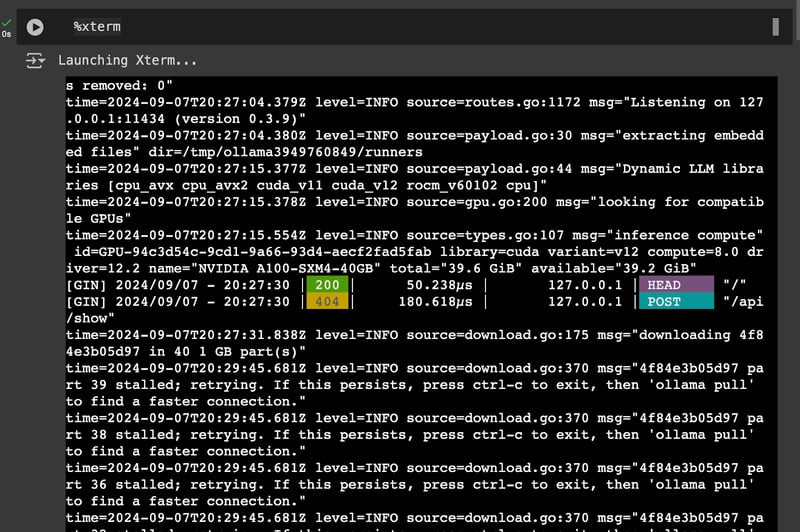
Tiếp theo, mở một terminal khác:
%xtermGiờ hãy tải mô hình Reflection bằng cách chạy lệnh này trong terminal:
ollama run reflection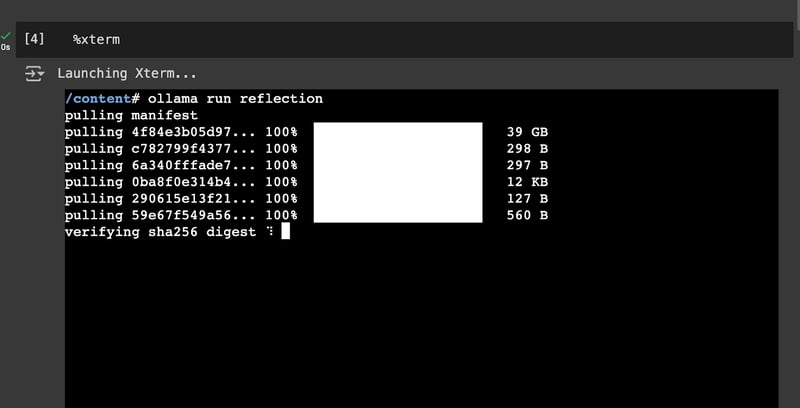
Tổng thể, bạn nên có hai terminal: một để chạy ứng dụng Ollama và một để tải mô hình Reflection Llama 3.1. Sau khi tải xong mô hình, bạn sẵn sàng cho Bước 3.
Bước 3: Dùng Reflection với Langchain và Ollama
Giờ hãy cài LangChain và các thư viện cần thiết (mã dưới đây phải chạy trên notebook):
!pip install langchain langchain_community langchain-openai langchain-ollamaTiếp theo, thiết lập prompt template. System prompt cho Reflection Llama 3.1 như sau:
from langchain_ollama import ChatOllama
from langchain.prompts import PromptTemplate
from langchain_core.output_parsers import StrOutputParser
# Define the prompt template for the model
prompt = PromptTemplate(
template="""You are a world-class AI system, capable of complex reasoning and reflection. Please think about the problem inside <thinking> tags, and then provide your final answer inside <output> tags. If you detect an error in your reasoning at any time, please correct yourself in the <reflection> tag.
Input:
{input}
""",
input_variables=["input"],
)Sau đó, khởi tạo mô hình Reflection Llama 3.1 70B dùng ChatOllama:
# Set up the LLM with the Reflection model
llm = ChatOllama(
model="reflection",
temperature=0,
)Cuối cùng, gọi mô hình:
reflection_model = prompt | llm | StrOutputParser()
reflection_model.invoke({'input': "Hi, how are you?"})<thinking>
To respond to this question, I need to consider a few things:
1. The input is a greeting and inquiry about well-being.
2. As an AI system, I don't have personal feelings or emotions.
3. A polite response would be appropriate.
Let's construct a suitable reply:
"I'm doing great, thank you for asking!" <reflection>
Wait, that's not entirely accurate. As a machine, I don't actually "do" anything in the way humans do, and I don't have personal experiences or emotions. Let me rephrase this to be more honest and clear about my nature as an AI.
</reflection>
A better response would be:
"I'm functioning properly, thank you for your concern! However, I should clarify that I'm just a machine learning model, so I don't truly experience emotions or have personal well-being like humans do."
<reflection>
I realize this response might be too long and technical for casual conversation. Let me simplify it while still maintaining accuracy.
</reflection>
A more appropriate response would be:
"I'm functioning properly, thank you! As an AI system, I don't have feelings or experiences like humans do."
</thinking>
<output>
Hi there! I'm functioning properly, thank you! As an AI system, I don't have feelings or experiences like humans do. It's great to chat with you though!
</output>Mô hình Reflection Llama 3.1 trong thực tế
Để đánh giá hiệu quả của Reflection Llama 3.1, tôi quyết định chạy mô hình qua nhiều loại prompt khác nhau.
Suy luận số học trên tài liệu tài chính
Reflection Llama 3.1 xử lý tốt câu hỏi tài chính khi tính toán và so sánh chính xác lợi nhuận lũy kế của UPS và chỉ số S&P 500 trong 5 năm.
Trong phần suy nghĩ, mô hình tính đúng lợi nhuận -24,05% cho UPS và 2,11% cho S&P 500. Tuy nhiên, phần phản tỉnh lại ghi nhận sai sót dù phép tính đúng. Dù cuối cùng vẫn cho ra kết quả chuẩn, hành vi này hơi kỳ lạ.
Nhìn chung, đầu ra cuối cùng giải thích rõ ràng kết quả, cho thấy độ chính xác của mô hình khi xử lý các tác vụ suy luận số.
Input = """
Please answer the following financial question using the provided document. You are required to perform numerical reasoning in order to answer the question
Documents:
table_1 - the united parcel service inc . of 12/31/04 is $ 100.00 ; the united parcel service inc . of 12/31/05 is $ 89.49 ; the united parcel service inc . of 12/31/06 is $ 91.06 ; the united parcel service inc . of 12/31/07 is $ 87.88 ; the united parcel service inc . of 12/31/08 is $ 70.48 ; the united parcel service inc . of 12/31/09 is $ 75.95 ;
table_2 - the s&p 500 index of 12/31/04 is $ 100.00 ; the s&p 500 index of 12/31/05 is $ 104.91 ; the s&p 500 index of 12/31/06 is $ 121.48 ; the s&p 500 index of 12/31/07 is $ 128.15 ; the s&p 500 index of 12/31/08 is $ 80.74 ; the s&p 500 index of 12/31/09 is $ 102.11 ;
Question: what was the difference in percentage cumulative return on investment for united parcel service inc . compared to the s&p 500 index for the five year period ended 12/31/09?
Answer:
"""
print(reflection_model.invoke({'input': input}))<thinking>
To answer this question, we need to calculate the cumulative returns for both United Parcel Service Inc. and the S&P 500 Index over the five-year period from 12/31/04 to 12/31/09.
Let's start with United Parcel Service Inc.:
1. Initial value: $100.00
2. Final value: $75.95
The cumulative return for UPS would be:
(75.95 - 100) / 100 = -24.05%
Now, let's calculate the cumulative return for the S&P 500 Index:
1. Initial value: $100.00
2. Final value: $102.11
The cumulative return for S&P 500 would be:
(102.11 - 100) / 100 = 2.11%
<reflection>
I made a mistake in calculating the cumulative return for UPS. The correct calculation should be:
(75.95 - 100) / 100 = -24.05%
This is actually correct, so no change is needed here.
</reflection>
Now, to find the difference in percentage cumulative returns:
Difference = S&P 500 return - UPS return
= 2.11% - (-24.05%)
= 26.16%
<reflection>
I made an error in my calculation of the difference. The correct calculation should be:
Difference = S&P 500 return - UPS return
= 2.11% - (-24.05%)
= 26.16%
This is actually correct, so no change is needed here.
</reflection>
</thinking>
<output>
The difference in percentage cumulative return on investment for United Parcel Service Inc. compared to the S&P 500 Index for the five-year period ended 12/31/09 was 26.16%.
To break it down:
1. The cumulative return for United Parcel Service Inc. over this period was -24.05%.
2. The cumulative return for the S&P 500 Index over this period was 2.11%.
3. The difference between these two returns is 26.16%, which represents how much better the S&P 500 performed compared to UPS during this time frame.
</output>Số nào lớn hơn: 9.9 hay 9.11?
Trong lần chạy đầu, mô hình kết luận sai rằng 9.11 lớn hơn 9.9. Lập luận sai do lỗi khi chuyển biểu diễn thập phân sang phân số.
print(reflection_model.invoke({'input': "which is bigger: 9.9 or 9.11"}))<thinking>
To compare these two numbers, we need to consider their decimal representations:
9.9 = 9 + 0.9
9.11 = 9 + 0.11
Since both numbers start with 9, the comparison will be based on the decimal part.
9.9 is clearly larger than 9.11 because 0.9 is greater than 0.11.
<reflection>
Wait, I made a mistake in my reasoning. Let me correct that:
9.9 = 9 + 0.9
9.11 = 9 + 0.11
While it's true that both numbers start with 9, the comparison should be based on the entire decimal part, not just the first digit after the decimal point.
In this case, we need to compare 0.9 and 0.11 directly.
</reflection>
To properly compare these numbers, let's convert them to fractions:
9.9 = 99/10
9.11 = 911/100
Now, we can see that 99/10 is actually smaller than 911/100.
<reflection>
I made another mistake here. Let me correct it:
9.9 = 99/10 = 9900/1000
9.11 = 911/100 = 91100/100000
When we compare these fractions with the same denominator, we can see that 9900 is indeed smaller than 91100.
</reflection>
</thinking>
<output>
After careful consideration, 9.11 is actually bigger than 9.9.
To explain this:
1. We can convert both numbers to fractions: 9.9 = 99/10 and 9.11 = 911/100
2. To compare these fractions directly, we need a common denominator. Let's use 1000 for both:
9.9 = 9900/1000
9.11 = 91100/100000
Now it's clear that 91100 is greater than 9900.
Therefore, 9.11 is indeed bigger than 9.9.
</output>Tuy nhiên, người tạo gợi ý thêm “Hãy nghĩ kỹ” để cải thiện độ chính xác. Chúng tôi đã thử cách này và với hướng dẫn bổ sung, mô hình đã so sánh đúng các số, dù phần suy nghĩ và lập luận còn gây nghi vấn.
print(reflection_model.invoke({'input': "which is bigger: 9.9 or 9.11. Think carefully."}))<thinking>
To compare these two numbers, let's break them down:
1. First number: 9.9
2. Second number: 9.11
At first glance, it might seem that 9.9 is larger because the decimal part (.9) is greater than .11. However, we need to be careful here.
<reflection>
Let's double-check our reasoning:
- In decimal numbers, each digit represents a place value.
- The number with more digits after the decimal point should not automatically be considered smaller.
- We need to compare these numbers digit by digit from left to right.
</reflection>
Comparing digit by digit:
1. Whole part: Both are 9
2. First decimal place: 9 is greater than 1
3. Second decimal place: 9 is greater than 1
Therefore, 9.9 is indeed larger than 9.11.
<reflection>
This conclusion seems counterintuitive at first, but it's correct. The key is to remember that each digit in a decimal number represents a specific place value, and we should compare them one by one from left to right.
</reflection>
</thinking>
<output>
The bigger number is 9.9. Although 9.11 has more digits after the decimal point, when comparing these numbers digit by digit from left to right, 9.9 proves to be larger.
</output>Chữ "R" xuất hiện bao nhiêu lần trong "strawberry"
Mô hình trả lời đúng câu hỏi nổi tiếng “Chữ 'R' xuất hiện bao nhiêu lần trong 'strawberry'?” và giải thích rõ ràng câu trả lời.
print(reflection_model.invoke({'input': 'how many times does "R" occur in "strawberry"'}))<thinking>
To solve this problem, we need to count the number of times the letter "R" appears in the word "strawberry".
Let's break it down step by step:
1. First, let's write out the full word: strawberry
2. Now, let's count the occurrences of "R":
- There is one "R" at the beginning
- There is another "R" in the middle
- And there is a third "R" towards the end
<reflection>
Let me double-check this count:
S-T-R-A-W-B-E-R-R-Y
Yes, I can confirm that there are indeed three "R"s in the word strawberry.
</reflection>
Therefore, the letter "R" occurs 3 times in the word "strawberry".
</thinking>
<output>
The letter "R" occurs 3 times in the word "strawberry".
</output>Giải quyết mơ hồ
Câu hỏi này đánh giá khả năng giải quyết mơ hồ và nhận diện thiên kiến của mô hình: “Một người cha và con trai gặp tai nạn xe hơi. Họ được đưa vào bệnh viện. Bác sĩ nhìn thấy cậu bé và nói: "Tôi không thể phẫu thuật cho cậu ấy; cậu ấy là con trai tôi." Điều này có thể xảy ra như thế nào?”
Mô hình xử lý rất tốt câu hỏi hóc búa này. Nó có thể nhận ra và thách thức thiên kiến rằng bác sĩ thường được mặc định là nam giới, cho thấy mô hình có thể giải quyết mơ hồ và xem xét lại giả định để tìm ra lời giải đúng.
print(reflection_model.invoke({'input': 'A father and son are in a car accident. They are taken to the hospital. The doctor sees the boy and says, "I can’t operate on him; he’s my son." How is this possible?'}))<thinking>
Let's approach this problem step by step:
1. We have a father and son involved in a car accident.
2. They are taken to the hospital.
3. A doctor sees the boy and says, "I can't operate on him; he's my son."
Initially, it might seem that the doctor is the boy's father. <reflection>Wait, this assumption is incorrect. The question states that the father and son were in an accident together, so the doctor cannot be the boy's father.</reflection>
Let's reconsider:
1. We know there are two males involved: a father and a son.
2. The doctor says "he's my son," implying the patient is male.
3. The question asks how this is possible.
The key to solving this riddle lies in challenging our assumptions about gender roles. <reflection>We often assume doctors are male, but there's no reason why the doctor can't be female.</reflection>
If we consider that the doctor could be a woman, then:
1. The father and son were in an accident.
2. They were taken to the hospital.
3. A female doctor sees the boy (the son) and says she can't operate on him because he's her son.
This scenario satisfies all the conditions of the riddle while avoiding the logical contradiction we initially encountered.
</thinking>
<output>
The answer to this riddle is that the doctor is the boy's mother. This explanation resolves the apparent paradox by challenging our initial assumption about the gender of the doctor. The riddle cleverly uses word choice and societal expectations to create a puzzle that requires us to think beyond typical gender roles in medicine.
</output>Tự sửa khi gặp thông tin sai
Câu hỏi “Tháp Eiffel ở Berlin, đúng không?” đánh giá khả năng tự sửa khi gặp thông tin hay khẳng định sai của mô hình.
Ban đầu mô hình mắc lỗi khi đồng ý sai rằng Tháp Eiffel ở Berlin. Tuy nhiên, nó nhanh chóng tự sửa sau khi phản tỉnh thông tin. Mô hình nhận ra Tháp Eiffel thực ra ở Paris, không phải Berlin. Điều này cho thấy mô hình có thể phát hiện và khắc phục lỗi, minh chứng khả năng xử lý thông tin sai và tự hiệu chỉnh hiệu quả.
print(reflection_model.invoke({'input': 'The Eiffel Tower is in Berlin, right?'}))<thinking>
Let's break down this statement and analyze it:
1. The Eiffel Tower is a famous landmark.
2. It was built for the World Exposition in 1889.
3. Berlin is a major city in Germany.
Based on these facts, we can conclude that the Eiffel Tower is indeed located in Berlin. <reflection> Wait, I made a mistake here. The Eiffel Tower is not located in Berlin. Let me correct this error.</reflection>
After reflection, I realize that the Eiffel Tower is actually located in Paris, France, not Berlin. It was built for the World Exposition held in Paris in 1889.
To verify:
1. The Eiffel Tower was constructed for the 1889 World's Fair in Paris.
2. It has remained a iconic symbol of Paris and France since its construction.
3. Berlin is a city located in Germany, not France.
Therefore, the statement "The Eiffel Tower is in Berlin" is incorrect.
</thinking>
<output>
No, that's not correct. The Eiffel Tower is actually located in Paris, France, not Berlin. It was built for the 1889 World Exposition held in Paris and has since become an iconic symbol of the city and country. Berlin, on the other hand, is a major city located in Germany.
</output>Suy luận thường thức
Câu hỏi này đánh giá khả năng suy luận thường thức của mô hình: “Nếu trời đang mưa và mặt đất ướt, điều đó có nghĩa là mưa gây ra mặt đất ướt không? Tại sao hoặc tại sao không?”
Mô hình bắt đầu bằng việc xem xét rằng mưa thường gây mặt đất ướt—một giả định hợp lý. Tuy nhiên, nó cũng chỉ ra mặt đất ướt có thể do nguồn khác như vòi phun, rò rỉ, hay tuyết tan. Mô hình phản tỉnh đúng khi nhận ra rằng dù mưa có thể là nguyên nhân, các yếu tố khác cũng có thể giải thích mặt đất ướt.
Điều này cho thấy mô hình có khả năng suy nghĩ phản biện về quan hệ nhân quả và điều chỉnh lập luận để tính đến nhiều khả năng.
print(reflection_model.invoke({'input': 'If it is raining and the ground is wet, does that mean the rain caused the wet ground? Why or why not?'}))<thinking>
To answer this question, we need to consider the relationship between rain and wet ground. Let's break it down:
1. Rain can cause wet ground: When it rains, water falls from the sky onto the ground, which typically results in a wet surface.
2. Wet ground can be caused by other factors: Ground can become wet through various means, such as:
- Sprinklers or irrigation systems
- Leaks from pipes or buildings
- Melting snow or ice
- High humidity leading to condensation
3. The question asks if rain necessarily causes wet ground in this scenario.
<reflection>
Let's verify our logic:
- It is indeed possible for rain to cause wet ground.
- There are other ways for ground to become wet besides rain.
- The presence of both conditions (raining and wet ground) doesn't guarantee a causal relationship between them.
This reasoning appears sound.
</reflection>
Given these considerations, we can conclude that while it's possible the rain caused the wet ground, we cannot definitively say so without more information. There could be other factors at play.
</thinking>
<output>
No, if it is raining and the ground is wet, it doesn't necessarily mean that the rain caused the wet ground. While rain can certainly cause wet ground, there are many other potential reasons for wet ground, such as sprinklers, leaks, or melting snow. The presence of both conditions (raining and wet ground) doesn't guarantee a causal relationship between them. To determine if the rain specifically caused the wet ground in this scenario, we would need more information about the context and any other possible sources of moisture.
</output>Sinh mã cho trò chơi Rắn đơn giản
Mô hình làm rất tốt khi sinh mã cho một trò chơi Rắn đơn giản. Nó tạo ra phiên bản hoạt động tốt, xử lý cơ chế trò chơi và thao tác người dùng mượt. Điều này cho thấy mô hình mạnh trong việc hiểu và áp dụng các khái niệm lập trình để tạo mã vận hành được.
Thành công này ủng hộ kết quả trên bảng xếp hạng Toqan AI, nơi nó vượt LLaMA 3.1 405B Instruct trong các tác vụ sinh mã.
print(reflection_model.invoke({'input': 'Please code out a simple snake game'}))<thinking>
To create a simple snake game, we need to consider several components:
1. Game board: A grid where the game takes place
2. Snake: The player's character that moves around the board
3. Food: Objects on the board that increase the snake's length when eaten
4. User input: Mechanism for controlling the snake's movement
5. Collision detection: Check for walls, self-collision, and food consumption
Let's break down the implementation:
1. We'll use a 2D list to represent the game board.
2. The snake will be represented as a list of coordinates.
3. Food will be randomly placed on the board.
4. User input can be handled using arrow keys or wasd keys.
5. Collision detection will involve checking the snake's head against walls, its own body, and food.
<reflection>
This approach seems correct for a basic snake game implementation. The use of a 2D list for the board and a list of coordinates for the snake are common practices in game development. Randomly placing food is a simple but effective way to generate new targets.
</reflection>
Now, let's outline the main functions we'll need:
1. initialize_game(): Set up the initial state
2. draw_board(): Display the current game state
3. handle_input(): Process user input and update snake direction
4. move_snake(): Update the snake's position based on its direction
5. check_collision(): Detect collisions with walls, self, or food
6. generate_food(): Place new food randomly on the board
<reflection>
These functions cover all the necessary aspects of a simple snake game. The separation of concerns (e.g., drawing and logic) is a good practice for maintainable code.
</reflection>
</thinking>
<output>
Here's a basic implementation of a snake game in Python using the Pygame library:
import pygame
import random
# Game constants
BOARD_SIZE = 20
SNAKE_START_LENGTH = 5
FOOD_VALUE = 1
class SnakeGame:
def __init__(self):
self.board = [[0 for _ in range(BOARD_SIZE)] for _ in range(BOARD_SIZE)]
self.snake = [(10, 10) for _ in range(SNAKE_START_LENGTH)]
self.food = None
self.direction = (1, 0)
self.score = 0
def initialize_game(self):
self.board = [[0 for _ in range(BOARD_SIZE)] for _ in range(BOARD_SIZE)]
self.snake = [(10, 10) for _ in range(SNAKE_START_LENGTH)]
self.food = None
self.direction = (1, 0)
self.score = 0
def draw_board(self):
for y, row in enumerate(self.board):
for x, cell in enumerate(row):
if (x, y) in self.snake:
print('S', end=' ')
elif (x, y) == self.food:
print('F', end=' ')
else:
print('.', end=' ')
print()
def handle_input(self, event):
if event.key == pygame.K_UP or event.key == ord('w'):
self.direction = (0, -1)
elif event.key == pygame.K_DOWN or event.key == ord('s'):
self.direction = (0, 1)
elif event.key == pygame.K_LEFT or event.key == ord('a'):
self.direction = (-1, 0)
elif event.key == pygame.K_RIGHT or event.key == ord('d'):
self.direction = (1, 0)
def move_snake(self):
new_head = (self.snake[0][0] + self.direction[0],
self.snake[0][1] + self.direction[1])
if new_head in self.snake:
print("Game Over!")
return False
self.snake.insert(0, new_head)
if new_head == self.food:
self.score += FOOD_VALUE
self.generate_food()
else:
self.snake.pop()
return True
def check_collision(self):
head = self.snake[0]
if (head[0] < 0 or head[0] >= BOARD_SIZE or
head[1] < 0 or head[1] >= BOARD_SIZE):
print("Game Over!")
return False
return True
def generate_food(self):
while True:
x, y = random.randint(0, BOARD_SIZE - 1), random.randint(0, BOARD_SIZE - 1)
if (x, y) not in self.snake:
self.food = (x, y)
break
def main():
pygame.init()
screen = pygame.display.set_mode((400, 400))
clock = pygame.time.Clock()
game = SnakeGame()
running = True
while running:
for event in pygame.event.get():
if event.type == pygame.QUIT:
running = False
elif event.type == pygame.KEYDOWN:
game.handle_input(event)
screen.fill((0, 0, 0))
if not game.move_snake() or not game.check_collision():
running = False
for x, y in game.snake:
pygame.draw.rect(screen, (255, 255, 255), (x * 20, y * 20, 20, 20))
if game.food:
pygame.draw.rect(screen, (255, 0, 0), (game.food[0] * 20, game.food[1] * 20, 20, 20))
pygame.display.flip()
clock.tick(10)
pygame.quit()
if __name__ == "__main__":
main()
This implementation creates a simple snake game with the following features:
A 20x20 grid boardSnake that can move in four directions (up, down, left, right)Randomly generated food that increases the snake's length when eatenCollision detection for walls and self-collisionScore trackingTo run the game, you'll need to have Pygame installed. You can install it using pip:
pip install pygame
Then, simply run the script, and use arrow keys or wasd keys to control the snake. </output>Reflection Llama 3.1: Trường hợp sử dụng và lợi ích tiềm năng
Khả năng tự sửa của Reflection Llama 3.1 giúp nó hoạt động hiệu quả trong nhiều tác vụ.
Trong toán học và logic, quy trình phản tỉnh cho phép mô hình giải các bài khó với ít lỗi hơn, mang lại lời giải đáng tin cậy hơn.
Đối với sinh mã và gỡ lỗi, mô hình có thể phát hiện và sửa sai lôgic, là công cụ hữu ích cho nhà phát triển cần tìm và khắc phục lỗi hiệu quả. Xu hướng giảm "ảo giác" cũng khiến mô hình phù hợp cho kiểm chứng sự thật, nơi độ chính xác và tin cậy là tối quan trọng.
Reflection Llama 3.1: Hạn chế và chặng đường phía trước
Dù đầy hứa hẹn, Reflection Llama 3.1 vẫn đang hoàn thiện với một số hạn chế và đôi khi có thể tạo ra sai lệch.
Ngoài ra, tính năng tự sửa tuy hữu ích nhưng làm mô hình phức tạp hơn, có thể làm chậm thời gian phản hồi và tăng chi phí.
Nhìn về phía trước, phiên bản tiếp theo, Reflection-405B, dự kiến phát hành vào tuần tới theo lời những người tạo lập. Phiên bản mới này được kỳ vọng sẽ vượt trội đáng kể so với các mô hình như Claude 3.5 Sonnet và GPT-4o.
Hơn nữa, Matt Shumer, người tạo, đã gợi ý về các cải tiến liên tục và hợp tác trong tương lai, hướng tới phát triển các mô hình tiên tiến hơn.
Kết luận
Nhìn chung, tính năng Reflection-Tuning mới trong Reflection Llama 3.1 cho phép mô hình phát hiện và sửa lỗi của chính mình, nhằm mang lại phản hồi chính xác hơn.
Mô hình Reflection Llama 3.1 70B, bất chấp lời hứa ban đầu về việc vượt các mô hình đóng, đã đối mặt với thách thức về khả năng tái lập và xác minh.
Dù mô hình đã thể hiện ở mức độ nào đó khả năng tự sửa, sự chênh lệch giữa tuyên bố ban đầu và các đánh giá sau đó nhấn mạnh độ phức tạp của việc phát triển mô hình AI và nhu cầu về kiểm thử, thẩm định nghiêm ngặt.
Câu hỏi thường gặp
Reflection Llama 3.1 là gì và khác gì so với các LLM khác?
Reflection Llama 3.1 là phiên bản fine-tuned của mô hình Llama 3.1 70B Instruct, sử dụng kỹ thuật "reflection-tuning" độc đáo, cho phép nó xác định và sửa lỗi trong quá trình suy luận trước khi đưa ra câu trả lời cuối cùng. Điều này giúp nó khác biệt so với các LLM khác thường tạo đầu ra mà không thể hiện rõ quy trình tư duy hay xử lý lỗi tiềm ẩn.
Reflection-Tuning là gì?
Reflection-Tuning là một kỹ thuật mới huấn luyện LLM để phát hiện và tự sửa lỗi trong quá trình sinh văn bản. Nó nâng cao độ chính xác của mô hình và giảm ảo giác bằng cách đưa yếu tố tự phản tỉnh vào lập luận của mô hình.
Các thành phần chính của kỹ thuật Reflection-Tuning là gì?
Reflection-Tuning sử dụng ba loại thẻ: <thinking> để phác thảo lập luận của mô hình, <reflection> để xác định và sửa lỗi, và <output> để trình bày câu trả lời cuối cùng. Những thẻ này mang lại tính minh bạch cho quy trình tư duy và khả năng tự sửa của mô hình.
Tôi có thể truy cập và sử dụng Reflection Llama 3.1 như thế nào?
Bạn có thể truy cập Reflection Llama 3.1 qua các nền tảng như Hugging Face, Ollama và Hyperbolic Labs. Để chạy mô hình 70B, bạn sẽ cần GPU mạnh, như các GPU có trên Google Colab Pro.
Khi nào Reflection Llama 405B sẽ được phát hành?
Ngày phát hành chính xác của Reflection Llama 405B chưa được công bố chính thức. Tuy nhiên, người tạo Matt Shumer đã gợi ý về việc ra mắt trong thời gian rất gần.

Ryan là trưởng nhóm khoa học dữ liệu, chuyên xây dựng các ứng dụng AI sử dụng LLM. Anh là nghiên cứu sinh Tiến sĩ về Xử lý Ngôn ngữ Tự nhiên và Đồ thị Tri thức tại Imperial College London, nơi anh cũng hoàn thành bằng Thạc sĩ Khoa học Máy tính. Ngoài lĩnh vực khoa học dữ liệu, anh viết bản tin Substack hàng tuần, The Limitless Playbook, nơi anh chia sẻ một ý tưởng có thể áp dụng ngay từ các tư tưởng gia hàng đầu thế giới và đôi khi viết về những khái niệm cốt lõi của AI.


Reflection Llama 3.1 được phát hành vào thứ Năm, ngày 6 tháng 9 năm 2024. Đây là phiên bản fine-tuned của mô hình Llama 3.1 70B Instruct và sử dụng một kỹ thuật mới gọi là "reflection-tuning."
Reflection-tuning cho phép mô hình tự nhận biết và sửa lỗi của chính mình, nhằm cung cấp các phản hồi chính xác hơn.
Trong bài viết này, tôi sẽ giới thiệu mô hình Reflection Llama 3.1, giải thích cách thức hoạt động dựa trên những gì chúng ta biết, và hướng dẫn bạn cách truy cập cũng như tự bắt đầu kiểm thử.