Corso
Introduzione a Python
4 ore
7.1M
Da due anni sono un grande utilizzatore di DataCamp e ho imparato davvero molto. Il mio business principale è nel marketing online e ho tratto grande beneficio dalle competenze di data science che ho acquisito. Ora riesco a gestire campagne molto più grandi e complesse e a mantenerle in modo efficiente. Dato che ormai conosco bene i contenuti, gli argomenti e i package in R e Python, ho pensato a come potrei creare campagne di ricerca per DataCamp, giusto come esercizio.
In questo tutorial affronterai i seguenti argomenti:
Il SEM è uno dei modi più efficaci per far crescere il tuo business in un mercato sempre più competitivo. È il processo di acquisizione di traffico sul sito acquistando annunci sui motori di ricerca. Google AdWords è una delle forme più popolari di pubblicità online: fai offerte per la posizione dell'annuncio nei link sponsorizzati del motore di ricerca per keyword correlate alla tua attività, poi paghi al motore di ricerca un costo per ogni clic.
Pagare per clic può diventare piuttosto oneroso, quindi è molto importante pianificare e raggruppare le tue keyword e i tuoi annunci in modo da controllare i costi e, si spera, avere campagne profittevoli.
Sebbene il processo esatto di determinazione del prezzo per clic sia un segreto ben custodito e dipenda da molti fattori, l'idea principale è che più i tuoi annunci sono pertinenti, più basso sarà il costo per clic.
Prima di impostare una campagna, in genere definisci un budget, scegli le keyword e analizzi la concorrenza. Inoltre, ti assicuri che la landing page sia a posto. Poi puoi configurare la campagna: scrivi il tuo primo annuncio, ne sistemi i dettagli e imposti il monitoraggio delle conversioni. Questo tutorial tratterà principalmente il processo di generazione di un gran numero di keyword e annunci, basato sulle diverse landing page che abbiamo.
Ma prima di iniziare, vediamo più precisamente cosa sono queste campagne di ricerca!
Per iniziare con una campagna di ricerca, devi prima sviluppare un piano per i tuoi gruppi di annunci. Questa è l'unità fondamentale di organizzazione in cui mappi keyword, annunci e landing page. Ma cosa sono esattamente questi tre componenti?
Mappare correttamente questi tre elementi è circa il 70-80% del lavoro. Se lo fai bene, manutenzione e modifiche diventano molto più semplici.
Questo significa che, per essere specifico e rilevante per gli utenti, devi promuovere il prodotto che hai e concentrarti principalmente sul mandare la persona giusta alla pagina giusta, con il messaggio o l'aspettativa giusta. Una buona struttura di campagna riflette e segue la struttura del sito web, che essenzialmente riflette la strategia di business.
Nota che ogni gruppo di annunci deve far parte di una campagna. A livello di campagna, hai impostazioni che governano tutti i gruppi di annunci nella campagna, come targeting linguistico, località, dispositivi, orari, ecc.
Nella sezione precedente hai visto le campagne di ricerca da un punto di vista alto: hai visto che keyword, annunci e landing page fanno parte di un gruppo di annunci e che devi elaborare un piano per questa unità di base in cui mappi questi tre componenti in modo che riflettano la tua strategia di business. In questa sezione, entrerai più nel dettaglio su cosa puoi fare per impostare una campagna, concentrandoti sui passaggi che seguirai in questo tutorial.
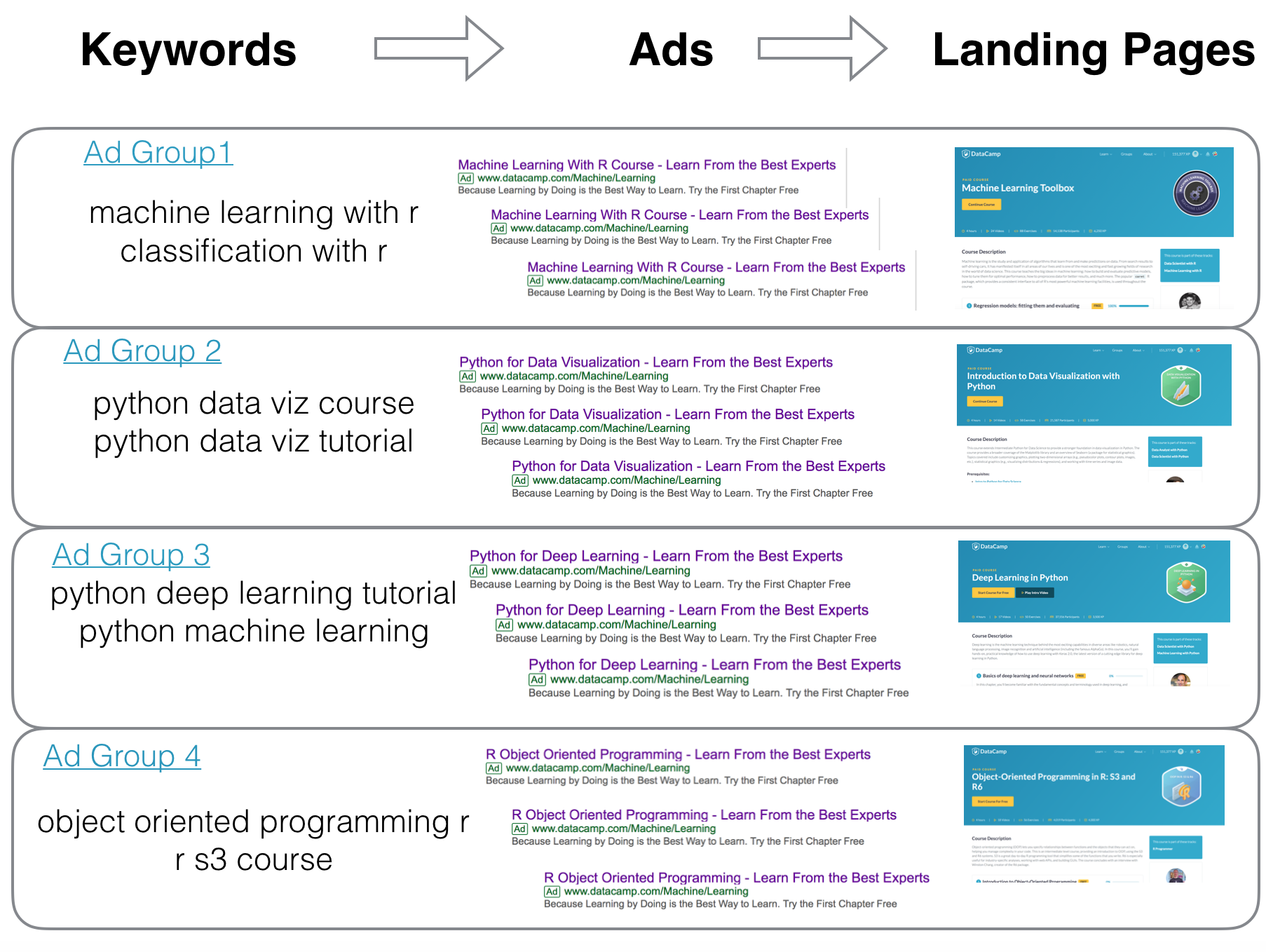
Come mostrato sopra, questo è il mapping che vuoi ottenere. In output, vuoi finire con due DataFrame principali: uno per le keyword e un altro per gli annunci. Puoi vedere come apparirebbero qui sotto.
| Campagna | Gruppo di annunci | Keyword |
|---|---|---|
| campaign 1 | adgroup 1 | keyword 1 |
| campaign 1 | adgroup 2 | keyword 2 |
| campaign 2 | adgroup 1 | keyword 3 |
| campaign 2 | adgroup 1 | keyword 4 |
| campaign 2 | adgroup 2 | keyword 5 |
| Campagna | Gruppo di annunci | URL visualizzato | URL finale | Titolo 1 | Titolo 2 |
|---|---|---|---|---|---|
| campaign 1 | adgroup 1 | datacamp.com | datacamp.com/a | Headline 1 | Headline 1a |
| campaign 1 | adgroup 2 | datacamp.com | datacamp.com/b | Headline 1 | Headline 1a |
| campaign 2 | adgroup 1 | datacamp.com | datacamp.com/c | Headline 1 | Headline 1a |
| campaign 2 | adgroup 2 | datacamp.com | datacamp.com/d | Headline 2 | Headline 2a |
| campaign 2 | adgroup 3 | datacamp.com | datacamp.com/e | Headline 3 | Headline 1a |
Una volta fatto questo, sarai pronto a caricarli come file CSV (Comma-separated Value) su Google AdWords o anche su altre piattaforme che funzionano allo stesso modo. Google AdWords è di gran lunga la piattaforma di search a pagamento più popolare usata dai search marketer, insieme a Bing Ads, Yandex, Baidu e altre.
Nota che se vuoi importare i dati su altre piattaforme e non su Google Adwords o Bing Ads, dovrai fare piccole modifiche!
Come hai letto nell'introduzione, vuoi creare campagne di ricerca per DataCamp. Considerando i diversi modi in cui qualcuno può esprimere interesse per il prodotto offerto da questa azienda, cioè la formazione in data science, puoi facilmente stilare un primo elenco di alcuni di questi modi:
In questo tutorial non passerai per la tradizionale fase di ricerca delle keyword, e questo perché hai la potenza del linguaggio di programmazione per generare tutte le combinazioni possibili e raggrupparle nelle rispettive campagne e gruppi di annunci.
Pertanto, ti servono due elementi principali per fare questo setup:
Iniziamo generando le keyword!
Questa campagna prenderà di mira persone che cercano corsi di uno qualsiasi dei docenti di DataCamp.
Puoi limitare le keyword a "course by <instructor name>" oppure puntare a un set ampio di keyword che targettizzano solo il nome del docente. All'inizio è meglio targettizzare i nomi con "course" o "courses" e vedere l'effetto.
Dovrai anche controllare se alcuni dei nomi che hai coincidono con quelli di un'altra persona famosa, o sono nomi molto comuni, e in quel caso dovrai restringere le keyword per quel docente.
Inizi recuperando i nomi dei docenti e gli URL per ciascuno:
import requests
from bs4 import BeautifulSoup


instructors_page = 'https://www.datacamp.com/instructors?all=true'
instructor_link_selector = '.instructor-block__description .instructor-block__link' # CSS class of the link
instructor_name_selector = '.mb-sm'  # CSS class of the name

instructor_resp = requests.get(instructors_page)
soup = BeautifulSoup(instructor_resp.text, 'lxml')

instructor_urls = [url['href'] for url in soup.select(instructor_link_selector)]
instructor_names = [name.text.strip() for name in soup.select(instructor_name_selector)]
instructor_urls = ['https://www.datacamp.com' + url for url in instructor_urls]
Li metti in un DataFrame per utilizzi successivi. Gli URL verranno usati in seguito per generare gli annunci.
instructor_df = pd.DataFrame({
    'name': instructor_names,
    'url': instructor_urls
})
print(instructor_df.shape)
instructor_df.head()
(72, 2)
| name | url | |
|---|---|---|
| 0 | Filip Schouwenaars | https://www.datacamp.com/instructors/filipsch |
| 1 | Jonathan Cornelissen | https://www.datacamp.com/instructors/jonathana... |
| 2 | Hugo Bowne-Anderson | https://www.datacamp.com/instructors/hugobowne |
| 3 | Greg Wilson | https://www.datacamp.com/instructors/greg48f64... |
| 4 | Nick Carchedi | https://www.datacamp.com/instructors/nickyc |
Ora che hai i nomi dei docenti, userai un template con cui combinare ogni nome con un set di keyword legate al tuo tema, cioè principalmente corsi del docente.
Variabili usate nel codice sotto:
col_names: è l'elenco delle intestazioni della tabella che caricheremo su Google AdWords.words: le parole che combinerai con i nomi dei docenti per generare le keyword/frasi complete.match_types: trovi più dettagli nel Centro assistenza AdWords, ma ecco le basi.
[data science course], "data science course" e data science course sono tecnicamente tre keyword diverse.
col_names = ['Campaign', 'Ad Group', 'Keyword', 'Criterion Type']
instructor_keywords = []

words = ['course', 'courses', 'learn', 'data science', 'data camp', 'datacamp']
match_types = ['Exact', 'Phrase', 'Broad']
for instructor in instructor_df['name']:
    for word in words:
        for match in match_types:
            if match == 'Broad':
                keyword = '+' + ' +'.join([instructor.replace(' ', ' +').lower(), word])  # modified broach match
            else:
                keyword = instructor.lower() + ' ' + word
            row = ['SEM_Instructors',  # campaign name
                   instructor,  # ad group name
                   keyword, # instructor <keyword>
                   match]  # keyword match type
            instructor_keywords.append(row)

# do the same by having the keywords come before the instructor name
for instructor in instructor_df['name']:
    for word in words:
        for match in match_types:
            if match == 'Broad':
                keyword = '+' + ' +'.join([word, instructor.replace(' ', ' +').lower()])
            else:
                keyword = word + ' ' + instructor.lower()
            row = ['SEM_Instructors',  # campaign name
                   instructor,  # ad group name
                   keyword, # <keyword> instructor
                   match]  # keyword match type
            instructor_keywords.append(row)


instructor_keywords_df = pd.DataFrame.from_records(instructor_keywords,
                                                   columns=col_names)
print('total keywords:', instructor_keywords_df.shape[0])
instructor_keywords_df.head()
total keywords: 2592
| Campaign | Ad Group | Keyword | Criterion Type | |
|---|---|---|---|---|
| 0 | SEM_Instructors | Filip Schouwenaars | filip schouwenaars course | Exact |
| 1 | SEM_Instructors | Filip Schouwenaars | filip schouwenaars course | Phrase |
| 2 | SEM_Instructors | Filip Schouwenaars | +filip +schouwenaars +course | Broad |
| 3 | SEM_Instructors | Filip Schouwenaars | filip schouwenaars courses | Exact |
| 4 | SEM_Instructors | Filip Schouwenaars | filip schouwenaars courses | Phrase |
In pratica, stai iterando sui nomi dei docenti, su tutte le diverse keyword e su tutti i tipi di corrispondenza che abbiamo, così da avere tutte le combinazioni possibili. Lo facciamo due volte, una per avere il template "nome docente keyword" e l'altra per "keyword nome docente".
Ora ripeti semplicemente lo stesso per tutti i nostri segmenti con piccole modifiche alle keyword e a come estraiamo i dati.
Una buona linea guida che ho imparato da R for Data Science è che se stai per copiare e incollare più di due volte, è ora di scrivere una funzione!
def generate_keywords(topics, keywords, match_types=['Exact', 'Phrase', 'Broad'],
                     campaign='SEM_Campaign'):
    col_names = ['Campaign', 'Ad Group', 'Keyword', 'Criterion Type']
    campaign_keywords = []

    for topic in topics:
        for word in keywords:
            for match in match_types:
                if match == 'Broad':
                    keyword = '+' + ' +'.join([topic.lower().replace(' ', ' +'), word.replace(' ', ' +')])
                else:
                    keyword = topic.lower() + ' ' + word
                row = [campaign,  # campaign name
                       topic,  # ad group name
                       keyword, # instructor <keyword>
                       match]  # keyword match type
                campaign_keywords.append(row)

    # I said more than twice! :)
    for topic in topics:
        for word in keywords:
            for match in match_types:
                if match == 'Broad':
                    keyword = '+' + ' +'.join([word.replace(' ', ' +'), topic.lower().replace(' ', ' +')])
                else:
                    keyword = word + ' ' + topic.lower()
                row = [campaign,  # campaign name
                       topic,  # ad group name
                       keyword, # <keyword> instructor
                       match]  # keyword match type
                campaign_keywords.append(row)

    return pd.DataFrame.from_records(campaign_keywords, columns=col_names)
Proviamola:
topics = ['Data Science', 'Machine Learning']
keywords = ['course', 'tutorial']
generate_keywords(topics, keywords).head(10)
| Campaign | Ad Group | Keyword | Criterion Type | |
|---|---|---|---|---|
| 0 | SEM_Campaign | Data Science | data science course | Exact |
| 1 | SEM_Campaign | Data Science | data science course | Phrase |
| 2 | SEM_Campaign | Data Science | +data +science +course | Broad |
| 3 | SEM_Campaign | Data Science | data science tutorial | Exact |
| 4 | SEM_Campaign | Data Science | data science tutorial | Phrase |
| 5 | SEM_Campaign | Data Science | +data +science +tutorial | Broad |
| 6 | SEM_Campaign | Machine Learning | machine learning course | Exact |
| 7 | SEM_Campaign | Machine Learning | machine learning course | Phrase |
| 8 | SEM_Campaign | Machine Learning | +machine +learning +course | Broad |
| 9 | SEM_Campaign | Machine Learning | machine learning tutorial | Exact |
Sembra buono. Ora generiamo gli argomenti e le keyword rilevanti per ciascuno dei tuoi segmenti!
topics = ['R', 'Python', 'SQL', 'Git', 'Shell']  # listed on the /courses page
keywords = ['data science', 'programming', 'analytics', 'data analysis', 'machine learning',
            'deep learning', 'financial analysis', 'data viz', 'visualization', 'data visualization',
            'learn', 'course', 'courses', 'education', 'data import', 'data cleaning',
            'data manipulation', 'probability', 'stats', 'statistics', 'course', 'courses',
           'learn', 'education', 'tutorial']  # @marketing_team: this list can / should be refined or
                                              # expanded based on the strategy and how specific the
                                              # targeting needs to be
tech_keywords = generate_keywords(topics, keywords, campaign='SEM_Technologies')
print('total keywords:', tech_keywords.shape[0])
tech_keywords.head()
total keywords: 750
| Campaign | Ad Group | Keyword | Criterion Type | |
|---|---|---|---|---|
| 0 | SEM_Technologies | R | r data science | Exact |
| 1 | SEM_Technologies | R | r data science | Phrase |
| 2 | SEM_Technologies | R | +r +data +science | Broad |
| 3 | SEM_Technologies | R | r programming | Exact |
| 4 | SEM_Technologies | R | r programming | Phrase |
Questo è probabilmente il segmento più specifico e quindi il più rilevante a cui mirare. Se qualcuno cerca "data visualization with r" e DataCamp ha quel corso, allora l'annuncio sarebbe estremamente pertinente, perché avresti la landing page giusta che soddisfa esattamente l'esigenza dell'utente.
C'è però un piccolo problema. Alcuni nomi dei corsi non corrispondono a ciò che un utente cercherebbe tipicamente: "Machine Learning with the Experts: School Budgets", "Sentiment Analysis in R: The Tidy Way". Non sono cattivi nomi di corsi, ma richiedono attenzione nella selezione delle keyword che le persone potrebbero usare per cercarli.
Ancora una volta, puoi fare scraping dei nomi e degli URL corrispondenti come hai fatto per la campagna dei docenti:
courses_page = 'https://www.datacamp.com/courses/all'
course_link_selector = '.courses__explore-list .course-block'

course_resp = requests.get(courses_page)
soup = BeautifulSoup(course_resp.text, 'lxml')

course_urls = [link.contents[1]['href'] for link in soup.select(course_link_selector)]
course_urls = ['https://www.datacamp.com' + url for url in course_urls]
course_names = [link.h4.text for link in soup.select(course_link_selector)]
course_df = pd.DataFrame({
    'name': course_names,
    'url': course_urls
})
course_df['name_clean'] = course_df.name.str.replace('\(.*\)', '').str.strip()  # remove (part x)
print('total keywords:', course_df.shape[0])
course_df.head()
total keywords: 104
| name | url | name_clean | |
|---|---|---|---|
| 0 | Intro to Python for Data Science | https://www.datacamp.com/courses/intro-to-python-for-data-science... | Intro to Python for Data Science |
| 1 | Introduction to R | https://www.datacamp.com/courses/free-introduction-to-r... | Introduction to R |
| 2 | Intermediate Python for Data Science | https://www.datacamp.com/courses/intermediate-python... | Intermediate Python for Data Science |
| 3 | Introduction to Git for Data Science | https://www.datacamp.com/courses/introduction-to-git... | Introduction to Git for Data Science |
| 4 | Intermediate R | https://www.datacamp.com/courses/intermediate-r | Intermediate R |
Farai lo stesso (usa la funzione generate_keywords()) per i corsi, ma devi fare attenzione, perché vanno riviste: come detto sopra, alcuni nomi non sono davvero ciò che le persone cercherebbero, e devi gestirli caso per caso. Quanto segue è un buon punto di partenza, poi potrai guardare i dati e decidere.
Nota che usare il carattere vuoto qui sotto non è un errore. I nomi dei corsi sono abbastanza lunghi e specifici da poter essere keyword in sé, senza dover aggiungere altri qualificatori come "learn" o "course". Quindi userai i nomi dei corsi da soli, oltre che con i qualificatori.
keywords = ['', 'learn', 'course', 'courses', 'tutorial', 'education']
course_keywords = generate_keywords(course_df['name_clean'], keywords, campaign='SEM_Courses')
print('total keywords:', course_keywords.shape[0])
course_keywords.head(10)
total keywords: 3744
| Campaign | Ad Group | Keyword | Criterion Type | |
|---|---|---|---|---|
| 0 | SEM_Courses | Intro to Python for Data Science | intro to python for data science | Exact |
| 1 | SEM_Courses | Intro to Python for Data Science | intro to python for data science | Phrase |
| 2 | SEM_Courses | Intro to Python for Data Science | +intro +to +python +for +data +science + | Broad |
| 3 | SEM_Courses | Intro to Python for Data Science | intro to python for data science learn | Exact |
| 4 | SEM_Courses | Intro to Python for Data Science | intro to python for data science learn | Phrase |
| 5 | SEM_Courses | Intro to Python for Data Science | +intro +to +python +for +data +science +learn | Broad |
| 6 | SEM_Courses | Intro to Python for Data Science | intro to python for data science course | Exact |
| 7 | SEM_Courses | Intro to Python for Data Science | intro to python for data science course | Phrase |
| 8 | SEM_Courses | Intro to Python for Data Science | +intro +to +python +for +data +science +course | Broad |
| 9 | SEM_Courses | Intro to Python for Data Science | intro to python for data science courses | Exact |
Questi sono sostanzialmente argomenti generici che le persone potrebbero essere interessate a cercare. Sono coperti dalla sezione "tracks", che ha skill e carriera come sotto-sezioni. Per il tuo scopo, possono essere raggruppati sotto la stessa campagna. Il processo è di nuovo lo stesso, proprio come hai fatto nelle sezioni precedenti!
skills_page = 'https://www.datacamp.com/tracks/skill'
skills_link_selector = '#all .shim'

skills_resp = requests.get(skills_page)
skill_soup = BeautifulSoup(skills_resp.text, 'lxml')

skills_urls = [link['href'] for link in skill_soup.select(skills_link_selector)]
skills_names = [skill.replace('/tracks/', '').replace('-', ' ') for skill in skills_urls]
skills_urls = ['https://www.datacamp.com' + url for url in skills_urls]
career_page = 'https://www.datacamp.com/tracks/career'
career_link_selector = '#all .shim'

career_resp = requests.get(career_page)
career_soup = BeautifulSoup(career_resp.text, 'lxml')

career_urls = [link['href'] for link in career_soup.select(career_link_selector)]

career_names = [career.replace('/tracks/', '').replace('-', ' ') for career in career_urls]
career_urls = ['https://www.datacamp.com' + url for url in career_urls]
tracks_df = pd.DataFrame({
    'name': skills_names + career_names,
    'url': skills_urls + career_urls
})
tracks_df['name'] = [x.title() for x in tracks_df['name']]
tracks_df.head()
| name | url | |
|---|---|---|
| 0 | R Programming | https://www.datacamp.com/tracks/r-programming |
| 1 | Importing Cleaning Data With R | https://www.datacamp.com/tracks/importing-cleaning-data-with-r... |
| 2 | Data Manipulation With R | https://www.datacamp.com/tracks/data-manipulation-with-r... |
| 3 | Python Programming | https://www.datacamp.com/tracks/python-programming... |
| 4 | Importing Cleaning Data With Python | https://www.datacamp.com/tracks/importing-cleaning-data-with-python... |
tracks_keywords = generate_keywords(tracks_df['name'], keywords, campaign='SEM_Tracks')
print('total keywords:', tracks_keywords.shape[0])
tracks_keywords.head()
total keywords: 720
| Campaign | Ad Group | Keyword | Criterion Type | |
|---|---|---|---|---|
| 0 | SEM_Tracks | R Programming | r programming | Exact |
| 1 | SEM_Tracks | R Programming | r programming | Phrase |
| 2 | SEM_Tracks | R Programming | +r +programming + | Broad |
| 3 | SEM_Tracks | R Programming | r programming learn | Exact |
| 4 | SEM_Tracks | R Programming | r programming learn | Phrase |
Infine, concateni tutte le keyword elencate in instructor_keywords, tech_keywords, course_keywords e tracks_keywords in modo che siano raccolte in un unico grande DataFrame:
full_keywords_df = pd.concat([instructor_keywords_df, tech_keywords, course_keywords, tracks_keywords])
print('total keywords:', full_keywords_df.shape[0])
print('total campaigns:', len(set(full_keywords_df['Campaign'])))
print('total ad groups:', len(set(full_keywords_df['Ad Group'])))
full_keywords_df.to_csv('keywords.csv', index=False)
full_keywords_df.head()
total keywords: 7806
total campaigns: 4
total ad groups: 191
| Campaign | Ad Group | Keyword | Criterion Type | |
|---|---|---|---|---|
| 0 | SEM_Instructors | Filip Schouwenaars | filip schouwenaars course | Exact |
| 1 | SEM_Instructors | Filip Schouwenaars | filip schouwenaars course | Phrase |
| 2 | SEM_Instructors | Filip Schouwenaars | +filip +schouwenaars +course | Broad |
| 3 | SEM_Instructors | Filip Schouwenaars | filip schouwenaars courses | Exact |
| 4 | SEM_Instructors | Filip Schouwenaars | filip schouwenaars courses | Phrase |
Ora sei pronto a partire con le tue keyword! Se vuoi dare un'occhiata al set di dati completo, lo trovi qui. Ora devi generare gli annunci per ciascuno dei tuoi gruppi di annunci.
Generiamo gli annunci.
Al momento hai quanto segue:
full_keywords_dfCon questo a disposizione, puoi seguire il seguente piano:
Campaign e aggiungila ai DataFrame ('name', 'url')'name', 'url') in un unico grande DataFrameGenera tutti gli annunci per tutti i gruppi di annunci; per ciascun annuncio servono i seguenti campi (che saranno nuove colonne nello stesso DataFrame con cui stai lavorando):
Assicurati che il lavoro sia coerente con il DataFrame delle keywords
Generare gli annunci significa semplicemente sostituire il nome dell'argomento (corso, tecnologia, docente, ecc.) dove necessario nel template, e creare 2-3 varianti di annuncio per ciascuno dei gruppi di annunci che hai.
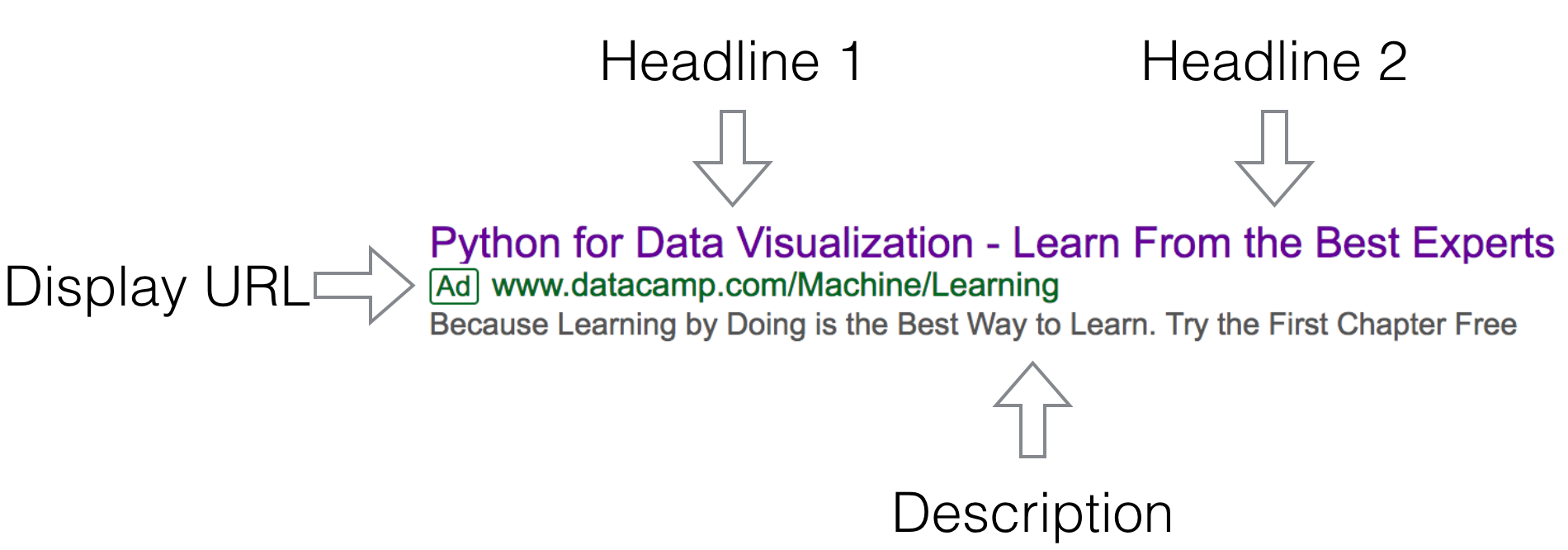
Una cosa importante da notare è che, sebbene inserire i nomi dei gruppi di annunci dove spettano sia un processo semplice, il problema è che devi rispettare i limiti di lunghezza dei campi indicati sopra. E dato che i nomi dei corsi e degli argomenti variano molto, devi capire cosa puoi fare al riguardo.
Vediamo quanto è grande il problema:
%matplotlib inline
import matplotlib.pyplot as plt
adgroup_lengths = pd.Series([len(adgrp) for adgrp in full_keywords_df['Ad Group'].unique()])
long_adgroups = sum(adgroup_lengths > 30)
plt.figure(figsize=(9,6))
plt.hist(adgroup_lengths, rwidth=0.9, bins=50)
plt.vlines(x=30, ymin=0, ymax=10, colors='red')
plt.title(str(long_adgroups) + ' ad group name lenghts > 30 (don\'t fit in a headline)',  fontsize=17)
plt.xlabel('Ad Group Name Lengths', fontsize=15)
plt.ylabel('Count', fontsize=15)
plt.yticks(range(11))
plt.xticks(range(0, 51, 5))
plt.grid(alpha=0.5)
plt.show()
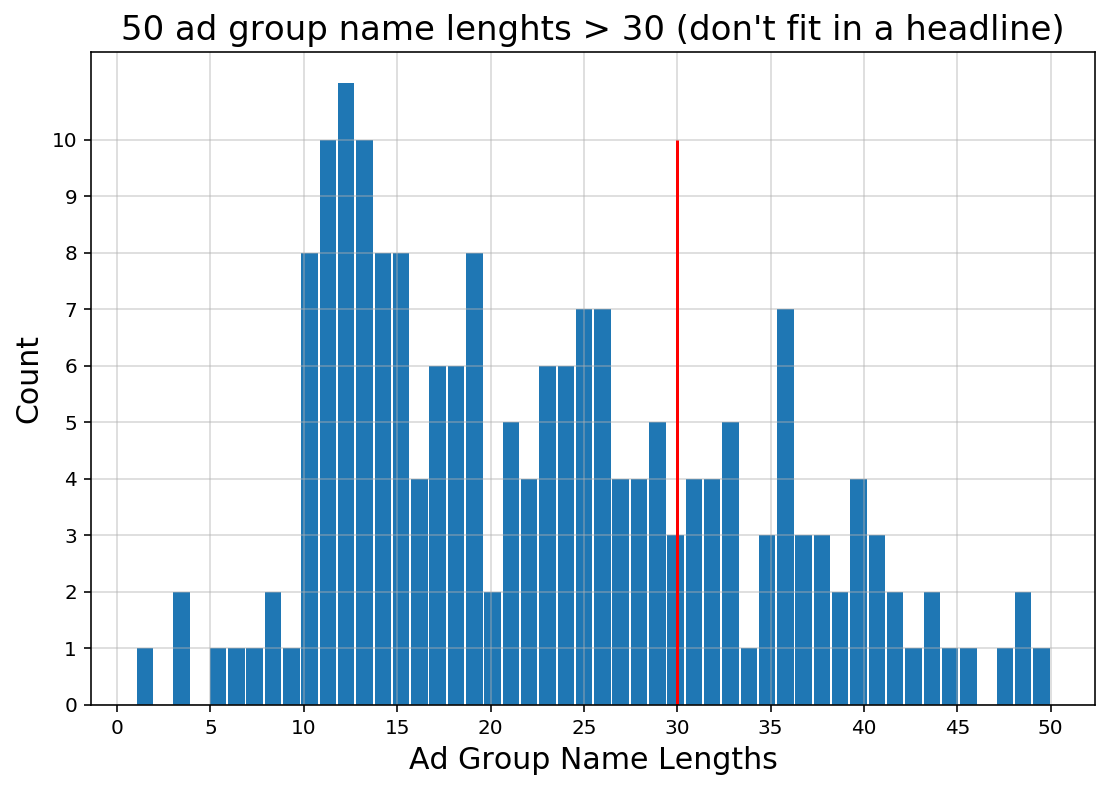
Sembra che il problema non sia banale e non esista un modo diretto per gestirlo. Idealmente, vorresti che i due titoli contenessero il titolo completo del prodotto (corso) che stiamo promuovendo.
Ho pensato a diversi modi per aggirarlo e ho deciso di scrivere un semplice algoritmo che divide il nome in due frasi, ciascuna contenente al massimo trenta caratteri.
L'algoritmo non è adatto all'uso generale e richiede qualche ritocco per essere generalizzato, ma funziona abbastanza bene per questo set di dati:
def split_string(string, splits=2, max_len=60):
    """Split `string` into `splits` words, each shorter than `max_len` / `splits`"""
    if len(string) < max_len / splits:
        return string, ''
    str_words = string.split(' ')
    result = ''
    for i, word in enumerate(str_words):
        if len(result + ' ' + word) <= max_len / splits:
            result += word + ' '
        else:
            break
    spaces = result.strip().count(' ')
    result2 = string[string[len(result):].index(word) + len(result):]
    return result.strip(), result2
print(split_string('this is a very long course name that needs splitting', 2, 60))
print(split_string('short course name', 2, 60))
('this is a very long course', 'name that needs splitting')
('short course name', '')
Non è qualcosa che faccio di solito, ma mi piace questa tecnica e penso che la userò quando creerò altre campagne. È un bel effetto collaterale dello scrivere un tutorial!
Ora pensiamo ai template che vuoi scrivere.
Il template generale di annuncio che uso è composto dai seguenti elementi (tipicamente in quest'ordine).
Non è facile mettere tutto questo in un annuncio lungo quanto un tweet, e alcuni elementi possono sovrapporsi. Ma farai del tuo meglio.
Campaignfull_keywords_df.Campaign.unique() # just to make sure you have consistent naming conventions
array(['SEM_Instructors', 'SEM_Technologies', 'SEM_Courses', 'SEM_Tracks'], dtype=object)
course_df['Campaign'] = 'SEM_Courses'
course_df = course_df.rename(columns={'name_clean': 'name', 'name': 'old_name'})
course_df.head()
| old_name | url | name | Campaign | |
|---|---|---|---|---|
| 0 | Intro to Python for Data Science | https://www.datacamp.com/courses/intro-to-python-for-data-science... | Intro to Python for Data Science | SEM_Courses |
| 1 | Introduction to R | https://www.datacamp.com/courses/free-introduction-to-r... | Introduction to R | SEM_Courses |
| 2 | Intermediate Python for Data Science | https://www.datacamp.com/courses/intermediate-python... | Intermediate Python for Data Science | SEM_Courses |
| 3 | Introduction to Git for Data Science | https://www.datacamp.com/courses/introduction-to-git... | Introduction to Git for Data Science | SEM_Courses |
| 4 | Intermediate R | https://www.datacamp.com/courses/intermediate-r | Intermediate R | SEM_Courses |
instructor_df['Campaign'] = 'SEM_Instructors'
instructor_df.head()
| name | url | Campaign | |
|---|---|---|---|
| 0 | Filip Schouwenaars | https://www.datacamp.com/instructors/filipsch | SEM_Instructors |
| 1 | Jonathan Cornelissen | https://www.datacamp.com/instructors/jonathana... | SEM_Instructors |
| 2 | Hugo Bowne-Anderson | https://www.datacamp.com/instructors/hugobowne | SEM_Instructors |
| 3 | Greg Wilson | https://www.datacamp.com/instructors/greg48f64... | SEM_Instructors |
| 4 | Nick Carchedi | https://www.datacamp.com/instructors/nickyc | SEM_Instructors |
tracks_df['Campaign'] = 'SEM_Tracks'
tracks_df.head()
| name | url | Campaign | |
|---|---|---|---|
| 0 | R Programming | https://www.datacamp.com/tracks/r-programming | SEM_Tracks |
| 1 | Importing Cleaning Data With R | https://www.datacamp.com/tracks/importing-cleaning-data-with-r... | SEM_Tracks |
| 2 | Data Manipulation With R | https://www.datacamp.com/tracks/data-manipulation-with-r... | SEM_Tracks |
| 3 | Python Programming | https://www.datacamp.com/tracks/python-programming... | SEM_Tracks |
| 4 | Importing Cleaning Data With Python | https://www.datacamp.com/tracks/importing-cleaning-data-with-python... | SEM_Tracks |
tech_domain = 'https://www.datacamp.com/courses/tech:'
tech_domain_list = []
for tech in ['R', 'Python', 'SQL', 'Git', 'Shell']:
    tech_domain_list.append((tech, tech_domain + tech))
tech_df = pd.DataFrame.from_records(tech_domain_list, columns=['name', 'url'])
tech_df['Campaign'] = 'SEM_Technologies'
tech_df
| name | url | Campaign | |
|---|---|---|---|
| 0 | R | https://www.datacamp.com/category/r | SEM_Technologies |
| 1 | Python | https://www.datacamp.com/category/python | SEM_Technologies |
| 2 | SQL | https://www.datacamp.com/category/sql | SEM_Technologies |
| 3 | Git | https://www.datacamp.com/courses/tech:Git | SEM_Technologies |
| 4 | Shell | https://www.datacamp.com/category/shell | SEM_Technologies |
'name', 'url')full_ads_df = pd.concat([course_df[['Campaign', 'name', 'url']],
instructor_df,
tracks_df,
tech_df], ignore_index=True)
full_ads_df = full_ads_df.rename(columns={'name': 'Ad Group', 'url': 'Final URL'})
print('total rows:', full_ads_df.shape[0])
n_adgroups = full_ads_df.shape[0]
full_ads_df.head()
total rows: 201
| Campaign | Ad Group | Final URL | |
|---|---|---|---|
| 0 | SEM_Courses | Intro to Python for Data Science | https://www.datacamp.com/courses/intro-to-python-for-data-science... |
| 1 | SEM_Courses | Introduction to R | https://www.datacamp.com/courses/free-introduction-to-r... |
| 2 | SEM_Courses | Intermediate Python for Data Science | https://www.datacamp.com/courses/intermediate-python... |
| 3 | SEM_Courses | Introduction to Git for Data Science | https://www.datacamp.com/courses/introduction-to-git... |
| 4 | SEM_Courses | Intermediate R | https://www.datacamp.com/courses/intermediate-r |
Per tenere traccia di dove sei arrivato: ora hai il DataFrame degli annunci con le colonne Campaign, Ad Group e Final URL mappate correttamente. Devi aggiungere i campi Headline 1, Headline 2 e Description.
Tieni presente che per ogni gruppo di annunci aggiungerai tre varianti diverse. È una buona pratica soprattutto per i test, per vedere su cosa le persone cliccano, quali annunci convertono di più, ecc. Alla fine dovresti avere un DataFrame con un numero di righe triplo rispetto a quello attuale.
Iniziamo duplicando ogni riga tre volte, nel full_ads_df:
full_ads_df = full_ads_df.iloc[[x  for x in range(n_adgroups) for i in range(3)], :]
print('total rows:', full_ads_df.shape[0])
full_ads_df.head(9)
total rows: 603
| Campaign | Ad Group | Final URL | |
|---|---|---|---|
| 0 | SEM_Courses | Intro to Python for Data Science | https://www.datacamp.com/courses/intro-to-python-for-data-science... |
| 0 | SEM_Courses | Intro to Python for Data Science | https://www.datacamp.com/courses/intro-to-python-for-data-science... |
| 0 | SEM_Courses | Intro to Python for Data Science | https://www.datacamp.com/courses/intro-to-python-for-data-science... |
| 1 | SEM_Courses | Introduction to R | https://www.datacamp.com/courses/free-introduction-to-r... |
| 1 | SEM_Courses | Introduction to R | https://www.datacamp.com/courses/free-introduction-to-r... |
| 1 | SEM_Courses | Introduction to R | https://www.datacamp.com/courses/free-introduction-to-r... |
| 2 | SEM_Courses | Intermediate Python for Data Science | https://www.datacamp.com/courses/intermediate-python... |
| 2 | SEM_Courses | Intermediate Python for Data Science | https://www.datacamp.com/courses/intermediate-python... |
| 2 | SEM_Courses | Intermediate Python for Data Science | https://www.datacamp.com/courses/intermediate-python... |
Ora aggiungi le tre descrizioni diverse che hai creato sopra.
Description = [
    'Learn Directly From the Top Experts in the Field. 20% off Annual Subcriptions',
    'Be Ahead of the Curve, Master Data Science Skills. $29 / Month. Cancel Anytime',
    'Choose From a Wide Variety of Topics Tuaght by the Best in the World. Start Now'
]
Description = [x for i in range(n_adgroups) for x in Description ]
full_ads_df['Description'] = Description
full_ads_df.head()
| Campaign | Ad Group | Final URL | Description | |
|---|---|---|---|---|
| 0 | SEM_Courses | Intro to Python for Data Science | https://www.datacamp.com/courses/intro-to-python-for-data-science... | Learn Directly From the Top Experts in the Fie... |
| 0 | SEM_Courses | Intro to Python for Data Science | https://www.datacamp.com/courses/intro-to-python-for-data-science... | Be Ahead of the Curve, Master Data Science Ski... |
| 0 | SEM_Courses | Intro to Python for Data Science | https://www.datacamp.com/courses/intro-to-python-for-data-science... | Choose From a Wide Variety of Topics Tuaght by... |
| 1 | SEM_Courses | Introduction to R | https://www.datacamp.com/courses/free-introduction-to-r... | Learn Directly From the Top Experts in the Fie... |
| 1 | SEM_Courses | Introduction to R | https://www.datacamp.com/courses/free-introduction-to-r... | Be Ahead of the Curve, Master Data Science Ski... |
Poi aggiungi Headline 1 e Headline 2 al DataFrame. Ci sei quasi!
benefits = [
    'Boost Your Data Science Career',
    'Stand Out From the Crowd',
    'Tackle Complex Questions'
]
I benefici verranno inseriti come Headline 2 nei casi in cui la lunghezza del gruppo di annunci sia 30 o meno. In questo caso, avresti un campo vuoto che riempirai con uno dei benefici che hai.
benefits = [x for i in range(n_adgroups) for x in benefits]
headlines = [split_string(x) for x in full_ads_df['Ad Group']]
full_ads_df['Headline 1'] = [x[0] for x in headlines]
full_ads_df['Headline 2'] = [x[1] if x[1] else benefits[i] for i, x in enumerate(headlines)]
print('total ads:', full_ads_df.shape[0])
full_ads_df.head(9)
total ads: 603
| Campaign | Ad Group | Final URL | Description | Headline 1 | Headline 2 | |
|---|---|---|---|---|---|---|
| 0 | SEM_Courses | Intro to Python for Data Science | https://www.datacamp.com/courses/intro-to-python-for-data-science... | Learn Directly From the Top Experts in the Fie... | Intro to Python for Data | Science |
| 0 | SEM_Courses | Intro to Python for Data Science | https://www.datacamp.com/courses/intro-to-python-for-data-science... | Be Ahead of the Curve, Master Data Science Ski... | Intro to Python for Data | Science |
| 0 | SEM_Courses | Intro to Python for Data Science | https://www.datacamp.com/courses/intro-to-python-for-data-science... | Choose From a Wide Variety of Topics Tuaght by... | Intro to Python for Data | Science |
| 1 | SEM_Courses | Introduction to R | https://www.datacamp.com/courses/free-introduction-to-r... | Learn Directly From the Top Experts in the Fie... | Introduction to R | Boost Your Data Science Career |
| 1 | SEM_Courses | Introduction to R | https://www.datacamp.com/courses/free-introduction-to-r... | Be Ahead of the Curve, Master Data Science Ski... | Introduction to R | Stand Out From the Crowd |
| 1 | SEM_Courses | Introduction to R | https://www.datacamp.com/courses/free-introduction-to-r... | Choose From a Wide Variety of Topics Tuaght by... | Introduction to R | Tackle Complex Questions |
| 2 | SEM_Courses | Intermediate Python for Data Science | https://www.datacamp.com/courses/intermediate-python... | Learn Directly From the Top Experts in the Fie... | Intermediate Python for Data | Science |
| 2 | SEM_Courses | Intermediate Python for Data Science | https://www.datacamp.com/courses/intermediate-python... | Be Ahead of the Curve, Master Data Science Ski... | Intermediate Python for Data | Science |
| 2 | SEM_Courses | Intermediate Python for Data Science | https://www.datacamp.com/courses/intermediate-python... | Choose From a Wide Variety of Topics Tuaght by... | Intermediate Python for Data | Science |
Come vedi, "Intro to Python for Data Science" era abbastanza lungo da occupare due campi, quindi lo lasci così com'è, per mantenerlo chiaro. Nel secondo caso "Introduction to R" entra nel primo titolo, quindi inserisci nei Headline 2 i tre diversi benefici che hai creato.
E hai finito!
Un rapido controllo, per assicurarti che tutti i nomi di campagna e gruppo di annunci in entrambi i DataFrame coincidano.
ads_check = (full_ads_df[['Campaign', 'Ad Group']]
             .drop_duplicates()
             .sort_values(['Campaign', 'Ad Group'])
             .reset_index(drop=True))
keywords_check = (full_keywords_df[['Campaign', 'Ad Group']]
                  .drop_duplicates()
                  .sort_values(['Campaign', 'Ad Group'])
                  .reset_index(drop=True))

all(ads_check == keywords_check)
True
full_ads_df.to_csv('ads.csv', index=False)
Come discusso, questo tutorial ha coperto solo passaggi specifici all'interno delle campagne SEM e richiede quindi una comprensione di base di come funziona il search engine marketing. Se vuoi saperne di più sulla meccanica e i dettagli relativi al caricamento e al lancio dei tuoi gruppi di annunci, puoi consultare la guida di AdWords per iniziare. Per accedere ai corsi completi in diverse aree, dai un'occhiata alla Google Academy for Ads.
Con i due file CSV che hai ora, puoi caricarli e iniziare a far partire le campagne. Dovrai impostare budget giornalieri, geo-targeting e qualche altro parametro, ma per la maggior parte sei a posto.
Se vuoi controllare i file CSV, li trovi qui:
Spero che questo tutorial ti sia stato utile. Grazie per la lettura e, se vuoi condividere progetti di growth che hai realizzato con l'aiuto di Python, non esitare a contattarmi su Twitter @eliasdabbas.
Scopri di più su Python
Corso
Corso
Corso
blog
Abid Ali Awan
10 min
blog
Tim Lu
12 min
blog
Abid Ali Awan
15 min