강의
LangChain으로 LLM 애플리케이션 개발하기
3시간
51.8K
실습 문제하고 트랙하세요.
Google로 계속하기Imagine running the exact same large language model (LLM) twice, but giving each two completely different harnesses. One run finishes a complex refactoring task cleanly. The second run halts and fails entirely. The model never changed, but the scaffolding around the model did.
In a nutshell, agent harness engineering is the practice of building the surrounding logic, filesystem access, memory, and rules that let an LLM act reliably.
In this agent harness engineering tutorial, I will teach you how to construct a minimal Python setup with a Reason and Act (ReAct) loop, tools, and hooks. You need Python 3, pip installed on your machine, and basic familiarity with making LLM API calls.
Agent harness engineering is the practice of building the infrastructure, configurations, and execution logic that wraps around a large language model, taking it from a static LLM text generator to an autonomous AI agent
Agent harness engineering is the structural configuration that turns a static text generator into an autonomous worker.
The core equation is simple: agent = model + harness. The harness includes system prompts, tool definitions, filesystem workspaces, orchestration logic, and observability hooks.
Addy Osmani codified this concept in his April 2026 O'Reilly piece on AI workflows. He defined the harness as every piece of code, configuration, and execution logic that isn't the model itself: your surface area as a developer, distinct from the provider's API.
When I first started building machine learning workflows, I blamed the model every time an agent hallucinated a Python dependency. I learned the hard way that most failures are configuration problems.
The exact same version of a model with a better harness measurably outperforms itself with a bad one.
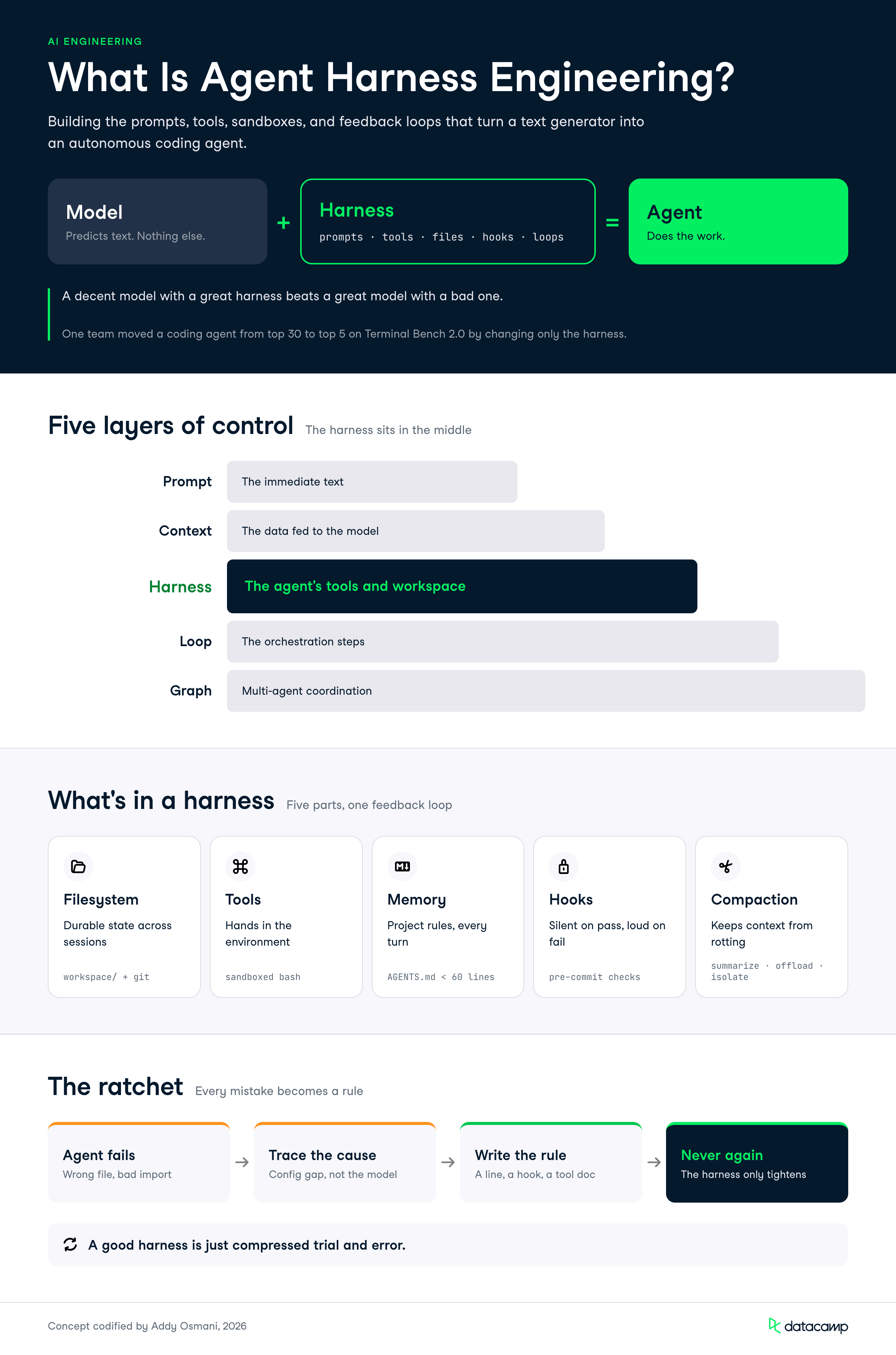
We can break down AI development into distinct layers of control.
Harness engineering sits squarely in the middle of this hierarchy.
|
Layer |
What It Controls |
Example Action |
|
Prompt engineering |
The immediate text |
Tweaking instructions |
|
Context engineering |
The data fed to the model |
RAG pipeline tuning |
|
Harness engineering |
The agent's physical tools |
Adding a Bash tool |
|
Loop engineering |
The orchestration steps |
Changing ReAct flow |
|
Graph engineering |
Multi-agent coordination |
Building routing nodes |
pandas script or reads a local CSV. The defining mindset of agent harness engineering is the ratchet effect.
When an agent makes a mistake, you engineer a fix so it never repeats that mistake. A good harness is just compressed trial and error.
Instead of letting the agent repeat mistakes, you add a line to your AGENTS.md, write a new hook, or tighten a tool description.
You don’t just instinctively reach for a new model; instead, you build a corpus that allows you to trace specific failures and how you’ve hardened against them.
The core components of an AI agent harness are the filesystem, tools, memory, hooks, and context management systems that let the model operate.
These parts work together to turn isolated API calls into a continuous feedback loop. I want to give you a clear map before we start writing code.
|
Component |
Job |
Python Implementation |
|
Filesystem |
Durable state |
Local workspace/ directory |
|
Tools |
Acting in the environment |
Python functions for Bash |
|
Memory |
Project context |
An AGENTS.md file |
|
Hooks |
Enforcement |
Pre-commit validation scripts |
|
Compaction |
Context management |
Summarization logic |
A model can only process information inside its limited context window. A filesystem provides a stable workspace to read data, write intermediate results, and coordinate across sessions.
Adding Git version control provides a necessary safety net. The agent can track progress, branch out for experiments with different hyperparameters, and roll back broken code automatically.
The ReAct loop operates in a cycle of reasoning, acting via a tool call, and observing the result. Tool descriptions form the direct interface between the model and the environment. Vague descriptions produce vague behavior.
Bash serves as a great general-purpose tool. Instead of pre-building a specific Python function for every possible action, Bash lets the agent construct the exact commands it needs on the fly. You must carefully sandbox these commands to prevent system damage.
AGENTS.md and knowledge injectionYour agent needs project-specific memory to understand local conventions. An AGENTS.md file is a flat markdown document at the repository root that lands in the system prompt every turn. It defines your tech stack, formatting rules, and forbidden actions.
Keep this file under 60 lines. Treat it like a pilot's checklist rather than a comprehensive style guide. You can read a complete AGENTS.md tutorial for deeper examples. You should also consider Model Context Protocol (MCP) tools for post-cutoff knowledge.
Hooks are small scripts that run at specific lifecycle points.
You might run a hook before a tool call, after a file edit, or before a Git commit. Check out this guide on Claude Code Hooks for advanced hook patterns.
The main design principle for hooks is that success is silent, but failures are verbose. A passing typecheck produces zero output.
A failure injects the exact error text back into the agent loop for self-correction.
Context rot happens when instruction-following degrades as the context window fills up with long conversation histories. A solid AI agent scaffolding must manage this actively. Read more about the context window to understand these limits.
You can reduce context by summarizing older messages. You can offload large tool outputs to disk and keep only a short reference in the prompt.
Finally, you can isolate token-heavy subtasks to a subagent with its own fresh context.
Building an AI agent harness involves writing the Python orchestration code that ties the ReAct loop, tools, and hooks together.
Be clear on the relationship before writing any code: harness.py is the agent, and you start it yourself with python harness.py like any other script.
The model is a remote API that never sees this file; it only receives the system prompt, message history, and tool schemas that your script sends it.
Every snippet in this section is a piece of one file, harness.py, and the first 4 sections build it top to bottom. The final 2 sections (hooks and compaction) upgrade it, and because the loop executes as soon as Python reaches it, their function definitions must sit above the loop; each section tells you exactly where its code lands.
To build this, you need a developer account with your chosen provider. Standard consumer subscriptions (like ChatGPT Plus or Claude Pro) do not grant API access.
ANTHROPIC_API_KEY (or OPENAI_API_KEY).For this example, we will be using Anthropic, so make sure to install the Anthropic Python package using pip install anthropic.
Next, create the project skeleton. Naming every file up front matters: our loop will read AGENTS.md on startup, so that file must exist before the loop ever runs.
agent-harness/
├── AGENTS.md        # Project memory (we write this first)
├── harness.py       # The ReAct loop, tools, and hooks
└── workspace/       # The only directory the agent may touch
The workspace/ directory is the agent's sandbox. Everything the agent reads, writes, or executes happens inside it, never in your project root.
We write AGENTS.md before the loop because the loop depends on it.
Create the file in your project root and include your specific stack details and architectural boundaries:
# Project Context
Stack: Python 3.11, Pytest
Workspace: All commands run inside the workspace/ directory.

# Rules
1. Never use rm -rf. Use standard rm with specific file names.
2. Never write tests inside the main application file.
3. When you finish the task, reply with a plain-text summary and no tool call.
Our loop will treat "the model responded without requesting a tool" as the task-complete signal, so we tell the model explicitly how to signal completion.
Rules that reference your own loop mechanics are the key to harness engineering. The memory file and the orchestration code are designed together.
Now start harness.py by creating this file as the system prompt and preparing the workspace:
import subprocess
from pathlib import Path

import anthropic

client = anthropic.Anthropic()

WORKSPACE = Path("workspace")
WORKSPACE.mkdir(exist_ok=True)

# Project memory: AGENTS.md lands in the system prompt on every turn
system_prompt = Path("AGENTS.md").read_text()
Because the SDK sends system_prompt with every API call, the rules in AGENTS.md are re-injected on every single turn. The model cannot "forget" them the way it forgets mid-conversation instructions.
We define 2 tools: run_bash for general-purpose execution and write_file for creating files.
The second tool might look redundant since Bash can write files with heredocs, but a dedicated write_file gives us a clean edit event that our post-edit hook can latch onto later.
Harness design decisions like this are always about what you want to observe and enforce.
Tool descriptions are the interface, and their quality directly controls agent behavior:
Continuing in our harness.py file, we can now define the tool schemas on the next line:
TOOLS = [
    {
        "name": "run_bash",
        "description": (
            "Run a bash command inside the workspace/ directory and return "
            "its stdout, stderr, and exit code. Use it to list files, run "
            "scripts, and run tests. Do not use it to create Python files; "
            "use write_file instead."
        ),
        "input_schema": {
            "type": "object",
            "properties": {
                "command": {"type": "string", "description": "The bash command to run."}
            },
            "required": ["command"],
        },
    },
    {
        "name": "write_file",
        "description": (
            "Create or overwrite a file inside the workspace/ directory. "
            "Provide a path relative to workspace/ and the full file content."
        ),
        "input_schema": {
            "type": "object",
            "properties": {
                "path": {"type": "string", "description": "Path relative to workspace/."},
                "content": {"type": "string", "description": "Full file content."},
            },
            "required": ["path", "content"],
        },
    },
]
This next block defines the actual Python functions that will execute these commands.
Note the following safety features that have been built: a hard timeout so a stuck command cannot hang the harness, exit code included in every result so the agent can tell success from failure, and a path check so write_file() doesn’t escape the sandbox.
def run_bash(command: str) -> str:
    result = subprocess.run(
        command,
        shell=True,
        capture_output=True,
        text=True,
        cwd=WORKSPACE,
        timeout=60,
    )
    output = (result.stdout + result.stderr).strip()
    return f"exit code: {result.returncode}\n{output or '(no output)'}"


def write_file(path: str, content: str) -> str:
    target = (WORKSPACE / path).resolve()
    if WORKSPACE.resolve() not in target.parents:
        return "Error: path escapes the workspace/ directory."
    target.parent.mkdir(parents=True, exist_ok=True)
    target.write_text(content)
    return f"Wrote {len(content)} characters to {path}."


TOOL_EXECUTORS = {"run_bash": run_bash, "write_file": write_file}
The or '(no output)' fallback is not cosmetic.
A command like touch data.csv succeeds silently, and returning an empty string gives the model nothing to observe.
Always give the agent an explicit signal, even for silence.
The core of our harness is a standard Python for loop with an iteration cap.
Each pass calls the API, checks whether the model requested a tool, executes every requested tool, and feeds the results back as a single message.
This block sits at the bottom of harness.py, since it starts executing the moment Python reaches it.
	messages = [
	    {
	        "role": "user",
	        "content": "Create a fizzbuzz.py script in the workspace, "
	                   "then run it to verify the output.",
	    }
	]

	MAX_STEPS = 15

	for step in range(MAX_STEPS):
	    print(f"--- Iteration {step + 1} ---")

	    response = client.messages.create(
	        model="claude-sonnet-5",
	        max_tokens=2000,
	        system=system_prompt,
	        messages=messages,
	        tools=TOOLS,
	    )

	    # Append the model's turn to the history
	    messages.append({"role": "assistant", "content": response.content})

	    # Stop condition: the model answered without requesting a tool
	    if response.stop_reason != "tool_use":
	        final_text = "".join(b.text for b in response.content if b.type == "text")
	        print(f"Task complete: {final_text}")
	        break

	    # Execute EVERY tool call in this turn, collecting the results
	    tool_results = []
	    for block in response.content:
	        if block.type != "tool_use":
	            continue
	        print(f"Agent calling {block.name}: {block.input}")
	        output = TOOL_EXECUTORS[block.name](**block.input)
	        tool_results.append(
	            {"type": "tool_result", "tool_use_id": block.id, "content": output}
	        )

	    # All tool results for one assistant turn go back in ONE user message
	    messages.append({"role": "user", "content": tool_results})
	else:
	    print("Stopped: hit the maximum iteration cap without finishing.")
Two details in this loop prevent real crashes.
First, a single model turn can contain multiple tool calls, and the Anthropic API requires all of its results to come back in one user message.
Second, the for/else construct reports when the agent hits the iteration cap, so a stalled run fails loudly instead of ending in silence.
This explicit structure lets you see exactly where the model stops thinking, where Python takes over to run the command, and how the output feeds back into the loop.
Hooks catch mistakes before they compound into larger structural issues.
In our harness, a hook is a function that inspects a completed tool call and returns extra text to append to the tool result.
Success returns an empty string; failure returns a verbose report.
Add this function to harness.py above the ReAct loop, next to the tool executors. The loop starts running the moment Python reaches it, so everything it calls must already be defined.
def post_edit_hook(tool_name: str, tool_input: dict) -> str:
    """Run pytest after any edit to a Python file. Silent on success."""
    edited_python = (
        tool_name == "write_file" and tool_input.get("path", "").endswith(".py")
    )
    if not edited_python:
        return ""

    tests = subprocess.run(
        ["pytest", "--tb=short", "-q"],
        capture_output=True,
        text=True,
        cwd=WORKSPACE,
        timeout=120,
    )
    # Exit code 5 means "no tests collected", which is fine for our purposes
    if tests.returncode in (0, 5):
        return ""
    return f"\n\n[HOOK] pytest failed after this edit:\n{tests.stdout}"
Wiring it into the loop is a one-line change inside the tool execution block:
output = TOOL_EXECUTORS[block.name](**block.input)
output += post_edit_hook(block.name, block.input)  # hooks run after every tool call
Without the hook, the agent writes a broken file, sees Wrote 412 characters to fizzbuzz.py, and confidently moves on.
With the hook, the same tool result carries the exact pytest traceback. On the next iteration, the agent reads the error and fixes the bug itself, with no extra prompting.
To fight context rot, monitor the length of your messages list and summarize the oldest turns when it grows too long.
There is one trap: you cannot cut the history at an arbitrary point, because an assistant tool_use block and its paired tool_result message must stay together. Splitting a pair produces an immediate API error.
Our compaction function moves the cut point forward until it lands on a safe boundary. Build this above harness.py:
COMPACTION_THRESHOLD = 20
KEEP_RECENT = 6


def is_tool_result(message: dict) -> bool:
    return (
        message["role"] == "user"
        and isinstance(message["content"], list)
        and any(
            isinstance(b, dict) and b.get("type") == "tool_result"
            for b in message["content"]
        )
    )


def compact(messages: list) -> list:
    if len(messages) <= COMPACTION_THRESHOLD:
        return messages

    # Never orphan a tool_result from its tool_use: slide the cut forward
    cut = len(messages) - KEEP_RECENT
    while cut < len(messages) and is_tool_result(messages[cut]):
        cut += 1

    old, recent = messages[1:cut], messages[cut:]
    transcript = "\n".join(f"{m['role']}: {str(m['content'])[:500]}" for m in old)

    summary = client.messages.create(
        model="claude-haiku-4-5",
        max_tokens=500,
        messages=[{
            "role": "user",
            "content": "Summarize this agent transcript. Preserve the task, "
                       "decisions made, files created, and any unresolved "
                       f"errors:\n\n{transcript}",
        }],
    )

    return [
        messages[0],  # always keep the original task verbatim
        {
            "role": "user",
            "content": f"[Earlier progress, summarized by the harness]\n"
                       f"{summary.content[0].text}",
        },
        *recent,
    ]
Add one line at the top of the ReAct loop, before the API call:
messages = compact(messages)We use a smaller, cheaper model for the summary because compaction runs often and needs speed.
We also keep the original task message verbatim rather than trusting the summary to preserve it.
The harness is now complete.
Before moving on, check that your harness.py reads in this order from top to bottom:
client, WORKSPACE, and system_promptTOOLS schema listrun_bash(), write_file(), and TOOL_EXECUTORSpost_edit_hook()COMPACTION_THRESHOLD, KEEP_RECENT, is_tool_result(), and compact()To give you a sense of what the final API loop should look like since we’ve added the hook and compaction sections, here is the finished loop in full:
messages = [
    {
        "role": "user",
        "content": "Create a fizzbuzz.py script in the workspace, "
                   "then run it to verify the output.",
    }
]

MAX_STEPS = 15

for step in range(MAX_STEPS):
    print(f"--- Iteration {step + 1} ---")

    # Compaction: summarize old turns before they rot the context
    messages = compact(messages)

    # The API call: model, memory, history, and tools travel together
    response = client.messages.create(
        model="claude-sonnet-5",
        max_tokens=2000,
        system=system_prompt,   # AGENTS.md text, re-injected every turn
        messages=messages,      # the full (possibly compacted) history
        tools=TOOLS,            # the schemas from the tools section
    )

    # Append the model's turn to the history
    messages.append({"role": "assistant", "content": response.content})

    # Stop condition: the model answered without requesting a tool
    if response.stop_reason != "tool_use":
        final_text = "".join(b.text for b in response.content if b.type == "text")
        print(f"Task complete: {final_text}")
        break

    # Execute EVERY tool call in this turn, collecting the results
    tool_results = []
    for block in response.content:
        if block.type != "tool_use":
            continue
        print(f"Agent calling {block.name}: {block.input}")
        output = TOOL_EXECUTORS[block.name](**block.input)
        output += post_edit_hook(block.name, block.input)  # hooks run after every tool call
        tool_results.append(
            {"type": "tool_result", "tool_use_id": block.id, "content": output}
        )

    # All tool results for one assistant turn go back in ONE user message
    messages.append({"role": "user", "content": tool_results})
else:
    print("Stopped: hit the maximum iteration cap without finishing.")
Now run the agent from the project root python harness.py.
The script sends the task from the messages list to the API.
The harness does the work and you should see each iteration print in your terminal:
--- Iteration 1 ---
Agent calling write_file: {'path': 'fizzbuzz.py', 'content': 'def fizz(n):...'}
--- Iteration 2 ---
Agent calling run_bash: {'command': 'python fizzbuzz.py'}
--- Iteration 3 ---
Task complete: fizzbuzz.py is written and prints the correct sequence.
The program exits when the model answers without a tool call, or when the 15-iteration cap trips.
To give the agent a different task, change the content string in the initial messages list; a production harness would read it from input() or a command-line argument instead.
The ratchet is the continuous process of diagnosing agent failures and updating your harness to prevent them.
A harness improves strictly through exposure to real-world edge cases.
Let us walk through a complete failure and fix cycle based on a real route optimization project.
Imagine your agent keeps importing a deprecated internal routing library called legacy_route_math instead of the updated version.
The agent writes the script, the tests fail, and it gets stuck in a loop trying to fix the syntax instead of changing the library.
The diagnosis here is straightforward.
The agent simply does not know the library is deprecated. This is a missing rule, not a failure of the underlying neural network.
Fix 1 updates the memory layer, add this one rule to AGENTS.md:
# Rules
1. Never use rm -rf. Use standard rm with specific file names.
2. Never write tests inside the main application file.
3. When you finish the task, reply with a plain-text summary and no tool call.
4. Do not import legacy_route_math; it is deprecated. Use routes_v2 instead.
Fix 2 adds a permanent enforcement hook.
Rules are advice to the agent, hooks are commands. This fix is a few lines and can be added next to post_edit_hook(), as long as it is before the ReAct loop.
def deprecated_import_hook(tool_name: str, tool_input: dict) -> str:
    if tool_name != "write_file":
        return ""
    if "import legacy_route_math" in tool_input.get("content", ""):
        return (
            "\n\n[HOOK] Blocked pattern: legacy_route_math is deprecated. "
            "Rewrite this file using routes_v2 instead."
        )
    return ""
Register it next to the pytest hook in the tool execution block:
output += post_edit_hook(block.name, block.input)
output += deprecated_import_hook(block.name, block.input)
Here is what self-correction looks like in the transcript after both fixes land.
The agent writes the file, the hook fires, and the very next turn fixes the import without a human in the loop:
--- Iteration 3 ---
Agent calling write_file: {'path': 'optimizer.py', ...}
  [HOOK] Blocked pattern: legacy_route_math is deprecated...
--- Iteration 4 ---
Agent calling write_file: {'path': 'optimizer.py', ...}   # now imports routes_v2
--- Iteration 5 ---
Task complete: Rewrote optimizer.py using routes_v2 and verified the tests pass.
This is important because it connects back to the context rot. Very long sessions with degraded context will eventually ignore memory rules.
The AGENTS.md rule prevents the mistake most of the time, and the hook guarantees that when the rule slips, the mistake does not cause any damage.
Every failure you diagnose should make you ask 2 questions: what rule was missing, and what check would have caught it anyway?
Best practices for agent harness engineering focus on keeping configurations lean and designing for future model upgrades.
The goal is to build a scaffolding that supports the model without overwhelming it.
I have learned a few hard lessons while building various agent skills and architectures.
Target a maximum of 60 lines for your context file.
Every single rule must trace back to a real, documented failure you experienced. If you can’t recall the incident for the rule, then it is worth deleting.
This discipline matters because AGENTS.md is paid for on every turn.
A 300-line style guide costs you tokens on every API call and dilutes the rules that matter, since models follow 10 sharp rules far better than 80 vague ones.
Adding a datestamp can even help with the next practice I recommend.
Harnesses need constant rearchitecting as base models improve their native capabilities.
Build your components so you can strip them away easily.
The hook pattern in this tutorial is deliberately modular for this reason.
Each hook is a separate function that is then added in as a single line. If you deprecate the hook, you then delete one line in the loop.
Nothing else in the loop changes.
Compare that to validation logic woven directly into your ReAct loop, where removing a stale check means re-testing the whole orchestration path.
What feels like a necessary crutch today will become unnecessary overhead next quarter.
When a new model releases, re-run your old failure cases with each hook disabled one at a time, and treat any hook that no longer catches anything as a candidate for deletion.
Check out Claude Code Best Practices for more architecture tips.
A bare ReAct loop with a filesystem and one Bash tool is already highly practical.
Resist the urge to pre-emptively build a complex graph system using heavy frameworks. The ratchet only works in one direction, from observed failure to targeted fix. Speculative fixes invert it.
Add custom hooks only after you have seen the exact failure that justifies them. For more on structuring basic systems, check out this guide on LLM agents.
You cannot ratchet what you cannot see.
Our loop already prints each tool call, and that is the minimum viable observability: when a run fails, the printed transcript is your diagnosis material.
As your harness matures, write each session's full message history to a timestamped JSON file at the end of the run.
Failed transcripts become your regression suite; after every harness change, replay the old failing tasks and confirm the fix still holds.
This is the harness engineer's equivalent of a test suite, and it separates a harness that improves from one that merely changes.
Agent harness engineering is the practical reality of making AI models do useful work.
The gap between what today's models can theoretically do and what you actually see them doing in production is largely a harness gap.
This discipline is not about learning a specific framework.
The right AI agent harness for your codebase is shaped entirely by your unique failure history, built incrementally through the ratchet method.
Ready to put these concepts into practice?
Check out DataCamp's AI Agent Fundamentals skills track to continue building production-ready systems. You can also explore the Claude Agent SDK Tutorial for more hands-on code examples.
You might also want to check out the AI for Software Engineering skills track.
Top DataCamp Courses
강의
강의
실습 문제하고 트랙하세요.
Google로 계속하기블로그
Khalid Abdelaty
11분
튜토리얼
Vaibhav Mehra
튜토리얼
Bexruz (Bex) Tuychiev
14분
튜토리얼
Abid Ali Awan
10분
튜토리얼
Bexruz (Bex) Tuychiev
12분
code-along
Nyah Macklin