Course
Introduction to AI Agents
1 hr 30 min
138.5K
The idea is not brand new. Developers had been building wrappers, scaffolds, and execution environments around models for years. The label spread after Mitchell Hashimoto, the HashiCorp co-founder, used "harness engineering" in a February 2026 blog post about his AI workflow. His point was simple: when an agent makes a mistake, change the environment so the mistake cannot happen again. OpenAI adopted the term the same week for its Codex work, and LangChain followed with the same framing.
In this article, I'll explain what an agent harness is, why AI agents need one, how it differs from frameworks and runtimes, and which tools developers use to build harness-like systems.
One definition comes from LangChain: "If you're not the model, you're the harness." In practice, an agent harness is the software around a language model: tools, memory, state, execution, guardrails, and observability.
Agent = Model + Harness
The model reasons. The harness gives that reasoning a place to act, remember, check results, and follow rules.
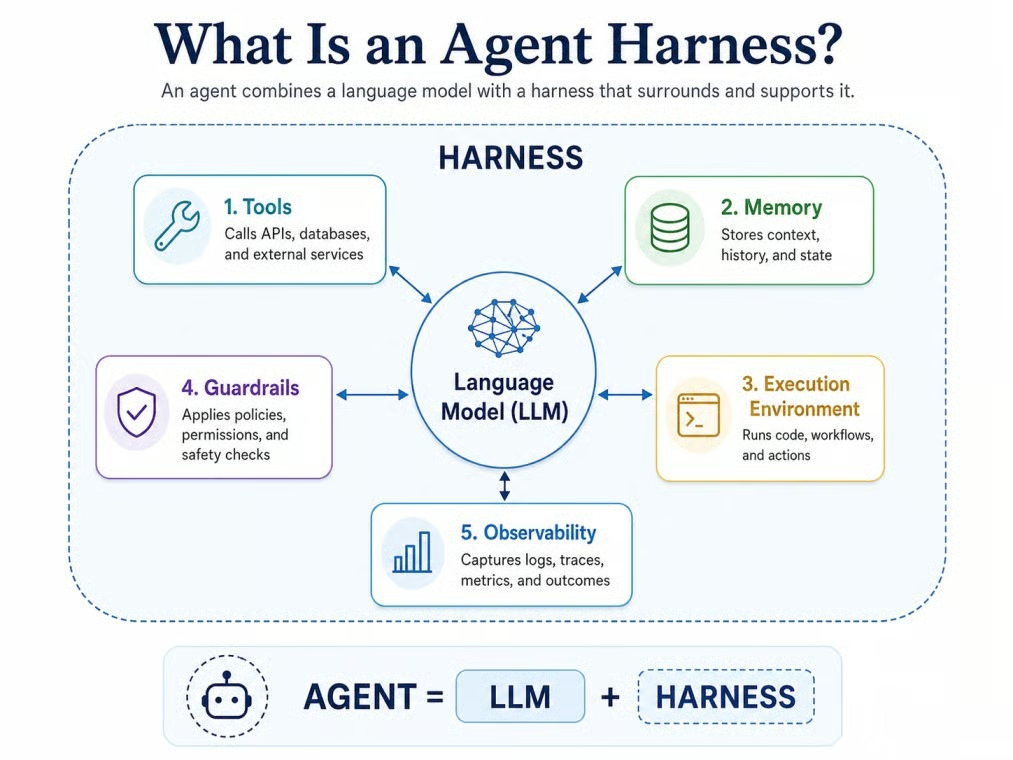
Model inside its working agent harness. Image by Author.
The formula is useful, but it is a mental model, not an industry standard. Some vendors still use "harness," "framework," and "scaffold" to mean roughly the same thing.
A raw language model has limits when you ask it to work over many steps. It does not keep a durable state by itself, execute tools on its own, manage a growing context window, or recover from failed tool calls without help.

Picture an agent asked to fix a failing test in a Python project. Without a harness, the model can write what looks like a fix, but it cannot read the actual test file, run pytest, see the real error, edit the failing function, or confirm the fix passes. With a harness, that whole loop becomes a few minutes of work the agent does on its own, with each step recorded somewhere a human can inspect.
Anthropic's guidance still applies, though: start with the simplest approach possible and only add moving parts when the task needs them.
The parts vary, but most share a few building blocks. Think of them as a checklist, not a strict product spec. A small agent may only need a few of these pieces, while a production agent will need more.
The harness usually controls the model's baseline instructions. This includes the system prompt, but it can also include project rules, coding standards, role constraints, and safety policies. In LangChain's Deep Agents, for example, an AGENTS.md file can set the ground rules before a task begins.
Some harnesses in 2026 also use progressive disclosure for instructions. Rather than loading every tool description into context at startup, the harness adds only a summary of what's available. Full instructions for a tool are loaded only when the model needs that tool.
Tools let the agent do things beyond text generation. Common examples include web search, file reading and writing, database queries, API calls, browser actions, code execution, and terminal commands. The harness controls which tools are available, when the model is allowed to call them, and how results are formatted and returned to the agent's context.
Model Context Protocol (MCP) has become a standard interface for this in 2026. Many harnesses, including the Anthropic Agent SDK, LangChain Deep Agents, and the OpenAI Agents SDK, use MCP to connect external tool servers without writing custom integration code for each one.
Agents need to know what happened earlier in a task. A harness can keep short-term state in the active conversation and longer-term state in files, logs, summaries, or saved preferences. Some harnesses also compact long histories into shorter summaries so the model does not carry every detail in context.
Many useful agents need somewhere to actually work. That could be a filesystem, a container, a sandboxed terminal, a browser instance, or a cloud runtime. Without an execution environment managed by the harness, tool calls have nowhere to land.
Many harnesses now use isolated sandbox containers: short-lived environments scoped to a single session, cleaned up when the task ends, so that file writes, installed packages, and network calls from one agent task cannot bleed into another.
Some tasks do not fit a single straight line of steps. The harness can provide a planning tool that breaks a goal into subtasks and tracks their status. It can also spawn subagents that handle one piece of the work and return only a summary to the main agent.
LangChain Deep Agents, for instance, tracks plan steps in a file on the filesystem, updating each step from pending to completed as the task runs.
The harness is where you put the rules: human approval, blocked tool calls, role-based permissions, and output checks. OpenAI Agents SDK, LangChain Deep Agents, and Microsoft Agent Framework all support this kind of control. The safer pattern is to check input, output, and tool permissions separately.
When a fifty-step agent task fails at step thirty-seven, a trace shows what happened. Tracing records model calls, tool calls, handoffs, errors, latency, and cost across a full run. The OpenAI Agents SDK turns on tracing by default. LangSmith adds debugging and evaluation dashboards on top. OpenTelemetry has become the standard for exporting traces in a vendor-neutral format, so you are not locked into one observability tool.
This question comes up often, and the answer is messier than most explainers suggest. The taxonomy is useful, but it is not fixed.
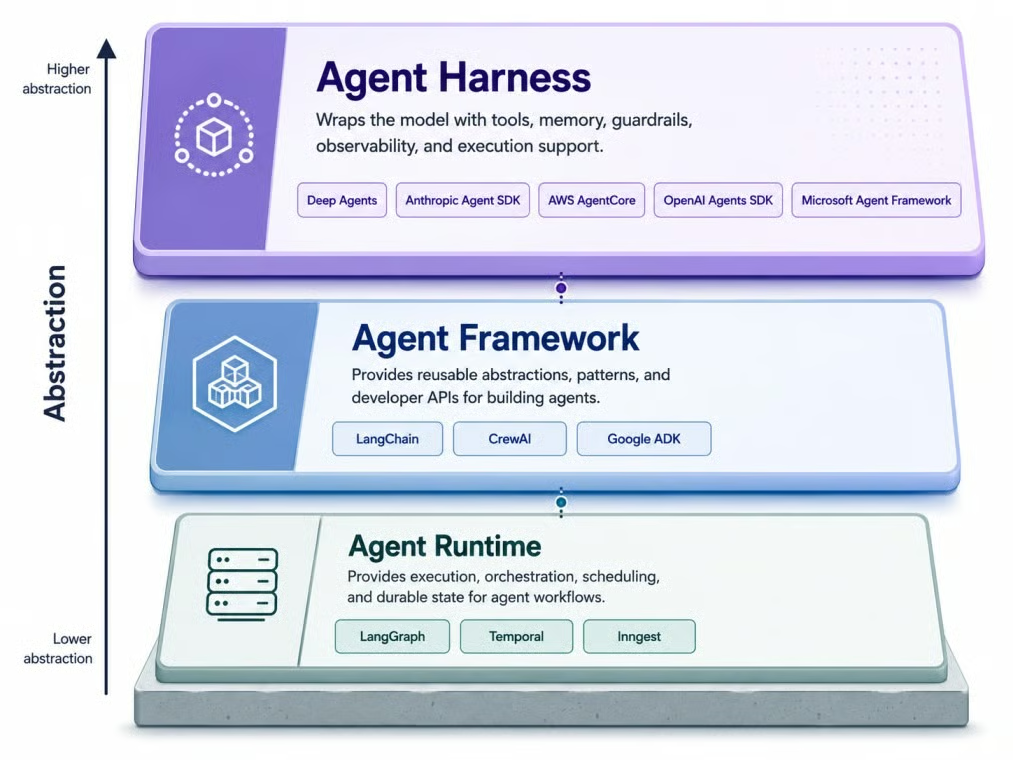
Three layers, increasing abstraction from bottom. Image by Author.
I'll start with the framework, since many developers have already used one.
An agent framework gives developers building blocks for creating agents. It covers model calls, tool definitions, memory patterns, and agent loop structure. Examples include early LangChain, CrewAI, and Google ADK. A framework tells you how to structure an agent, but not always how to run it reliably in production.
An agent runtime is the layer that helps an agent run reliably over time. It handles durable execution, state persistence, retries, human-in-the-loop steps, and streaming. LangGraph, Temporal, and Inngest are examples. Harrison Chase offered this analogy: if Node.js is the runtime and Express is the framework, a harness is like Next.js.
A harness is higher-level than a framework. Where a framework gives you components, a harness usually arrives with more decisions already made: tools, planning, filesystem access, and context management.
The same building blocks show up across very different jobs, but the mix is what changes. A coding agent and an enterprise workflow agent both need a harness, but they stress different parts of it. These categories are not formal standards. They are practical ways to see how the same idea bends to the work in front of it.
Coding agents are a good current example because the harness is visible. To do useful coding work, an agent needs file access, git context, terminal execution, test running, dependency installation, and project rules. Claude Code and Codex are examples of this pattern: both run on a lot of harness code, not a bare model API.
The difference between a good and a mediocre coding harness usually shows up in small details: how it recovers from a failed test, whether it can roll back a bad edit, how cleanly it exposes git history to the model. Those details are where most of the engineering effort actually goes.
For a hands-on example, DeepSeek's own harness takes the 'everything is a plugin' idea to its extreme; see our DeepSeek Harness tutorial.
Research agents need a different tool set: web search, source tracking, note-taking, citation management, and summarization. The harness manages how search results are stored, how sources are attributed, and how long documents get chunked and offloaded to avoid consuming the entire context window in one go.
Data agents need access to datasets, SQL databases, Python execution environments, and schema context so they know what tables and columns are available before they start writing queries. The harness also enforces permission boundaries, which matter when the agent can touch production data.
Enterprise deployments add another layer of requirements: authentication, audit logs, approval workflows, role-based access control, and links to internal systems. AWS AgentCore is one managed example in this category, with identity, VPC networking, and observability included. Microsoft Agent Framework covers similar ground for teams in Azure or .NET environments.
A handful of products come up most often in mid-2026. They sit at different points on the framework-runtime-harness spectrum, and the boundaries are still moving.
LangChain Deep Agents is LangChain's open-source harness, built on LangGraph as its runtime. It ships with a planning tool, virtual filesystem, subagent spawning, automatic context compaction, and middleware for human-in-the-loop approval and PII detection. It is model-agnostic, supports OpenAI-compatible endpoints, and connects to sandbox providers including Modal, Runloop, and Daytona for code execution.
The Anthropic Agent SDK (package name: claude-agent-sdk) was extracted from Claude Code and released as a standalone option. It includes a built-in agent loop, tools for bash execution, file reading and writing, web search, MCP integration, and context compaction. It works with Claude models only, across Anthropic's API, Amazon Bedrock, Vertex AI, and Azure.
As I mentioned earlier, OpenAI Agents SDK crossed from framework into harness territory as its feature set grew. The April 2026 release added native sandbox execution, memory compaction, and filesystem tools. Available in Python and TypeScript, the SDK supports tool use, agent handoffs, and guardrails.
Google ADK supports multi-agent orchestration with built-in classes for sequential, parallel, and loop-based agent structures. It includes evaluation tools, works with Vertex AI for managed deployment, and supports MCP for tool connectivity. Available in Python, Java, TypeScript, and Go, it is tuned for Gemini models but described as model-agnostic.
Microsoft Agent Framework is Microsoft's current migration path for AutoGen projects. It supports Python and .NET, works with Azure AI services, and includes MCP support for tool connectivity.
CrewAI takes a role-based approach to multi-agent systems. You define agents with specific roles, assign tasks, set up crews, and configure memory and guardrails declaratively. It fits problems that map naturally to a team of specialists.
These are not agent harnesses on their own. They are durable execution platforms that handle what happens when an agent task needs to run for hours or days without losing state. On failure, the engine replays from the last successful checkpoint instead of starting over.
Adding a harness lets the system do more, but every added tool, permission, and agent adds another way for things to break. As tasks get longer, guardrails, tracing, and durable state stop being optional and become most of what keeps a long run recoverable.
There is also a coupling risk that catches teams off guard. LangChain reported a 10 to 20 point jump on a tau2-bench subset after adding model-specific harness profiles. Artificial Analysis made a similar point in its Coding Agent Index: coding-agent results depend on the model and the harness together, with cost, token use, and time per task changing a lot across combinations. The model did not change. The surrounding prompts, tools, and middleware did. That profile itself is harness work.
Here's a direct way to think through whether you need one.
You likely need a harness if your system meets one or more of these conditions:
You likely do not need a harness if the task is a predictable workflow where every step is predetermined.
A useful test: if the task could be handled by one model call, or by a small deterministic script with a handful of conditional statements, a harness is probably overkill. The moment the task requires the agent to make decisions, use tools, and react to results over time, the harness starts doing real work.
One pattern I keep seeing is teams reaching for a harness too early, building tracing and sandboxing for what is really a one-shot text generation task. The reverse mistake is the painful one: shipping the model directly and then realizing on the second failed test, the third tool call, or the fifth restart that there is no infrastructure to fall back on.
As I mentioned earlier, vendors do not all use the same words for the same things, and the boundary between framework, runtime, and agent harness is still moving.
For one-shot generation, the wrapper is overkill. For agents that have to act, remember, and recover across long sessions, the agent harness becomes a major part of the system. Picking the right one is increasingly a separate decision from picking the right model. I am curious to see how much of this layer the next generation of models absorbs on its own, since some of the moves coming out of OpenAI and Anthropic suggest the boundary will keep shifting. The basic idea still holds: an agent is a model plus an agent harness.
If you want to learn more about building agent systems, our Building Scalable Agentic Systems course covers the patterns behind tool use, orchestration, and long-running agent workflows.
Learn with DataCamp
Course
Course
Course
blog
Vikash Singh
13 min
blog
Austin Chia
12 min
blog
Bexruz (Bex) Tuychiev
15 min
blog
Vinod Chugani
14 min
Tutorial
Abid Ali Awan
8 min
Tutorial
Abid Ali Awan
10 min