dbt (data build tool) is a powerful tool used by data analysts and engineers to transform, test, and document data in the modern data stack.
While it is widely known for its modeling capabilities, another critical feature is dbt snapshot, which enables you to capture slowly changing dimensions (SCD) in your data warehouse.
This tutorial will provide an in-depth explanation of dbt snapshots, their use cases, and implementation. I will:
- Define what dbt snapshots are.
- Explain when and why to use snapshots.
- Implement a snapshot step-by-step.
- Visualise snapshot data.
- Share some best practices and challenges.
To learn more about dbt, be sure to check out our guide What is dbt? A Hands-On Introduction for Data Engineers and our Introduction to dbt course.
What are dbt Snapshots?
A dbt snapshot is a mechanism to track changes in records over time, especially for tables where historical changes are not retained by default. Snapshots are mainly used to implement Slowly Changing Dimensions (SCD) Type 2. They store versions of rows when tracked columns change.
Use cases include:
- Tracking changes in customer profiles over time.
- Monitoring status changes in operational data.
- Recording the evolution of dimension attributes for accurate historical reporting.
Why Use dbt Snapshots? Benefits and Use Cases
dbt snapshots are valuable because they function as a record of data changes over time, enabling historical analysis and compliance reporting.
Benefits
Here are some benefits you’ll get for using Snapshots:
- Trend analysis: Understand how customer behaviour, attributes, or statuses evolve.
- Auditing & compliance: Demonstrate historical data states to auditors or regulators.
- Debugging data pipelines: Identify when a record changed unexpectedly to trace issues.
Common Use Cases
Snapshots can be useful in some unique situations, such as:
- Tracking membership upgrades in loyalty programs.
- Recording price history for products in retail.
- Capturing employee department changes in HR systems.
Architectural Foundations
Snapshots integrate seamlessly within dbt’s ecosystem, leveraging its configuration and run management to build historical tables efficiently.
Let’s look at the types of models used in data as an example.
There are two models used for data:
- Standard models: Transform data to create current-state tables.
- Snapshot models: Create versioned tables to track historical changes.
These two models differ in their purpose, storage methods, and applications.
Here’s a summary of their differences:
|
Feature
|
Standard Models
|
Snapshots
|
|
Purpose
|
Current state transformations
|
Historical tracking
|
|
Storage
|
Table or view with current data
|
Append-only history table
|
|
Best For
|
Fact/dimensional models
|
Slowly changing dimensions
|
How dbt Snapshots Work
Snapshots generally follow a structured workflow that ensures all changes are captured systematically, involving the following steps:
- Configuration: Define snapshot strategy, unique keys, and change detection columns.
- Execution: Run
dbt snapshot to compare current data against existing snapshots.
- Storage: dbt inserts new records for detected changes, updating validity timestamps.
But how are changes tracked in dbt?
All the changes are recorded in the output Snapshot table.
If a change is detected, dbt updates the dbt_valid_to field for the previous version to the current timestamp and inserts a new row with the dbt_valid_from field as the current timestamp.
Snapshot Strategies in dbt
Snapshots use two primary strategies to detect changes.
1. Timestamp strategy
- Definition: Uses a timestamp field to detect changes.
- When to use: The source table has reliable
updated_at timestamps.
2. Check strategy
- Definition: Compares specified columns directly.
- When to use: Source table lacks reliable timestamps, but attribute changes need tracking.
|
Strategy
|
Detection Method
|
Best For
|
|
Timestamp
|
Updated timestamp column
|
Tables with reliable last-modified timestamps
|
|
Check
|
Direct comparison of columns
|
Tables without timestamp columns
|
Hard Deletes
Data changes, such as deletes, can also be tracked, but not by default. However, there’s a way to change that to monitor such hard delete changes.
- Problem: Snapshots do not track deleted rows by default.
- Solution: Set
invalidate_hard_deletes=True to mark deleted rows with a dbt_valid_to value, preserving their last state.
Here’s an example of a check strategy being implemented, while accounting for hard deletes:
{%
  snapshot customers_snapshot %}

{%
  set config(
    target_schema='snapshots',
    unique_key='customer_id',
    strategy='check',
    check_cols=['tier'],
    invalidate_hard_deletes=True
  )
%}

SELECT * FROM {{ source('customers') }}

{% endsnapshot %}
Implementation Guide for dbt Snapshots
Now that we know how dbt Snapshots work, let’s look at how to implement them
1. Sample dataset for Snapshot tutorial
To practice snapshots, we’ll create a sample customers table that mimics a real-world membership system. This provides us with some concrete data to test common snapshot strategies.
import csv
from datetime import datetime
customers_data = [
["customer_id", "name", "tier", "updated_at"],
[1, "Alice Tan", "Silver", "2025-07-01 10:00:00"],
[2, "Bob Lee", "Gold", "2025-07-01 10:00:00"],
[3, "Cheryl Lim", "Silver", "2025-07-01 10:00:00"]
]
with open("customers.csv", mode="w", newline="", encoding="utf-8") as file:
writer = csv.writer(file)
writer.writerows(customers_data)
2. Setting up your dbt project
Before you can implement snapshots, it is essential to set up your dbt project correctly. This ensures your environment is configured to manage models, snapshots, tests, and documentation in a structured, scalable way.
Prerequisites
- Ensure you have Python 3.7+ installed.
- Install dbt using pip:
Replace dbt-postgres with your warehouse adapter, e.g. dbt-snowflake or dbt-bigquery, based on your environment.
Step-by-step setup instructions
1. Navigate to your desired projects directory.
This is where you will store your analytics or ELT projects. In this case, we’ll be storing all the related files in this dbt project folder.
cd ~/dbt-snapshot-project
2. Initialize a new dbt project.
Create a config file called dbt_project.yml:
Paste the following in your project file:
name: dbt_snapshots_project
version: '1.0'
profile: austinchia

seeds:
  dbt_snapshots_project:
    +quote_columns: false
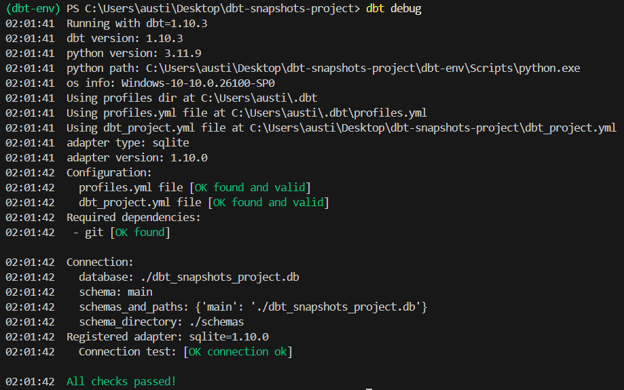
3. Test your connection.
This should be the output of the command:
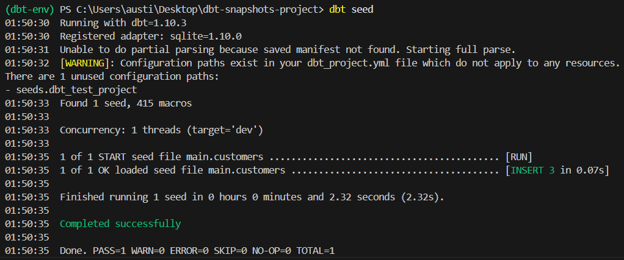
4. Load the seeds into a local database.
Run the following command:
This should be the output of the command:
5. Configure your database connection settings
In the profiles.yml file, usually located in ~/.dbt/profiles.yml.
Here’s what is inside my profiles file:
austinchia:
  target: dev
  outputs:
    dev:
      type: sqlite
      threads: 1
      database: ./dbt_snapshots_project.db
      schema: main
      schema_directory: ./schemas
      schemas_and_paths:
        main: ./dbt_snapshots_project.db
      extensions:
        - "C:/sqlean/crypto.dll"
If you’re using a SQLite database like me, you’ll need to install the SQLean extension as well.
6. Ingest your data into the dbt staging models:
Create a new folder called models. In that folder, create a file called stg_customers.sql.
Paste the following code in the file:
SELECT
  *
FROM {{ ref('customers') }}
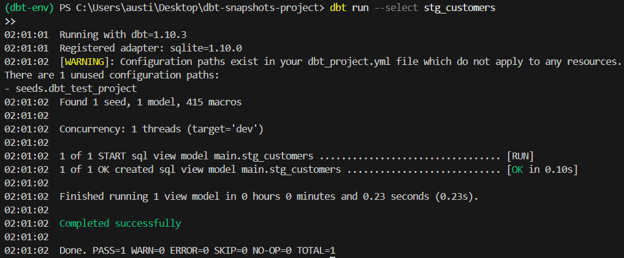
7. Build staging models using the following command in dbt.
dbt run --select stg_customers
This should be the output of the command:
3. Configuring dbt Snapshot
- Create a snapshots/ directory.
- Write your snapshot SQL file with proper configuration.
For this example, you can use the following code to perform a timestamp strategy snapshot.
{% snapshot customers_snapshot %}

{{
  config(
    target_schema='snapshots',
    unique_key='customer_id',
    strategy='timestamp',
    updated_at='updated_at'
  )
}}

select * from {{ ref('customers') }}

{% endsnapshot %}
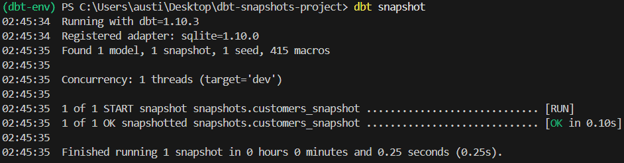
4. Running dbt Snapshot
Execute:
In this command, dbt creates the snapshot table if it doesn’t exist. It also inserts new rows for changes detected.
This should be the output of the command:
5. Checking Snapshot Tables
Now that you’ve performed your snapshot, you should get a new snapshot.db file created in your project file directory.
I’ve opened this up in VSCode to view what this file looks like:

As you can see, it contains additional columns such as dbt_updated_at and so on. These are crucial in determining if there were changes made to the data and when they were made.
For more hands-on guides on dbt, check out our Semantic Layer with dbt guide.
Example: Tracking Data Changes With dbt Snapshots
Snapshots allow teams to capture a full audit trail of changes in any attribute within a table over time, making them powerful for compliance, debugging, and analytics.
- Create a sample
customers table with relevant fields. This includes customer ID, name, email, and updated_at timestamp to track when changes occur.
CREATE TABLE customers (
    customer_id INTEGER PRIMARY KEY,
    name VARCHAR(100),
    email VARCHAR(100),
    updated_at TIMESTAMP
);
- Insert initial data to simulate a baseline state.
Use the following code to insert data into the table. This data will be used for the original data before the change.
INSERT INTO customers VALUES
(1, 'Alice Tan', '[email protected]', '2025-07-01 10:00:00'),
(2, 'Bob Lee', '[email protected]', '2025-07-01 10:00:00');
- Write a dbt snapshot configuration to track email changes:
{% snapshot customers_email_snapshot %}

{%
  set config(
    target_schema='snapshots',
    unique_key='customer_id',
    strategy='check',
    check_cols=['email'],
    invalidate_hard_deletes=True
  )
%}

SELECT * FROM {{ source('customers') }}

{% endsnapshot %}
- Run
dbt snapshot to record the initial state.
- Simulate an email update in the source table.
Next, we’ll update our original table by modifying the information of one customer to simulate a data change.
UPDATE customers
SET email = '[email protected]', updated_at = '2025-07-02 09:00:00'
WHERE customer_id = 1;
- Run
dbt snapshot again to capture the change.
- Query the snapshot table.
To view the differences and changes made to the data, you’ll have to query the snapshot table. The table should show both versions of the email address with their respective validity windows:
SELECT customer_id, email, dbt_valid_from, dbt_valid_to
FROM snapshots.customers_email_snapshot
ORDER BY customer_id, dbt_valid_from;
This process ensures you retain a full change history for email updates, critical for GDPR audits, contact history tracking, or customer support analytics.
Advanced Configuration and Management
Effective configuration management allows teams to scale snapshot implementations across projects and environments seamlessly.
1. Project-level and resource-level configuration
- Project-level config: Use
dbt_project.yml to set default snapshot configurations, such as target schema or materializations, applicable to all snapshots.
- Resource-level config: Override settings within individual snapshot SQL files for specific requirements, ensuring flexibility.
By default, dbt creates dbt_valid_from and dbt_valid_to fields. You can rename these using the valid_from and valid_to config options if your team standards require different naming conventions for clarity in BI or data governance tools.
3. Migrating legacy Snapshot configurations
Migrations can cause some discrepancies if not handled properly. Here are some areas to take note of when you’re migrating your snapshot configurations:
- Identify legacy snapshot definitions using deprecated config block styles.
- Refactor to YAML-based configurations if using modern dbt versions for consistency.
- Validate correctness:
- Run snapshots on test environments.
- Compare outputs before decommissioning legacy snapshots.
- Decommissioning: Remove old snapshot files and adjust documentation accordingly.
Data changes can be tracked in unison with dbt snapshots.
For example:
- BI tools (e.g., Power BI, Tableau): Build temporal visualizations showing attribute changes over time.
- Observability platforms (e.g., Monte Carlo, Datafold): Monitor data freshness and historical integrity.
- Data catalogs (e.g,. Alation, Collibra): Include snapshot history tables as documented lineage artifacts for compliance.
Best Practices for Production Implementation
Implementing dbt snapshots in production requires thoughtful design to ensure performance, maintainability, and business value.
It’s best to follow these:
1. Optimal use cases and table selection
- Prioritize dimension tables with slowly changing attributes such as customer profiles, product master data, and supplier contracts.
- Avoid transactional tables (e.g., order line items) with high-frequency inserts and updates unless necessary due to rapid storage growth concerns.
In production, you’ll want to optimize your data so that data changes can be tracked efficiently without affecting your product.
Here are some tips:
- Indexing: Add indexes on
unique_key and validity columns for faster queries.
- Partitioning: Partition snapshot tables by date to optimize scan performance.
- Clustering (warehouse-specific): Use clustering keys (e.g. in BigQuery) on high cardinality fields to improve filter query speeds.
3. Maintenance and monitoring practices
- Scheduling: Run snapshots during off-peak hours to minimize compute cost impacts.
- Monitoring: Set up alerts for snapshot failures in dbt Cloud or your orchestration tool.
- Data freshness checks: Use dbt tests or observability tools to validate snapshot data freshness.
- Storage analysis: Periodically review snapshot table sizes and prune historical data if the business allows.
4. Common pitfalls
Using a non-unique unique_key leads to incorrect row versioning. Always test uniqueness logic before deployment.
Snapshot bloat can also happen when storing unnecessary historical changes (e.g., columns with frequent timestamp updates) can grow storage costs rapidly.
Common Challenges and Solutions
Using Snapshots in dbt might come with some specific technical challenges:
1. Unique key collisions
Problem: Duplicate rows in the snapshot due to poorly defined unique keys.
Solution:
- Validate uniqueness using dbt tests before snapshot deployment.
- Concatenate multiple fields to ensure composite uniqueness where needed.
Problem: Slow queries when analyzing historical data.
Solution:
- Use warehouse partitioning and clustering effectively.
- Always filter queries by
dbt_valid_from or date ranges to reduce scanned data volume.
3. Troubleshooting Snapshot execution errors
Common issues include:
- Incorrect schema or database permissions.
- Source table schema changes (e.g. dropped columns) breaking snapshot
SELECT statements.
- Syntax errors in snapshot config blocks.
Solutions:
- Use
dbt debug to validate connection and configuration.
- Implement CI tests in dbt to catch errors before deployment.
- Review dbt run logs for detailed error messages.
Conclusion
dbt snapshots empower analytics teams to build robust historical datasets with minimal engineering overhead, enabling compliance analytics. If you’re interested in learning more about dbt, our course on Introduction to dbt. For readings and more guides, check out our Introduction to The dbt-utils Package and dbt Tutorial.


dbt (data build tool) is a powerful tool used by data analysts and engineers to transform, test, and document data in the modern data stack.
While it is widely known for its modeling capabilities, another critical feature is dbt snapshot, which enables you to capture slowly changing dimensions (SCD) in your data warehouse.
This tutorial will provide an in-depth explanation of dbt snapshots, their use cases, and implementation. I will:
To learn more about dbt, be sure to check out our guide What is dbt? A Hands-On Introduction for Data Engineers and our Introduction to dbt course.
What are dbt Snapshots?
A dbt snapshot is a mechanism to track changes in records over time, especially for tables where historical changes are not retained by default. Snapshots are mainly used to implement Slowly Changing Dimensions (SCD) Type 2. They store versions of rows when tracked columns change.
Use cases include:
Why Use dbt Snapshots? Benefits and Use Cases
dbt snapshots are valuable because they function as a record of data changes over time, enabling historical analysis and compliance reporting.
Benefits
Here are some benefits you’ll get for using Snapshots:
Common Use Cases
Snapshots can be useful in some unique situations, such as:
Architectural Foundations
Snapshots integrate seamlessly within dbt’s ecosystem, leveraging its configuration and run management to build historical tables efficiently.
Let’s look at the types of models used in data as an example.
There are two models used for data:
These two models differ in their purpose, storage methods, and applications.
Here’s a summary of their differences:
Feature
Standard Models
Snapshots
Purpose
Current state transformations
Historical tracking
Storage
Table or view with current data
Append-only history table
Best For
Fact/dimensional models
Slowly changing dimensions
How dbt Snapshots Work
Snapshots generally follow a structured workflow that ensures all changes are captured systematically, involving the following steps:
dbt snapshotto compare current data against existing snapshots.But how are changes tracked in dbt?
All the changes are recorded in the output Snapshot table.
If a change is detected, dbt updates the
dbt_valid_tofield for the previous version to the current timestamp and inserts a new row with thedbt_valid_fromfield as the current timestamp.Snapshot Strategies in dbt
Snapshots use two primary strategies to detect changes.
1. Timestamp strategy
updated_attimestamps.2. Check strategy
Strategy
Detection Method
Best For
Timestamp
Updated timestamp column
Tables with reliable last-modified timestamps
Check
Direct comparison of columns
Tables without timestamp columns
Hard Deletes
Data changes, such as deletes, can also be tracked, but not by default. However, there’s a way to change that to monitor such hard delete changes.
invalidate_hard_deletes=Trueto mark deleted rows with adbt_valid_tovalue, preserving their last state.Here’s an example of a check strategy being implemented, while accounting for hard deletes:
Implementation Guide for dbt Snapshots
Now that we know how dbt Snapshots work, let’s look at how to implement them
1. Sample dataset for Snapshot tutorial
To practice snapshots, we’ll create a sample customers table that mimics a real-world membership system. This provides us with some concrete data to test common snapshot strategies.
2. Setting up your dbt project
Before you can implement snapshots, it is essential to set up your dbt project correctly. This ensures your environment is configured to manage models, snapshots, tests, and documentation in a structured, scalable way.
Prerequisites
Replace dbt-postgres with your warehouse adapter, e.g. dbt-snowflake or dbt-bigquery, based on your environment.
Step-by-step setup instructions
1. Navigate to your desired projects directory.
This is where you will store your analytics or ELT projects. In this case, we’ll be storing all the related files in this dbt project folder.
2. Initialize a new dbt project.
Create a config file called dbt_project.yml:
Paste the following in your project file:
3. Test your connection.
This should be the output of the command:
4. Load the seeds into a local database.
Run the following command:
This should be the output of the command:
5. Configure your database connection settings
In the profiles.yml file, usually located in ~/.dbt/profiles.yml.
Here’s what is inside my profiles file:
If you’re using a SQLite database like me, you’ll need to install the SQLean extension as well.
6. Ingest your data into the dbt staging models:
Create a new folder called models. In that folder, create a file called
stg_customers.sql.Paste the following code in the file:
7. Build staging models using the following command in dbt.
This should be the output of the command:
3. Configuring dbt Snapshot
For this example, you can use the following code to perform a timestamp strategy snapshot.
4. Running dbt Snapshot
Execute:
In this command, dbt creates the snapshot table if it doesn’t exist. It also inserts new rows for changes detected.
This should be the output of the command:
5. Checking Snapshot Tables
Now that you’ve performed your snapshot, you should get a new
snapshot.dbfile created in your project file directory.I’ve opened this up in VSCode to view what this file looks like:
As you can see, it contains additional columns such as
dbt_updated_atand so on. These are crucial in determining if there were changes made to the data and when they were made.For more hands-on guides on dbt, check out our Semantic Layer with dbt guide.
Example: Tracking Data Changes With dbt Snapshots
Snapshots allow teams to capture a full audit trail of changes in any attribute within a table over time, making them powerful for compliance, debugging, and analytics.
customerstable with relevant fields. This includes customer ID, name, email, and updated_at timestamp to track when changes occur.Use the following code to insert data into the table. This data will be used for the original data before the change.
dbt snapshotto record the initial state.Next, we’ll update our original table by modifying the information of one customer to simulate a data change.
dbt snapshotagain to capture the change.To view the differences and changes made to the data, you’ll have to query the snapshot table. The table should show both versions of the email address with their respective validity windows:
This process ensures you retain a full change history for email updates, critical for GDPR audits, contact history tracking, or customer support analytics.
Advanced Configuration and Management
Effective configuration management allows teams to scale snapshot implementations across projects and environments seamlessly.
1. Project-level and resource-level configuration
dbt_project.ymlto set default snapshot configurations, such as target schema or materializations, applicable to all snapshots.2. Customizing metadata fields
By default, dbt creates
dbt_valid_fromanddbt_valid_tofields. You can rename these using thevalid_fromandvalid_toconfig options if your team standards require different naming conventions for clarity in BI or data governance tools.3. Migrating legacy Snapshot configurations
Migrations can cause some discrepancies if not handled properly. Here are some areas to take note of when you’re migrating your snapshot configurations:
4. Integrating with other tools
Data changes can be tracked in unison with dbt snapshots.
For example:
Best Practices for Production Implementation
Implementing dbt snapshots in production requires thoughtful design to ensure performance, maintainability, and business value.
It’s best to follow these:
1. Optimal use cases and table selection
2. Performance optimization techniques
In production, you’ll want to optimize your data so that data changes can be tracked efficiently without affecting your product.
Here are some tips:
unique_keyand validity columns for faster queries.3. Maintenance and monitoring practices
4. Common pitfalls
Using a non-unique
unique_keyleads to incorrect row versioning. Always test uniqueness logic before deployment.Snapshot bloat can also happen when storing unnecessary historical changes (e.g., columns with frequent timestamp updates) can grow storage costs rapidly.
Common Challenges and Solutions
Using Snapshots in dbt might come with some specific technical challenges:
1. Unique key collisions
Problem: Duplicate rows in the snapshot due to poorly defined unique keys.
Solution:
2. Temporal query performance
Problem: Slow queries when analyzing historical data.
Solution:
dbt_valid_fromor date ranges to reduce scanned data volume.3. Troubleshooting Snapshot execution errors
Common issues include:
SELECTstatements.Solutions:
dbt debugto validate connection and configuration.Conclusion
dbt snapshots empower analytics teams to build robust historical datasets with minimal engineering overhead, enabling compliance analytics. If you’re interested in learning more about dbt, our course on Introduction to dbt. For readings and more guides, check out our Introduction to The dbt-utils Package and dbt Tutorial.