
Course
Claude Code 101
3 hr
27.8K
Claude Code will happily write you a thousand lines of good-looking code you didn’t ask for.
Most of the time you need a small fix, but it gives you a refactor, “improved” logic, three new files, and tests that pass because they don’t test anything. The agent never asked what you were actually trying to build and never paused to review its own work. That's the default behavior for most coding assistants, and it's why so many sessions take two hours for 15 minute tasks.
Superpowers is a Claude Code plugin from Jesse Vincent that fixes this by showing Claude a disciplined engineering workflow. It covers brainstorming, test-driven development, systematic debugging, subagent-driven development, code review, and skill authoring, so Claude behaves more like a real engineer you can count on.
In this article, I'll walk you through what Superpowers is, how its skills work, and how to use it for structured AI-assisted development.
If you’re just starting out with generative AI, enroll in our Generative AI Concepts course - it will give you strong foundations in one afternoon.
Superpowers is a skills framework that tries to turn Claude Code into a disciplined engineer.
It's a plugin built by Jesse Vincent and the team at Prime Radiant, distributed through the official Claude plugin marketplace. The plugin installs a library of composable skills that cover the full software development lifecycle, from refining requirements to merging a finished branch.
Each skill is a structured methodology for one type of task. Some cover planning and design, others are for implementation, debugging, testing, or review. They work together, so Claude can chain them through a full workflow instead of treating every request as a one-off.
With Superpowers, you get a coding agent that pauses to think, writes tests before code, debugs from root cause instead of guessing, and reviews its own work before declaring it done.
Superpowers change Claude's behavior by giving it a set of skills it can call on, plus slash commands that run specific workflows.
A skill is a small markdown file with a clear methodology written for Claude to follow. When a task matches a skill's purpose, Claude reads it and applies the steps. You don't have to memorize what each skill does. Claude checks for relevant skills before starting any task and automatically pulls them in.
You can also trigger workflows with slash commands. For example, describing what you want to build triggers the brainstorming skill's Socratic design session automatically. Once a design is approved, the writing-plans skill breaks it into small, verifiable tasks, and executing-plans or subagent-driven-development runs through that plan with built-in review checkpoints.
The general pattern always follows the same three steps:
The agent isn't waiting for you to write a perfect prompt because it already knows the process and runs through it, asking for input only when a real decision needs you. This is what makes the framework feel different from regular Claude Code use.
Superpowers come with a library of skills, but you only need to know a few that do most of the work.
The brainstorming skill activates before any code gets written.
It forces a Socratic back-and-forth that refines what you actually want instead of letting Claude jump straight into a solution. Claude asks pointed questions and explores alternatives you might not have considered.
The output is a design document broken into small sections you can read and verify. Nothing moves forward until you've approved the design, which kills the "Claude built the wrong thing" problem at its source.
The test-driven-development skill enforces the classic RED-GREEN-REFACTOR cycle.
Tests must fail before any implementation code is written. If Claude writes code before a test exists, the skill tells it to delete that code and start over. It's a strict rule.
The systematic-debugging skill replaces random patching with a four-phase process.
The skill also has a built-in safety mechanism. If three fix attempts fail in a row, Claude stops looking at the code and runs an architectural review instead. This stops the loop where the agent keeps trying small patches on a problem that needs a bigger rethink.
The subagent-driven-development skill splits work across new subagents instead of running everything in one long context.
For each task in the plan, Claude creates a new subagent. That subagent implements the task, then a separate review subagent runs a two-stage check on the work: first for spec compliance, then for code quality. If either check fails, the task goes back for fixes before the next one starts.
Each subagent only sees what it needs for its specific task, and the review step catches drift before it makes a mess.
The writing-skills skill lets you build new skills for Superpowers itself.
Claude walks you through writing the skill's methodology, testing it against real scenarios, and refining it based on how it performs. The same TDD discipline applies here, meaning you define what the skill should do, write tests for that behavior, and only then write the skill's instructions.
This makes Superpowers extensible. You can encode your team's specific conventions or review checklists, and Claude will follow them like any other part of the framework.
Slash commands are how you tell Claude which workflow to run.
You can describe a task in plain English and let Claude pick the right skill, or have direct control with slash commands. They're handy when you know exactly what phase of the workflow you want to be in and don't want Claude to guess.
The commands map to specific points in the development lifecycle. Some run a workflow from scratch, others run a discrete step inside a larger one.
A typical session might look like this:
You start with /superpowers:brainstorm to refine requirements for a new feature. Claude runs a Socratic questioning session, surfaces edge cases, and produces a design document for you to approve.
Once the design is approved, you run /superpowers:plan to break it into small, verifiable tasks with exact file paths and code changes.
Then /superpowers:execute-plan runs through those tasks with built-in checkpoints, creating subagents and pausing for review where the plan calls for it.
After implementation, /superpowers:review runs the code-reviewer agent against the work to catch issues before you proceed further.
Note: Superpowers is under very active development. As of writing, it had shipped a new release just the day before, and exact command names may change between versions, so check the project's GitHub repo for the current syntax.
After Claude implements a task or batch of tasks, the code-reviewer agent runs as a separate subagent with a clean context. It doesn't see the conversation history that led to the implementation, only the plan, the code, and the review criteria. This matters because you want the reviewer to be as unbiased as possible.
The reviewer checks three things:
CLAUDE.md file.Issues come back graded by severity. Critical issues block progress until they're fixed. Lower-severity findings get reported so you can decide what to address now versus later.
In a nutshell, Claude doesn't get to declare a task done just because the code compiles or the tests pass. A separate agent has to agree that the work matches what was planned and fits the codebase.
Most coding assistants treat tests as a nice-to-have.
You ask for a feature, they write the feature, and tests show up as an afterthought, or not at all. The result is code that "works" because nothing has actually proved it does. Superpowers make the test the first thing Claude writes and the gating mechanism for everything after.
The test-driven-development skill runs Claude through the RED-GREEN-REFACTOR cycle for every change.
Claude writes a test for the behavior you want and runs it.
The test must fail. If it passes on the first run, that means either the behavior already exists or the test isn't checking what it should. Either way, Claude doesn't move forward until the test fails and the reason for the failure is clear.
This step also forces Claude to think about what "done" looks like before writing any implementation. The test is a specification you can run.
Claude writes the smallest amount of code that makes the failing test pass.
The goal is to flip the test from RED to GREEN with as little code as possible. If Claude tries to do more, the skill constraints it. This is where YAGNI (You Aren't Gonna Need It) shows up. Claude only builds for what you need today, not for what you might need in the future.
Once the test is green, Claude cleans up the code without changing what it does.
The refactor step is where structure improves. Claude might extract a helper or split a long function, but the test still has to pass after every change. If a refactor breaks the test, it gets rolled back.
The code-reviewer agent runs against the new code before the next task starts.
It checks the implementation against the plan, the test against the requirement, and the whole change against the project's standards. If anything fails, the task isn't done.
The rule is that code written before a test exists gets deleted. If Claude jumps ahead and implements something without a failing test in place first, the skill instructs it to throw that code away and start the cycle properly.
Debugging is one area where AI coding tools fall short, even in 2026.
The systematic-debugging skill was designed to prevent this from happening.
Instead of random patching, Claude runs through four phases in order. Root cause investigation comes first: reproduce the bug reliably, then trace it back to the actual source instead of the first symptom. Pattern analysis comes next, where Claude looks for related issues elsewhere that share the same root cause. Then hypothesis testing, where Claude states an explicit theory about the fix and validates it before modifying anything. Only after those three steps does implementation happen.
This is slower per attempt but much faster overall. You spend less time watching Claude guessing and more time actually fixing the problem.
The skill also has a built-in safeguard for when things go wrong. If three fix attempts fail in a row, Claude stops trying small patches and runs an architectural review instead.
Repeated failed fixes are a signal that the problem isn't where you think it is, or that the design itself is wrong. Superpowers treats the third failure as a stop sign and forces a step back to look at the bigger picture.
Superpowers comes with a good default library, but the best part is that you can extend it.
Every team has conventions that don't perfectly align with public best-practices. Out of the box, Claude doesn't know about your conventions, so you end up repeating yourself in every prompt. Custom skills get around that by encoding your rules once and letting Claude follow them every time.
The writing-skills skill walks you through building a new skill. It applies the same TDD discipline Superpowers uses for code - define what the skill should do, write tests for that behavior, and only then write the skill itself.
A skill is a markdown file with a methodology Claude can follow.
You start by describing the problem the skill solves and the trigger that should activate it. Then you write the steps Claude should take, the checks it should run, and the rules it should never break. The format is plain text with structure, not code, so anyone on your team can read and edit it.
The writing-skills skill helps you avoid the common traps. Skills that are too vague get ignored and skills that are too rigid usually don’t work on edge cases. Skills that overlap with existing ones cause Claude to pick the wrong methodology.
Superpowers treats skill testing as an engineering task. You write scenarios that the skill should cover, run Claude against those scenarios with the skill loaded, and check whether the behavior matches what you specified. If Claude does the wrong thing, the skill needs work.
This addresses the gap between what you meant and what you wrote. A skill that reads clearly to you might be ambiguous to Claude, and the only way to know is to run it against real cases.
The first version of a skill usually misses edge cases you didn't think of. Maybe Claude follows the methodology but skips a step you assumed was obvious. Maybe the skill activates in situations it shouldn't. Each gap tells you how to refine the skill.
Over time, your skill library becomes a record of how your team actually works. It contains the mistakes you've already paid for and the rules that came out of those mistakes. New engineers don't need to learn your conventions because Claude already follows them.
This is what makes Superpowers a framework instead of just a plugin.
The default skills are a starting point. The real value shows up when you treat the skills library as code your team owns, reviews, and improves like anything else in the repo.
Standard Claude Code is a general-purpose coding agent. You tell it what you want and it figures out how to do it.
That flexibility is the whole point. You can ask it to refactor a file, debug a function, write tests, or explain a piece of code, and it adapts to the request. But the quality of the output depends on how well you prompt. A vague prompt gets a vague answer and a detailed prompt with constraints and examples usually gets something closer to what you want.
Superpowers are all of that with added structure. The skills define how Claude approaches specific tasks, so you don't have to spell out the methodology every time. TDD already has a workflow. Debugging already has a process. Code review already has criteria. More is done for you out of the box.
Here’s a side-by-side overview:
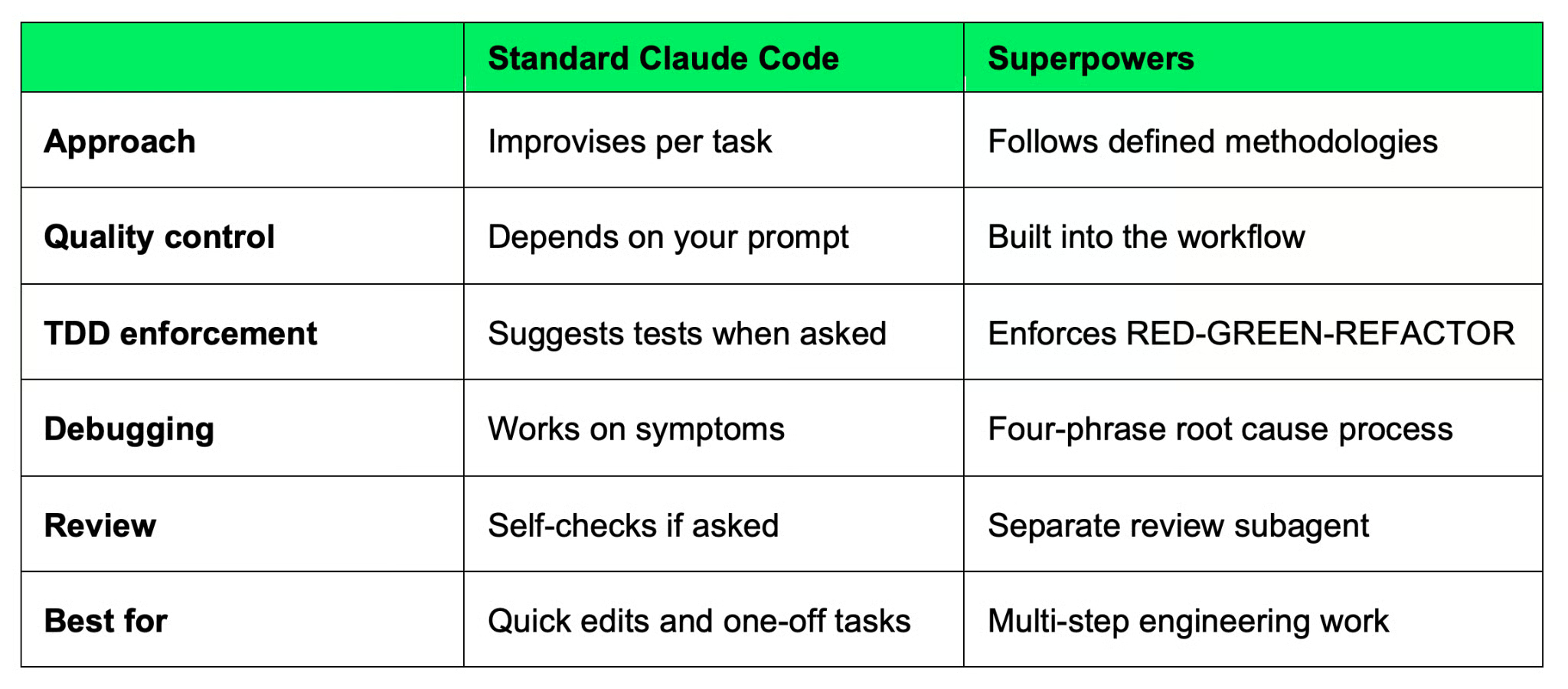
Claude Code versus Superpowers
Standard Claude Code is still useful because not every task needs a workflow, and forcing structure on a five-line fix is overkill. Go with Superpowers when the work is bigger than a single prompt can describe well.
Superpowers isn't the only plugin in the Claude marketplace, but it's one of the rare ones that focuses on how you work.
The other popular plugins solve more specific problems.
Each of these does one thing well. You install Frontend Design when you want better UI code. You install Context7 when you want current docs in context.
Superpowers are the opposite. It doesn't add a new capability to Claude, it changes how Claude approaches the whole development cycle. Brainstorming, planning, implementation, testing, debugging, review, and merging all get a defined methodology. The skills work together instead of standing alone as features.
You can run Superpowers alongside the others.
Context7 inside a Superpowers session means Claude follows a disciplined workflow and uses current docs. Frontend Design inside a Superpowers session means Claude builds your UI through the same plan-implement-review cycle as everything else.
Superpowers are best used when the work is complex enough to need structure.
Here are some concrete situations:
You want disciplined AI coding workflows: You've experienced Claude producing confident but wrong code, and you want a framework that makes the agent stop and think before acting.
Your team practices TDD: The plugin enforces the cycle, which means Claude will always start with the tests first and produce a minimum amount of code that makes the tests pass.
You're building complex Claude Code workflows: Multi-step features and refactors that edit a lot of files benefit from the planning and review steps.
You want to author your own skills: If you've been writing long CLAUDE.md files trying to encode your team's conventions, skills are a cleaner way to do the same thing.
Superpowers is probably too much if:
The line is usually how much the code matters after today. If you'll never look at it again, Superpowers is too much. If someone else will read it, run it, or maintain it, it’s probably a good choice.
Even though individual developers and engineering teams can benefit from Superpowers, it has some limitations and cases when it might not be worth the extra overhead.
The structured methodology is the main “selling point.” Claude follows defined processes for the tasks it usually improvises on, which makes outputs more consistent across sessions and across team members.
This reduces the chaotic behavior that makes AI coding tools frustrating. There are no more issues of random patches, no more new unwanted features, no more skipped tests, no more "Claude built something different from what I asked for."
TDD and debugging are also worth mentioning. Tests come before code. Debugging starts at the root cause. Superpowers framework enforces these.
The skill authoring system makes the framework yours. You can encode your team's conventions and your project's knowledge into skills Claude will follow every time.
There's a learning curve. You have to understand what the skills do, when to invoke them, and how the workflow stages connect. The first few sessions will feel slower than plain Claude Code because you're learning the framework alongside doing the work.
It can also feel heavy for simple tasks. You don’t need a four-phase debugging process for a small fix. You have to develop a sense for when to use the framework and when to go without it.
Further, the framework depends on you actually following the workflow. If you skip the brainstorming step, you lose the design document that the planning step depends on. If you skip planning, the execution step has nothing to execute against. The skills are designed to chain, and breaking the chain breaks the value.
None of these are dealbreakers, but just something to be aware of. Superpowers rewards engineers who want to work this way on bigger projects. Small, demo projects are not where it shines.
Superpowers is a plugin that gives Claude a defined methodology a seasoned engineering team would follow manually - design, implementation, testing, debugging, and review.
The core value is discipline. With Superpowers, Claude no longer needs to guess and starts following processes that actually work, which means less repetition from your end, less wasted sessions, less rework, and code you can trust without re-reading every line.
If you want Claude to behave less like a chatbot and more like an actual engineering partner, Superpowers is worth giving a try.
Does generative AI work in a business environment? Enroll in our Generative AI for Business course to see the value for small businesses and enterprises.
Learn with DataCamp
Course
Course
Course
Tutorial
Vikash Singh
10 min
Tutorial
Aashi Dutt
8 min
Tutorial
Bexruz (Bex) Tuychiev
15 min
Tutorial
Aashi Dutt
12 min
Tutorial
Bexruz (Bex) Tuychiev
9 min
Tutorial
Dario Radečić
15 min