

Kurs
Einführung in die Claude-Modelle
3 Std.
15K
Üben und Lernpfad deinen Fortschritt.
Weiter Mit GoogleClawHub (clawhub.ai) ist das Skill-Register für OpenClaw, und die Zahl der dort verfügbaren Skills ist schneller gewachsen als erwartet. Anfang 2026 hostet das Register Tausende von Community-Skills und der Katalog wächst weiter. Die eigentliche Herausforderung ist nicht, Skills zu finden, sondern herauszufinden, welche sich wirklich lohnen.
In diesem Artikel zeige ich dir die Skills, die in Community-Empfehlungen immer wieder auftauchen, starke Downloadzahlen haben und echte Probleme lösen. Außerdem erkläre ich, wie du deinen Skill-Stack installierst und verwaltest, worauf du bei der Sicherheit achten solltest und wie du die typischen Stolperfallen für neue Nutzer vermeidest.
Vorweg ein kurzer Hinweis zur Schreibweise: In älterer Doku und manchen Community-Threads wird das Register teils als "ClawdHub" bezeichnet. Diese Schreibweise stammt aus der Zeit, als das Projekt noch Clawdbot hieß. Der offizielle Name ist inzwischen ClawHub, und dabei bleiben wir hier.
OpenClaw ist ein Open-Source, selbst gehosteter KI-Agent, der lokal auf deinem Rechner läuft. Der österreichische Entwickler Peter Steinberger veröffentlichte ihn Ende 2025 zuerst als Clawdbot. Nach Markenrechtsstreitigkeiten mit Anthropic wurde er kurzzeitig in Moltbot umbenannt, bevor er im Januar 2026 endgültig OpenClaw hieß.
Das Projekt sammelte in kurzer Zeit über 200.000 GitHub-Stars und zählt damit zu den am schnellsten wachsenden Open-Source-Repositories der letzten Jahre. Im Februar 2026 kündigte Steinberger an, zu OpenAI zu wechseln, um an der nächsten Generation persönlicher Agenten zu arbeiten, während OpenClaw selbst in eine unabhängige Open-Source-Stiftung überging, um community-getrieben zu bleiben.
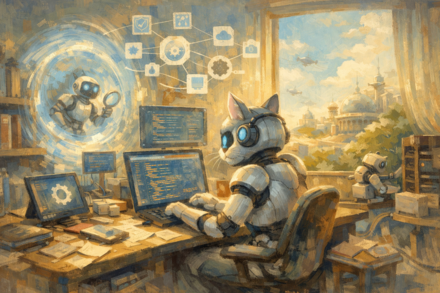
OpenClaw läuft als Hintergrunddienst auf deinem Rechner und verbindet sich mit Messengern wie WhatsApp, Telegram, Slack, Discord, Signal und iMessage. Wenn du über eine dieser Apps eine Nachricht sendest, empfängt der Agent sie, interpretiert sie und führt Aktionen aus. Das kann ein Shell-Befehl sein, das Lesen einer Datei, Web-Browsing, E-Mail-Management oder der Zugriff auf eine externe API.
Der Agent ist modellagnostisch. Du kannst ihn mit Claude, GPT, Gemini, DeepSeek oder lokalen Modellen über Ollama betreiben. Alle Daten bleiben auf deinem Gerät, sofern du sie nicht ausdrücklich irgendwohin sendest. Wenn du neu bei OpenClaw bist, zeigt dir unser OpenClaw-Tutorial den kompletten Setup-Prozess von Grund auf.
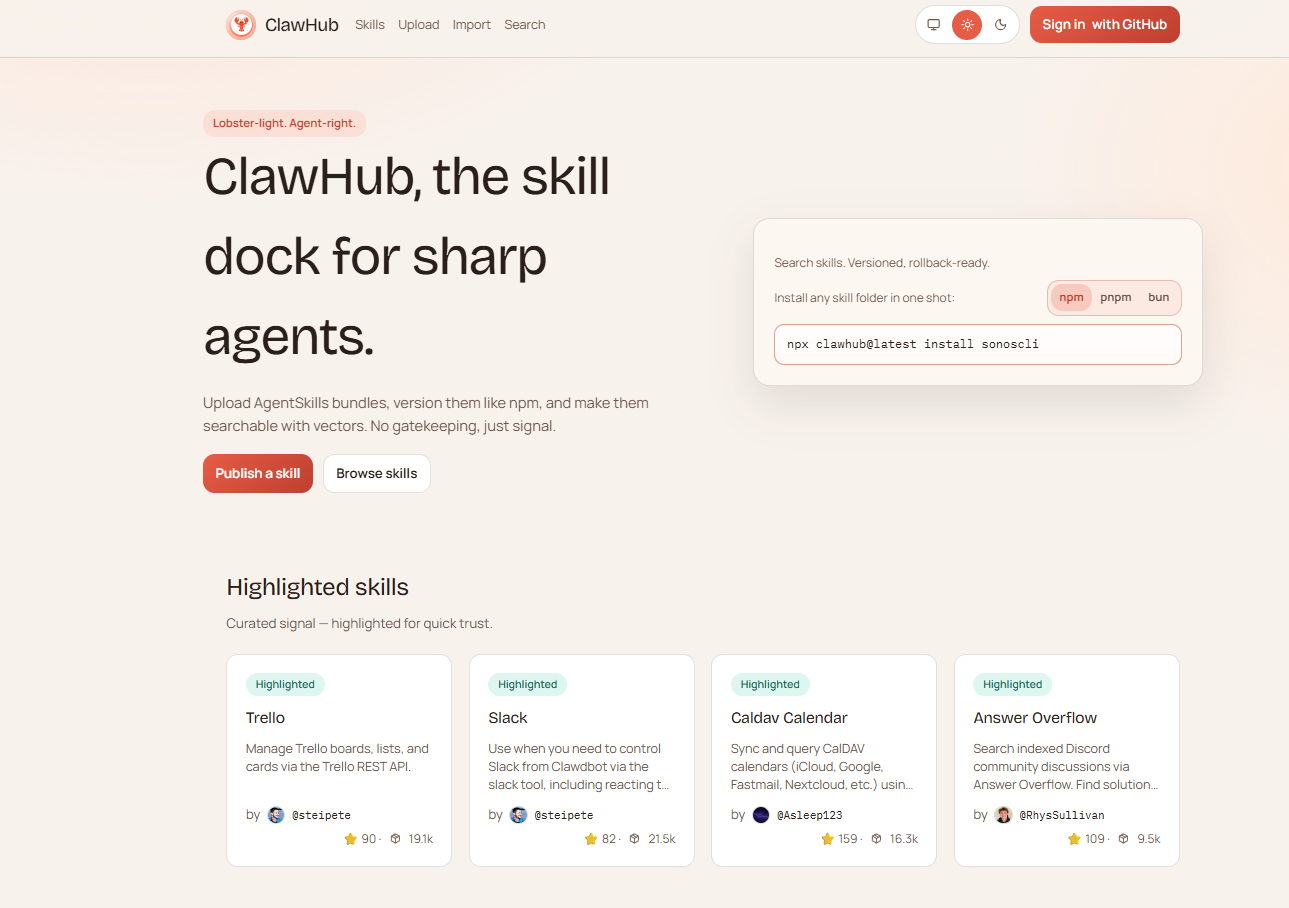
ClawHub ist der Skill-Marktplatz für OpenClaw. Denk an npm, aber für KI-Agenten. Jeder mit einem mindestens eine Woche alten GitHub-Account kann Skills veröffentlichen. Und jeder kann sie installieren. Das Register nutzt vektorbasierte semantische Suche auf Basis von OpenAI-Embeddings, sodass du mit natürlichen Suchanfragen relevante Skills findest, ohne exakte Paketnamen kennen zu müssen.
Das ClawHub-Skillregister, nach Kategorien organisiert. Bild: Autor.
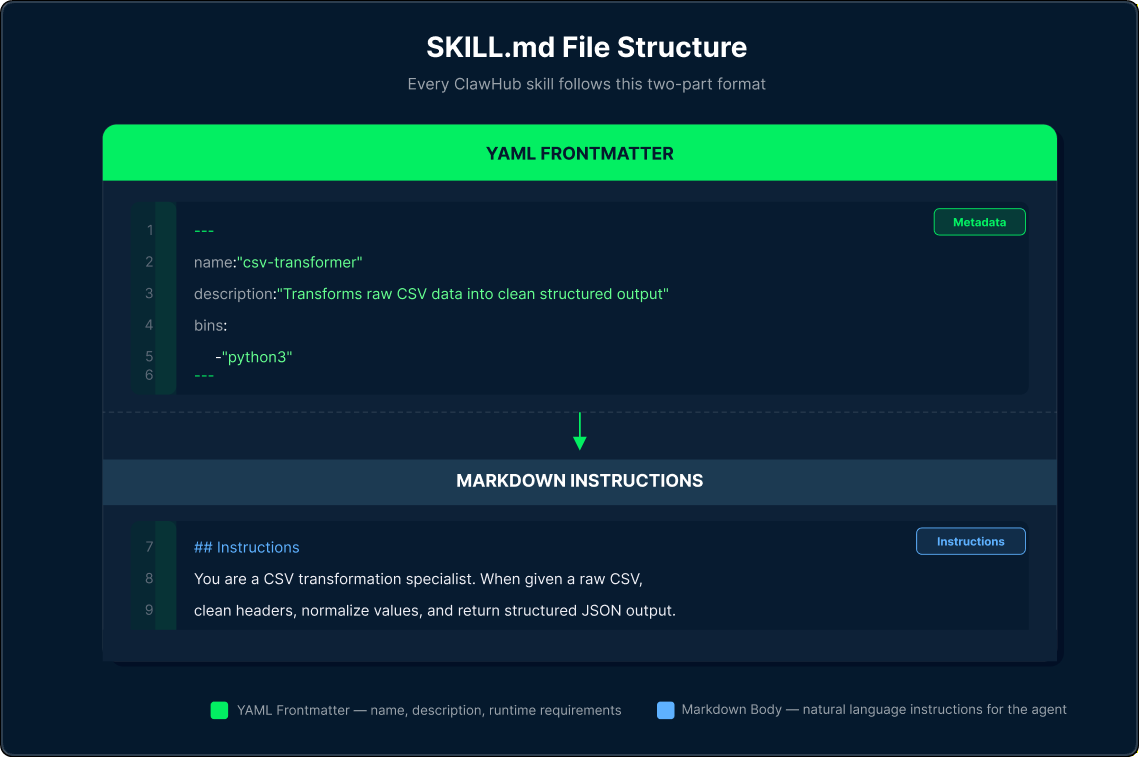
Skills sind keine Plugins oder kompilierten Binärdateien. Jeder Skill ist ein Verzeichnis mit einer SKILL.md-Datei, die YAML-Frontmatter und Markdown-Anweisungen enthält. Die Frontmatter deklariert Name, Beschreibung, benötigte Binaries und Umgebungsvariablen. Der Markdown-Body enthält die natürlichsprachigen Anweisungen, denen der Agent folgt, wenn dieser Skill relevant ist.
Die zweiteilige Struktur jedes ClawHub-Skills. Bild: Autor.
OpenClaw lädt Skills effizient. Zu Beginn jeder Session wird eine kompakte Liste geeigneter Skills in den System-Prompt gesnapshottet. Vollständige Anweisungen werden nur geladen, wenn der Agent entscheidet, dass ein Skill zur aktuellen Aufgabe passt. So kannst du Dutzende Skills installiert haben, ohne den Token-Overhead für alltägliche Unterhaltungen merklich zu erhöhen.
Skills sind in einer dreistufigen Hierarchie organisiert. Zuerst kommen Workspace-Skills, danach gemanagte Skills in ~/.openclaw/skills/ und schließlich die mit OpenClaw gebündelten Skills. Das Bundled-Set umfasst rund 50 offizielle Skills des Core-Teams, darunter Essentials wie github, gog, summarize, obsidian, weather und sonoscli.
ClawHub teilt Skills offiziell in 11 Kategorien ein: AI/ML, Utility, Development, Productivity, Web, Science, Media, Social, Finance, Location und Business.
Ich habe sie hier anders gruppiert, nämlich nach dem, wofür du sie im Alltag tatsächlich nutzt.
Jeder Skill in dieser Liste ist ein echter Eintrag auf ClawHub, ausgewählt anhand von Downloadzahlen, Community-Feedback und verifizierten Beschreibungen aus dem awesome-openclaw-skills-Repository. Du kannst jeden davon so installieren:
clawhub install <skill-slug>Eine Standardinstallation von OpenClaw weiß nichts über das, was gestern passiert ist. Diese Skills beheben das, indem sie dem Agenten Live-Informationen geben: das Web, wissenschaftliche Datenbanken und strukturierte Inhalte auf Abruf.
Wenn du den Großteil des Tages im Terminal oder in einer IDE verbringst, wirst du hier am ehesten fündig.
gh-CLI und lässt den Agenten Issues, Pull Requests, Branches und Repository-Workflows direkt aus dem Chat steuern.Viele unterschätzen, wie viel Datenarbeit du an OpenClaw abgeben kannst, sobald die richtigen Skills installiert sind. Die besten Skills hier kapseln schnelle CLI-Tools statt Rohdaten in das Kontextfenster des Modells zu laden – das hält es flott und verhindert Token-Bloat.
xsv count, Spaltenstatistiken mit csvstat und komplexes Multi-Condition-Filtering mit Millers DSL. Für große Dateien nutzt es indexbasiertes Slicing, um Speicherengpässe zu vermeiden.Bei DevOps-Skills treffen Power und Risiko aufeinander. Sie sind extrem nützlich, wenn du die zugrunde liegenden Tools beherrschst – und riskant, wenn nicht. Der Agent hat Shell-Zugriff, also prüfe immer, was ein Skill gleich ausführen will, bevor du bestätigst.
hcloud-CLI. Praktisch für Self-Hoster und kleine Teams mit VPS-Workloads zum kleinen Budget.Das ist für viele die erste Anlaufstelle – zu Recht. Diese Skills verbinden OpenClaw mit Tools, die die meisten täglich nutzen: E-Mail, Notizen, Dokumente und Kalender.
Einem Agenten Zugriff auf deine Messaging-Konten zu geben, ist ein großer Schritt. Diese Skills sind nützlich – nimm dir aber ein paar Minuten, um die benötigten Berechtigungen zu verstehen, bevor du sie live verbindest.
Diese Kategorie würde ich nicht überspringen. OpenClaw hat Root-Zugriff auf dein System – und jeder installierte Skill erbt diesen Zugriff. Diese Skills geben dir Sichtbarkeit und Kontrolle darüber, was dein Agent tatsächlich tut.
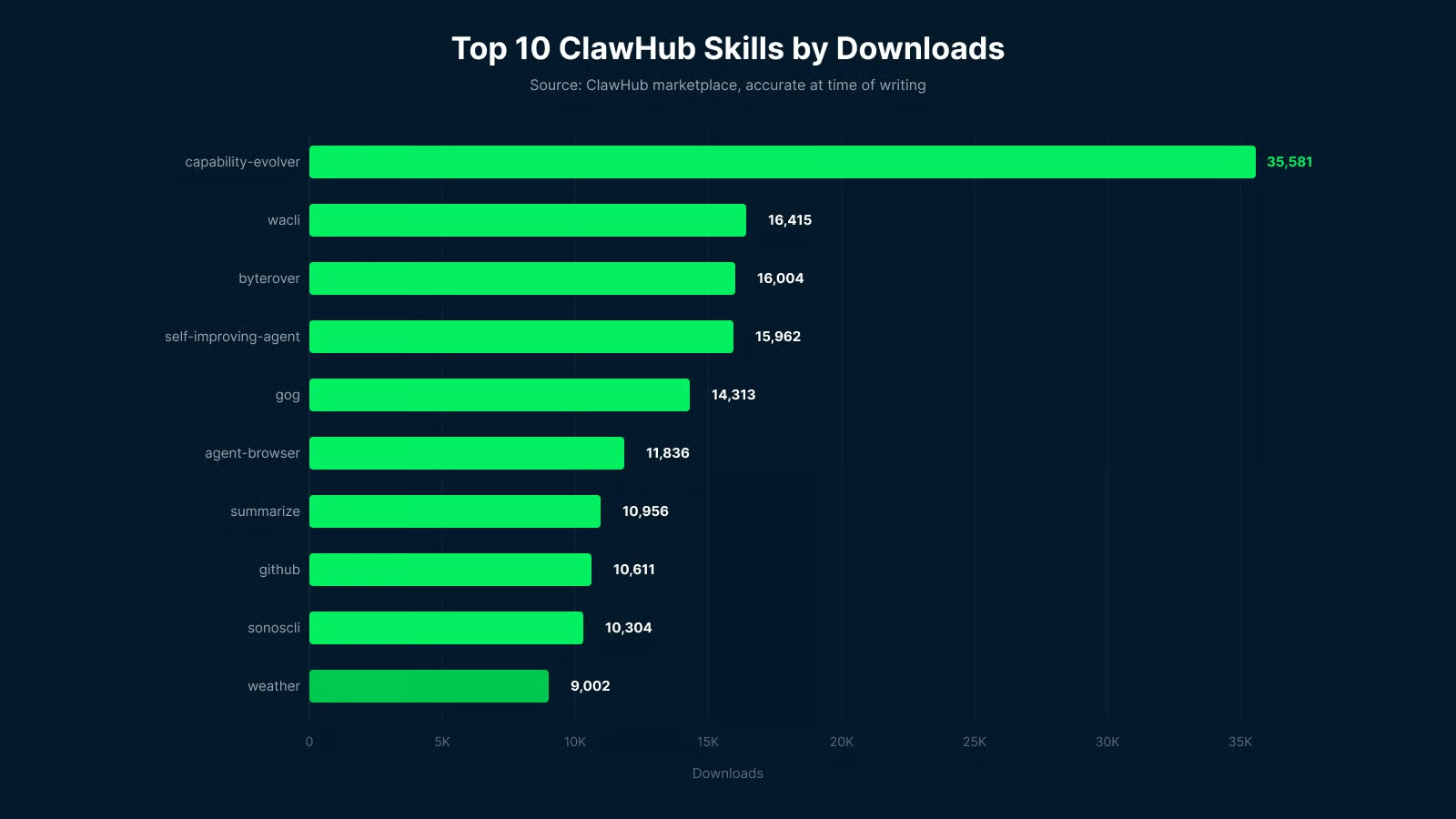
Downloadzahlen sind ein guter Indikator für Community-Vertrauen, aber kein perfekter Qualitätsmaßstab. Die Zahlen unten spiegeln die Marktplatz-Rankings zum Zeitpunkt des Schreibens wider und können sich seitdem verändert haben.
Meistgeladene ClawHub-Skills zum Zeitpunkt der Erstellung. Bild: Autor.
Hier sind die aktuell meistgeladenen Skills auf ClawHub:
Wenn du OpenClaw zum ersten Mal einrichtest, ist diese Liste ein guter Startpunkt. Diese Skills sind weit verbreitet und in vielen Setups erprobt – gängige Bugs und Edge-Cases sind damit eher schon abgefangen. Skills für Alltagsaufgaben wie E-Mail, Suche und Versionskontrolle bleiben meist dauerhaft installiert, während speziellere Integrationen bei Bedarf dazukommen.
Die ClawHub-CLI übernimmt Suche, Installation und Updates. Sie ist dein zentrales Tool für das Skill-Management und in wenigen Minuten eingerichtet. Installiere sie global mit npm:
npm i -g clawhubAuthentifiziere dich anschließend mit deinem GitHub-Account:
clawhub loginWenn hier der Fehler "Missing state. Run the CLI again to start a fresh login." auftaucht, bist du nicht allein. Der browserbasierte OAuth-Flow hat einen bekannten Bug, der manche Setups betrifft. Der Workaround: Auf der ClawHub-Website direkt einloggen, in den Kontoeinstellungen ein persönliches API-Token erzeugen und dann ausführen:
clawhub login --token <your-token>Damit umgehst du den OAuth-Flow komplett – funktioniert zuverlässig, bis das zugrunde liegende Problem behoben ist.
Die folgenden Befehle nutzt du im Alltag am häufigsten, sobald alles läuft:
# Nach Skills mit natürlicher Sprache suchen
clawhub search "calendar management"

# Einen Skill installieren
clawhub install <skill-slug>

# Installierte Skills auflisten
clawhub list

# Alle installierten Skills aktualisieren
clawhub update --all

# Einen Skill entfernen
clawhub remove <skill-slug>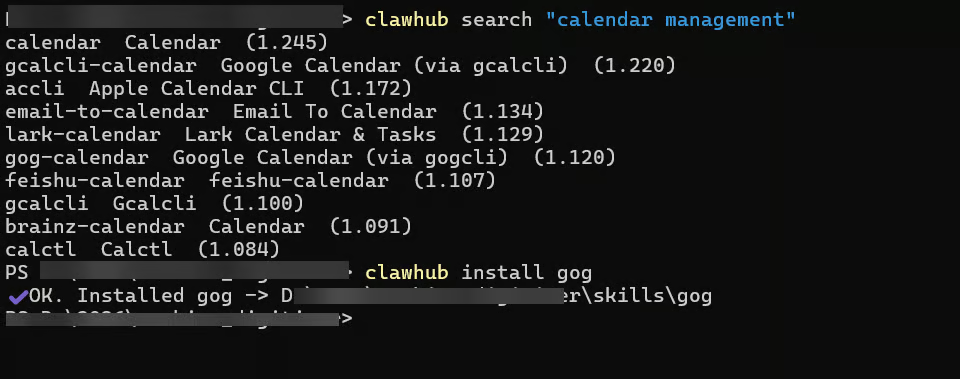
Installation eines ClawHub-Skills im Terminal. Bild: Autor.
Standardmäßig installieren sich Skills in einen ./skills-Ordner in deinem aktuellen Arbeitsverzeichnis. Eine Lockfile unter .clawhub/lock.json trackt Versionen. Um eine bestimmte Version zu pinnen:
clawhub install <skill-slug> --version 1.2.0Es gibt einen zweiten Installationsweg, den manche bevorzugen. Wenn du einen GitHub-Repository-Link direkt in den OpenClaw-Chat einfügst, übernimmt der Agent die Installation automatisch. Bequem, aber es entfällt die Review – daher eher für bereits geprüfte Skills geeignet.
Nach der Installation neuer Skills solltest du deine OpenClaw-Session neu starten. Skills werden beim Session-Start gesnapshottet; Ergänzungen während einer laufenden Session greifen erst nach einem Neustart.
Bevor du irgendetwas installierst, lohnt ein Blick auf das, was Anfang 2026 im ClawHub-Register passiert ist.
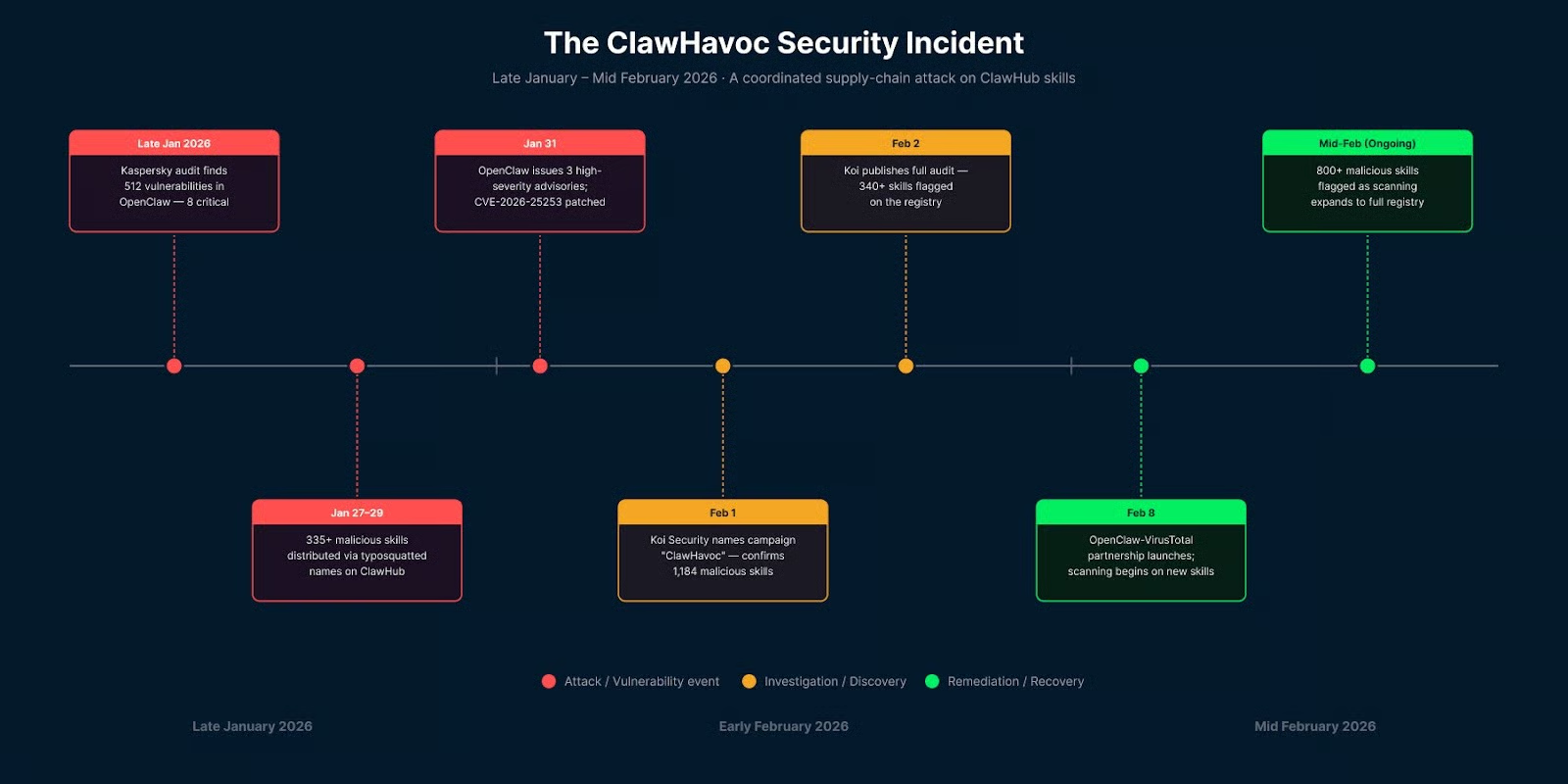
Eine koordinierte Angriffskampagne namens ClawHavoc verteilte Hunderte bösartige Skills über ClawHub. Sicherheitsforscher von Koi Security fanden heraus, dass ein signifikanter Teil der Skills im Register schädlich war – viele mit typosquatteten Namen, die legitimen Tools ähnelten (z. B. clawhubb statt clawhub).
Die bösartigen Skills enthielten versteckte Skripte, die Reverse Shells aufbauten und unbemerkt SSH-Keys, API-Tokens und Browser-Sitzungscookies exfiltrierten.
Der ClawHavoc-Vorfall erstreckte sich über drei Wochen. Bild: Autor.
OpenClaw kooperiert inzwischen mit VirusTotal, um die Lage zu verbessern. Jeder veröffentlichte Skill auf ClawHub erhält nun einen SHA-256-Hash, der gegen die VirusTotal-Datenbank geprüft wird. Gibt es keinen Treffer, wird das vollständige Skill-ZIP zur Analyse mit Googles Gemini-gestütztem Code Insight hochgeladen. Als verdächtig markierte Skills zeigen eine Warnung; als bösartig markierte werden im Register blockiert. Das ist ein deutlicher Fortschritt, aber nicht narrensicher. Prompt-Injection-Payloads und neue Angriffstechniken können durch statische Analysen rutschen.
Lies vor der Installation immer die SKILL.md. Achte auf verdächtige Voraussetzungen, verschleierten Code oder base64-kodierte Befehle. Nutze clawscan oder skill-scanner als ersten Check, bevor du einem neuen Skill vertraust. Und wenn OpenClaw auf einer Maschine mit sensiblen Credentials läuft, nutze ein sandboxed Workspace-Root, das den Verzeichniszugriff des Agenten beschränkt.
Wichtig zum Schluss: Skills laufen mit denselben Rechten wie der Agent. Wenn der Agent Zugriff auf deine .env-Dateien, SSH-Keys und Browser-Sessions hat, dann gilt das für jeden installierten Skill.
Es ist verlockend, viele Skills zu installieren und zu schauen, was hängen bleibt. Dieser Ansatz geht oft nach hinten los – wenn du das schon mit Browser-Erweiterungen oder VS-Code-Plugins erlebt hast, kennst du das Ende. Jeder installierte Skill erhöht den Kontext-Overhead, und überlappende Skills verwirren den Agenten bei der Auswahl.
Besser: Starte mit den meistgeladenen Skills für das, was du wirklich brauchst. Ergänze dann Skill für Skill, wenn ein konkreter Bedarf entsteht.
Die meisten Nutzer arbeiten im Alltag mit 10 bis 15 Skills. Teams mit komplexen Workflows nutzen teils mehr, isolieren sie aber oft in dedizierten Workspaces statt alles in einen Agenten zu packen.
Ein solides Starter-Stack deckt das meiste für Developer und Wissensarbeiter ab: gog für Google Workspace, github für Versionskontrolle, summarize zum Verdichten von Inhalten und capability-evolver für Selbstverbesserung. Ergänze obsidian oder notion, je nachdem, wo du deine Notizen führst.
Prüfe bei neuen Skills, ob die benötigten Binaries und Umgebungsvariablen bereits vorhanden sind. Skills mit unerfüllten Abhängigkeiten laden stillschweigend nicht – das ist irritierend. Der Befehl clawhub list zeigt aktive Skills, und die OpenClaw-Logs erklären, warum andere übersprungen wurden.
Ohne Sichtprüfung zu installieren, ist der häufigste Fehler. Das Register ist offen – jeder kann veröffentlichen. Die Details stehen im Sicherheitsabschnitt, die Kurzfassung: Lies die SKILL.md, bevor du installierst.
Weitere Stolperfallen sind:
Nicht neu starten nach der Installation ist eine leise Fehlersituation und bringt neue Nutzer häufiger zu Fall als fast alles andere. Wie oben beschrieben, wird der Session-Snapshot beim Start erstellt – ein Skill, den du mitten in der Session hinzufügst, ist erst nach einem Neustart aktiv.
Mehrzeiliges YAML im Metadata-Feld verursacht Parse-Fehler. Wenn ein installierter Skill nicht auftaucht, prüfe die Frontmatter der SKILL.md darauf.
Secrets in SKILL.md statt in openclaw.json abzulegen, ist ein Sicherheitsfehler. Die SKILL.md wird oft öffentlich geteilt. API-Keys und Zugangsdaten gehören in die Config-Datei.
Skill-Wildwuchs ohne Doku ist ein schleichendes Problem. Nach ein paar Monaten ad-hoc Installationen hast du schnell Dutzende ungenutzter Skills. Ein regelmäßiger Check mit skills-audit hält Ordnung und reduziert die Angriffsfläche.
Überautomatisierung ohne Leitplanken potenziert sich, je fähiger der Agent wird. Ein Agent mit Browser-, E-Mail- und Shell-Zugriff, der eine bösartige Prompt Injection erhält, kann erheblichen Schaden anrichten. agentguard und ähnliche Monitoring-Tools sind genau aus diesem Grund da.
ClawHub ist das, was OpenClaw die meiste Bandbreite verleiht. Ohne ClawHub ist der Agent ein fähiger Allround-Assistent mit einem soliden Set an Bundled-Tools. Mit ClawHub lässt er sich in nahezu jeden Workflow erweitern, der dir wichtig ist.
Die Skills in diesem Guide sind ein Startpunkt, keine vollständige Liste. Mein Rat: Starte mit den meistgeladenen in den Kategorien, die zu deiner Arbeit passen, lies jede SKILL.md vor der Installation und baue deinen Stack Skill für Skill auf.
Wenn du dieses Setup ernsthaft angehen willst, zeigt unser Building Custom OpenClaw Skills-Tutorial, wie du eigene Skills schreibst und veröffentlichst. Für einen breiteren Überblick darüber, was OpenClaw kann, führt dich unser OpenClaw Projects Guide durch neun reale Workflows, die sich lohnen.
Mehr über KI-Agenten und Entwicklertools erfährst du in unserem Guide zu den besten kostenlosen KI-Tools. Für praxisnahe Agentenentwicklung ist unser Kurs AI-Assisted Coding for Developers ein guter nächster Schritt.
Learn with DataCamp
Kurs
Kurs
Üben und Lernpfad deinen Fortschritt.
Weiter Mit GoogleBlog
Blog
Zoumana Keita
15 Min.
Blog
Nisha Arya Ahmed
15 Min.
Blog
Matt Crabtree
14 Min.
Tutorial
Kurtis Pykes
15 Min.
Tutorial
Javier Canales Luna
11 Min.