
Corso
Introduzione ai modelli Claude
3 h
14.3K
Claude Code's system prompt already takes up around 50 instructions before your session begins. Research on frontier LLMs shows that instruction-following starts to degrade at roughly 150 to 200 total instructions, which leaves you somewhere around 100 to 150 slots for everything you want Claude to know about your project.
CLAUDE.md is the file that fills those slots. It's a markdown file that Claude Code reads at the start of every session, giving it persistent context about your codebase without you having to repeat yourself. But Claude actively filters content that it considers irrelevant to the current task. A bloated file doesn't just waste space; it competes with your actual rules.
This tutorial covers how to build a CLAUDE.md that earns every line: what goes in, what stays out, how to structure it for teams, and how to keep it useful over time.
I also recommend checking out our other recent Claude Code guides:
CLAUDE.md is a markdown file that Claude Code loads automatically at the beginning of every conversation. It sits at your project root and gives Claude standing instructions on all kinds of relevant facts:
Without it, every session starts from zero. You explain the same context, correct the same assumptions, and watch Claude make the same mistakes it made yesterday. CLAUDE.md fixes that by encoding your project knowledge once.
It is one of several context systems Claude Code uses, and they each handle different work:
|
System |
Who writes it |
What it does |
When it loads |
|
|
You |
Project rules, conventions, and constraints you define |
Every session (full file) |
|
Memory ( |
Claude |
Patterns and facts it discovers on its own during sessions |
Every session (first 200 lines) |
|
You |
Domain knowledge for specific workflows, loaded on request |
On demand |
|
|
You |
Shell commands that run at trigger points like pre-commit or post-edit |
At specific trigger points |
Running /init generates a starter CLAUDE.md by analyzing your codebase, detecting build systems, test frameworks, and code patterns. If a file already exists, it suggests improvements instead of overwriting. It's a reasonable starting point, but the file is too important to leave on autopilot.
One important thing to know is that CLAUDE.md content also survives /compact. When context gets compressed mid-session, Claude re-reads the file from disk and re-injects it fresh.
CLAUDE.md files can live in four places, listed from broadest to most specific:
Managed policy (org-wide): /Library/Application Support/ClaudeCode/CLAUDE.md on macOS. Applies to all users on the machine and cannot be excluded by any setting. On Linux/WSL found at /etc/claude-code/CLAUDE.md, and on Windows at C:\Program Files\ClaudeCode\CLAUDE.md.
User-level: ~/.claude/CLAUDE.md. Personal instructions that apply across every project on your machine.
Project-level: ./CLAUDE.md or ./.claude/CLAUDE.md at the repo root. This is the one you commit to git and share with your team.
Subdirectory: ./subdir/CLAUDE.md. Scoped to that directory and loaded on demand when Claude reads files there, not at session start.
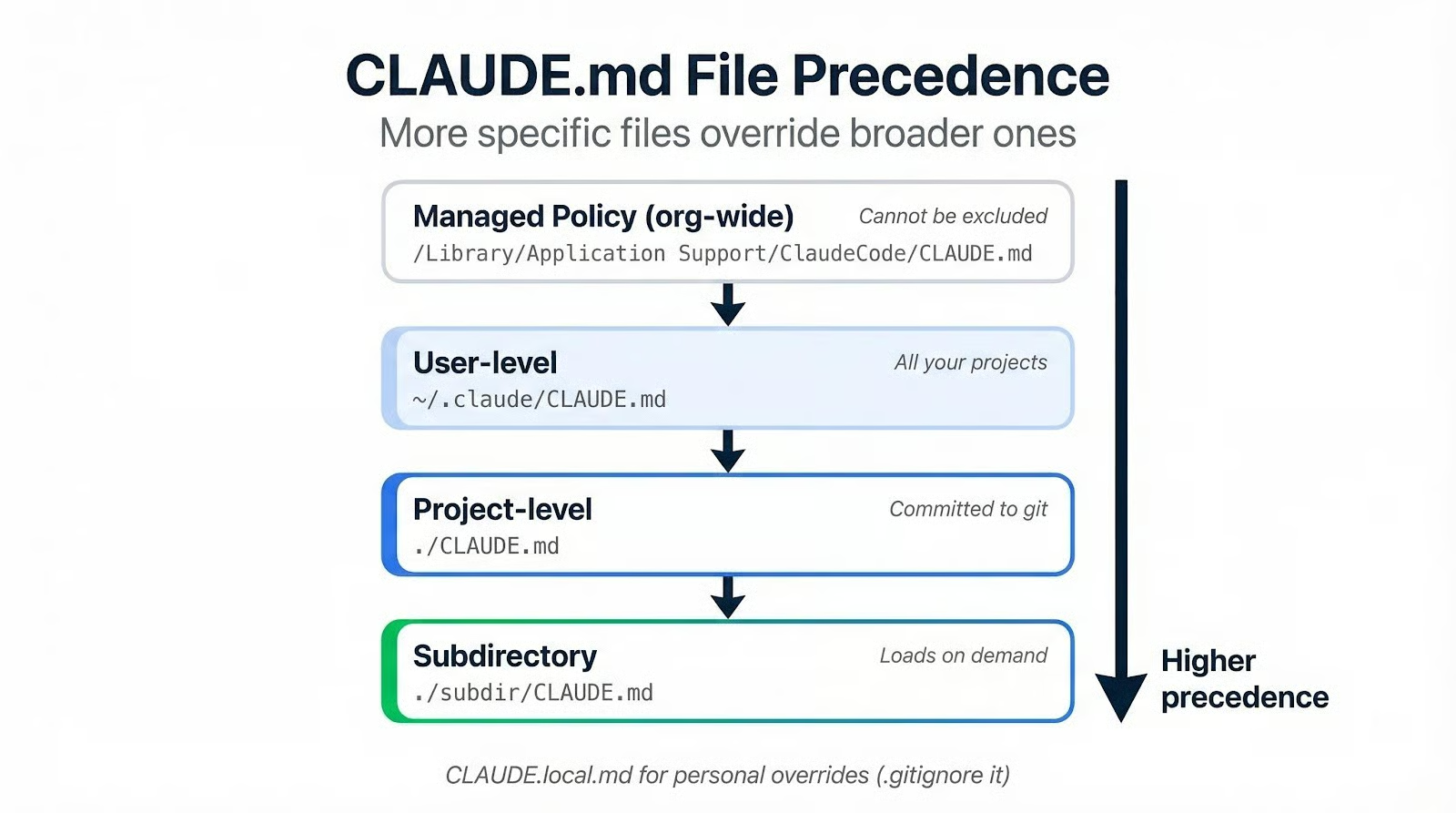
More specific files take precedence over broader ones. If your project CLAUDE.md says "use tabs" and your user-level file says "use spaces," the project file wins.
For personal preferences that shouldn't end up in version control, create a CLAUDE.local.md and add it to .gitignore. Editor quirks, preferred commit styles, or temporary overrides go here instead of polluting the shared file.
Knowing where the file lives and what it competes with, the next question is what actually belongs inside it.
A CLAUDE.md breaks down into three layers:
If you've read Claude Code Best Practices, you'll recognize this as the same principle applied to a narrower surface. (If you haven’t, you should definitely check it out after reading this article!)
Open with a one or two-line project description and your tech stack with version numbers. Claude can infer a lot from reading your code, but it won't guess that you're on Next.js 15 instead of 14, or that you chose Drizzle over Prisma.
Include a directory structure map. Not every file, just the top-level layout with brief descriptions:
src/
  data/        # Data loading and preprocessing pipelines
  models/      # Model definitions and training loops
  evaluation/  # Metrics, validation, experiment tracking
  api/         # FastAPI endpoints for model serving
  tests/       # Co-located with source, test_*.py
Put common commands in code blocks. Build, test, lint, and dev server startup. A command inside a code fence is something Claude will run verbatim. A command written in a sentence is a suggestion it might improvise on.
Your architectural decisions need to be in the file because Claude will make its own if you don't. If you chose SQLite over Postgres for a reason, say so. If your API layer follows a specific pattern, explain the reasoning.
Rationale does real work here. "Never force push" is a flat instruction that Claude might ignore under pressure. "Never force push. This rewrites shared history and is unrecoverable for collaborators," gives Claude enough context to generalize. It won't just avoid git push --force. It'll hesitate before git reset --hard on a shared branch too.
This covers conventions Claude can't pick up from reading your code. If you use Conventional Commits (feat:, fix:, docs:), say so. If branches follow a naming pattern like initials/description, write it down.
Quirks and traps belong here, too. Every codebase has them: the migration script that must run before builds, the env variable that needs a specific value before tests pass, the module that breaks if imported out of order. Claude is a new team member every session, and these are the things a new hire trips over on day one.
What you can skip: anything Claude already knows from the language itself. You don't need to tell it to use async/await in modern JavaScript or to prefer pathlib in Python 3. If a convention is the language default, writing it down is noise that crowds out the instructions that actually matter.
Getting the content right is the easier half. The harder part is writing instructions Claude will actually follow, and knowing what to cut.
Specificity beats intent every time. "Format code properly" tells Claude nothing. "Use 2-space indentation, no semicolons, single quotes" tells it exactly what to do and gives it something verifiable.
Apply this test to every line: "Would removing this cause Claude to make mistakes?" If the answer is no, the line goes. The official recommendation is under 200 lines per file, and some experienced teams run with fewer than 60. That's not minimalism for its own sake: a shorter file means more of it gets read.
Keep heading levels to three at most. Use section names agents recognize from README conventions: Commands, Structure, Conventions, Testing. Getting creative with section names introduces friction because Claude has seen millions of READMEs and has strong expectations about what lives where.
When a rule keeps getting ignored despite being in the file, don't add more words around it. Prefix it with IMPORTANT: or YOU MUST. But use this sparingly, because emphasis scales poorly. If every rule is marked important, the emphasis becomes invisible.
Code style enforcement is the biggest trap. Formatting, indentation, import ordering: these are deterministic problems with deterministic solutions. Linters and formatters like Biome, ESLint, or Ruff handle them faster, cheaper, and with 100% consistency. Spending instruction budget on style rules is dead weight: the same work a pre-commit hook does for free.
Standard language conventions belong on the exclusion list, too, since Claude already knows TypeScript patterns and Python idioms. Full API documentation should be linked rather than pasted. Task-specific instructions that only apply to certain workflows belong in skills, where they load on demand instead of taking up space in every session.
One pattern worth calling out: negation-only constraints. "Never use --legacy-peer-deps" leaves Claude stuck when it hits a dependency conflict. Pair every prohibition with a direction: "Never use --legacy-peer-deps; resolve conflicts by updating the package to a compatible version." If you've worked with Cursor Rules or similar AI configuration files, you'll find this principle applies across tools.
Here's what the difference looks like in practice. On the left, a typical auto-generated CLAUDE.md section full of generic advice Claude already knows. On the right, the same section after applying the specificity test: only project-specific facts survive.
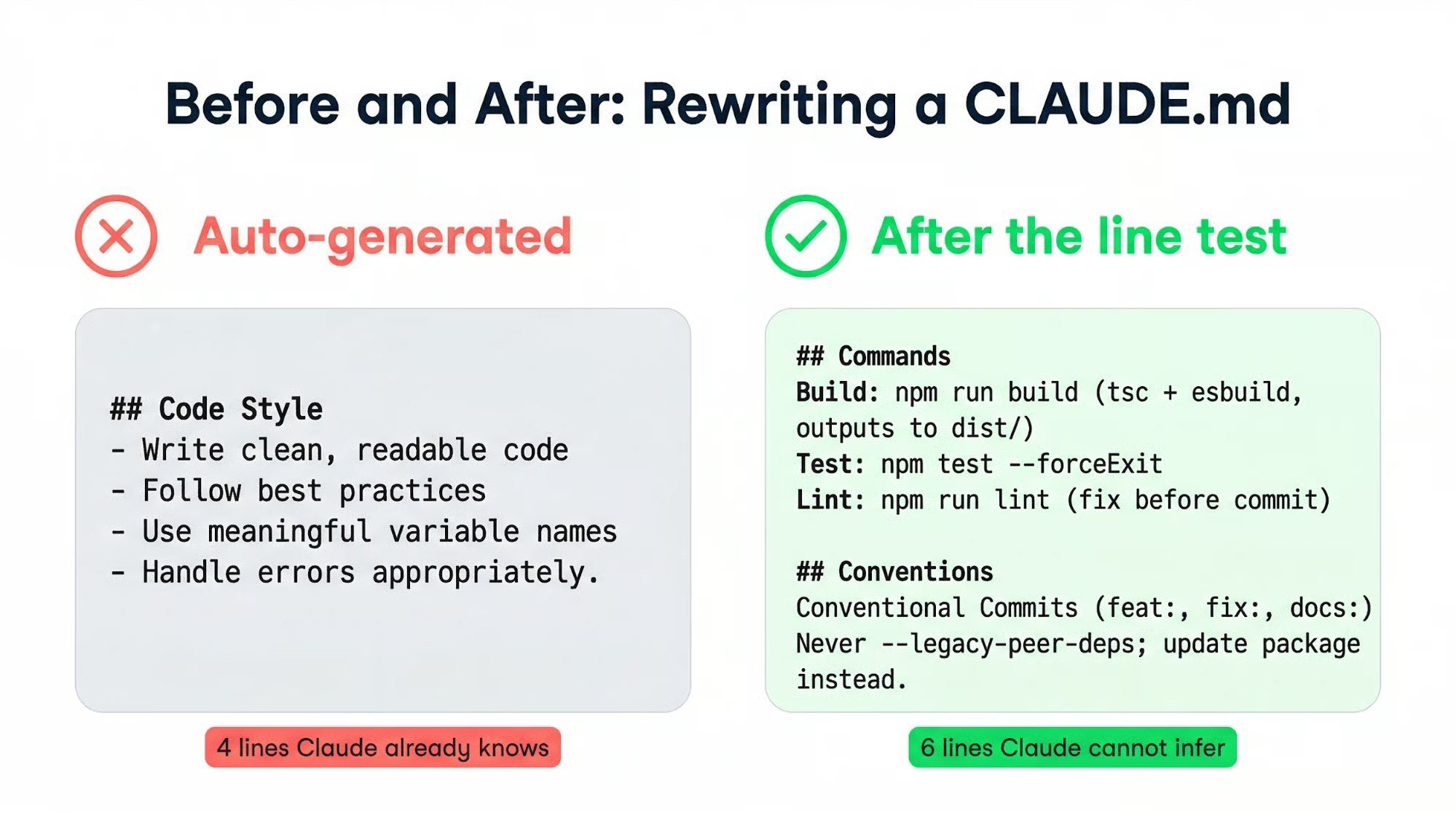
The second version is shorter and tells Claude things it cannot infer from the codebase.
Run /init in your project root to get a generated starting point. Read every line, cut what's obvious, and add what's missing from how your team actually works. Starting from /init output is faster than from a blank file, but auto-generated content should never ship without review.
If you prefer writing from scratch, start with five sections:
You can always grow the file later, and starting minimal means every line you add comes from a real mistake rather than speculation.
Two signals tell you the file needs maintenance:
Both point to the same remedy: fewer words, clearer structure.
A single-developer file can stay this lean indefinitely. Once a team gets involved, the file needs a different kind of structure.
Your project-level CLAUDE.md belongs in git. It's shared documentation that gets better as teammates contribute rules from their own mistakes. Treat changes to it the same way you treat code PRs: review them, question whether each new line earns its place.
When conventions pile up beyond what fits in a single file, move them into .claude/rules/. Each Markdown file covers one topic with descriptive filenames: testing.md, api-design.md, database-migrations.md. Claude discovers these files recursively and loads them with the same priority as the main CLAUDE.md.
Path-scoped rules make this even more targeted. Add YAML frontmatter, and the rule only loads when Claude works with matching files:
---
paths:
  - "src/api/**/*.ts"
---
# API conventions go here
Your frontend conventions won't burn instruction budget during backend work, and vice versa.
In monorepos where teams have conflicting conventions, claudeMdExcludes blocks specific files from loading:
{
  "claudeMdExcludes": [
    "**/other-team/.claude/rules/**"
  ]
}
Put this in .claude/settings.local.json to keep it out of version control.
Scaling a CLAUDE.md typically triggers the urge to centralize: one big file with everything. That's the wrong direction. Splitting a monorepo's CLAUDE.md into service-level files can reduce total word count by 80% while improving how well Claude follows the rules; less to read per session means less to filter out.
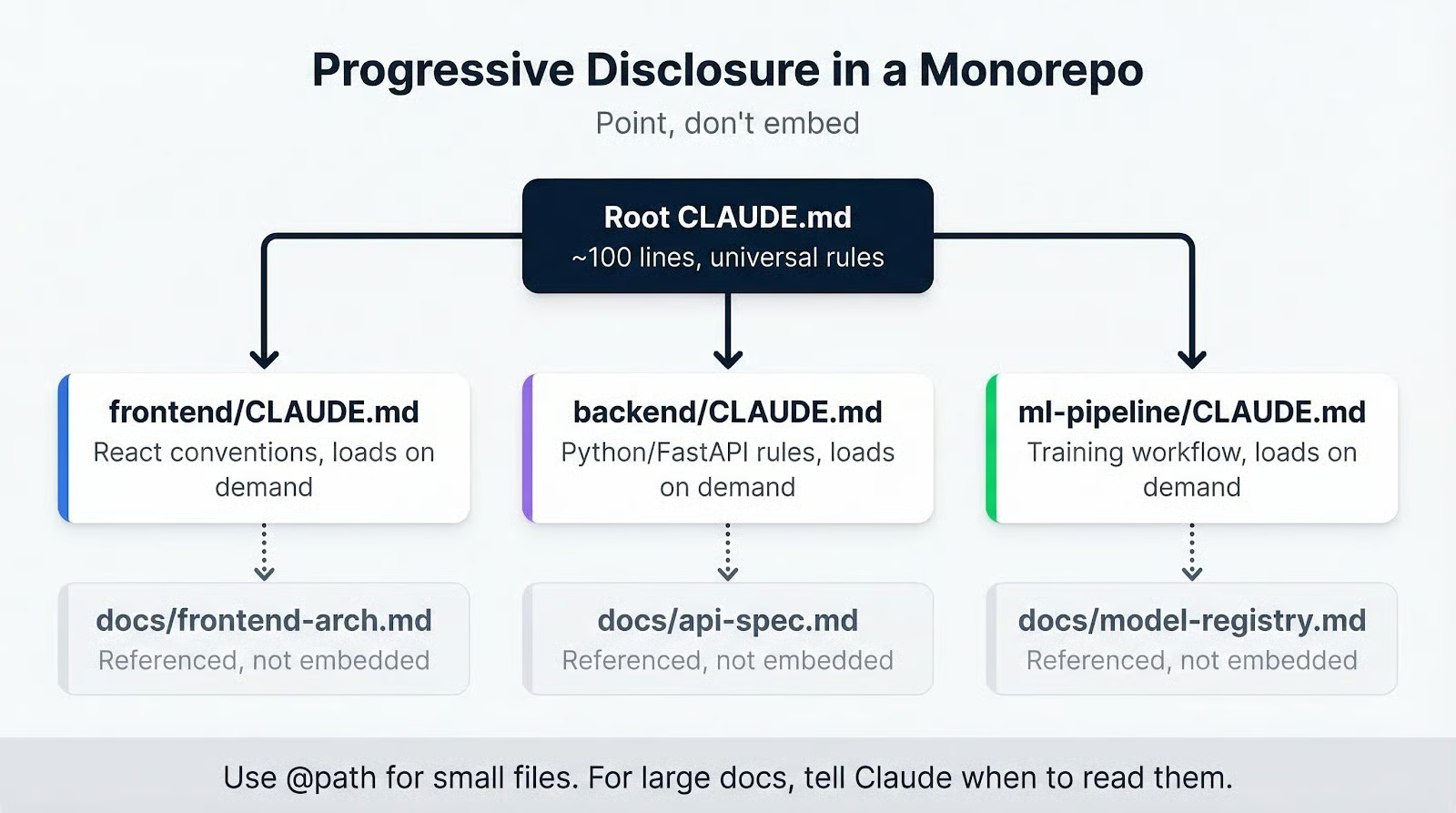 The principle: point, don't embed. Instead of
 @path/to/big-doc.md (which loads the entire file into every session), write "For migration procedures, see docs/migrations.md." Claude reads it when it needs the information. The @ import syntax works for small files, but anything substantial is better referenced than embedded.
Subdirectory CLAUDE.md files complete this pattern. A frontend/CLAUDE.md with React conventions loads only when Claude touches files in that directory. Backend rules stay out of the way during frontend work.
Scaling structure is mostly a solved problem once you know the primitives. But projects change, and conventions evolve. Rules that made sense six months ago become noise that crowds out the ones that matter now. The ongoing challenge is keeping the file honest over time.
Add rules slower than you think you should. A new line belongs in the file only when Claude makes an actual mistake that line would have prevented. Every rule should trace back to a real incident, not a hypothetical one.
The opposite direction matters just as much: if Claude already follows a convention without being told, that rule is dead weight. Remove it and free up instruction budget for rules that change behavior.
A low-effort maintenance habit is telling Claude, "Review this CLAUDE.md and suggest improvements" every few weeks. It spots contradictions between rules, flags overlapping instructions, and identifies phrasing that could be tighter.
You can also add a standing instruction in the file itself: "When you encounter a bad assumption during a session, suggest a CLAUDE.md correction." This creates a feedback loop in which the file improves through normal use.
The most common failure mode is accumulation. Rules pile up after every frustrating session, nobody removes the ones that stopped mattering, and eventually, the file is long enough that Claude filters out half of it. When Claude keeps ignoring a rule, adding emphasis on top of a bloated file won't fix it. Pruning will.
If you're using @ imports for large files, that's the second problem to check. A 500-line architecture doc imported with @ embeds the entire document into every session, burning through your instruction budget before Claude processes your first actual rule. Reference it instead.
Auto-generating with /init and never curating the output is a reliable way to get bad behavior across the board. A wrong instruction in CLAUDE.md doesn't just affect one response. It shapes Claude's research, planning, and implementation across every session until someone catches it.
Contradictory rules across multiple files cause unpredictable behavior. When two rules conflict, Claude picks one without telling you which. This gets worse in projects that combine a root CLAUDE.md with several .claude/rules/ files. Periodic review across all instruction files is the only prevention.
Not every mistake deserves a new rule. Some failures are one-offs. A rule added for every edge case creates a file packed with conditional instructions that help in narrow situations and hurt in the majority of sessions. The goal the whole time has been the same: a short file where every line changes behavior.
CLAUDE.md is probably the most load-bearing file in a Claude Code project. It shapes every session before a single prompt is typed, and a well-maintained one compounds across weeks of work.
If you don't have one yet, run /init, read what comes out, and cut every line that wouldn't prevent a real mistake. If you have one, open it now and apply the same test. If your CLAUDE.md has to be enormous to explain your project, that's a signal that the project's tooling is too complex, not that you need a bigger file.
The right next step: audit your repo and draft a baseline today. Start with five sections, keep it under 60 lines, and let real mistakes drive every addition from there.
If you want to build tools that use the Anthropic API, our Introduction to Claude Models course covers the full model family and teaches you how to use them effectively.
AI Courses
Corso
Programma
Corso
blog
Matt Crabtree
15 min
Tutorial
Bexruz (Bex) Tuychiev
14 min
Tutorial
Aashi Dutt
10 min
Tutorial
Tim Lu
15 min
Tutorial
Vikash Singh
10 min
Tutorial
Abid Ali Awan
8 min