Curso
Introducción a los modelos Claude
3 h
14.4K
El prompt del sistema de Claude Code ya ocupa unas 50 instrucciones antes de que empiece tu sesión. La investigación sobre LLMs de vanguardia muestra que el seguimiento de instrucciones empieza a degradarse en torno a las 150–200 instrucciones totales, lo que te deja entre 100 y 150 "huecos" para todo lo que quieres que Claude sepa sobre tu proyecto.
CLAUDE.md es el archivo que rellena esos huecos. Es un archivo Markdown que Claude Code lee al inicio de cada sesión, dándole un contexto persistente sobre tu base de código sin que tengas que repetirte. Pero Claude filtra activamente el contenido que considera irrelevante para la tarea actual. Un archivo inflado no solo desperdicia espacio; compite con tus reglas reales.
Este tutorial explica cómo crear un CLAUDE.md en el que cada línea aporte valor: qué incluir, qué dejar fuera, cómo estructurarlo para equipos y cómo mantenerlo útil con el tiempo.
También te recomiendo echar un vistazo a nuestras otras guías recientes de Claude Code:
CLAUDE.md es un archivo Markdown que Claude Code carga automáticamente al comienzo de cada conversación. Se coloca en la raíz del proyecto y le da a Claude instrucciones permanentes sobre todo tipo de aspectos relevantes:
Sin él, cada sesión empieza desde cero. Repites el mismo contexto, corriges los mismos supuestos y ves a Claude cometer los mismos errores que ayer. CLAUDE.md lo soluciona codificando el conocimiento del proyecto una sola vez.
Es uno de varios sistemas de contexto que usa Claude Code, y cada uno cubre un tipo de trabajo distinto:
|
Sistema |
Quién lo escribe |
Qué hace |
Cuándo se carga |
|
|
Tú |
Reglas, convenciones y restricciones del proyecto que defines |
Cada sesión (archivo completo) |
|
Memoria ( |
Claude |
Patrones y hechos que descubre por su cuenta durante las sesiones |
Cada sesión (primeras 200 líneas) |
|
Tú |
Conocimiento de dominio para flujos específicos, cargado bajo demanda |
Bajo demanda |
|
|
Tú |
Comandos de shell que se ejecutan en puntos de disparo como pre-commit o post-edit |
En puntos de disparo concretos |
Al ejecutar /init se genera un CLAUDE.md inicial analizando tu base de código, detectando sistemas de build, frameworks de test y patrones de código. Si el archivo ya existe, sugiere mejoras en lugar de sobrescribirlo. Es un punto de partida razonable, pero el archivo es demasiado importante como para dejarlo en piloto automático.
Algo clave: el contenido de CLAUDE.md también sobrevive a /compact. Cuando el contexto se comprime a mitad de sesión, Claude relee el archivo del disco y lo vuelve a inyectar fresco.
Los archivos CLAUDE.md pueden vivir en cuatro ubicaciones, de la más amplia a la más específica:
Política gestionada (a nivel de organización): /Library/Application Support/ClaudeCode/CLAUDE.md en macOS. Se aplica a todos los usuarios de la máquina y no se puede excluir con ninguna configuración. En Linux/WSL está en /etc/claude-code/CLAUDE.md y en Windows en C:\Program Files\ClaudeCode\CLAUDE.md.
A nivel de usuario: ~/.claude/CLAUDE.md. Instrucciones personales que se aplican en todos los proyectos de tu máquina.
A nivel de proyecto: ./CLAUDE.md o ./.claude/CLAUDE.md en la raíz del repo. Este es el que se comitea a git y compartes con tu equipo.
Subdirectorio: ./subdir/CLAUDE.md. Se limita a ese directorio y se carga bajo demanda cuando Claude lee archivos ahí, no al inicio de la sesión.
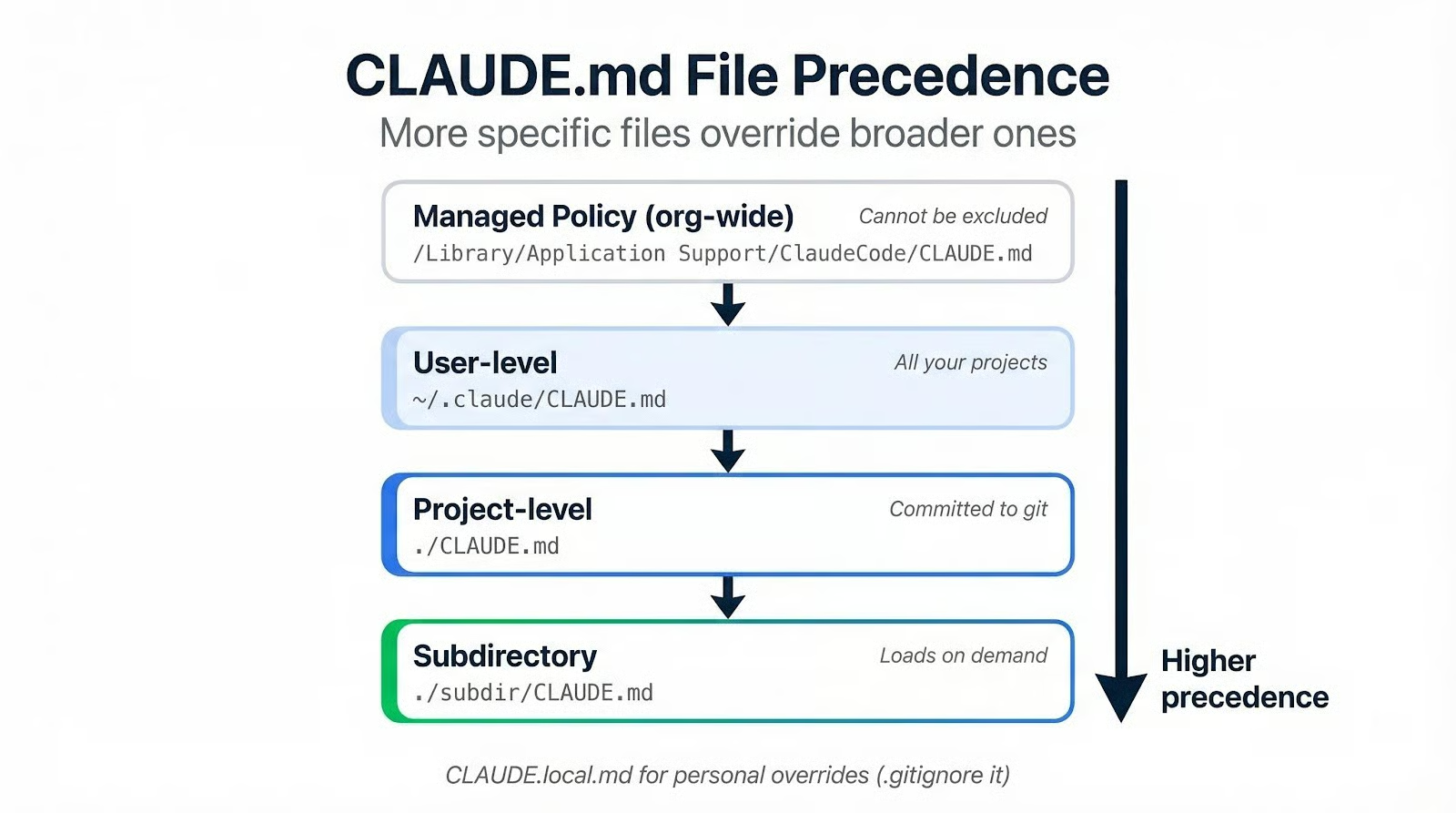
Los archivos más específicos tienen prioridad sobre los más generales. Si tu CLAUDE.md de proyecto dice "usa tabulaciones" y tu archivo a nivel de usuario dice "usa espacios", gana el de proyecto.
Para preferencias personales que no deberían entrar en control de versiones, crea un CLAUDE.local.md y añádelo a .gitignore. Las rarezas del editor, estilos de commit preferidos u overrides temporales van ahí para no contaminar el archivo compartido.
Sabiendo dónde vive el archivo y con qué compite, la siguiente pregunta es qué debe ir dentro.
Un CLAUDE.md se organiza en tres capas:
Si has leído Claude Code Best Practices, verás que es el mismo principio aplicado a un alcance más reducido. (Si no lo has hecho, merece la pena leerlo después de este artículo).
Empieza con una descripción de una o dos líneas y tu stack con números de versión. Claude puede inferir mucho leyendo tu código, pero no adivinará que usas Next.js 15 en lugar de 14, o que elegiste Drizzle en vez de Prisma.
Incluye un mapa de la estructura de directorios. No todos los archivos, solo el esquema de alto nivel con breves descripciones:
src/
  data/        # Data loading and preprocessing pipelines
  models/      # Model definitions and training loops
  evaluation/  # Metrics, validation, experiment tracking
  api/         # FastAPI endpoints for model serving
  tests/       # Co-located with source, test_*.py
Pon los comandos habituales en bloques de código. Build, test, lint y arranque del servidor de desarrollo. Un comando dentro de una valla de código es algo que Claude ejecutará literalmente. Un comando escrito en una frase es una sugerencia sobre la que podría improvisar.
Tus decisiones arquitectónicas deben estar en el archivo porque, si no, Claude tomará las suyas. Si elegiste SQLite en lugar de Postgres por un motivo, explícalo. Si tu capa de API sigue un patrón concreto, cuenta el razonamiento.
La justificación aquí hace un trabajo real. "No hagas force push" es una instrucción plana que Claude podría ignorar bajo presión. "No hagas force push. Esto reescribe el historial compartido y es irrecuperable para tus compañeros" le da a Claude suficiente contexto para generalizar. No solo evitará git push --force; también dudará antes de git reset --hard en una rama compartida.
Aquí entran las convenciones que Claude no puede deducir leyendo tu código. Si usas Conventional Commits (feat:, fix:, docs:), indícalo. Si las ramas siguen un patrón como initials/description, escríbelo.
Las rarezas y trampas también van aquí. Todas las bases de código las tienen: el script de migración que debe ejecutarse antes del build, la variable de entorno que necesita un valor concreto para que pasen los tests, el módulo que se rompe si se importa fuera de orden. Claude es un miembro nuevo del equipo en cada sesión, y estas son las cosas con las que tropieza cualquier nueva incorporación el primer día.
Qué puedes omitir: todo lo que Claude ya sepa por el propio lenguaje. No hace falta decirle que use async/await en JavaScript moderno o que prefiera pathlib en Python 3. Si una convención es el valor por defecto del lenguaje, escribirla es ruido que desplaza las instrucciones que sí importan.
Acertar con el contenido es la mitad fácil. La parte difícil es redactar instrucciones que Claude vaya a seguir de verdad y saber qué recortar.
La especificidad siempre gana a la intención. "Da formato al código correctamente" no le dice nada a Claude. "Sangría de 2 espacios, sin punto y coma, comillas simples" le dice exactamente qué hacer y le da algo verificable.
Aplica esta prueba a cada línea: "¿Si la quito, Claude cometería errores?" Si la respuesta es no, esa línea se va. La recomendación oficial es menos de 200 líneas por archivo, y algunos equipos con experiencia funcionan con menos de 60. No es minimalismo por postureo: un archivo más corto se lee más.
Limita los niveles de encabezado a tres como máximo. Usa nombres de sección que los agentes reconozcan por las convenciones de los README: Commands, Structure, Conventions, Testing. Ponerte creativo con los nombres añade fricción porque Claude ha visto millones de README y tiene expectativas claras de qué va en cada sitio.
Si una regla se ignora una y otra vez pese a estar en el archivo, no le añadas más palabras alrededor. Anteponle IMPORTANT: o YOU MUST. Pero úsalo con mesura, porque el énfasis escala mal. Si todo es importante, nada lo es.
El mayor error es imponer estilo de código aquí. Formato, sangría, orden de imports: son problemas deterministas con soluciones deterministas. Linters y formatters como Biome, ESLint o Ruff los resuelven más rápido, más barato y con un 100% de consistencia. Gastar presupuesto de instrucciones en reglas de estilo es peso muerto: lo mismo que hace gratis un hook de pre-commit.
Las convenciones estándar del lenguaje también van a la lista de exclusiones: Claude ya conoce los patrones de TypeScript y los modismos de Python. La documentación completa del API debería enlazarse, no pegarse. Las instrucciones específicas de tareas que solo aplican a ciertos flujos deben ir en skills, donde se cargan bajo demanda en lugar de ocupar espacio en cada sesión.
Un patrón a destacar: restricciones solo negativas. "No uses --legacy-peer-deps" deja a Claude atascado cuando haya un conflicto de dependencias. Acompaña cada prohibición de una dirección: "No uses --legacy-peer-deps; resuelve los conflictos actualizando el paquete a una versión compatible". Si has trabajado con Cursor Rules u otros archivos de configuración de IA, verás que este principio se aplica en todas las herramientas.
Así se ve la diferencia en la práctica. A la izquierda, una sección típica auto-generada de CLAUDE.md llena de consejos genéricos que Claude ya sabe. A la derecha, la misma sección tras aplicar la prueba de especificidad: solo sobreviven los hechos específicos del proyecto.
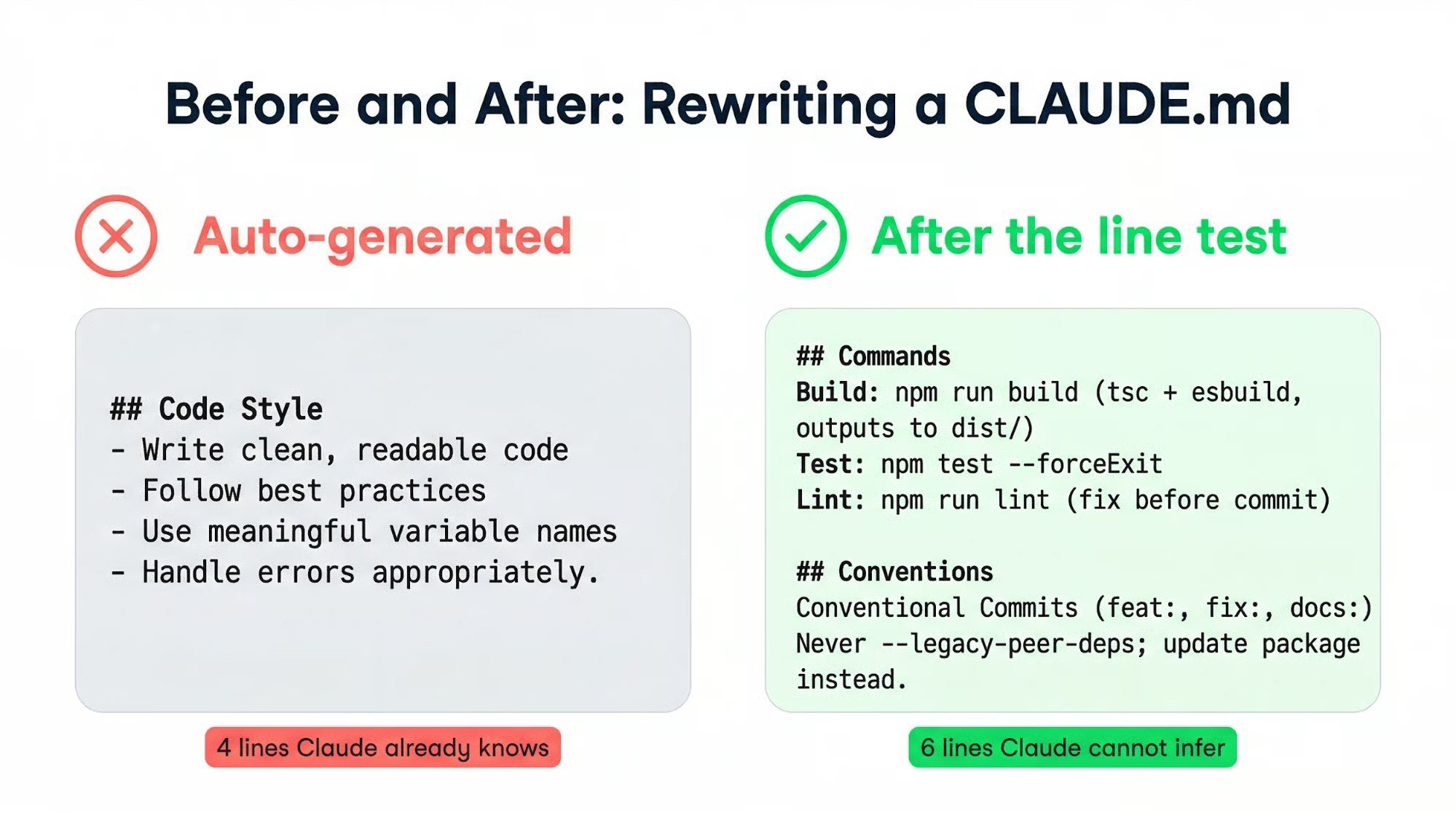
La segunda versión es más corta y le dice a Claude cosas que no puede deducir del código.
Ejecuta /init en la raíz de tu proyecto para generar un punto de partida. Lee cada línea, elimina lo obvio y añade lo que falte según cómo trabaja realmente tu equipo. Partir del resultado de /init es más rápido que un archivo en blanco, pero el contenido auto-generado nunca debería publicarse sin revisión.
Si prefieres escribirlo desde cero, empieza con cinco secciones:
Siempre podrás ampliar el archivo más adelante, y empezar en pequeño significa que cada línea que añadas nace de un error real y no de una suposición.
Dos señales te dirán que el archivo necesita mantenimiento:
Ambas apuntan al mismo remedio: menos palabras, estructura más clara.
Un archivo para una sola persona puede mantenerse así de ligero indefinidamente. Cuando se suma un equipo, el archivo necesita otra clase de estructura.
Tu CLAUDE.md a nivel de proyecto debe vivir en git. Es documentación compartida que mejora a medida que tus compañeros aportan reglas basadas en sus propios errores. Trata los cambios igual que los PR de código: revísalos y cuestiona si cada línea nueva se ha ganado su sitio.
Cuando las convenciones se acumulen más allá de lo que cabe en un solo archivo, muévelas a .claude/rules/. Cada archivo Markdown cubre un tema con nombres descriptivos: testing.md, api-design.md, database-migrations.md. Claude descubre estos archivos de forma recursiva y los carga con la misma prioridad que el CLAUDE.md principal.
Las reglas acotadas por ruta lo hacen aún más preciso. Añade frontmatter YAML y la regla solo se cargará cuando Claude trabaje con archivos coincidentes:
---
paths:
  - "src/api/**/*.ts"
---
# API conventions go here
Tus convenciones de frontend no gastarán presupuesto de instrucciones durante el trabajo de backend, y viceversa.
En monorepos donde los equipos tienen convenciones en conflicto, claudeMdExcludes bloquea la carga de archivos específicos:
{
  "claudeMdExcludes": [
    "**/other-team/.claude/rules/**"
  ]
}
Pon esto en .claude/settings.local.json para mantenerlo fuera del control de versiones.
Escalar un CLAUDE.md suele despertar el impulso de centralizar: un archivo enorme con todo dentro. Es el camino equivocado. Dividir el CLAUDE.md de un monorepo en archivos a nivel de servicio puede reducir el número total de palabras un 80% y a la vez mejorar el cumplimiento de las reglas por parte de Claude; menos que leer por sesión implica menos que filtrar.
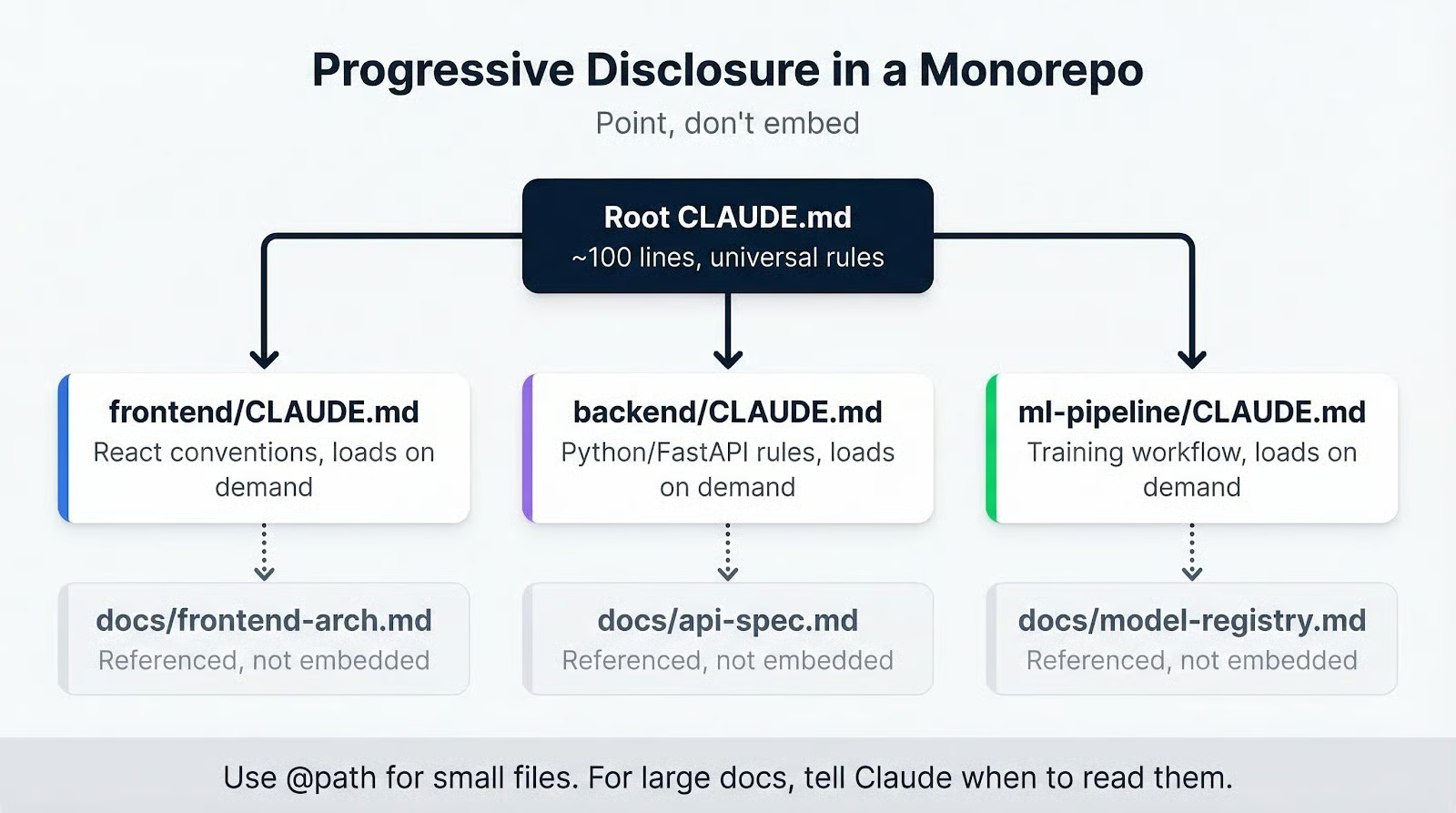 El principio: señala, no incrustes. En lugar de
 @path/to/big-doc.md (que carga el archivo entero en cada sesión), escribe "Para los procedimientos de migración, consulta docs/migrations.md". Claude lo leerá cuando necesite esa información. La sintaxis de importación con @ sirve para archivos pequeños, pero cualquier cosa sustancial es mejor referenciarla que incrustarla.
Los CLAUDE.md de subdirectorios completan este patrón. Un frontend/CLAUDE.md con convenciones de React se carga solo cuando Claude toca archivos de ese directorio. Las reglas de backend no estorban durante el trabajo de frontend.
La estructura a escala es un problema casi resuelto una vez conoces las piezas. Pero los proyectos cambian y las convenciones evolucionan. Reglas que tenían sentido hace seis meses se convierten en ruido que tapa las que importan ahora. El reto continuo es mantener el archivo honesto con el tiempo.
Añade reglas más despacio de lo que crees. Una línea nueva solo pertenece al archivo cuando Claude ha cometido un error real que esa línea habría prevenido. Cada regla debe remontarse a un incidente real, no a un hipotético.
La dirección contraria importa igual: si Claude ya sigue una convención sin que se lo digas, esa regla es peso muerto. Quítala y libera presupuesto para instrucciones que sí cambien el comportamiento.
Un hábito de bajo esfuerzo es pedirle a Claude cada pocas semanas: "Revisa este CLAUDE.md y sugiere mejoras". Detecta contradicciones entre reglas, señala solapamientos e identifica redacciones que pueden ser más precisas.
También puedes añadir una instrucción permanente en el propio archivo: "Cuando te encuentres un supuesto erróneo durante una sesión, sugiere una corrección para CLAUDE.md". Así creas un bucle de feedback que mejora el archivo con el uso normal.
El fallo más común es la acumulación. Se amontonan reglas tras cada sesión frustrante, nadie elimina las que han dejado de importar y, al final, el archivo es tan largo que Claude filtra la mitad. Si Claude sigue ignorando una regla, añadir énfasis encima de un archivo inflado no la arreglará. Podar sí.
Si estás usando importaciones con @ para archivos grandes, ese es el segundo problema a revisar. Un documento de arquitectura de 500 líneas importado con @ se incrusta entero en cada sesión, quemando tu presupuesto de instrucciones antes de que Claude procese tu primera regla. Referéncialo en su lugar.
Auto-generar con /init y no curar nunca el resultado es una forma garantizada de obtener malos comportamientos en general. Una instrucción errónea en CLAUDE.md no afecta solo a una respuesta: guía la investigación, planificación e implementación de Claude en todas las sesiones hasta que alguien la detecta.
Reglas contradictorias repartidas por varios archivos provocan comportamientos impredecibles. Cuando dos reglas chocan, Claude elige una sin decirte cuál. Esto empeora en proyectos que combinan un CLAUDE.md en la raíz con varios archivos en .claude/rules/. La única prevención es una revisión periódica de todos los archivos de instrucciones.
No todo error merece una regla nueva. Algunos fallos son casos aislados. Añadir una regla por cada esquina crea un archivo lleno de instrucciones condicionales que ayudan en situaciones muy concretas y perjudican en la mayoría. El objetivo siempre ha sido el mismo: un archivo corto donde cada línea cambia el comportamiento.
CLAUDE.md probablemente sea el archivo más crítico de un proyecto con Claude Code. Moldea cada sesión antes de que escribas un solo prompt, y mantenerlo bien repercute día a día.
Si aún no tienes uno, ejecuta /init, lee el resultado y elimina toda línea que no evitaría un error real. Si ya lo tienes, ábrelo ahora y aplica la misma prueba. Si tu CLAUDE.md tiene que ser enorme para explicar tu proyecto, eso indica que el tooling del proyecto es demasiado complejo, no que necesites un archivo más grande.
El siguiente paso: audita tu repo y redacta una base hoy mismo. Empieza con cinco secciones, mantenlo por debajo de 60 líneas y deja que los errores reales justifiquen cada nueva adición.
Si quieres crear herramientas que usen la API de Anthropic, nuestro curso Introduction to Claude Models cubre toda la familia de modelos y te enseña a usarlos con eficacia.
Cursos de IA
Curso
programa
Curso
blog
Abid Ali Awan
15 min
Tutorial
Abid Ali Awan
Tutorial
Abid Ali Awan
12 min
Tutorial
Dimitri Didmanidze
8 min
Tutorial
Moez Ali
12 min
Tutorial
Arunn Thevapalan
13 min