
Course
Claude Code 101
3 hr
26.9K
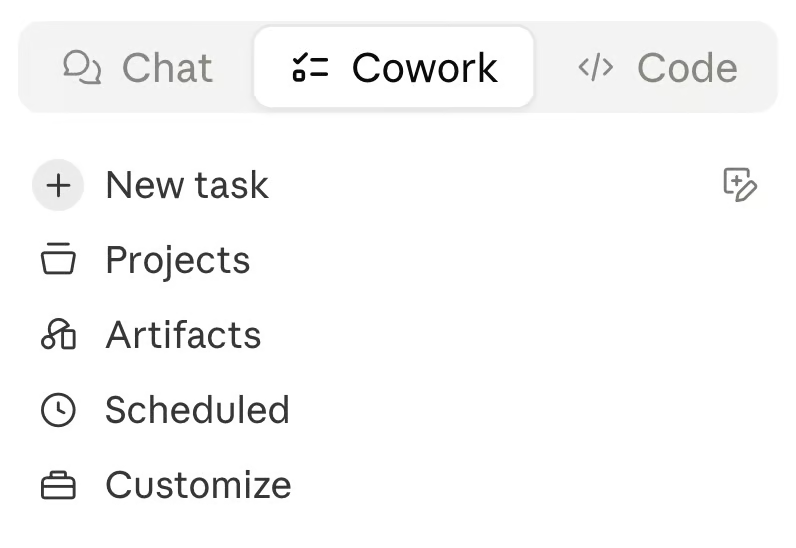
Claude Cowork is Anthropic's desktop agent for non-technical knowledge work, announced in January 2026 as a research preview. Anthropic built it after watching its own Marketing and Data teams reach for Claude Code, and Cowork is that same agent wrapped in a simpler experience for non-developers. You give it a goal, and it works across your local files, folders, and applications to return a finished deliverable.
The design idea is delegation rather than conversation. Most assistants make you steer one prompt at a time; Cowork takes the outcome and handles assembly, synthesis, and formatting on its own. It runs inside the Claude desktop app with no terminal setup, which is the whole point for users who would never touch a command line.
We walk through real Cowork examples, including organizing a downloads folder and pulling expense data from receipt screenshots, in our Claude Cowork tutorial. If you are looking for similar tools from other vendors, check out our Claude Cowork alternatives blog.
Claude Code is Anthropic's agentic coding system that reads your codebase, makes changes across files, runs tests, and delivers committed code. Generally available since May 2025, it operates at the project level rather than suggesting the next line like an autocomplete tool. It's terminal-native, though it now also runs elsewhere:
Anthropic runs Claude Code on its own repositories, using it to triage issues and deduplicate bug reports, and its engineers now run multiple sessions in parallel while focusing on architecture. The tool uses real development tooling natively, calling the GitHub CLI, git, and CI pipelines on GitHub and GitLab to commit fixes automatically.
If you want a hands-on walkthrough, our Claude Code tutorial covers using it to refactor, document, and debug a file in the Supabase Python SDK.
Both tools run the same kind of agentic loop: read context, plan steps, execute with real tools, and adjust. The difference is the surface they work on and the person they're built for. Here's the high-level split before we get into specifics.
| Feature | Claude Cowork | Claude Code |
|---|---|---|
| Interface | Claude desktop app (Cowork tab) | Terminal-native; also IDE, web, desktop, mobile |
| Primary user | Non-technical knowledge workers | Developers and technical builders |
| Main surface | Local files, folders, applications, browser | Codebases, git, CI pipelines |
| Core job | Documents, data extraction, file organization | Multi-file refactors, tests, committed code |
| Setup | None beyond the desktop app | Local install (CLI, IDE, or app); web needs none |
| Pricing | All paid plans (Pro, Max, Team, Enterprise) | Paid plan or API billing |
| Status | Research preview (Jan 2026) | Generally available (since May 2025) |
The cleanest way to read these two tools: Cowork is built around the outcome, and Claude Code is built around the codebase. Anthropic's own framing is that most AI tools are built around the prompt, and both of these break that mold by taking a full task instead of answering one question.
Cowork deliberately hides complexity. There are no permission flags to set or commands to memorize, because its users are operations teams, analysts, and legal professionals who want the assembly done, not the knobs exposed. Claude Code does the opposite by surfacing control: developers can approve every action or let built-in classifiers automatically separate safe actions from risky ones.
There's a one-line version of the whole relationship:
Claude Cowork is Claude Code for the rest of your work.
Anthropic
Simon Willison amplified that line on launch day, and his own framing is that Claude Code was always a general agent hiding inside a developer tool. If you've ever wished Claude Code existed without the terminal, Cowork is that wish, with fewer dials.
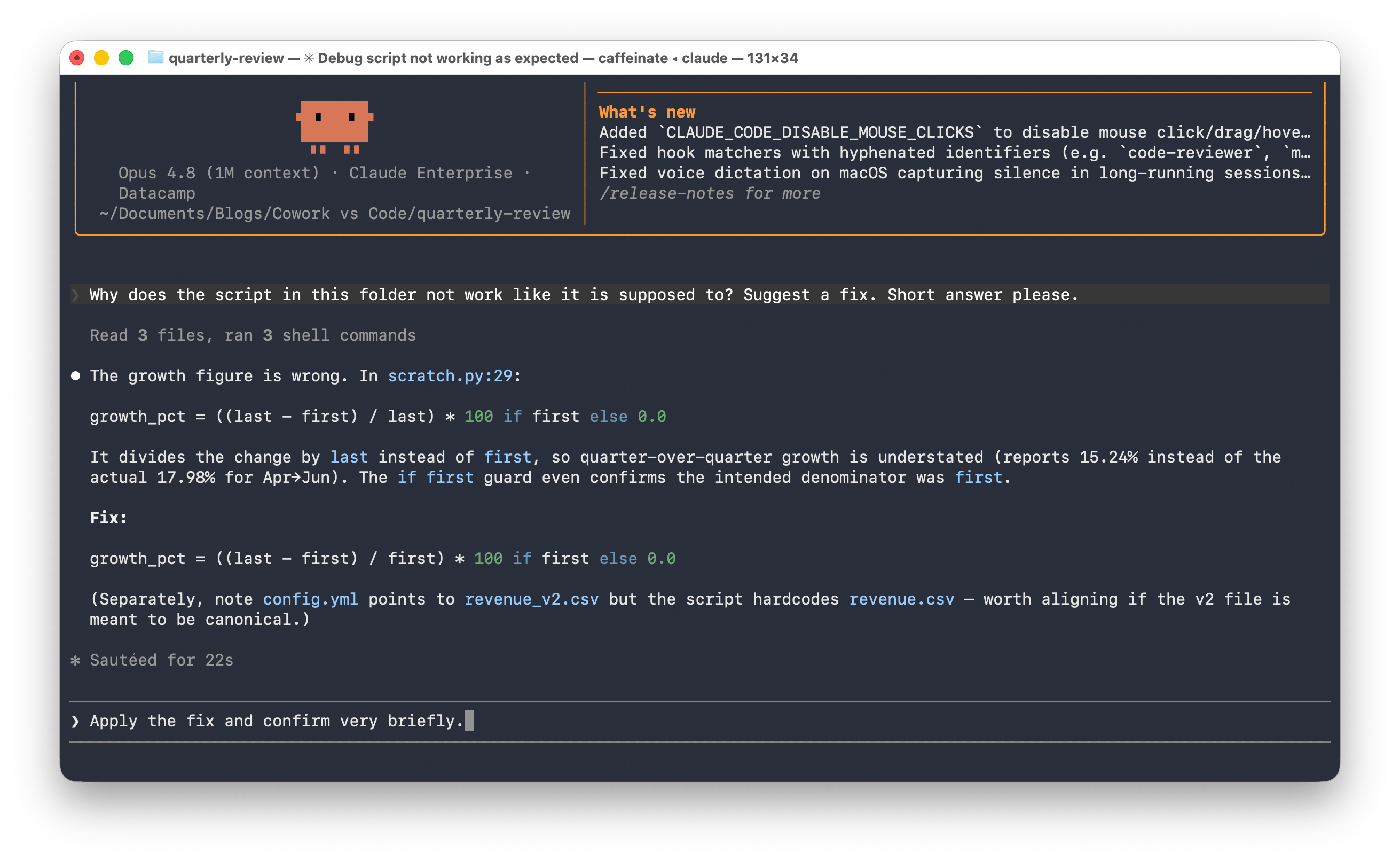
This dimension is where the two tools feel genuinely different, and it's the one most likely to decide your choice. In Cowork, you point Claude at a folder in the desktop app and describe what you want; it moves between files, synthesizes across sources, and hands back a deliverable. In Claude Code, you describe a task in the terminal, and it edits files across the project, runs the suite, and surfaces a diff or commit for you to review.
Cowork's strongest work is high-effort and repeatable, the kind of task that often gets skipped because nobody has the hour. Common workflows include the following:
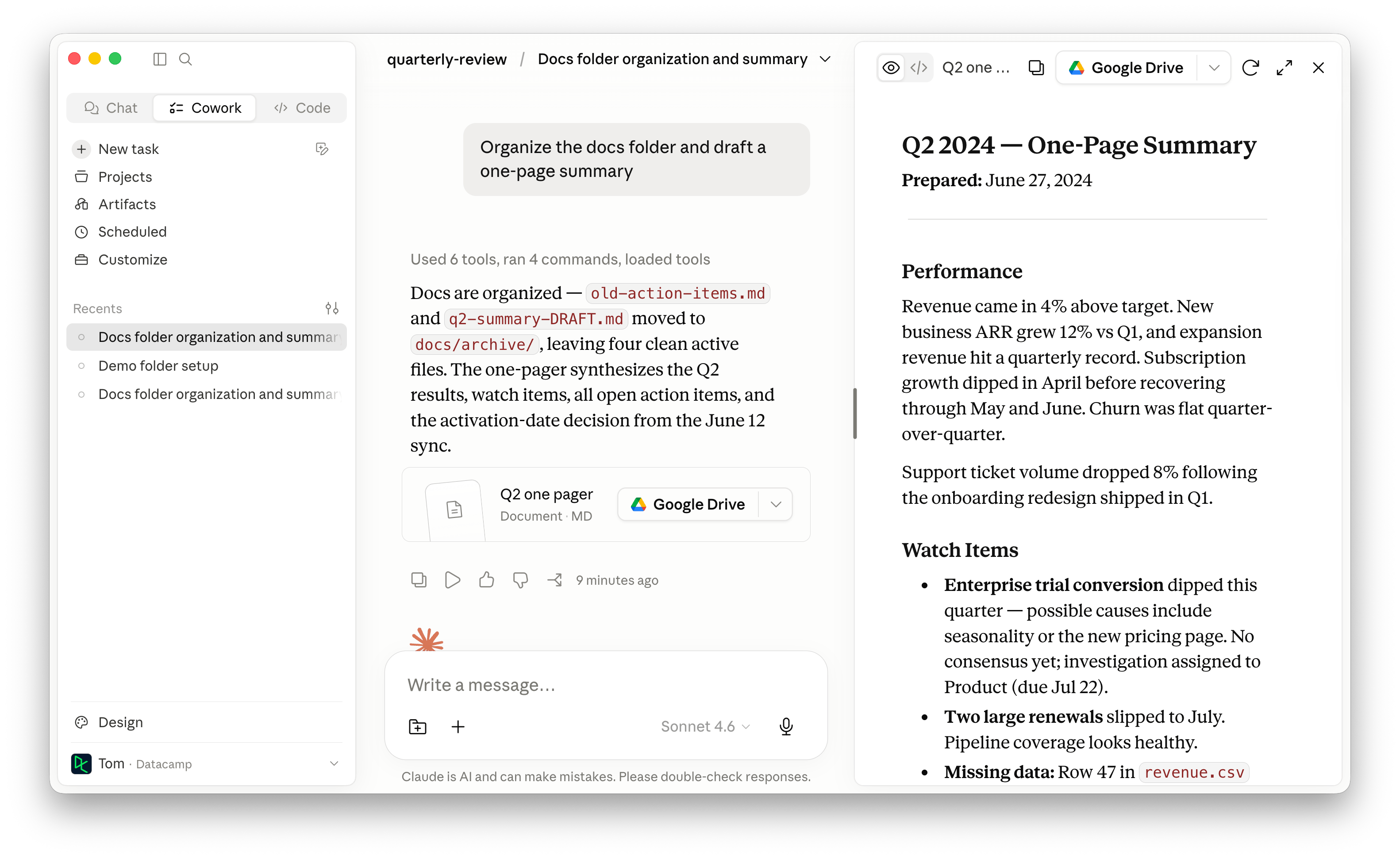
Cowork also reaches beyond static files: through the Claude in Chrome extension, it can drive a web browser, and it can turn a prompt into a scheduled task that runs on a cadence, with past runs listed on a Scheduled page in the left sidebar. Browser control isn't Cowork-only (Claude Code uses the same extension), but pairing it with no-code scheduling is what makes recurring desktop work click for people who don't script.
Claude Code's wheelhouse is multi-step engineering that touches many files. Its documented use cases include tracing dependencies in unfamiliar code, executing multi-file refactors, calling CLI tools like the GitHub CLI with correct syntax, and reading test failures to fix the code and rerun until everything passes.
The customer evidence here is concrete. Stripe deployed Claude Code across 1,370 engineers, and one team finished a 10,000-line Scala-to-Java migration in four days, work the company estimated at ten engineer-weeks. Wiz migrated a 50,000-line Python library to Go in roughly 20 hours of active development against a two-to-three-month manual estimate, and Rakuten cut average feature delivery from 24 working days to 5.
The takeaway is straightforward:
Both tools keep the human in charge of consequential decisions, but they expose control differently.
Claude Code requires explicit permission before modifying files or running commands by default, and developers can dial autonomy from approving every action to trusting classifiers to gate risky operations. Plan Mode goes further still, locking Claude into a read-only pass that produces a plan you review before a single file changes.
Cowork exposes control too, just more coarsely. It shows its approach before running, requires explicit permission before permanently deleting any file, and only touches folders you grant it access to. But it also has an "act without asking" mode that runs steps without pausing, and Anthropic warns that this sharply raises the risk of prompt injection.
That risk is the heart of Cowork's safety story. Anthropic's own guidance flags prompt injection as a key danger when Cowork reads web content, emails, or documents, and recommends you watch tasks for unexpected patterns rather than validating every command, since Cowork executes code on your behalf. It also advises keeping sensitive apps like banking and healthcare out of reach and limiting the Chrome extension to sites you trust.
Cowork runs in a virtual machine isolated from the wider internet, a containment layer that Claude Code's open local environment doesn't have by default. The catch is that the sandbox isolates the compute and filesystem, not the web content Cowork pulls in through fetch, search, and the browser, which is exactly where injection sneaks through. So the trade-off is real: Cowork is more sandboxed but reaches further into your browser and inbox, while Claude Code is more open to your system but starts cautious and asks first.
Claude Code is the more mature integration story, tying into git hosting, CI pipelines, and cost and usage analytics. It monitors CI on GitHub and GitLab, commits fixes automatically, and calls developer CLI tools natively instead of hiding the work in a backend you can't see. For recurring and event-driven automation, our Claude Code Routines tutorial walks through scheduling a run against your repos or triggering one on a GitHub event.
Cowork's integration story is shaped for non-developers. Both tools operate over the same Model Context Protocol, but the packaging is reversed:
That's why Cowork can coordinate across your everyday applications without you having to touch a config file. That said, the connector catalog is still expanding, although it covers the most popular office applications.
For a related Anthropic agent built for shared team channels rather than a single user, see our coverage of Claude Tag, Anthropic's AI teammate for Slack.
Both tools run on the same Claude models, so benchmarks don't separate them; they just predict different things for each. With either tool, the agent loop and tool access decide whether your suite goes green or your folder gets organized, more than any single score does. Claude Opus currently leads on the most important benchmarks for both:
For a deeper look, read our Claude Opus 4.8 guide and our Claude Opus 4.8 vs GPT-5.5 breakdown.
Pricing used to be the one place Cowork asked more of you, but that gap has closed. At launch, it was Max-only ($100–200/month) and macOS-only; it has since opened to every paid plan and added Windows, so both tools now start at the same $20 Pro tier inside the same desktop app.
The cost variable that's left isn't the plan; it's usage. Agentic tasks burn through your quota faster than chat, since Claude coordinates sub-agents and tool calls to finish a job. Claude Code can also run on API billing instead of a subscription, which matters for high-volume or automated workloads where per-token costs add up.
The decision usually comes down to one question: Does your task end in a document or in committed code? Price and platform no longer separate them; both run from the same paid plans in the same desktop app, so the surface your work lives on is the whole decision.
| Use case | Recommended | Why |
|---|---|---|
| Organizing and deduplicating a messy folder | Claude Cowork | Direct file access in the desktop app, no terminal needed |
| Multi-file refactor across a codebase | Claude Code | Project-level edits, diffs, and committed changes |
| Drafting a report from scattered source files | Claude Cowork | Synthesizes across sources and returns a structured draft |
| Fixing failing CI tests automatically | Claude Code | Reads errors, fixes code, reruns the suite, commits fixes |
| Extracting data from contracts or receipts | Claude Cowork | Reads dense, unstructured files into clean, structured output |
| Migrating a legacy library to a new language | Claude Code | Proven on Stripe and Wiz migrations in days, not weeks |
| Cross-application or browser automation | Claude Cowork | Drives Chrome and connectors beyond a single app |
| Onboarding to an unfamiliar codebase | Claude Code | Searches directories and traces dependencies fast |
If you write code, use Claude Code; if you wrangle documents and files, use Claude Cowork. That sounds obvious, but the genuinely interesting part is that both run the same agentic engine, so the choice is about interface and surface, not about which one is smarter.
For most readers, the decision is settled by your job title before you read a single benchmark. If you're a developer, Claude Code earns its keep. If you're a knowledge worker who keeps losing an hour a day to file organization and format conversion, Cowork is worth trying on whatever paid plan you already have, starting with low-risk tasks you trust.
If you want to build your own agent workflows on top of either tool, our Claude Agent SDK tutorial is a good starting point, and our Claude Cowork tutorial walks through the desktop agent step by step. If Claude Code is where you're headed, our guides to Claude Code 2.1, slash commands, and spec-driven development go deeper once you're set up. And to learn it hands-on from scratch, I'd start with our Claude Code 101 course, which takes you from install to custom subagents, hooks, and MCP.
Learn Using Claude with DataCamp!
Course
Course
Course
blog
Tom Farnschläder
15 min
blog
Khalid Abdelaty
10 min
blog
Derrick Mwiti
8 min
Tutorial
Bexruz (Bex) Tuychiev
11 min
Tutorial
Tim Lu
15 min
Tutorial
Dario Radečić
15 min


