
Free access is closing! 700+ free courses are waiting.
Ends in:
Start Now
Apache Kafka is an open-source distributed event-streaming framework developed at LinkedIn by a team that included Jay Kreps, Jun Rao, and Neha Narkhede. The tool was optimized to ingest and process streaming data in real time; thus, it can be used to implement high-performance data pipelines, streaming analytics applications, and data integration services.
After storing the events, the event streaming platform directs them to the relevant services. Developers can scale and maintain a system like this without relying on other services. Since Kafka is an all-in-one package that can be used as a message broker, event store, or stream processing framework, it works excellently for such a requirement.
With high throughput and durability, hundreds of data sources can simultaneously provide huge inflows of continuous data streams that can be processed sequentially and progressively by Apache Kafka's message broker system.
Kafka differs from traditional message brokers like RabbitMQ in several fundamental ways:
| Feature | Apache Kafka | Traditional Brokers (e.g., RabbitMQ) |
|---|---|---|
| Message retention | Configurable (days to years); messages persist after consumption | Messages deleted after consumer acknowledgment |
| Consumer model | Pull-based; consumers read at their own pace | Push-based; broker delivers to consumers |
| Throughput | Millions of messages per second | Thousands to tens of thousands per second |
| Ordering | Guaranteed within a partition | Varies by implementation |
| Replay | Consumers can re-read past messages at any offset | Not supported after delivery |
| Primary use case | Event streaming, log aggregation, real-time pipelines | Task queues, request-reply patterns |
Key advantages of Apache Kafka include:
Kafka’s well-designed architecture, which includes data partitioning, batch processing, zero-copy techniques, and append-only logs, enables it to reach high throughput and handle millions of messages per second, catering to high-velocity and high-volume data scenarios. Thus, the lightweight communication protocol that facilitates effective client-broker interaction makes real-time data streaming feasible.
Apache Kafka provides load balancing across servers by partitioning a topic into multiple partitions. This enables users to distribute production clusters among geographical areas or availability zones and scale them up or down to suit their needs. In other words, Apache Kafka can be easily scaled up to handle trillions of messages per day across a large number of partitions.
Apache Kafka uses a cluster of servers with low latency (as low as 2 milliseconds) to efficiently deliver messages at network-limited throughput by decoupling data streams.
Apache Kafka enhances data fault-tolerance and durability in two key ways:
Due to its cluster-based brokers, Kafka remains operational during a server outage. This works because when one of the servers experiences issues, Kafka is smart enough to send queries to different brokers.
Apache Kafka enables users to analyze data in real time, store records in the order they were created, and publish and subscribe to them.
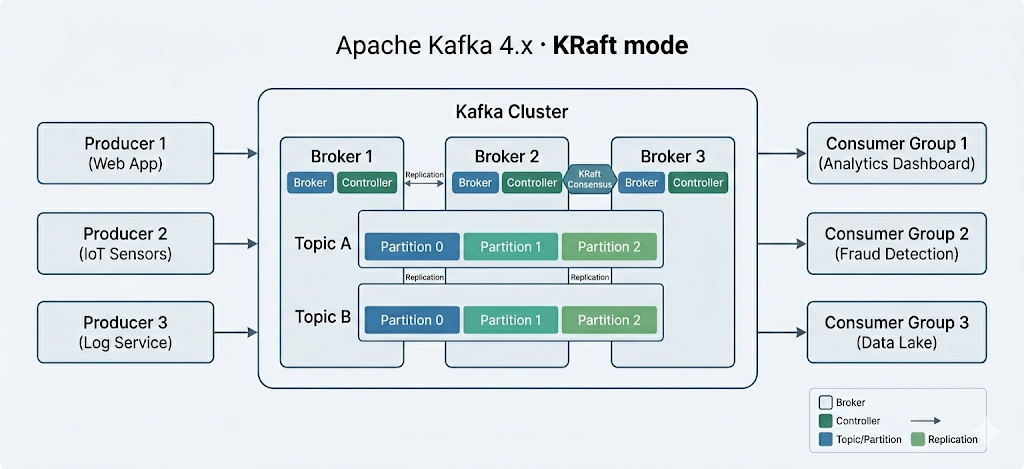
The core components of Apache Kafka
Apache Kafka is a horizontally scalable cluster of commodity servers that processes real-time data from multiple "producer" systems and applications (e.g., logging, monitoring, sensors, and Internet of Things applications) and makes it available to multiple "consumer" systems and applications (e.g., real-time analytics) at very low latency – as shown in the diagram above.
Note that applications that depend on real-time data processing and analytics systems can both be considered consumers. For example, an application for location-based micromarketing or logistics.
Here are some key terms to know to understand the core components of Kafka better:
Important (2025 update): Apache Kafka 4.0, released in March 2025, removed ZooKeeper entirely in favor of KRaft (Kafka Raft) mode. The setup instructions below use ZooKeeper and apply to Kafka 3.x only. For Kafka 4.x, ZooKeeper is no longer needed or supported. If you are starting fresh, consider using Docker with KRaft mode for a simpler setup.
It is often recommended that Apache Kafka 3.x be started with Zookeeper for optimum compatibility. Also, Kafka may run into several problems when installed on Windows because it’s not natively designed for use with this operating system. Consequently, it is advised to launch Apache Kafka on Windows using WSL2 or Docker.
It is not advised to use the JVM to run Kafka on Windows since it does not have some of the POSIX characteristics that are unique to Linux. You will eventually encounter difficulties if you attempt to run Kafka on Windows without WSL2.
That said, the first step to install Apache Kafka on Windows is to install WSL2.
WSL2, or Windows Subsystem for Linux 2, gives your Windows PC access to a Linux environment without needing a virtual machine.
Most Linux commands are compatible with WSL2, bringing the Kafka installation process closer to the instructions offered for Mac and Linux.
Tip: Ensure you’re running Windows 10 version 2004 or higher (Build 19041 and higher) before installing WSL2. Press the Windows logo key + R, type “winver,” then click OK to see your Windows version.
The easiest way to install Windows Subsystem for Linux (WSL) is by running the following command in an administrator PowerShell or Windows Command Prompt and then restarting your computer:
Note you’ll be prompted to create a user account and password for your newly installed Linux distribution.
Follow the steps on the Microsoft Docs website if you get stuck.
If Java is not installed on your machine, then you’ll need to download the latest version.
As of this update, the latest stable version of Apache Kafka is 4.2.0, released in February 2026. Kafka 4.0 (March 2025) replaced ZooKeeper with KRaft mode for metadata management. To get the current stable version, check out the download page.
Download the latest version from the Binary downloads.
Once the download is complete, navigate to the folder where Kafka was downloaded and extract all the files from the zipped folder. Note we named our new folder “Kafka.”
Zookeeper is required for cluster management in Apache Kafka 3.x. Therefore, Zookeeper must be launched before Kafka. Installing Zookeeper separately is not necessary because it is part of Apache Kafka.
Open the command prompt and navigate to the root Kafka directory. Once there, run the following command to start Zookeeper:
Open another command prompt and run the following command from the root of Apache Kafka to start Apache Kafka:
To create a topic, start a new command prompt from the root Kafka directory and run the following command:
This will create a new Kafka topic called “MyFirstTopic.”
Note: to confirm it’s created correctly, executing the command will return “Create topic <name of topic>.”
A producer must be started to put a message in the Kafka topic. Execute the following command to do so:
Open another command prompt from the root Kafka directory and run the following command to start the Kafka consumer:
.\bin\windows\kafka-console-consumer.bat --topic MyFirstTopic --from-beginning --bootstrap-server localhost:9092Now, when a message is produced in the Producer, it is read by the Consumer in real time.
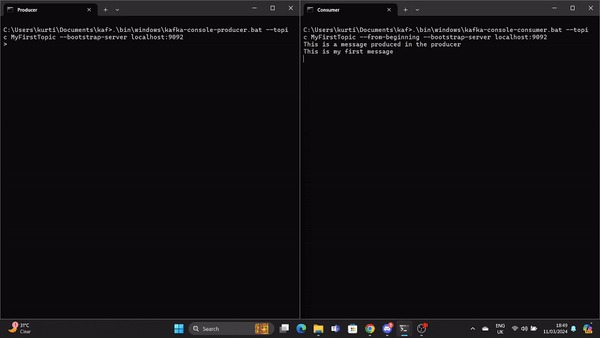
A GIF demonstrates a message produced by the Producer and read by the Kafka Consumer in real time.
You’ve just created your first Kafka topic and sent a message from producer to consumer in real time.
Kafka offers several advanced features beyond basic message passing.
Using Apache Kafka, developers can build fault-tolerant stream-processing applications with Kafka Streams. It offers APIs and a high-level Domain-Specific Language (DSL) for handling, converting, and evaluating continuous streams of data.
A few key features include:
Real-time processing of record streams is made possible by Kafka Streams. It enables you to take in data from Kafka topics, process and transform the data, and then return the processed information back to Kafka topics. Stream processing allows for near real-time analytics, monitoring, and data enrichment. It can be applied to individual recordings or to windowed aggregations.
Using the timestamps attached to the records, you can handle out-of-order records with Kafka Streams' support for event-time processing. It provides event-time semantics windowing operations, allowing for window joining, sessionization, and time-based aggregations.
Kafka Streams provides a number of windowing operations that enable users to perform computations over session windows, tumbling windows, sliding windows, and fixed time windows.
Event-based triggers, time-sensitive analysis, and time-based aggregations are possible via windowed procedures.
During stream processing, Kafka Streams enables users to keep and update the state. Built-in support for state stores is provided. Note a state store is a key-value store that can be updated and queried within a processing topology.
Advanced stream processing functions like joins, aggregations, and anomaly detection are made possible by stateful operations.
Kafka Streams provides end-to-end semantics for exactly-once processing, guaranteeing that every record is handled precisely once—even in the event of a failure. This is accomplished by utilizing Kafka's built-in durability guarantees and transactional features.
The declarative, pluggable data integration framework for Kafka is called Kafka Connect. It is an open-source, free component of Apache Kafka that acts as a centralized data hub for simple data integration between file systems, databases, search indexes, and key-value stores.
The Kafka distribution includes Kafka Connect by default. To install it, you just have to start a worker process.
Use the following command from the root Kafka directory to launch the Kafka Connect worker process:
This will launch the Kafka Connect worker in distributed mode, enabling the high availability and scalability of running numerous workers in a cluster.
Note: The .\config\connect-distributed.properties file specifies the Kafka broker information and other configuration properties for Kafka Connect.
Connectors are used by Kafka Connect to transfer data between external systems and Kafka topics. Connectors can be installed and configured to suit your unique requirements for data integration.
Downloading and adding the connector JAR file to the plugin.path directory mentioned in the .\config\connect-distributed.properties file is all that is required to install a connector.
A configuration file for the connector must be created, in which the connector class and any other characteristics must be specified. The Kafka Connect REST API and command-line tools can be used to construct and maintain connectors.
Next, in order to combine data from other systems, you must configure the Kafka Connector. Kafka Connect offers various connectors for integrating data from various systems, such as file systems, message queues, and databases. Select a connector based on the needs you have for integration - see the documentation for the list of connectors.
Here are a few common use cases of Apache Kafka.
Kafka can be used by an online e-commerce platform to track user activity in real time. Every user action, including viewing products, adding items to carts, making purchases, leaving reviews, doing searches, and so on, may be published as an event to particular Kafka topics.
Other microservices can store or use these events for real-time fraud detection, reporting, personalized offers, and recommendations.
With its improved throughput, built-in partitioning, replication, fault-tolerance, and scaling capabilities, Kafka is a good substitute for conventional message brokers.
A microservices-based ride-hailing app can use it to facilitate message exchanges across various services.
For instance, the ride-booking business might use Kafka to communicate with the driver-matching service when a rider makes a reservation. The driver-matching service may then, in almost real time, locate a driver in the area and reply with a message.
Typically, this entails obtaining physical log files from servers and storing them in a central location for processing, such as a file server or data lake. Kafka abstracts the data as a stream of messages and filters the file-specific information. This makes it possible to process data with reduced latency and to accommodate distributed data consumption and different data sources more easily.
After the logs are published to Kafka, they can be used for troubleshooting, security monitoring, and compliance reporting by a log analysis tool or a security information and event management (SIEM) system.
Several Kafka users process data in multi-stage processing pipelines. Raw input data is taken from Kafka topics, aggregated, enriched, or otherwise transformed into new topics for additional consumption or processing.
For example, a bank may use Kafka to process real-time transactions. Each transaction a customer starts is then posted to a Kafka topic as an event. Subsequently, an application may take in these events, verify and handle the transactions, stop dubious ones, and instantly update customer balances.
Kafka could be used by a cloud service provider to aggregate statistics from distributed applications to generate real-time centralized streams of operational data. Metrics from hundreds of servers, such as CPU and memory consumption, request counts, error rates, etc., might be reported to Kafka. Monitoring applications might then use these metrics for anomaly identification, alerting, and real-time visualization.
Apache Kafka is the industry standard for real-time event streaming, used by over 80% of Fortune 100 companies. With Kafka 4.0 and KRaft mode, deploying and managing clusters is simpler than in previous versions.
In this article, I covered why Kafka matters, its core components, a step-by-step setup, advanced features like Kafka Streams and Kafka Connect, and real-world applications. To continue your learning, check out:


blog
 Maria Eugenia Inzaugarat• 10 min

blog
 Kurtis Pykes • 15 min

blog
 Adejumo Ridwan Suleiman• 13 min
Start Your Data Engineer Journey Today!
Kurs
Odkryj, jak inżynierowie danych tworzą fundamenty, które umożliwiają data science. Bez kodowania!
Kurs
Opanuj Apache Kafka! Od podstaw po zaawansowaną architekturę: naucz się tworzyć, zarządzać i diagnozować Kafka w realnych wyzwaniach streamingu danych!
Ścieżka
Naucz się inżynierii danych na Databricks z SQL, Python i Spark oraz przygotuj się do certyfikacji Databricks Certified Data Engineer Associate.


Microservices and event-based architectures now define the modern application landscape. The days of batch-based processing are long gone. To meet the demands of speed and availability, developers aim for near-real timeliness and fully decoupled application architecture.
An event management system is usually used by decoupled applications to help with integration across different services. Another application for an event store is in event sourcing-based architectures, where all application logic is expressed in terms of events. This is where Apache Kafka comes into the discussion.
Essentially, Kafka is a framework for distributed event stores and stream processing that can be used as a message broker, event store, queue management system, etc. You can read our comparison of Kafka vs Amazon SQS in a separate guide and check out how Kafka Partitions work in our tutorial.
If you want to create a learning plan, check out this blog on how to learn Apache Kafka.