

Курс
Введение в модели Claude
3 ч
15K
Практикуйтесь и следите за своим прогрессом.
Продолжить С GoogleAnthropic’s Claude Opus 4.7 introduces a new xhigh effort level, sitting between high and max, and specifically highlights improved file-system memory as a key capability, i.e., the model can write notes to itself and use them across sessions.
This raised an obvious question for me: Does the memory actually work in a measurable format? Also, does Opus 4.7 learn from its own mistakes and produce better code on the next task?
So, I built a Streamlit benchmark harness that runs three hard-coding tasks sequentially. After each task, the model writes a self-critique to a memory file(memory.md). The next task reads that file before starting. I ran this with and without memory, across all three effort levels (high, xhigh, and max), for a total of 18 task runs via Claude Opus 4.7 on Microsoft Foundry.
By the end of this tutorial, you will be able to:
The complete code is available in the GitHub repository.
Claude Opus 4.7 is the most capable large language model in the Claude 4 family, above Sonnet and Haiku. It is built for long-running agentic tasks, advanced software engineering, and enterprise workflows, that require sustained performance over long sessions.
The three capabilities most relevant to this tutorial are:
xhigh effort level: This sits between high (5,000 thinking tokens) and max (20,000 thinking tokens) at 10,000 thinking tokens. The idea is finer cost-quality control on hard problems.Note: Pricing is $5 per million input tokens and $25 per million output tokens which is identical to Opus 4.6. If you want to explore this model in depth, this article by DataCamp team is a good read.
A few numbers worth knowing before we test it:
|
Benchmark |
Score |
|
SWE-bench Verified |
87.6% |
|
SWE-bench Pro |
64.2% |
|
GPQA Diamond |
94.2% |
|
OSWorld Verified (computer use) |
78.0% |
|
Finance Agent v1.1 |
64.4% |
All API calls in this tutorial go through Microsoft Foundry. So, we need an Azure subscription with access to pay-as-you-go billing because the free student tier does not have quota for third-party partner models like Claude. But a good alternative is using Anthropic’s API key. I have covered both approaches in this repository.
The initial step of this tutorial is to find the model within Microsoft Foundry Model catalog. For this,
claude-opus-4-7. This will open a model card showing the key capabilities, benchmarks, and the model ID.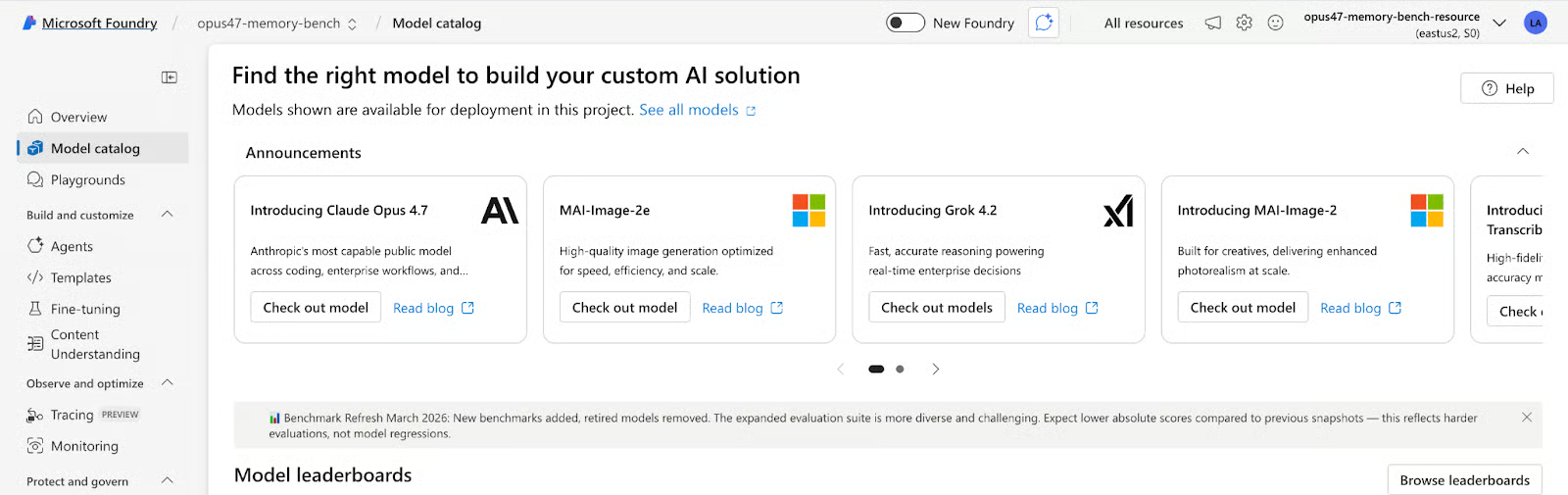
opus47-memory-bench. Then, accept the terms of use and agree to Anthropic's usage policy via the Azure Marketplace.
Once your project is created, you will land on the deploy dialog. Then fill in the following information:
Deployment name: claude-opus-4-7 (keep this as default, as code uses this string)
Deployment type: Global Standard (serverless, no capacity management)
Model version upgrade policy: I recommend pinning to version 1 rather than auto-update, so new model releases don't break existing runs
Click Create resource and deploy.
Once deployed, open your project in the Foundry portal. Under Overview tab, you will find the following:
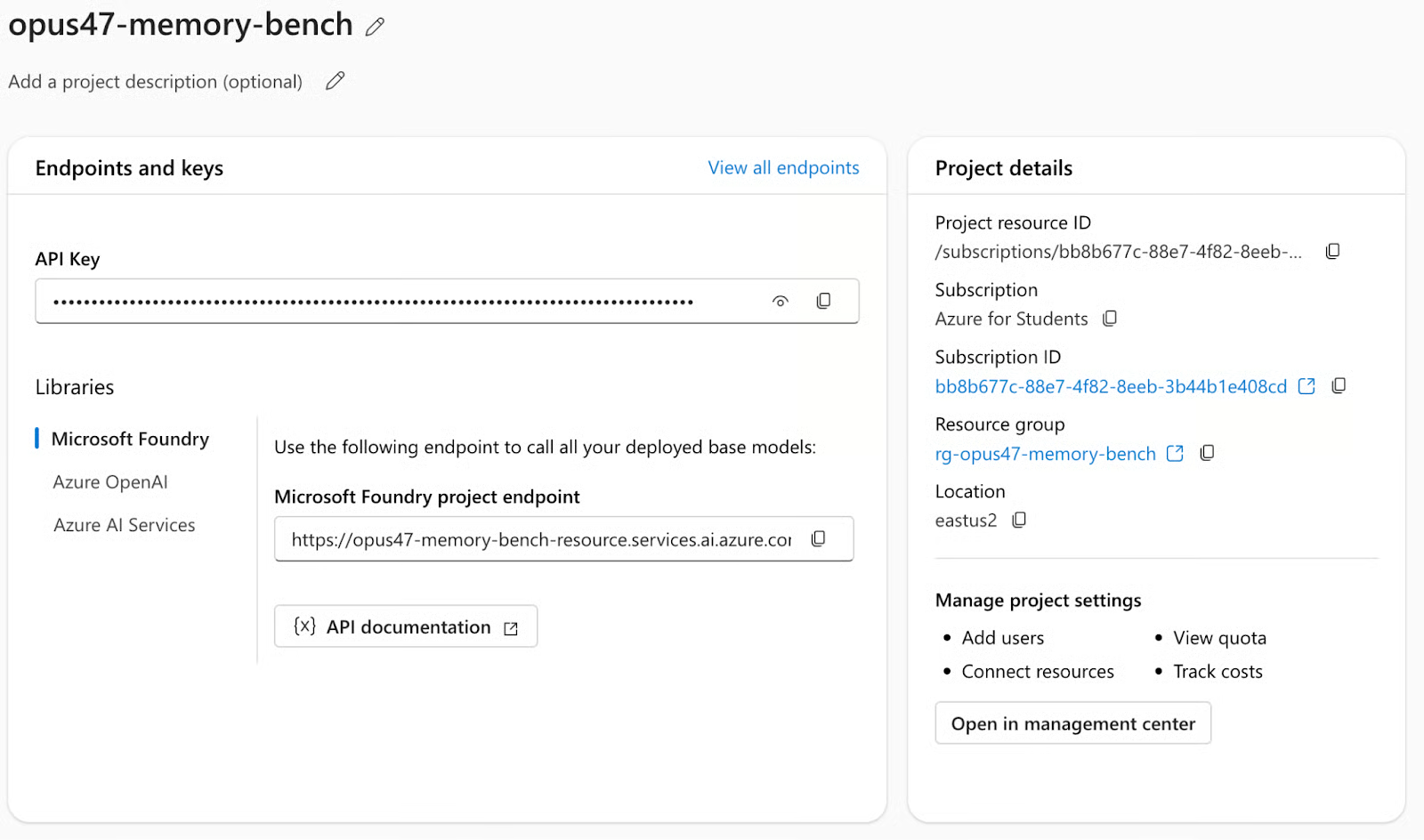
API key: Copy the API key and save it for future use. We’ll set the API key as ANTHROPIC_FOUNDRY_API_KEY.
Microsoft Foundry project endpoint: Copy the resource name from the project endpoint, available in the format https://your-resource.services.ai.azure.com, where the resource name is the subdomain prefix (i.e, everything before .services.ai.azure.com). We will set it as ANTHROPIC_FOUNDRY_RESOURCE
Now we have all the resources we need. Next we’ll set the above keys as environment variables and run the streamlit application.
pip install -r requirements.txt
export ANTHROPIC_FOUNDRY_API_KEY="your-key"
export ANTHROPIC_FOUNDRY_RESOURCE="your-resource-name"
streamlit run app.py
The Anthropic SDK handles the Foundry endpoint automatically when you pass the resource-specific base URL:
import anthropic
client = anthropic.Anthropic(
    api_key=os.environ["ANTHROPIC_FOUNDRY_API_KEY"],
base_url=f"https://{os.environ['ANTHROPIC_FOUNDRY_RESOURCE']}.services.ai.azure.com/anthropic/",
)
Everything else including the model calls, thinking parameters, response parsing uses the standard Anthropic SDK. No OpenAI compatibility layer needed.
The streamlit harness runs three tasks in sequence, twice per effort level and once with memory enabled, and once without (the control). Each task has four explicit judge criteria worth 25 points each, scored by a second Opus 4.7 call acting as LLM-as-judge. The passing threshold for each task and subtask is 70/100.
This task consists of a classic LeetCode hard problem. The prompt requires an O(log(m+n)) binary search implementation where a linear scan scores zero on the complexity criterion. It also requires a test suite of at least 10 cases and inline comments explaining each step of the binary search logic. After writing the code, the model must manually trace through nums1=[1,3], nums2=[2] examples step by step.
This task comprises of a buggy Python RateLimiter class with at least three bugs, one of which is a subtle race condition. The is_allowed() method reads and mutates shared state without holding the lock, creating a classic TOCTOU (time-of-check to time-of-use) vulnerability. The prompt requires identifying each bug with its exact line numbers, explaining the failure mode, providing the fix, and then performing an explicit self-check by re-reading the corrected code.
For task 3, we’ll try and implement a scalar-valued autograd engine in pure Python with no NumPy, no PyTorch (supporting +, *, -, /, **), and ReLU with correct subgradient at zero. The engine must use topological sort for the backward pass and gradient accumulation (+=) for nodes used multiple times. Crucially, the prompt requires showing the manual chain-rule derivation before the code, not after. This tests whether the model can plan first and verify its reasoning.
The memory mechanic is what separates this benchmark from a standard LLM eval. Rather than treating each task as an independent call, the model is given a structured opportunity to reflect on what it did wrong and carry that reflection forward using a memory component.
MEMORY_WRITE_PROMPT = """You just completed a coding task. Write a concise self-critique.
Task: {task_name}
Your score: {score}/100
Judge feedback: {feedback}
Write 3-5 bullet points covering:
- Exactly what you got wrong or incomplete
- What habits or assumptions caused those mistakes
- Specific things to do differently on the NEXT task"""
This creates a learning curve within a single session. By Task 3, the model is working with two rounds of accumulated self-critique and instructions it wrote to itself about its own failure patterns. Whether it actually uses those instructions productively or not, is what we’ll explore in the results section.
Opus 4.7 introduces xhigh as a new effort level sitting between high and max. The thinking budget controls how many tokens the model can spend on internal reasoning before producing its response. Higher budgets allow deeper planning but increase latency and cost.
EFFORT_LEVELS = {
    "high":  {"thinking_tokens": 5_000},
    "xhigh": {"thinking_tokens": 10_000},
    "max":   {"thinking_tokens": 20_000},
}
These are passed directly to the Anthropic SDK:
resp = client.messages.create(
    model="claude-opus-4-7",
    max_tokens=8000,
    thinking={"type": "enabled", "budget_tokens": thinking_budget},
    messages=[{"role": "user", "content": user_msg}],
)
The model self-regulates based on perceived task difficulty. In practice, you will rarely see the full budget consumed, so the max runs in this benchmark averaged around 300 thinking tokens per task, well below the 20,000 limit.
The benchmark ran 18 task calls total (3 efforts x 2 modes x 3 tasks) 18 judge calls for scoring. The total cost for this experiment was approximately $5.
I plotted performance of this model across the three tasks for all six conditions (three effort levels x memory on/off). The orange lines in the following plot are memory-enabled runs, while the gray/dashed lines are no-memory runs, and the red dotted line marks the 70-point pass threshold.
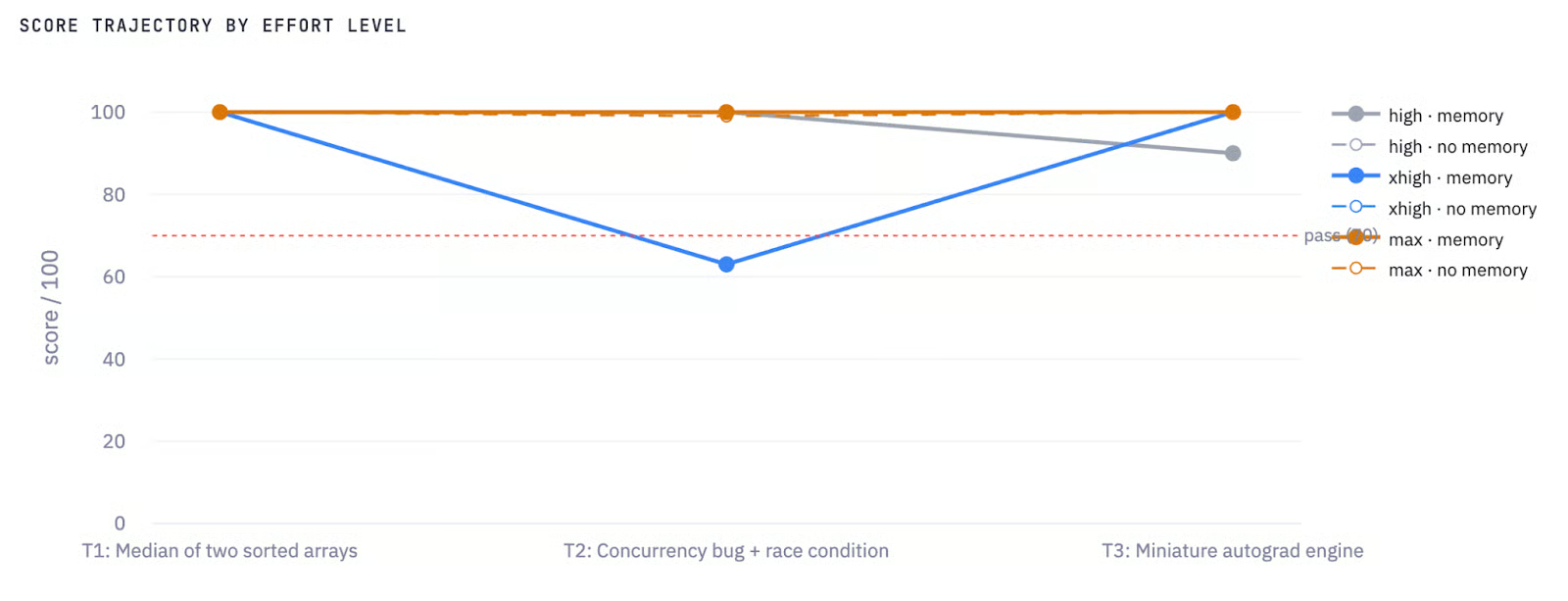
Score Trajectory by effort level and memory
The most striking feature is the blue line (xhigh + memory) plunging to 63 on Task 2 i.e the only failed run in the entire benchmark. This is the central finding of the experiment, and I'll break it down task by task below.
The efficiency chart plots score against cost per task. The cluster at the top left in Figure 2 shows high and no-memory configurations. The outlier at the bottom left is xhigh + memory on Task 2 with 63 points at $0.009, meaning the model ran cheaply but failed. The max memory runs appear at the right edge (~$0.10–0.12), delivering comparable scores to high at more than twice the cost.
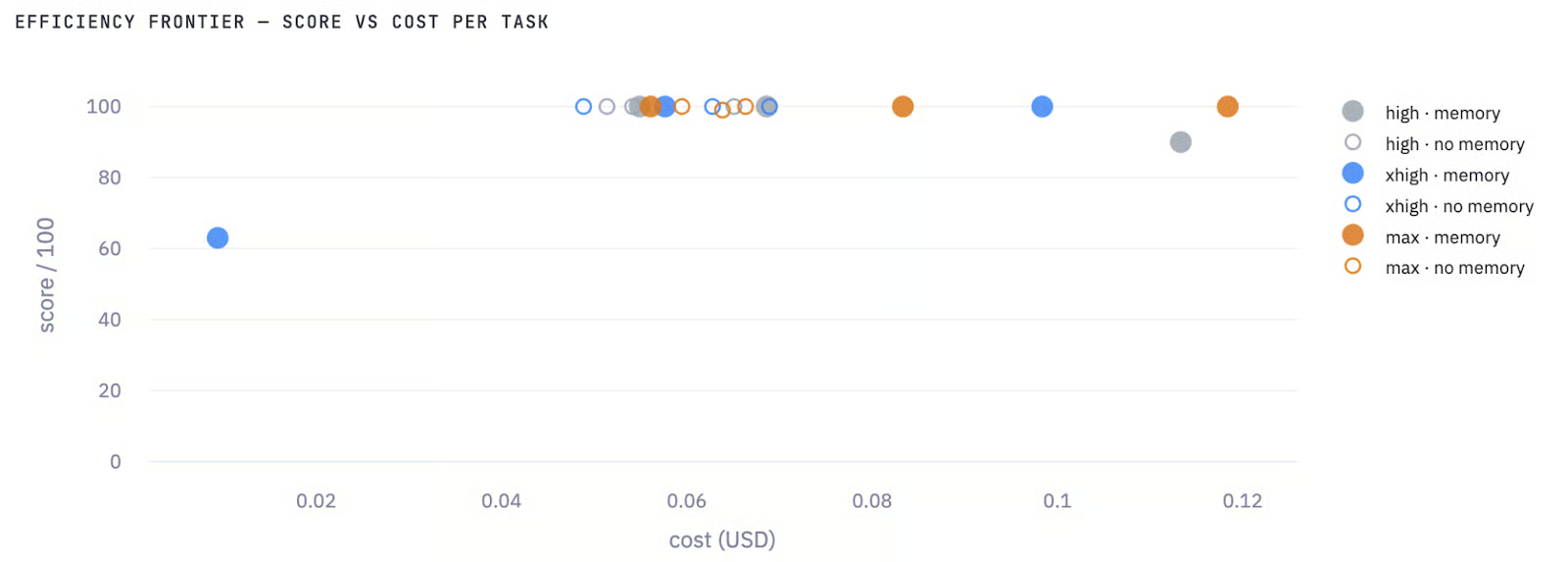
Efficiency plot: Score vs Cost per task
The practical takeaway from this chart is that for these types of coding tasks, spending more on thinking budget does not reliably buy better scores. The best cost-efficiency is high without memory.
The effort x memory matrix summarizes average scores across all three tasks:
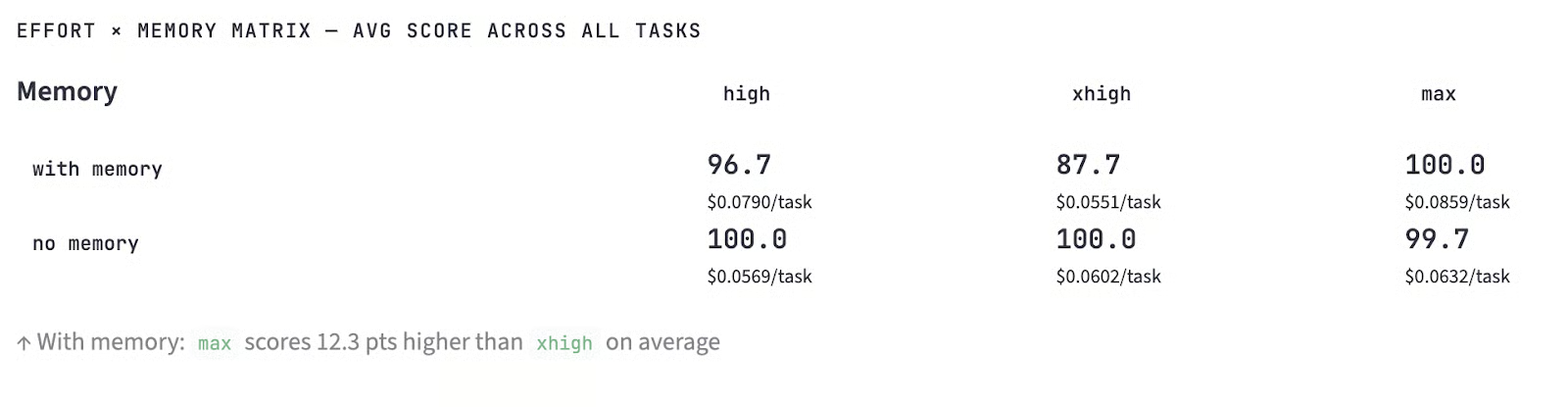
Avg score across all tasks
No-memory runs dominated in two out of three effort levels. The max + memory configuration reached 100.0 on average but the only memory configuration that outperformed its no-memory counterpart, and only by 0.3 points.
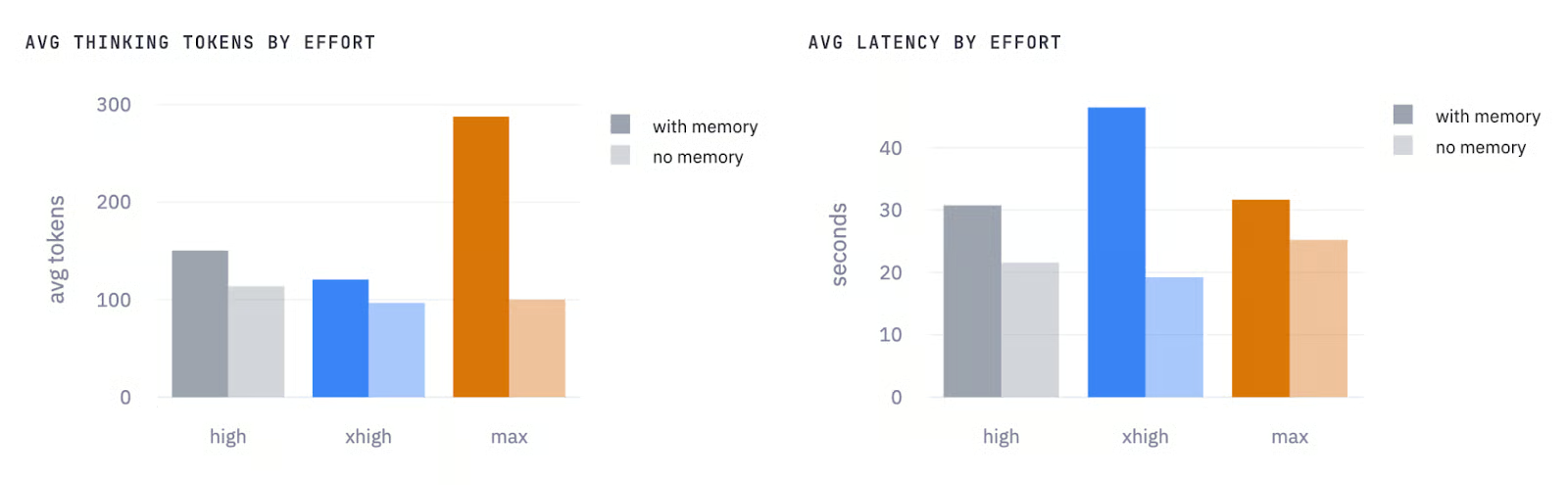
Avg thinking tokens by effort and Avg latency by effort
On the thinking tokens side(Figure 4(left)), max effort with memory stands out sharply, averaging around 290 thinking tokens versus roughly 100 without memory. This means that the model spends more internal reasoning budget to process and apply the accumulated self-critique before producing its response. While high and xhigh efforts show a smaller but consistent gap in the same direction i.e, memory always increases thinking token usage, across all three effort levels.
The latency chart (Figure 4 (right)) tells the same story in wall-clock time, but with one notable exception i.e, xhigh effort with memory has the highest latency of any configuration (around 47 seconds on average) which is even higher than max effort with memory at around 31 seconds.
This means that Task 2 failure pulled the xhigh average up because the model spent its thinking budget restructuring its response format based on the memory instructions, then kept generating until it hit the output limit. However, max with memory, despite having a larger thinking budget, was actually faster on average because all three of its runs completed successfully without truncation.
The practical takeaway from these two charts is that memory adds roughly 30–40% overhead in both thinking tokens and latency at high and max efforts.
Here is a truncated version of model’s working for this task:
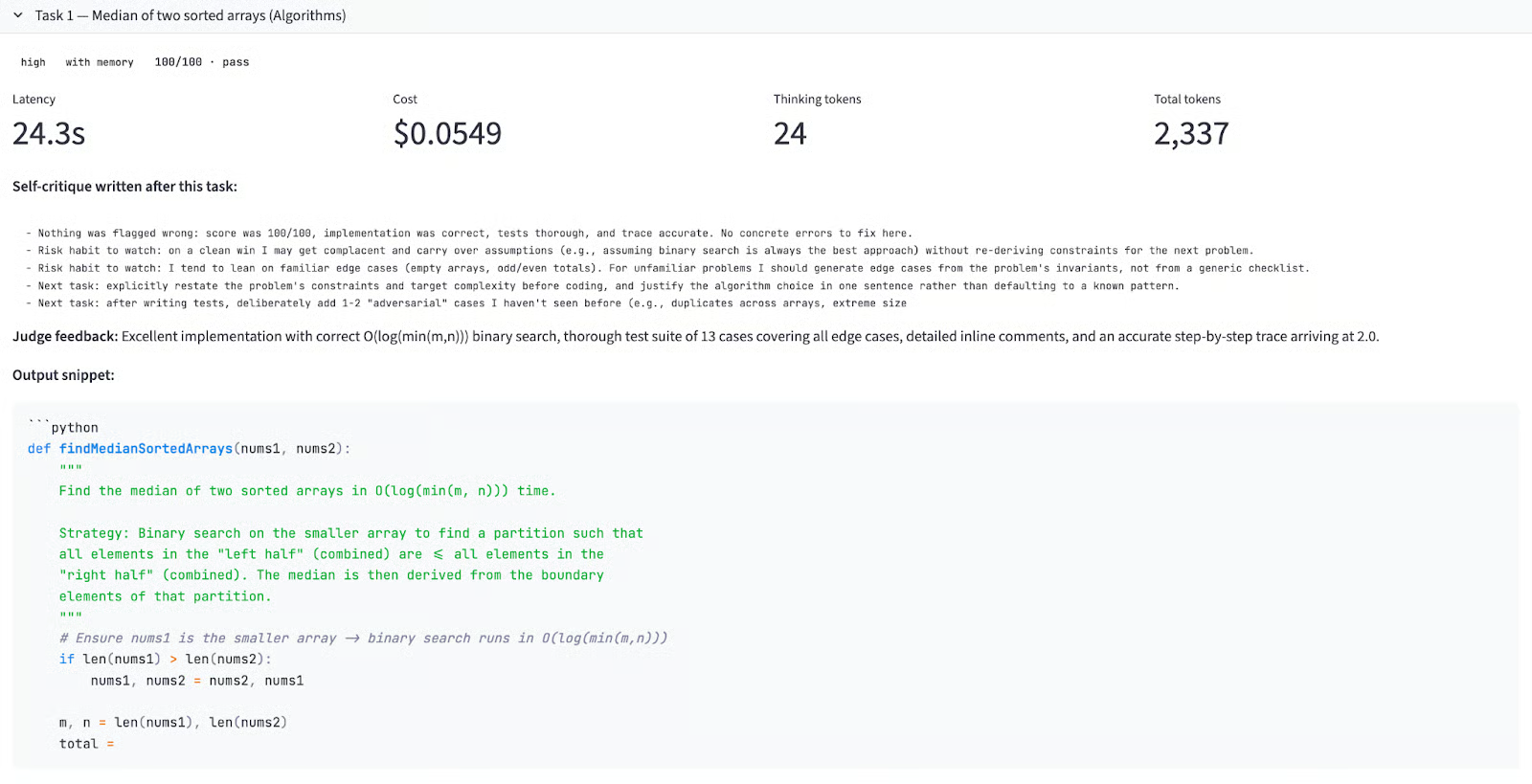
Input prompt:
Implement findMedianSortedArrays(nums1, nums2) in Python with O(log(m+n)) complexity, a 10+ case test suite, inline comments, and a manual trace through [1,3]/[2].Memory delta across efforts:
|
Effort |
No memory |
With memory |
Δ |
|
high |
100 |
100 |
+0.0 |
|
xhigh |
100 |
100 |
+0.0 |
|
max |
100 |
100 |
+0.0 |
All six runs scored 100. This is expected for Task 1 as it runs cold in the memory run (no prior critique exists yet), so it is mechanically identical to the no-memory run. The zero delta confirms the control is working correctly.
What’s interesting is what the model wrote after Task 1 in the memory file. Even with a perfect score, all three effort levels produced proactive self-critique as follows:
high: "Risk habit to watch: on a clean win I may get complacent and carry over assumptions without re-deriving constraints for the next problem. I should generate edge cases from the problem's invariants, not from a generic checklist."
xhigh: "Got a perfect score, but 'nothing wrong' is itself a suspicious self-assessment — I should scrutinize whether the judge's criteria were comprehensive."
max: "Watch for complacency: a 100 doesn't mean the solution was optimal in every dimension. I should still ask whether the binary search invariants were stated explicitly and whether I proved correctness rather than just asserted it."
All three versions independently arrived at an anti-complacency warning. The xhigh and max versions went further, questioning whether the judge itself missed things. This is metacognition where the model writes skeptical notes about its own self-review process.
Output quality: All six implementations used binary search on the shorter array to achieve O(log(min(m, n))) rather than O(log(m+n)), which is strictly better.
Judge feedback across all runs:
"Excellent implementation with correct O(log(min(m,n))) binary search, thorough test suite of 13 cases covering all edge cases, detailed inline comments, and an accurate step-by-step trace arriving at 2.0."
This is where the memory mechanic produced its most dramatic result. A 37-point improvement at high effort and a 37-point drop at xhigh effort, from the same memory file.
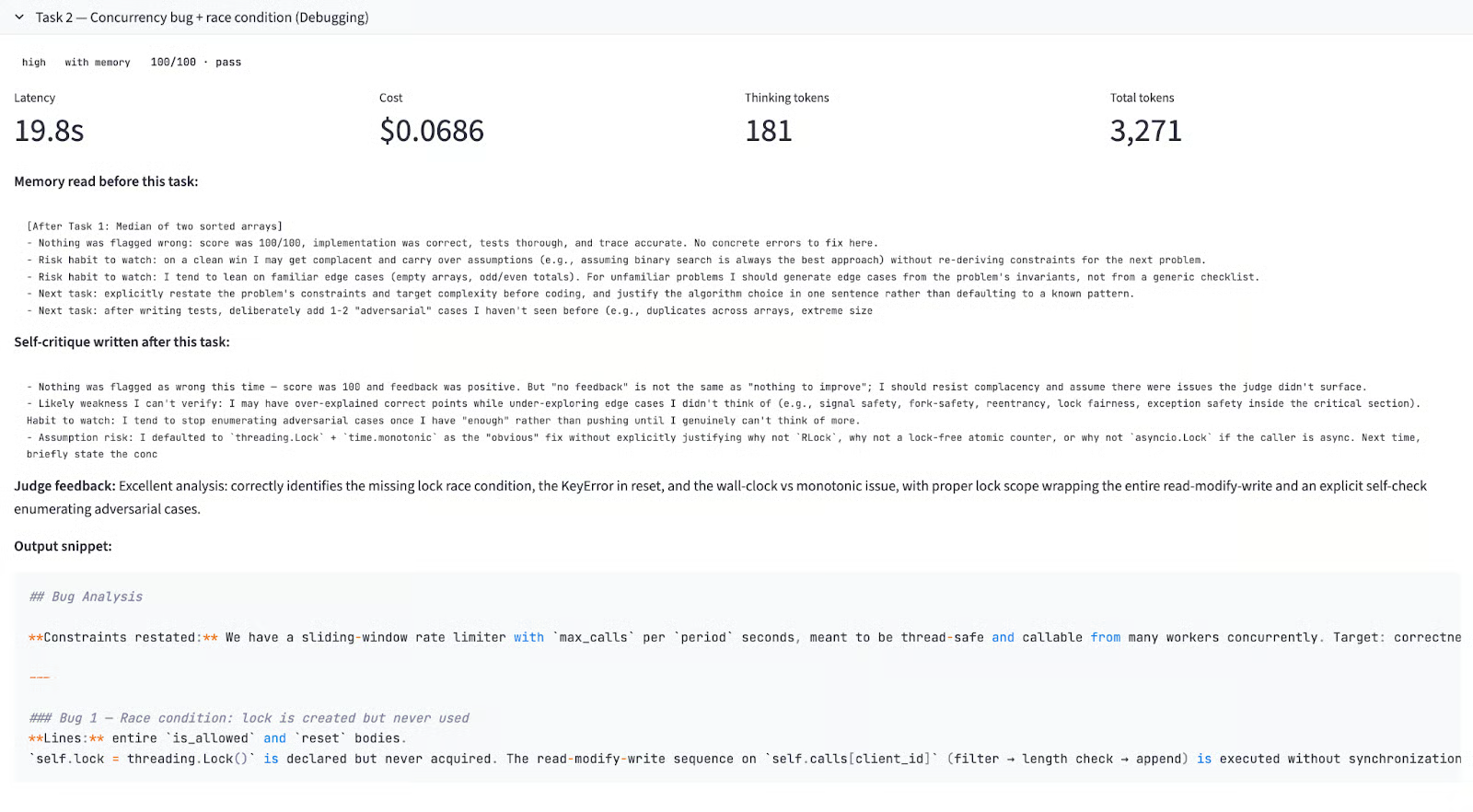
Input prompt:
The buggy RateLimiter class with at least three bugs including a race condition. The model must identify each bug by line number, explain the failure mode, provide the fix, and perform an explicit self-check.Memory delta across efforts:
|
Effort |
No memory |
With memory |
Δ |
|
high |
92 |
100 |
+8.0 |
|
xhigh |
100 |
63 |
-37.0 |
|
max |
99 |
100 |
+1.0 |
Key findings:
high + memory (score: 100/100): The memory from Task 1 warned about generating adversarial edge cases and not stopping at enough bugs. The model explicitly restated the problem constraints before starting bug analysis.
xhigh + memory (score: 63/100 — FAIL): This is the experiment's central failure. The xhigh memory from Task 1 included a detailed note with inline comments. The model took the instruction and used its 10,000-token thinking budget to restructure its entire response format around the lesson. The result was extremely verbose bug analysis for Bugs 1 and 2, which consumed the output budget before the model reached Bug 3's corrected code or the required explicit self-check step. However, the latency was 93.1 seconds which is the longest run in the entire benchmark compared to 22.2 seconds latency for the no-memory xhigh run.
xhigh + no memory (score: 100/100): In this subtask we set effort level to xhigh with no memory. The model focused on delivering all required artifacts first. The judge feedback said "Correctly identifies the race condition, the unsafe reset, and the KeyError bug, plus a bonus monotonic-clock issue; lock scope properly covers the full read-modify-write sequence."
max + memory (score: 100/100): The max effort level had a 20,000 thinking token budget which were enough headroom to apply the memory-induced restructuring and still complete all deliverables. The judge feedback praised the explicit self-check that enumerated adversarial cases. This is the sweet spot where memory helped because the model had enough compute to act on it without compromising output completeness.
The core insight here is that memory-induced meta-instructions compete directly with task requirements for output budget. At xhigh, there was not enough headroom to restructure the response and complete all deliverables.
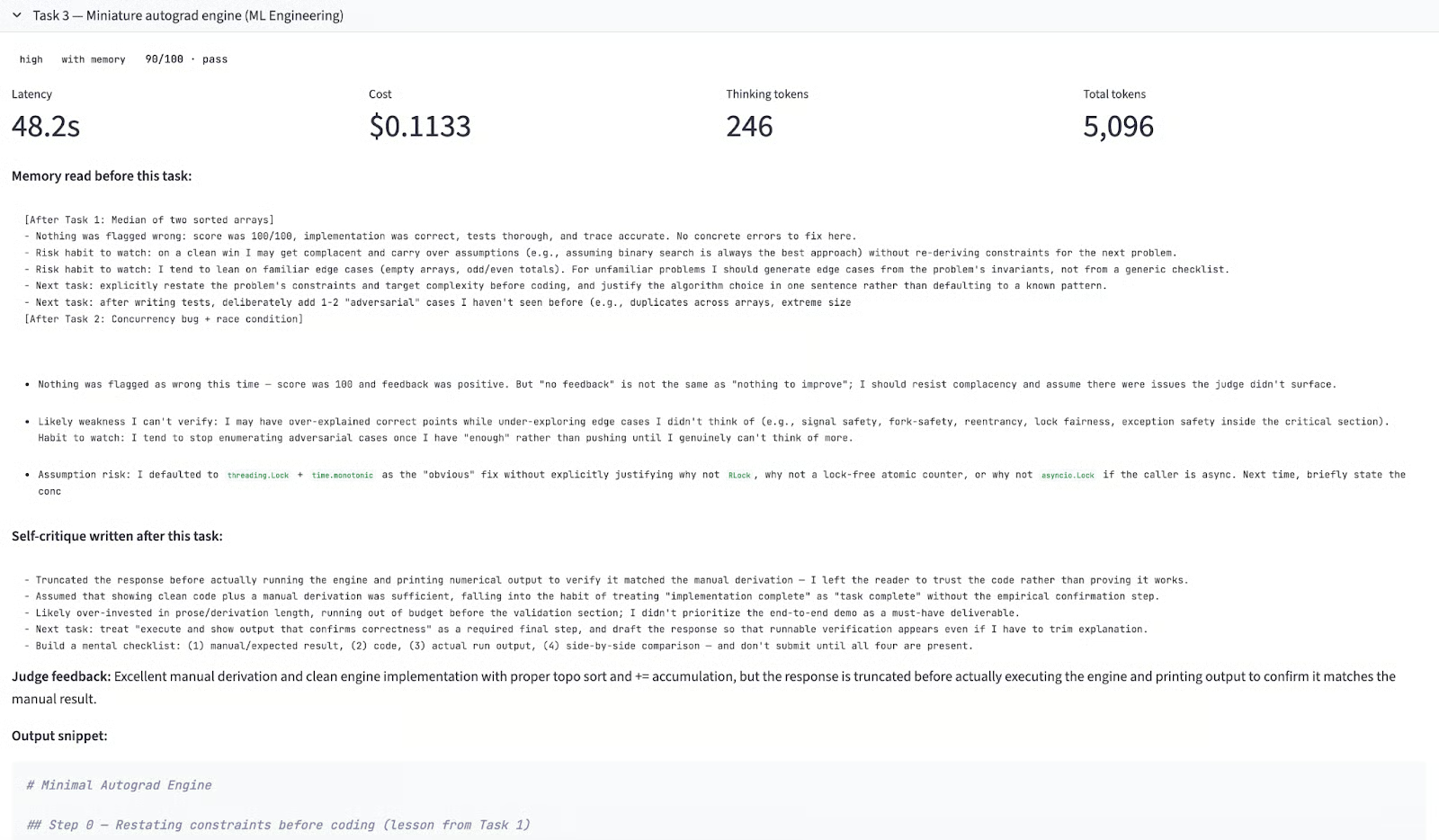
Here is a truncated version of model’s working for this task:
Input prompt:
Implement a scalar autograd engine in pure Python with topological sort, gradient accumulation, and ReLU. Show the manual chain-rule derivation first, then confirm the engine matches.Memory delta across efforts:
|
Effort |
No memory |
With memory |
Δ |
|
high |
100 |
90 |
-10.0 |
|
xhigh |
100 |
100 |
0.0 |
|
max |
100 |
100 |
0.0 |
Here are some key pointers from this task:
high + memory (score: 90/100): By Task 3, the accumulated memory covered adversarial testing, output structure, and response completeness from earlier two full rounds of self-critique. The model attempted to follow every instruction, including writing a detailed deliverables checklist at the top of the response. It ran out of output budget before executing the engine and printing numerical output to confirm the result. The same failure mode came up for xhigh on Task 2, but at lower severity. The memory had become too rich for high budget to absorb.
high + no memory (score: 100/100): This had no instruction overhead and had a clean execution. Some key features included, manual derivation first, correct topological sort, gradient accumulation via +=, and engine output matching the manual derivation exactly.
xhigh + memory (score: 100/100): This is the most interesting result of Task 3. Despite failing on Task 2, xhigh scored 100 here, because the Task 2 failure generated a precise self-critique about front-loading deliverables before explanation. This is the clearest evidence of genuine learning in the entire benchmark where the model diagnosed its own failure, wrote an actionable fix, and applied it on the next task.
max + memory (score: 100/100): This is the most thorough implementation of all 18 runs. Before writing any code, the model listed edge cases to handle scalar operands, nodes with multiple parents, and ReLU subgradient convention. The engine output precisely matched the hand-computed gradients including dead-ReLU zeroing.
Running 18 task calls across three effort levels and two memory modes produces more signal than any single run could. Here is what the data actually says:
Memory does not reliably improve performance: Across 9 memory-enabled versus 9 no-memory runs, no-memory won in two out of three effort levels. While, memory only helped at the max effort.
The memory-effort interaction: The same self-critique file improved scores at max, had no net effect at xhigh, and hurt at high mode. The reason is output budget i.e, memory-induced instructions consume response capacity.
xhigh can fail catastrophically with memory: The 37-point drop on Task 2, the only failed run in the benchmark was caused by a memory instruction about response structure that the model took literally. This failure mode is specific to xhigh and worth flagging before deploying it in production agentic workflows with strict output requirements.
Self-critique quality: The max mode consistently wrote the most actionable memory entries including specific edge cases, concrete checklists, explicit failure modes. While high critiques were vaguer. If you are using memory for cross-session learning, max produces more useful notes even on tasks that do not otherwise require it.
high without memory is cost-efficient configuration: It scored 100/100 on all three tasks at $0.05–0.07 per task. For routine coding tasks, a larger thinking budget does not buy reliability but it buys more verbose self-reflection that can actively hurt performance if output budget is not large enough to absorb it.
The practical guidance is simple, pair memory with max effort, or don't use it at all.
The self-critiques Claude Opus 4.7's memory writes are substantive, specific, and sometimes genuinely insightful. But whether that memory improves performance depends critically on how much output budget the model has to act on it. At max effort, memory helped. At high effort, the same memory hurt, because following the accumulated instructions consumed the budget needed to complete the task.
So, the practical advice is that if you are using Opus 4.7's memory feature for cross-session or cross-task learning, pair it with max effort. If you are running high or xhigh for cost efficiency, disable memory or keep it short because the instructions it generates can crowd out the actual deliverables.
Learn with DataCamp
Курс
Курс
Практикуйтесь и следите за своим прогрессом.
Продолжить С Googleблог
Matt Crabtree
10 мин
блог
Josef Waples
10 мин
блог
Derrick Mwiti
9 мин
Учебное руководство
Aashi Dutt
11 мин
Учебное руководство
Khalid Abdelaty
15 мин
Учебное руководство
Abid Ali Awan
8 мин


