Spreadsheets are quick to flag a formula they cannot run. Finding a valid formula that returns the wrong number is harder, because the workbook looks healthy. So I built a test where the correct formulas are known and hidden from the model.
So I handed Gemini 4 Hydrogen a four-sheet Q4 budget workbook for a fictional company, Northstar Retail. The workbook says Northstar has $43,700 of budget to spare. In reality, it is $24,100 over budget. Three formulas are quietly wrong, and two others only look wrong on purpose. The model has to find the three real errors, leave the two exceptions alone, and submit its repairs. Only then does separate Python code change the inputs and grade whether the fixes hold.
In this tutorial, you'll build that workflow in Python through the Interactions API. The model acts as an AI agent: it chooses what to inspect, while four Python tools read cells, trace formulas, test changes, and record repairs through function calling.
You'll need basic Python and enough Excel to read a SUMIFS(). We'll cover how to:
- Pass an Excel workbook to Gemini 4 Hydrogen from Python
- Trace formulas across four worksheets
- Test and apply the proposed repairs that pass
- Verify the repaired workbook after its inputs change
If you want the launch story and benchmark scores, our Gemini 4 Hydrogen overview has them. I ran this experiment the day after Google launched Gemini 4 Hydrogen.
This builds on the controlled-agent approach in our Gemini 4 Argon API tutorial and Gemini 4 Carbon API tutorial. Here, the challenge is repairing formulas that already calculate without errors.
TL;DR
I gave Gemini 4 Hydrogen a four-sheet workbook whose formulas all calculate, with 3 silent errors and 2 deliberate exceptions. It had to find the errors, submit minimal repairs, and leave the correct formulas alone.
- In its initial diagnosis, before the harness allowed tool execution, Gemini 4 Hydrogen identified 3 likely errors from the saved values and business rules.
- After inspecting the exact formulas, the model confirmed that 2 unusual-looking formulas were correct.
- Its 3 repairs matched the reference formulas and passed all 7 hidden scenarios, with 0 false positives.
- The synthetic workbook was easier than I meant because its saved values exposed the errors through arithmetic, so this is a case study rather than an accuracy benchmark.
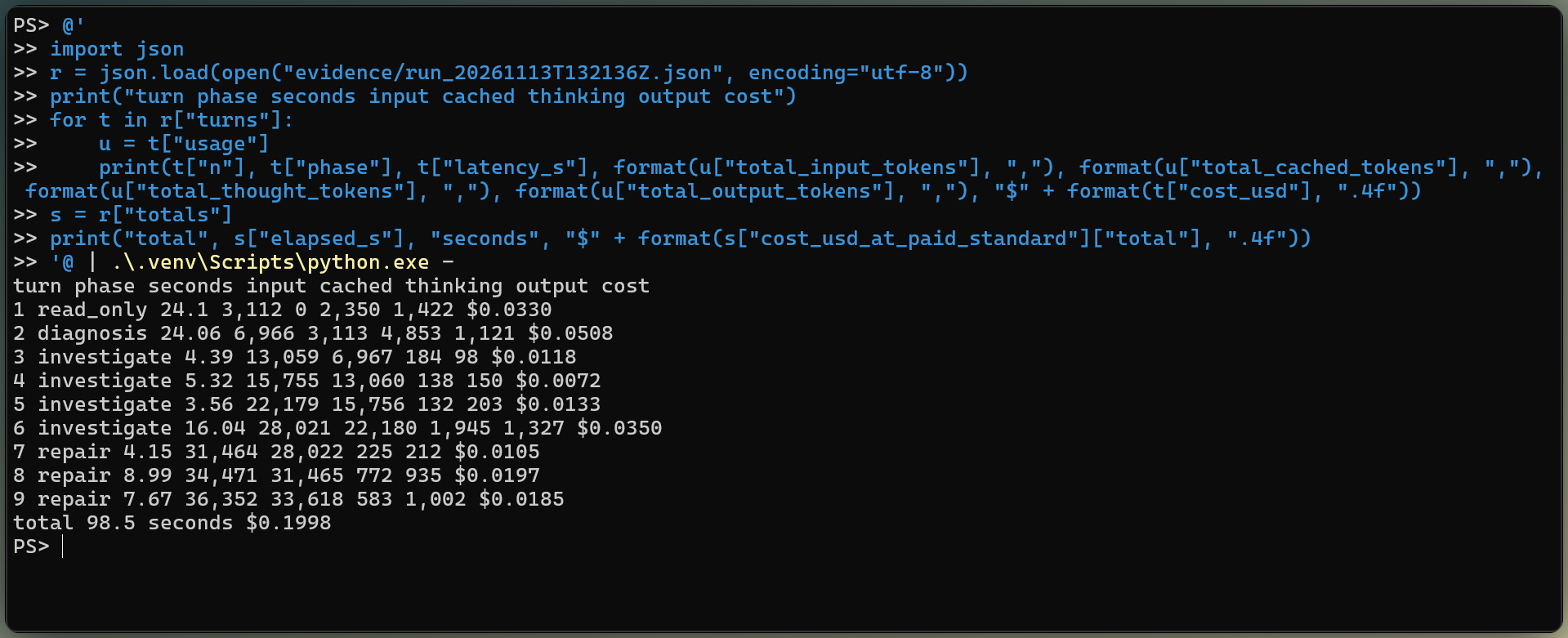
- The estimated cost was about 20 cents at Google's paid Standard rate, and the investigation took under 2 minutes.
What Is Gemini 4 Hydrogen and Why Use It for Excel?
Gemini 4 Hydrogen (gemini-4-hydrogen) is the Gemini 4 model that Google's launch post aims at fast coding and agent work. It is a short-term release with at least 45 days of retirement notice.
Google's developer guide lists .xlsx and .xls as supported inputs on the Interactions API. The model uses the upload as context, while Python remains responsible for exact cell reads, writes, and recalculation.
The model investigates and proposes repairs. Python runs the tools, restricts which formulas may change, and scores the repaired workbook with rules and scenarios the model cannot access.
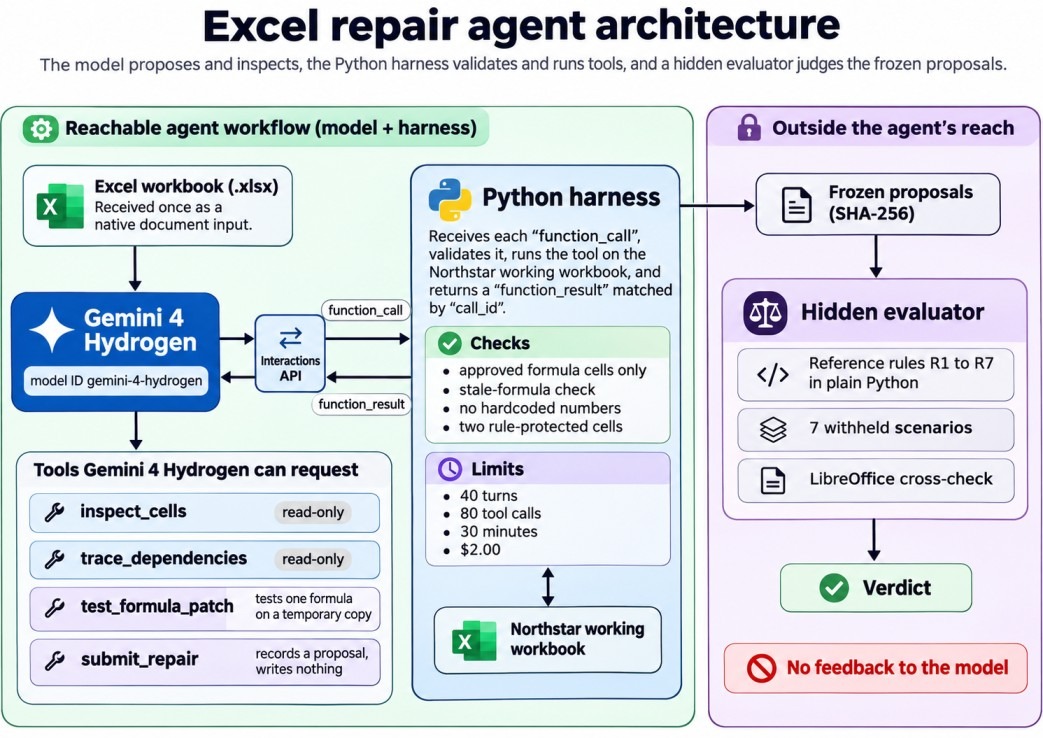
Gemini 4 Hydrogen asks, Python checks. Image by Author.
The assistant in our Claude in Excel guide works inside Excel and applies approved changes to the open sheet. This tutorial builds an API workflow instead: Gemini 4 Hydrogen submits repairs, Python tests them, and only the evaluator writes the submitted formulas to a new copy. The code around the model is what our agent harness engineering guide calls the harness.
The project is Northstar Retail's four-sheet Q4 budget workbook, built in two versions: a correct reference and a working copy with the errors. The complete code is on GitHub, including the build script and the small Streamlit app you'll see in a short video later on.
How the workbook reaches its budget status
The workbook has four sheets, ordered like a report, with the summary first:
Summary: Q4 spend for 8 approved categories, then total, rebates, net spend, budget, remaining budget, and statusForecast: 12 lines, one per department and category, each with a Q3 actual from SUMIFS(), a growth rate, and a Q4 projection, plus two rebate rowsAssumptions: growth rates, rebate thresholds, an advertising cap, the $1,415,000 budget, approved categories, and seven written rules, R1 to R7Transactions: 41 Q3 records by department, category, vendor, and amount, including two capital-equipment purchases that R2 excludes
Summary!B18 answers whether Northstar has enough budget for Q4. A cross-sheet dependency appears whenever a formula reads a cell on another worksheet. Northstar's final status depends on a chain from Transactions through Forecast and Assumptions into Summary.
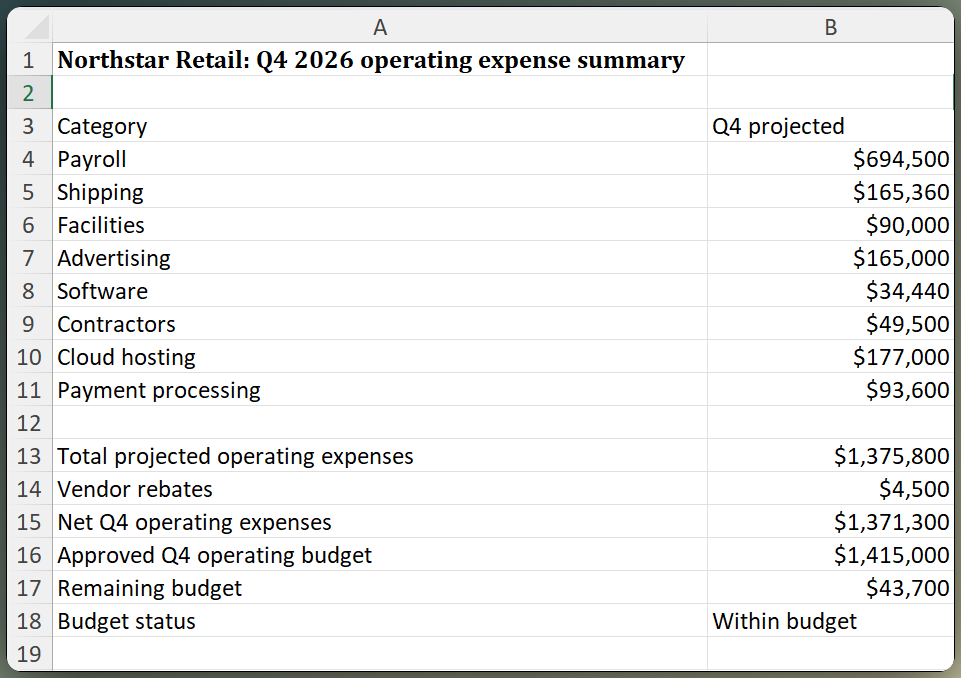
Northstar workbook claims $43,700 of headroom. Image by Author.
I built the correct workbook first, then changed three formulas in a separate working copy. Each one is valid Excel and returns a believable number:
|
Cell
|
Working formula
|
What goes wrong
|
|
Summary!B13
|
=SUM(B4:B10)
|
Leaves Payment processing out of the total
|
|
Forecast!D14
|
=Assumptions!$B$5
|
Technology cloud hosting grows at Marketing's 18% instead of 4%
|
|
Forecast!E20
|
=IF(B20>C20,B20*D20,0)
|
ParcelPoint spends exactly its $120,000 threshold and loses its rebate
|
The first understates spending and the other two overstate it, so they partly cancel and end up turning an overrun into apparent headroom.
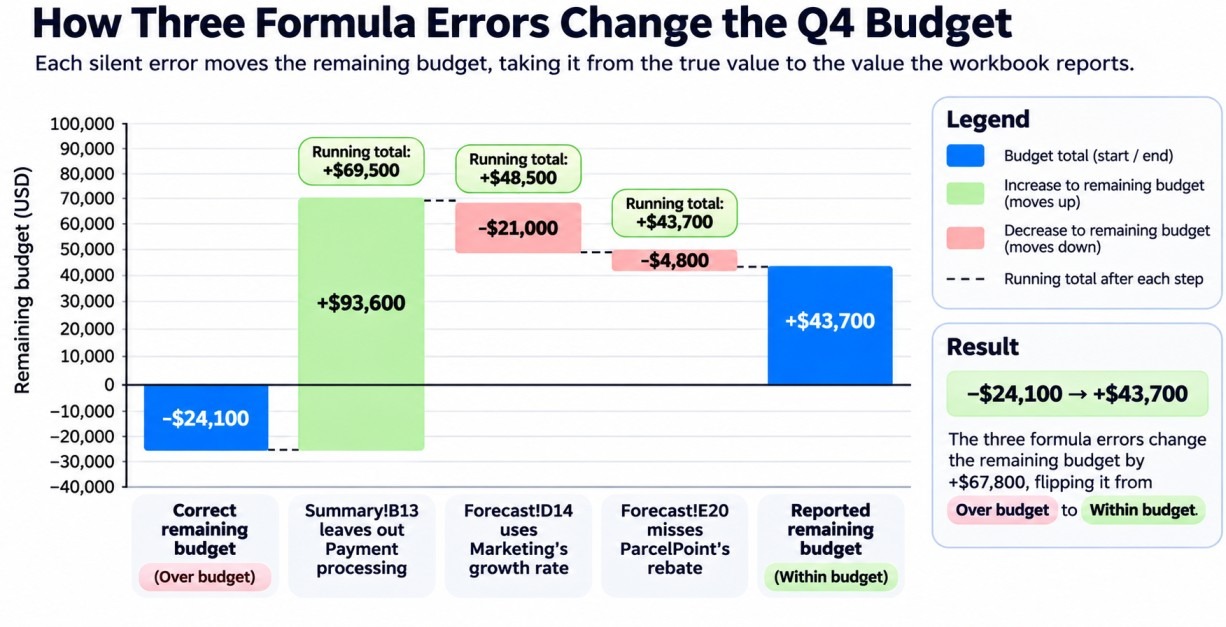
Three errors flip the budget status. Image by Author.
Two formulas look odd on purpose. Forecast!E6 is just =C6, because R3 says the warehouse lease is a fixed-price contract with no growth. Forecast!E8 wraps its projection in MIN(), because R4 caps paid advertising at $165,000.
What counts as a successful repair
The answers live in a separate evaluator that no tool can reach. It recomputes R1 to R7 in plain Python straight from the transactions and assumptions, so its answers are independent of the workbook's formulas.
A hidden scenario changes workbook inputs after the proposals are frozen, then compares the new outputs with the plain-Python rules. I wrote 7 scenarios before the first API call: the original inputs plus these six changes:
- Add new expenses
- Change every growth rate
- Move both rebate thresholds
- Put spending 50 cents below a threshold
- Drop advertising below its cap
- Change many inputs at once, so a hardcoded total fails
A repair counts only if it corrects the result, survives those changes, leaves both exceptions alone, and touches nothing else; a different but equivalent formula is fine. Mine rejected =IF(B20>C20-1,...) only in the 50-cent case, after it passed the other six.
Formula recalculation runs the formulas again after an input or formula changes. Excel files can also store the last calculated value beside each formula, and that cached value may be stale until a spreadsheet program recalculates the file. I opened and saved both workbooks with LibreOffice before the API call, so the working copy's cached values match its wrong formulas.
How to Set Up the Gemini 4 Hydrogen API in Python
Setting up the Gemini 4 Hydrogen API for Northstar means installing the Google Gen AI SDK and pointing it at an API key. I used the Gemini Developer API with a Google AI Studio key. Agent Platform has different credentials and pricing, so don't mix the two setups.
Before you clone the project, check that you have:
- A Gemini API key from Google AI Studio
- Python 3.11 or newer
- LibreOffice, which the evaluator uses to cross-check its recalculation
The project pins google-genai==3.3.0, the SDK release that landed on launch day with Gemini 4 Hydrogen in its model enum and XHIGH in its thinking levels. Clone the repository into a fresh virtual environment and install the pinned packages:
git clone https://github.com/KhalidAbdelaty/gemini-4-hydrogen-api.git
cd gemini-4-hydrogen-api
python -m venv .venv
.venv\Scripts\Activate.ps1
pip install -r requirements.txt
Put one line, GEMINI_API_KEY=..., in a .env file.
Run the agent from the project folder, or open the Streamlit interface:
python agent.py
streamlit run app_streamlit.py
Every request carries the same model, system instruction, tools, and thinking_level, so the Agent class keeps them in self.request. These snippets come from that class in the repository and are shown separately here to explain the workflow.
from google import genai
from tools import DECLARATIONS, Toolbox

class Agent:
    def __init__(self):
        self.client = genai.Client(api_key=load_api_key())
        self.tools = Toolbox()
        self.request = dict(
            model=MODEL,
            system_instruction=SYSTEM_INSTRUCTION,
            tools=DECLARATIONS,
            generation_config={"thinking_level": THINKING_LEVEL},
        )
high is the default and the developer guide's pick for multi-step tool loops; low, medium, and xhigh also exist. Don't send thinking_budget or thinking_level="minimal", which return HTTP 400, or custom temperature, top_p, and top_k, which are ignored.
Send an Excel file to Gemini 4 Hydrogen
The first turn is read-only. The workbook goes in as an inline document block, and the prompt asks which sheets the model sees, which cells hold the main outputs, and whether it can see formulas:
import base64

reports = {}
doc = {"type": "document", "mime_type": XLSX_MIME,
       "data": base64.b64encode(WORKING.read_bytes()).decode()}
reports["read_only"] = self.run_phase(
    "read_only",
    [{"type": "text", "text": PROMPTS["read_only"]}, doc],
)["text"]
The usage counted the whole input as text. Gemini 4 Hydrogen described "four distinct worksheet sections concatenated without explicit sheet tab headers," named only Assumptions, which my prompt had already named, and said it could see values but not formulas.
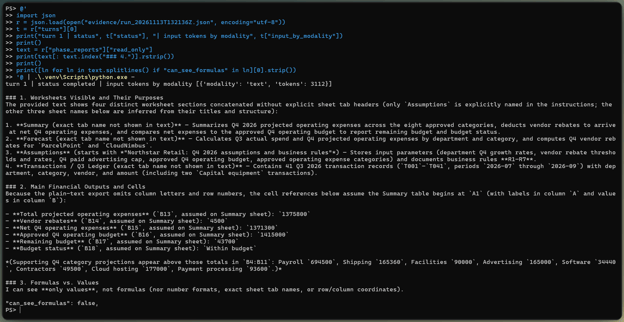
Gemini 4 Hydrogen saw no formulas. Image by Author.
It reported none of the workbook's formulas, but part of its answer exists only beyond Summary. It quoted the Assumptions title, "Northstar Retail: Q4 2026 assumptions and business rules," and counted 41 transactions from T001 to T041, two of them capital-equipment rows.
Google's document processing page says that for .xlsx "only the first sheet is read," converted to CSV with cell values but no formulas. The text-only usage and the missing formulas fit that description. The extra sheets don't, and since the API doesn't expose the parsed workbook, I can't tell you how much of it arrived.
The agent gets four Python tools, each tied to the Northstar working copy:
-
inspect_cells returns exact formulas, saved values, and number formats for a bounded range
-
trace_dependencies lists the cells a formula reads and the formulas that read its result
-
test_formula_patch recalculates one replacement on a temporary copy and rejects new calculation errors
-
submit_repair records a candidate that cleared those safety checks without editing the workbook
The complete schemas are on GitHub. Their boundary matters more than each JSON field.
Transactions and Assumptions are read-only, edits are limited to existing formula cells, and E6 and E8 are locked because they implement written rules. Python must test the exact patch without producing a new calculation error before the model can submit it. The hidden evaluator checks whether that candidate is correct later.
When Gemini 4 Hydrogen requests a tool, Python validates and runs it, then sends the result back. previous_interaction_id carries the conversation, while self._create() resends self.request because the tools, system instruction, and thinking_level apply only to the current turn:
calls = [step for step in interaction.steps if step.type == "function_call"]
results = []
for call in calls:
    args = dict(call.arguments or {})
    output, is_error = self.tools.call(call.name, args)
    text = json.dumps(output, default=str)
    results.append({
        "type": "function_result",
        "name": call.name,
        "call_id": call.id,
        "is_error": is_error,
        "result": [{"type": "text", "text": text}],
    })
interaction, turn = self._create(phase, results)
The full dispatcher also stops failed interactions and checks the application limits between turns. Our Gemini 3.8 Flash API tutorial covers the Interactions API loop in more detail.
Trace the Excel Errors Across Worksheets
Gemini 4 Hydrogen traced the error from the Summary outputs back to their inputs in the same interaction chain: a diagnosis first, then read-only tools. The diagram shows the chain it had to follow.
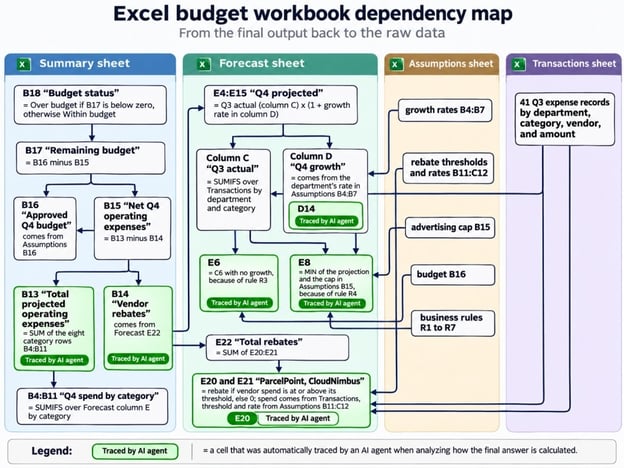
How the budget error crosses sheets. Image by Author.
The tool declarations were present on every request, but the harness did not allow their execution during this phase. I asked whether the reported budget position followed R1 to R7, and Gemini 4 Hydrogen answered no.
It noticed that the eight category values add to $1,469,400 while the total shows $1,375,800, "the exact subtotal of the first seven categories." It also caught Technology's cloud hosting carrying 0.18, Marketing's rate, and ParcelPoint's rebate sitting at 0 with spend exactly at its threshold. Northstar, it concluded, "appears to be Over budget by $24,100, not Within budget by $43,700."
I didn't expect that. The offsetting errors made the final number look normal, but the saved values gave each error away to anyone who added them up.
Values can't say which formula to change, so the next step opened two read-only tools:
inspect_cells: the exact formula, saved value, and number format for one A1 range on one sheet, capped at 120 cellstrace_dependencies: the references a cell's formula reads and the formula cells that read it
Neither takes a file path, and both label cell text as untrusted. The tracer uses the formula Tokenizer from openpyxl and supports the six functions used in Northstar. It returns an unsupported status for anything else; the complete parser is on GitHub.
Follow the investigation through the workbook
The model asked for tools in parallel batches, so the investigation took only a few round trips.
One call in its first batch asked for more than the 120-cell cap. The model split that range in two on its next request without being told, so write tool errors the model can act on.
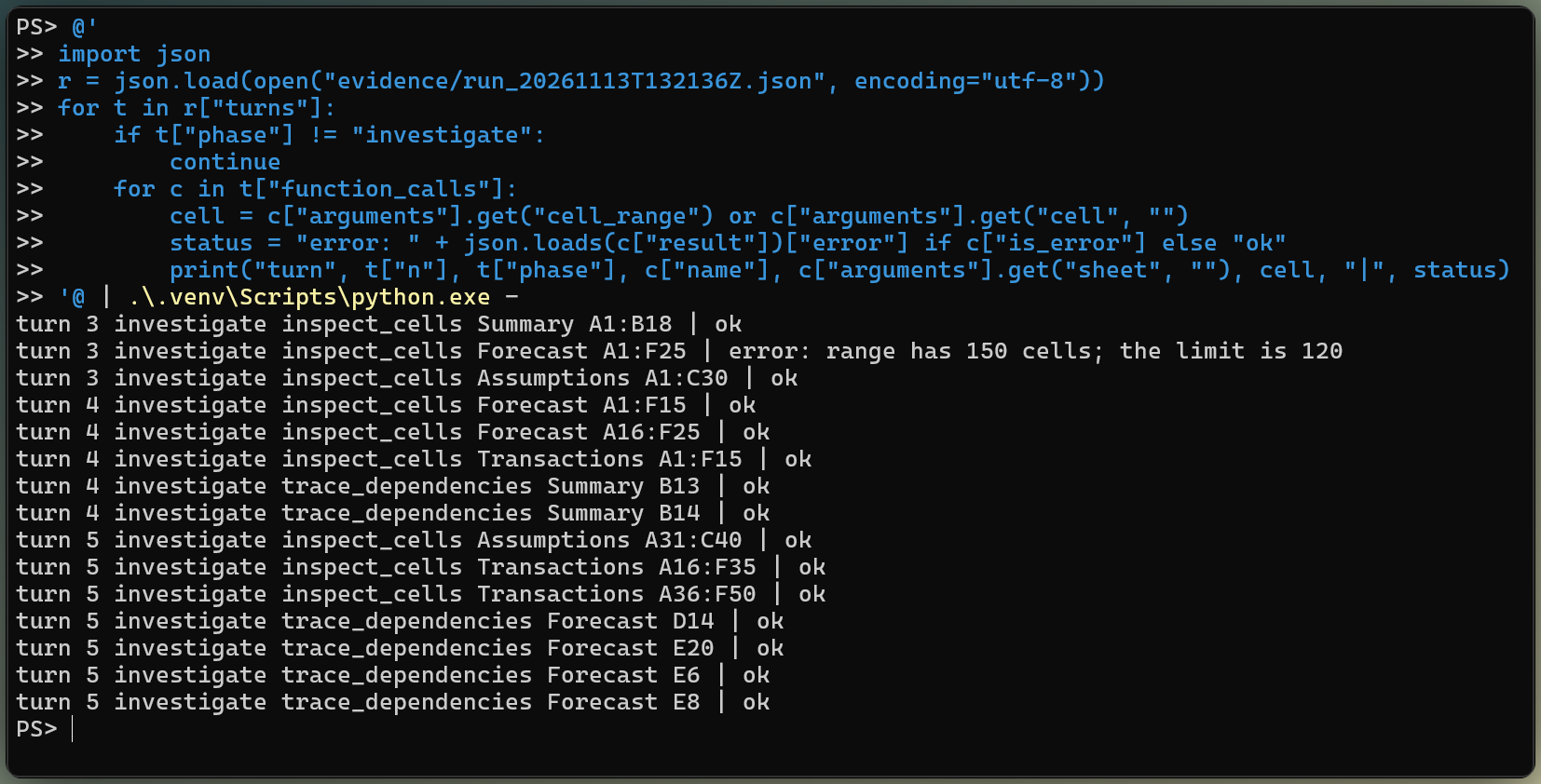
Parallel read-only calls, one rejected range. Image by Author.
It then traced the four suspect cells and both exceptions, listing E6 and E8 as "unusual formulas that are correct," citing R3 and R4.
A suspect cell, a submitted candidate, and a verified repair are three separate things in this workflow. Gemini 4 Hydrogen identifies the cell and writes the candidate formula. Python tests the candidate and decides whether it is eligible for submission.
Recalculate one candidate on a temporary copy
openpyxl can read and write formula text, but its formula documentation says it "never evaluates formula." The harness therefore has a small formula engine for the six functions used in Northstar.
Before the API run, I compared its result on every formula cell with LibreOffice's recalculation of both workbooks, and they agreed. I did not test Excel itself. The patch tool then applies each candidate to an in-memory copy and rejects any new calculation problem; the complete implementation is on GitHub.
test_formula_patch inserts one candidate into an in-memory copy, then calculates the target cell and the Summary outputs under current inputs and three ordinary changes:
- A new $9,000 Customer Support software expense
- A Customer Support growth rate raised from 10% to 14%
- The CloudNimbus threshold set exactly to its $150,000 spend
The tool returns the numbers to Gemini 4 Hydrogen without telling it whether they are correct. The D14 fix illustrates why: applied alone, it made the workbook look healthier in every visible scenario because the other two errors were still present.
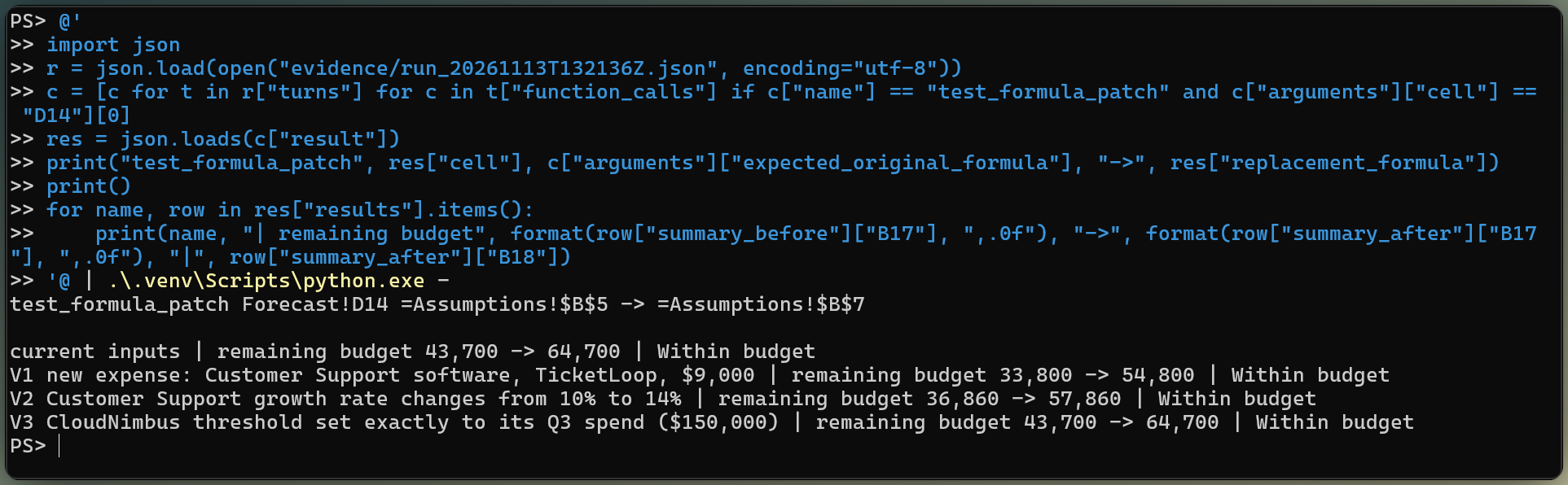
One fix alone looks healthier everywhere. Image by Author.
Submit only candidates that clear the safety checks
Gemini 4 Hydrogen tested all three candidates in one parallel batch, then submitted all three. Python was set up to reject stale originals, hardcoded results, circular references, and changes to protected cells. None of those checks had to reject a repair in this run.
Each submitted candidate changed one small piece of formula text: a range end, a row number, or an operator.
|
Cell
|
Working formula
|
Submitted replacement
|
|
Summary!B13
|
=SUM(B4:B10)
|
=SUM(B4:B11)
|
|
Forecast!D14
|
=Assumptions!$B$5
|
=Assumptions!$B$7
|
|
Forecast!E20
|
=IF(B20>C20,B20*D20,0)
|
=IF(B20>=C20,B20*D20,0)
|
All three candidates matched the reference formulas character for character. The model submitted no unresolved case and never tried to change E6 or E8. They became verified repairs only after the hidden evaluator passed them.
Python copied the original working workbook, checked that each target still held the formula Gemini 4 Hydrogen inspected, and applied the submitted replacements. A workbook diff then found exactly 3 changed cells. Sheet order, every Transactions and Assumptions cell, both valid exceptions, and all number formats stayed unchanged.
That integrity check covers cell contents and formats. A workbook with charts, macros, external connections, or other features that openpyxl may not round-trip needs additional checks.
The repaired workbook passed all 7 scenarios defined before the API call. The current total alone is a weak test; the formulas also need to follow R1 to R7 when transactions, growth rates, thresholds, the advertising cap, and the budget change.
Freeze repairs before the hidden evaluation
When Gemini 4 Hydrogen stopped calling tools, the harness locked every tool and hashed the proposal list. Only then did the separate evaluator start. As in our Claude Fable 5.2 API tutorial, hidden results never went back to the model for another attempt.
Run the seven hidden scenarios
For each scenario, the evaluator changes the source inputs, recalculates the repaired formulas, and compares every Summary output with the plain-Python rules. The hardcode trap changes many inputs at once, and the 50-cent case checks the exact rebate boundary that a plausible shortcut missed.
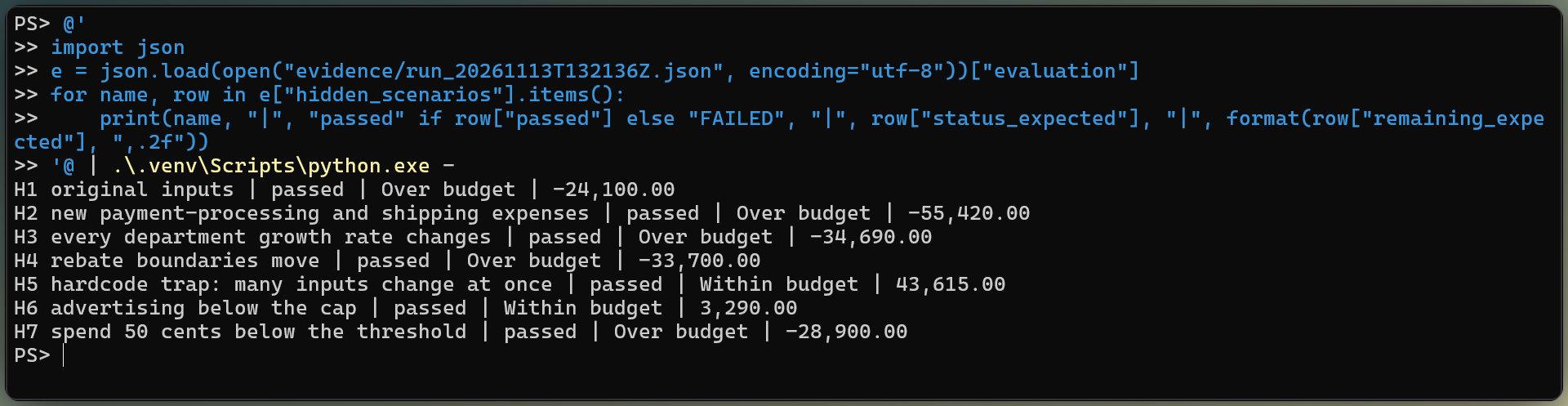
Repaired workbook passes all seven scenarios. Image by Author.
All 7 scenarios passed. Each proposed formula also passed all 7 when placed alone into the otherwise correct reference workbook, so no repair depended on another error being present.
Results: What Gemini 4 Hydrogen Fixed and What It Cost
Gemini 4 Hydrogen fixed all three errors in this workbook. As in our Copilot Cowork tutorial, I checked the figures against a source the tool never touched, the plain-Python rules behind the hidden evaluator. The sanitized recorded run contains the tool trace, frozen proposals, usage, and evaluation.
Detection and repair accuracy
Every score below comes from the evaluator, which scores the frozen proposals and ignores the model's own report:
|
Measure
|
Result
|
|
Planted errors detected
|
3 of 3
|
|
Missed errors
|
0
|
|
False positives
|
0
|
|
Repairs that passed every hidden scenario
|
3 of 3
|
|
Hidden scenarios passed by the repaired workbook
|
7 of 7
|
|
Valid exceptions left unchanged
|
2 of 2
|
|
Verdict
|
Complete repair
|
Gemini 4 Hydrogen detected and repaired all 3 planted errors. This is one synthetic workbook, so the result does not estimate performance on other files. Detection and repair stay separate because a model can find the right cell and still write a formula that fails on new inputs.
Watch the investigation in Streamlit
In the video, I open the investigation in the Streamlit app, follow the tool log, and step through the Report, Patches, Hidden tests, and Cost tabs.













Spreadsheets are quick to flag a formula they cannot run. Finding a valid formula that returns the wrong number is harder, because the workbook looks healthy. So I built a test where the correct formulas are known and hidden from the model.
So I handed Gemini 4 Hydrogen a four-sheet Q4 budget workbook for a fictional company, Northstar Retail. The workbook says Northstar has $43,700 of budget to spare. In reality, it is $24,100 over budget. Three formulas are quietly wrong, and two others only look wrong on purpose. The model has to find the three real errors, leave the two exceptions alone, and submit its repairs. Only then does separate Python code change the inputs and grade whether the fixes hold.
In this tutorial, you'll build that workflow in Python through the Interactions API. The model acts as an AI agent: it chooses what to inspect, while four Python tools read cells, trace formulas, test changes, and record repairs through function calling.
You'll need basic Python and enough Excel to read a
SUMIFS(). We'll cover how to:If you want the launch story and benchmark scores, our Gemini 4 Hydrogen overview has them. I ran this experiment the day after Google launched Gemini 4 Hydrogen.
This builds on the controlled-agent approach in our Gemini 4 Argon API tutorial and Gemini 4 Carbon API tutorial. Here, the challenge is repairing formulas that already calculate without errors.
TL;DR
I gave Gemini 4 Hydrogen a four-sheet workbook whose formulas all calculate, with 3 silent errors and 2 deliberate exceptions. It had to find the errors, submit minimal repairs, and leave the correct formulas alone.
What Is Gemini 4 Hydrogen and Why Use It for Excel?
Gemini 4 Hydrogen (
gemini-4-hydrogen) is the Gemini 4 model that Google's launch post aims at fast coding and agent work. It is a short-term release with at least 45 days of retirement notice.Google's developer guide lists
.xlsxand.xlsas supported inputs on the Interactions API. The model uses the upload as context, while Python remains responsible for exact cell reads, writes, and recalculation.The model investigates and proposes repairs. Python runs the tools, restricts which formulas may change, and scores the repaired workbook with rules and scenarios the model cannot access.
Gemini 4 Hydrogen asks, Python checks. Image by Author.
The assistant in our Claude in Excel guide works inside Excel and applies approved changes to the open sheet. This tutorial builds an API workflow instead: Gemini 4 Hydrogen submits repairs, Python tests them, and only the evaluator writes the submitted formulas to a new copy. The code around the model is what our agent harness engineering guide calls the harness.
The Northstar Retail Workbook: Three Errors Hidden in Working Formulas
The project is Northstar Retail's four-sheet Q4 budget workbook, built in two versions: a correct reference and a working copy with the errors. The complete code is on GitHub, including the build script and the small Streamlit app you'll see in a short video later on.
How the workbook reaches its budget status
The workbook has four sheets, ordered like a report, with the summary first:
Summary: Q4 spend for 8 approved categories, then total, rebates, net spend, budget, remaining budget, and statusForecast: 12 lines, one per department and category, each with a Q3 actual fromSUMIFS(), a growth rate, and a Q4 projection, plus two rebate rowsAssumptions: growth rates, rebate thresholds, an advertising cap, the $1,415,000 budget, approved categories, and seven written rules, R1 to R7Transactions: 41 Q3 records by department, category, vendor, and amount, including two capital-equipment purchases that R2 excludesSummary!B18answers whether Northstar has enough budget for Q4. A cross-sheet dependency appears whenever a formula reads a cell on another worksheet. Northstar's final status depends on a chain fromTransactionsthroughForecastandAssumptionsintoSummary.Northstar workbook claims $43,700 of headroom. Image by Author.
Three working formulas with the wrong logic
I built the correct workbook first, then changed three formulas in a separate working copy. Each one is valid Excel and returns a believable number:
Cell
Working formula
What goes wrong
Summary!B13=SUM(B4:B10)Leaves Payment processing out of the total
Forecast!D14=Assumptions!$B$5Technology cloud hosting grows at Marketing's 18% instead of 4%
Forecast!E20=IF(B20>C20,B20*D20,0)ParcelPoint spends exactly its $120,000 threshold and loses its rebate
The first understates spending and the other two overstate it, so they partly cancel and end up turning an overrun into apparent headroom.
Three errors flip the budget status. Image by Author.
Two formulas look odd on purpose.
Forecast!E6is just=C6, because R3 says the warehouse lease is a fixed-price contract with no growth.Forecast!E8wraps its projection inMIN(), because R4 caps paid advertising at $165,000.What counts as a successful repair
The answers live in a separate evaluator that no tool can reach. It recomputes R1 to R7 in plain Python straight from the transactions and assumptions, so its answers are independent of the workbook's formulas.
A hidden scenario changes workbook inputs after the proposals are frozen, then compares the new outputs with the plain-Python rules. I wrote 7 scenarios before the first API call: the original inputs plus these six changes:
A repair counts only if it corrects the result, survives those changes, leaves both exceptions alone, and touches nothing else; a different but equivalent formula is fine. Mine rejected
=IF(B20>C20-1,...)only in the 50-cent case, after it passed the other six.Formula recalculation runs the formulas again after an input or formula changes. Excel files can also store the last calculated value beside each formula, and that cached value may be stale until a spreadsheet program recalculates the file. I opened and saved both workbooks with LibreOffice before the API call, so the working copy's cached values match its wrong formulas.
How to Set Up the Gemini 4 Hydrogen API in Python
Setting up the Gemini 4 Hydrogen API for Northstar means installing the Google Gen AI SDK and pointing it at an API key. I used the Gemini Developer API with a Google AI Studio key. Agent Platform has different credentials and pricing, so don't mix the two setups.
Before you clone the project, check that you have:
The project pins
google-genai==3.3.0, the SDK release that landed on launch day with Gemini 4 Hydrogen in its model enum andXHIGHin its thinking levels. Clone the repository into a fresh virtual environment and install the pinned packages:Put one line,
GEMINI_API_KEY=..., in a.envfile.Run the agent from the project folder, or open the Streamlit interface:
Configure the client and the Gemini 4 Hydrogen thinking level
Every request carries the same model, system instruction, tools, and
thinking_level, so theAgentclass keeps them inself.request. These snippets come from that class in the repository and are shown separately here to explain the workflow.highis the default and the developer guide's pick for multi-step tool loops;low,medium, andxhighalso exist. Don't sendthinking_budgetorthinking_level="minimal", which return HTTP 400, or customtemperature,top_p, andtop_k, which are ignored.Send an Excel file to Gemini 4 Hydrogen
The first turn is read-only. The workbook goes in as an inline
documentblock, and the prompt asks which sheets the model sees, which cells hold the main outputs, and whether it can see formulas:The usage counted the whole input as text. Gemini 4 Hydrogen described "four distinct worksheet sections concatenated without explicit sheet tab headers," named only
Assumptions, which my prompt had already named, and said it could see values but not formulas.Gemini 4 Hydrogen saw no formulas. Image by Author.
It reported none of the workbook's formulas, but part of its answer exists only beyond
Summary. It quoted theAssumptionstitle, "Northstar Retail: Q4 2026 assumptions and business rules," and counted 41 transactions from T001 to T041, two of them capital-equipment rows.Google's document processing page says that for
.xlsx"only the first sheet is read," converted to CSV with cell values but no formulas. The text-only usage and the missing formulas fit that description. The extra sheets don't, and since the API doesn't expose the parsed workbook, I can't tell you how much of it arrived.Give the agent four bounded tools
The agent gets four Python tools, each tied to the Northstar working copy:
inspect_cellsreturns exact formulas, saved values, and number formats for a bounded rangetrace_dependencieslists the cells a formula reads and the formulas that read its resulttest_formula_patchrecalculates one replacement on a temporary copy and rejects new calculation errorssubmit_repairrecords a candidate that cleared those safety checks without editing the workbookThe complete schemas are on GitHub. Their boundary matters more than each JSON field.
TransactionsandAssumptionsare read-only, edits are limited to existing formula cells, andE6andE8are locked because they implement written rules. Python must test the exact patch without producing a new calculation error before the model can submit it. The hidden evaluator checks whether that candidate is correct later.When Gemini 4 Hydrogen requests a tool, Python validates and runs it, then sends the result back.
previous_interaction_idcarries the conversation, whileself._create()resendsself.requestbecause the tools, system instruction, andthinking_levelapply only to the current turn:The full dispatcher also stops failed interactions and checks the application limits between turns. Our Gemini 3.8 Flash API tutorial covers the Interactions API loop in more detail.
Trace the Excel Errors Across Worksheets
Gemini 4 Hydrogen traced the error from the Summary outputs back to their inputs in the same interaction chain: a diagnosis first, then read-only tools. The diagram shows the chain it had to follow.
How the budget error crosses sheets. Image by Author.
Ask for a diagnosis before the harness runs tools
The tool declarations were present on every request, but the harness did not allow their execution during this phase. I asked whether the reported budget position followed R1 to R7, and Gemini 4 Hydrogen answered no.
It noticed that the eight category values add to $1,469,400 while the total shows $1,375,800, "the exact subtotal of the first seven categories." It also caught Technology's cloud hosting carrying 0.18, Marketing's rate, and ParcelPoint's rebate sitting at 0 with spend exactly at its threshold. Northstar, it concluded, "appears to be Over budget by $24,100, not Within budget by $43,700."
I didn't expect that. The offsetting errors made the final number look normal, but the saved values gave each error away to anyone who added them up.
Give Gemini 4 Hydrogen read-only tools for cells and dependencies
Values can't say which formula to change, so the next step opened two read-only tools:
inspect_cells: the exact formula, saved value, and number format for one A1 range on one sheet, capped at 120 cellstrace_dependencies: the references a cell's formula reads and the formula cells that read itNeither takes a file path, and both label cell text as untrusted. The tracer uses the formula
Tokenizerfromopenpyxland supports the six functions used in Northstar. It returns an unsupported status for anything else; the complete parser is on GitHub.Follow the investigation through the workbook
The model asked for tools in parallel batches, so the investigation took only a few round trips.
One call in its first batch asked for more than the 120-cell cap. The model split that range in two on its next request without being told, so write tool errors the model can act on.
Parallel read-only calls, one rejected range. Image by Author.
It then traced the four suspect cells and both exceptions, listing
E6andE8as "unusual formulas that are correct," citing R3 and R4.Test and Apply Minimal Formula Repairs
A suspect cell, a submitted candidate, and a verified repair are three separate things in this workflow. Gemini 4 Hydrogen identifies the cell and writes the candidate formula. Python tests the candidate and decides whether it is eligible for submission.
Recalculate one candidate on a temporary copy
openpyxlcan read and write formula text, but its formula documentation says it "never evaluates formula." The harness therefore has a small formula engine for the six functions used in Northstar.Before the API run, I compared its result on every formula cell with LibreOffice's recalculation of both workbooks, and they agreed. I did not test Excel itself. The patch tool then applies each candidate to an in-memory copy and rejects any new calculation problem; the complete implementation is on GitHub.
test_formula_patchinserts one candidate into an in-memory copy, then calculates the target cell and the Summary outputs under current inputs and three ordinary changes:The tool returns the numbers to Gemini 4 Hydrogen without telling it whether they are correct. The
D14fix illustrates why: applied alone, it made the workbook look healthier in every visible scenario because the other two errors were still present.One fix alone looks healthier everywhere. Image by Author.
Submit only candidates that clear the safety checks
Gemini 4 Hydrogen tested all three candidates in one parallel batch, then submitted all three. Python was set up to reject stale originals, hardcoded results, circular references, and changes to protected cells. None of those checks had to reject a repair in this run.
Each submitted candidate changed one small piece of formula text: a range end, a row number, or an operator.
Cell
Working formula
Submitted replacement
Summary!B13=SUM(B4:B10)=SUM(B4:B11)Forecast!D14=Assumptions!$B$5=Assumptions!$B$7Forecast!E20=IF(B20>C20,B20*D20,0)=IF(B20>=C20,B20*D20,0)All three candidates matched the reference formulas character for character. The model submitted no unresolved case and never tried to change
E6orE8. They became verified repairs only after the hidden evaluator passed them.Apply the submitted formulas to a fresh copy
Python copied the original working workbook, checked that each target still held the formula Gemini 4 Hydrogen inspected, and applied the submitted replacements. A workbook diff then found exactly 3 changed cells. Sheet order, every
TransactionsandAssumptionscell, both valid exceptions, and all number formats stayed unchanged.That integrity check covers cell contents and formats. A workbook with charts, macros, external connections, or other features that
openpyxlmay not round-trip needs additional checks.Verify the Repaired Workbook on Changed Inputs
The repaired workbook passed all 7 scenarios defined before the API call. The current total alone is a weak test; the formulas also need to follow R1 to R7 when transactions, growth rates, thresholds, the advertising cap, and the budget change.
Freeze repairs before the hidden evaluation
When Gemini 4 Hydrogen stopped calling tools, the harness locked every tool and hashed the proposal list. Only then did the separate evaluator start. As in our Claude Fable 5.2 API tutorial, hidden results never went back to the model for another attempt.
Run the seven hidden scenarios
For each scenario, the evaluator changes the source inputs, recalculates the repaired formulas, and compares every Summary output with the plain-Python rules. The hardcode trap changes many inputs at once, and the 50-cent case checks the exact rebate boundary that a plausible shortcut missed.
Repaired workbook passes all seven scenarios. Image by Author.
All 7 scenarios passed. Each proposed formula also passed all 7 when placed alone into the otherwise correct reference workbook, so no repair depended on another error being present.
Results: What Gemini 4 Hydrogen Fixed and What It Cost
Gemini 4 Hydrogen fixed all three errors in this workbook. As in our Copilot Cowork tutorial, I checked the figures against a source the tool never touched, the plain-Python rules behind the hidden evaluator. The sanitized recorded run contains the tool trace, frozen proposals, usage, and evaluation.
Detection and repair accuracy
Every score below comes from the evaluator, which scores the frozen proposals and ignores the model's own report:
Measure
Result
Planted errors detected
3 of 3
Missed errors
0
False positives
0
Repairs that passed every hidden scenario
3 of 3
Hidden scenarios passed by the repaired workbook
7 of 7
Valid exceptions left unchanged
2 of 2
Verdict
Complete repair
Gemini 4 Hydrogen detected and repaired all 3 planted errors. This is one synthetic workbook, so the result does not estimate performance on other files. Detection and repair stay separate because a model can find the right cell and still write a formula that fails on new inputs.
Watch the investigation in Streamlit
In the video, I open the investigation in the Streamlit app, follow the tool log, and step through the Report, Patches, Hidden tests, and Cost tabs.