Course
Introduction to Google Workspace with Gemini
30 min
2.6K
Practice and track your progress.
Continue with GoogleGemini 3.8 Flash is Google's workhorse model, generally available since September 2, 2026, under the model ID gemini-3.8-flash. It landed 3 weeks after 3.7 Flash, and Google positions it for long-horizon coding, agentic workflows, and multi-step reasoning in specialized domains like finance and legal work.
The specs that matter for API calls are unchanged from 3.7:
What changed is behavior, not surface: Google says 3.8 works harder on complex tasks, taking extra reasoning steps and calling tools iteratively, which can raise token use at higher effort levels. 3.7 Flash stays fully supported for workloads where efficiency matters more than depth.
For benchmarks and detailed pricing, check out our Gemini 3.8 Flash guide, or read the What is Google Gemini? guide for an overview of the platform. You can also see how it stacks up against the competition in our DeepSeek v4.1 vs Gemini 3.8 Flash comparison guide.
The launch includes 2 variants, and only 1 of them has a model ID you can type.
The Cyber variant is unavailable on the public API: access goes through Google's Fairwind Program, which is limited to approved government authorities, critical-infrastructure operators, and software maintainers.
If you are following this tutorial, your model ID is gemini-3.8-flash. Nothing below needs or uses the Cyber variant.
To call Gemini 3.8 Flash, use client.interactions.create() in the google-genai SDK. Google made the Interactions API GA in June 2026 and recommends it for all new work. While generateContent still works, it's now legacy. New features like server-side history, background execution, and observable execution steps land on Interactions first.
The biggest change in practice is state management. Multi-turn calls now use a server-side previous_interaction_id: you pass the last interaction ID, and the server handles state restoration. You no longer need to manually append or resend the full chat history from your client. Avoid prefilling model turns as well; that's a legacy generateContent pattern and will break on Gemini 3.x.
One thing catches almost everyone, and it comes back in the PDF section: previous_interaction_id restores the conversation history and nothing else. tools, system_instruction, generation_config, and response_format are interaction-scoped, so any turn that needs them has to pass them again.
On older Gemini models, developers used temperature, top_p, and top_k to control output randomness. Gemini 3.x drops these sampling knobs and replaces them with thinking_level, which is now the only dial.
It accepts 3 values:
low: fewest reasoning tokens, fastest and cheapest. Fits extraction, classification, and anything you will check yourself.
medium: the default, and Google's recommendation for code and agent work.
high: the largest reasoning budget, for hard multi-step logic and tool-heavy tasks.
Do not send minimal. It is invalid since Gemini Flash 3.7 and returns a 400 validation error.
Another rule that carries over from 3.7: frequency_penalty, presence_penalty, and candidate_count now throw an active API error, so remove them from legacy configs as well.
Setting up your environment takes about 2 minutes. You need an API key from Google AI Studio and the updated google-genai Python library.
Visit Google AI Studio in your browser and log in with your Google account. Click Create API Key, select or create a Google Cloud project, and copy your secret key string.
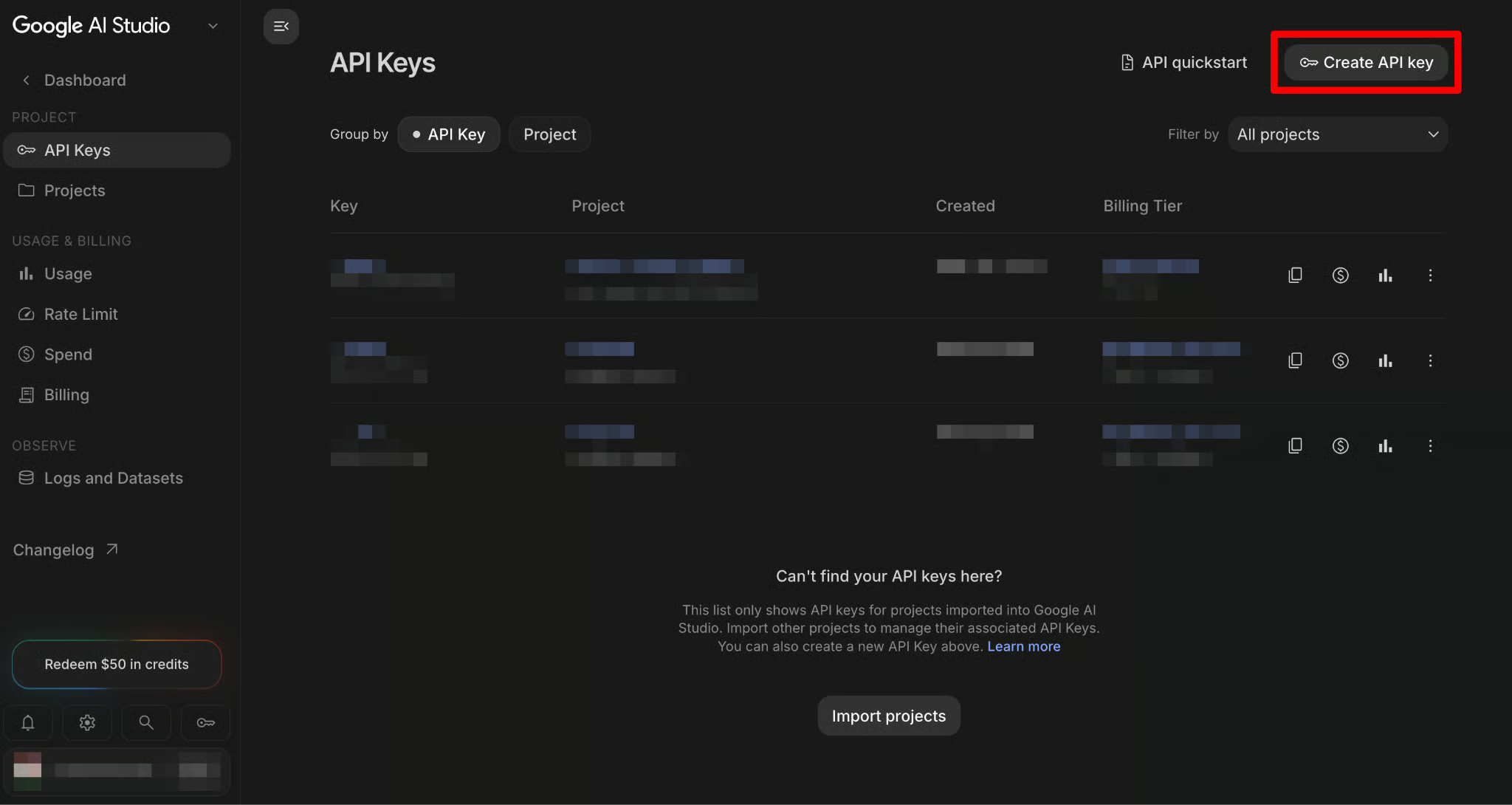
Open your terminal and save the key as an environment variable with export GEMINI_API_KEY=<your-key>.
Never pass the key as a ?key= query parameter in a URL; query strings end up in server logs, browser history, and proxy caches. If you want to explore the model in a playground before writing code, the Google AI Studio Tutorial covers Chat, Build, and Stream modes; this article stays on the API.
For production systems, the auth story changes: Vertex AI (now part of the Gemini Enterprise Agent Platform) gives you OAuth, IAM roles, and regional endpoints instead of a raw API key. Everything in this tutorial uses AI Studio keys because that is the fastest path for learning, but plan the Vertex migration before anything touches real user data.
Many tutorials still say to install google-generativeai. That is the old SDK, and it has no Interactions API. Install google-genai (version 2.3.0 or later):
pip install -U google-genaiOnce installed, verify that Python loads the library and initializes your client without errors:
from google import genai # reads GEMINI_API_KEY from the environment
client = genai.Client()
print("Client initialized successfully.")Every request to the Interactions API creates an Interaction resource, which records the full turn: your input, the model's thoughts, any tool calls, and the final output. The SDK exposes the final text through the output_text convenience property, so you rarely need to walk through the steps manually.
from google import genai
client = genai.Client()
interaction = client.interactions.create(
    model="gemini-3.8-flash",
    input=(
        "Write a pandas one-liner that adds a 7-day rolling average "
        "revenue column per store_id to a DataFrame with columns "
        "date, store_id, revenue. Reply with only the code, no explanation."
    ),
    generation_config={"thinking_level": "medium"},
)
print(interaction.output_text)
usage = interaction.usage
print(
    f"input={usage.total_input_tokens} | output={usage.total_output_tokens} | "
    f"thinking={usage.total_thought_tokens} | total={usage.total_tokens}"
)
On my machine, the model answered with a chained pandas one-liner, and this usage line:
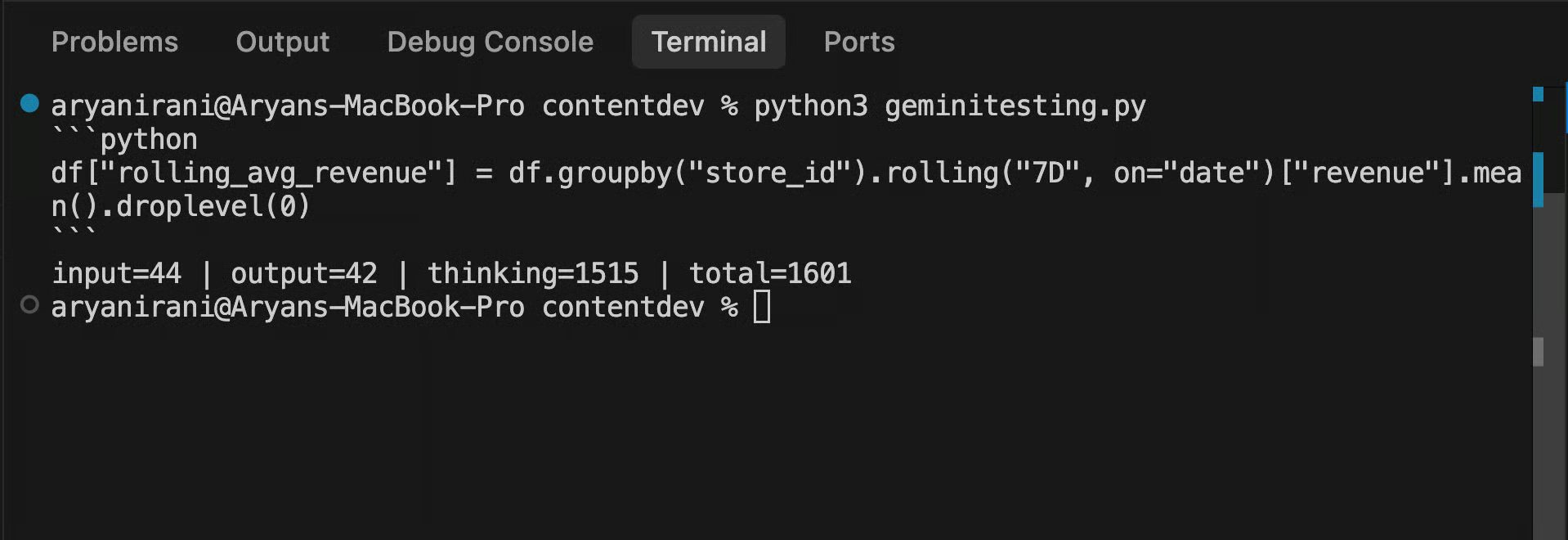
Those numbers hide the first real difference from 3.7. I ran the same task again with a longer prompt and no output restriction, and 3.8 spent 1,436 thinking tokens against 870 output tokens. With the restriction, it spent 1,515 against 42. The reasoning budget barely moved, which is the opposite of 3.7, where the same 2 prompts swung thinking from 838 to 1,530.
In other words, 3.8 decides how hard to think based on the task, not on how you phrase the task, which matches Google's claim that the model deliberately reasons and verifies more. Thinking bills at the output rate, so on the constrained call, about 97% of the billed tokens were reasoning I never saw. That is why the next section exists.
For chat interfaces or anything a person watches, waiting several seconds for the full response feels slow. Pass stream=True to client.interactions.create() and print chunks as they arrive:
	from google import genai

	client = genai.Client()

	stream = client.interactions.create(
	   model="gemini-3.8-flash",
	   input="Explain the difference between a JOIN and a correlated subquery in SQL.",
	   generation_config={"thinking_level": "low"},
	   stream=True,
	)

	for event in stream:
	   if event.event_type == "step.delta" and event.delta.type == "text":
	       print(event.delta.text, end="", flush=True)
	print()
When I ran this, the model returned a long, well-organized answer at thinking_level: "low": a conceptual comparison, a summary table, and 2 SQL examples for finding each customer's most recent order, 1 with a derived-table join and 1 with a correlated subquery in the SELECT list. The first words appeared almost immediately, which is the whole point.
That final print() is there for a reason. Without it, the last chunk ends mid-line, and zsh shows a stray % before your prompt, because the stream stops exactly where the model's text stops. Also, deltas carry text only if you log token counts per request, read them from the final completion event rather than summing chunks.
thinking_level sets how much reasoning Gemini 3.8 Flash does before it writes the answer. Reasoning tokens bill at the output rate of $3.75 per 1M, so the level you pick controls cost and latency directly, and Google says 3.8 leans into this on purpose: it takes extra reasoning steps on complex tasks and may spend more tokens at higher effort levels than 3.7 did.
The test is a race condition in a payment-retry function that is sent with the same prompt at all 3 levels. Concurrency bugs punish skim-reading, so if the levels differ, this is where it should show. If you only run 1 code block from this article, make it this one, since the numbers argue better than any prose can.
import time

from google import genai

client = genai.Client()

BUGGY_CODE = '''
import threading

payment_attempts = {}

def retry_payment(order_id, charge_fn, max_retries=3):
    """Retry a failed payment up to max_retries times."""
    if order_id not in payment_attempts:
        payment_attempts[order_id] = 0

    while payment_attempts[order_id] < max_retries:
        success = charge_fn(order_id)
        if success:
            del payment_attempts[order_id]
            return True
        payment_attempts[order_id] += 1
    return False
'''

PROMPT = (
    "Two worker threads can call retry_payment() with the same order_id "
    "at the same time. Identify the concurrency bug that can double-charge "
    "a customer, and rewrite the function to fix it.\n\n" + BUGGY_CODE
)

for level in ["low", "medium", "high"]:
    start = time.perf_counter()
    interaction = client.interactions.create(
        model="gemini-3.8-flash",
        input=PROMPT,
        generation_config={"thinking_level": level},
    )
    elapsed = time.perf_counter() - start
    usage = interaction.usage
    print(f"\n=== thinking_level: {level} | {elapsed:.1f}s ===")
    print(interaction.output_text)
    print(
        f"input={usage.total_input_tokens} | output={usage.total_output_tokens} | "
        f"thinking={usage.total_thought_tokens}"
    )
For context, the vulnerability is a non-atomic check-then-act on payment_attempts[order_id]. Under concurrency, 2 threads can both pass the while condition, and both call charge_fn() before either increments the counter. Fixing it means wrapping the read-check-charge-increment flow in a per-order lock, or using an idempotency key at the gateway.
Results from my runs:
|
|
Caught the race? |
Fix correct? |
Fix design |
Latency |
Thinking tokens |
Output tokens |
Cost |
|
|
Yes |
Yes |
Per-order locks + completed set |
7.8 s |
0 |
791 |
$0.0031 |
|
|
Yes |
Yes |
Per-order locks + per-order state dict |
16.6 s |
3,158 |
627 |
$0.0143 |
|
|
Yes |
Yes |
Per-order record (lock, attempts, completed) with documented failure path |
25.5 s |
4,512 |
896 |
$0.0204 |
All 3 levels found the double-charge, and all 3 shipped per-order locking, so unrelated orders run in parallel. That 2nd part is the headline if you compare this on 3.7: there, low wrapped everything in 1 global lock held during the network call, and per-order locks only appeared at medium. On 3.8, low writes that better design at 0 thinking tokens, in 7.8 seconds, for less than a 3rd of a cent.
So what do the levels buy now? Audit depth. This code has 4 distinct failure modes (the double-charge, a KeyError on concurrent delete, a re-charge after the success path deletes state, and non-atomic counter increments), and high was the only level to name all 4; low missed the re-charge case, and medium missed the counter.
high was also the only one to spell out the failure-path semantics of its fix: once retries are exhausted, later callers get False back instead of charging again.
The thinking column is Google's "3.8 works harder" claim showing up in a terminal. Against the same prompt on 3.7, medium went from 2,343 thinking tokens to 3,158, and high went from 2,217 to 4,512, roughly double, and the extra tokens bought a more complete analysis rather than a different verdict. Latency climbed in step this run (7.8 s, 16.6 s, 25.5 s), but single-run timings on these models swing, so compare token counts rather than seconds.
This is my rule of thumb for reasoning levels:
On 3.8, low earned a bigger role than Google's medium default suggests: it produced a correct, well-designed fix at 0 thinking tokens, so start there for anything a human reads before it matters (triage, drafts, summaries, code you will review).
Keep medium where the output ships unread, because the extra thinking brought a more complete failure-mode analysis, and an unread pipeline is exactly where the failure mode you did not list is the one that fires.
Reserve high for outputs where the failure path itself is the product, like payment flows, migrations, or anything a reviewer would audit line by line. In my run, it was the only level to catch all 4 bugs and document what happens after retries are exhausted.
At 6.6x the cost of lowfor high, that trade reads very differently at $3.75 per 1M output tokens now versus $7.50 after December 31, 2026, so escalate per request rather than globally.
One escape hatch worth knowing is that Google states that 3.7 Flash remains fully supported for efficiency-first workloads. If 3.8's extra diligence costs more than your task needs, staying on gemini-3.7-flash for that workload is a supported choice, not a hack.
Gemini 3.8 Flash reads PDFs directly as input, so you can send an invoice or a report and ask questions about it. I used a 1-page vendor invoice with the invoice number, dates, 4 line items, and a total.
Let us upload a local invoice PDF using the Files API. The Files API handles file storage and caching on Google's infrastructure:
	from google import genai
	client = genai.Client()
	print("Uploading invoice...")
	doc = client.files.upload(file="invoice_aug_2026.pdf")
	print(f"File uploaded: {doc.uri}\n")

	interaction = client.interactions.create(
	   model="gemini-3.8-flash",
	   input=[
	       {
	           "type": "text",
	           "text": "Extract the invoice number, total amount due, and due date.",
	       },
	       {"type": "document", "uri": doc.uri, "mime_type": doc.mime_type},
	   ],
	)
	print(interaction.output_text)
The output from my invoice:
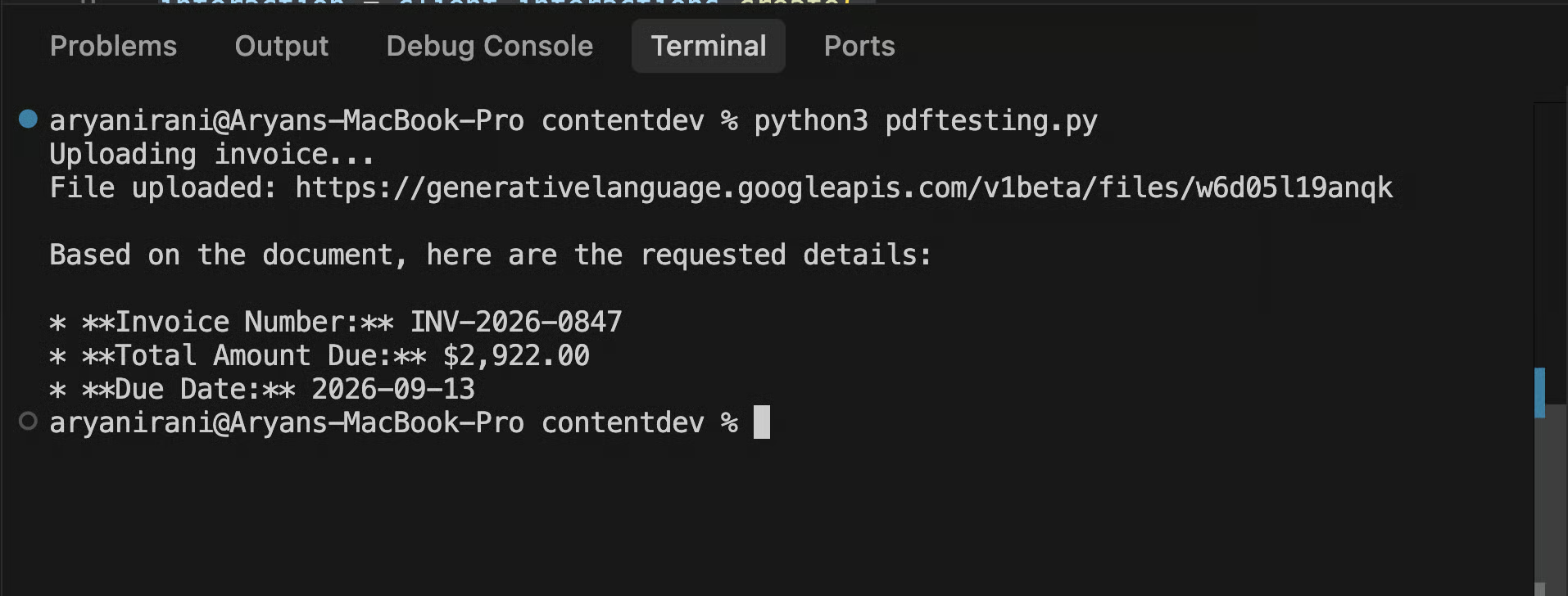
All 3 values are correct. The upload happens once, and the file stays available for later requests, which matters as soon as you ask more than 1 question about the same document. The answer comes back as markdown bullets, which is fine for reading and not fine for feeding into a pipeline.
To get JSON instead of prose, pass a schema in response_format. On the Interactions API, this is a top-level parameter; the responseMimeType setting inside generationConfig that you will see in older tutorials belongs to the legacy generateContent endpoint.
import json

from google import genai
from pydantic import BaseModel

client = genai.Client()


class Invoice(BaseModel):
    invoice_number: str
    total_due_usd: float
    due_date: str  # ISO 8601


doc = client.files.upload(file="invoice_aug_2026.pdf")

interaction = client.interactions.create(
    model="gemini-3.8-flash",
    input=[
        {
            "type": "text",
            "text": "Extract the invoice number, total amount due in USD, and due date.",
        },
        {"type": "document", "uri": doc.uri, "mime_type": doc.mime_type},
    ],
    response_format={
        "type": "text",
        "mime_type": "application/json",
        "schema": Invoice.model_json_schema(),
    },
)

invoice = json.loads(interaction.output_text)
print(invoice)
This is the output I received:
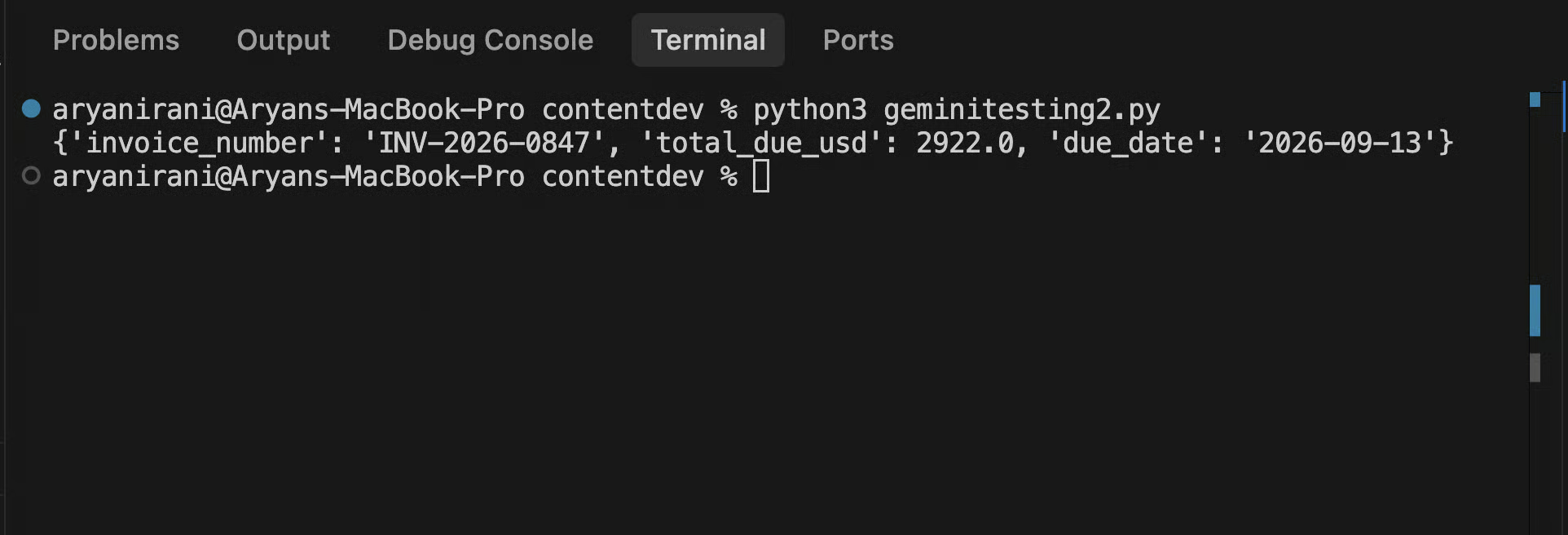
Your Pydantic class defines the required fields and data types, while model_json_schema() generates the JSON schema required by the Gemini API. Once processed, json.loads() converts the model's output into a standard Python dictionary. From this point, the structured data is ready to be converted into a DataFrame row, committed to a database, or appended to a Google Sheet.
For a 2nd question about the same document, pass the 1st interaction's id as previous_interaction_id. The server already has the PDF and the 1st exchange, so you do not send either again:
follow_up = client.interactions.create(
    model="gemini-3.8-flash",
    previous_interaction_id=interaction.id,
    input="List each line item on the invoice with its amount.",
)

print(follow_up.output_text)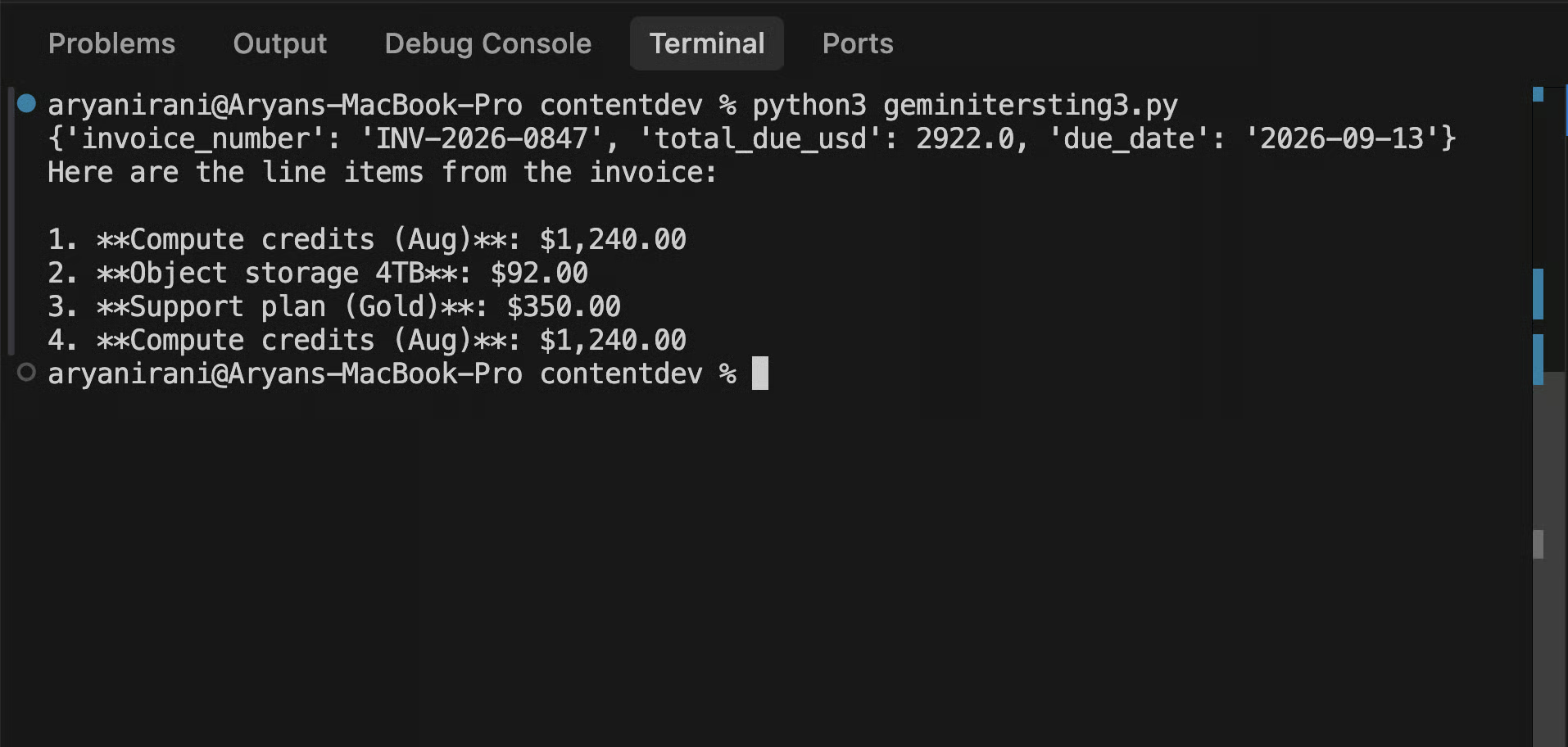
It returned all 4 items in order, including the repeated compute line, without commenting on the repeat. That is the right behavior for the question asked; if you want it to flag anomalies, ask for that.
For what it is worth, 3.7 behaved identically here, so 3.8's extra diligence applies to its own reasoning, not to volunteering for audits you did not request.
2 things to know about this call:
response_format did not carry over, because it is interaction-scoped, so this turn returned prose.
And interactions are stored by default (store=True) for 55 days on the paid tier and 1 day on the free tier; store=False makes a call stateless, but you then cannot chain a previous_interaction_id off it.
Function calling on Gemini 3.8 Flash is one loop, where the model asks for a tool, your code runs it, you send the result back, and the model writes the final answer. This section builds that loop by hand.
If you want Google to run the loop for you with hosted multi-tool agents, read our tutorial on "Managed Agents" in the Gemini API next. And if agents are where you are heading long term, the Building AI Agents with Google ADK course builds a full customer-support assistant on the same primitives.
The tool is lookup_exchange_rate(currency, date), backed by a small in-memory dict, so the example runs without an external API. The declaration is a JSON schema. The model never runs the function; it returns a function_call step asking your code to:
import json

from google import genai

client = genai.Client()

# Local "data source" standing in for a real FX API
RATES = {
    ("USD", "2026-08-03"): 87.42,
    ("USD", "2026-08-10"): 87.15,
    ("EUR", "2026-08-03"): 95.08,
}


def lookup_exchange_rate(currency: str, date: str) -> dict:
    rate = RATES.get((currency.upper(), date))
    if rate is None:
        return {"error": f"No rate for {currency} on {date}"}
    return {"currency": currency.upper(), "date": date, "inr_rate": rate}


rate_tool = {
    "type": "function",
    "name": "lookup_exchange_rate",
    "description": "Look up the INR exchange rate for a currency on a date (YYYY-MM-DD).",
    "parameters": {
        "type": "object",
        "properties": {
            "currency": {"type": "string", "description": "ISO code, e.g. USD"},
            "date": {"type": "string", "description": "YYYY-MM-DD"},
        },
        "required": ["currency", "date"],
    },
}

# Turn 1: the model decides to call the tool
interaction = client.interactions.create(
    model="gemini-3.8-flash",
    input="What was the USD to INR exchange rate on 2026-08-03?",
    tools=[rate_tool],
)

fc_step = next(s for s in interaction.steps if s.type == "function_call")
print(f"Model requested: {fc_step.name}({fc_step.arguments})")

# Your code executes the function locally
result = lookup_exchange_rate(**fc_step.arguments)

# Turn 2: send the result back; tools must be re-specified (interaction-scoped)
final = client.interactions.create(
    model="gemini-3.8-flash",
    previous_interaction_id=interaction.id,
    input=[
        {
            "type": "function_result",
            "name": fc_step.name,
            "call_id": fc_step.id,
            "result": [{"type": "text", "text": json.dumps(result)}],
        }
    ],
    tools=[rate_tool],
)

print(final.output_text)
The output:
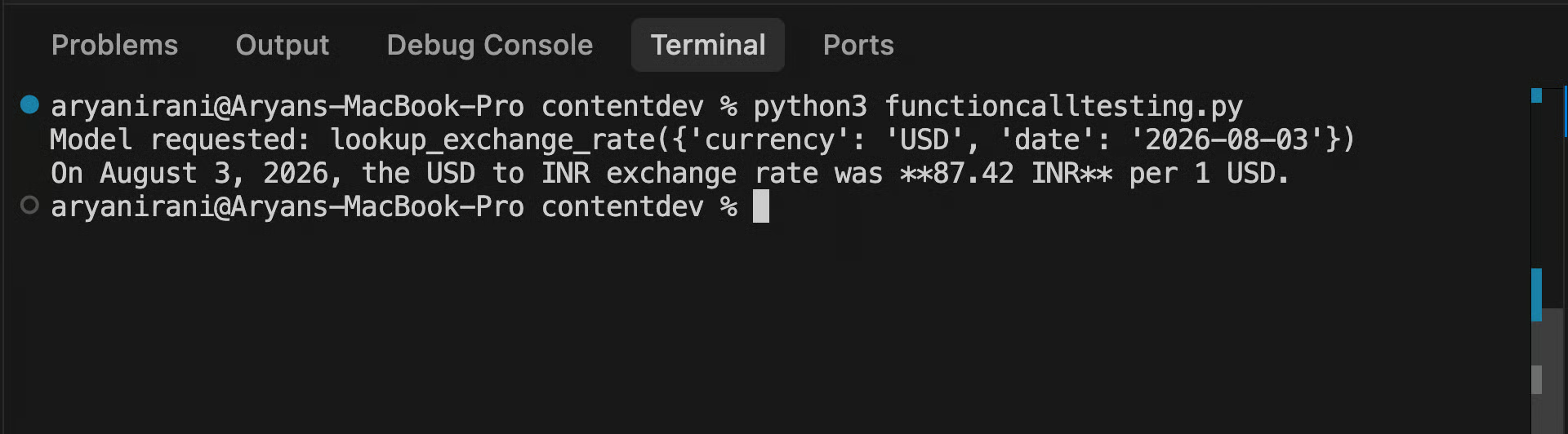
3 things happened here:
Turn 1 returned a function_call step with a name, structured arguments, and an id.
Your Python ran the lookup.
Turn 2 sent a function_result block referencing that call.
The tools parameter is passed again on turn 2 for the same reason response_format had to be re-passed in the PDF section: previous_interaction_id carries history, not config.
If a tool loop breaks, it is almost always 1 of 2 things.
First, every result has to map back to its call. On the Interactions API, that is call_id and name on the function_result block; on the legacy generateContent API, the FunctionResponse must match the id and name of the preceding FunctionCall. Neither is optional on Gemini 3.x.
Second, a Malformed_Function_Call error usually occurs when the model emits commentary before the tool call. Google's 3.8 developer guide says to clean up leading pre-tool text, format inline instructions with \n\n, and wrap working notes in a dedicated function call rather than raw text. Tighten the system instruction; do not retry blindly.
That depends on where you start.
From Gemini 3.7 Flash: nothing. Change the model string to gemini-3.8-flash, and every snippet in this article runs unmodified, since the API surface is identical.
From Gemini 3.6 Flash or earlier, the model configuration requires the same 15-minute audit as before.
Work through these in order. Items 1 to 3 cause immediate 400s; items 4 and 5 cause silent quality problems.
Change the model ID to gemini-3.8-flash.
Delete dead sampling parameters: temperature, top_p, and top_k are ignored or rejected on Gemini 3.x, and frequency_penalty, presence_penalty, and candidate_count throw an active API error. Strip all 6 from legacy configs.
Replace thinking_budget with thinking_level: use only low, medium, or high. The old minimal value returns a validation error. Sending both thinking_budget and thinking_level in a single request returns a 400.
Remove prefilled model turns: strip these from any conversation you construct, and make sure the final user turn has non-empty text. History payloads cannot end with a model turn.
Standardize multi-turn flows: rely on previous_interaction_id instead of client-side history replay. You must re-specify your tools, system_instruction, and generation_config on every turn where they matter.
Google publishes the authoritative version in the Gemini API model docs, including an automated path if your coding agent supports skills. Read it yourself once, even so; an automated migration will not tell you why your temperature=0.2 was there in the first place.
Here are the 4 status codes worth wiring handlers for, and what each one actually means on this API:
|
Status |
Typical cause |
What to do |
|
|
Leftover legacy fields: |
Fix the request; retrying is pointless |
|
|
Wrong, missing, or restricted |
Re-export the key; check it is set, unrestricted for this API, and not committed to git |
|
|
Rate limit on your tier, often during batch extraction jobs |
Retry with exponential backoff and jitter; consider spreading load |
|
|
Transient overload on Google's side |
Same jittered backoff; alert only if it persists past a few minutes |
2 more things here:
Set explicit client timeouts when combining thinking_level: "high" with long tool loops, because a hung request is worse than a failed one, and 3.8's extra diligence makes long reasoning runs more likely, not less.
And log interaction.id with every request; it is your handle for retrieving, debugging, or deleting stored interactions later.
Everything in this article traces back to 3 shifts. The Interactions API changed the calling convention, thinking_level replaced every sampling knob you used to tune, and server-side state through previous_interaction_id is what made both the PDF follow-up and the tool loop 1-liner turns instead of history-replay exercises. Gemini 3.8 Flash changed none of that surface; what it changed is how hard the model works inside it, which is why the measurements in this article were taken fresh on 3.8 rather than carried over from 3.7.
Before you take my level recommendations on faith, point the comparison script at a task from your own backlog; the level that wins on a payment-retry race may lose on your SQL generation workload.
When single API calls stop being enough, and you want production AI systems, our Associate AI Engineer for Developers track covers the full path, and the Associate AI Engineer for Data Scientists track does the same from the data side. I also recommend reading our article about Google's new voice assistant model, Gemini 3.8 Live.
Learn AI With DataCamp!
Course
Track
Practice and track your progress.
Continue with Googleblog
Alex Olteanu
8 min
Tutorial
François Aubry
12 min
Tutorial
Abid Ali Awan
10 min
Tutorial
Aashi Dutt
10 min
Tutorial
Bexruz (Bex) Tuychiev
11 min
Tutorial
Abid Ali Awan
12 min