In our Gemini 4 Argon API Tutorial, the agent had a clear job: find slow code, change it, and pass hidden tests. This companion experiment keeps the same pattern of controlled tools and an outside check, but changes the decision. Gemini 4 Carbon has to work out whether the original rules can be satisfied at all.
PayGuard, a fictional online store, has a trained machine learning (ML) model that scores orders for fraud. Its deployment policy requires the model to catch enough fraud value overall and on each sales channel without overwhelming the review team. The agent must investigate those rules without being told whether a valid threshold exists.
Gemini 4 Carbon is a Google reasoning model you call from Python through the Interactions API . Here, it acts as an AI agent: it chooses which checks to request, and Python runs them through three read-only tools using function calling . My question is whether it can identify the conflict, explain the evidence, and recommend an allowed change without treating that change as approved.
You'll need basic Python and a little experience with API requests. I define each fraud metric before the numbers use it. We'll cover how to:
Send a first request to Gemini 4 Carbon from Python
Give the model read-only tools and run them in a loop with limits
Get the verdict back as JSON your code can check
Verify that verdict with code and data the model never sees
Compare two thinking levels, which control how much the model reasons before answering
If you want the launch story and benchmark scores, our Gemini 4 Carbon overview has them, and our Claude Fable 5.2 vs. Gemini 4 Carbon breakdown compares the two models. I ran this experiment the day after Google opened the API to paying developers.
What Is the Gemini 4 Carbon API?
The Gemini 4 Carbon API is the paid application programming interface (API) for gemini-4-carbon, which the model page describes as a reasoning model for long, multi-step agent tasks. Input, thinking, and output share a 1,048,576-token context window, and a synchronous response stops at 65,536 tokens of thinking plus output by default.
Why an ML model audit is a good test for Gemini 4 Carbon
The task requires several checks, a search through allowed changes, and a clear stop when the rules leave no answer. I picked it because Python can compute the reference result. The model card lists hallucinations among Gemini 4 Carbon's known limits, so the model investigates while Python decides whether its recommendation holds.
The Project: Deciding Whether PayGuard's Fraud Model Can Go Live
PayGuard is the fictional store from the intro, and the full project is in the GitHub repository. Its classifier is already trained.
How PayGuard scores transactions
Each transaction has a Coordinated Universal Time (UTC) timestamp, an amount, a channel (Website or Mobile App), a risk score, and a fraud label. A scikit-learn HistGradientBoostingClassifier produces the score, rounded to 0.001, and PayGuard flags a transaction when risk_score >= threshold. Our precision-recall curve tutorial shows how moving a threshold changes what gets flagged, and our Fraud Detection in Python course covers the modeling side.
The synthetic data is split by time:
Training: the first nine weeks, used only to fit the classifier
Validation: the next four weeks, the only window the tools can read
Holdout: the four weeks after that, sealed until the recommendation is frozen
The current threshold is 0.5, and the data and policy never change during the experiment. Website fraud leaves clear signals in this data, while most Mobile App fraud looks like an ordinary order.
Gemini 4 Carbon asks, Python decides. Image by Author.
PayGuard's three deployment rules
Here are the three rules from the intro, written the way the policy states them. All are fictional targets I picked for this experiment:
R1: flagged transactions cover at least 85% of labeled fraud value overall
R2: they cover at least 70% of labeled fraud value within each channel
R3: no more than 200 transactions are flagged on any single UTC day
Fraud-value recall is the value of flagged fraud divided by the total value of fraud. Unlike the transaction-level recall in our precision versus recall guide, a missed $2,000 fraud counts far more than a missed $15 one, and flagging doesn't mean the money was saved. R3 caps the busiest single day, and that wording ends up deciding the audit.
The agent may investigate two changes: a daily capacity of up to 260 with one threshold, or separate channel thresholds at the original cap. Both need human approval, they can't be combined, and the policy prefers the option with no extra reviewers.
What counts as a correct audit
A correct audit gets four things right, and you should decide them before the first request:
The verdict: whether any single threshold meets R1, R2, and R3 on validation
The conflict: which requirements make the original policy impossible
The alternative: an allowed change that passes every rule when Python recomputes it
The preference: the recommendation follows the policy's preference order
An evaluator the agent can't call computes the answer.
How to Set Up the Gemini 4 Carbon API in Python
Setting up the Gemini 4 Carbon API takes Python 3.11 or newer and an API key from a Google AI Studio project with billing on, since the pricing page lists no free tier.
Install the Google Gen AI SDK and prepare the project
I tested this project with the Google Gen AI software development kit (SDK) pinned at google-genai==3.1.0, the launch-day release on PyPI that added gemini-4-carbon to the Interactions model list. Clone the project and install it in a virtual environment:
git clone https://github.com/KhalidAbdelaty/gemini-4-carbon-api.git
cd gemini-4-carbon-api
python -m venv .venv
.venv\Scripts\Activate.ps1 # macOS or Linux: source .venv/bin/activate
pip install-r requirements.txt
After that, run the two commands on the repository page that build the data and fit the classifier with fixed seeds. On a fresh clone, they print this:
Fixed seeds rebuild the same dataset. Image by Author.
Then put GEMINI_API_KEY=your-key in a .env file. The repository loads it without printing it.
Make your first Gemini 4 Carbon API request
Run this complete example from the project folder. It gives Gemini 4 Carbon the policy and classifier summary and asks what it would need to measure, without hinting at a conflict:
import json
import os
from dotenv import dotenv_values
from google import genai
import config as cfg # the project's policy text, threshold, and limits
os.environ.pop("GOOGLE_API_KEY",None)# it would take precedence over GEMINI_API_KEY
os.environ["GEMINI_API_KEY"]= dotenv_values(".env")["GEMINI_API_KEY"]
client = genai.Client()
summary = json.loads(open("data/model_summary.json").read())
prompt =("PayGuard is an e-commerce fraud classifier that gives each transaction a risk score from 0 to 1. "f"Model summary: {json.dumps(summary)}\n\n{cfg.POLICY_TEXT}\n\n"f"The current threshold is {cfg.CURRENT_THRESHOLD}. Before you judge whether this model can be ""deployed, list in at most five short bullets the measurements you would need and why.")
interaction = client.interactions.create(
model="gemini-4-carbon",input=prompt,
generation_config={"thinking_level":"medium"},
timeout=900,# Google recommends at least 15 minutes)print(interaction.output_text)
u = interaction.usage
print(f"status={interaction.status} | input={u.total_input_tokens} cached={u.total_cached_tokens} "f"output={u.total_output_tokens} thinking={u.total_thought_tokens}")
The thinking level goes into generation_config, and output_text holds the answer. Here is part of what came back:
* Peak single-day UTC flag count at threshold 0.5: The maximum number of transactions
  flagged on any single UTC calendar day, to check ... the strict R3 cap ...
* Channel-specific threshold grid: ... to test the preferred zero-extra-capacity
  alternative (<= 200/day) if no single global threshold complies.

status=completed | input=536 cached=0 output=310 thinking=1412
It read R3 as a peak and planned the policy's preference order before seeing a number. It never asked how ties or score rounding work, though, and the exhaustive check I'll show later depends on exactly that. The call took about 40 seconds and cost about 2 cents.
Leave out temperature, top_p, and top_k, which Gemini 4 Carbon ignores, and thinking_budget.
How to Build an ML Audit Agent With Gemini 4 Carbon Function Calling
A Gemini 4 Carbon audit agent is a loop: the model requests an evaluation, Python validates and runs it, and the result goes back until the model stops asking.
Define read-only tools for model evaluation
The agent gets three tools. All are limited to the validation window:
get_audit_context: the classifier summary, current configuration, policy, and allowed changes
evaluate_global_threshold: fraud-value recall overall and by channel, flags per day, and diagnostics for one threshold
evaluate_policy_change: the same measurements for a capacity increase or a channel-threshold pair
The full schemas are in the repository. This simplified excerpt omits the threshold and capacity fields, so it isn't a complete declaration to copy. It only shows the boundary that matters here: the tool accepts the two policy changes PayGuard allows, reads validation data, and approves nothing.
{"type":"function","name":"evaluate_policy_change","description":("Evaluate one allowed policy change on validation. ""Read-only; it approves nothing."),"parameters":{"type":"object","properties":{"change_type":{"type":"string","enum":["capacity_increase","channel_thresholds"]}},"required":["change_type"]}}Powered by
Python validates the omitted threshold and capacity fields, rejects changes outside the policy, and returns measurements instead of pass or fail flags. The agent can't reach the holdout, call the evaluator, or change the policy. I explain in the FAQs why I skipped Gemini 4 Carbon's built-in code execution.
Give the agent a clear objective and stopping rules
The system instruction sets the method. Like the first request, it doesn't hint at where the conflict is:
- Read the audit context first, then evaluate the current configuration before anything else.
- Check every requirement yourself by comparing tool numbers with the policy text: R1, R2 for
  Website, R2 for Mobile App, and R3. R3 is a limit on the busiest single day, not on the average.
- Use only numbers that a tool returned. Do not estimate a metric you have not measured.
- If the evidence does not settle a question, say so. Inconclusive is an acceptable answer.
The prompt can only ask, so the limits live in the agent harness, the Python code around the model. Since the API has no budget setting, the application sets them per attempt: 25 turns, 60 tool calls, 30 minutes, and $3, with spend checked between turns.
Implement the function calling loop with the Interactions API
Each turn is one client.interactions.create() call. Gemini 4 Carbon often requests several tools at once, so the loop runs every function_call step. This is the core loop, and the repository version adds logging and limit checks:
request =dict(model="gemini-4-carbon", system_instruction=SYSTEM_INSTRUCTION, tools=DECLARATIONS,
generation_config={"thinking_level": level,"max_output_tokens":65_536,"thinking_summaries":"auto"})
interaction = client.interactions.create(input=TASK, timeout=900,**request)whileTrue:
calls =[s for s in interaction.steps if s.type=="function_call"]if interaction.status in("failed","cancelled","incomplete")ornot calls:break# incomplete: the output cap cut the turn off
results =[]for call in calls:
out, is_error = tools.call(call.name,dict(call.arguments))# allowlisted, validated
results.append({"type":"function_result","name": call.name,"call_id": call.id,"is_error": is_error,"result":[{"type":"text","text": json.dumps(out)}]})# turn, tool-call, time, and spend limits are checked here, before the next request
interaction = client.interactions.create(input=results, previous_interaction_id=interaction.id,
timeout=900,**request)
I keep these settings in one request dict so every follow-up call resends them. previous_interaction_id carries the history, but tools, system_instruction, and generation_config apply to one interaction only. If a turn ends incomplete, max_output_tokens cut it off, and you still pay for its thinking tokens.
Return a structured audit report with a JSON schema
Google's structured output guide lists tools plus a JSON schema in one request as a Preview feature that includes Gemini 4 Carbon. I kept them apart anyway: the investigation turns only measure, and a final turn on the same history and config writes the report with a schema and no tools:
AuditReport is a Pydantic model with the verdict, conflict, evidence, recommendation, and approvals. Python measures time and cost instead of asking Gemini 4 Carbon to report them.
Run the Gemini 4 Carbon Audit on the Fraud Detection Model
Gemini 4 Carbon audited the model the way I'd want a junior analyst to, with measurements before any conclusion. On the first medium attempt, it read the audit context, checked about two dozen single thresholds, and tested eight policy changes.
All 32 tool calls, in order. Image by Author.
Evaluate PayGuard's current threshold
The agent evaluated the current threshold of 0.5 and found 91% Website recall, 20% Mobile App recall, 64% overall recall, and 85 flags on the busiest day. That fails R1 and the Mobile App half of R2 with room under R3, so the obvious move is a lower threshold.
Test fraud-value recall against daily review capacity
Lowering a threshold catches more fraud value and sends more orders to review. PayGuard needs enough of the first while keeping the second under a daily cap.
The agent tried a few coarse thresholds in one batch, then narrowed to single grid points. Calls 11, 12, 17, and 18 in the trace settled it.
On this validation window, the Mobile App floor needs 0.108 or lower, because one step higher drops it just under 70%. The cap needs 0.118 or higher. No threshold does both.
Overall recall holds up to 0.137, so R1 stays outside the conflict. At 0.108 the average day has about 169 flags, and only one Saturday goes over. This is why the policy uses the busiest day's workload rather than the daily average.
Mobile recall and capacity never overlap. Image by Author.
Check performance across both payment channels
Mobile App fraud, with its weaker signals, sits low in the score range. Dragging one threshold down to 0.108 for the Mobile App also pulls in more legitimate Website orders, and on that Saturday they push the total over the cap.
The overall number hides it: at 0.118, overall recall is about 87% while the Mobile App sits below its floor. If your policy names segments, measure each one, because the total can pass while one segment fails.
Can Gemini 4 Carbon Detect Conflicting Deployment Requirements?
Yes, on this audit. The frozen report says not deployable, says no single threshold works, and names R2 for the Mobile App and R3 as the conflict.
Check Gemini 4 Carbon's deployment verdict against its evidence
Every number the report cites matches a tool result, but one sentence claims more than the agent measured. It says no threshold works "across all 0.001 risk-score grid points," yet the agent tested only the two dozen in the trace above, out of 1,002 possible thresholds.
The claim holds because recall and daily counts both fall as the threshold rises, which the report never says. Check each claim in an agent's report against what it measured, and our guide to evaluating AI agents covers more checks of this kind.
Verify the conflict with an exhaustive Python evaluator
Gemini 4 Carbon sampled thresholds and inferred that none could work. The evaluator proves that result for this validation set by checking every distinct flag set, without sharing code with the tools.
Scores sit on a 0.001 grid, so the 1,002 candidate cutoffs cover every possible flag set. The evaluator checks all of them, plus every pair of channel thresholds, using integer cents so 85% and 70% are exact.
Exhaustive check and four rejected configurations. Image by Author.
No global threshold passes all three rules, so Gemini 4 Carbon's claim now has proof behind it. The evaluator matched the 0.108 and 0.118 boundaries from the agent's probing and found thousands of channel pairs that pass at 200 per day.
An evaluator only helps if it rejects bad answers, so I fed it four wrong configurations, and it rejected all four.
Test Deployment Alternatives With Gemini 4 Carbon
Gemini 4 Carbon tested both allowed changes and picked separate thresholds at the original cap over extra reviewers. It flagged that choice as an exception a person must approve.
Test an increase in manual review capacity
One global threshold works if the cap rises from 200 to 205, and the evaluator confirmed 205 as the smallest increase. Gemini 4 Carbon still ranked this option second, because of the preference rule I described earlier.
Test separate thresholds for each payment channel
On the channel side, the agent kept the Mobile App threshold near its limit (it had already seen 0.109 break the floor) and raised the Website threshold, dropping flags on legitimate Website orders. It tested seven pairs, and one failed by a single flag on the busiest day. It recommended Website 0.3 and Mobile App 0.1 because that pair clears every rule with room to spare, and the evaluator confirmed it at the original cap.
Compare the verified alternatives
These numbers came up above, and the evaluator recomputed each one:
Option
Thresholds
Overall
Website
Mobile App
Busiest day
Approval
Original policy
Global 0.108
87.5%
98.2%
70.1%
205, cap 200
Fails
More capacity
Global 0.108
87.5%
98.2%
70.1%
205, cap 205
Needed
Channel split
Website 0.3, Mobile App 0.1
86.2%
94.5%
72.8%
191, cap 200
Needed
The channel split also flags about 6% fewer transactions than the capacity option. Fewer than half of its flags are fraud, though, which the report listed as an open issue.
How to Verify Gemini 4 Carbon's Recommendation on Unseen Data
You verify the recommendation by applying it, frozen, to the sealed holdout. The difference from the evaluator is the data: the evaluator scored weeks the agent could see, and the holdout scores four later weeks no tool could read. The check runs once per frozen recommendation and won't start if the report changed after freezing.
The frozen recommendation passes on holdout. Image by Author.
It passed all three rules, and the busiest day stayed under the cap. Don't read too much into it, though. Three things keep this result modest:
The holdout comes from the same generator, so it says nothing about new kinds of fraud or data drift
Overall recall cleared 85% by less than two points
My untested guess: the split could break the cap if Mobile App traffic grows faster than Website traffic, because the Mobile App threshold sits so low
The first two come from the numbers.
Watch the full audit in Streamlit
The repository also includes a Streamlit app and the six recorded attempts, so you can open this audit without an API call. In the video, I load it and step through each tab.
The Streamlit app shows one audit. Video by Author.
Gemini 4 Carbon Medium vs. High Thinking: Accuracy, Time, and Cost
Success here means finishing within the application limits and returning a report that the evaluator accepts. A stopped attempt has no verdict to score. By that definition, medium finished every attempt and cost less than half as much per correct audit.
Six attempts are too few to make that a general rule. If thinking levels are new to you, our Gemini 3.8 Flash API tutorial covers thinking_level in more detail.
Compare medium and high thinking on the same audit
This is the full comparison behind the TL;DR. I ran 3 attempts per level, each from a clean state with no memory of the others, with identical data, prompt, tools, limits, and evaluator:
Per level
medium
high
Attempts that finished with a report
3 of 3
2 of 3
Correct audits among those
3 of 3
2 of 2
Thinking tokens per attempt
About 7,700
About 17,500
Time per attempt
About 5 minutes
About 6 minutes
Cost per correct audit, introductory rate
About $0.25
About $0.62
Cost per correct audit, standard rate
About $0.51
About $1.24
The cost rows count every attempt's spend, including the one that stopped. Every completed attempt reached the same verdict and conflict and picked a channel pair the evaluator accepted, so the extra thinking went into more checks.
I saw a similar pattern in the Gemini 4 Argon coding experiment: highspent more and did more work for a smaller change in the verified result. The tasks are different, so their costs and success rates aren't directly comparable. In both cases, the independent check tells us more than the thinking total.
Why one high-thinking attempt never finished
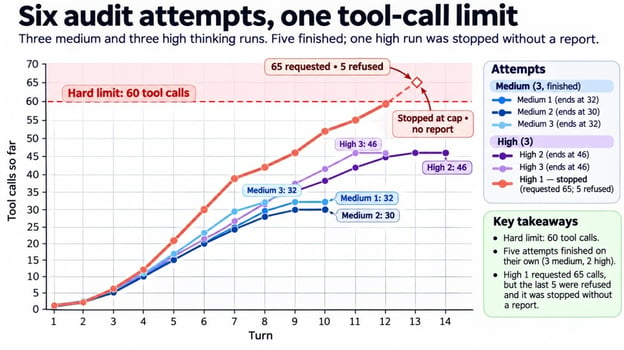
The attempt that stopped was high's first, and it never gave a wrong verdict. It probed every grid point from 0.101 to 0.119 and then went hunting for the Website's 70% boundary, which nothing depended on, and it kept asking for more checks until it hit the 60-call limit I set earlier and the application stopped it before it wrote a report.
Only one attempt hit the limit. Image by Author.
That stop is the useful part. A prompt asking for fewer calls wouldn't have ended it, and the limit in code did, after about 22 cents.
The five finished reports also passed Python's other checks. None misread the current configuration, named a requirement outside the conflict, cited a tool call that didn't exist, or recommended a configuration it hadn't tested.
Measure tokens, time, and cost per audit
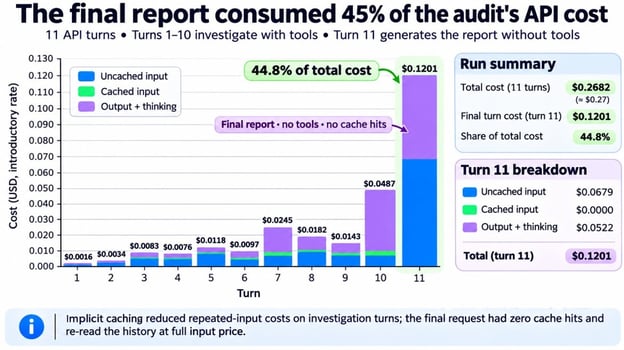
An audit costs the sum of each turn's usage, priced at $2.00 per million input tokens, $0.10 cached, and $10.00 output including thinking, all doubling on December 1, 2026. total_input_tokens includes cached tokens, so the code prices the two parts separately.
The report turn costs the most. Image by Author.
The surprise was the report, or more exactly, its bill. Implicit caching covered about three-quarters of the input tokens in the investigation turns, but the no-tools report request never got a cache hit.
The likely cause is that dropping tools changes the start of the request. Either way, that turn reread the whole history at full price and took about 40% of each completed attempt's cost. Count that turn when you size your spend limit.
Limitations of Using Gemini 4 Carbon for ML Model Auditing
I designed this test and generated its data myself, so the results carry these limits:
The data is synthetic and comes from one classifier, and I tuned the generator until a conflict existed, before any API call
The verdict covers this classifier only, and a better one might meet all three rules with one threshold
A threshold can be checked, but approving a channel split is a business and fairness judgment
Interactions are stored for 55 days on the paid tier by default, and store=false rules out previous_interaction_id, so an agent that sends transaction rows needs a data review
The evaluator solves the threshold problem on its own, with no model involved. If all you need is a threshold, use an optimization solver. What Gemini 4 Carbon added was the audit around it.
Nothing here is tied to fraud. The setup fits any model whose rules Python can measure.
Final Thoughts
The main result is that Gemini 4 Carbon recognized the original policy had no valid global threshold. All 5 completed attempts named the conflict and proposed a channel split the evaluator accepted; one high attempt stopped before producing a report.
The Gemini 4 Argon and Gemini 4 Carbon experiments test two sides of agent reliability. The Gemini 4 Argon agent changed code and had to preserve behavior, while the Gemini 4 Carbon agent reached a decision under rules that made the original answer impossible. Both needed narrow tools, resource limits, and a check outside the model.
That is the standard I'd use for an agent: define what its tools can establish, verify the result independently, and allow an inconclusiveanswer when the evidence runs out. Next, I'd put two or three candidate classifiers under the same policy and ask which one, if any, can ship.
I’m a data engineer and community builder who works across data pipelines, cloud, and AI tooling while writing practical, high-impact tutorials for DataCamp and emerging developers.
FAQs
How do I get access to the Gemini 4 Carbon API?⌄
Through a paid Google AI Studio project or through Gemini for business on Google Cloud. The Gemini app, Antigravity, and AI Mode also offer it to Google AI Ultra subscribers, but those consumer apps don't give you an API key.
How much does the Gemini 4 Carbon API cost?⌄
All 6 audits here came to $2.00 at the introductory rate. Standard requests like these get implicit caching once a request passes 4,096 input tokens, so keep the start of each request identical. Flex inference, which Interactions requests also support, halves the token rates in exchange for slower, less reliable responses.
What are the rate limits for the Gemini 4 Carbon API?⌄
Paid projects have per-minute limits plus a spend limit, which is $10 per rolling 10-minute window on Tier 1, and going over returns 429 RESOURCE_EXHAUSTED. One audit here cost under $1, so only many parallel attempts would hit it. The limits rise with your tier, so check Google's rate limits page for your project.
What is the difference between medium and high thinking in Gemini 4 Carbon?⌄
Gemini 4 Carbon has three levels, low, medium (the default), and high, and I only compared the top two here. To see what the extra thinking looks like, set thinking_summariesto "auto" and you'll get condensed summaries next to each answer. They're off by default and can come back empty when the model barely reasons.
Can Gemini 4 Carbon run Python code?⌄
Yes. Add {"type": "code_execution"} to toolsand Gemini 4 Carbon can write and run Python on Google's side, billed at its normal token rates. I left it out to keep control on my side: the three tools decide what it can measure, and the raw transactions and the holdout never leave my machine.
Gemini 4 Carbon tops the Artificial Analysis Intelligence Index. See what's new, how it compares to Opus 5.5 and GPT-6 Astra, pricing, and who can use it.
Build a multi‑agent workflow powered by Gemini 3 API to take a dataset, analyze it, generate insights, and produce a complete PDF report automatically.
Google's Managed Agents let you deploy autonomous agents with a single API call. Learn how to build one that analyzes data, runs Python, and generates charts.
Learn how to stream mic audio, handle interruptions, and call tools asynchronously in Python, then compare Gemini 3.8 Live with its Extended Thinking variant.
Analyze data smarter with Gemini in Google Sheets. Use AI-powered insights, formula suggestions, and automation to simplify spreadsheets and boost productivity.
Connect data sources to your app to build a search and analysis engine. Master capabilities like deep research agents, ideation, and NotebookLM for analysis.











In our Gemini 4 Argon API Tutorial, the agent had a clear job: find slow code, change it, and pass hidden tests. This companion experiment keeps the same pattern of controlled tools and an outside check, but changes the decision. Gemini 4 Carbon has to work out whether the original rules can be satisfied at all.
PayGuard, a fictional online store, has a trained machine learning (ML) model that scores orders for fraud. Its deployment policy requires the model to catch enough fraud value overall and on each sales channel without overwhelming the review team. The agent must investigate those rules without being told whether a valid threshold exists.
Gemini 4 Carbon is a Google reasoning model you call from Python through the Interactions API . Here, it acts as an AI agent: it chooses which checks to request, and Python runs them through three read-only tools using function calling . My question is whether it can identify the conflict, explain the evidence, and recommend an allowed change without treating that change as approved.
You'll need basic Python and a little experience with API requests. I define each fraud metric before the numbers use it. We'll cover how to:
If you want the launch story and benchmark scores, our Gemini 4 Carbon overview has them, and our Claude Fable 5.2 vs. Gemini 4 Carbon breakdown compares the two models. I ran this experiment the day after Google opened the API to paying developers.
What Is the Gemini 4 Carbon API?
The Gemini 4 Carbon API is the paid application programming interface (API) for
gemini-4-carbon, which the model page describes as a reasoning model for long, multi-step agent tasks. Input, thinking, and output share a 1,048,576-token context window, and a synchronous response stops at 65,536 tokens of thinking plus output by default.Why an ML model audit is a good test for Gemini 4 Carbon
The task requires several checks, a search through allowed changes, and a clear stop when the rules leave no answer. I picked it because Python can compute the reference result. The model card lists hallucinations among Gemini 4 Carbon's known limits, so the model investigates while Python decides whether its recommendation holds.
The Project: Deciding Whether PayGuard's Fraud Model Can Go Live
PayGuard is the fictional store from the intro, and the full project is in the GitHub repository. Its classifier is already trained.
How PayGuard scores transactions
Each transaction has a Coordinated Universal Time (UTC) timestamp, an amount, a channel (Website or Mobile App), a risk score, and a fraud label. A scikit-learn
HistGradientBoostingClassifierproduces the score, rounded to 0.001, and PayGuard flags a transaction whenrisk_score >= threshold. Our precision-recall curve tutorial shows how moving a threshold changes what gets flagged, and our Fraud Detection in Python course covers the modeling side.The synthetic data is split by time:
The current threshold is 0.5, and the data and policy never change during the experiment. Website fraud leaves clear signals in this data, while most Mobile App fraud looks like an ordinary order.
Gemini 4 Carbon asks, Python decides. Image by Author.
PayGuard's three deployment rules
Here are the three rules from the intro, written the way the policy states them. All are fictional targets I picked for this experiment:
Fraud-value recall is the value of flagged fraud divided by the total value of fraud. Unlike the transaction-level recall in our precision versus recall guide, a missed $2,000 fraud counts far more than a missed $15 one, and flagging doesn't mean the money was saved. R3 caps the busiest single day, and that wording ends up deciding the audit.
The agent may investigate two changes: a daily capacity of up to 260 with one threshold, or separate channel thresholds at the original cap. Both need human approval, they can't be combined, and the policy prefers the option with no extra reviewers.
What counts as a correct audit
A correct audit gets four things right, and you should decide them before the first request:
An evaluator the agent can't call computes the answer.
How to Set Up the Gemini 4 Carbon API in Python
Setting up the Gemini 4 Carbon API takes Python 3.11 or newer and an API key from a Google AI Studio project with billing on, since the pricing page lists no free tier.
Install the Google Gen AI SDK and prepare the project
I tested this project with the Google Gen AI software development kit (SDK) pinned at
google-genai==3.1.0, the launch-day release on PyPI that addedgemini-4-carbonto the Interactions model list. Clone the project and install it in a virtual environment:After that, run the two commands on the repository page that build the data and fit the classifier with fixed seeds. On a fresh clone, they print this:
Fixed seeds rebuild the same dataset. Image by Author.
Then put
GEMINI_API_KEY=your-keyin a.envfile. The repository loads it without printing it.Make your first Gemini 4 Carbon API request
Run this complete example from the project folder. It gives Gemini 4 Carbon the policy and classifier summary and asks what it would need to measure, without hinting at a conflict:
The thinking level goes into
generation_config, andoutput_textholds the answer. Here is part of what came back:It read R3 as a peak and planned the policy's preference order before seeing a number. It never asked how ties or score rounding work, though, and the exhaustive check I'll show later depends on exactly that. The call took about 40 seconds and cost about 2 cents.
Leave out
temperature,top_p, andtop_k, which Gemini 4 Carbon ignores, andthinking_budget.How to Build an ML Audit Agent With Gemini 4 Carbon Function Calling
A Gemini 4 Carbon audit agent is a loop: the model requests an evaluation, Python validates and runs it, and the result goes back until the model stops asking.
Define read-only tools for model evaluation
The agent gets three tools. All are limited to the validation window:
get_audit_context: the classifier summary, current configuration, policy, and allowed changesevaluate_global_threshold: fraud-value recall overall and by channel, flags per day, and diagnostics for one thresholdevaluate_policy_change: the same measurements for a capacity increase or a channel-threshold pairThe full schemas are in the repository. This simplified excerpt omits the threshold and capacity fields, so it isn't a complete declaration to copy. It only shows the boundary that matters here: the tool accepts the two policy changes PayGuard allows, reads validation data, and approves nothing.
Python validates the omitted threshold and capacity fields, rejects changes outside the policy, and returns measurements instead of pass or fail flags. The agent can't reach the holdout, call the evaluator, or change the policy. I explain in the FAQs why I skipped Gemini 4 Carbon's built-in code execution.
Give the agent a clear objective and stopping rules
The system instruction sets the method. Like the first request, it doesn't hint at where the conflict is:
The prompt can only ask, so the limits live in the agent harness, the Python code around the model. Since the API has no budget setting, the application sets them per attempt: 25 turns, 60 tool calls, 30 minutes, and $3, with spend checked between turns.
Implement the function calling loop with the Interactions API
Each turn is one
client.interactions.create()call. Gemini 4 Carbon often requests several tools at once, so the loop runs everyfunction_callstep. This is the core loop, and the repository version adds logging and limit checks:I keep these settings in one
requestdict so every follow-up call resends them.previous_interaction_idcarries the history, buttools,system_instruction, andgeneration_configapply to one interaction only. If a turn endsincomplete,max_output_tokenscut it off, and you still pay for its thinking tokens.Return a structured audit report with a JSON schema
Google's structured output guide lists tools plus a JSON schema in one request as a Preview feature that includes Gemini 4 Carbon. I kept them apart anyway: the investigation turns only measure, and a final turn on the same history and config writes the report with a schema and no tools:
AuditReportis a Pydantic model with the verdict, conflict, evidence, recommendation, and approvals. Python measures time and cost instead of asking Gemini 4 Carbon to report them.Run the Gemini 4 Carbon Audit on the Fraud Detection Model
Gemini 4 Carbon audited the model the way I'd want a junior analyst to, with measurements before any conclusion. On the first
mediumattempt, it read the audit context, checked about two dozen single thresholds, and tested eight policy changes.All 32 tool calls, in order. Image by Author.
Evaluate PayGuard's current threshold
The agent evaluated the current threshold of 0.5 and found 91% Website recall, 20% Mobile App recall, 64% overall recall, and 85 flags on the busiest day. That fails R1 and the Mobile App half of R2 with room under R3, so the obvious move is a lower threshold.
Test fraud-value recall against daily review capacity
Lowering a threshold catches more fraud value and sends more orders to review. PayGuard needs enough of the first while keeping the second under a daily cap.
The agent tried a few coarse thresholds in one batch, then narrowed to single grid points. Calls 11, 12, 17, and 18 in the trace settled it.
On this validation window, the Mobile App floor needs 0.108 or lower, because one step higher drops it just under 70%. The cap needs 0.118 or higher. No threshold does both.
Overall recall holds up to 0.137, so R1 stays outside the conflict. At 0.108 the average day has about 169 flags, and only one Saturday goes over. This is why the policy uses the busiest day's workload rather than the daily average.
Mobile recall and capacity never overlap. Image by Author.
Check performance across both payment channels
Mobile App fraud, with its weaker signals, sits low in the score range. Dragging one threshold down to 0.108 for the Mobile App also pulls in more legitimate Website orders, and on that Saturday they push the total over the cap.
The overall number hides it: at 0.118, overall recall is about 87% while the Mobile App sits below its floor. If your policy names segments, measure each one, because the total can pass while one segment fails.
Can Gemini 4 Carbon Detect Conflicting Deployment Requirements?
Yes, on this audit. The frozen report says
not deployable, says no single threshold works, and names R2 for the Mobile App and R3 as the conflict.Check Gemini 4 Carbon's deployment verdict against its evidence
Every number the report cites matches a tool result, but one sentence claims more than the agent measured. It says no threshold works "across all 0.001 risk-score grid points," yet the agent tested only the two dozen in the trace above, out of 1,002 possible thresholds.
The claim holds because recall and daily counts both fall as the threshold rises, which the report never says. Check each claim in an agent's report against what it measured, and our guide to evaluating AI agents covers more checks of this kind.
Verify the conflict with an exhaustive Python evaluator
Gemini 4 Carbon sampled thresholds and inferred that none could work. The evaluator proves that result for this validation set by checking every distinct flag set, without sharing code with the tools.
Scores sit on a 0.001 grid, so the 1,002 candidate cutoffs cover every possible flag set. The evaluator checks all of them, plus every pair of channel thresholds, using integer cents so 85% and 70% are exact.
Exhaustive check and four rejected configurations. Image by Author.
No global threshold passes all three rules, so Gemini 4 Carbon's claim now has proof behind it. The evaluator matched the 0.108 and 0.118 boundaries from the agent's probing and found thousands of channel pairs that pass at 200 per day.
An evaluator only helps if it rejects bad answers, so I fed it four wrong configurations, and it rejected all four.
Test Deployment Alternatives With Gemini 4 Carbon
Gemini 4 Carbon tested both allowed changes and picked separate thresholds at the original cap over extra reviewers. It flagged that choice as an exception a person must approve.
Test an increase in manual review capacity
One global threshold works if the cap rises from 200 to 205, and the evaluator confirmed 205 as the smallest increase. Gemini 4 Carbon still ranked this option second, because of the preference rule I described earlier.
Test separate thresholds for each payment channel
On the channel side, the agent kept the Mobile App threshold near its limit (it had already seen 0.109 break the floor) and raised the Website threshold, dropping flags on legitimate Website orders. It tested seven pairs, and one failed by a single flag on the busiest day. It recommended Website 0.3 and Mobile App 0.1 because that pair clears every rule with room to spare, and the evaluator confirmed it at the original cap.
Compare the verified alternatives
These numbers came up above, and the evaluator recomputed each one:
Option
Thresholds
Overall
Website
Mobile App
Busiest day
Approval
Original policy
Global 0.108
87.5%
98.2%
70.1%
205, cap 200
Fails
More capacity
Global 0.108
87.5%
98.2%
70.1%
205, cap 205
Needed
Channel split
Website 0.3, Mobile App 0.1
86.2%
94.5%
72.8%
191, cap 200
Needed
The channel split also flags about 6% fewer transactions than the capacity option. Fewer than half of its flags are fraud, though, which the report listed as an open issue.
How to Verify Gemini 4 Carbon's Recommendation on Unseen Data
You verify the recommendation by applying it, frozen, to the sealed holdout. The difference from the evaluator is the data: the evaluator scored weeks the agent could see, and the holdout scores four later weeks no tool could read. The check runs once per frozen recommendation and won't start if the report changed after freezing.
The frozen recommendation passes on holdout. Image by Author.
It passed all three rules, and the busiest day stayed under the cap. Don't read too much into it, though. Three things keep this result modest:
The first two come from the numbers.
Watch the full audit in Streamlit
The repository also includes a Streamlit app and the six recorded attempts, so you can open this audit without an API call. In the video, I load it and step through each tab.