

What Is the Gemini 4 Argon API?
The Gemini 4 Argon API gives you gemini-4-argon, a Google reasoning model built for complex coding and multi-step agent tasks. It reached general availability in mid-October 2026. Per the model page, input, thinking, and output share one 1,048,576-token window, and a synchronous response stops at 65,536 output tokens.
Google ran a similar experiment in its ADK case study: an 11-hour Antigravity run with /goal on the Python Agent Development Kit (ADK). Its reviewers kept 2 of 6 proposals, cutting session prep by about 40% in long sessions and imports by 21%. This tutorial uses a small Python loop instead.
You'll use four API features:
-
The Interactions API, Google's recommended interface for new projects, which keeps conversation state on the server
-
Function calling, where the model asks for a tool, and your code decides whether to run it
-
thinking_level:low,medium(the default), orhigh -
The
usageobject, which reports input, cached, output, and thought tokens
Argon asks, and your code does the work.
The Project: A Slow Python App for Gemini 4 Argon to Fix
The agent gets the EventFlow code, 8 tools, and no hint about the slowdown. The complete code is on GitHub. Start with EventFlow.
How EventFlow works
EventFlow is a fictional event processor in six small modules. An event enters EventFlow.ingest(), validate() turns it into an Event, and CustomerState stores it in timestamp order per customer. Then summarize() turns each history into sessions, revenue, refunds, and page counts, and build_report() produces a CustomerReport.
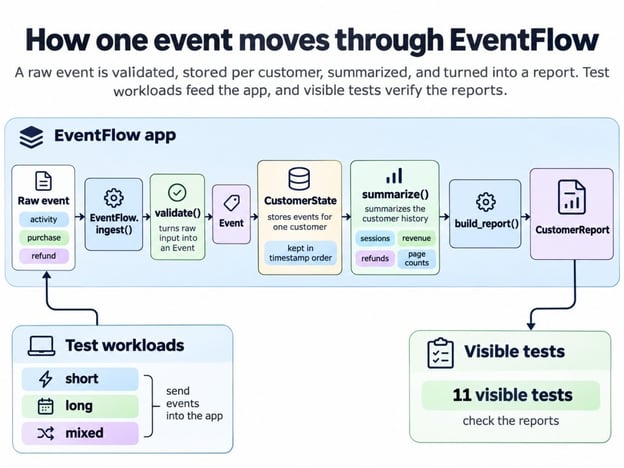
How one event becomes a report. Image by Author.
EventFlow's docstrings set the following rules:
-
Sessions split after a 30-minute gap
-
Refunds are capped at what remains of the purchase
-
A repeated
event_idis ignored, and the first copy wins -
Events sort by timestamp, even across batches
-
history()andreport()return objects the caller owns
The hidden tests check all of them, and the last one comes up again later.
Why EventFlow gets slow
Three workloads, built from fixed seeds, show how history length changes the picture:
-
short: many customers with 5 events each -
long: a few customers with 160 events each -
mixed: 1 to 30 events per customer, with duplicates and events arriving out of order
long has far fewer events than short and still takes about 3x as long. The chart keeps the total at 1,600 events while giving each customer a longer history.
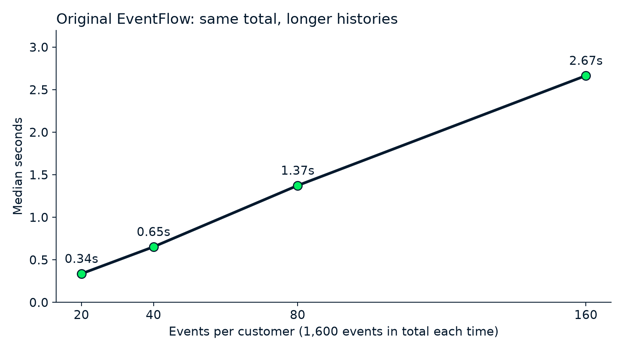
Same total, longer histories, slower processing. Image by Author.
Each time the history length doubles, the runtime doubles too, even though the total number of events never changes. That pattern usually means some step repeats work over the whole history on every new event. The agent never sees the causes, so I'll name them after Argon has had its turn.
Success criteria and hidden tests
A fix counts only if it passes five checks set before the first API call; the model's own report gets no weight. The agent's final code must do all of the following:
-
Run at least 1.5x faster on
long -
Run no more than 5% slower on
shortormixed -
Pass every visible test
-
Return the same report output as the original on all three workloads
-
Pass every hidden acceptance case
These thresholds are my own, so treat them as an example. The agent's tools can't reach hidden cases; they run only after its code is frozen. They compare its code with a separate reference implementation on new data, late batches, duplicates, and the ownership rules.
A hidden suite only helps if it rejects wrong fixes, so feed it a couple on purpose. Two easy shortcuts pass every visible test here, dropping the deep copy and caching the summary without ever refreshing it. The hidden cases reject both.

Hidden tests catch two wrong fixes. Image by Author.
How to Set Up the Gemini 4 Argon API in Python
You need Python 3.10 or newer, a Gemini API key, and a Google AI Studio project with billing turned on, because the pricing page lists no Free tier for Argon. This project pins the google-genai software development kit (SDK) at 2.33.0; the Interactions API needs at least 2.3.0.
git clone https://github.com/KhalidAbdelaty/Gemini-4-Argon-API-Tutorial-.git eventflow-argon
cd eventflow-argon
python -m venv .venv
.venv\Scripts\Activate.ps1
pip install -r requirements.txt
Copy-Item .env.example .envOn macOS or Linux, activate the virtual environment with source .venv/bin/activate and copy with cp, then put GEMINI_API_KEY=... in .env. If GOOGLE_API_KEY is also set in your shell, the SDK uses it instead, so the code below removes it first. Skip the next subsection if you've used the Interactions API before.
Make your first Gemini 4 Argon API request
Your first request hands Argon the top of EventFlow's profiler output and asks what it shows. load_dotenv() loads GEMINI_API_KEY from .env, genai.Client() reads it, the model ID goes into client.interactions.create(), and generation_config carries the thinking level.
import os

from dotenv import load_dotenv
from google import genai

load_dotenv()
os.environ.pop("GOOGLE_API_KEY", None)
client = genai.Client()  # reads GEMINI_API_KEY from the environment

profile_excerpt = """paste the top rows of your cProfile output here"""
prompt = (
    "This cProfile excerpt comes from a Python app that turns customer events into "
    "reports. It is correct but slow on long customer histories.\n\n"
    f"{profile_excerpt}\n\n"
    "In three short bullets: what the profile shows, what you would read next in the "
    "code, and what this evidence alone does not prove."
)

interaction = client.interactions.create(
    model="gemini-4-argon",
    input=prompt,
    generation_config={"thinking_level": "medium"},
    timeout=900,  # seconds; Google recommends at least 15 minutes
)
print(interaction.output_text)
usage = interaction.usage
print(usage.total_input_tokens, usage.total_output_tokens, usage.total_thought_tokens)Here is what came back:

First Argon request reads the profile. Image by Author.
Argon got it right; nearly all the time sat under get_history() and copy.deepcopy, probably called twice per event. Its third bullet warned that removing the deep copy could break callers who modify what they get back, which is the first shortcut I mentioned earlier. A question like this is cheap: under 8 seconds and less than half a cent, with no thinking tokens.
medium is the default, and the latest-model guide I linked earlier recommends it "for most tasks, including complex code and agentic use cases." The same guide says temperature, top_p, and top_k are ignored on Argon, so leave them out.
Profile Python Code Before Using Gemini 4 Argon
Measure the original app before the model touches it, so every later number has something to compare against. Take three kinds of measurement, each in its own process, because each tool skews the others:
-
Timing with
time.perf_counter(), as the median of several fresh processes with one warm-up each -
Profiling with
cProfileto find where the time goes; it made long about 6x slower, so never trust a timing taken under a profiler -
Memory with
tracemalloc, which reports peak tracked Python allocations instead of total process memory
On the three workloads, rather than the chart's fixed 1,600 events, the original app took about 0.7 seconds on short, 2.2 on long, and 1.0 on mixed. It also passed every visible pytest test.
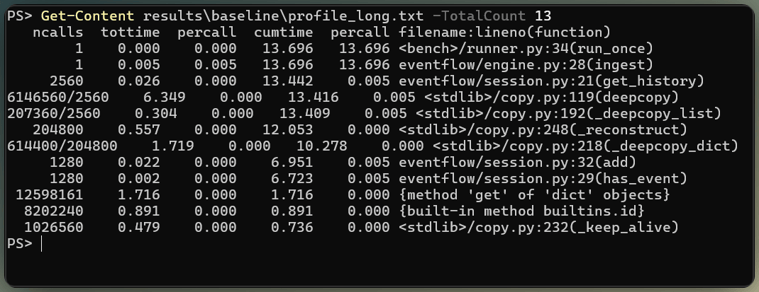
Where the slow app spends time. Image by Author.
Expect drift: the same code later timed about 10% faster, so time every version in one session.
How to Build a Performance Agent With Gemini 4 Argon Function Calling
As I mentioned earlier, Argon only asks for tools. The Python code that runs them is called the harness, and our agent harness engineering guide explains why its checks belong in code instead of the prompt. The tools come first, since they decide what Argon can touch.
Define the agent's tools and permissions
The 8 tools I mentioned earlier are Python functions declared as plain JSON schemas, and only two of them can change code:
-
list_filesandread_file, limited to the app's Python source, tests, and fixtures -
run_profilerandrun_benchmarkfor one named workload -
apply_patch, which replaces one exact occurrence of text in an existing app source file -
revert_file,run_tests, andshow_diff
Declarations follow the format in the function-calling guide I linked earlier:
{"type": "function", "name": "apply_patch",
 "description": ("Replace exactly one occurrence of old_text with new_text in a file under eventflow/. "
                 "The file must still compile afterwards."),
 "parameters": {"type": "object", "properties": {
     "path": {"type": "string"},
     "old_text": {"type": "string", "description": "Exact text to replace; must occur once."},
     "new_text": {"type": "string"}},
"required": ["path", "old_text", "new_text"]}},A schema describes the call, but doesn't make the call safe. The harness adds the following checks in Python:
- Every path is resolved first, so a path that escapes the copied app fails
- Writes outside the app's source folder are refused
- A patched file must still compile, or the patch is rejected
- Tests and benchmarks run in subprocesses with timeouts and no API key
That isn't a container, and patched code could still read files outside the copy, so treat it as the minimum.
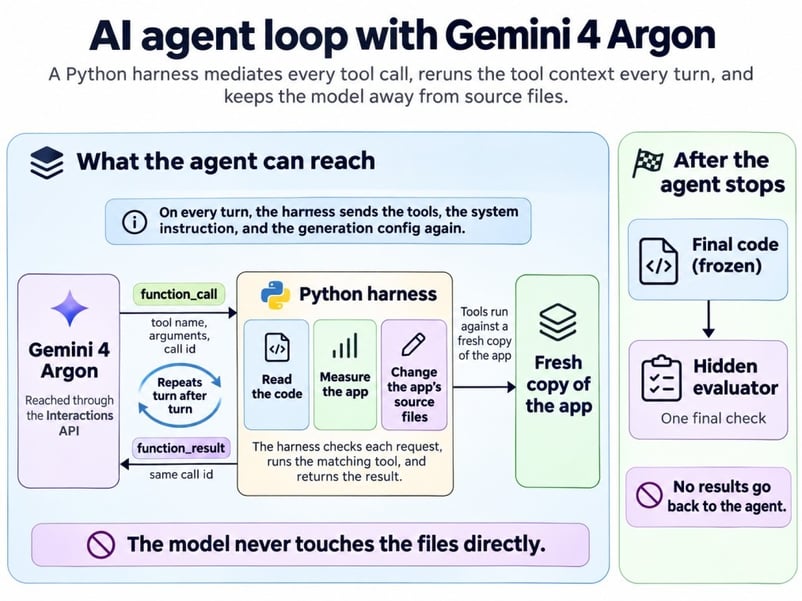
Argon asks, Python decides and runs. Image by Author.
Give the agent a measurable performance goal
The system instruction states the goal and the rules but never says where the slowdown is:
Objective: make EventFlow faster on the supplied workloads without changing its
observable outputs or its public interfaces.
- Measure before you edit. Use run_benchmark and run_profiler to find where the
  time goes, then read the code the evidence points to.
- Behavior must follow the public contract documented in the docstrings, not
  only the visible tests.
- After every change, run run_tests and run_benchmark. If a test fails or
  output_matches_original is false, repair or revert the change.
- Acceptance target: at least 1.5x faster on the long workload, no more than 5%
  slower on short and mixed, all visible tests passing, and
output_matches_original true on all three workloads.The agent decides when to stop from what it can see: visible tests, profiler and benchmark results, and the limits the loop sets next.
Implement the Interactions API tool loop
The snippet below is the core of the loop; the complete version adds the client, tool dispatcher, and limits. Each turn is one client.interactions.create() call, and Argon often asks for several tools in one turn, so run every function_call step it returns. Send each result back as a function_result with the matching call_id:
# requires_action means "run my tools"; incomplete means the output cap cut the turn off
TERMINAL = {"failed", "cancelled", "incomplete"}

request = dict(
    model="gemini-4-argon",
    system_instruction=SYSTEM_INSTRUCTION,  # the goal shown above
    tools=DECLARATIONS,                     # the 8 schemas, like apply_patch above
    generation_config={"thinking_level": level, "max_output_tokens": 65_536,
                       "thinking_summaries": "auto"},
)
interaction = client.interactions.create(input=task, timeout=900, **request)

while True:
    calls = [s for s in interaction.steps if s.type == "function_call"]
    if interaction.status in TERMINAL or not calls:   # failed, cut off, or completed
        break
    results = []
    for call in calls:
        output, is_error, _ = tools.call(call.name, call.arguments)   # validated, run locally
        results.append({"type": "function_result", "name": call.name, "call_id": call.id,
                        "is_error": is_error,
                        "result": [{"type": "text", "text": json.dumps(output)}]})
    # application limits checked here: 40 turns, 45 minutes, $5
    # **request again: tools, instruction, and config don't carry over between turns
    interaction = client.interactions.create(
input=results, previous_interaction_id=interaction.id, timeout=900, **request)The **request on the follow-up call is the line people drop. previous_interaction_id carries the history, but tools, system_instruction, and generation_config are interaction-scoped, so a turn without them loses the tools or falls back to the default thinking level. I find this rule easy to forget, so the code keeps all three settings in one dict.
The API has no task budget, so set turn, time, and spend limits in your application before you start. I used 40 turns, 10 patches, 45 minutes, and $5, and no attempt came close, though the spend check runs between turns, so one long turn can overshoot it. Google's rate-limits page adds its own cap on Tier 1 accounts, $10 per rolling 10 minutes, and returns 429 RESOURCE_EXHAUSTED past it.
Run the Gemini 4 Argon Agent and Verify Its Changes
Each attempt started from a fresh copy of the app, stopped on its own within about 5 minutes, and had its code frozen before any hidden check ran.
Finding the bottleneck from evidence
Argon found the bottleneck by measuring first. Here is the first medium attempt, turn by turn.
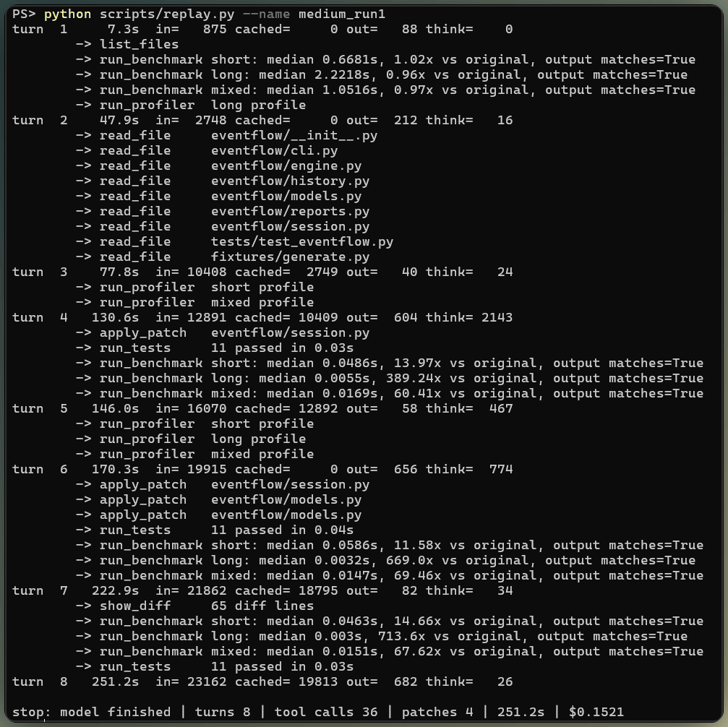
One medium attempt, turn by turn. Image by Author.
Its thought summaries, a condensed version of its reasoning rather than every step, show how it got to the fix. Argon noticed that has_event() and add() both call get_history(). It asked whether the deep copy was "actually necessary here, or if the requirement is merely that the caller owns the data," and settled it with the summarize() docstring, which says the function doesn't modify its input.
Not every claim rested on evidence. The same summary says there is "no direct access in tests or hidden usages," which Argon couldn't know. The guess held (this time), but it's the kind of line to circle in a review.
The fix all six attempts landed on
Every attempt made the same core change to CustomerState, and the smallest of the six diffs shows it best:
     def __init__(self, customer_id: str):
         self.customer_id = customer_id
         self._events = []
-        self.summary = summarize([])
+        self._event_ids = set()
+        self._summary = None
+
+    @property
+    def summary(self):
+        if self._summary is None:
+            self._summary = summarize(self._events)
+        return self._summary

     def get_history(self):
@@
         return copy.deepcopy(self._events)

     def has_event(self, event_id: str) -> bool:
-        return any(e.event_id == event_id for e in self.get_history())
+        return event_id in self._event_ids

     def add(self, event) -> None:
-        bisect.insort(self._events, event, key=_order_key)
-        self.summary = summarize(self.get_history())
+        self._event_ids.add(event.event_id)
+        if not self._events or (self._events[-1].ts, self._events[-1].seq) <= (event.ts, event.seq):
+            self._events.append(event)
+        else:
+            bisect.insort(self._events, event, key=_order_key)
+ self._summary = NoneNow the planted causes I promised earlier: add() re-summarized the whole history on every event, every event paid for two full deep copies, and duplicate checks scanned the list.
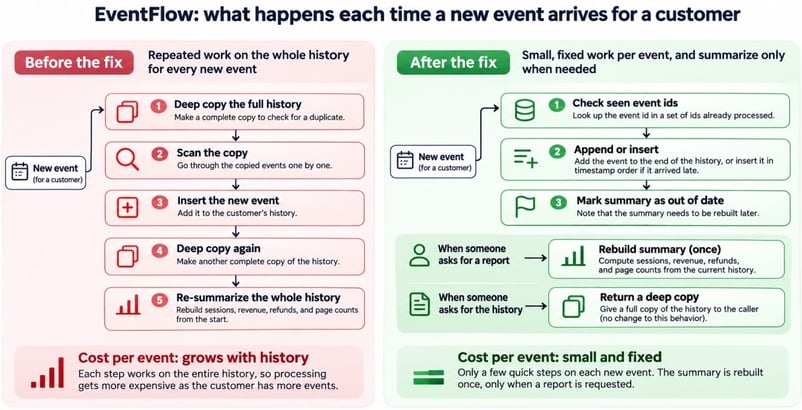
Per-event work before and after fix. Image by Author.
get_history() keeps its deep copy for outside callers, which is the detail the deep-copy shortcut from earlier gets wrong.
Every round of patches passed the visible tests, so the agent never had to revert, but most attempts also added a summary setter that nothing calls. Nobody asked for it, and somebody still has to review it.
Hidden acceptance test results
The hidden evaluator ran once per attempt, and every attempt passed every case. The cases call ingest() after report(), send refunds before their purchases, and modify returned objects to confirm engine state stays put.
Did Gemini 4 Argon Actually Make the App Faster?
Yes. Every new version was much faster and returned the same output as the original. As I mentioned earlier, timings drift, so I timed the original and all 6 new versions in alternating order, 9 fresh processes each.
Each timing covers ingest and reports only, not Python startup or imports. At a few milliseconds a single timing can land well above the median, so compare medians. The chart's log scale keeps the new versions from vanishing next to the original.
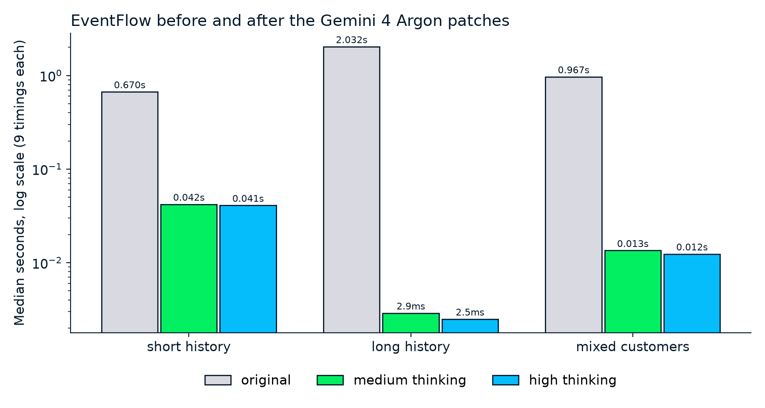
Milliseconds after, seconds before, same outputs. Image by Author.
The chart shows the first attempt at each level, and the table covers all 6, with speedup as original median divided by new median:
|
Measure |
Original |
Medium (3 attempts) |
High (3 attempts) |
|
|
Reference |
14.8x to 15.9x |
16.3x to 17.4x |
|
|
Reference |
656x to 701x |
about 810x |
|
|
Reference |
65.4x to 71.6x |
76.8x to 78.0x |
|
Peak tracked memory, |
7,108 KiB |
7,822 KiB |
7,822 KiB |
|
Peak tracked memory, |
885 KiB |
570 KiB |
569 KiB |
long gained the most, since the removed work grew with each customer's history. The memory rows are the only place the fix costs anything. short, with the most customers, used about 10% more, probably for the new per-customer ID set, while long used less, likely because it stopped building copies.
Don't read 700x as something special about Argon. Removing a quadratic loop from synthetic data tends to produce numbers like this, whoever writes the fix.
Gemini 4 Argon Thinking Levels: Medium vs. High
On this task, high wrote slightly faster code than medium, but both levels found the same fix, so the extra thinking went into polish rather than diagnosis.
Keeping the comparison fair
Change the thinking level and nothing else. Every attempt used the same code, prompt, tools, limits, and evaluator, and none saw another attempt's work. The levels alternated, 3 attempts each, the same setup I used in my Claude Opus 5 API tutorial.
Results, time, and cost by level
The two levels split like this, averaged per attempt:
|
Average per attempt |
Medium |
High |
|
Accepted fixes |
3 of 3 |
3 of 3 |
|
Tool calls |
28 |
35 |
|
Thinking tokens |
1,877 |
14,764 |
|
Lines changed |
24 |
193 |
|
Time |
3.4 minutes |
5 minutes |
|
Cost at the introductory price |
$0.10 |
$0.29 |
|
Cost after that price ends |
$0.20 |
$0.58 |
high landed the same fix in its first patch and then kept polishing. It went on to rewrite parts of summarization, reporting, and validation that were no longer the main bottleneck.
That lead shifts with the machine and sits close to the timing noise on workloads that already finish in milliseconds, so I'd still ship medium's smaller diff on review time alone.
High's thinking peaked in turn 4, after its first patch had already fixed the problem.
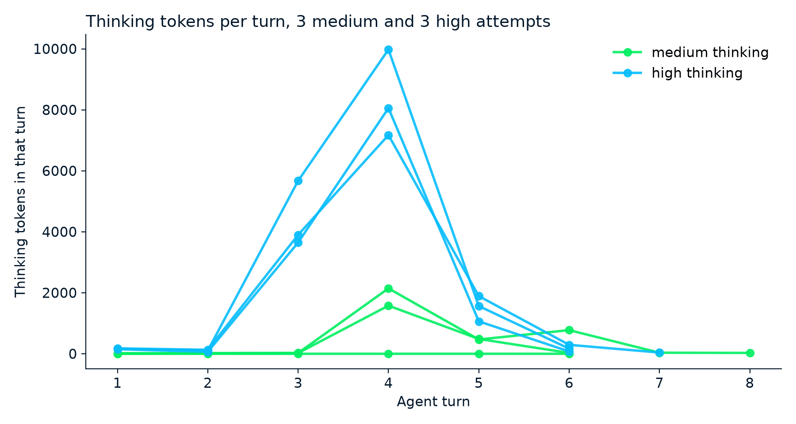
Where each attempt spent its thinking. Image by Author.
Don't take thinking tokens as a quality signal, either; like the first request, one medium attempt used none and still landed an accepted fix, faster and cheaper than any other attempt.
To price an agent, add up the usage of every turn, because each turn reports the full context it processed. Most of each turn's input repeats the previous turn, and the implicit cache billed about two-thirds of it at the cached rate.
Per the caching guide, the cache needs a prompt of at least 4,096 tokens, and a turn that adds fewer than 2,050 new tokens pays the full rate on the last 2,050 of the previous request, so loops with tiny tool results save less. At the Standard introductory rates, which I cover in the FAQs, all 6 attempts together cost $1.16.
Limitations of an AI Performance Agent
An agent like this works best on problems a profiler can point at, and this one was built to be clean:
-
The bottleneck was planted, as I mentioned at the start. A profiler points almost straight at a quadratic loop in six small files, while real slowdowns hide in I/O, databases, and undocumented code.
-
The docstrings did a lot of work. Argon leaned on one to decide which copy it could skip, and an undocumented codebase gives it nothing to lean on.
-
Tests only check what someone thought of. In Google's ADK case study, one import change passed the public suite and still failed internal test targets.
-
Timings come from one small Linux machine on synthetic workloads, so your speedups will differ.
-
Every file the agent reads goes to Google, which stores paid-tier interactions for 55 days by default;
store=falsestops that but rules outprevious_interaction_id.
Google's model card also lists hallucinations and occasional timeouts among known limitations.
Final Thoughts
The agent found the repeated summaries and deep copies in all six attempts, kept the copy callers rely on, and passed the held-out checks. high thinking added a little speed and a much larger diff.
I wouldn't generalize that to your codebase, since I planted the bottleneck. What carries over is the method: measure first, keep the tools narrow, freeze the code before checking it, and let hidden tests decide the result.
The extension I'd build first is a router that starts at medium and moves to high only when the visible tests fail, so the hidden cases never feed back into the agent.
If the profiler output above is new to you, Writing Efficient Python Code covers the same timing and profiling tools I used before letting Argon touch the code.
FAQs
Can Gemini 4 Argon speed up Python code automatically?
Not on its own. The Interactions API doesn't run tools for you yet, so your code does that, and here the checking code ended up being twice the size of the app.
Can Gemini 4 Argon run Python code itself?
Yes, with the built-in code execution tool, but it stops after 30 seconds and can't install pytest. For real tests, use your own machine or the hosted setup in our Managed Agents tutorial.
Should I use low thinking for an agent like this?
I didn't test it, and Google says quality can drop on hard tasks. Since you set the level on every turn, I'd try low for reading files and medium for writing patches.
How much does the Gemini 4 Argon API cost?
I paid $2 per million input tokens and $10 per million output tokens, thinking included, and those prices double after November 30, 2026. Flex costs half, but each request can take up to 15 minutes, which I'd only accept for overnight experiments.
Can I use this agent on a production codebase?
Not as written, so run it in a disposable container and have a person review every diff. Also keep in mind that Argon's knowledge stops in March 2026, so give it current docs for newer libraries.

I’m a data engineer and community builder who works across data pipelines, cloud, and AI tooling while writing practical, high-impact tutorials for DataCamp and emerging developers.





I wanted to see what Gemini 4 Argon does with a Python app that isn't broken, just slow. Every test passes and every report is right, but some of the work takes seconds when it should take milliseconds, and it gets worse the more history a customer has. Many AI coding tutorials start from a failing test, which hands the model an obvious target.
But here, no failing test points to the slow code. Gemini 4 Argon is a Google model you call from Python through the Gemini API, and you'll use it to build an AI agent, which is a model that takes actions toward a goal. In this case the agent reads, times, and edits code, but only through tools your own Python controls.
The app is EventFlow, a small fictional program that turns customer activity, purchases, and refunds into reports. My question was whether the agent could find the slow part and fix it without changing what the app returns. If you're comfortable with Python functions, classes, and running tests, you can follow along, and I'll cover how to:
Our Gemini 4 Argon overview covers the launch and benchmarks, so this tutorial stays on the API. For the wider model picture, also see our Gemini 4 Argon vs Claude Opus 5.5 and Gemini 4 Argon vs. GPT-6 Astra comparisons.
TL;DR
I gave the agent the same task 6 times, 3 at
mediumthinking and 3 athigh, and this is what came out of it:Argon fixed the slowdown in all 6 attempts, and a separate set of hidden tests agreed.
The slow workload went from about 2 seconds to about 3 milliseconds.
Argon ran benchmarks and a profiler before it changed any code, so give your agent those tools as well as tests.
highcost about 3x more thanmedium($0.29 versus $0.10 per attempt, on average) and wrote diffs 8x larger for a modest extra speed gain. Start atmedium.I planted the bottleneck on purpose in one small app, so these results describe this case only.