Courses
การสร้าง AI Agent ด้วย Google ADK
1 ชม.
7.5K
Meta Superintelligence Labs released Muse Glimmer on August 10, 2026, and the pitch is unusual for a 2026 model launch: it runs on a laptop.
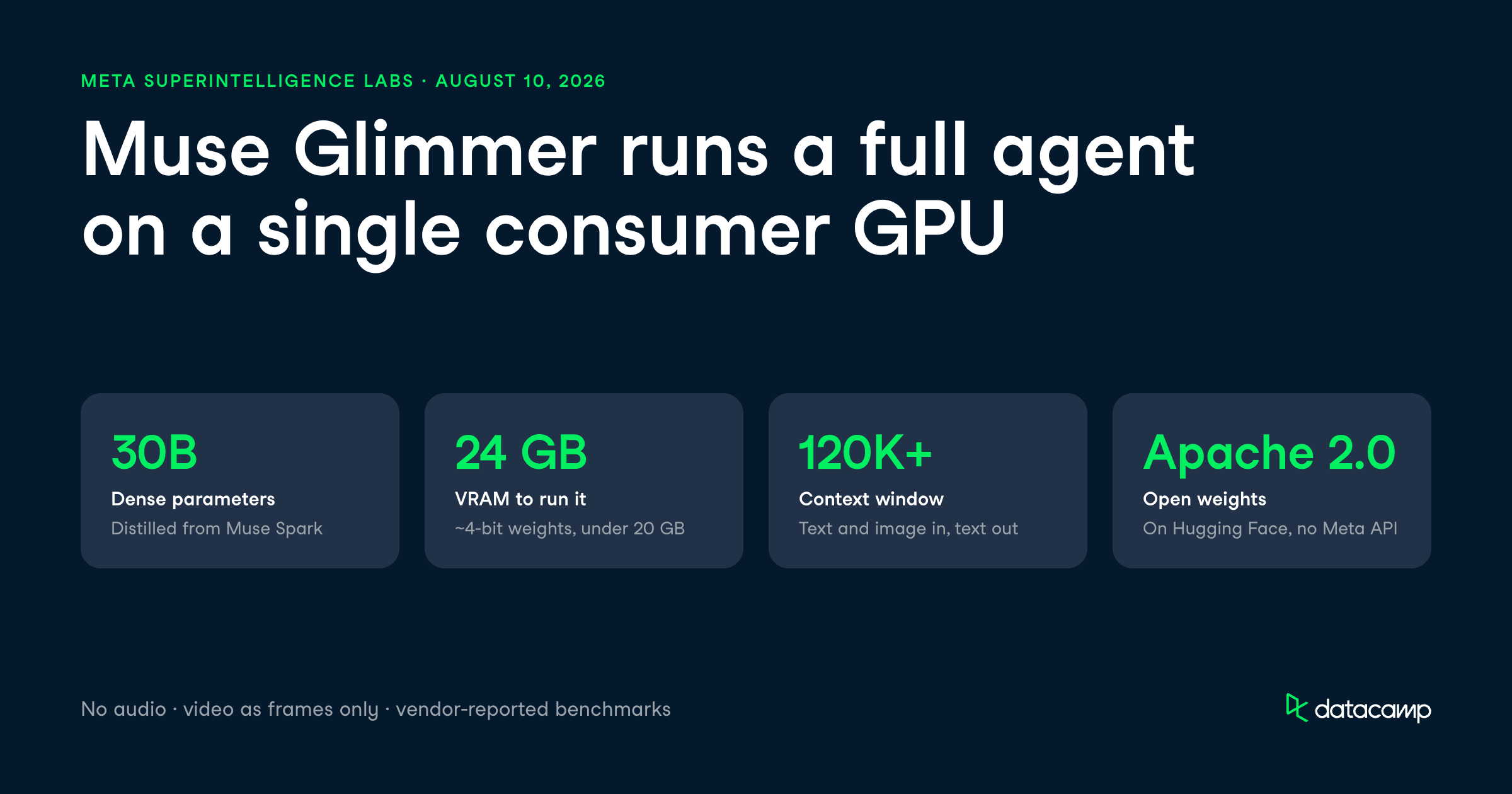
This is a 30-billion-parameter agentic model built for local, always-on workflows, shipped with open weights under an Apache 2.0 license.
The headline claim is that Muse Glimmer works as a full agent (planning, tool calls, self-checking, and failure recovery) on a single 24 GB consumer GPU or a Mac-class unified memory system. It ships with a 120K+ context window, multimodal text-and-image input, and quantized weights that shrink the model to under 20 GB. Meta open-sourced the weights on Hugging Face alongside developer documentation.
In this article, I'll cover everything new with Muse Glimmer, looking at the features, the benchmarks against models like Qwen3.6-27B and Gemma4-31B, and the local deployment tricks. You can read our separate guide to running Muse Glimmer locally for AI coding.
To learn more about running models locally in general, check out our tutorials on fine-tuning Qwen3.6 and get up to speed with our AI Agent Fundamentals skill track.
Muse Glimmer is a 30-billion-parameter dense model from Meta Superintelligence Labs, optimized for local agent workflows rather than cloud-hosted chat.
It's positioned as the smaller, distilled sibling of a larger internal teacher model, Muse Spark, and Meta explicitly says Muse Glimmer does not meet its "Frontier AI" definition.
What's new here is the deployment target.
Most agentic models this capable assume a datacenter behind them, but Muse Glimmer is built to run offline on a single consumer GPU.
Meta compressed the weights to roughly 4-bit precision, bringing the language model under 20 GB so it fits inside a 24 GB or 32 GB memory envelope with room left to spare.
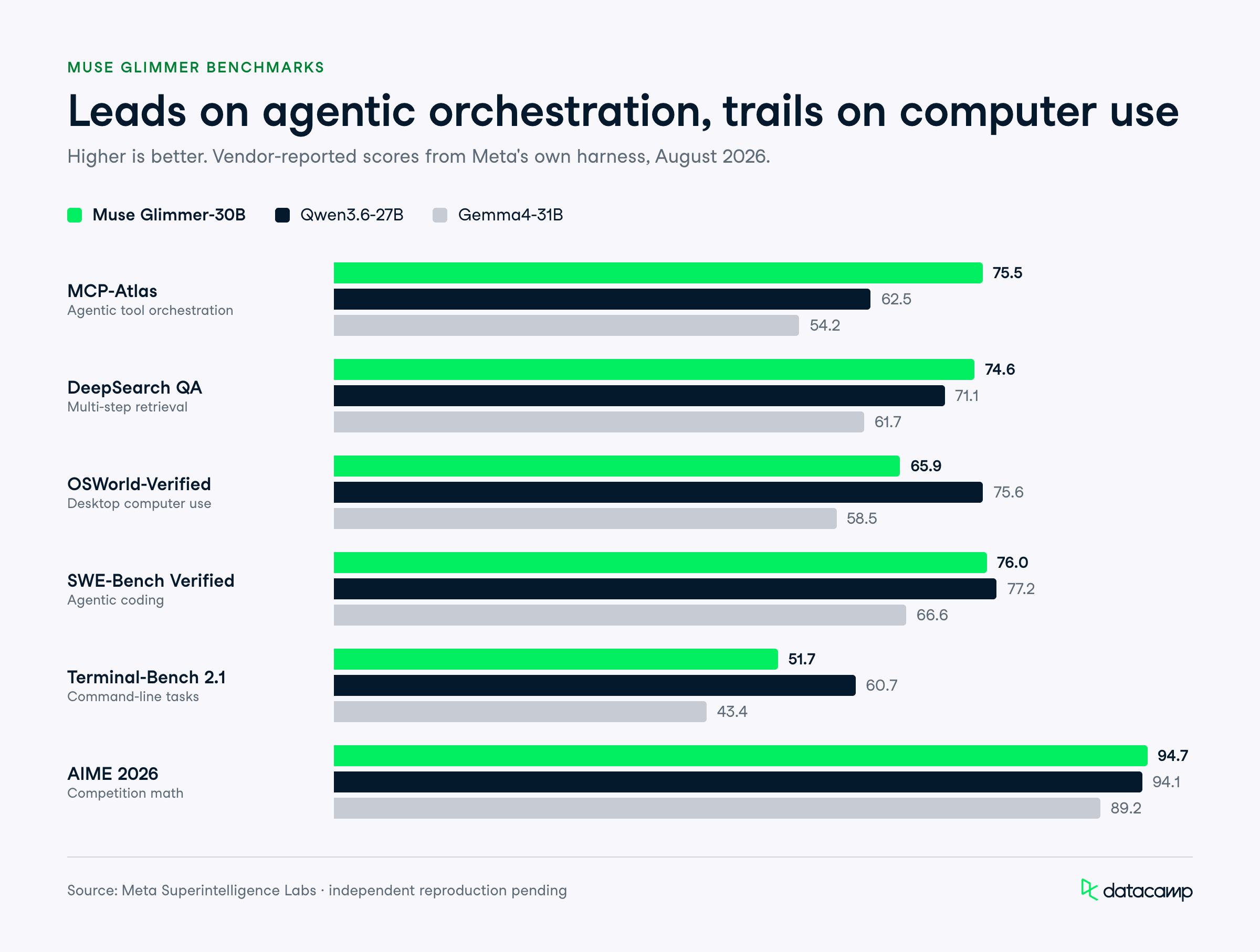
The benchmark headline that stands out is MCP-Atlas, a general agentic benchmark, where Muse Glimmer scores 75.5 against Qwen3.6-27B's 62.5 and Gemma4-31B's 54.2.
For a model you can run without an internet connection, leading its size class on agentic orchestration is the point of the release.
Muse Glimmer is built around running personal agents locally, so its features are about task completion, tool use, and staying responsive on limited hardware.
Here are the capabilities that matter most for practitioners.
You can point Muse Glimmer at a multi-step task and have it plan, call tools, check its own results, and recover from failures without a network connection.
Alexandr Wang, Chief AI officer of Meta, said the model operates "as a fully capable agent" and keeps its agentic reliability on 24 GB of VRAM.
For practitioners, this changes where an agent can live.
A model that drafts your emails, reorganizes your files, or triages your calendar needs deep access to personal context, and keeping that context on-device is a different privacy posture than shipping it to a cloud API.
Muse Glimmer invokes tools with precise schemas across extended workflows, and when a call fails or returns something unexpected, it's trained to diagnose the error and retry instead of halting. This failure-recovery behavior is the difference between an agent that finishes a task and one that stalls halfway.
It works across OpenClaw and other agentic orchestration patterns, so you're not locked into a single scaffold.
Meta ships guidance on setting up custom scaffolds in the documentation, which matters because agent quality often depends more on the surrounding harness than the raw model.
Through a dedicated perception encoder, Muse Glimmer accepts interleaved text and images, so an agent can interpret a screenshot of an error dialog, a sales chart, or a scanned invoice alongside the conversation.
This is text-and-image in, text out.
There's a real limit worth flagging here: there is no audio input or output, and video is handled only as individual frames rather than true video understanding.
If your workflow needs to watch a screen recording end-to-end, this isn't the model for it.
Muse Glimmer supports different reasoning strengths, so you can trade quality for speed depending on the task.
A quick file-rename agent doesn't need the same deliberation as a multi-step debugging session, and being able to dial that in on-device keeps latency reasonable.
The model is also trained on data from more than 100 languages, though Meta cautions it hasn't been evaluated on all of them, and quality can drop outside the strongly supported set.
Meta evaluated Muse Glimmer against Gemma4-31B and Qwen3.6-27B across agentic, coding, multimodal, safety, and reasoning categories, using its own harness.
Independent reproduction had not landed at the time of writing, so treat these as vendor numbers.
Muse Glimmer leads its size class on general agentic benchmarks but trails Qwen3.6-27B on several computer-use and terminal tasks.
In the table below, you can quickly see how Muse Glimmer compares to the competition:
| Benchmark | Muse Glimmer-30B | Qwen3.6-27B | Gemma4-31B |
|---|---|---|---|
| MCP-Atlas | 75.5 | 62.5 | 54.2 |
| DeepSearch QA | 74.6 | 71.1 | 61.7 |
| OSWorld-Verified | 65.9 | 75.6 | 58.5 |
| SWE-Bench Verified | 76.0 | 77.2 | 66.6 |
| Terminal-Bench 2.1 | 51.7 | 60.7 | 43.4 |
| AIME 2026 | 94.7 | 94.1 | 89.2 |
| GPQA Diamond | 83.5 | 84.2 | 85.7 |
| MMMU Pro | 74 | 75 | 73 |
MCP-Atlas measures how well a model orchestrates tool calls through the Model Context Protocol, and Muse Glimmer scores 75.5 against Qwen3.6-27B's 62.5 and Gemma4-31B's 54.2.
On DeepSearch QA, a benchmark for multi-step information retrieval, Muse Glimmer scores 74.6, just ahead of Qwen3.6-27B's 71.1 and well past Gemma4-31B's 61.7.
The picture is not uniform. On OSWorld-Verified, which tests computer-use agents in a real desktop environment, Muse Glimmer scores 65.9 while Qwen3.6-27B leads at 75.6, so Qwen is the stronger choice for screen-driving agents.
SWE-Bench Verified measures whether a model can resolve real GitHub issues by writing and debugging code.
Muse Glimmer scores 76.0, close to Qwen3.6-27B's 77.2 and ahead of Gemma4-31B's 66.6.
On Terminal-Bench 2.1, which tests command-line task completion, Muse Glimmer trails at 51.7 against Qwen3.6-27B's 60.7. For reference, when we fine-tuned Qwen3.6 in our own tutorial, we found its strength on SWE-bench and Terminal-Bench held up in practice, so Qwen's edge on terminal tasks here tracks with what we've seen.
AIME 2026 is a competition-math benchmark, and Muse Glimmer scores 94.7, edging Qwen3.6-27B's 94.1 and beating Gemma4-31B's 89.2.
That's a strong result for a model this small.
On GPQA Diamond, a set of graduate-level science questions, Muse Glimmer scores 83.5 while Gemma4-31B leads at 85.7, and Qwen3.6-27B sits at 84.2.
On Humanity's Last Exam (text, no tools), Muse Glimmer scores 22.0, slightly behind both rivals.
MMMU Pro tests multimodal reasoning across images and text at graduate difficulty, and the three models are near-identical: Muse Glimmer 74, Qwen3.6-27B 75, Gemma4-31B 73.
On Charxiv Reasoning, which tests chart interpretation, Muse Glimmer scores 78.8, marginally ahead of both rivals.
Meta's own strength claim on ScreenSpot Pro doesn't quite hold: Muse Glimmer scores 75.4 while Qwen3.6-27B leads at 76.1.
The multimodal category is close enough that it won't be the deciding factor between these models.
On CI Memories, which measures privacy-violation rate (lower is better), Muse Glimmer records a 26.4 violation rate against Gemma4-31B's much cleaner 12.1 and Qwen3.6-27B's 53.4.
So Muse Glimmer sits between its rivals here, safer than Qwen but well behind Gemma on this metric.
On Siren AgentDojo, which measures resistance to prompt-injection attacks, Muse Glimmer shows a 28.4 attack success rate with 94.2 utility, compared to Gemma4-31B's 25.6 and Qwen3.6-27B's 40.3. If you're deploying an agent that touches untrusted content, that injection resistance is worth weighing.
Muse Glimmer is distributed as open weights under Apache 2.0, and there is no Meta-hosted first-party API.
That means there are no per-token prices from Meta to report: your cost is infrastructure and self-hosting, not a metered API fee.
You can get running through several routes:
Meta is working with AMD, Arm, Dell, Intel, and NVIDIA to tune performance across devices.
The practical hardware target is a 24 GB or 32 GB machine: Meta reports the K-Quant-17GB build plus the quantized DFlash drafter speeds up decoding by 3.1x on an RTX 5090, 1.8x on an M5 Max, and 1.5x on an M4 Max.
Muse Glimmer is Meta making a deliberate bet on local, private, open-weight agents rather than another cloud flagship.
By capping this at 30B and shipping quantized weights that fit on a single consumer GPU, Meta is targeting a niche most labs ignore: developers who want an agent that runs offline with personal context that never leaves the device.
My honest read is that this is a builder's stack, not a one-click cloud replacement.
The benchmark story is mixed (Qwen3.6-27B still leads on OSWorld-Verified and Terminal-Bench 2.1, and Gemma4-31B is cleaner on CI Memories), and reviewers have called Muse Glimmer slow and fragile near the memory ceiling. But leading its size class on MCP-Atlas and DeepSearch QA, with a permissive Apache 2.0 license, makes it a serious option for anyone building local agents.
The caveats are that there's no audio, video only as frames, uneven language coverage, and vendor-only benchmarks until independent reproductions land.
If your workflow is privacy-sensitive or genuinely needs to run without a network, Muse Glimmer is worth downloading and testing against Qwen3.6 on your own hardware.
If you want to build the skills to run and tune models like this yourself, I recommend our tutorial on building your first autonomous AI agent.
Top DataCamp Courses
Courses
Courses
Tracks
blogs
Matt Crabtree
10 นาที
blogs
Matt Crabtree
8 นาที
blogs
Matt Crabtree
10 นาที
blogs
Matt Crabtree
10 นาที
blogs
Khalid Abdelaty
14 นาที
Tutorials
Abid Ali Awan
9 นาที