
Course
Claude Code 101
3 hr
27.2K
In large-scale applications or enterprise environments, context fills up faster than you think. A big design decision you made an hour ago is probably no longer in the context, so you have to keep re-explaining things the model already worked through. You’re doing mostly everything right, but the problem is you're asking one assistant to do the work of an entire team.
Claude Code Agent Teams were introduced to change this. The idea is that instead of one session doing everything in order, you start multiple specialized agents that share a task list, directly message each other, and execute work in parallel.
In this article, I'll walk you through how Agent Teams work, what each specialized role does, and how to coordinate them on real software projects.
New to Claude Code? Dial in the basics in one afternoon with our Claude Code 101 course.
Claude Code Agent Teams are a coordination layer that allows multiple Claude Code sessions to work on the same project at the same time. One session takes the role of team lead, and it creates other sessions, called teammates, to handle specific parts of the work.
Each teammate runs as a full, independent Claude Code instance with its own context window. They share a task list, claim work as it becomes available, and message each other directly when they need to coordinate.
The setup is more than just opening a couple of terminal tabs and running Claude in each one. When you do that, separate chat windows can't see each other's progress and can't agree on who is doing what. An agent team, on the other hand, gives every session a shared view of the work and a way to communicate. The lead keeps everyone aligned.
In practice, this means you are no longer the relay between sessions. The team handles its own coordination, and you step in only to set direction and review outcomes.
A single Claude Code session works fine until the project gets too big.
Every Claude Code session has a context window, and that window has a limit. As you work, the session fills up with file contents, command outputs, design discussions, and your own back-and-forth. At some point, older information is no longer in the context, and the model starts forgetting decisions you made earlier in the same task.
There are three common situations where this becomes obvious:
The answer is the same one human teams arrived at decades ago: split the work.
If one session is hitting its limits on a refactor, give the backend changes to one teammate, the frontend changes to another, and the test updates to a third. Each teammate uses only what it needs for its part of the work.
The same idea applies to research. A task with three competing hypotheses runs faster when three teammates each investigate one theory in parallel, then compare notes, rather than one session walking through them sequentially.
Specialization gives you depth and parallelism gives you speed. But when combined, they let you do work that a single session would either hallucinate on or take far too long to finish.
A team session moves through five stages, with orchestration handled inside Claude Code itself.
Roles give an agent team its shape. Without them, you end up with generic sessions doing overlapping work. Claude Code doesn't provide a fixed list — you define roles in your brief or by pointing the lead at a subagent definition saved under .claude/agents/.
The planning agent breaks the objective into tasks before any code gets written. It explores the codebase, maps dependencies, and produces a task list of self-contained units a single teammate can finish without constant check-ins.
In practice, the team lead often plays this role itself. You can also run a dedicated planning teammate when the work is large enough to justify it.
The coding agent writes the implementation. Most teammates will be coding agents, each owning a distinct part of the work — backend, frontend, database, AI features. The key is keeping scopes from overlapping: two teammates editing the same file will overwrite each other.
Coding agents work well on cheaper models. Many practitioners run the lead on Opus and teammates on Sonnet, since execution doesn't need the same depth of reasoning as coordination.
The testing agent writes and runs tests. It can work against an agreed API contract while the coding teammate is still building the endpoint — so when the code lands, the tests are already there.
You can also keep a testing teammate running for the whole session, re-running the suite every time a coding teammate marks a task complete.
The review agent reads diffs and flags bugs, style issues, missing edge cases, and security problems. Splitting review across two teammates with different lenses — one for security, one for performance — works especially well, with the lead combining their findings.
If you've already written a subagent definition for your project, the teammate inherits its tools and system prompt automatically.
The documentation agent writes docstrings, README updates, and longer-form docs like architecture notes or API references. It's a good candidate for the last teammate to run — by the time coding and testing are done, the final shape of the work is clear.
A general-purpose session has to hold implementation, tests, docs, and review feedback in context simultaneously. A specialized teammate loads only what it needs, keeping its context small and its reasoning focused. Specialization also makes debugging easier: when something goes wrong, you know exactly which session to check.
Parallelism is the whole point of an agent team.
Once the lead has broken the work into tasks and started the teammates, all of them run at the same time. Each teammate is a separate Claude Code session, so the work isn't queued behind a single context window. The total time to finish a multi-part feature drops from the sum of all the parts to the time of the slowest part.
Here are three combinations that work especially well in parallel.
The limit comes down to file conflicts. Two teammates writing to the same file at the same time will overwrite each other, so the lead needs to split the work along file or module boundaries. As long as the parts are clean, you can run as many teammates in parallel as your task list supports.
Large codebases are where agent teams are more of a must-have than nice-to-have.
A repository with hundreds or thousands of files can't fit into a single context window. A solo session working on a large codebase spends a lot of its budget just rediscovering the code.
With Agent teams, each teammate loads only the files relevant to its part of the work, so the context window per teammate stays small and focused. The team as a whole can reason about the entire repository, but no single session has to.
This matters most in three situations:
There is a cost.
Each teammate is a full Claude Code session with its own context window, so token usage scales linearly with the size of the team. A team of four uses roughly four times the tokens of a single session for the same amount of work. Some estimates have it higher. The trade is faster wall-clock time and better depth per concern, which usually pays off on work that a single session can't realistically finish.
The bigger the project, the more you gain with Agent teams. But don’t overuse it - for a small bug fix, a single session is cheaper and just as effective.
Agent teams aren't the only place Anthropic is rethinking how AI fits into team workflows.
Claude Tag is a separate feature that brings Claude into Slack as a shared organizational participant. You tag @Claude in a channel, and Claude takes on work using your organization's tools and the context of the channel. It remembers what's been discussed, follows up on its own, and works under your organization's identity.
The two features solve different coordination problems. Agent teams coordinate multiple Claude Code sessions on one developer's machine for one focused task. Claude Tag coordinates one Claude identity across a team of humans in Slack over days and weeks. But the direction is the same: AI is moving from a tool a single person uses in isolation to a participant that operates inside a team's existing workflow.
This changes what the AI needs to be good at.
A solo assistant has to be a strong generalist, but a coordinated system has to be a strong specialist that knows how to plan, hand off, ask for help, and stay aligned with other agents and humans. Agent teams do that for Claude Code workflows, and Claude Tag makes it visible in the Slack workflow.
A good agent team setup is mostly about setup up front. The team itself is fast, but the time you'll lose is in poorly scoped tasks and ambiguous roles.
Here are a couple of best practices:
Clearly define the roles: Each teammate should have one focus and one set of files it owns. When you create a teammate, tell it exactly what it's responsible for, what it's not responsible for, and what files or modules it can work with. Vague roles produce overlapping work, and overlapping work produces merge conflicts.
Decompose tasks before parallelizing: Plan first, parallelize second. Run a planning pass to break the work into tasks with clear inputs, outputs, and dependencies, then hand the plan to the team for execution. A plan costs a few thousand tokens, but a team that goes in the wrong direction can cost hundreds of thousands.
Share standards through CLAUDE.md: Every teammate reads the CLAUDE.md file in the working directory when it starts, so put your shared conventions there, including code style, file layout, testing approach, and commit message format.
Build in review checkpoints: Check in on teammate progress, redirect the ones that are off track, and review the lead's output before accepting it. For risky tasks, require plan approval before any teammate makes changes. This forces the teammate to show its plan first and wait for the lead to approve it.
Limit team size: Start with three to five teammates for most workflows. Beyond that, coordination overhead grows faster than the parallel speedup.
Avoid file conflicts: Split work along file or module boundaries so each teammate is clearly separated. Two teammates editing the same file will overwrite each other's changes. If a task really requires multiple teammates to work the same file, sequence it instead of parallelizing.
Pre-approve common operations: Permission prompts from teammates bubble up to the lead, and a team with four teammates can produce four times the prompts. Set up your permissions.allow list before spawning the team so routine operations like reading files or running tests don't interrupt the work.
Match the model to the role: Run the lead on a stronger model like Opus, since coordination benefits from deeper reasoning, and run the teammates on Sonnet for execution.
And here’s the short version: create a detailed work plan, brief the team like you'd brief a small group of junior engineers, give them clear scopes and shared standards, and check their work at the end. The closer your setup gets to how a real engineering team operates, the better the agent team will perform.
Here's the whole thing end to end.
I'll walk through a small example: a "hello world" REST API in FastAPI that reads a message from a SQLite database, plus a tiny HTML page that calls the API and shows the result. The app has a backend route, a database layer, a static frontend, and a readme documentation, which makes it a good fit for a four-person team.
Agent teams are an experimental feature and off by default. You turn them on by setting an environment variable, either in your shell or in your Claude Code settings file.
The settings file is at ~/.claude/settings.json. Open it and add:
{
  "env": {
    "CLAUDE_CODE_EXPERIMENTAL_AGENT_TEAMS": "1"
  }
}
If you'd rather not edit the settings file, you can set the variable in your shell before starting Claude Code:
export CLAUDE_CODE_EXPERIMENTAL_AGENT_TEAMS=1Either approach works. Once the variable is set, Claude Code will recognize team-related prompts and start the coordination layer when you ask for it.
Create an empty directory for the project and start Claude Code inside it:
mkdir hello-api && cd hello-api
claude
Now you brief the team. The prompt is plain natural language, but the more specific you are about roles and boundaries, the better the team performs. Here's the prompt for the hello world API:
Create an agent team to build a small "hello world" REST API.

The project is a FastAPI service that returns a greeting from a SQLite
database, plus a tiny HTML page that calls the API and shows the result.
- One teammate on the database: create app/db.py with a sqlite3 connection
  to a greetings.db file. Define a get_greeting() function that returns
  the message column from the first row. On import, create the table if
  it doesn't exist and seed it with "Hello, World!" if empty.
- One teammate on the backend: build a FastAPI app in app/main.py with
  a GET /greeting endpoint that calls get_greeting() from app/db.py.
  Add permissive CORS and mount the static/ directory at the root so
  the HTML page is served from the same origin.
- One teammate on the frontend: build static/index.html as a single page
  that fetches /greeting on load, shows a spinner while loading, displays
  the greeting in a centered card on success, and shows an error message
  on failure. Inline the CSS and JavaScript.
- One teammate on docs: write README.md with installation, run, and
  open-in-browser steps, plus an API reference table. Also create
  requirements.txt with fastapi and uvicorn[standard].
Use Sonnet for each teammate. Require plan approval before any teammate
makes changes.
Three things are worth noting in this prompt. The file boundaries (app/db.py, app/main.py, static/index.html, README.md, requirements.txt) prevent overlap. The model choice (Sonnet) keeps token costs manageable. And plan approval forces each teammate to show its plan before writing any code, which gives you a checkpoint to redirect anyone who misunderstood the brief.
After you submit the prompt, the lead breaks the work into tasks and starts the teammates. You'll see an agent panel appear at the bottom of the terminal with one row per teammate.
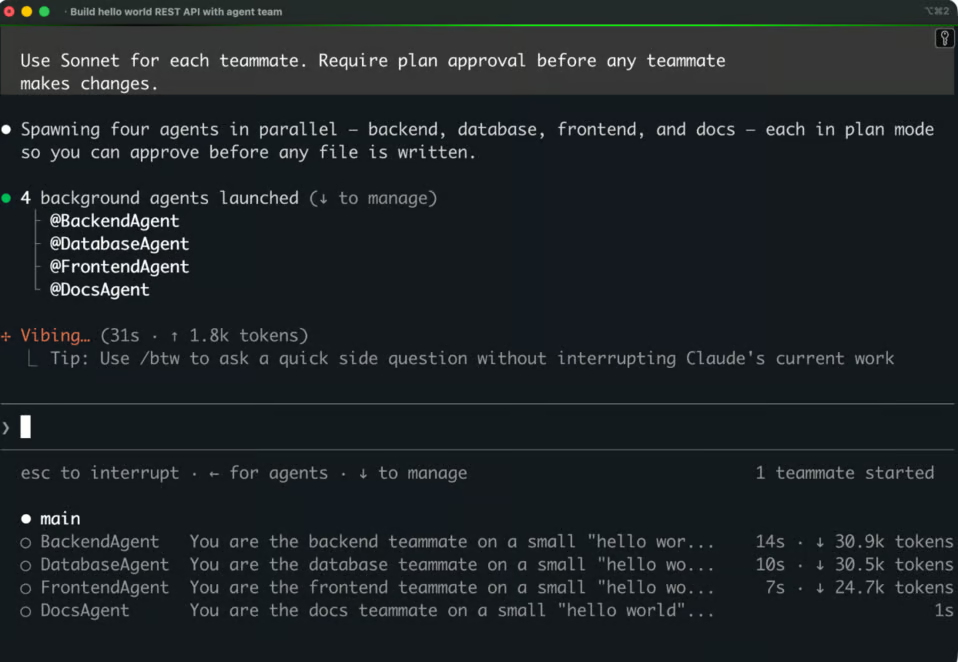 Created agents
Each row shows the teammate's name and what it's currently doing. The lead populates the shared task list and assigns or releases tasks based on dependencies. The backend teammate waits for the database layer because it imports get_greeting() from it. The docs teammate waits until the rest is far enough along to describe accurately.
You can also see the task list. Press Ctrl+T to toggle it. The list shows every task, its status (pending, in progress, or completed), and which teammate owns it.
Each teammate is a full Claude Code session, and you can talk to any of them.
In the agent panel, use the up and down arrows to select a teammate, then press Enter to open its transcript. You're now in that teammate's session, and anything you type goes to that teammate, not to the lead. This is how you give a specific teammate extra context or redirect its approach without involving the rest of the team.
Press Esc to return to the lead.
Sometimes a teammate misunderstands the brief or wanders off into work it shouldn't be doing. You catch this either by checking its plan during plan approval or by noticing its progress drift in the agent panel.
If you're using plan approval, the teammate pauses after planning and shows you its proposal before writing any files. Here's what that looks like for the database agent:
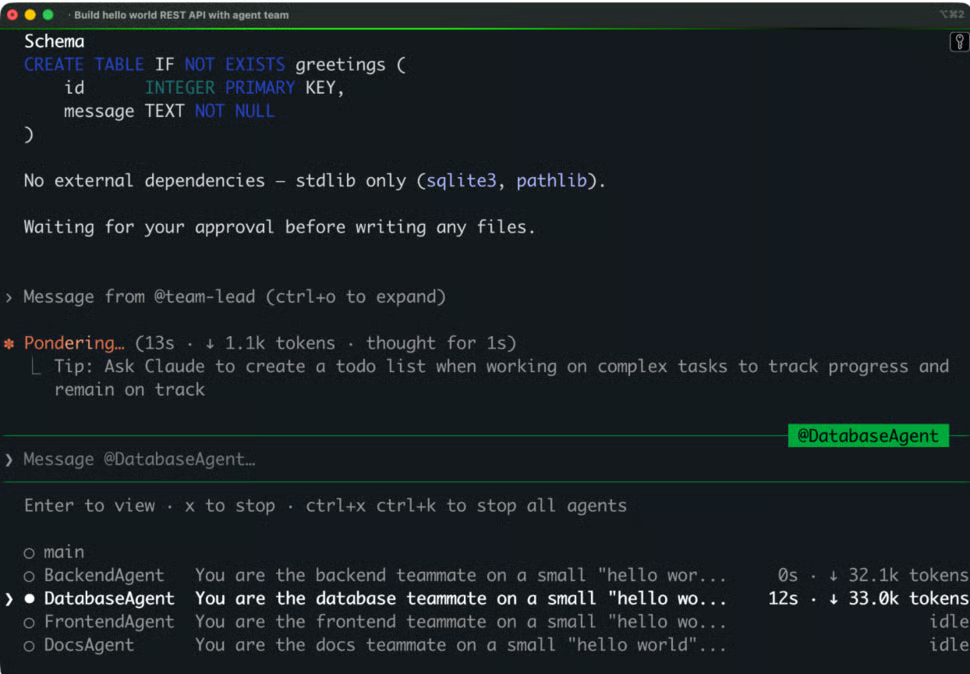
Database agent approval
You can read the proposed schema and approach, then approve or reject with feedback. If the plan is missing something, you can reply with something like "Use SQLAlchemy instead of raw sqlite3," and the teammate will replan.
If you spot a problem after a teammate has already started working, select the teammate in the agent panel, press Enter to open its session, and message it. You can also press x on a selected teammate to stop it, or ask the lead to start a replacement teammate if the current one is fully stuck.
When all teammates finish their tasks, the lead reports back with a short summary and the commands you need to run the project.
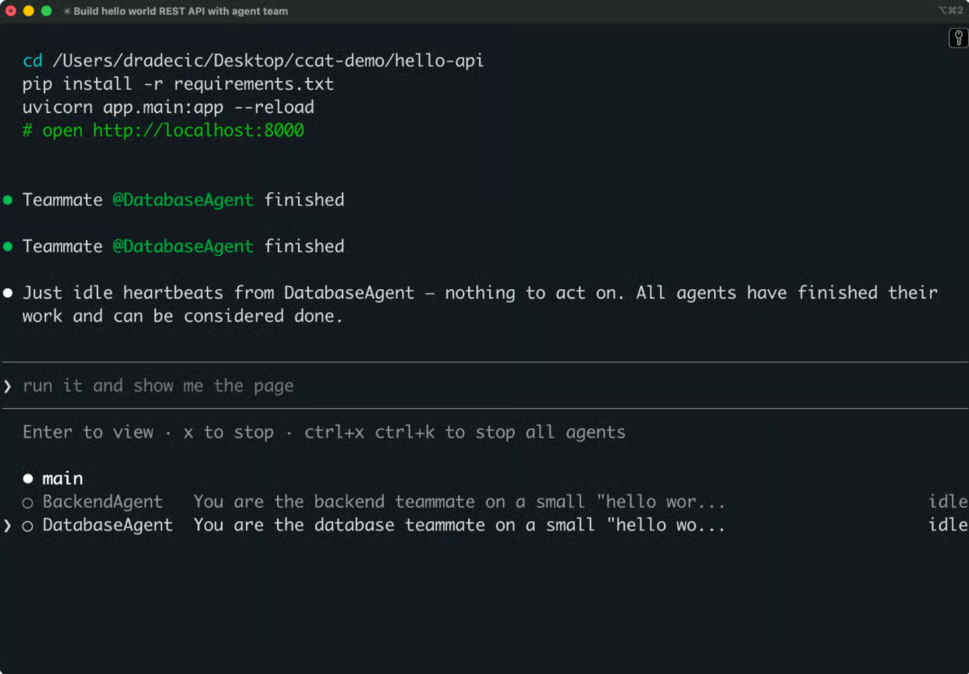
Final lead instructions
At this point, you review the work. You can open the generated files in your editor and read the diffs.
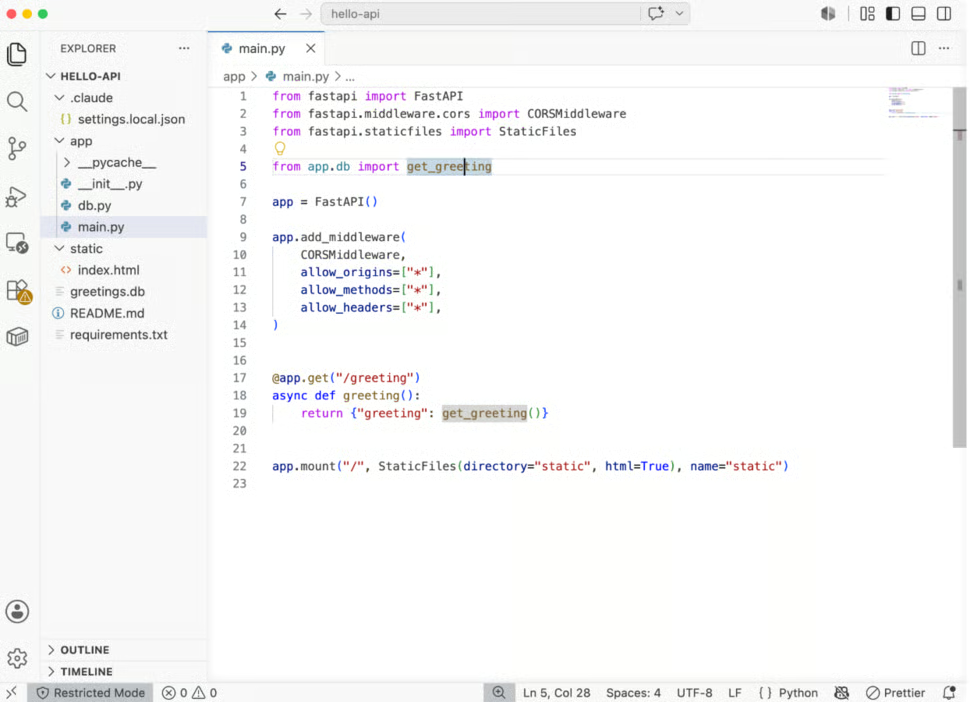
The generated app/main.py file
You can also inspect the database the database agent created and seeded.
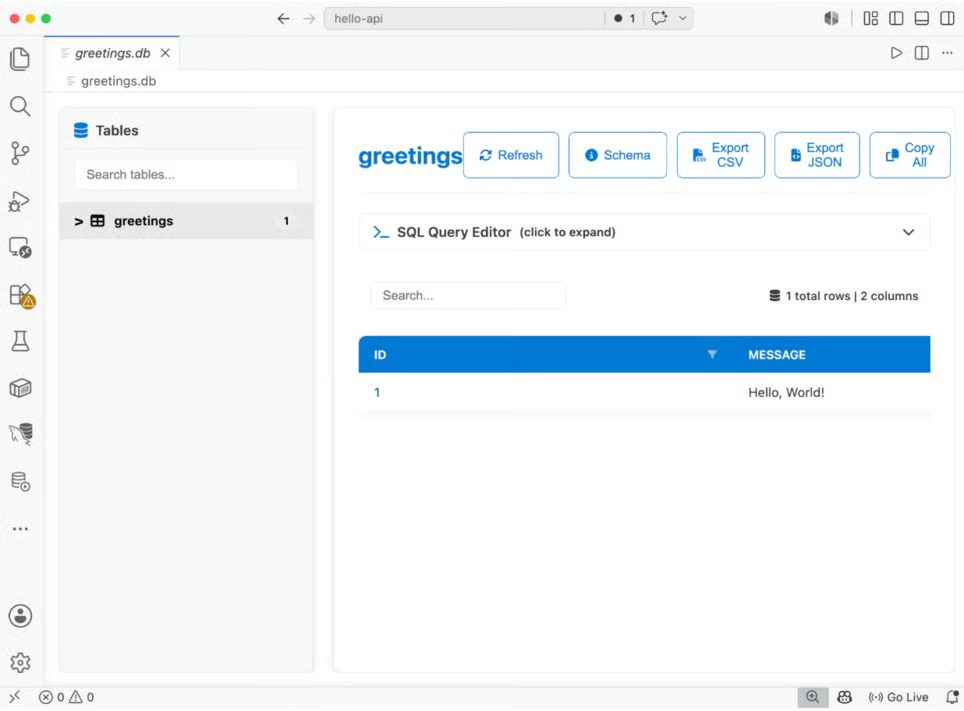
The greetings table
Then install the dependencies, run uvicorn app.main:app --reload, and open http://localhost:8000 in your browser to confirm the full stack works end to end.
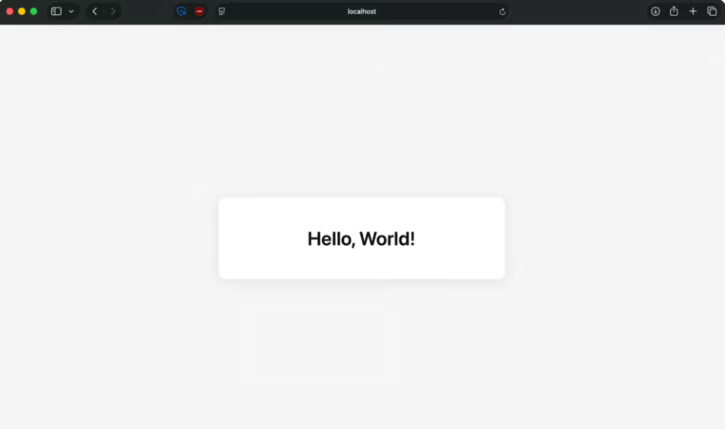
Final app
If you want changes, tell the lead what to adjust, and it will either fix the issue itself or start a new teammate to handle it. Once you're happy with the result, you can ask the lead to commit the changes. The lead shuts the teammates down when the session ends, and the team config gets cleaned up.
That’s it!
Claude Code Agent Teams are about two things: specialization and coordination. Each teammate has its own part of the work and its own context window. The lead keeps them aligned, the task list keeps them in sync, and direct messaging keeps them from waiting on you to relay information between sessions.
The bigger picture is that AI-assisted development is moving from solo to coordinated. Agent teams are how that change shows up in Claude Code today, and the same pattern is showing up in Claude Tag for Slack. The developers who get comfortable with this now will spend less time dealing with context limits and more time producing actual features.
Are you looking to get certified in Generative AI? Here are the Best Generative AI Certifications in 2026 including top courses, preparation tips, and FAQs.
Learn Claude with DataCamp
Course
Course
Course
Tutorial
Vikash Singh
10 min
Tutorial
Aashi Dutt
10 min
Tutorial
Dario Radečić
15 min
Tutorial
Abid Ali Awan
9 min
Tutorial
Benito Martin
14 min
Tutorial
François Aubry
8 min