

课程
使用 MongoDB 和 LangGraph 的 Text-to-Query 代理
2 小时
926
实践并学习路径你的进步。
使用 Google 继续DeepSeek 近日发布了 DeepSeek V3.1,一款大规模混合推理模型,支持“思考(think)”与“非思考(non-think)”两种答复模式,非常适合做交互式文档分析。
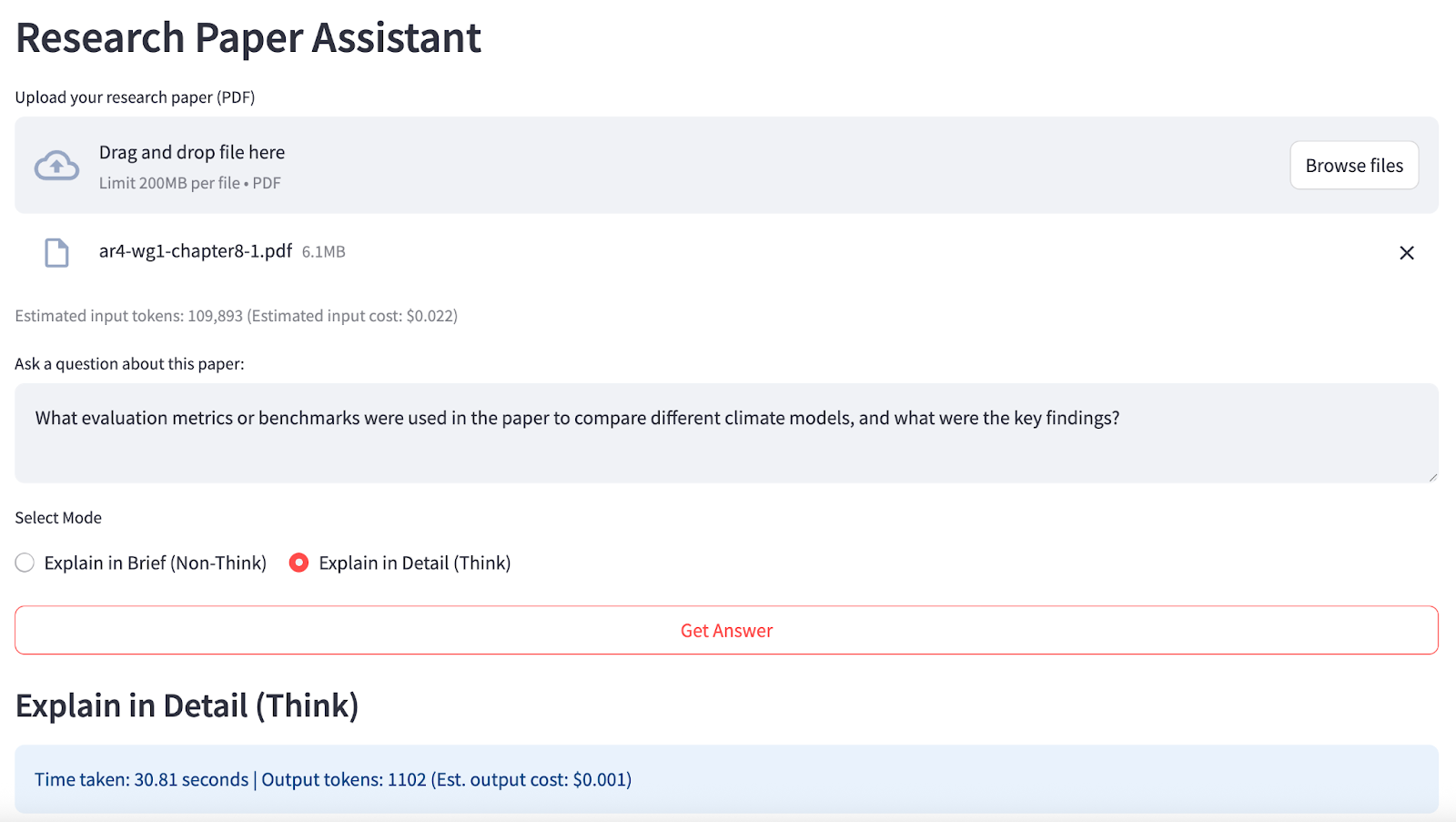
本文将重点介绍 DeepSeek V3.1 在理解学术论文方面的代理能力。我会逐步讲解如何通过一个 Streamlit 应用,将任何 PDF 转化为交互式研究助理——我们将涉及:
完成后,您的应用将如下所示:
DeepSeek V3.1 是一个拥有 671B 参数的混合型 专家混合(Mixture-of-Experts, MoE)模型,同时训练用于“思考”(详尽、有理据)与“非思考”(事实性、简洁)两种答题风格。它支持 128,000 个 token 的上下文窗口,并可通过 OpenRouter 提供的 OpenAI 兼容 API 访问。
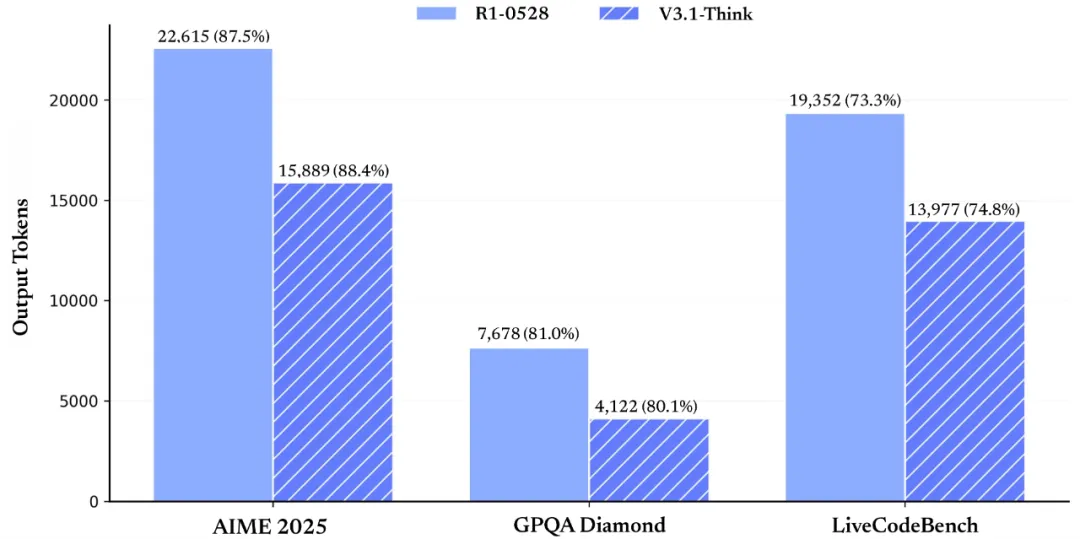
来源:DeepSeek
DeepSeek V3.1 的核心特性包括:
本节将演示我如何使用 DeepSeek V3.1将任意上传的 PDF 论文转化为交互式、由 AI 驱动的研究助理。
其工作方式如下:
在运行本演示之前,请先确认所有先决条件均已就绪。
首先,确保安装以下依赖:
pip install streamlit openai pypdf该命令可确保您具备用于界面、PDF 处理与 API 请求的核心依赖。
DeepSeek V3.1 模型可通过多个平台使用,包括DeepSeek 官方 API。不过,我在本演示中使用了OpenRouter,它为多种模型提供统一访问,并且对于本演示而言成本最低。以下是在 OpenRouter 上为 DeepSeek V3.1 设置 API 密钥的步骤:
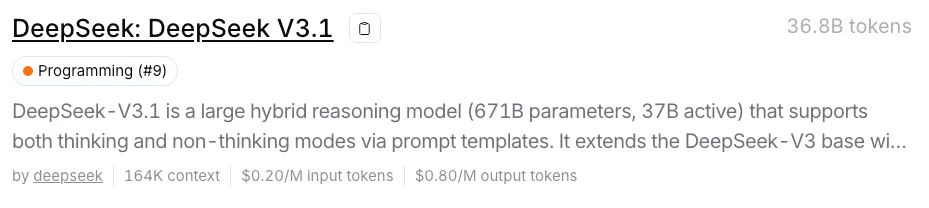
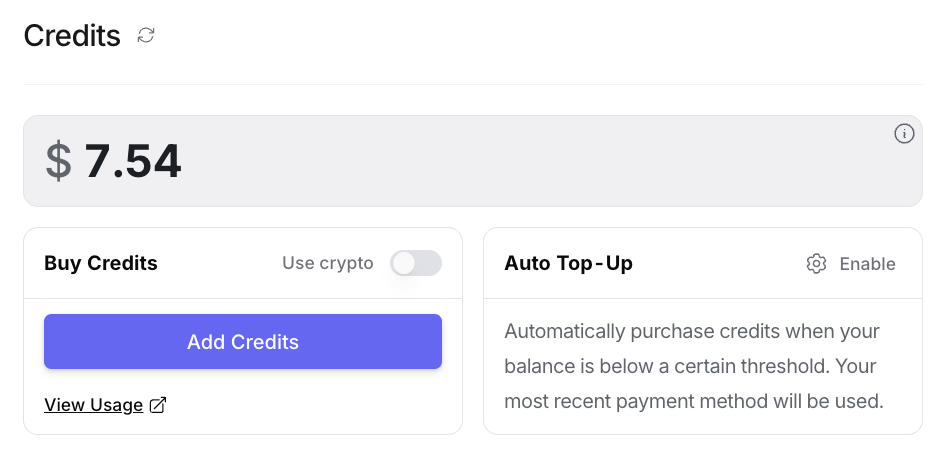
现在,在运行应用之前将您的 API 密钥设置为环境变量:
export OPENROUTER_API_KEY=your_api_key官方 DeepSeek API 更适合高并发、自动化的工作负载。
对于大多数研究、教育或演示类用例(包括本 Streamlit 论文助理),我更倾向于使用 OpenRouter,因为它更简单灵活,提供可预测的全球定价,无需管理时间窗口限制或缓存逻辑,非常适合临时分析、独特文档查询与便捷协作。
注意:通过 API 使用 DeepSeek V3.1,仅需约 8 GB 内存用于界面,无需在本地托管庞大的 670B 参数模型(否则需要 170+ GB 的磁盘空间和高性能 GPU)。
为了让用户以友好界面使用 DeepSeek V3.1,我们将采用Streamlit 作为应用框架,并通过 OpenRouter 的 OpenAI 兼容 API 连接模型。
本步骤涵盖环境配置、API 认证与基础的 Streamlit 配置。
import streamlit as stimport pypdfimport tempfilefrom openai import OpenAIimport osimport timeimport rest.set_page_config( page_title="DeepSeek V3.1 Research Assistant", layout="wide")with st.sidebar: st.title("Research Paper Assistant") st.info("Tip: Ask about the methods, findings, or reasoning for best results.")OPENROUTER_API_KEY = os.environ.get("OPENROUTER_API_KEY", "")if not OPENROUTER_API_KEY: st.warning("Add your OpenRouter API key to an environment variable.") st.stop()client = OpenAI( base_url="https://openrouter.ai/api/v1", api_key=OPENROUTER_API_KEY,)在上述代码中,st.set_page_config() 用于自定义 Streamlit 应用的页面标题与布局。应用从环境变量中读取 OpenRouter API 密钥,并实例化一个指向 OpenRouter API 端点的 OpenAI 兼容客户端,确保后续的 LLM 调用都能正确路由并为 DeepSeek V3.1 完成认证。
在构建主流程前,我们需要稳健的工具函数来处理文档与资源评估。本步骤将定义用于从上传的 PDF 中提取文本、预览文档内容、粗略统计 token 数量,并基于 OpenRouter 的 DeepSeek V3.1 定价估算成本的辅助函数。
def pdf_to_text(uploaded_file): with tempfile.NamedTemporaryFile(delete=False, suffix=".pdf") as tmp_file: tmp_file.write(uploaded_file.read()) tmp_path = tmp_file.name reader = pypdf.PdfReader(tmp_path) text = "" for page in reader.pages: page_text = page.extract_text() if page_text: text += page_text + "\n" return textdef preview_pdf_text(text, max_chars=600): preview = text[:max_chars] if len(text) > max_chars: preview += "\n...\n[Preview truncated]" return previewdef count_tokens(text): return max(1, int(len(text) / 4))def estimate_cost(tokens, mode="input"): if mode == "input": return tokens / 1_000_000 * 0.20 else: return tokens / 1_000_000 * 0.80有了这些辅助函数,我们的后端已充分准备好支持可扩展的研究助理界面:
pdf_to_text() 将多页 PDF 处理为纯文本,同时保留页与页之间的边界,使数据更适合作为 LLM 输入与后续处理。count_tokens() 提供大致的 token 数,帮助监控相对于 DeepSeek 高上下文窗口的 API 使用量;estimate_cost() 则据此按 OpenRouter 的输入/输出定价将 token 数转换为实时成本反馈,让用户随时了解每次查询的算力预算。preview_pdf_text() 生成截断预览,允许用户在产生模型费用或触发 API 限制前,验证提取内容的完整性与相关性。在这些构件就位后,我们即可组装完整的 Streamlit 应用,实现面向长上下文、具代理能力的论文问答。
在具备核心工具后,我们可以组装主界面,将 PDF 处理、token/成本估算、用户驱动的问答,以及通过 OpenRouter 与 DeepSeek V3.1 的实时交互整合起来。
st.header("Research Paper Assistant")pdf_file = st.file_uploader("Upload your research paper (PDF)", type=["pdf"])if "paper_text" not in st.session_state or st.session_state.get("last_uploaded") != pdf_file: if pdf_file is not None: with st.spinner("Extracting text from PDF..."): st.session_state.paper_text = pdf_to_text(pdf_file) st.session_state.last_uploaded = pdf_file st.success(f"PDF uploaded. Total characters extracted: {len(st.session_state.paper_text):,}") with st.expander("Preview of extracted PDF text:"): st.code(preview_pdf_text(st.session_state.paper_text), language='markdown')paper_text = st.session_state.get("paper_text")if paper_text: input_tokens = count_tokens(paper_text) st.caption(f"Estimated input tokens: {input_tokens:,} (Estimated input cost: ${estimate_cost(input_tokens):.3f})") question = st.text_area("Ask a question about this paper:", height=80, placeholder="E.g. What are the main findings?") mode = st.radio( "Select Mode", ["Explain in Brief (Non-Think)", "Explain in Detail (Think)"], horizontal=True, ) go = st.button("Get Answer", use_container_width=True) if question and go: if mode == "Explain in Brief (Non-Think)": prompt = ( f"{paper_text}\n\n" f"Question: {question}\n" "First, answer in a few sentences. Then, quote 1–2 exact sentences from the above paper that best support your answer. " "Show each quote on a new line." ) thinking_flag = False header = "Explain in Brief (Non-Think)" else: prompt = ( f"{paper_text}\n\n" f"Question: {question}\n" "First, answer in detail with reasoning and evidence. Then, quote 2–3 exact sentences from the above paper that most strongly support your answer. " "List the quotes after your answer." ) thinking_flag = True header = "Explain in Detail (Think)" with st.spinner(f"Generating answer..."): start_time = time.perf_counter() try: response = client.chat.completions.create( model="deepseek/deepseek-chat-v3.1", messages=[ {"role": "system", "content": "You are a helpful research assistant."}, {"role": "user", "content": prompt} ], max_tokens=900, extra_body={"thinking": thinking_flag}, ) answer = response.choices[0].message.content.strip() output_tokens = count_tokens(answer) except Exception as e: answer = f"Error: {e}" output_tokens = 0 end_time = time.perf_counter() elapsed_time = end_time - start_time parts = re.split(r"(?:^|\n)(Quotes?:?)", answer, flags=re.IGNORECASE) if len(parts) >= 3: main_answer = parts[0].strip() quotes = parts[2].strip() else: main_answer = answer quotes = None st.markdown(f"### {header}") st.info(f"Time taken: {elapsed_time:.2f} seconds | Output tokens: {output_tokens} (Est. output cost: ${estimate_cost(output_tokens, 'output'):.3f})") st.write(main_answer) if quotes: st.markdown("**Supporting Quotes:**") st.success(quotes)该 Streamlit 应用实现了一个动态的论文研究助理,使用 DeepSeek V3.1 处理从文档导入到具上下文的 LLM 问答。以下是该应用承担的关键职能:
用户通过界面上传 PDF 文件,随后:
st.session_state 以判断文件是否为新文件。若是,则提取文本并与上传引用一并缓存进 session_state,避免每次交互都重复提取。文档加载后,用户可以输入问题,并在非思考与思考模式间选择,界面会针对不同模式调整提示词指令:
当用户点击“Get Answer”时,应用会:
thinking 参数(extra_body={"thinking": thinking_flag}),确保模型运行在正确的推理模式,而非仅依赖温度控制。解析返回的答案,并在可分离的情况下拆分主体回答与支持性引文。随后在界面中展示答案与引文,突出显示来自原文的精确证据。
如需亲自尝试,将代码保存为 app.py 并运行:
streamlit run app.py用这些课程学习 AI!
课程
课程
实践并学习路径你的进步。
使用 Google 继续