

课程
在 Python 中使用 DeepSeek
3 小时
1.4K
实践并学习路径你的进步。
使用 Google 继续DeepSeek V3.2 Speciale 是一款为复杂、可借助工具的工作流而调优的高算力推理模型。它并非仅仅直接回答问题,而是被设计用于规划、推理并协调工具,以构建具备代理能力的分析系统。
在本教程中,我们将使用 DeepSeek V3.2 Speciale 构建一个AI 数据分析代理,可用于任何 CSV。流程如下:
最终,您将获得一个带有明确计划和可复现实验步骤的 Streamlit 应用。如果您想进一步了解 AI 代理,建议查看AI Agent Fundamentals 技能路径。
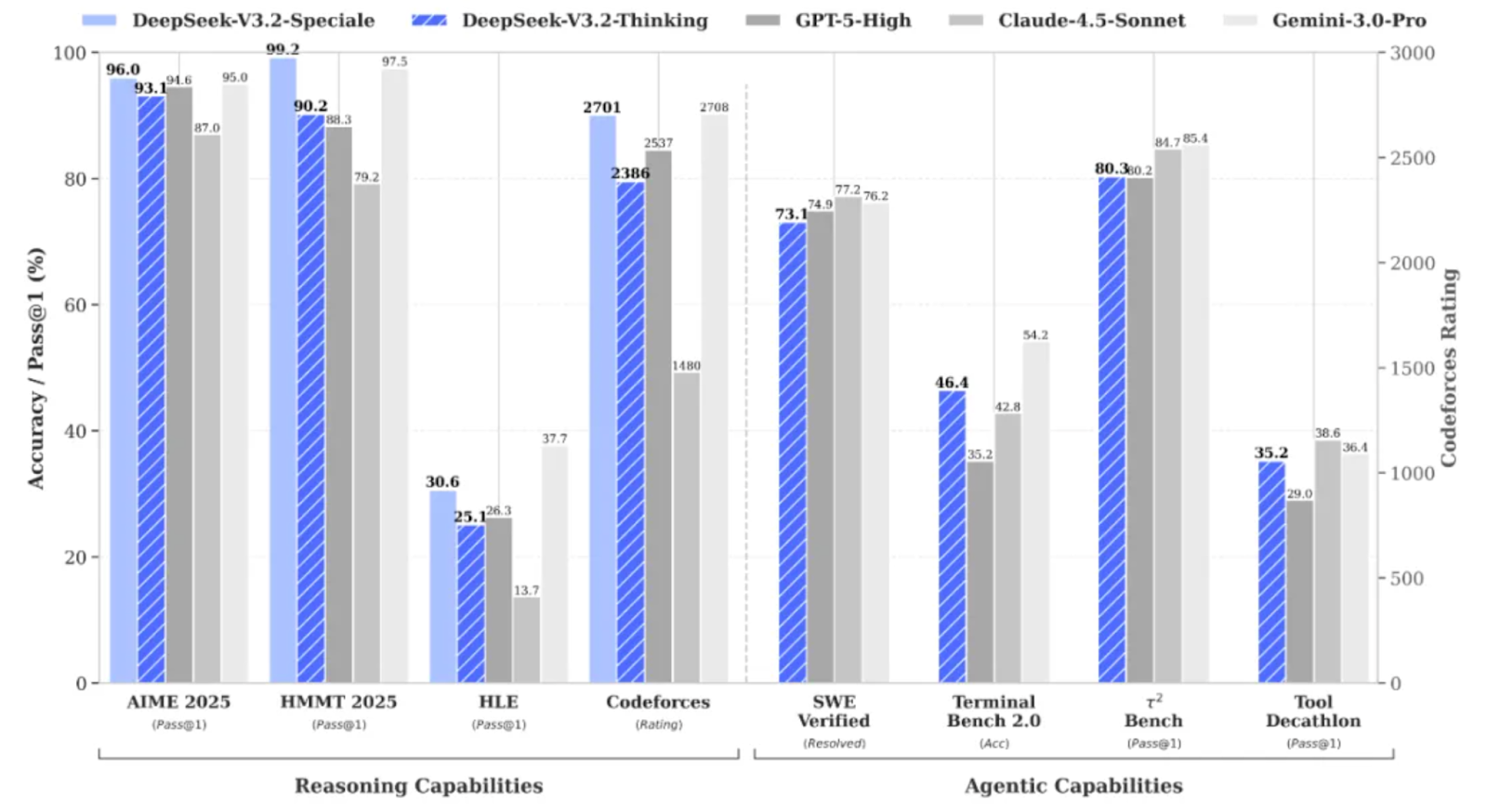
DeepSeek V3.2 Speciale 是 DeepSeek V3.2 系列中经高算力与强化学习增强的变体,专为深度推理而非随意聊天而设计。
它在复杂任务上的表现已可与Gemini 3 Pro等模型相媲美,并在 IMO、CMO、ICPC 世界总决赛以及 IOI 2025 等基准上取得金牌级成绩。
DeepSeek V3.2 Speciale 的优化方向:
V3.2 Speciale 仅支持思考模式,目前尚不支持通过官方 API 进行工具调用。您不能只调一下 temperature 就指望首次就拿到干净的 JSON。Speciale 模型会进行较长时间的思考,并常将推理过程与最终答案交错输出。
本节我们将在一个 Streamlit 应用中封装 DeepSeek V3.2 Speciale 模型,实现一个 AI 数据分析代理。总体而言,最终应用将实现以下功能:
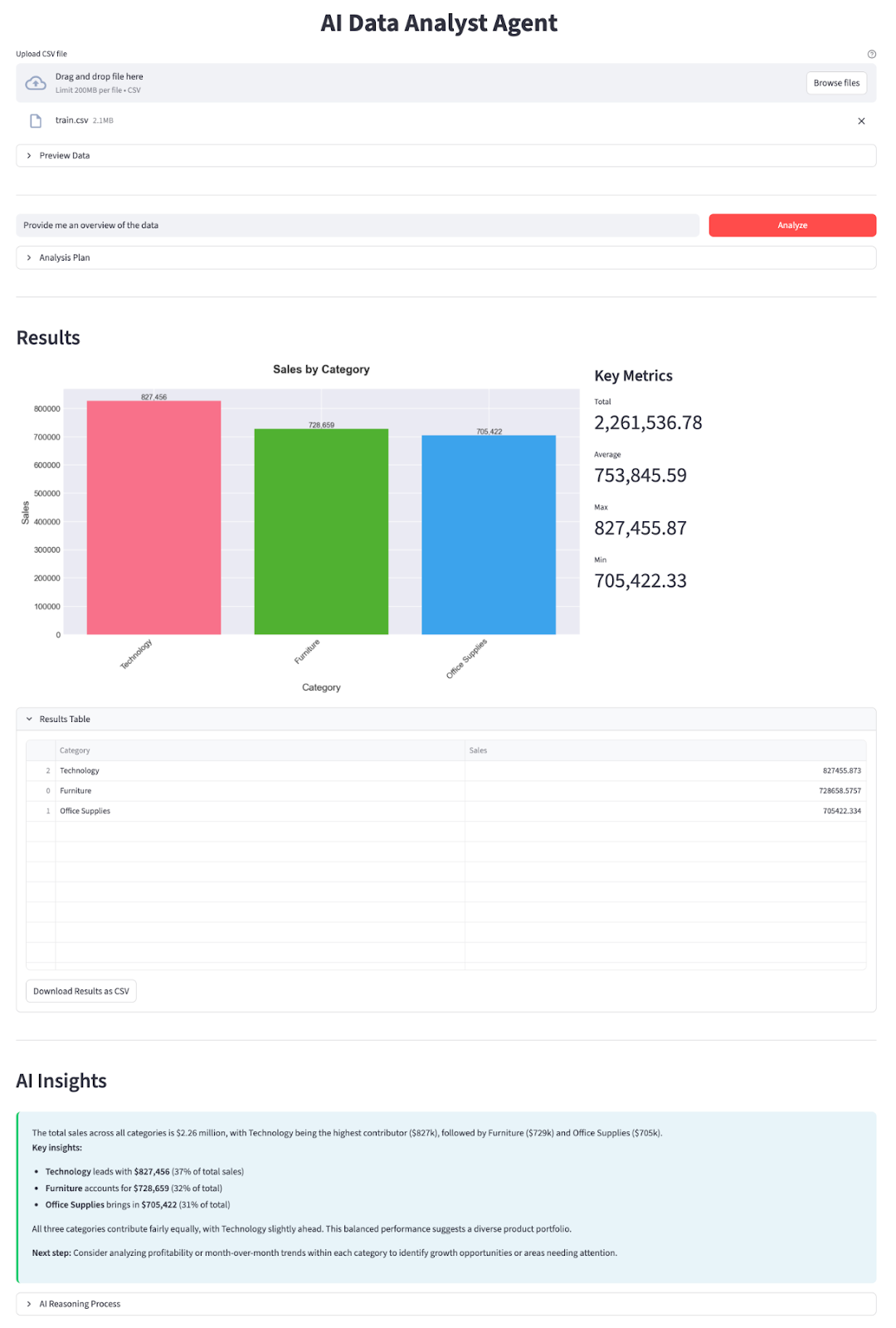
让我们一步步搭建。
首先,安装核心依赖,并从 DeepSeek 的 API 平台获取一个 API Key:
pip install streamlit pandas matplotlib seaborn python-dotenv openai我们将使用几款核心库,例如用 streamlit 构建交互式 Web 应用 UI,用 pandas 加载和处理 CSV 数据,用 matplotlib 与 seaborn 创建图表和可视化。python-dotenv 用于从 .env 文件加载环境变量,而 OpenAI 则作为与 DeepSeek 的 OpenAI 兼容 API 交互的客户端。
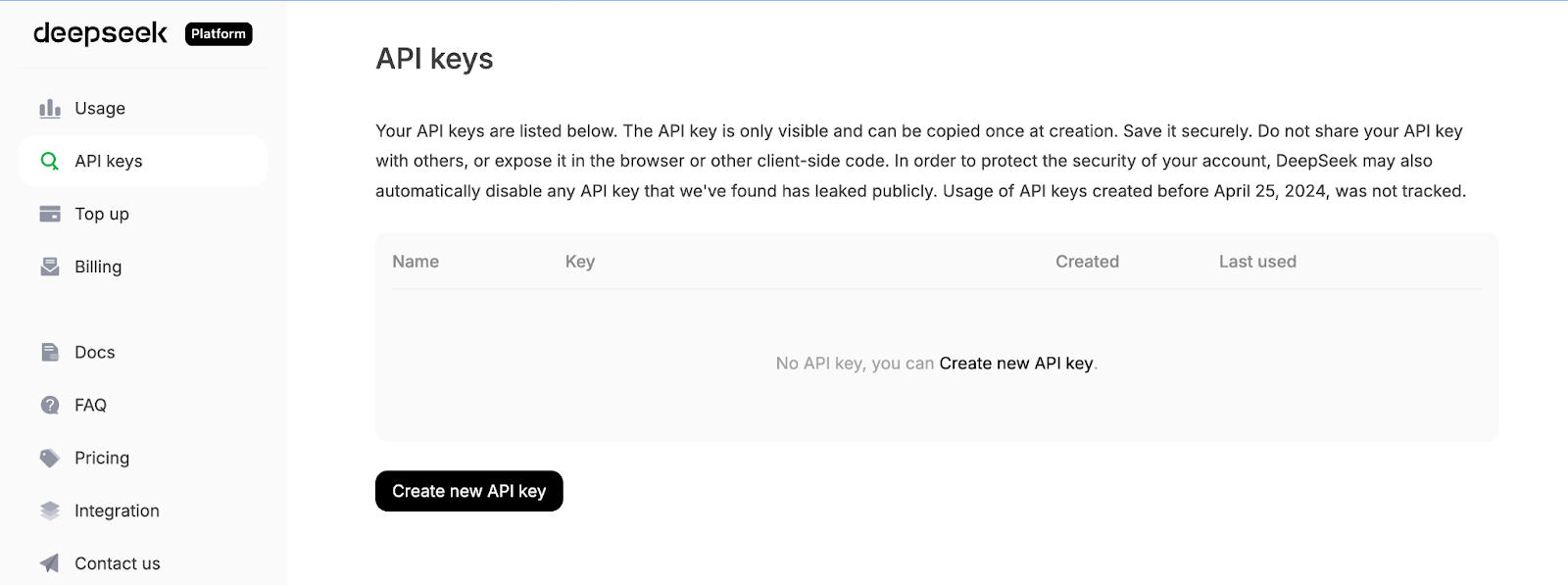
接着,登录 DeepSeek API 平台,进入 API Keys 选项卡,点击 Create a new API key。
最后,为您的密钥命名,并复制生成的密钥。
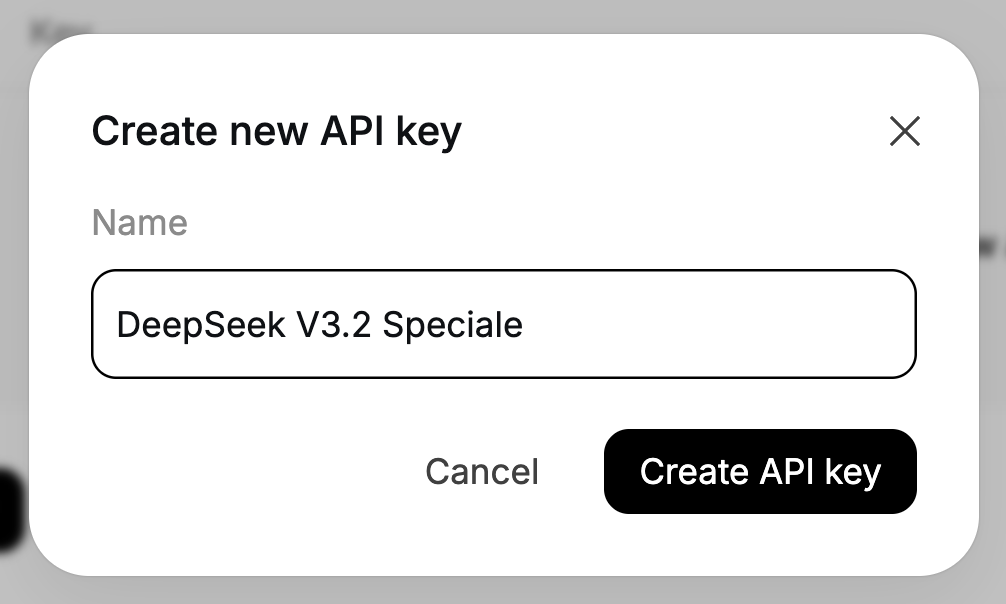
将您的 DeepSeek API Key 设置为环境变量:
export DEEPSEEK_API_KEY="your_api_key_here"至此环境已准备就绪。
安装好依赖后,下一步是在脚本中引入它们,并配置为我们的规划与讲解代理提供动力的 DeepSeek 客户端。
import io
import json
import os
import re
from datetime import datetime
import matplotlib.pyplot as plt
import pandas as pd
import seaborn as sns
import streamlit as st
from dotenv import load_dotenv
from openai import OpenAI
plt.style.use('seaborn-v0_8-darkgrid')
sns.set_palette("husl")
load_dotenv()
DEEPSEEK_API_KEY = os.getenv("DEEPSEEK_API_KEY")
if not DEEPSEEK_API_KEY:
    raise RuntimeError("Please set DEEPSEEK_API_KEY env variable.")
DEEPSEEK_BASE_URL = os.getenv(
    "DEEPSEEK_BASE_URL",
    "https://api.deepseek.com/v3.2_speciale_expires_on_20251215",
)
client = OpenAI(
    api_key=DEEPSEEK_API_KEY,
    base_url=DEEPSEEK_BASE_URL,
)
上述代码块完成三件事:导入核心库、应用绘图样式,并从 .env 加载环境变量。随后读取 DEEPSEEK_API_KEY 并进行校验,构建一个指向 DeepSeek 临时 V3.2 Speciale 端点的 OpenAI 客户端,以确保后续所有 LLM 调用均使用正确的模型。
请注意,DeepSeek V3.2 Speciale 目前通过一个将于 2025 年 12 月 15 日到期的临时端点提供服务。届时部署 URL 可能会变化,但模型名称将保持为 deepseek-reasoner。如需了解最新端点与用法,请参阅 DeepSeek 官方文档。
客户端配置完成后,让我们定义两个代理——一个负责规划分析,另一个负责解释结果。
在有了客户端之后,我们可以构建规划代理,用于决定基于数据应运行哪些分析。我们不让模型直接操作 DataFrame,而是要求其生成一个结构化的 JSON 计划,由我们的 Python “数据工作器”安全地执行。
规划器会看到数据集的文本描述以及用户的问题,并返回一个 JSON 对象,描述操作类型、分组列、过滤条件、指标列和图表类型。
def call_planner_llm(schema_text: str, question: str) -> tuple[dict, str]:
    system_prompt = """
    You are a data analysis planner. Convert user questions into JSON plans.
    JSON Structure (REQUIRED):
    {
      "operation": "group_by_summary",
      "group_by": ["column_name"],
      "filters": [],
      "target_column": "column_to_analyze",
      "metric": "sum",
      "need_chart": true,
      "chart_type": "bar"
    }
    Fields:
    - operation: Always use "group_by_summary" (most flexible)
    - group_by: Columns to group by (e.g., ["Product Name"] or ["Category", "Region"])
    - filters: Optional filters, e.g., [{"column": "Year", "op": "==", "value": "2023"}]
    - target_column: Column to aggregate (must exist in schema!)
    - metric: One of: sum, mean, count, max, min
    - need_chart: true (always show chart)
    - chart_type: bar, line, or pie
    Quick Rules:
    - Use ONLY columns from the provided schema
    - For "this year", look for year columns or use the latest year in data
    - For "top N", use appropriate group_by and metric
    - For comparisons, use filters to split groups
    Think briefly, then output the complete JSON.
    """.strip()
    messages = [
        {"role": "system", "content": system_prompt},
        {
            "role": "user",
            "content": f"Dataset:\n{schema_text}\n\nQuestion:\n{question}\n\nReminder: After analyzing, output the complete JSON plan.",
        },
    ]
    resp = client.chat.completions.create(
        model="deepseek-reasoner",
        messages=messages,
        max_tokens=8192,
    )
    message = resp.choices[0].message
    content = message.content or ""
    content = content.strip()
    reasoning_content = getattr(message, 'reasoning_content', None) or ""
    finish_reason = resp.choices[0].finish_reason
    def extract_json_from_text(text: str) -> dict | None:
        if not text:
            return None
        try:
            return json.loads(text)
        except json.JSONDecodeError:
            pass
        code_block_match = re.search(r'```(?:json)?\s*(\{[\s\S]*?\})\s*```', text, re.DOTALL)
        if code_block_match:
            try:
                return json.loads(code_block_match.group(1))
            except json.JSONDecodeError:
                pass
        def find_all_json_objects(s):
            objects = []
            depth = 0
            start_idx = None
            in_string = False
            escape_next = False
            for i, char in enumerate(s):
                if escape_next:
                    escape_next = False
                    continue
                if char == '\\':
                    escape_next = True
                    continue
                if char == '"' and not in_string:
                    in_string = True
                elif char == '"' and in_string:
                    in_string = False
                elif not in_string:
                    if char == '{':
                        if depth == 0:
                            start_idx = i
                        depth += 1
                    elif char == '}':
                        depth -= 1
                        if depth == 0 and start_idx is not None:
                            objects.append(s[start_idx:i+1])
                            start_idx = None
            return objects
        for candidate in find_all_json_objects(text):
            try:
                parsed = json.loads(candidate)
                if isinstance(parsed, dict) and any(k in parsed for k in ['operation', 'target_column', 'metric', 'group_by']):
                    return parsed
            except json.JSONDecodeError:
                continue
        for i in range(len(text)):
            if text[i] == '{':
                decoder = json.JSONDecoder()
                try:
                    parsed, _ = decoder.raw_decode(text[i:])
                    if isinstance(parsed, dict) and any(k in parsed for k in ['operation', 'target_column', 'metric', 'group_by']):
                        return parsed
                except json.JSONDecodeError:
                    continue
        return None
    if reasoning_content:
        plan = extract_json_from_text(reasoning_content)
        if plan is not None:
            return plan, reasoning_content
    plan = extract_json_from_text(content)
    if plan is not None:
        return plan, reasoning_content
    error_msg = (
        f"Planner returned non-JSON content.\n"
        f"Finish reason: {finish_reason}\n"
        f"Content received: {repr(content[:500]) if content else '(empty)'}\n"
        f"Reasoning content length: {len(reasoning_content) if reasoning_content else 0}\n"
        f"Reasoning content sample: {reasoning_content[:500] if reasoning_content else '(none)'}"
    )
    if finish_reason == "length":
        error_msg += "\n\nNote: Response was truncated due to token limit. The model didn't finish generating the JSON."
raise ValueError(error_msg)首先,system_prompt 定义了规划代理的“合约”,即将用户问题转换为 JSON 计划,并明确我们期望的字段,例如 group_by 列表、可选 filters、target_column、metric 与 chart_type 等。
我们还加入了一些启发式规则(比如如何处理“this year”或“top N”),从而让模型更像一位初级数据分析师,而非通用聊天机器人。
接着,我们构建携带指令的系统消息,并打包两部分内容:数据集架构的文本描述(列名、数据类型、示例行)和用户的问题。这为模型提供足够上下文,以便选择有效的列名并为问题选择合理的聚合方式。
随后通过 client.chat.completions.create() 调用 DeepSeek V3.2 Speciale。由于这是推理模型,它可能产生两种输出通道:可见的 content 字符串,以及用于承载大部分“思考过程”和最终答案的内部 reasoning_content 字符串。我们会从响应中取出这两部分,并记录 finish_reason 以便检测截断。
核心工作在 extract_json_from_text() 函数中完成。由于推理模型不总是返回干净的 JSON,我们将其包裹在 markdown 中。为增强规划器的健壮性,该辅助函数依次尝试多种策略:
json.loads 解析整个字符串对每个候选,仅当对象看起来像有效计划时才接受,即它们至少包含 operation、target_column、metric 或 group_by 之一。
最后,我们将 extract_json_from_text() 应用于 reasoning_content。
通过这些组件,可将任意自然语言问题与架构快照转化为结构化的分析计划。
当数据工作器使用 Pandas 跑完分析后,我们将结果表与 JSON 计划一并发回 DeepSeek,将其转化为包含具体洞察的总结。
def call_explainer_llm(question: str, plan: dict, result_summary: list) -> tuple[str, str]:
    system_prompt = """
    You are a senior data analyst explaining insights to business stakeholders.
    The user asked a question about their CSV data.
    Another agent already designed an analysis plan and we executed it in Python.
    You will now explain the results in clear, engaging, non-technical language.
    Requirements:
    - Start with a direct 1-2 sentence answer to their question
    - Use bullet points (3-5 points) to highlight key insights, trends, or comparisons
    - Include specific numbers and percentages where relevant
    - Use business-friendly language (avoid technical jargon like "aggregation", "groupby")
    - If the data shows interesting patterns, point them out
    - End with a brief recommendation or next step if appropriate
    Keep it concise and actionable.
    """.strip()
    limited_summary = result_summary[:20] if len(result_summary) > 20 else result_summary
    user_content = f"""
    User question:
    {question}
    Analysis performed:
    {json.dumps(plan, indent=2)}
    Results (top rows):
    {json.dumps(limited_summary, indent=2)}
    Total rows in result: {len(result_summary)}
    """.strip()
    messages = [
        {"role": "system", "content": system_prompt},
        {"role": "user", "content": user_content},
    ]
    resp = client.chat.completions.create(
        model="deepseek-reasoner",
        messages=messages,
        max_tokens=2048,
    )
    message = resp.choices[0].message
    content = message.content or ""
    content = content.strip()
    reasoning_content = getattr(message, 'reasoning_content', None) or ""
    if not content:
        if reasoning_content:
            content = reasoning_content.strip()
    return (content if content else "Unable to generate explanation from the model response.",
            reasoning_content)
讲解代理首先设置 system_prompt,指示 DeepSeek 以资深数据分析师对业务干系人讲话的方式行文。我们明确了答案的结构,并给出撰写建议。
随后,准备 user_content,为模型提供所需全部上下文。我们传入原始问题、JSON 分析计划(便于了解执行了哪些计算)以及结果总行数。
接着组装消息列表并通过 client.chat.completions.create() 调用 DeepSeek V3.2 Speciale。与规划器类似,模型可能在 content 与 reasoning_content 同时返回文本,因此我们同时取用,若 content 为空则回退到 reasoning_content。
最后,该函数返回一个元组,其中包含讲解文本与原始推理字符串,后者会显示在折叠面板中。
有了这个讲解代理,闭环就完成了:
在让 DeepSeek 进行规划之前,我们需要清晰描述数据并使其便于分析。这通过一组辅助函数实现。
规划代理无法直接看到您的 DataFrame,因此我们向其发送数据集的紧凑文本摘要。
def get_schema_description(df: pd.DataFrame, max_rows: int = 3) -> str:
    schema_lines = ["Columns:"]
    for col, dtype in df.dtypes.items():
        if dtype == 'object' and df[col].nunique() < 20:
            unique_vals = df[col].dropna().unique()[:5]
            schema_lines.append(f"- {col} ({dtype}) - sample values: {', '.join(map(str, unique_vals))}")
        else:
            schema_lines.append(f"- {col} ({dtype})")
    sample = df.head(max_rows).to_markdown(index=False)
    return "\n".join(schema_lines) + "\n\nSample rows:\n" + sample
该辅助函数会遍历所有列。对于产品名称、地区或类别这类“对象”列,还会附上部分示例值。
最后附上一张前几行的简短 markdown 表格,便于模型据此进行推理。
这段架构字符串是规划器观察您数据的窗口,使其能够选择有效列名和分组。
我们会自动检测日期列,并添加 <col>_year 与 <col>_year_month 等辅助字段,便于 DeepSeek 回答“去年”或“按月”之类的问题。
def preprocess_dates(df: pd.DataFrame) -> pd.DataFrame:
    df = df.copy()
    date_columns = []
    for col in df.columns:
        if pd.api.types.is_datetime64_any_dtype(df[col]):
            date_columns.append(col)
            continue
        if any(x in col.lower() for x in ['date', 'time', 'day']):
            try:
                df[col] = pd.to_datetime(df[col], errors='coerce')
                if df[col].notna().sum() > 0:
                    date_columns.append(col)
            except:
                pass
    for col in date_columns:
        if col in df.columns and pd.api.types.is_datetime64_any_dtype(df[col]):
            df[f'{col}_year'] = df[col].dt.year
            df[f'{col}_month'] = df[col].dt.month
            df[f'{col}_year_month'] = df[col].dt.to_period('M').astype(str)
    return df
我们先扫描各列,若某列已为 datetime 类型或列名暗示日期(如 order_date 或 day),则尝试用 pd.to_datetime 解析。对每个日期列,创建 <col>_year、<col>_month、<col>_year_month 等特征。
有了该预处理,规划器即可安全引用 year 与 year_month 列,而无需您为每个数据集手动构造时间特征。
规划器可以在计划中加入简单的行过滤条件,该辅助函数将其转化为 pandas 过滤。
def apply_filters(df: pd.DataFrame, filters: list) -> pd.DataFrame:
    if not filters:
        return df
    filtered = df.copy()
    for f in filters:
        col = f.get("column")
        op = f.get("op")
        val = f.get("value")
        if col not in filtered.columns:
            continue
        try:
            val_cast = pd.to_numeric(val)
        except Exception:
            val_cast = val
        if op == "==":
            filtered = filtered[filtered[col] == val_cast]
        elif op == "!=":
            filtered = filtered[filtered[col] != val_cast]
        elif op == ">":
            filtered = filtered[filtered[col] > val_cast]
        elif op == "<":
            filtered = filtered[filtered[col] < val_cast]
        elif op == ">=":
            filtered = filtered[filtered[col] >= val_cast]
        elif op == "<=":
            filtered = filtered[filtered[col] <= val_cast]
        elif op == "contains":
            filtered = filtered[filtered[col].astype(str).str.contains(str(val_cast), case=False, na=False)]
    return filtered
对每个过滤条件,我们检查列是否存在,并尽可能将值转换为数值类型,然后应用相应比较。所有过滤按顺序执行,因此可以自然地组合诸如“Region contains West”和“Year >= 2021”之类条件。
该函数实现了将自然语言约束从计划连接到行子集。
现在实现数据工作器,这是一个薄层组件,读取 JSON 计划并运行相应的 pandas 聚合。
def run_analysis_plan(df: pd.DataFrame, plan: dict) -> pd.DataFrame:
    op = plan.get("operation")
    target_col = plan.get("target_column")
    group_by = plan.get("group_by") or []
    filters = plan.get("filters") or []
    metric = plan.get("metric", "sum")
    if filters:
        df = apply_filters(df, filters)
    if not op or not target_col or target_col not in df.columns:
        return df.head(20)
    if op in ("aggregate_compare", "group_by_summary", "filter_then_aggregate"):
        if not group_by:
            if metric == "sum":
                value = df[target_col].sum()
            elif metric == "mean":
                value = df[target_col].mean()
            elif metric == "count":
                value = df[target_col].count()
            elif metric == "max":
                value = df[target_col].max()
            elif metric == "min":
                value = df[target_col].min()
            else:
                raise ValueError(f"Unsupported metric: {metric}")
            return pd.DataFrame({f"{metric}_{target_col}": [value]})
        if metric == "sum":
            agg_df = df.groupby(group_by)[target_col].sum().reset_index()
        elif metric == "mean":
            agg_df = df.groupby(group_by)[target_col].mean().reset_index()
        elif metric == "count":
            agg_df = df.groupby(group_by)[target_col].count().reset_index()
        elif metric == "max":
            agg_df = df.groupby(group_by)[target_col].max().reset_index()
        elif metric == "min":
            agg_df = df.groupby(group_by)[target_col].min().reset_index()
        else:
            raise ValueError(f"Unsupported metric: {metric}")
        agg_df = agg_df.sort_values(by=target_col, ascending=False)
        return agg_df
    return df.head(20)
我们先解包计划中的操作类型、目标列、分组列、过滤条件与度量参数。
然后通过 apply_filters() 应用过滤器。若计划引用了无效列,则回退为返回一个简易预览。
否则,对于受支持的操作,我们要么对整表聚合,要么按分组运行 sum、mean、count、max 或 min,并按指标列对结果排序。
这就是工具层的核心:LLM 决定算什么,这个函数决定如何用 pandas 安全地算出来。
最后,我们将结果表转化为与计划中 chart_type 匹配的图表,从而在输出中同时拥有数字与可视化。
def generate_chart(df: pd.DataFrame, plan: dict):
    if not plan.get("need_chart") or df.empty:
        return None
    chart_type = plan.get("chart_type", "bar")
    group_by = plan.get("group_by") or []
    target_col = plan.get("target_column")
    if not target_col or target_col not in df.columns:
        return None
    fig, ax = plt.subplots(figsize=(10, 6))
    if group_by and len(group_by) > 0:
        x_col = group_by[0]
        if x_col not in df.columns:
            return None
        plot_df = df.head(15)
        if chart_type == "bar":
            bars = ax.bar(range(len(plot_df)), plot_df[target_col], color=sns.color_palette("husl", len(plot_df)))
            ax.set_xticks(range(len(plot_df)))
            ax.set_xticklabels(plot_df[x_col], rotation=45, ha='right')
            ax.set_ylabel(target_col, fontsize=12)
            ax.set_xlabel(x_col, fontsize=12)
            for i, (bar, val) in enumerate(zip(bars, plot_df[target_col])):
                height = bar.get_height()
                ax.text(bar.get_x() + bar.get_width()/2., height,
                       f'{val:,.0f}' if abs(val) > 100 else f'{val:.2f}',
                       ha='center', va='bottom', fontsize=9)
        elif chart_type == "line":
            ax.plot(range(len(plot_df)), plot_df[target_col], marker='o', linewidth=2, markersize=8)
            ax.set_xticks(range(len(plot_df)))
            ax.set_xticklabels(plot_df[x_col], rotation=45, ha='right')
            ax.set_ylabel(target_col, fontsize=12)
            ax.set_xlabel(x_col, fontsize=12)
            ax.grid(True, alpha=0.3)
        elif chart_type == "pie" and len(plot_df) <= 10:
            ax.pie(plot_df[target_col], labels=plot_df[x_col], autopct='%1.1f%%', startangle=90)
            ax.axis('equal')
        else:
            bars = ax.bar(range(len(plot_df)), plot_df[target_col])
            ax.set_xticks(range(len(plot_df)))
            ax.set_xticklabels(plot_df[x_col], rotation=45, ha='right')
        title = f"{target_col} by {x_col}"
    else:
        ax.bar([target_col], [df[target_col].iloc[0]])
        title = f"{target_col}"
    ax.set_title(title, fontsize=14, fontweight='bold', pad=20)
    fig.tight_layout()
    buf = io.BytesIO()
    fig.savefig(buf, format="png", dpi=150, bbox_inches='tight')
    buf.seek(0)
    plt.close(fig)
    return buf
我们从计划中读取 chart_type、group_by 与 target_column 并构建 Matplotlib 图。上述 generate_chart() 函数返回一个内存中的 PNG 缓冲区,Streamlit 应用会在关键指标旁显示该图。
有了这些辅助函数,系统其余部分就简单多了。规划器用 get_schema_description 设计分析,数据工作器用 preprocess_dates()、apply_filters() 和 run_analysis_plan() 计算结果,generate_chart() 则将最终表格转化为图表。
现在我们已具备规划器、数据工作器、讲解器与辅助函数,可以将一切封装进一个 Streamlit 应用中。
st.set_page_config(
    page_title="AI Data Analyst Agent",
    page_icon="📊",
    layout="wide",
    initial_sidebar_state="expanded"
)
st.markdown("""
<style>
    .main-header {

        font-weight: 700;


        text-align: center;
    }
    .sub-header {


        text-align: center;
    }
    .metric-card {
        background-

        border-radius: 0.5rem;
        border-left: 4px solid #1f77b4;
    }
    .insight-box {
        background-

        border-radius: 0.5rem;
        border-left: 4px solid #2ecc71;

    }
</style>
""", unsafe_allow_html=True)
st.markdown("<h1 class='main-header'>AI Data Analyst Agent</h1>", unsafe_allow_html=True)
uploaded_file = st.file_uploader("Upload CSV file", type=["csv"], help="Upload any CSV file to get started")
if uploaded_file is not None:
    try:
        df = pd.read_csv(uploaded_file)
        df = preprocess_dates(df)
    except Exception as e:
        st.error(f"Error loading CSV: {e}")
        st.stop()
    with st.expander("Preview Data", expanded=False):
        col1, col2, col3 = st.columns(3)
        col1.metric("Total Rows", f"{len(df):,}")
        col2.metric("Total Columns", len(df.columns))
        col3.metric("Memory Usage", f"{df.memory_usage(deep=True).sum() / 1024**2:.1f} MB")
        st.dataframe(df.head(100), width='stretch', height=300)
        st.markdown("**Numeric Columns Summary:**")
        numeric_cols = df.select_dtypes(include=['number']).columns
        if len(numeric_cols) > 0:
            st.dataframe(df[numeric_cols].describe(), width='stretch')
    st.markdown("---")
    col1, col2 = st.columns([4, 1])
    with col1:
        question = st.text_input(
            " Ask a question about your data",
            placeholder="e.g., Which product category had the highest sales last year?",
            label_visibility="collapsed"
        )
    with col2:
        analyze_button = st.button("Analyze", type="primary", width='stretch')
    if analyze_button and question.strip():
        with st.spinner("Analyzing data..."):
            schema_text = get_schema_description(df)
            try:
                plan, planner_reasoning = call_planner_llm(schema_text, question)
            except Exception as e:
                st.error(f" Planner agent failed: {e}")
                st.stop()
            with st.expander(" Analysis Plan", expanded=False):
                col1, col2 = st.columns(2)
                with col1:
                    st.json(plan)
                with col2:
                    if planner_reasoning:
                        st.markdown("**AI Reasoning Process:**")
                        st.text_area("Planner Reasoning", planner_reasoning[:1000] + "..." if len(planner_reasoning) > 1000 else planner_reasoning,
                                   height=200, label_visibility="collapsed")
            try:
                result_df = run_analysis_plan(df, plan)
            except Exception as e:
                st.error(f" Error running analysis: {e}")
                st.info(" Tip: Try rephrasing your question or be more specific about the columns you want to analyze.")
                st.stop()
        st.markdown("---")
        st.markdown("## Results")
        chart_buf = generate_chart(result_df, plan)
        if chart_buf is not None:
            col1, col2 = st.columns([2, 1])
            with col1:
                st.image(chart_buf)
            with col2:
                st.markdown("### Key Metrics")
                target_col = plan.get("target_column")
                if target_col in result_df.columns:
                    st.metric("Total", f"{result_df[target_col].sum():,.2f}")
                    st.metric("Average", f"{result_df[target_col].mean():,.2f}")
                    st.metric("Max", f"{result_df[target_col].max():,.2f}")
                    st.metric("Min", f"{result_df[target_col].min():,.2f}")
        else:
            st.info("Chart generation skipped (not applicable for this query)")
        with st.expander("Results Table", expanded=True):
            st.dataframe(result_df, width='stretch', height=400)
            csv_data = result_df.to_csv(index=False)
            st.download_button(
                label="Download Results as CSV",
                data=csv_data,
                file_name=f"analysis_results_{datetime.now().strftime('%Y%m%d_%H%M%S')}.csv",
                mime="text/csv"
            )
        with st.spinner("Generating insights..."):
            result_df_serializable = result_df.copy()
            for col in result_df_serializable.columns:
                if pd.api.types.is_datetime64_any_dtype(result_df_serializable[col]):
                    result_df_serializable[col] = result_df_serializable[col].astype(str)
                elif pd.api.types.is_period_dtype(result_df_serializable[col]):
                    result_df_serializable[col] = result_df_serializable[col].astype(str)
            result_summary = result_df_serializable.to_dict(orient="records")
            explanation, explainer_reasoning = call_explainer_llm(
                question=question,
                plan=plan,
                result_summary=result_summary,
            )
        st.markdown("---")
        st.markdown("## AI Insights")
        st.markdown(f'<div class="insight-box">{explanation}</div>', unsafe_allow_html=True)
        if explainer_reasoning:
            with st.expander(" AI Reasoning Process", expanded=False):
                st.text_area("Explainer Reasoning", explainer_reasoning[:1500] + "..." if len(explainer_reasoning) > 1500 else explainer_reasoning,
                           height=300, label_visibility="collapsed")
顶部我们用 st.set_page_config 与 CSS 配置仪表盘样式。用户首先上传 CSV,我们将其加载为 DataFrame,经过 preprocess_dates 处理,并在“数据预览”折叠面板中展示行/列计数、内存占用与快速统计。
在幕后,我们用 get_schema_description() 构建架构描述,调用 call_planner_llm 获得 JSON 计划,并在折叠面板中同时展示计划与模型的推理。随后数据工作器用 pandas 执行计划,“结果”部分显示 generate_chart 绘制的图表及关键指标。
最后,我们将问题、计划与结果摘要传给 call_explainer_llm,为“AI 洞察”模块生成解释,并提供可选的“AI 推理过程”折叠面板,供有兴趣的读者了解细节。
将所有内容保存为 app.py 并运行:
streamlit run app.py下方视频展示了该工作流的精简演示:
DataCamp 热门课程
课程
课程
实践并学习路径你的进步。
使用 Google 继续