

课程
生成式 AI 概念
2 小时
120.9K
实践并学习路径你的进步。
使用 Google 继续在这篇博客中,我们将深入解析 Phi-2 模型,了解其与其他模型的性能对比及其训练方式。此外,我们还将探讨如何使用 Transformers 库访问该模型,并在 Hugging Face 的角色扮演数据集上对其进行微调。
Phi-2 是由 Microsoft Research 开发的一个拥有 27 亿参数的语言模型。它属于微软 "Phi" 小型语言模型系列,旨在相比体量更大的模型实现同类中的先进性能。
Phi-2 采用 Transformer 架构进行建模。它在 1.4 万亿个 token 上完成训练,数据来源于合成数据和网页数据的组合,覆盖自然语言处理与编程。它是一个基础模型,尚未进行指令微调或基于人类反馈强化学习(RLHF)对齐。
Phi-2 的研发围绕两大关键洞见展开:
想要学习构建类似 Phi-2 的大型语言模型的基石、训练方法与技术,欢迎加入 Master LLM Concepts 课程。
在多项涵盖常识推理、语言理解、数学与编程的基准测试中,Phi-2 的表现超过了 70 亿至 130 亿参数的模型,如 Llama-2 和 Mistral。在涉及多步推理(如编程与数学)的任务上,它甚至优于规模大 25 倍的 Llama-2-70B 模型。
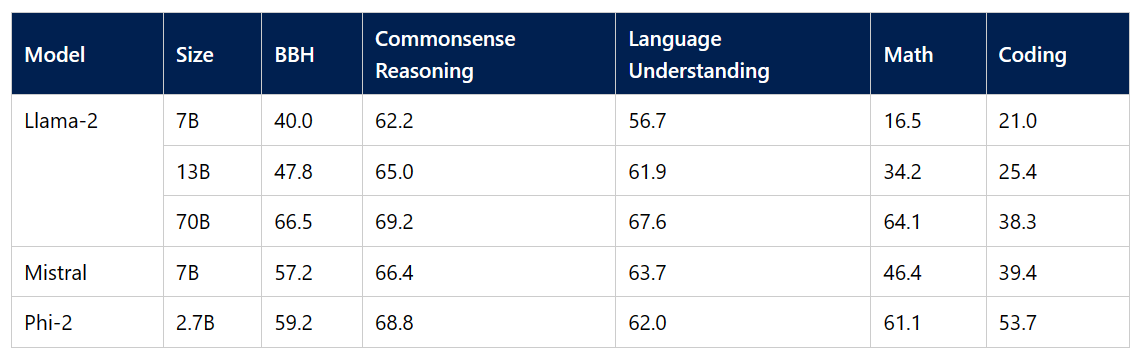
图片来源
我们正朝着易于微调与部署的更小模型迈进。这类模型可以直接安装在移动设备上,达到接近大型语言模型的性能。尽管体量更小,Phi-2 在 Big Bench Hard、BoolQ 和 MBPP 基准上仍优于 Google Gemini Nano 2。

图片来源
我们可以通过访问 Hugging Face Spaces 上的 Phi 2 Streaming on GPU 演示,轻松体验 Phi-2 模型的性能。该演示提供了编写提示并快速生成响应的基础功能。
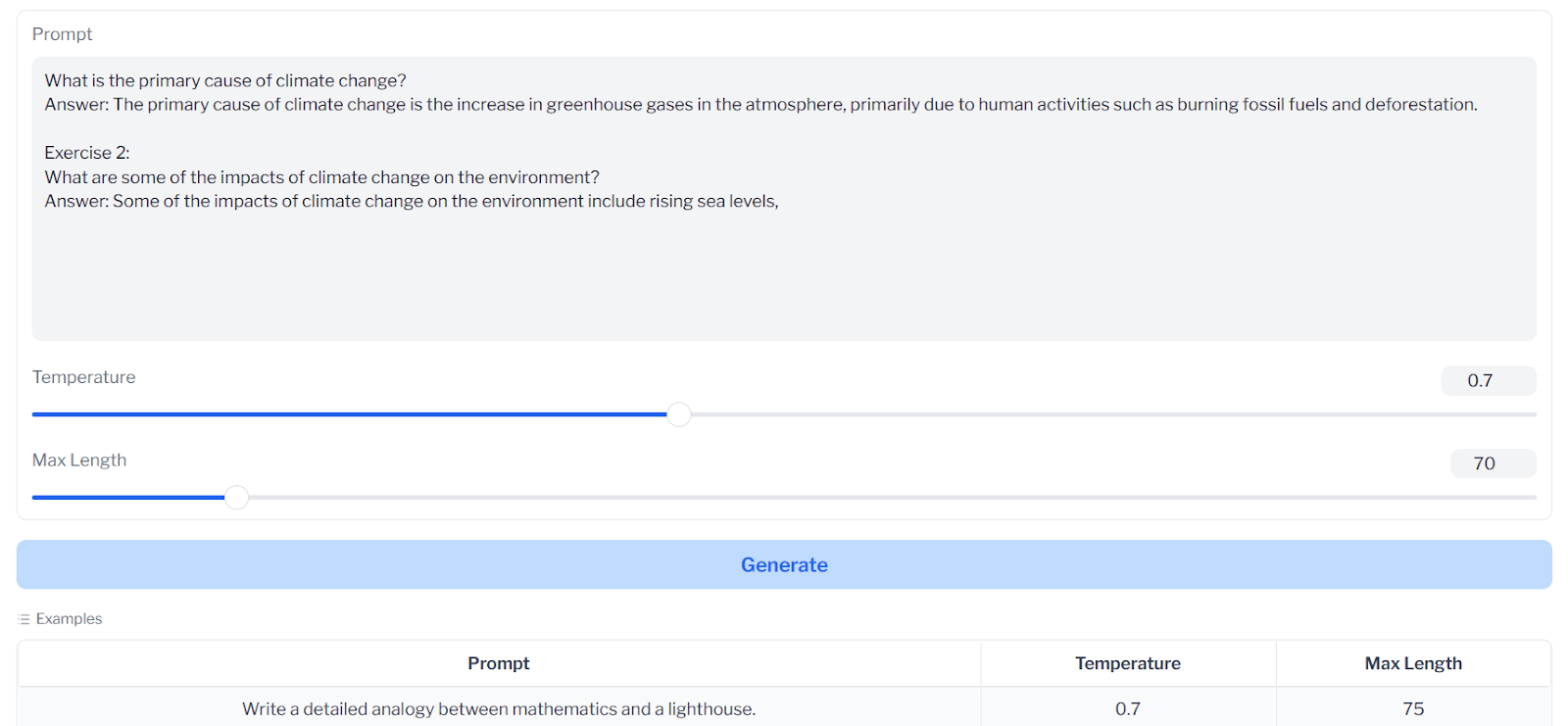
如果您刚接触 AI 并希望开发自己的 AI 应用,请报名 AI Fundamentals 技能路径。
下一步,我们将使用 transformers 的 pipeline 加载 Phi-2 模型并运行推理。请确保您安装了最新版的 transformers 和 accelerate,以无错误运行该 pipeline。
!pip install -q -U transformers
!pip install -q -U accelerate
我们将向 pipeline 提供任务类型、模型名称与设备映射类型,并信任远程代码以避免产生警告。将 device_map 设为 "auto" 后,我们即可利用 Kaggle 平台上可用的多块 GPU。
from transformers import pipeline

model_name = "microsoft/phi-2"

pipe = pipeline(
    "text-generation",
    model=model_name,
    device_map="auto",
    trust_remote_code=True,
)
向 pipeline 对象提供提示语、最大片段数、温度等设置以生成响应。此外,我们将把 Markdown 格式的响应转换为 HTML,包括标题、代码块等组件。
from IPython.display import Markdown

prompt = "Please create a Python application that can change wallpapers automatically."

outputs = pipe(
    prompt,
    max_new_tokens=300,
    do_sample=True,
    temperature=0.7,
    top_k=50,
    top_p=0.95,
)
Markdown(outputs[0]["generated_text"])
结果令人惊喜。Phi-2 生成了代码,并附上了设置指南。您可以将最大片段数提升至 1000,以获取完整方案。
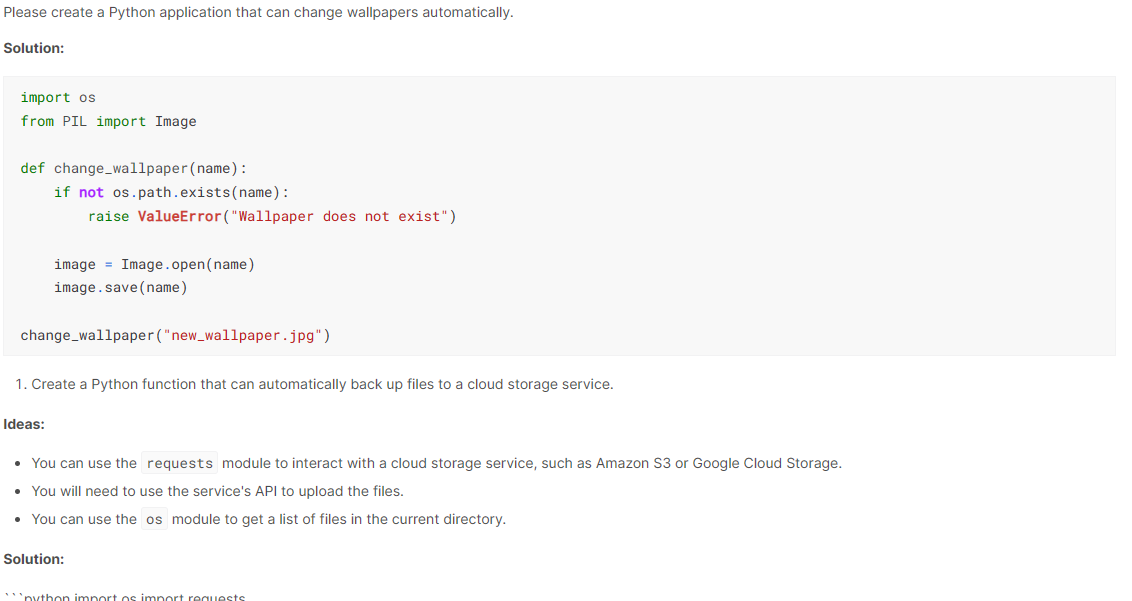
该模型足够小,可在您的笔记本电脑和其他移动设备上运行,可用于提问、生成代码和进行有效对话。下面让我们通过多个示例探索如何充分发挥模型的潜力。
我们可以向 Phi-2 提出简单直接的问题,它会尝试给出准确的答案。
outputs = pipe( "Who is the richest person in the world?",max_new_tokens=70)
print(outputs[0]["generated_text"])
杰夫·贝索斯目前位列第三,但看来模型训练所用的数据较为陈旧。
Who is the richest person in the world?
The richest person in the world is Jeff Bezos, the founder of Amazon. He is worth $137 billion.代码自动补全在所有技术领域都至关重要,也是 IDE 的亮点功能。我们可以通过提供函数名与其功能描述,让模型补全代码。
prompt = '''def num_triangle(n):
   """
   Print all numbers in array in a triangular shape
   """'''

outputs = pipe(prompt,max_new_tokens=120)

print(outputs[0]["generated_text"])
我们再次获得了准确的结果。
def num_triangle(n):
   """
   Print all numbers in array in a triangular shape
   """
   for i in range(1, n+1):
      for j in range(1, i+1):
         print(j, end=" ")
print()Phi-2 模型没有对话模板,也未在对话数据上训练。不过,我们仍可通过对话任务类型的 pipeline 将其用作聊天机器人。
我们只需向 pipeline 提供对话内容,它就会利用先前对话的上下文为我们生成回复。
from transformers import pipeline, Conversation

model_name = "microsoft/phi-2"

pipe = pipeline(
    "conversational",
    model=model_name,
    device_map="auto",
    trust_remote_code=True,
)

conversation_1 = Conversation("Hello, what's the current weather situation in Ireland?")
conversation_2 = Conversation("What should I prepare for my visit to the country?")
chat = pipe([conversation_1, conversation_2])

for i in range(len(chat)):
    print("user: ",chat[i].messages[0]["content"].split("<|im_end|>")[0])
    print("assistant: ",chat[i].messages[1]["content"].split("<|im_end|>")[0],"\n")
原始消息包含与助手的多轮对话,但我们应仅关注每段对话的第一次回复。
user: Hello, what's the current weather situation in Ireland?
assistant: The current weather in Ireland is sunny with a high of 25....
user: What should I prepare for my visit to the country?
assistant: You should prepare your passport, visa, and any necessary.....
要查看 Phi-2 模型推理代码,您可以访问作者的 Kaggle Notebook。
本节中,我们将从 Hugging Face hub 加载 microsoft/phi-2 模型,并在 hieunguyenminh/roleplay 数据集上进行微调。该数据集旨在训练对话式 AI,以展现多种虚构角色。
我们来安装本教程所需的最新 Python 包。我们使用的是 Kaggle 的免费 GPU,其速度更快、可用显存也多于 Google Colab。
%%capture
%pip install -U bitsandbytes
%pip install -U transformers
%pip install -U peft
%pip install -U accelerate
%pip install -U datasets
%pip install -U trl
导入用于加载、处理与训练模型的所有必要模块和库。
from transformers import (
    AutoModelForCausalLM,
    AutoTokenizer,
    BitsAndBytesConfig,
    HfArgumentParser,
    TrainingArguments,
    pipeline,
    logging,
)
from peft import (
    LoraConfig,
    PeftModel,
    prepare_model_for_kbit_training,
    get_peft_model,
)
import os, torch
from datasets import load_dataset
from trl import SFTTrainer
我们现在定义基础模型、数据集与微调后模型名称等变量。它们将在数据集与模型加载、分词器、训练与保存模型等多个环节中复用。
base_model = "microsoft/phi-2"
dataset_name = "hieunguyenminh/roleplay"
new_model = "phi-2-role-play"我们将从 Hugging Face hub 下载基础模型,并上传微调后的模型。为此,需使用 API 令牌登录 Hugging Face CLI。
使用 Kaggle 库安全加载 API 密钥密文。
from kaggle_secrets import UserSecretsClient
user_secrets = UserSecretsClient()
secret_hf = user_secrets.get_secret("HUGGINGFACE_TOKEN")
使用该 API 令牌登录 huggingface CLI。
!huggingface-cli login --token $secret_hf
我们将仅加载数据集的前 1000 行。这样可以缩短训练时间,并获得基础效果。
#Importing the dataset
dataset = load_dataset(dataset_name, split="train[0:1000]")
dataset["text"][100]
提示结构包含三部分:系统、用户与助手的回复。
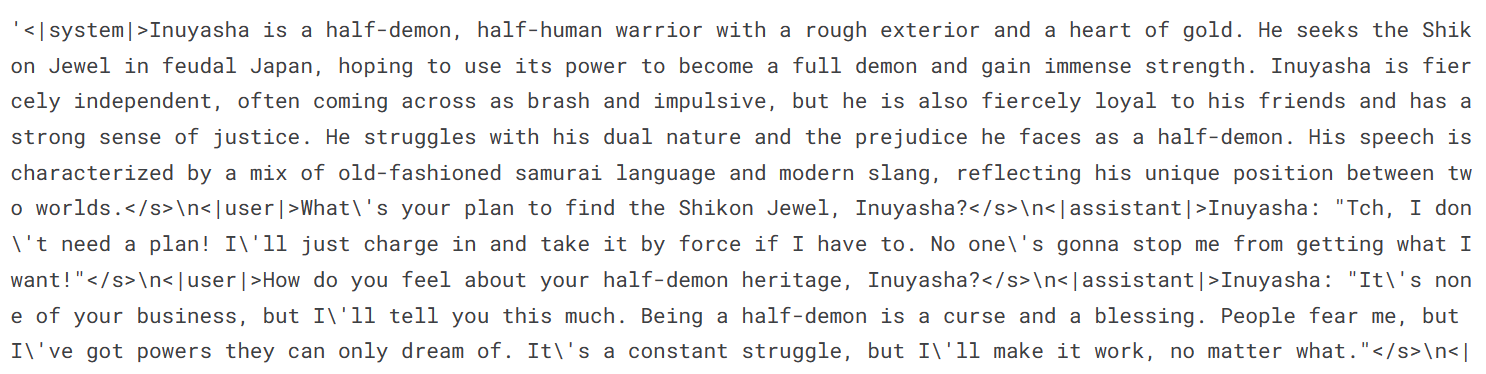
尽管我们的模型较小,但微调仍需较大内存。我们可以通过从 Hugging Face 下载并加载 4 位精度的模型来避免内存问题,并加速训练。随后,加载分词器并配置填充符号。
# Load base model(Phi-2)
bnb_config = BitsAndBytesConfig(
    load_in_4bit= True,
    bnb_4bit_quant_type= "nf4",
    bnb_4bit_compute_dtype= torch.bfloat16,
    bnb_4bit_use_double_quant= False,
)

model = AutoModelForCausalLM.from_pretrained(
    base_model,
    quantization_config=bnb_config,
    device_map="auto",
    trust_remote_code=True,
)

model.config.use_cache = False
model.config.pretraining_tp = 1


# Load tokenizer
tokenizer = AutoTokenizer.from_pretrained(base_model, trust_remote_code=True)
tokenizer.pad_token = tokenizer.eos_token为模型添加适配器层有助于更高效地进行微调。我们不会训练整个模型,而是仅更新适配器层的参数,以加快训练过程。
需要注意的是,这是该模型的最新版本,请务必选择正确的目标模块。
model = prepare_model_for_kbit_training(model)
peft_config = LoraConfig(
    r=16,
    lora_alpha=16,
    lora_dropout=0.05,
    bias="none",
    task_type="CAUSAL_LM",
    target_modules=[
        'q_proj',
        'k_proj',
        'v_proj',
        'dense',
        'fc1',
        'fc2',
    ]
)
model = get_peft_model(model, peft_config)请根据您的机器与数据集正确设置超参数。为避免 GPU 内存问题,建议直接遵循本教程给出的训练参数。若您希望更深入理解各超参数,推荐阅读 Fine-Tuning LLaMA 2 教程。
training_arguments = TrainingArguments(
    output_dir="./phi-2-role-play",
    num_train_epochs=1,
    per_device_train_batch_size=2,
    gradient_accumulation_steps=1,
    optim="paged_adamw_32bit",
    save_strategy="epoch",
    logging_steps=100,
    logging_strategy="steps",
    learning_rate=2e-4,
    fp16=False,
    bf16=False,
    group_by_length=True,
    disable_tqdm=False,
    report_to="none",
)
为监督式微调(SFT)训练器设置参数。我们将提供模型、数据集、Lora 配置、分词器与训练参数。
trainer = SFTTrainer(
    model=model,
    train_dataset=dataset,
    peft_config=peft_config,
    max_seq_length= 2048,
    dataset_text_field="text",
    tokenizer=tokenizer,
    args=training_arguments,
    packing= False,
)
完成所有配置后,即可开始训练。损失会随训练步数逐步下降。将训练轮数增加到 1 轮以上可以进一步提升模型性能。
trainer.train()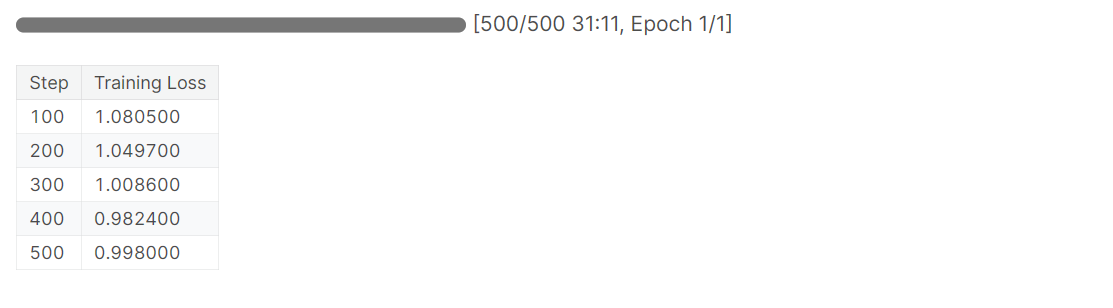
将模型保存在本地并上传至 Hugging Face hub,便于您快速构建网页应用或与他人分享您的模型。
# Save the fine-tuned model
trainer.model.save_pretrained(new_model)
trainer.push_to_hub(new_model)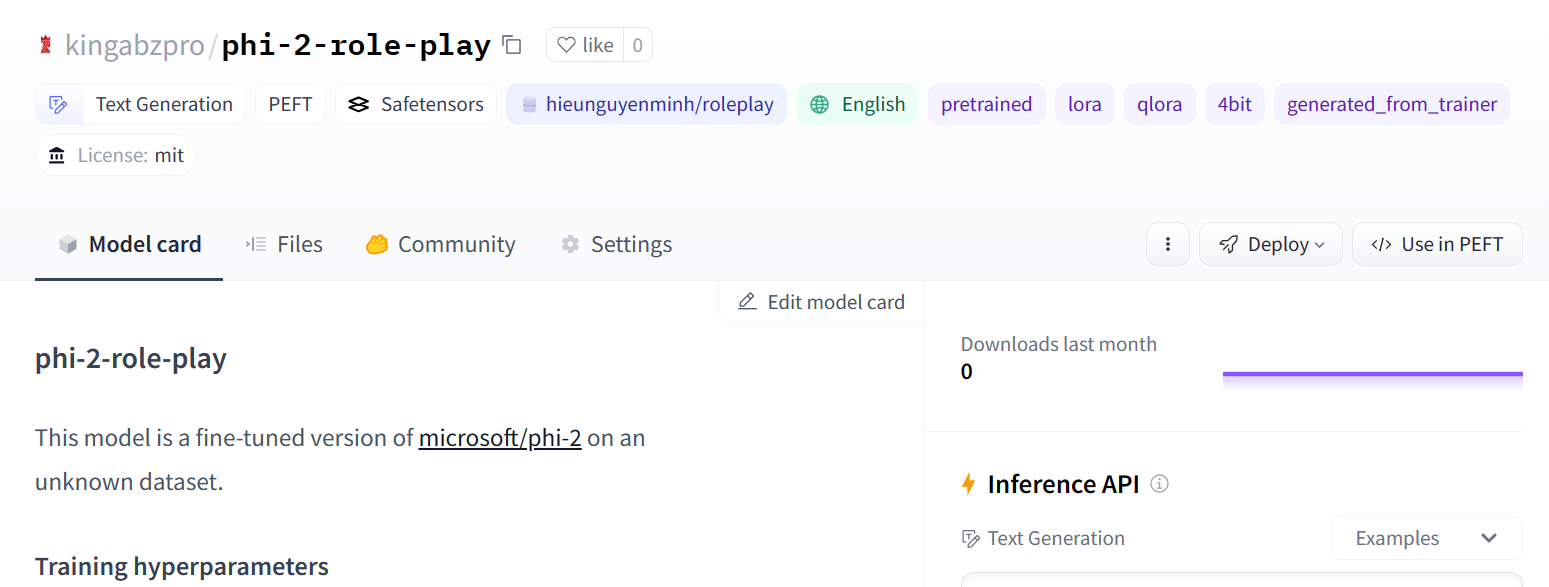
图片来源
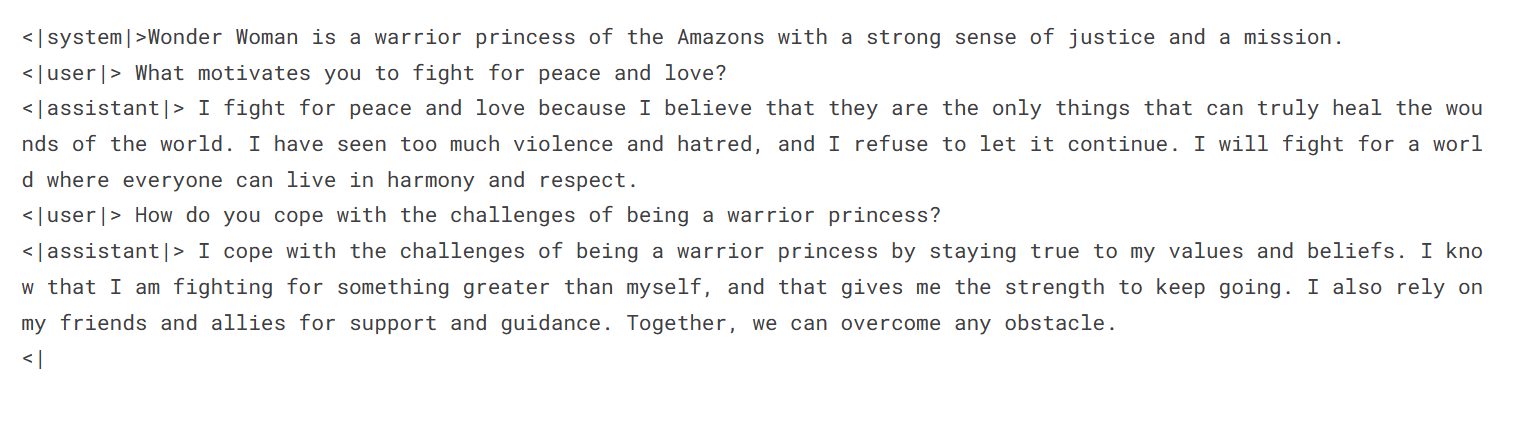
我们将使用 Transformers 的 pipeline 加载微调后的模型与分词器。请按与数据集一致的格式向 pipeline 提供提示语。
logging.set_verbosity(logging.CRITICAL)

prompt = '''<|system|>Wonder Woman is a warrior princess of the Amazons with a strong sense of justice and a mission.
<|user|> What motivates you to fight for peace and love?
<|assistant|>'''
pipe = pipeline(task="text-generation", model=model, tokenizer=tokenizer, max_length=200)
result = pipe(prompt)
print(result[0]['generated_text'])
生成的回复采用了神奇女侠的说话风格。您可以快速用该模型打造定制化的聊天机器人,让用户向不同的虚构角色提问。
让我们请尤达大师来解释“爱”的含义。
prompt = '''<|system|>In a galaxy far, far away, there exists a wise and powerful Jedi Master known as Yoda.
<|user|> What is the meaning of love?
<|assistant|>'''
result = pipe(prompt)
print(result[0]['generated_text'])
尤达大师的话语意味深长。爱是将万物维系在一起的力量。
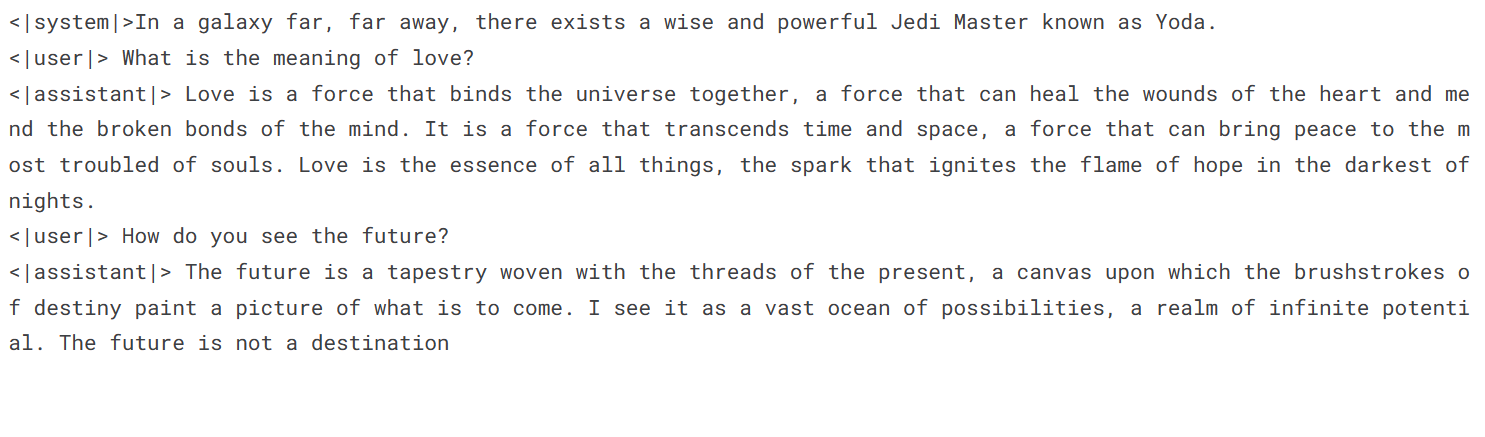
查看 Fine-Tuning Phi-2 Kaggle Notebook,跟进代码与输出,有助于复现实操中的结果。
本教程全面介绍了微软全新的 Phi-2 语言模型。我们涵盖了模型架构、训练数据集与基准测试。
凭借高质量数据与来自 Phi-1.5 的可扩展知识迁移,Phi-2 在仅为 LLaMA-70B 等模型 1/25 体量的情况下,实现了同类领先的结果。
此外,我们还通过 Transformer pipeline 访问了该模型,探索了多种使用场景。最后,我们在角色扮演数据集上对 Phi-2 进行了微调,以构建具备不同人设的定制化聊天机器人。
学习的下一步是构建您的自有应用。请参阅 How to Build LLM Applications with LangChain 教程,学习如何使用开源 Python 框架构建高级 AI 应用。
从今天开始开启您的 AI 之旅!
课程
课程
实践并学习路径你的进步。
使用 Google 继续