

什么是 Qwen2.5-Coder 系列?
Qwen2.5-Coder 系列(原名 CodeQwen1.5)由阿里巴巴通义千问研究团队开发,致力于推动开源代码大模型(Open CodeLLMs)。该系列包括诸如 Qwen 2.5-32B-Instruct 等模型,已成为开源代码领域的最新一代 SOTA 模型,其编程能力可与 GPT-4o 和 Gemini 等专有巨头相媲美。
这些模型具备以下特点:
- 强大:能够进行高级代码生成、修复与推理。
- 多样:支持超过 92 种编程语言,包括 Python、Java、C++、Ruby 和 Rust。
- 实用:Qwen 2.5 模型面向真实世界应用,从代码辅助到工件生成,并具备最长 128K tokens 的长上下文理解能力。
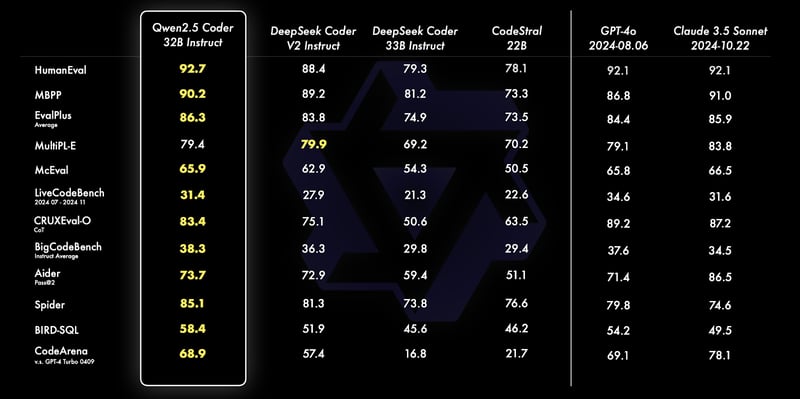
来源:通义千问官方博客
Qwen 2.5 Coder 32B Instruct 在 HumanEval、MBPP、Spider 等多项基准上表现优异,展现出卓越的编码与问题求解能力。它在 SQL 查询生成、代码评估以及真实编程挑战等任务中表现突出,超越了GPT-4o和Claude 3.5 Sonnet 等模型。
要进一步了解这些模型的能力与对比,请阅读 Qwen2.5-Coder 系列的发布文章。
Qwen 2.5 代码实现:概览
本节我们将使用 Gradio 深入实现代码审查助手的代码。
我们先完成必要的环境准备,然后以优化配置初始化模型。
接着定义核心功能,利用模型的指令能力,最后将这些组件集成到一个易用的 Gradio 界面中,方便与助手交互。
步骤 1:准备条件
在开始实现之前,请确保已安装以下工具与库:
- Python 3.8+
- PyTorch:用于高效处理深度学习模型。
- Hugging Face Transformers 库:用于加载和使用预训练的大语言模型。
- BitsandBytes:用于配置量化以优化性能。
- Gradio:用于创建友好的 Web 界面。
运行以下命令安装所需依赖:
!pip install torch transformers gradio bitsandbytes -q安装完成后,运行以下导入命令:
from transformers import AutoModelForCausalLM, AutoTokenizer, BitsAndBytesConfig
import torch
Import gradio as gr注意:在 Google Colab 上运行 Qwen2.5-Coder-32B-Instruct 模型需要配备高内存的 A100 GPU。若资源有限,可考虑使用 0.5B、3B、7B 或 14B 等更小参数规模的模型。
步骤 2:初始化模型与分词器
Hugging Face Transformers 库让大模型的加载更为简单。我们将从 HuggingFace 加载Qwen2.5-Coder-32B-Instruct模型,并结合量化以获得更佳性能:
# Define quantization configuration for optimized performance
bnb_config = BitsAndBytesConfig(load_in_8bit=True)
# Load the model and tokenizer
model_name = "Qwen/Qwen2.5-Coder-32B-Instruct"
model = AutoModelForCausalLM.from_pretrained(
model_name,
torch_dtype=torch.float16,
device_map="auto",
quantization_config=bnb_config
)
tokenizer = AutoTokenizer.from_pretrained(model_name)
if tokenizer.pad_token_id is None:
tokenizer.pad_token_id = tokenizer.eos_token_id上述代码片段以 8 位量化方式加载 Qwen2.5-Coder-32B-Instruct,降低内存占用,从而在资源有限的设备上高效运行。
其中使用 BitsAndBytesConfig 启用量化,torch.float16 以便在支持的 GPU 上优化计算,device_map="auto" 则自动分配硬件。来自 HuggingFace transformers 的分词器简化了文本处理,并在未设置时分配 pad_token_id。该配置有助于在消费级硬件上高效运行大模型。
步骤 3:生成回复
加载模型与分词器后,我们通过 apply_chat_template 方法设置函数以从模型生成回复。
def generate_response(messages):
text = tokenizer.apply_chat_template(
messages,
tokenize=False,
add_generation_prompt=True
)
model_inputs = tokenizer([text], return_tensors="pt").to(model.device)
generated_ids = model.generate(
**model_inputs,
max_new_tokens=200,
temperature=0.7,
repetition_penalty=1.2
)
generated_ids = [
output_ids[len(input_ids):] for input_ids, output_ids in zip(model_inputs.input_ids, generated_ids)
]
response = tokenizer.batch_decode(generated_ids, skip_special_tokens=True)[0].strip()
return response上述函数作为与 Qwen2.5-Coder-32B-Instruct 交互的工具,用于生成具备上下文的回复。它接收一组类聊天消息(包含“system”“user”等角色)作为输入,并执行以下步骤:
- 应用聊天模板:使用
apply_chat_template对消息进行格式化,以适配模型的聊天式理解。 - 分词与输入准备:将格式化后的文本通过分词器转换为模型可用的张量。
- 生成回复:模型基于输入并结合以下参数生成回复:
max_new_tokens=200:限制回复长度为 200 个 token。temperature=0.7:控制随机性,以平衡创造性与一致性。repetition_penalty=1.2:抑制输出中的重复表述。
4. 后处理:通过切片移除输入提示,再用 batch_decode 将结果解码为可读字符串。该函数封装了准备、生成与解码的复杂性,可复用于调试、代码分析与生成可操作反馈等多种任务。
步骤 4:应用核心功能设置
接下来为应用的核心功能编写代码,即代码分析器、代码改进器与编码规范检查器。由于使用的是指令模型,我们可以在提示中使用“system”“user”等角色并传入模型以生成回复。
我们的应用包含三大核心功能:问题检测器、代码质量专家与编码规范专家。
1. 问题检测器
该助手用于识别所给代码中的语法错误、逻辑缺陷与潜在漏洞。模型的具体指令如下:
def analyze_code_issues(code):
messages = [
{"role": "system", "content": "You are Qwen, a helpful coding assistant. Your job is to analyze and debug code."},
{"role": "user", "content": f"""Review this code:
{code}
List all syntax errors, logical bugs, and potential runtime issues. Format as:
- Error/Bug: [description]
- Impact: [potential consequences]
- Fix: [suggested solution]"""}
]
return generate_response(messages)以上代码包含带有角色与内容的消息,并通过初始提示令模型扮演一位有帮助的编码助手。随后将该消息传入 generate_response 函数以返回合适的回复。
2. 代码质量专家
该助手通过生成优化与代码质量建议,帮助提升代码的可读性、效率与可维护性。
def suggest_code_improvements(code):
messages = [
{"role": "system", "content": "You are Qwen, an expert in code optimization. Help improve code quality."},
{"role": "user", "content": f"""Review this code:
{code}
Provide specific optimization suggestions:
1. Performance improvements
2. Better variable names
3. Simpler logic
4. Memory efficiency
Include code examples where relevant."""}
]
return generate_response(messages)3. 编码规范专家
该助手检查所给代码是否遵循理想的编码规范,并据此提出建议。
messages = [
{"role": "system", "content": "You are Qwen, a coding standards expert. Your task is to evaluate code adherence to best practices."},
{"role": "user", "content": f"""Evaluate this code:
{code}
Check against these standards:
1. PEP 8 compliance
2. Function/variable naming
3. Documentation completeness
4. Error handling
5. Code organization
List violations with specific examples and corrections."""}
]
return generate_response(messages)上述函数让模型扮演编码规范专家,评估代码是否遵循诸如 PEP 8 合规、函数命名、健壮的错误处理等指南。
步骤 5:使用 Gradio 创建友好界面
Gradio 简化了助手的部署,用户可以交互式输入代码并查看结果。前面各部分的模型输出将无缝集成到 Gradio 界面中。
def review_code(code):
issues = analyze_code_issues(code)
improvements = suggest_code_improvements(code)
standards = check_coding_standards(code)
return issues, improvements, standards
interface = gr.Interface(
fn=review_code,
inputs="textbox",
outputs=["text", "text", "text"],
title="AI Code Review Assistant",
description="Analyze code for issues, suggest improvements, and check adherence to coding standards."
)
interface.launch(debug=True)review_code 函数整合了 analyze_code_issues、suggest_code_improvements 与 check_coding_standards 三个组件。这些功能用于识别语法错误、缺陷、优化项以及对编码规范的遵循情况。Gradio 界面通过文本框接收用户输入,并以三段文本输出结果。它为开发者提供了一个易用的 Web 界面来分析与改进代码。运行该单元后,即可获得如下所示的 Gradio 应用界面。
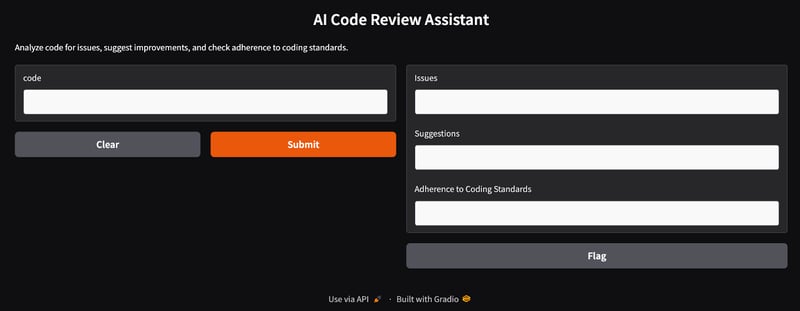
使用 Gradio 构建的 AI 代码审查助手界面
步骤 6:测试与验证代码审查助手
如果用户不想运行 Gradio 应用,也可以通过运行以下代码测试助手。下面展示助手如何分析一个含缺陷的 Python 函数:
code = """
def add_numbers(a, b):
return a + b
"""
issues, suggestions, standards = review_code(code)
print("Issues:", issues)
print("Suggestions:", suggestions)
print("Adherence to coding standards:", standards)Issues:
Here's the review of your provided Python code:
```python
.
.
- **Fix:** Implement input validation or use exception handling to manage unexpected data types gracefully.
Suggestions:
Certainly! Let's review the provided function and suggest optimizations based on your criteria:
1. **Proper Indentation**
.
.
2. **Better Variable Names**
In this simple case, `a` and `b` could be considered generic enough as they represent arbitrary operands. However, more descriptive names can help when functions become complex.
Adherence to coding standards:
Certainly! Let's go through the provided Python function `add_numbers` according to the specified standards.
.
.
2. **Function/Variable Naming**
- The names `add_numbers`, `a`, and `b` follow good conventions for simplicity and clarity in their context (function name clearly indicates addition; variable names indicate they're operands). However, if you want more descriptive variable names (especially useful in larger functions), consider using something like `operand_one` or `num1`.
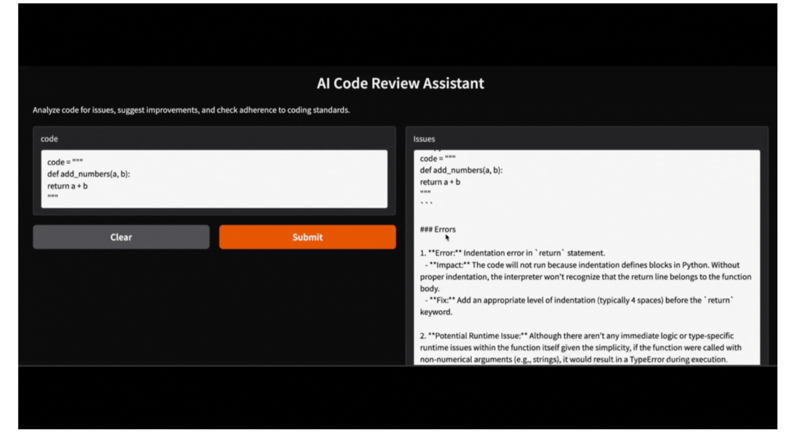
该 Gradio 应用也可借助Ollama 提供的 Qwen-2.5 模型在本地运行。只需将 HF 库模型替换为本地 Ollama 库模型,您的应用即可无缝启动并运行。
结语
本文介绍了如何将Qwen 2.5-Coder-32B-Instruct 与 Gradio 结合,构建一款 AI 代码审查助手。该工具能够分析语法错误、提出优化建议并落实编码规范,从而简化软件开发流程。
现在您已经了解如何设置 Qwen 2.5,欢迎动手构建自己的项目!

我是一名 Google Developers 机器学习(生成式 AI)领域的专家、Kaggle 三项专家,以及 Women Techmakers 大使,拥有 3 年以上的技术从业经验。2020 年我共同创办了一家健康科技初创公司,目前在佐治亚理工学院攻读计算机科学硕士,专攻机器学习。
阿里巴巴通义千问研究团队近期发布了Qwen2.5-Coder系列。该系列包含两个主要类别下的 12 个模型:基础模型与指令模型。
Qwen2.5-Coder 系列提供从 0.5B 到 32B 的参数规模变体,便于开发者在边缘设备和高负载 GPU 上进行灵活试验。
在这篇实践指南中,我们将使用 Qwen 2.5-32B-Instruct 模型构建一个集成了 Gradio 的代码审查助手。完成本教程后,您将拥有一个功能完善的 Web 应用,能够分析代码、提出改进建议并生成有用的解决方案——就像一位虚拟支持助手!