

什么是 ScrapeGraphAI?
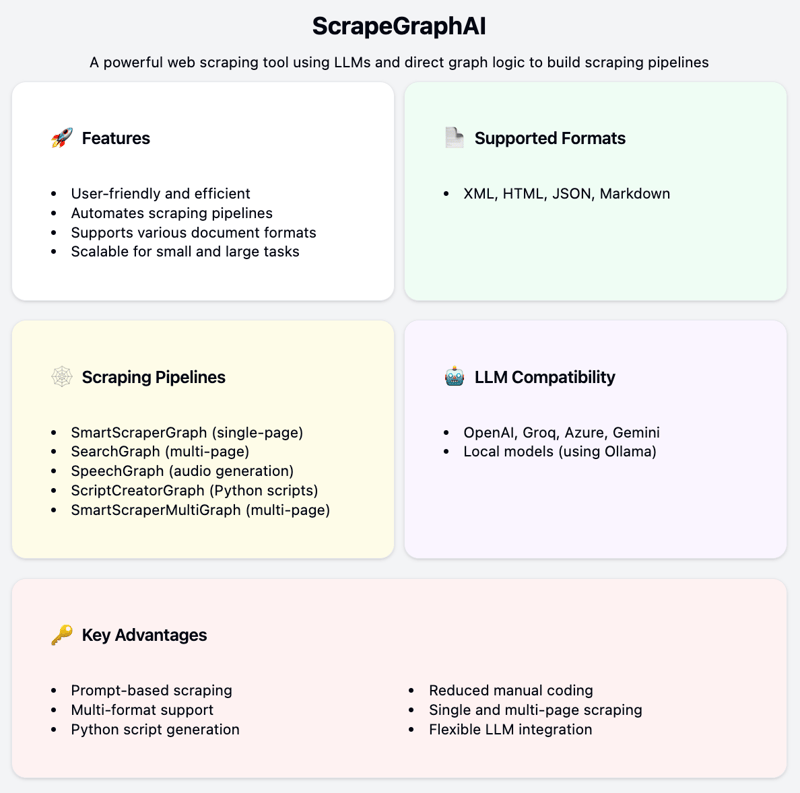
ScrapeGraphAI 是一款功能强大的网页抓取工具,利用大语言模型(LLM)与直接图逻辑来构建抓取管线。
它能够从网站及多种本地文档格式(如 XML、HTML、JSON 和 Markdown)中提取信息。
功能特性
ScrapeGraphAI 以易用和高效为设计目标。用户只需明确所需信息,剩下的交给 ScrapeGraphAI。它可基于用户提示自动创建抓取管线,从而减少手工编码。
该工具支持多种文档格式,并可通过 API 集成不同的 LLM。它具有良好的可扩展性,既支持单页也支持多页抓取,适用于小规模和大规模的数据提取任务。
此外,它兼容多家 LLM 提供商,如OpenAI、Groq、Azure 和 Gemini,也支持通过 Ollama 使用本地模型。
抓取管线
ScrapeGraphAI 提供多种抓取管线类型:
- SmartScraperGraph:单页抓取器,仅需用户提示和输入来源。
- SearchGraph:多页抓取器,从搜索结果前列页面提取信息。
- SpeechGraph:单页抓取器,可将网站内容生成音频文件。
- ScriptCreatorGraph:单页抓取器,为提取的数据生成 Python 脚本。
- SmartScraperMultiGraph:多页抓取器,使用单条提示配合来源列表处理多页面。
- ScriptCreatorMultiGraph:多页抓取器,为从多个页面和来源提取信息生成 Python 脚本。
安装 ScrapeGraphAI
ScrapeGraphAI 让您更轻松地从网站和本地文档设置并运行数据提取任务。以下是快速安装该库并构建基础抓取应用的方法。
快速安装
安装 ScrapeGraphAI,运行:
pip install scrapegraphai构建一个简单的 ScrapeGraphAI 应用
我们将使用 SmartScraperGraph 构建一个简单的抓取管线。首先我会介绍步骤,然后给出代码。
步骤 1:定义任务
明确您要提取哪些信息。在本示例中,我们将从我自己的 Substack 通讯The Limitless Playbook 🧬 中提取所有文章标题和 URL。
步骤 2:选择抓取管线
选择合适的管线。对于单页,我们将使用 SmartScraperGraph。您也可以根据不同场景探索其他管线。
步骤 3:执行管线
使用 .run() 方法运行管线以提取数据。
步骤 4:检查并利用数据:
验证提取的数据。LLM 功能强大,但最初的结果未必完美。根据需要调整提示词,以获得期望的输出。
代码
以下是覆盖上述步骤的完整代码片段:
import json
import nest_asyncio
nest_asyncio.apply()
from scrapegraphai.graphs import SmartScraperGraph
# Define the configuration for the scraping pipeline
OPENAI_API_KEY = "YOUR_OPENAI_API_KEY"
graph_config = {
"llm": {
"api_key": OPENAI_API_KEY,
"model": "gpt-3.5-turbo-0125",
"temperature": 0,
},
"verbose": True,
}
# Create the SmartScraperGraph instance
smart_scraper_graph = SmartScraperGraph(
prompt="List me all the articles with their respective urls",
source="<https://ryanocm.substack.com/archive>",
config=graph_config
)
# Run the pipeline
articles_data = smart_scraper_graph.run()
# Save the result to a JSON file
with open('articles_data.json', 'w') as json_file:
json.dump(articles_data, json_file, indent=4)以下是最终结果。相当不错,对吧?
{
"articles": [
{
"title": "#112 | I Built an AI Tool to Help You Learn More and Take Action Faster",
"url": "<https://ryanocm.substack.com/p/112-i-built-an-ai-tool-to-help-you>"
},
{
"title": "#111 | Don't Fight When You Are Getting Flooded \\ud83c\\udf0a",
"url": "<https://ryanocm.substack.com/p/111-dont-fight-when-you-are-getting>"
},
{
"title": "#110 | How to process past fights in relationships",
"url": "<https://ryanocm.substack.com/p/110-how-to-process-past-fights-in>"
},
{
"title": "#109 | AI x Crypto(graphy)",
"url": "<https://ryanocm.substack.com/p/109-ai-x-cryptography>"
},
{
"title": "#108 | How to Love Intentionally \\u2764\\ufe0f",
"url": "<https://ryanocm.substack.com/p/108-how-to-love-intentionally>"
},
{
"title": "#107 | 16 Questions To Better Understand Who You Are \\ud83c\\udfad",
"url": "<https://ryanocm.substack.com/p/107-16-questions-to-better-understand>"
},
{
"title": "#106 | Three Types of Burnouts \\ud83e\\udd15",
"url": "<https://ryanocm.substack.com/p/106-three-types-of-burnouts>"
},
{
"title": "#105 | The Bagel Method in Relationships \\ud83e\\udd6f",
"url": "<https://ryanocm.substack.com/p/105-the-bagel-method-in-relationships>"
},
{
"title": "#104 | The 8 Play Personalities \\ud83c\\udfad",
"url": "<https://ryanocm.substack.com/p/104-the-8-play-personalities>"
},
{
"title": "#103 | The Top Ten Myths About Conflict by Relationship Experts Julie and John Gottman",
"url": "<https://ryanocm.substack.com/p/103-the-top-ten-myths-about-conflict>"
},
{
"title": "#102 | 7 Principles to Writing Well",
"url": "<https://ryanocm.substack.com/p/102-7-principles-to-writing-well>"
},
{
"title": "#101 | How to Remember More from Books",
"url": "<https://ryanocm.substack.com/p/101-how-to-remember-more-from-books>"
}
]
}结语
ScrapeGraphAI 简化并自动化了网页与文档抓取,让数据提取更轻松、更高效。其对多种 LLM 和文档格式的兼容性,使之成为各类数据任务的通用工具。借助 ScrapeGraphAI,您可以将重心放在分析与利用数据上,而非采集本身。
想要进一步了解,请查看以下资源:
最后,请合理合规地使用 ScrapeGraphAI,并留意目标网站的抓取规则。务必遵守服务条款及相关法律法规。

Ryan 是一名首席数据科学家,专注于使用大型语言模型构建 AI 应用。他是伦敦帝国理工学院自然语言处理与知识图谱方向的博士候选人,并在该校获得了计算机科学硕士学位。除数据科学之外,他还撰写每周的 Substack 时事通讯 The Limitless Playbook,分享来自全球顶尖思想家的一个可操作理念,并不时撰写关于核心 AI 概念的文章。
从网站和本地文档(XML、HTML、JSON、Markdown)等多种来源提取和整理数据,往往复杂且耗时。无论您是在做研究、商业分析,还是内容聚合,手工处理都会令人难以招架。
ScrapeGraphAI 是一个用于网页抓取的 Python 库,可简化这一流程。
它结合大语言模型(LLM)与直接图逻辑来构建高效的抓取管线,自动化数据提取,最大限度减少大量编码需求。
在本文中,我将简要介绍 ScrapeGraphAI,并带您完成首个管线的搭建。