课程
R 中的情感分析
4 小时
14.2K
通过情感分析与 R,一起踏上穿越 Prince(这位艺术家)人生与时代的“感性之旅”。本教程为三部曲系列的二-A 部分,旨在借助情感分析洞察这位艺术家的职业生涯与社会影响。三篇教程分别涵盖:
如果您想进一步学习情感分析,务必查看我们的课程Sentiment Analysis in R: The Tidy Way。
您知道吗?Prince 在 9/11 发生前三年,就在舞台上“预言”了这件事;他似乎也“预言”了自己的离世。这可能是真的吗?不如我们来分析他的歌词,自己做出有根据的判断吧。1985 年 4 月 21 日,他录制了《Sometimes It Snows In April》。31 年后的同一天,也就是 2016 年 4 月 21 日,他离世。看看对这首歌进行情感分析后,他用词的选择:
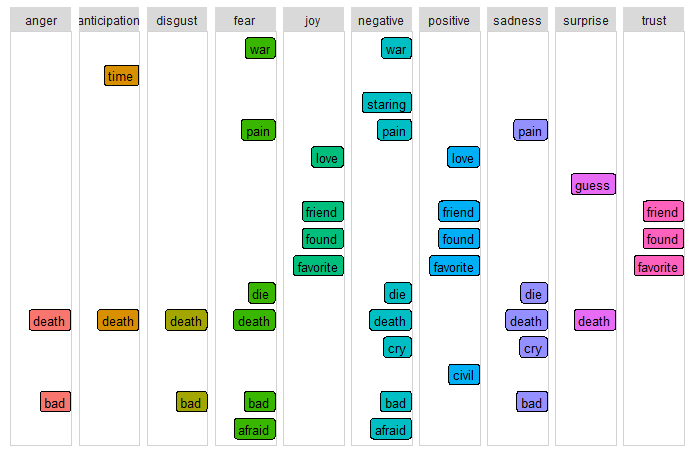
这为“预测性分析”赋予了新的含义!
每段代码之后都会跟随一段见解,通常带有主观色彩。您也可以自由在各章节间跳转,形成自己的判断!我建议先阅读下面的引言,但如果您想直接上手代码,请点击这里。如果您已经理解词典(lexicon)的概念,可以直接前往详细分析部分快速上手。
我刚救助了两只小猫和一只小狗,所以现在总爱“成三地”思考。另外,三法则也是一种写作原则,认为“三个一组”的事物往往更有趣、更令人满意或更有效——这也是我把教程拆成三部分的原因……在第一部分中,您已使用传奇艺术家 Prince 的数百首歌词数据集,入门文本挖掘与探索性分析。在第二部分,您将聚焦情感分析(2-A)与主题建模(2-B)。第三部分将以机器学习技术收尾,探讨诸如是否可以判断歌曲发行的年代、或者更有意思的是,是否能仅凭歌词预测歌曲能否打入 Billboard 榜单等问题。在整个系列中,您将使用多种机器学习算法——下图中以红色标出。
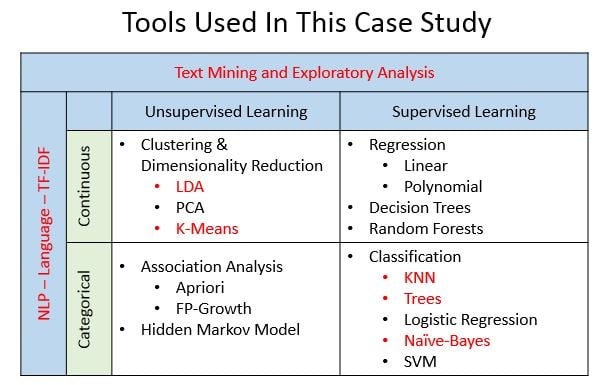
是的,我承诺做三部分,但最终把第二部分拆成了 2-A(情感分析)和 2-B(主题建模——敬请期待),于是成了四篇独立教程。关于情感分析流程已有很多不错的文章与课程,因此 2-A 的目标是聚焦从分析中提炼洞见——而不仅仅是写代码。我们将以 Prince 的歌词为例,但步骤同样适用于您喜欢的任何艺术家。希望完整系列之旅,能在向您介绍自然语言处理(NLP)与机器学习技术的同时,激发您对歌词分析所带来机遇的好奇与惊叹。
本系列教程的 2-A 部分要求您对整洁数据有基本理解——特别是如 dplyr(数据变换)、ggplot2(可视化)和 %>% 管道操作符(最初来自 magrittr 包)等。您会注意到,多步操作常被用 %>% 组合,以使代码更紧凑可复用。
由于本教程也是一个案例研究,包含的可视化远超常见的图表形式。因此,另一项前提是您需要能在自己的环境中安装新包。为便于专注洞见提炼,我包含了可在您自有数据集上复用的代码,但详细解释还需您进一步探索。每个包都会提供支持链接。这将在聚焦应用的同时让您接触新工具。
提示:建议先阅读第一部分,为系列教程打下基础,并了解 Prince 歌词中高密度且多样化的词汇。
方法:情感分析是一类文本挖掘,旨在识别文本的观点与主观性。应用于歌词时,结果不仅可代表艺术家的态度,也能揭示广泛的文化影响。情感分析方法多样,包括:用已标注数据集训练、用规则自建分类器、以及使用预定义词典(lexicons)。本教程采用基于词典的方法,同时也鼓励您探索其他方法及其权衡。
层级:正如方法不同,基于文本的分析层级也不同,通常分为文档、句子、词。在歌词场景下,文档可定义为按年代、年份、上榜级别或歌曲的情感。句子层级在歌词中通常不可行,因为标点可能破坏押韵和节奏。词级分析能揭示细节,并可为更高级的主题建模提供基础。
每个数据科学项目都需要一组可探索的问题。随着教程推进,请牢记这些问题:能否编写程序判断歌词表达的情绪?预定义词典是否足够?需要多少数据准备?能否将结果与现实事件关联?情感会随时间改变吗?上榜歌曲是否比未上榜歌曲更积极或更消极?在据称预测 9/11 的那一年,他歌词中有哪些突出的词?他是否“预言”了自己的离世?
提示:歌词分析与演讲或书籍大相径庭,通常更复杂,洞见不易捕捉,因此务必对所有假设保持谨慎!本教程中我提出的问题会多于答案,请准备好“跳出四边形平行四边形”去思考!
要开始分析 Prince 的歌词,请加载下列库。初看可能有些多,但大多数都是用于绘图。鉴于大量用到可视化,最好先定义一套标准配色以保持一致性。我用 ANSI 色码创建了一组颜色列表。ggplot2 的 theme() 函数允许对单个图形进行自定义,因此您还将创建一个自定义函数 theme_lyrics(),以修改默认设置。knitr 包是 R 动态报告生成引擎。与 kableExtra 和 formattable 搭配,可生成带颜色的美观文本表格。我们再创建一个函数 my_kable_styling() 来规范这些库的输出。其他包会在用到时说明。
library(dplyr) #Data manipulation (also included in the tidyverse package)
library(tidytext) #Text mining
library(tidyr) #Spread, separate, unite, text mining (also included in the tidyverse package)
library(widyr) #Use for pairwise correlation

#Visualizations!
library(ggplot2) #Visualizations (also included in the tidyverse package)
library(ggrepel) #`geom_label_repel`
library(gridExtra) #`grid.arrange()` for multi-graphs
library(knitr) #Create nicely formatted output tables
library(kableExtra) #Create nicely formatted output tables
library(formattable) #For the color_tile function
library(circlize) #Visualizations - chord diagram
library(memery) #Memes - images with plots
library(magick) #Memes - images with plots (image_read)
library(yarrr)  #Pirate plot
library(radarchart) #Visualizations
library(igraph) #ngram network diagrams
library(ggraph) #ngram network diagrams

#Define some colors to use throughout
my_colors <- c("#E69F00", "#56B4E9", "#009E73", "#CC79A7", "#D55E00", "#D65E00")

#Customize ggplot2's default theme settings
#This tutorial doesn't actually pass any parameters, but you may use it again in future tutorials so it's nice to have the options
theme_lyrics <- function(aticks = element_blank(),
                         pgminor = element_blank(),
                         lt = element_blank(),
                         lp = "none")
{
  theme(plot.title = element_text(hjust = 0.5), #Center the title
        axis.ticks = aticks, #Set axis ticks to on or off
        panel.grid.minor = pgminor, #Turn the minor grid lines on or off
        legend.title = lt, #Turn the legend title on or off
        legend.position = lp) #Turn the legend on or off
}

#Customize the text tables for consistency using HTML formatting
my_kable_styling <- function(dat, caption) {
  kable(dat, "html", escape = FALSE, caption = caption) %>%
  kable_styling(bootstrap_options = c("striped", "condensed", "bordered"),
                full_width = FALSE)
}
一如既往,先将原始数据读入数据框。在第一部分,您已对原始数据做过一些清洗,如展开缩写、移除转义序列、转换为小写。您将清洗后的数据保存为 CSV,以便本教程使用。用 read.csv() 创建 prince_data,并注意希望歌词以字符字符串形式存在,因此请确保设置 stringsAsFactors = FALSE。既然不需要行号,请设置 row.names = 1。
注意,您也可以用 read_csv() 读入一种称为 tibble 的现代数据框,省去这些参数,但为与第一部分保持一致,这里仍使用 read.csv()。
prince_data <- read.csv('prince_new.csv', stringsAsFactors = FALSE, row.names = 1)
先快速看一眼数据:
glimpse(prince_data) #Transposed version of `print()`## Observations: 824
## Variables: 10
## $ lyrics <chr> "all 7 and we will watch them fall they stand in t...
## $ song <chr> "7", "319", "1999", "2020", "3121", "7779311", "u"...
## $ year <int> 1992, NA, 1982, NA, 2006, NA, NA, NA, NA, NA, NA, ...
## $ album <chr> "Symbol", NA, "1999", "Other Songs", "3121", NA, N...
## $ peak <int> 3, NA, 2, NA, 1, NA, NA, NA, NA, NA, NA, NA, NA, N...
## $ us_pop <chr> "7", NA, "12", NA, "1", NA, NA, NA, NA, NA, NA, NA...
## $ us_rnb <chr> "61", NA, "4", NA, "1", NA, NA, NA, NA, NA, NA, NA...
## $ decade <chr> "1990s", NA, "1980s", NA, "2000s", NA, NA, NA, NA,...
## $ chart_level <chr> "Top 10", "Uncharted", "Top 10", "Uncharted", "Top...
## $ charted <chr> "Charted", "Uncharted", "Charted", "Uncharted", "C...可以看到,prince_data 是包含 824 首歌曲、10 列的数据框。这意味着每一条记录就是一首歌,字面意义上的!
prince_tidy这里还有一些剩余的数据整理步骤:
为将原始数据转为整洁格式,使用 tidytext 的 unnest_tokens() 创建 prince_tidy,将歌词拆分为一词一行。随后,使用 dplyr 的 anti_join() 与 filter() 完成剩余清洗步骤。(详见第一部分。)
#Created in the first tutorial
undesirable_words <- c("prince", "chorus", "repeat", "lyrics",
                       "theres", "bridge", "fe0f", "yeah", "baby",
                       "alright", "wanna", "gonna", "chorus", "verse",
                       "whoa", "gotta", "make", "miscellaneous", "2",
                       "4", "ooh", "uurh", "pheromone", "poompoom", "3121",
                       "matic", " ai ", " ca ", " la ", "hey", " na ",
                       " da ", " uh ", " tin ", "  ll", "transcription",
                       "repeats", "la", "da", "uh", "ah")

#Create tidy text format: Unnested, Unsummarized, -Undesirables, Stop and Short words
prince_tidy <- prince_data %>%
  unnest_tokens(word, lyrics) %>% #Break the lyrics into individual words
  filter(!word %in% undesirable_words) %>% #Remove undesirables
  filter(!nchar(word) < 3) %>% #Words like "ah" or "oo" used in music
  anti_join(stop_words) #Data provided by the tidytext package
glimpse(prince_tidy) #From `dplyr`, better than `str()`.
 ## Observations: 76,116
## Variables: 10
## $ song        <chr> "7", "7", "7", "7", "7", "7", "7", "7", "7", "7", ...
## $ year        <int> 1992, 1992, 1992, 1992, 1992, 1992, 1992, 1992, 19...
## $ album       <chr> "Symbol", "Symbol", "Symbol", "Symbol", "Symbol", ...
## $ peak        <int> 3, 3, 3, 3, 3, 3, 3, 3, 3, 3, 3, 3, 3, 3, 3, 3, 3,...
## $ us_pop      <chr> "7", "7", "7", "7", "7", "7", "7", "7", "7", "7", ...
## $ us_rnb      <chr> "61", "61", "61", "61", "61", "61", "61", "61", "6...
## $ decade      <chr> "1990s", "1990s", "1990s", "1990s", "1990s", "1990...
## $ chart_level <chr> "Top 10", "Top 10", "Top 10", "Top 10", "Top 10", ...
## $ charted     <chr> "Charted", "Charted", "Charted", "Charted", "Chart...
## $ word        <chr> "watch", "fall", "stand", "love", "smoke", "intell...
新的数据集 prince_tidy 现为标记化格式:一词一行,并带有其所属歌曲。您现在拥有一个 76116 行、10 列的数据框。
如果您还没读第一部分,建议先快速浏览下完整数据集的一些汇总图。我们将使用 ggplot2、circlize 和 yarrr 包中的创意图形来完成。
海盗会用 shipshape 表示一切整洁有序。下面的图以有趣的方式展示了干净整洁数据中歌词的词汇多样性(换言之,词汇量)如何随时间变化。海盗图(pirate plot)是一种将连续因变量(如词汇量)作为分类自变量(如年代)函数的高级绘图方式。它把原始数据点、描述性与推断性统计融合于一幅有效的图中。关于 yarrr 包的 pirateplot() 详见这篇优秀博文。
创建数据框 word_summary 来统计每首歌的不同词数。歌词越多样,词汇量越大。以这种方式思考数据有助于您为词级分析做准备。将没有发行年份的歌曲的年代字段重置为 "NONE",并使用 select() 为相关字段添加更清晰的标签。
word_summary <- prince_tidy %>%
  mutate(decade = ifelse(is.na(decade),"NONE", decade)) %>%
  group_by(decade, song) %>%
  mutate(word_count = n_distinct(word)) %>%
  select(song, Released = decade, Charted = charted, word_count) %>%
  distinct() %>% #To obtain one record per song
  ungroup()

pirateplot(formula =  word_count ~ Released + Charted, #Formula
   data = word_summary, #Data frame
   xlab = NULL, ylab = "Song Distinct Word Count", #Axis labels
   main = "Lexical Diversity Per Decade", #Plot title
   pal = "google", #Color scheme
   point.o = .2, #Points
   avg.line.o = 1, #Turn on the Average/Mean line
   theme = 0, #Theme
   point.pch = 16, #Point `pch` type
   point.cex = 1.5, #Point size
   jitter.val = .1, #Turn on jitter to see the songs better
   cex.lab = .9, cex.names = .7) #Axis label size
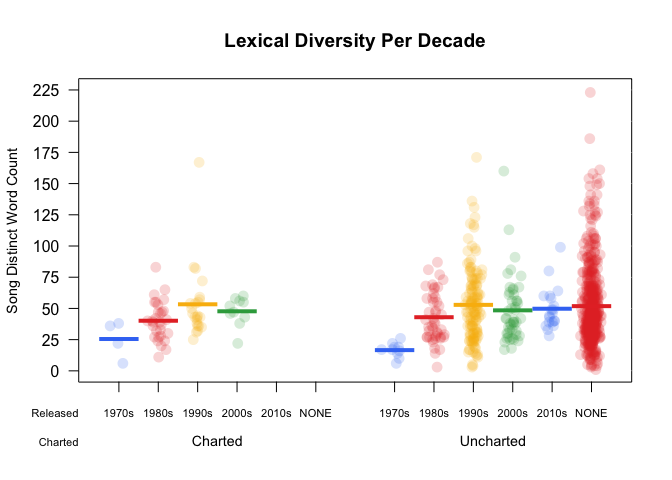
图中每个彩色圆点代表一首歌。值为 "NONE" 的密集红色区域表明数据集中大量歌曲没有发行日期。早期年代中,每首歌的唯一词数略有上升趋势:实线水平线表示该年代的平均词汇量。这在开始分析随时间变化的情感时很重要。随着 Prince 职业生涯推进,歌词用词愈发耐人寻味。
建议您更深入探索海盗图,我们目前只是浅尝辄止!
环形图是一种独特方式,可视化多个类别之间的复杂(或简单!)关系。(而且,唱片过去可都是圆的!)下图是使用 ggplot2 的 coord_polar() 绘制的圆形条形图,展示每年的相对歌曲数量。要写不少代码,但非常值得。类似示例可在 R Graph Gallery 中这里找到。与海盗图一样,这只是您能用环形图做到的入门示例。
songs_year <- prince_data %>%
  select(song, year) %>%
  group_by(year) %>%
  summarise(song_count = n())

id <- seq_len(nrow(songs_year))
songs_year <- cbind(songs_year, id)
label_data = songs_year
number_of_bar = nrow(label_data) #Calculate the ANGLE of the labels
angle = 90 - 360 * (label_data$id - 0.5) / number_of_bar #Center things
label_data$hjust <- ifelse(angle < -90, 1, 0) #Align label
label_data$angle <- ifelse(angle < -90, angle + 180, angle) #Flip angle
ggplot(songs_year, aes(x = as.factor(id), y = song_count)) +
  geom_bar(stat = "identity", fill = alpha("purple", 0.7)) +
  geom_text(data = label_data, aes(x = id, y = song_count + 10, label = year, hjust = hjust), color = "black", alpha = 0.6, size = 3, angle =  label_data$angle, inherit.aes = FALSE ) +
  coord_polar(start = 0) +
  ylim(-20, 150) + #Size of the circle
  theme_minimal() +
  theme(axis.text = element_blank(),
        axis.title = element_blank(),
        panel.grid = element_blank(),
        plot.margin = unit(rep(-4,4), "in"),
        plot.title = element_text(margin = margin(t = 10, b = -10)))
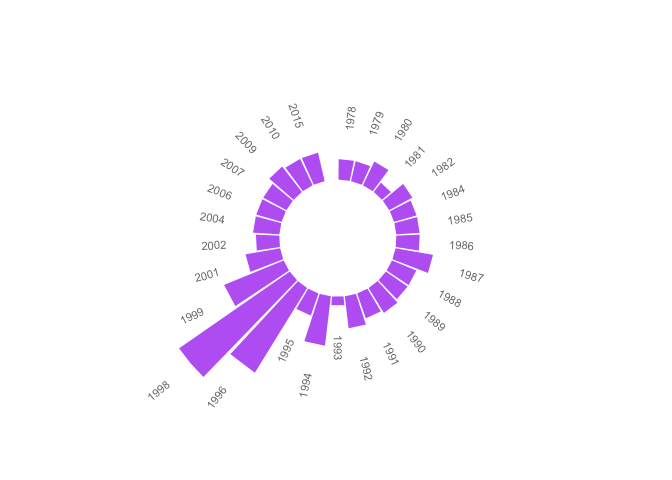
看到最顶端的缺口了吗?它表明了您在海盗图中识别的那些无发行日期的数百首歌曲。若将它们包含在内,此图将失去参考意义。缺失的年份表示当年没有歌曲发布。产量最高的是 1996 与 1998 年。
想知道为什么?继续往下看!
下图展示了歌曲发行年代与是否打入 Billboard 榜单之间的关系。用 chordDiagram() 来做音乐分析看起来就很“对味”!这个图形工具来自 Zuguang Gu 的精美circlize 包。图形分为两类:上榜(上方)与年代(下方)。两类之间以较宽的空隙分隔,类别内部则为空隙较小。下面代码的高层注释可结合此处了解更多细节。
decade_chart <-  prince_data %>%
  filter(decade != "NA") %>% #Remove songs without release dates
  count(decade, charted)  #Get SONG count per chart level per decade. Order determines top or bottom.

circos.clear() #Very important - Reset the circular layout parameters!
grid.col = c("1970s" = my_colors[1], "1980s" = my_colors[2], "1990s" = my_colors[3], "2000s" = my_colors[4], "2010s" = my_colors[5], "Charted" = "grey", "Uncharted" = "grey") #assign chord colors
# Set the global parameters for the circular layout. Specifically the gap size
circos.par(gap.after = c(rep(5, length(unique(decade_chart[[1]])) - 1), 15,
                         rep(5, length(unique(decade_chart[[2]])) - 1), 15))

chordDiagram(decade_chart, grid.col = grid.col, transparency = .2)
title("Relationship Between Chart and Decade")
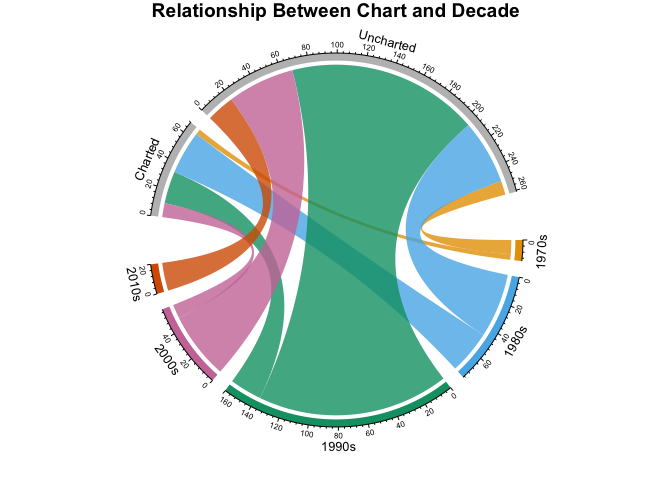
此环形图初看复杂,但很好地展示了每年代、按上榜与否的歌曲数量。您可以看到 Prince 在 1970 年代出道,发布不多,但也有部分上榜。比较 1980 与 1990 年代,会发现 1990 年代发布更多,但 1980 年代上榜更多。2000 年代仅有少数商业上成功的歌曲,而 2010 年代则没有热门歌曲。
本节您将:
tidytext 包包含名为 sentiments 的数据集,提供了若干不同词典。这些词典即带有情感类别或数值的词汇表。tidytext 提供三种通用词典:
为便于检查词典,创建数据框 new_sentiments。过滤掉财经类词典,为 AFINN 将数值分转为正/负二元(也称极性)情感字段,并添加一列统计各词典的不同词数。
new_sentiments 的情感类别在同一列中。为更好地查看各词典、各类别的词数,使用 tidyr 的 spread() 将这些类别旋转为独立字段。利用您先前创建的 my_kable_styling() 函数中 knitr 与 kableExtra 包。用 formattable 的 color_tile() 与 color_bar() 为表格上色,创建美观的格式化表格。打印表格,比较各词典的差异。
new_sentiments <- sentiments %>% #From the tidytext package
  filter(lexicon != "loughran") %>% #Remove the finance lexicon
  mutate( sentiment = ifelse(lexicon == "AFINN" & score >= 0, "positive",
                              ifelse(lexicon == "AFINN" & score < 0,
                                     "negative", sentiment))) %>%
  group_by(lexicon) %>%
  mutate(words_in_lexicon = n_distinct(word)) %>%
  ungroup()

new_sentiments %>%
  group_by(lexicon, sentiment, words_in_lexicon) %>%
  summarise(distinct_words = n_distinct(word)) %>%
  ungroup() %>%
  spread(sentiment, distinct_words) %>%
  mutate(lexicon = color_tile("lightblue", "lightblue")(lexicon),
         words_in_lexicon = color_bar("lightpink")(words_in_lexicon)) %>%
  my_kable_styling(caption = "Word Counts Per Lexicon")
| lexicon | words_in_lexicon | anger | anticipation | disgust | fear | joy | negative | positive | sadness | surprise | trust |
|---|---|---|---|---|---|---|---|---|---|---|---|
| AFINN | 2476 | NA | NA | NA | NA | NA | 1597 | 879 | NA | NA | NA |
| bing | 6785 | NA | NA | NA | NA | NA | 4782 | 2006 | NA | NA | NA |
| nrc | 6468 | 1247 | 839 | 1058 | 1476 | 689 | 3324 | 2312 | 1191 | 534 | 1231 |
上表有助于了解各词典的规模与结构。
要判断哪个词典更适用于歌词,您需要查看词典与歌词之间的共同词匹配率。提醒一下,prince_tidy 中共有 76116 个词、7851 个不同词。
那么这些词中,有多少实际上出现在词典里?
对 prince_tidy 与 new_sentiments 使用 inner_join(),随后按词典分组。NRC 有 10 个类别,而且一个词可以出现在多个类别中:例如,既“负面”又“悲伤”。因此请在 summarise() 中使用 n_distinct() 获取每个词典的不同词数。
prince_tidy %>%
  mutate(words_in_lyrics = n_distinct(word)) %>%
  inner_join(new_sentiments) %>%
  group_by(lexicon, words_in_lyrics, words_in_lexicon) %>%
  summarise(lex_match_words = n_distinct(word)) %>%
  ungroup() %>%
  mutate(total_match_words = sum(lex_match_words), #Not used but good to have
         match_ratio = lex_match_words / words_in_lyrics) %>%
  select(lexicon, lex_match_words,  words_in_lyrics, match_ratio) %>%
  mutate(lex_match_words = color_bar("lightpink")(lex_match_words),
         lexicon = color_tile("lightgreen", "lightgreen")(lexicon)) %>%
  my_kable_styling(caption = "Lyrics Found In Lexicons")
| lexicon | lex_match_words | words_in_lyrics | match_ratio |
|---|---|---|---|
| AFINN | 770 | 7851 | 0.0980767 |
| bing | 1185 | 7851 | 0.1509362 |
| nrc | 1678 | 7851 | 0.2137307 |
NRC 词典覆盖了更多来自歌词的不同词,相较于 AFINN 或 Bing。请注意匹配率总和较低。没有哪本词典能涵盖所有词汇,也不应该涵盖。许多词语是中性的,不会带有情感。例如 2000 通常是中性词,因此不在词典中。然而,若您还记得,当年人们曾预测飞机会从天上掉下、电脑会集体瘫痪。因此歌曲中可能存在与“恐惧”相关的语义,但典型词典无法捕捉。
某个词未出现在词典中的原因包括:
看看 Prince 歌词中一些似乎会影响情感的具体词语。它们是否出现在所有词典中?
new_sentiments %>%
  filter(word %in% c("dark", "controversy", "gangster",
                     "discouraged", "race")) %>%
  arrange(word) %>% #sort
  select(-score) %>% #remove this field
  mutate(word = color_tile("lightblue", "lightblue")(word),
         words_in_lexicon = color_bar("lightpink")(words_in_lexicon),
         lexicon = color_tile("lightgreen", "lightgreen")(lexicon)) %>%
  my_kable_styling(caption = "Specific Words")
| word | sentiment | lexicon | words_in_lexicon |
|---|---|---|---|
| controversy | negative | nrc | 6468 |
| controversy | negative | bing | 6785 |
| dark | sadness | nrc | 6468 |
| dark | negative | bing | 6785 |
| discouraged | negative | AFINN | 2476 |
| gangster | negative | bing | 6785 |
Controversy 与 dark 出现在 NRC 与 Bing 中,但 gangster 仅在 Bing 中出现。race 完全没有出现,而它在 Prince 的歌词中是关键主题。但它能否轻易绑定某种情感?同时注意到 AFINN 规模更小,仅包含了其中一个词。
现在看一个更复杂的例子。性是 Prince 音乐中的常见主题。不同词形会如何影响基于预定义词典的情感分析?例如,以下是歌词中所有以 sex 为词根的引用。将它们与 Bing 和 NRC 对照,看看有哪些匹配。
my_word_list <- prince_data %>%
  unnest_tokens(word, lyrics) %>%
  filter(grepl("sex", word)) %>% #Use `grepl()` to find the substring `"sex"`
  count(word) %>%
  select(myword = word, n) %>% #Rename word
  arrange(desc(n))

new_sentiments %>%
  #Right join gets all words in `my_word_list` to show nulls
  right_join(my_word_list, by = c("word" = "myword")) %>%
  filter(word %in% my_word_list$myword) %>%
  mutate(word = color_tile("lightblue", "lightblue")(word),
          instances = color_tile("lightpink", "lightpink")(n),
          lexicon = color_tile("lightgreen", "lightgreen")(lexicon)) %>%
  select(-score, -n) %>% #Remove these fields
  my_kable_styling(caption = "Dependency on Word Form")
| word | sentiment | lexicon | words_in_lexicon | instances |
|---|---|---|---|---|
| sexy | positive | bing | 6785 | 220 |
| sexy | positive | AFINN | 2476 | 220 |
| sex | anticipation | nrc | 6468 | 185 |
| sex | joy | nrc | 6468 | 185 |
| sex | positive | nrc | 6468 | 185 |
| sex | trust | nrc | 6468 | 185 |
| superfunkycalifragisexy | NA | NA | NA | 19 |
| lovesexy | NA | NA | NA | 16 |
| sexual | NA | NA | NA | 11 |
| sexuality | NA | NA | NA | 11 |
| sexiness | NA | NA | NA | 2 |
| sexually | NA | NA | NA | 2 |
| sexe | NA | NA | NA | 1 |
| sexed | NA | NA | NA | 1 |
| sexier | NA | NA | NA | 1 |
| superfunkycalifraagisexy | NA | NA | NA | 1 |
| superfunkycalifragisexi | NA | NA | NA | 1 |
注意 Prince 频繁使用 sexy,但 NRC 中并无此词形;sex 则在 NRC 中存在、在 Bing 中不存在。若我们看词干或词根,会有帮助吗?真是个难题!文本里可能包含词根的过去式、复数或副词形式,但词典里并没有。该如何处理?
也许您还需要进行更多数据准备。以下三种技术值得在情感分析前考虑:
情感分析中的一个高级概念是同义词(语义相近)与上位词(共同父类)替换。这些词比歌词中的原词更常用,且确实出现在词典中,从而提高匹配率。篇幅所限,本文无法展开更多数据准备,但绝对值得您考虑!
挑战:研究一下词典及其构建方法。是否已有更适合歌词的词典?如果您真的感兴趣,不妨考虑如何自建词典。基于分类器的情感分析与基于词典的情感分析有何区别?
现在您已对数据集与词典有了基础认识,可以将它们结合起来进行分析。接下来您将:
首先,通过对 get_sentiments()(传入词典名)执行 inner_join(),为每个词典创建 Prince 的情感数据集。本练习中,使用 Bing(用于二元极性)与 NRC(用于多类别情感)。由于 NRC 中词可能出现在多个类别(如 Negative/Fear 或 Positive/Joy),您还将创建一个不含 positive 与 negative 的子集备用。
prince_bing <- prince_tidy %>%
  inner_join(get_sentiments("bing"))
prince_nrc <- prince_tidy %>%
  inner_join(get_sentiments("nrc"))
prince_nrc_sub <- prince_tidy %>%
  inner_join(get_sentiments("nrc")) %>%
  filter(!sentiment %in% c("positive", "negative"))
在对歌词的详细分析中,您将查看不同文本层级,如所有歌曲、上榜级别、年代以及词。先绘制整个数据集的 NRC 情感分析。
(为了好玩,我用memery 和 magick 给图加了图片(梗图)。)
nrc_plot <- prince_nrc %>%
  group_by(sentiment) %>%
  summarise(word_count = n()) %>%
  ungroup() %>%
  mutate(sentiment = reorder(sentiment, word_count)) %>%
  #Use `fill = -word_count` to make the larger bars darker
  ggplot(aes(sentiment, word_count, fill = -word_count)) +
  geom_col() +
  guides(fill = FALSE) + #Turn off the legend
  theme_lyrics() +
  labs(x = NULL, y = "Word Count") +
  scale_y_continuous(limits = c(0, 15000)) + #Hard code the axis limit
  ggtitle("Prince NRC Sentiment") +
  coord_flip()

img <- "prince_background2.jpg" #Load the background image
lab <- ""  #Turn off the label
#Overlay the plot on the image and create the meme file
meme(img, lab, "meme_nrc.jpg", inset = nrc_plot)
#Read the file back in and display it!
nrc_meme <- image_read("meme_nrc.jpg")
plot(nrc_meme)
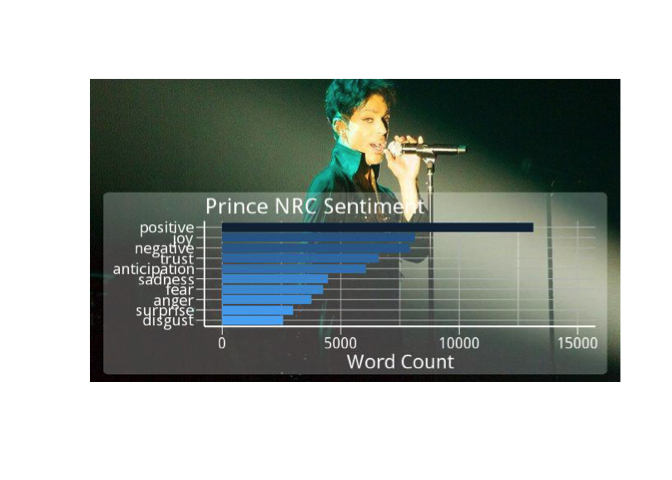
看起来在 Prince 的歌词中,NRC 明显偏向于positive。但所有 disgust 或 anger 的词是否也都在 negative 类别中?值得一探。
再看看 Bing 的整体情感。在出现在 Bing 词典中的 Prince 歌词 1185 个不同词中,有多少是正面,多少是负面?
bing_plot <- prince_bing %>%
  group_by(sentiment) %>%
  summarise(word_count = n()) %>%
  ungroup() %>%
  mutate(sentiment = reorder(sentiment, word_count)) %>%
  ggplot(aes(sentiment, word_count, fill = sentiment)) +
  geom_col() +
  guides(fill = FALSE) +
  theme_lyrics() +
  labs(x = NULL, y = "Word Count") +
  scale_y_continuous(limits = c(0, 8000)) +
  ggtitle("Prince Bing Sentiment") +
  coord_flip()

img1 <- "prince_background1.jpg"
lab1 <- ""
meme(img1, lab1, "meme_bing.jpg", inset = bing_plot)
x <- image_read("meme_bing.jpg")
plot(x)
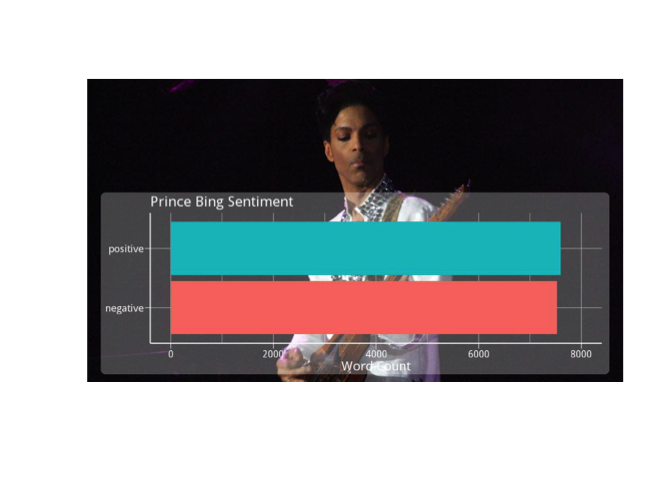
Bing 的结果看起来似乎正负面相当?在数据集过大时,整体情感会不会彼此“抵消”?很难说,不如我们分块查看。
在声学中,有个概念叫相位抵消,当同一频率的两个声波完全反相时会相互抵消,例如用两个麦克风录鼓,其中一个接收声波更晚。这会导致该频率下完全静音!这在大数据集的情感分析中会如何体现?值得思考。
语言学教授:“在英语中,双重否定形成肯定。在俄语中,双重否定仍是否定。然而,没有任何语言中,双重肯定会形成否定。”学生不服:“Yeah, right.”
用 Bing 词典,将分析细化到上榜级别,来“拧大”分析声量。绘制各上榜级别的极性情感图。用 spread() 将情感分拆为列,用 mutate() 创建极性(positive - negative)与 percent_positive($positive / total sentiment * 100$)。在极性图中,用 geom_hline() 添加 yintercept。用 grid.arrange() 将两图并排展示。
prince_polarity_chart <- prince_bing %>%
  count(sentiment, chart_level) %>%
  spread(sentiment, n, fill = 0) %>%
  mutate(polarity = positive - negative,
    percent_positive = positive / (positive + negative) * 100)

#Polarity by chart
plot1 <- prince_polarity_chart %>%
  ggplot( aes(chart_level, polarity, fill = chart_level)) +
  geom_col() +
  scale_fill_manual(values = my_colors[3:5]) +
  geom_hline(yintercept = 0, color = "red") +
  theme_lyrics() + theme(plot.title = element_text(size = 11)) +
  xlab(NULL) + ylab(NULL) +
  ggtitle("Polarity By Chart Level")

#Percent positive by chart
plot2 <- prince_polarity_chart %>%
  ggplot( aes(chart_level, percent_positive, fill = chart_level)) +
  geom_col() +
  scale_fill_manual(values = c(my_colors[3:5])) +
  geom_hline(yintercept = 0, color = "red") +
  theme_lyrics() + theme(plot.title = element_text(size = 11)) +
  xlab(NULL) + ylab(NULL) +
  ggtitle("Percent Positive By Chart Level")

grid.arrange(plot1, plot2, ncol = 2)
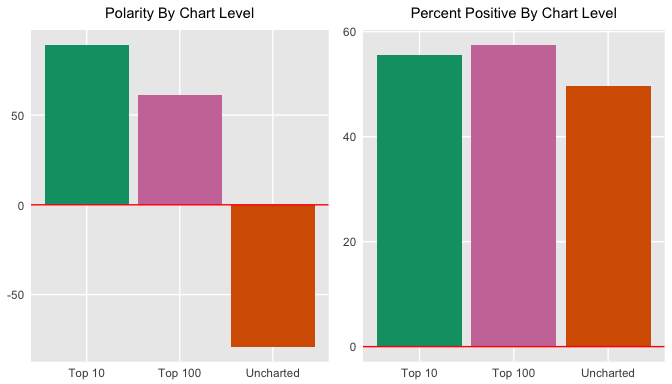
这是否表明上榜歌曲通常更积极?如果是,这对社会偏好有什么启示?这些假设是否站得住?从相对总情感的正面比例看,上榜歌略微更正面。这很有趣,考虑到 Bing 词典本身负面词多于正面词。
既然在看极性视角的情感,不妨看看它是否随时间“变天”(极客冷笑话)。这次用 geom_smooth() 的 loess 方法绘制更平滑曲线,再用 method = lm 绘制线性平滑曲线。
prince_polarity_year <- prince_bing %>%
  count(sentiment, year) %>%
  spread(sentiment, n, fill = 0) %>%
  mutate(polarity = positive - negative,
    percent_positive = positive / (positive + negative) * 100)

polarity_over_time <- prince_polarity_year %>%
  ggplot(aes(year, polarity, color = ifelse(polarity >= 0,my_colors[5],my_colors[4]))) +
  geom_col() +
  geom_smooth(method = "loess", se = FALSE) +
  geom_smooth(method = "lm", se = FALSE, aes(color = my_colors[1])) +
  theme_lyrics() + theme(plot.title = element_text(size = 11)) +
  xlab(NULL) + ylab(NULL) +
  ggtitle("Polarity Over Time")

relative_polarity_over_time <- prince_polarity_year %>%
  ggplot(aes(year, percent_positive , color = ifelse(polarity >= 0,my_colors[5],my_colors[4]))) +
  geom_col() +
  geom_smooth(method = "loess", se = FALSE) +
  geom_smooth(method = "lm", se = FALSE, aes(color = my_colors[1])) +
  theme_lyrics() + theme(plot.title = element_text(size = 11)) +
  xlab(NULL) + ylab(NULL) +
  ggtitle("Percent Positive Over Time")

grid.arrange(polarity_over_time, relative_polarity_over_time, ncol = 2)
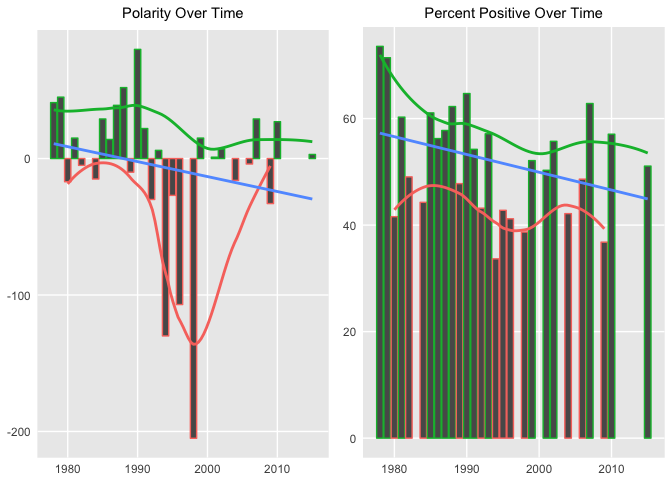
上图第二幅对极值做了调整,但总体极性随时间的趋势在两幅图中都偏负。
再次用 chordDiagram() 的威力,查看 NRC 情感与年代的关系。请注意,情感类别位于指环上方,年代位于下方。
grid.col = c("1970s" = my_colors[1], "1980s" = my_colors[2], "1990s" = my_colors[3], "2000s" = my_colors[4], "2010s" = my_colors[5], "anger" = "grey", "anticipation" = "grey", "disgust" = "grey", "fear" = "grey", "joy" = "grey", "sadness" = "grey", "surprise" = "grey", "trust" = "grey")

decade_mood <-  prince_nrc %>%
  filter(decade != "NA" & !sentiment %in% c("positive", "negative")) %>%
  count(sentiment, decade) %>%
  group_by(decade, sentiment) %>%
  summarise(sentiment_sum = sum(n)) %>%
  ungroup()

circos.clear()
#Set the gap size
circos.par(gap.after = c(rep(5, length(unique(decade_mood[[1]])) - 1), 15,
                         rep(5, length(unique(decade_mood[[2]])) - 1), 15))
chordDiagram(decade_mood, grid.col = grid.col, transparency = .2)
title("Relationship Between Mood and Decade")
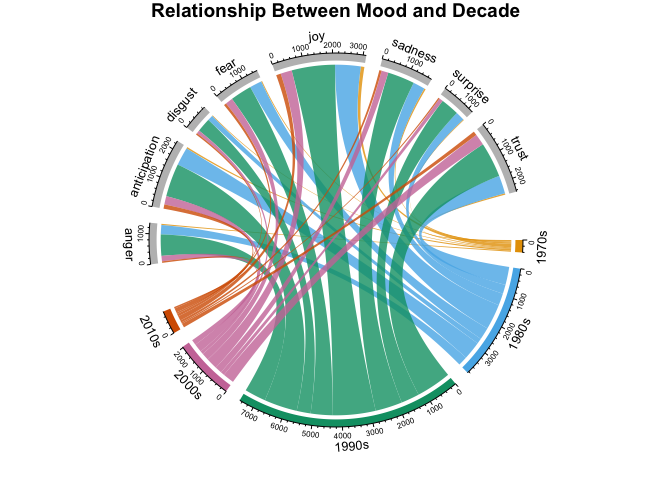
图中展示了每个年代、按 NRC 类别的词数。这幅小图信息量很大,但能提供大量关于类别与时间关系的信息。此类图表高度可定制,可简可繁。
学了这么多 DataCamp 课程,您肯定迫不及待想要应用到现实世界。现在就把对 Prince 歌词的分析与一段真实的时间序列事件对应起来。不过请谨慎怀疑,通过简化分析去解释如此复杂的主题。
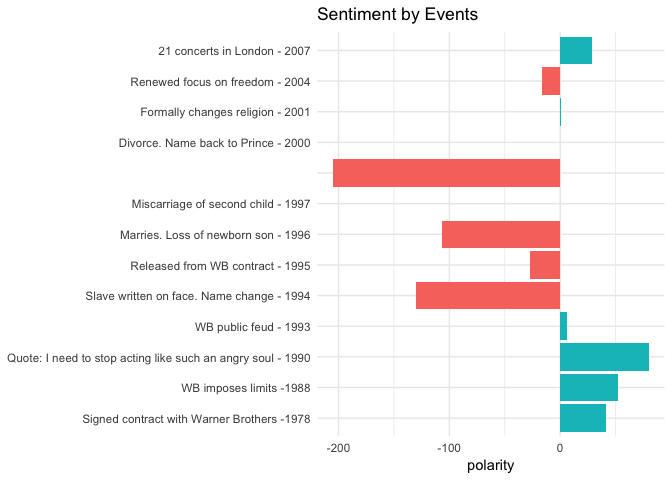
我整理了 Prince 的生平事件清单,来源于 Rolling Stone、Biography.com 等媒体。我选择了在我们的数据集中有发行年份的、最具公众关注度的年份。现在读入 princeEvents.csv。然后使用 prince_bing 与 spread() 计算每年的极性分。与 events 数据框连接,并创建一个情感字段,以在条形图中根据情感填色。像往常一样,当标签文本较大时用 coord_flip()。
events <- read.csv('princeEvents.csv', stringsAsFactors = FALSE)

year_polarity_bing <- prince_bing %>%
  group_by(year, sentiment) %>%
  count(year, sentiment) %>%
  spread(sentiment, n) %>%
  mutate(polarity = positive - negative,
         ratio = polarity / (positive + negative)) #use polarity ratio in next graph

 events %>%
   #Left join gets event years with no releases
   left_join(year_polarity_bing) %>%
   filter(event != " ") %>% #Account for bad data
   mutate(event = reorder(event, year), #Sort chart by desc year
           sentiment = ifelse(positive > negative,
                              "positive", "negative")) %>%
   ggplot(aes(event, polarity, fill = sentiment)) +
   geom_bar(stat = "identity") +
   theme_minimal() + theme(legend.position = "none") +
   xlab(NULL) +
   ggtitle("Sentiment by Events") +
   coord_flip()
提示:您可以在这里找到 princeEvents.csv。
把事件与情感做对照非常有意思。尽管主观,但我发现二者高度相关。当然,事件数据集是我自己整理的,确实可能带入偏差让它“贴合”歌词。不过,我对每年都参考了多家来源,选取最常被报道的事实。这些结果应该能激发您进一步深入到词级分析,看看 Prince 在唱什么。
1994 年,Prince 发行了 The Black Album,试图重新赢回非裔美国听众。鉴于 1994 年及其后两年在分析中格外显眼,您可以用 ggrepel 包的 geom_label_repel() 搭配 geom_point(),查看这一时期在 NRC 词典中匹配的高频词。这是张较难配置的图,建议您动手调整下面的代码。
plot_words_94_96 <- prince_nrc %>%
  filter(year %in% c("1994", "1995", "1996")) %>%
  group_by(sentiment) %>%
  count(word, sort = TRUE) %>%
  arrange(desc(n)) %>%
  slice(seq_len(8)) %>% #consider top_n() from dplyr also
  ungroup()

plot_words_94_96 %>%
  #Set `y = 1` to just plot one variable and use word as the label
  ggplot(aes(word, 1, label = word, fill = sentiment )) +
  #You want the words, not the points
  geom_point(color = "transparent") +
  #Make sure the labels don't overlap
  geom_label_repel(force = 1,nudge_y = .5,
                   direction = "y",
                   box.padding = 0.04,
                   segment.color = "transparent",
                   size = 3) +
  facet_grid(~sentiment) +
  theme_lyrics() +
  theme(axis.text.y = element_blank(), axis.text.x = element_blank(),
        axis.title.x = element_text(size = 6),
        panel.grid = element_blank(), panel.background = element_blank(),
        panel.border = element_rect("lightgray", fill = NA),
        strip.text.x = element_text(size = 9)) +
  xlab(NULL) + ylab(NULL) +
  ggtitle("1994 - 1996 NRC Sentiment") +
  coord_flip()
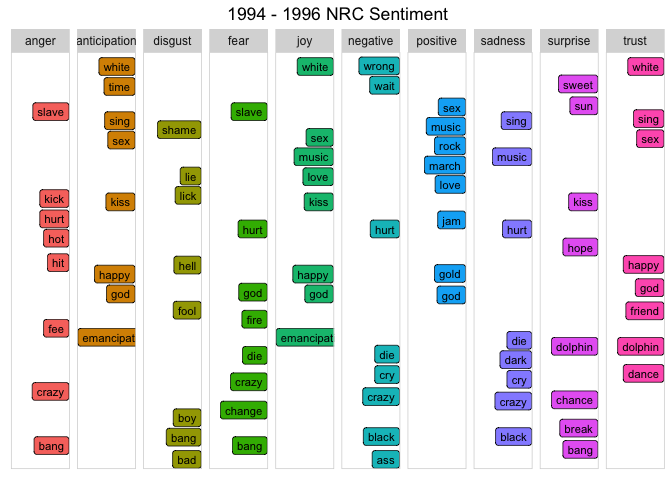
Prince 在 1994 年对 Rolling Stone 说:
“当你让一个人无法做梦,他就成了奴隶。我当时就是这样。”
因此他公开露面时在脸上醒目地写着“slave”,直言不讳反对当时的唱片公司。他也把名字改成了一个符号。上述词语与这些事件匹配得如何?图里是否注意到了 “slave”、“emancipation”、“black” 与 “change”?
(请记住,这不只是关于 Prince。您也可以将其应用到任何文本!例如,特朗普就任第一年,他表达“trust”情感的词语最多的是哪些?)
上面的“按事件的情感”图表显示,在 1996 至 1998 年间,Prince 结婚、失去两个孩子,并被认为在舞台上“预言”了 9/11。(在 YouTube 搜索他 1998 年荷兰演唱会,亲自去听!)用与上一图相同的步骤,查看 1998 年各 NRC 类别中的前 10 个词。
plot_words_1998 <- prince_nrc %>%
  filter(year == "1998") %>%
  group_by(sentiment) %>%
  count(word, sort = TRUE) %>%
  arrange(desc(n)) %>%
  slice(seq_len(10)) %>%
  ungroup()

#Same comments as previous graph
plot_words_1998 %>%
  ggplot(aes(word, 1, label = word, fill = sentiment )) +
  geom_point(color = "transparent") +
  geom_label_repel(force = 1,nudge_y = .5,
                   direction = "y",
                   box.padding = 0.05,
                   segment.color = "transparent",
                   size = 3) +
  facet_grid(~sentiment) +
  theme_lyrics() +
  theme(axis.text.y = element_blank(), axis.text.x = element_blank(),
        axis.title.x = element_text(size = 6),
        panel.grid = element_blank(), panel.background = element_blank(),
        panel.border = element_rect("lightgray", fill = NA),
        strip.text.x = element_text(size = 9)) +
  xlab(NULL) + ylab(NULL) +
  ggtitle("1998 NRC Sentiment") +
  coord_flip()
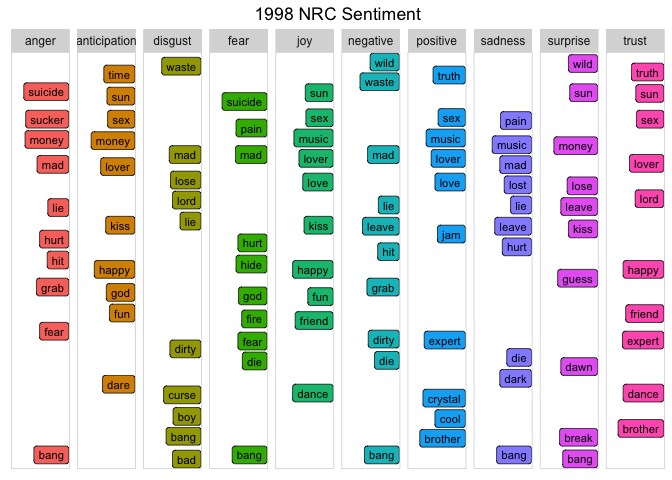
鉴于个人丧子之痛与恐怖主义阴云,“suicide”、“waste”、“mad”、“hurt” 等词(以及更多未在图中呈现的词)都强烈指向当时的真实事件。这些词极具力量,真实反映了该时期的情感。
比较类别间情感的另一好方法是雷达图(蜘蛛图)。您可以用radarchart 包来制作。这类图适用于观察变量间的相似性,以及是否存在离群值。
我们将该分析拆为三个层级:年份、上榜与年代。(为节省篇幅,仅给出具体年份的代码。)
prince_nrc_sub 数据集,让其他情感更醒目。这次先计算每年按情感的词总数,以及该年的总情感词数,得到百分比($当年某情感词数 / 当年总词数 * 100$)。select() 移除不需要的字段。spread() 展开成多列,使每行对应一个情感、每列对应一年。然后用 chartJSRadar() 生成交互式 HTML 小部件。您可以传参在鼠标悬停时显示数据集标签。(友情提示:有时 radarchart 会把 “joy” 的 J 和 Y 裁掉,看起来像“iov”。)#Get the count of words per sentiment per year
year_sentiment_nrc <- prince_nrc_sub %>%
group_by(year, sentiment) %>%
count(year, sentiment) %>%
select(year, sentiment, sentiment_year_count = n)
#Get the total count of sentiment words per year (not distinct)
total_sentiment_year <- prince_nrc_sub %>%
count(year) %>%
select(year, year_total = n)
#Join the two and create a percent field
year_radar_chart <- year_sentiment_nrc %>%
inner_join(total_sentiment_year, by = "year") %>%
mutate(percent = sentiment_year_count / year_total * 100 ) %>%
filter(year %in% c("1978","1994","1995")) %>%
select(-sentiment_year_count, -year_total) %>%
spread(year, percent) %>%
chartJSRadar(showToolTipLabel = TRUE,
main = "NRC Years Radar")
您可能需要上下滚动来比较这些图,因为我希望保留其原始尺寸。值得注意的是,在 year 这样较小的数据集上,您能更清晰地看到各情感的差异。您也会注意到,与先前练习不同,若看百分比,“joy” 在所有图上分数最高(尤其在 1978 年 Prince 职业生涯初期)。
Spotify 用机器学习为 1.4 亿活跃用户推荐歌曲。它目前还没有用到歌词内容。想象一下如果用上会怎样……现在更深入地探究具体歌曲的情绪。
1987 年,Prince 写了《Sign O' the Times》。Kenneth Partridge 在一篇Billboard 文章中写道:
“当他谈及艾滋病、帮派、毒品、自然灾害,甚至挑战者号爆炸时,Prince 表现得冷静且疏离。《Sign O' the Times》像是一条状态更新,不是行动号召。他的解决方案不是上街游行,也不是致电您的国会议员。”
那么机器会如何解读这首歌的情绪?它是否高度情绪化,还是仅仅在传递信息?它代表的是 Prince 本人,还是更广泛的社会?用 ggplot2 绘制 NRC 类别图。
prince_nrc %>%
  filter(song %in% "sign o the times") %>%
  group_by(sentiment) %>%
  summarise(word_count = n()) %>%
  ungroup() %>%
  mutate(sentiment = reorder(sentiment, word_count)) %>%
  ggplot(aes(sentiment, word_count, fill = -word_count)) +
  geom_col() +
  guides(fill = FALSE) +
  theme_minimal() + theme_lyrics() +
  labs(x = NULL, y = "Word Count") +
  ggtitle("Sign O' The Times NRC Sentiment") +
  coord_flip()
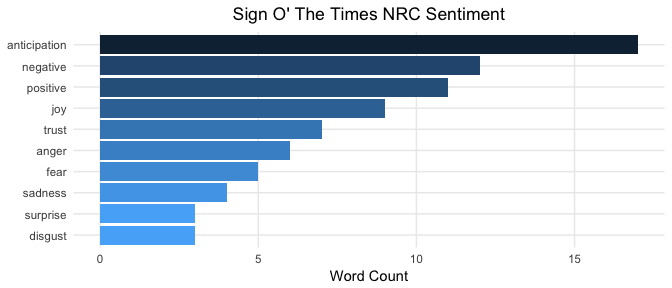
尽管仍然高度主观,结果似乎印证了 Partridge 所言:Prince “冷静而疏离”。这可从 anticipation 词多于 sadness、fear、anger 等情绪类词观察得出。有文章指出,这三者属于情绪,而 anticipation 属于情感。Billboard 作者也称此歌“像是一条几乎不带情绪的状态更新”。似乎机器也同意。您也会如此解读吗?虽说这是 R 教程,但情感分析并非纯技术话题,它被视为AI 与心理学的交汇点。
用 ggplot2 再画一张略有不同的图,看看各类别中的具体词。
prince_tidy %>%
  filter(song %in% 'sign o the times') %>%
  distinct(word) %>%
  inner_join(get_sentiments("nrc")) %>%
  ggplot(aes(x = word, fill = sentiment)) +
  facet_grid(~sentiment) +
  geom_bar() + #Create a bar for each word per sentiment
  theme_lyrics() +
  theme(panel.grid.major.x = element_blank(),
        axis.text.x = element_blank()) + #Place the words on the y-axis
  xlab(NULL) + ylab(NULL) +
  ggtitle("Sign O' The Times Sentiment Words") +
  coord_flip()
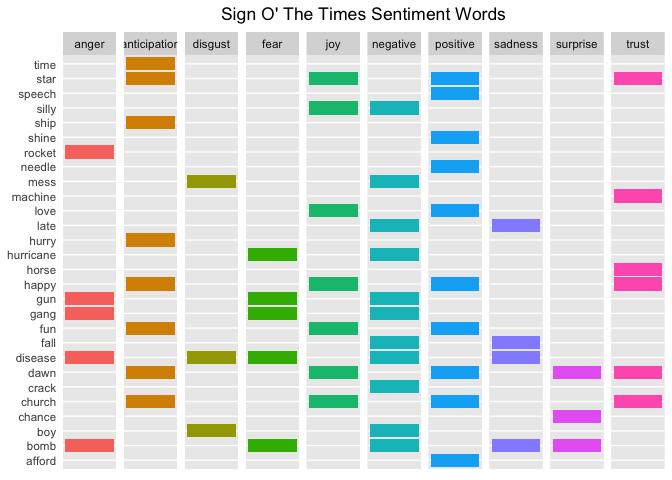
您能否将这些词与 Billboard 文章中提到的话题对上号?很容易看出关联:挑战者号灾难 -> “rocket”,艾滋病 -> “disease”,毒品 -> “crack”,自然灾害 -> “hurricane”,帮派 -> “gang”,等等。
仿佛 Partridge 在写文章前写了段 R 代码,画出了这张图!
再看看几首标题醒目的歌的情感类别,看看是否与标题相呼应。
prince_nrc_sub %>%
  filter(song %in% c("so blue", "controversy", "raspberry beret",
                     "when doves cry", "the future", "1999")) %>%
  count(song, sentiment, year) %>%
  mutate(sentiment = reorder(sentiment, n), song = reorder(song, n)) %>%
  ggplot(aes(sentiment, n, fill = sentiment)) +
  geom_col() +
  facet_wrap(year ~ song, scales = "free_x", labeller = label_both) +
  theme_lyrics() +
  theme(panel.grid.major.x = element_blank(),
        axis.text.x = element_blank()) +
  labs(x = NULL, y = NULL) +
  ggtitle("NRC Sentiment Song Analysis") +
  coord_flip()
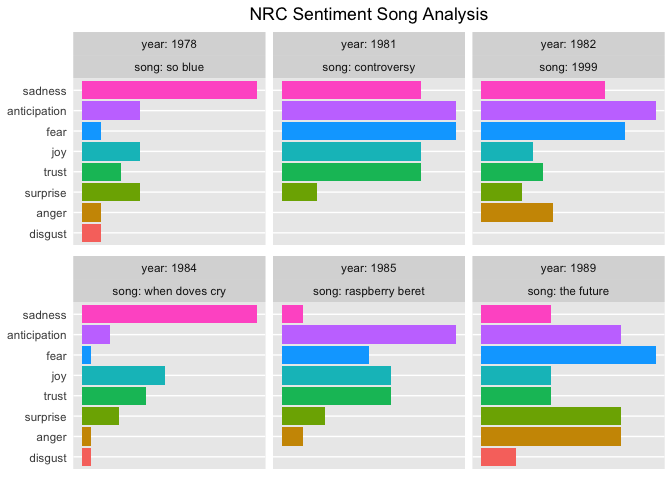
NRC 情感显示,一首关于未来的歌有较高的 anticipation 与 fear,而一首关于controversy 的歌除了这两者还有较高的 trust。以 sad 为主的歌曲似乎也与其标题相契合。
迄今为止,您只看了单词(unigram)。但如果 “love” 是高频词,它前面会接什么?后面会接什么?脱离语境只看单词可能会误导。因此,现在是时候看看双词组(bigram)或词对了。
幸运的是,tidytext 不仅能拆成单词,也能拆成词对。在本例中,调用 unnest_tokens() 并传入 token 参数 ngrams。由于这里只看双词组(两个相邻单词),传入 n = 2。用 prince_bigrams 存放结果。
tidyr 提供了用 separate() 将双词组拆为单词的能力。为移除停用词与不需要的词,先把双词组拆开并过滤掉不需要的词,再用 unite() 把词对合回去。这样可以轻松可视化各年代最常见的双词组。(第一部分中有 slice() 与 row_number() 的解释)
prince_bigrams <- prince_data %>%
  unnest_tokens(bigram, lyrics, token = "ngrams", n = 2)

bigrams_separated <- prince_bigrams %>%
  separate(bigram, c("word1", "word2"), sep = " ")

bigrams_filtered <- bigrams_separated %>%
  filter(!word1 %in% stop_words$word) %>%
  filter(!word2 %in% stop_words$word) %>%
  filter(!word1 %in% undesirable_words) %>%
  filter(!word2 %in% undesirable_words)

#Because there is so much repetition in music, also filter out the cases where the two words are the same
bigram_decade <- bigrams_filtered %>%
  filter(word1 != word2) %>%
  filter(decade != "NA") %>%
  unite(bigram, word1, word2, sep = " ") %>%
  inner_join(prince_data) %>%
  count(bigram, decade, sort = TRUE) %>%
  group_by(decade) %>%
  slice(seq_len(7)) %>%
  ungroup() %>%
  arrange(decade, n) %>%
  mutate(row = row_number())
## Joining, by = c("song", "year", "album", "peak", "us_pop", "us_rnb", "decade", "chart_level", "charted")bigram_decade %>%
ggplot(aes(row, n, fill = decade)) +
geom_col(show.legend = FALSE) +
facet_wrap(~decade, scales = "free_y") +
xlab(NULL) + ylab(NULL) +
scale_x_continuous( # This handles replacement of row
breaks = bigram_decade$row, # Notice need to reuse data frame
labels = bigram_decade$bigram) +
theme_lyrics() +
theme(panel.grid.major.x = element_blank()) +
ggtitle("Bigrams Per Decade") +
coord_flip()
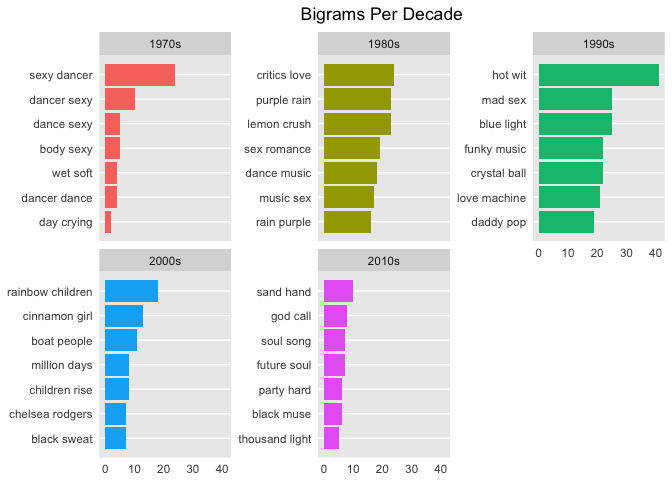
从双词组几乎能看出常见短语从性爱、舞蹈与浪漫,转向宗教与(彩虹)孩子。顺便一提,“rainbow baby”一词有时用于指代父母在流产后再次迎来的新生儿。有趣的是,我找不到对 Prince 的《Rainbow Children》专辑做出这一点注解的严肃评论。
那么双词组如何影响情感?这次用 AFINN 词典对词对进行情感分析,看看带情感色彩的词被 “not” 或其他否定词前置的频率。
AFINN <- get_sentiments("afinn")

not_words <- bigrams_separated %>%
  filter(word1 == "not") %>%
  inner_join(AFINN, by = c(word2 = "word")) %>%
  count(word2, score, sort = TRUE) %>%
  ungroup()

not_words %>%
  mutate(contribution = n * score) %>%
  arrange(desc(abs(contribution))) %>%
  head(20) %>%
  mutate(word2 = reorder(word2, contribution)) %>%
  ggplot(aes(word2, n * score, fill = n * score > 0)) +
  geom_col(show.legend = FALSE) +
  theme_lyrics() +
  xlab("Words preceded by \"not\"") +
  ylab("Sentiment score * Number of Occurrences") +
  ggtitle("Polar Sentiment of Words Preceded by Not") +
  coord_flip()
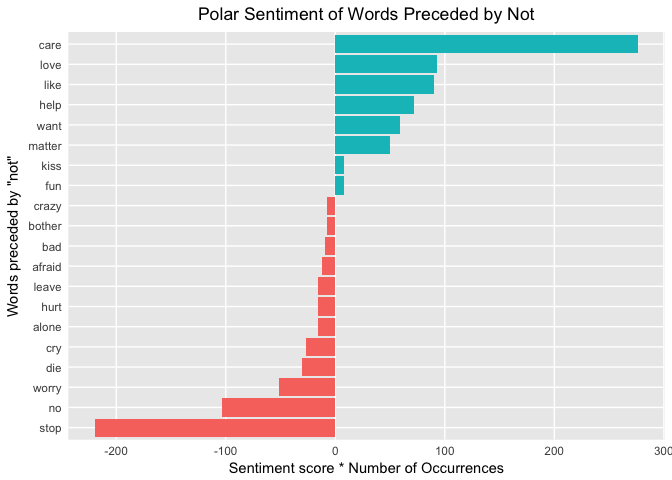
图中第一行,care 因为单词级分析忽略了 “not” 而被赋予了假阳性的情感。那些假阳性的双词组会不会与假阴性的双词组互相抵消?
又一个我无法立刻回答的问题,但很值得深入探索。提示:您也可以向 unnest_tokens() 传入参数 "trigrams" 与 "n = 3" 来查看三连词!
还有其他否定词值得考虑。下面我们用 ggraph 与 igraph 创建网络图。把词排列为相连节点,将否定词置于中心。用 graph_from_data_frame() 从整洁数据创建对象,然后用 ggraph() 绘制。调用 geom_edge_density() 可高亮主节点。类似示例可参考 Julia Silge 与 David Robinson 的著作《Tidy Text Mining》。
negation_words <- c("not", "no", "never", "without")

negation_bigrams <- bigrams_separated %>%
  filter(word1 %in% negation_words) %>%
  inner_join(AFINN, by = c(word2 = "word")) %>%
  count(word1, word2, score, sort = TRUE) %>%
  mutate(contribution = n * score) %>%
  arrange(desc(abs(contribution))) %>%
  group_by(word1) %>%
  slice(seq_len(20)) %>%
  arrange(word1,desc(contribution)) %>%
  ungroup()

bigram_graph <- negation_bigrams %>%
  graph_from_data_frame() #From `igraph`

set.seed(123)

a <- grid::arrow(type = "closed", length = unit(.15, "inches"))

ggraph(bigram_graph, layout = "fr") +
  geom_edge_link(alpha = .25) +
  geom_edge_density(aes(fill = score)) +
  geom_node_point(color = "purple1", size = 1) + #Purple for Prince!
  geom_node_text(aes(label = name),  repel = TRUE) +
  theme_void() + theme(legend.position = "none",
                       plot.title = element_text(hjust = 0.5)) +
  ggtitle("Negation Bigram Network")
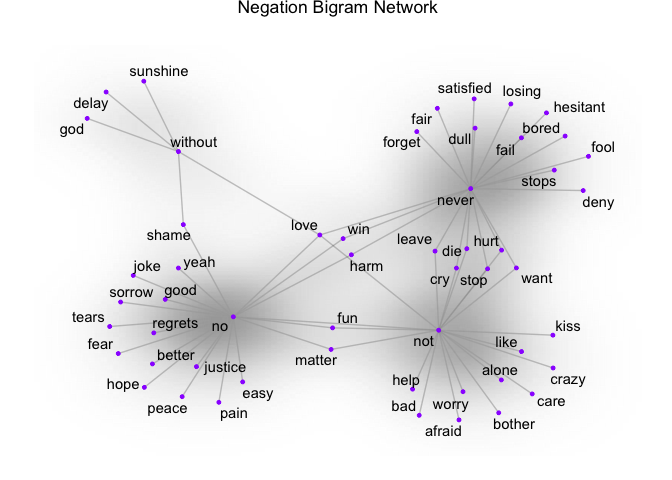
这里可以看到与否定词相关的词对。因此,如果您的分析基于单词层级,而 “alone” 被判为负面,那么如上图所示的双词组 “not alone” 将产生相反的影响。有些词跨多个中心节点,这在这样的可视化中一目了然:例如 “never hurt” 与 “not hurt”。
既然已看过 n-gram,再看看词之间的相关性。哪些词相关性最高?使用 widyr 包的 pairwise_count() 识别共现计数。即统计每对词在同一首歌曲中同时出现的次数。widyr 会把整洁数据暂时“加宽”,然后再还原为整洁结构,方便可视化与进一步分析。
为简化起见,我选择了 Prince 歌词中四个有意思的词。
pwc <- prince_tidy %>%
  filter(n() >= 20) %>%  #High counts
  pairwise_count(word, song, sort = TRUE) %>%
  filter(item1 %in% c("love", "peace", "gangster", "hate")) %>%
  group_by(item1) %>%
  slice(seq_len(7)) %>%
  ungroup() %>%
  mutate(row = -row_number()) #Descending order

pwc %>%
  ggplot(aes(row, n, fill = item1)) +
  geom_bar(stat = "identity", show.legend = FALSE) +
  facet_wrap(~item1, scales = "free") +
  scale_x_continuous(  #This handles replacement of row
      breaks = pwc$row, #Notice need to reuse data frame
      labels = pwc$item2) +
  theme_lyrics() + theme(panel.grid.major.x = element_blank()) +
  xlab(NULL) + ylab(NULL) +
  ggtitle("Pairwise Counts") +
  coord_flip()
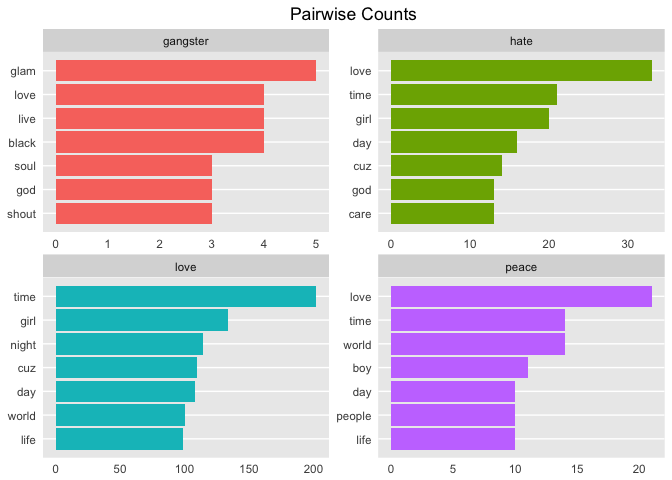
再将其与成对相关系数比较。相关系数衡量词语一同出现的频率相对各自单独出现的频率。用 pairwise_cor() 基于词在同一首歌中共同出现的频度,计算词之间的相关性。
prince_tidy %>%
  group_by(word) %>%
  filter(n() >= 20) %>%
  pairwise_cor(word, song, sort = TRUE) %>%
  filter(item1 %in% c("love", "peace", "gangster", "hate")) %>%
  group_by(item1) %>%
  top_n(7) %>%
  ungroup() %>%
  mutate(item2 = reorder(item2, correlation)) %>%
  ggplot(aes(item2, correlation, fill = item1)) +
  geom_bar(stat = 'identity', show.legend = FALSE) +
  facet_wrap(~item1, scales = 'free') +
  theme_lyrics() + theme(panel.grid.major.x = element_blank()) +
  xlab(NULL) + ylab(NULL) +
  ggtitle("Pairwise Correlation") +
  coord_flip()
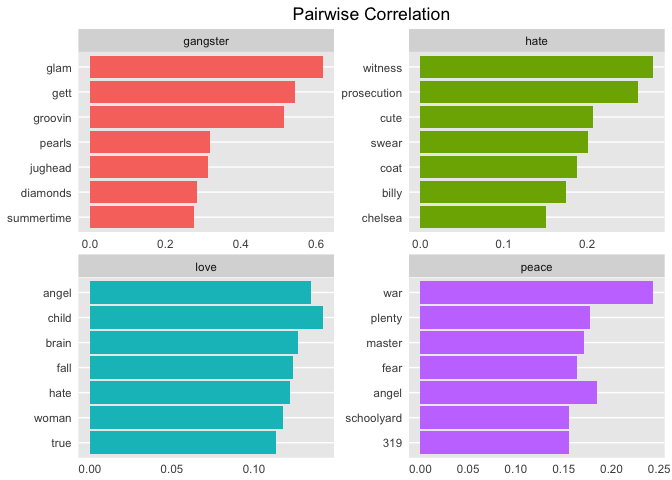
仅凭这四个词就能得到如此有趣的歌词洞见!由此您可以开始看到一些主题逐渐浮现。这也为下一篇主题建模教程做了很好的铺垫!
在本教程中,您创建了整洁数据集,并分析了如词汇多样性与每年发布歌曲数量等基础信息,还检视了发行年代与是否上榜之间的关系。随后,您探索了若干情感词典及其与歌词的匹配程度。接着,您对所有歌曲进行了情感分析,查看了随时间变化的情感、歌曲层面的情感,以及双词组的影响。为此,您使用了多种有趣图形,从不同维度给出视角。
所以,能否写一个程序来判断歌词的情绪?当然可以!结果有多可靠?这取决于多方面因素,如数据准备工作量、词典选择、分析方法、源数据质量,等等。将个人与社会层面的真实事件进行对照,可以更好地阐明任何歌词的情绪。Prince 的极性情感似乎随时间略有下降,但总体上,joy 的确更为突出。上榜歌曲似乎比未上榜更正面。关于预言 9/11 和他本人离世的说法,似乎也与他的文字诡异地吻合。
但歌词复杂多变,过多假设会带来问题。若您把本教程中对歌词的认识带到下一篇 2-B(主题建模),您将更有能力挖掘主题与母题。没有标点或句子结构的歌词,究竟能做多少 NLP?Prince 其实在唱什么?现在您已理解“情绪”,也就更准备好去探索潜在的“主题”。最后,能否用机器学习预测歌曲的年代或上榜级别?欢迎在接下来的教程中与我一起找答案!
希望您喜欢这段旅程。在 2-B 部分,我们要像 1999 年那样尽情狂欢!