%22%3E%3Cpath%20d%3D%22m-369%200h408v79h-408z%22%20fill%3D%22%237933ff%22%2F%3E%3Cpath%20d%3D%22m-148%200h306v45h-306z%22%20fill%3D%22%23974dff%22%2F%3E%3C%2Fg%3E%3C%2Fsvg%3E)
%22%2F%3E%3C%2FclipPath%3E%3Cg%20clip-path%3D%22url(%23a)%22%3E%3Cpath%20d%3D%22m76%200h484v36h-484z%22%20fill%3D%22%23974dff%22%2F%3E%3Cpath%20d%3D%22m0%200h384v24h-384z%22%20fill%3D%22%2306bdfc%22%20transform%3D%22matrix(1%200%200%20-1%200%2060)%22%2F%3E%3C%2Fg%3E%3C%2Fsvg%3E)
¿Qué es Claude Code Review?
Claude Code Review es un sistema de revisión multiagente que examina una PR en el contexto del repositorio y reporta posibles bugs, problemas de seguridad y regresiones. GitHub Code Review ejecuta esos agentes sobre una PR de GitHub, mientras que el /code-review local te ofrece una revisión de tu diff actual directamente desde Claude Code.
La palabra clave aquí es contexto. Una revisión tradicional del diff pide inspeccionar las líneas que cambiaron. Los agentes de revisión de Claude examinan esos cambios dentro del contexto del repositorio. El flujo de GitHub usa varios agentes especializados en paralelo, seguidos de verificación, desduplicación y priorización por severidad.
Por ejemplo, un cambio de 10 líneas en una transformación de pandas puede depender del esquema que crea un modelo de dbt aguas arriba, del grano de una tabla de Snowflake y de supuestos incrustados en un dashboard aguas abajo.
Claude ni aprueba ni bloquea una PR. GitHub Code Review reporta un check neutral, así que tus reglas actuales de protección de ramas no cambian salvo que construyas tu propia lógica de CI alrededor de la salida del check.
Tres superficies de revisión
Actualmente hay 3 formas principales de revisar código con Claude Code.
|
Superficie |
Dónde se ejecuta |
Mejor uso |
Disponibilidad actual |
|
|
Tu sesión de Claude Code |
Feedback rápido durante el desarrollo |
Disponible en cualquier plan de pago |
|
GitHub Code Review |
Infraestructura de Anthropic |
Revisión automática de PR con comentarios en línea |
Vista previa de investigación para Team y Enterprise (no disponible con Zero Data Retention) |
|
|
Sandbox remoto en la nube |
Revisión más profunda antes del merge |
Vista previa de investigación; requiere autenticación en claude.ai |
El comando local /code-review examina los commits de tu rama. También puedes pasarle un archivo concreto, otra rama, el número de PR o un rango de refs de Git.
GitHub Code Review está pensado alrededor de la PR. Según la configuración del repo, puede revisar una vez al crear la PR, tras cada push o solo cuando alguien pida una revisión con @claude review.
/code-review ultra es la opción más pesada. Anthropic llama a la función ultrareview, y /ultrareview funciona como alias cuando tu cuenta la tiene activa. Ejecuta una flota de agentes revisores en un sandbox remoto, y cada bug reportado se reproduce y verifica antes de aparecer en los hallazgos. Actualmente está en vista previa de investigación y una revisión típica tarda de 5 a 10 minutos.
Qué señala Claude y qué omite
Claude Code Review prioriza la corrección. La documentación de Anthropic distingue explícitamente los bugs con impacto en producción de las preferencias de formato y la falta de cobertura de tests.
Los hallazgos usan 3 niveles de severidad:
|
Severidad |
Significado |
Ejemplo en un pipeline de datos |
|
🔴 Importante |
Un bug que debería arreglarse antes del merge |
Unir pedidos al grano equivocado y duplicar ingresos |
|
🟡 Menor |
Un detalle a mejorar que no bloquea la PR |
Un nombre de variable confuso, como df2 |
|
🟣 Preexistente |
Un bug que ya estaba antes de la PR actual |
Un helper existente que expone un identificador de cliente |
Esa diferencia es útil porque los data scientists suelen discrepar mucho sobre qué merece tiempo de revisión. Una sugerencia de nombres entre revenue_df y weekly_revenue no está al mismo nivel que duplicar por 2 los ingresos porque se coló un join many-to-many en una transformación.
¿Cómo configuras Code Review en Claude Code?
La configuración de Claude Code Review varía según quieras una revisión local o una revisión de PR en GitHub. El /code-review local no requiere la app de GitHub y se puede ejecutar incluso antes de abrir una PR.
GitHub Code Review requiere que un Owner o Primary Owner de la organización configure la app de GitHub de Claude y seleccione los repos. Para las revisiones de PR conviene crear un archivo específico llamado REVIEW.md con reglas solo para revisión.
CLAUDE.md vs. REVIEW.md
CLAUDE.md y REVIEW.md tienen propósitos distintos, y mezclarlos es una receta para generar ruido en las revisiones.
CLAUDE.md contiene instrucciones generales del proyecto que Claude usa en distintas tareas. La revisión de código también lee esas instrucciones, y las violaciones nuevas se reportan como menores. REVIEW.md, en cambio, es específico para el comportamiento de revisión y le dice a los agentes qué quieres que señalen, qué omitan o qué traten como Importante.
En un repo de datos en Python, mantendría CLAUDE.md centrado en cosas como la estructura del repo, cómo ejecutar pytest, si las transformaciones usan pandas o polars, y dónde viven los modelos SQL.
Y pondría reglas de revisión en REVIEW.md. Algunos ejemplos:
- "Comprueba que toda transformación nueva tenga su test correspondiente".
- "Nunca registres credenciales".
- "Omite archivos generados".
Un REVIEW.md breve podría ser así:
# Review instructions
## Important findings
Report as Important:
- Incorrect joins or filters that can change dataset grain
- Missing tenant or customer scoping
- Secrets or credentials written to logs
- Silent changes to revenue or customer metrics
## Do not report
- Formatting already enforced by Ruff
- Generated files
- *.lock files
## Always check
- New transformations have tests
- Joins use the intended keys
- Datetime operations specify timezone assumptions
- Missing values are handled explicitlyTe recomiendo mantener REVIEW.md conciso porque las instrucciones largas diluyen lo importante. La implementación actual también lee el archivo como instrucciones en claro, así que pon las reglas directamente en él en lugar de usar el atajo con @.
Por cierto, cuando trabajas en local, /code-review no lee REVIEW.md. Sigue CLAUDE.md, mientras que la canalización de GitHub Code Review usa REVIEW.md para las instrucciones específicas de revisión.
Si quieres las mismas reglas en local y en GitHub, pon las generales en CLAUDE.md y repite en REVIEW.md las específicas de revisión cuando haga falta.
Para profundizar, te recomendamos leer nuestra guía para escribir el mejor archivo CLAUDE.md.
App de GitHub y modo de disparo
GitHub Code Review lo configura un Owner o Primary Owner de la organización desde los ajustes de administración de Claude. El admin debe instalar la app de GitHub de Claude, conceder acceso a repos, seleccionar los repos a revisar y asignar un comportamiento de revisión a cada repo.
Hay 3 modos de disparo:
|
Disparo |
Comportamiento |
Impacto en coste |
|
Una vez al crear la PR |
Revisa cuando la PR se abre o queda lista |
Una revisión por PR |
|
Tras cada push |
Revisa cada nuevo push |
La mayor frecuencia y coste |
|
Manual |
Solo se ejecuta cuando se solicita |
Controlas cuándo se consumen créditos |
Una excepción en los 3 casos: Claude nunca revisa automáticamente una pull request desde un fork. Alguien tiene que comentar @claude review en ella.
Desde la actualización de julio de 2026, los comandos manuales también han cambiado:
-
@claude reviewinicia una sola revisión y no suscribe la PR a futuros pushes. -
@claude review alwaysinicia una revisión y suscribe la PR para futuras revisiones disparadas por push. -
@claude review oncese comporta igual que el comando sin sufijo.
Si aprendiste Claude Code Review a principios de 2026, puede que tutoriales antiguos dijeran que @claude review suscribe la PR a futuras revisiones, pero ese comportamiento cambió en julio de 2026 y sigue vigente en septiembre de 2026.
Los usuarios Pro y Max que no tengan acceso al GitHub Code Review de la organización pueden saltarse la app y usar /code-review en local, con /code-review ultra para una revisión más profunda.
¿Cómo revisas un diff en local con /code-review?
El comando local /code-review revisa tu rama actual antes de abrir una PR. Yo siempre empiezo por aquí porque detecta problemas mientras aún estoy trabajando y puede evitar que falle la CI.
El caso a revisar
Imaginemos un repo de e-commerce con una tabla de pedidos que contiene order_id, customer_id, order_date, status y revenue, y creamos weekly_revenue.py para calcular los ingresos semanales:
orders = load_orders()
customers = load_customers()
# Derive the reporting week from the order date
orders["week"] = orders["order_date"].dt.to_period("W").dt.start_time
weekly_revenue = (
orders
.merge(customers, on="customer_id", how="inner")
.groupby("week", as_index=False)["revenue"]
.sum()
)A primera vista, nada raro. El merge() es explícito, el groupby es legible y los ingresos se agregan tras el join.
El problema es que la tabla de clientes contiene varios registros históricos para algunos clientes. Un cliente con 2 registros ahora produce 2 filas tras el join, duplicando los ingresos asociados a ese cliente. Este es exactamente el tipo de bug que es fácil pasar por alto leyendo la transformación en local sin comprobar el grano de la tabla.
Acota el diff
Desde tu sesión de Claude Code, ejecuta /code-review.
El comando revisa los commits de tu rama que van por delante de su rama upstream, junto con cambios sin commitear. También puedes apuntar a un archivo, rama, PR o rango concreto, como main...feature/weekly-revenue.
Por ejemplo:
/code-review weekly_revenue.pyo bien:
/code-review main...feature/weekly-revenueTambién puedes pasar un nivel de esfuerzo, como /code-review high. Con low y medium, la revisión reporta solo los hallazgos con mayor confianza, mientras que de high a max amplía la cobertura a costa de más posibles falsos positivos.
Usa flags para dirigir la revisión
Cuando te acostumbres al flujo, dos flags resultan muy útiles:
-
--fixaplica los hallazgos a tu working tree al terminar la revisión. -
--commentlos publica como comentarios en línea.
Claude ejecuta la revisión como un subagente en segundo plano, así que puedes seguir trabajando mientras procesa el cambio. Los hallazgos vuelven a tu sesión cuando la revisión termina.
La revisión podría reportar algo así:
🔴 Important
weekly_revenue.py:9
The merge on customer_id can duplicate order rows because
customers contains multiple records per customer. This can
inflate revenue when a customer has more than one matching
customer record.
Verify that customer_id is unique in customers or join against
the intended current-record subset before aggregating revenue.La revisión ha encontrado un modo concreto de fallo y me da algo que puedo verificar contra el esquema real, en lugar de pedirme que confíe a ciegas en el juicio de Claude.
Lee los hallazgos
Aun así, le daría una pasada manual a todo antes de ejecutar /code-review --fix. Primero, busca el código que construye customers, inspecciona sus restricciones de unicidad y mira los tests alrededor de weekly_revenue.py.
Si customers.customer_id es realmente único, el hallazgo de Claude es un falso positivo. Si la tabla contiene una fila por cliente y fecha de vigencia, el hallazgo es real y la transformación debe cambiar.
La idea clave es que el revisor de Claude observa el comportamiento del código, mientras que yo sigo siendo responsable de saber qué representa el dato.
Puedes pedir a Claude que investigue tras la revisión:
Investigate the customer_id join finding.
Check how the customers table is built and determine whether
customer_id is unique at the point of this merge. Do not modify
the code yet.Ese segundo paso suele ser más útil que pedirle a Claude que arregle a ciegas el comentario. Convierte la revisión en una breve investigación en lugar de un ejercicio de generación de código.
¿Cómo ejecutas Claude Code Review en una PR de GitHub?
GitHub Code Review coloca los hallazgos de Claude directamente en la PR, para que los revisores vean el problema junto al código cambiado.
El orden importa porque la revisión se adjunta a una PR que ya existe:
-
Haz push de la rama
weekly-revenuea GitHub congit push. -
Abre la pull request. Claude solo puede revisar una PR abierta; antes de ese punto no pasa nada.
-
Si el repo está en modo automático, la revisión se inicia sola. Si está en Manual, publica
@claude reviewcomo comentario de PR de nivel superior para iniciarla.
Tres requisitos suelen dar problemas. El comando debe ser un comentario de nivel superior en la PR (no una respuesta a un comentario en línea), y necesitas permisos de write, maintain o admin en el repo. El comando también debe abrir el comentario, con once o always en la misma línea si los añades.
Dispara la revisión
La elección que realmente afecta al gasto está entre los dos comandos manuales, no entre manual y automático.
@claude review ejecuta una revisión y deja la PR sin suscribirse. @claude review always ejecuta una revisión y suscribe la PR, así que cada push posterior inicia otra.
Este es el comportamiento desde julio de 2026 y vigente en septiembre de 2026. Antes de esa actualización, el @claude review sin sufijo suscribía la PR a futuras revisiones, así que si sigues un tutorial antiguo, compruébalo primero.
La revisión suele tardar unos 20 minutos, aunque Anthropic indica que el coste y la duración dependen del tamaño y la complejidad de la PR. Cada revisión se factura por separado mediante créditos de uso y no consume el uso incluido del plan Team o Enterprise. Si quieres saber más sobre la estructura de costes, te recomendamos nuestra guía de límites de uso de Claude Code.
Lee los comentarios en línea y el check
Cuando termina la revisión, Claude publica comentarios en línea en las líneas relevantes. El check de GitHub también incluye un resumen por severidad, útil cuando una PR tiene varios hallazgos en weekly_revenue.py, modelos SQL y archivos de test.
Por ejemplo:
|
Severidad |
Archivo |
Hallazgo |
|
🔴 Importante |
weekly_revenue.py:9 |
El join puede duplicar filas de pedidos |
|
🟡 Menor |
weekly_revenue.py:12 |
El nombre de la variable no describe el nivel de agregación |
|
🟣 Preexistente |
utils/dates.py:42 |
Suposición de zona horaria ya existente |
El comentario en línea es donde investigaría el problema real. El check es donde vería la foto general de la revisión.
Ojo: hacer clic en 👍 o 👎 no dispara otra revisión, y responder a un comentario en línea no hace que Claude conteste. Para otra revisión, corrige el código y haz push, o publica @claude review como nuevo comentario de PR de nivel superior.
La revisión tampoco bloquea el merge por sí sola. El check es neutral, aunque su salida incluye información de severidad legible por máquina que un equipo puede consumir vía gh y jq si quiere crear su propio filtro de merge.
¿Cómo priorizas los comentarios de la revisión de Claude?
La idea es mantener a la persona en el bucle durante el ciclo de revisión. Esto significa decidir en cada revisión de Claude si cada hallazgo es un bug real, una mejora no bloqueante o un falso positivo. Un revisor de código puede inspeccionar el comportamiento de la implementación sin conocer todas las suposiciones de negocio detrás de un dataset o una métrica.
Uso una decisión simple en 3 vías:
|
Decisión |
Cuándo |
Ejemplo |
|
Arreglar |
El hallazgo es real y cambia la salida |
El join con clientes duplica filas de pedidos |
|
Omitir |
Es real pero no merece bloquear |
Una sugerencia menor para renombrar |
|
Rebatir |
Es falso positivo o no aplica |
|
Esa última categoría es importante. Un revisor que reporta 30 hallazgos no es necesariamente mejor que quien reporta 5. Un falso positivo sobre un merge de pandas puede costar más tiempo que el cambio original.
Arreglar, omitir o rebatir
Si el bug de filas duplicadas de clientes es real, podría pedir a Claude que inspeccione el modelo aguas arriba y luego haga esta corrección:
The customer_id finding is valid. Inspect the existing customer
model and update weekly_revenue.py to join only the current
customer record. Add a regression test for a customer with
multiple historical records, then run the relevant tests.Claude puede inspeccionar el repo, cambiar el código Python, añadir el test y ejecutar la batería de pruebas.
Si quieres trabajar desde comentarios de GitHub, Claude Code también puede interactuar con el repo vía la GitHub CLI (gh). La distinción importante es elegir de forma selectiva los arreglos que consideres válidos, en lugar de darle toda la revisión para que "lo arregle todo".
Esto mantiene a los desarrolladores en el bucle de revisión:
- Claude detecta un posible problema.
- Yo verifico el problema frente al código y las suposiciones de datos.
- Claude aplica el arreglo solicitado.
- Se ejecutan los tests.
- Claude revisa de nuevo el diff resultante.
Ese ciclo es mucho más seguro que tratar la primera salida de la revisión como una cola automática de refactorización.
¿Para qué sigue haciendo falta una persona en una PR de datos?
El fallo que Claude no puede cubrir es el código que se ejecuta bien y aun así hace lo incorrecto. Tres variantes aparecen una y otra vez:
-
Suposiciones fuera del diff. Claude lee tu repo, no tu data warehouse, tu servicio de configuración o el contrato que mantiene otro equipo. Un join puede usar las claves correctas y aun así cambiar el grano del resultado, porque el número de filas por clave es una propiedad de la tabla aguas arriba, no del código que tienes delante.
-
Definiciones que solo maneja tu equipo. Contar ingresos a nivel de pedido, cliente o semana es una decisión de negocio. Claude puede decirte que
groupby()sumará con gusto lo que le des. No puede decirte qué número valida tu equipo de finanzas. -
Suposiciones de tiempo y tipos. ¿
2026-08-27significa día en UTC, día laboral local o fecha de reporting fijada por un modelo aguas arriba? La coerción silenciosa tiene el mismo patrón: operaciones entre columnas object, enteros nulos, datetimes con zona y strings pueden devolver algo plausible mientras cambian silenciosamente cómo se comportan las comparaciones.
La fuga de información es el ejemplo más claro del primer tipo. Una transformación de features puede unir un set de entrenamiento con una tabla que contiene información que solo existía tras la fecha de predicción. El join es válido, el recuento de filas cuadra, y el modelo queda contaminado.
Por eso trato a Claude como un revisor del comportamiento de la implementación, no como el dueño de la definición.
¿Cuándo usar Code Review vs Ultrareview?
Usa /code-review para feedback rápido en local yd /code-review ultra para una pasada más profunda antes del merge. Ambos revisan código, pero /code-review está diseñado para iterar, mientras que la revisión ultra ejecuta múltiples agentes remotos y verifica de forma independiente los bugs reportados.
|
|
| |
|
Ubicación |
Sesión local de Claude Code |
Sandbox remoto en la nube |
|
Estilo de revisión |
Flujo de revisión local único |
Revisión multiagente con verificación independiente |
|
Duración típica |
Segundos a pocos minutos |
Unos 5 a 10 minutos |
|
Coste |
Uso normal de Claude Code |
3 ejecuciones gratis en Pro/Max; después $5 a $25 en créditos |
|
Mejor momento |
Durante el desarrollo |
Antes de fusionar cambios importantes |
|
PR de GitHub |
Puede apuntar a una PR |
Puede revisar una PR por número |
|
Autenticación |
Autenticación de Claude Code |
Requiere cuenta en claude.ai |
Anthropic describe actualmente la revisión ultra como vista previa de investigación. Los suscriptores Pro y Max reciben 3 ejecuciones gratis una sola vez que no se renuevan; después, una revisión suele costar entre $5 y $25, según el tamaño del cambio. Los usuarios Team y Enterprise no reciben esas ejecuciones gratuitas, y la función no está disponible en Amazon Bedrock, Google Cloud Agent Platform, Microsoft Foundry ni para organizaciones con Zero Data Retention habilitado.
La diferencia clave es la verificación. /code-review ultra envía el estado del repo a un sandbox remoto y ejecuta una flota de agentes revisores, con bugs reproducidos de forma independiente antes de devolverlos como hallazgos.
Yo no lo ejecutaría en cada commit. Si cambio el nombre de una variable en un notebook de Python o ajusto el formato de un modelo de dbt, con un /code-review local basta. Si cambio la lógica de generación de features para un modelo en producción, reescribo una transformación de ingresos o modifico una agregación a nivel de cliente, tiene sentido la pasada extra.
También hay un detalle de nomenclatura. El comando documentado es /code-review ultra, y /ultrareview es un alias que funciona cuando ultrareview está disponible en tu cuenta. Tutoriales antiguos a menudo muestran /ultrareview como comando principal, pero la documentación de Anthropic ahora trata la revisión profunda en la nube como parte de la familia /code-review, y /code-review ultra hace fallback a revisión local cuando la función en la nube no está disponible.
Ejecuta la revisión ultra en la misma PR
Desde el repo, ejecuta:
/code-review ultraPara revisar directamente una PR de GitHub:
/code-review ultra <pr#>Sin argumentos, /code-review ultra compara tu rama actual con la rama por defecto e incluye cambios sin commitear y en staging. Por defecto, una revisión de rama se limita a unas 500 archivos cambiados y 8.000 líneas cambiadas, aunque Anthropic indica que estas cifras pueden variar. Si tu diff es demasiado grande, haz push de la rama y revísala como PR.
Con un número de PR, el entorno remoto clona la PR desde GitHub y no se sube nada desde tu máquina.
Antes de empezar, Claude muestra el alcance de la revisión, ejecuciones gratuitas restantes y coste estimado. Tras confirmar, la revisión se ejecuta en segundo plano, así que puedes seguir usando Claude Code mientras trabajan los agentes remotos.
En nuestro ejemplo de weekly_revenue.py, compararía los hallazgos en lugar de asumir que la revisión profunda debe tener razón.
Si /code-review señala el join con clientes y la revisión ultra reproduce de forma independiente la misma duplicación de ingresos, mi confianza en ese hallazgo aumenta. Si la revisión ultra lo ignora porque la tabla aguas arriba garantiza unicidad, inspeccionaría la evidencia de ambas revisiones y la definición real del modelo antes de cambiar el código.
Esa es una ventaja de tener varios revisores: el desacuerdo te da algo que investigar.
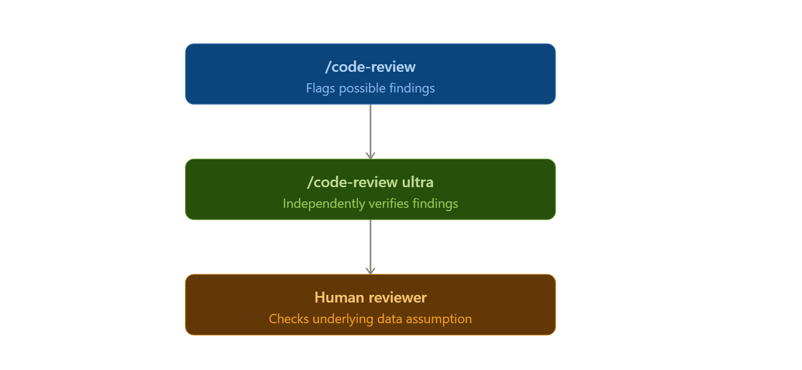
También hay que considerar el coste. GitHub Code Review actualmente promedia entre $15 y $25 por revisión, mientras que la revisión ultra suele costar entre $5 y $25 tras las ejecuciones gratuitas de Pro y Max. Los costes de GitHub Code Review son independientes del uso incluido en el plan, y Anthropic ofrece controles de gasto para organizaciones.
Si trabajas en solitario, /code-review local más un /code-review ultra ocasional es un buen punto de partida. Si estás en un plan Team o Enterprise y quieres que cada PR lleve una revisión automática, tiene más sentido GitHub Code Review.
Un flujo práctico de Claude Code Review
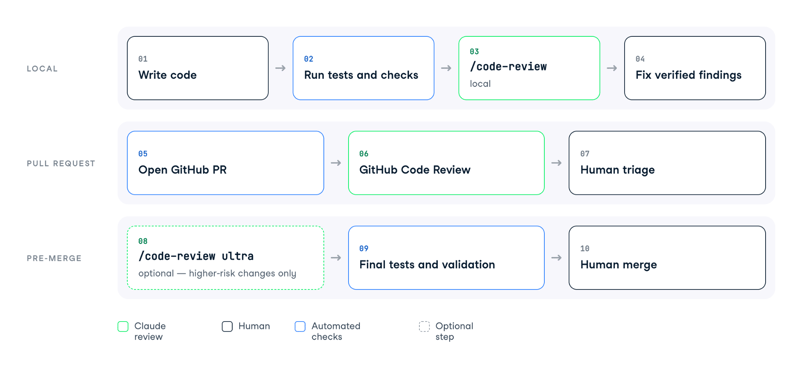
El flujo útil no es "ejecuta Claude antes de cada merge". Es una secuencia en la que cada revisión ocurre en un momento distinto del desarrollo, porque cada una cuesta distinto y detecta una clase diferente de problemas.
Este es el proceso que usaría para un cambio en producción:
Write code
↓
Run tests and data checks
↓
/code-review
↓
Fix verified findings
↓
Open GitHub PR
↓
GitHub Code Review
↓
Human triage
↓
/code-review ultra for higher-risk changes
↓
Final tests
↓
Human mergeLa revisión local detecta problemas cuando aún son baratos de arreglar. La revisión en GitHub da al equipo un registro compartido de hallazgos, mientras que la revisión ultra ofrece una segunda opinión de mayor esfuerzo antes de un merge con consecuencias.
Comprobaciones adicionales para data scientists
En trabajos de datos, añadiría 4 comprobaciones alrededor de Claude en lugar de esperar que el modelo haga toda la revisión:
- Comprueba los recuentos de filas y el grano del dataset antes y después de joins importantes
- Ejecuta tests unitarios o de integración alrededor de transformaciones y lógica de features.
- Comprueba fugas de información al crear features de ML.
- Valida métricas de negocio contra una query o dashboard de referencia.
Claude puede participar en las 4 actividades, pero el resultado esperado debe venir del código, los tests o los datos, no de la explicación de Claude.
Conclusiones
Claude Code Review funciona mejor cuando lo trato como a otra persona ingeniera en el hilo de revisión, no como un sello de aprobación automatizado.
El comando /code-review local te da una revisión rápida antes de que exista la PR. GitHub Code Review lleva hallazgos multiagente a la PR para organizaciones Team y Enterprise, mientras que /code-review ultra te brinda una revisión remota más profunda cuando el cambio merece otra pasada.
Yo empezaría poco a poco. Incorpora /code-review a tu flujo normal de ramas, escribe un REVIEW.md breve para tus revisiones en GitHub y prueba /code-review ultra en cambios donde un mal merge te pueda salir caro.
Para los conceptos del modelo subyacente, nuestro curso Introduction to Claude Models aporta el contexto general, mientras que GitHub Foundations e Intermediate GitHub Concepts cubren el flujo de trabajo de Git y GitHub sobre el que se apoya Code Review. Para más inspiración sobre cómo priorizar repos de GitHub con Claude, te recomendamos también nuestro tutorial del conector de Claude Code.
Preguntas frecuentes sobre Claude Code Review
¿Claude Code Review sustituye a una persona revisora de código?
No. Claude Code Review reporta hallazgos pero no aprueba ni bloquea una pull request, y su check en GitHub tiene una conclusión neutral. Aún hace falta que una persona decida si el hallazgo es correcto, especialmente en lógica de datos relacionada con grano, fugas de información, definiciones de negocio y suposiciones temporales.
¿Cuál es la diferencia entre /code-review y GitHub Code Review?
/code-review se ejecuta en local desde Claude Code y revisa tu rama, commits y cambios en el working tree sin requerir la app de GitHub Code Review. GitHub Code Review se ejecuta sobre pull requests de GitHub y publica los hallazgos como comentarios en línea, pero actualmente es una función en vista previa de investigación para Teams y Enterprise.
¿Cuál es la diferencia entre /code-review y /ultrareview?
/code-review está pensado para feedback rápido durante el desarrollo, mientras que /code-review ultra envía la revisión a un sandbox remoto donde varios agentes investigan y verifican bugs de forma independiente. Anthropic describe actualmente la revisión ultra (también accesible con el alias /ultrareview) como vista previa de investigación, con ejecuciones típicas de 5 a 10 minutos.
¿@claude review revisa automáticamente cada push futuro?
Ya no. Desde el cambio de comportamiento de julio de 2026 y vigente en septiembre de 2026, @claude review solicita una sola revisión, mientras que @claude review always solicita una revisión y suscribe la PR a revisiones futuras disparadas por push. @claude review once se comporta igual que el comando sin sufijo.
¿Cuándo debo usar REVIEW.md?
Si tu repositorio usa GitHub Code Review y tienes reglas específicas de revisión. Las reglas sobre joins, definiciones de métricas, archivos generados, secretos, tests y comprobaciones de calidad de datos son mejores candidatas para REVIEW.md que las instrucciones generales del proyecto, aunque el /code-review local actualmente sigue CLAUDE.md y no REVIEW.md.

Soy un científico de datos con experiencia en análisis espacial, aprendizaje automático y canalización de datos. He trabajado con GCP, Hadoop, Hive, Snowflake, Airflow y otros procesos de ciencia/ingeniería de datos.
Una pull request (PR) puede parecer impecable y aun así esconder un bug que distorsione métricas clave del negocio. Imagina que añades un script
weekly_revenue.pypara calcular los ingresos a partir de una tabla de pedidos. El código está limpio, los tests pasan y la PR solo tiene 40 líneas. Tu PR activa una revisión con Claude y detecta que la nueva agregación usa un join incorrecto con la tabla de clientes, duplicando pedidos de forma silenciosa y sobrestimando los ingresos semanales.Ese es el caso de uso que me interesa con Claude Code Review. Ejecuta varios agentes de revisión sobre una PR, examina el repositorio, verifica hallazgos frente al comportamiento real del código y reporta problemas como comentarios en línea en GitHub. Su foco principal es la corrección, la seguridad, los casos límite y las regresiones, más que las preferencias de formato o el contexto de negocio profundo.
En esta guía veremos la misma revisión de un pequeño fragmento de código de datos en Python en 3 lugares: un
/code-reviewlocal, GitHub Code Review y el/code-review ultraen la nube (quizá lo conozcas por su nombre original,/ultrareview). También dedicaré tiempo a decidir si el hallazgo de Claude es realmente correcto.Si eres nuevo en Claude Code, empieza con nuestro tutorial de Claude Code, que cubre la instalación y los flujos de trabajo básicos antes de entrar en la revisión. Otro recurso muy útil es nuestra guía de buenas prácticas de Claude Code.
Resumen
Claude Code Review es un revisor, no un filtro de merge. Su check en GitHub es neutral, así que una persona u otro proceso de CI sigue decidiendo si fusionar la PR.
Usa
/code-reviewantes de abrir una PR. Revisa tu rama local y cambios sin commitear sin necesidad de la app de GitHub.Usa GitHub Code Review cuando tu organización quiera que las revisiones queden adjuntas a las PR. Actualmente es una función en vista previa de investigación para Teams y Enterprise y cuesta de $15 a $25 por revisión de media.
Usa
/code-review ultrapara una pasada más profunda antes del merge. Envía la revisión a un sandbox remoto con varios agentes que reproducen y verifican de forma independiente los bugs reportados. Las cuentas Pro y Max reciben 3 ejecuciones gratis una sola vez; después, las revisiones se descuentan de los créditos de uso.La lógica de negocio sigue siendo tuya. Claude puede señalar joins sospechosos y filtros ausentes, pero tú debes saber si el esquema representa el nivel de detalle correcto del negocio.