
Course
Claude Code 101
3 hr
28.9K
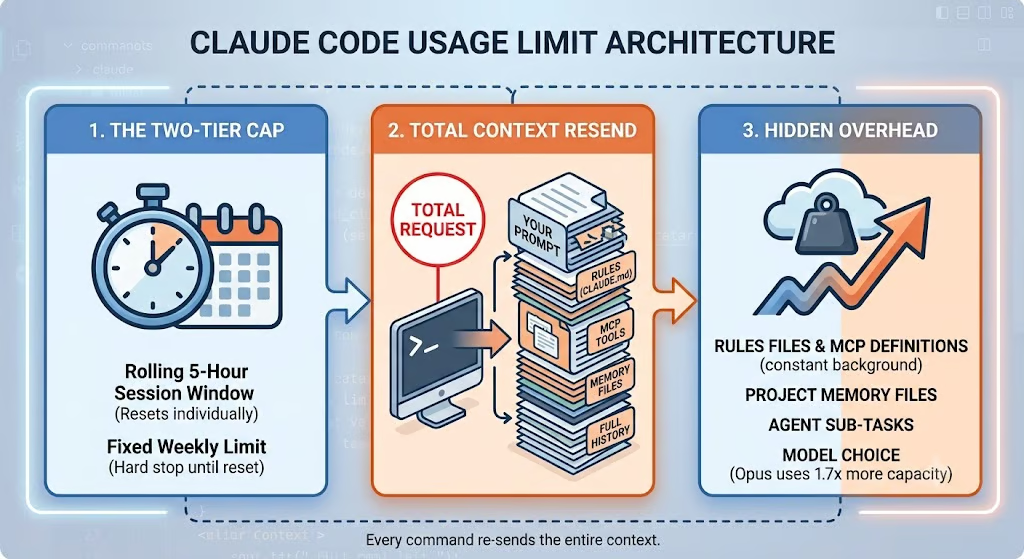
Claude Code usage is governed by two overlapping systems:
Hitting either one of these will cause you to run into rate limiting.
The most visible Claude Code rate limit is the 5-hour rolling window. Your window starts when you send your first prompt. Everything you do during the next five hours draws from the same usage pool. This pool is shared across Claude Code and Claude chat, meaning activity in one affects the other.
For example:
If you exhaust your available usage by 10:30 AM, access pauses until the window resets at 2:00 PM.
A common misconception is that starting a new conversation resets usage. It doesn't. The /clear command only starts a fresh conversation context. It does not restore usage allowance or reset the 5-hour timer.
In addition to timed session limits, Claude Code also enforces weekly limits. Even if you still have room remaining in your current session, reaching a weekly cap can temporarily prevent further usage until the weekly reset occurs.
Think of it this way: the 5-hour cap limits the timing of your usage, and the weekly limit caps your total volume of usage.
That means it's possible to have remaining capacity in your current 5-hour session but still be blocked because you've exhausted your weekly allowance. For most Pro users, this distinction is fairly straightforward. Max plans, however, introduce an additional layer of complexity.
Anthropic currently applies the following limit for Max plans:
This distinction matters because you might still have Sonnet capacity available even after exhausting your broader model allocation, or vice versa.
For example, imagine you spend most of your week using Sonnet for implementation work. You could exhaust your Sonnet-specific weekly allocation while still having remaining capacity in your overall weekly allowance. At that point, you may need to switch to another model, wait for the Sonnet reset, or upgrade your plan, depending on your remaining limits.
The reverse situation can also happen. If you've used a significant amount of Opus throughout the week, you might reach your overall weekly limit even though your Sonnet-specific allocation hasn't been fully consumed. Since the overall limit is the umbrella limit, reaching it prevents further usage regardless of how much Sonnet capacity remains.
For Sonnet requests to succeed, both conditions must be true:
Opus requests, on the other hand, only consume the overall weekly pool because there isn't a separate Opus-specific allowance. This is why the Usage page in Claude.ai is so important. It shows each weekly limit independently along with its reset time, making it much easier to understand which limit you're approaching before a long coding session.
One challenge when comparing plans is that Anthropic no longer publishes simple "prompt counts."
Instead, plans are described using relative capacity multipliers. These multipliers reflect the usage capacity you receive relative to the Pro plan baseline. It is not simple to get these exact numbers; some users track their usage as a percentage to get a decent idea of how many tokens they’ve used per percentage of capacity.
|
Plan |
Monthly Price |
Relative Capacity |
Weekly Limits |
Shared With Claude Chat |
|
Pro |
$20 |
Baseline |
Yes |
Yes |
|
Max 5x |
$100 |
5× Pro capacity |
Yes |
Yes |
|
Max 20x |
$200 |
20× Pro capacity |
Yes |
Yes |
|
Team |
Varies |
Higher shared allocation |
Yes |
Yes |
|
Enterprise |
Custom |
Organization-specific |
Yes |
Yes |
Anthropic expanded Claude Code capacity in May 2026 by doubling subscription usage limits and removing the peak-hour reductions that previously affected Pro and Max subscribers. Rather than publishing fixed prompt counts, Anthropic now expresses plan differences as relative capacity multipliers because actual usage depends on model choice, context size, and tool use.
Since then, Anthropic has occasionally adjusted weekly limits through temporary promotions. For example, during the Claude Fable 5 rollout, weekly Claude Code limits were increased by 50% for eligible subscribers. Because these promotional increases are temporary, readers should always verify the latest limits in the Claude Usage dashboard before planning long-running workloads.
The plan to separate interactive coding sessions from automated agent workloads brought some confusion in June 2026.
Before June 15, all Claude Code activity drew from the same subscription pool. Whether you were chatting interactively in the terminal, running a GitHub Action, or invoking claude -p inside a CI pipeline, everything competed for the same five-hour and weekly limits.
Anthropic had planned to begin splitting these workloads on June 15, 2026, but paused the change on launch day itself. This means that interactive usage and programmatic usage (Agent SDK, claude -p, GitHub Actions) still draw from the same subscription pool as before.
As of July 2026, there is no live separate Agent SDK credit, and no opt-in credit to claim.
Many developers focus on prompt usage and token tuning. The real culprit is often context. Every interaction contains significantly more information than the question you typed.
Claude Code loads instructions automatically from:
CLAUDE.md
Parent directory CLAUDE.md files
Imported @ references
.claude/rules/*.md files
All this context and additional instruction are repeatedly included in requests. This means a bloated rules file silently increases token consumption throughout the entire session. Anthropic recommends keeping individual CLAUDE.md files under approximately 200 lines.
For larger projects, consider splitting instructions into scoped rules that use paths frontmatter so they only load when relevant. If you want a deeper dive, our guide on writing the best CLAUDE.md file covers effective organization strategies.
Model Context Protocol (MCP) servers are another hidden source of overhead. Every connected MCP server injects tool schemas into Claude's context, even if you never use those tools.
Imagine:
That's 50 tool definitions included with every request. Disconnecting unused MCP servers is one of the easiest ways to reduce Claude Code token consumption.
One important caveat: avoid adding or removing MCP servers during an active session. Doing so invalidates prompt cache prefixes and can increase usage costs.
Since Claude Code v2.1.59, auto memory is enabled by default. Memory is global knowledge that Claude has saved during different sessions, which gives it more context. This could range from methods for pulling data from a database to the technical details that were implemented.
At startup, Claude loads content from MEMORY.md, up to:
For some workflows, this is useful. For others, it's simply extra context.
You can disable auto memory in a couple of ways. For a permanent kill switch that overrides all other settings (useful in CI pipelines and automated environments), set the environment variable in your shell:
export CLAUDE_CODE_DISABLE_AUTO_MEMORY=1Alternatively, add the following to your settings.json. Use ~/.claude/settings.json to disable it across all projects, or .claude/settings.json for a single project:
{ "autoMemoryEnabled": false }If you don't actively use memory files, disabling this feature can reduce baseline context size.
Conversation history grows continuously. Every tool result, file read, grep output, terminal command, and code search becomes part of the session context.
In my experience, repository exploration is often the biggest contributor. Claude might read tens of files just to find a single function. Those files remain available in context and continue contributing token overhead for future turns.
For automated workflows, claude -p --bare can reduce much of this fixed overhead by stripping away unnecessary session context. This can save a lot of the monthly Agent SDK credits that would otherwise be burned through Claude searching through files.
The best time to check your usage is before a long coding session. This way, you can be aware of how close you are to hitting your limits prior to actually coding.
Inside Claude Code typing /usage displays:
This is a great way to get an overview of how much quota you have remaining in your interactive session, so you can plan ahead. Trying to start a big complex task right before you hit your limit might not be the smartest, but simple tasks like file cleanup might be a good use of your remaining quota.
You can also run /status, which provides the following information:
Knowing your plan and active state helps you know about any potential limitations. It matters whether your usage is 5x or 20x the baseline.
The most complete view lives in Settings → Usage within Claude.ai.
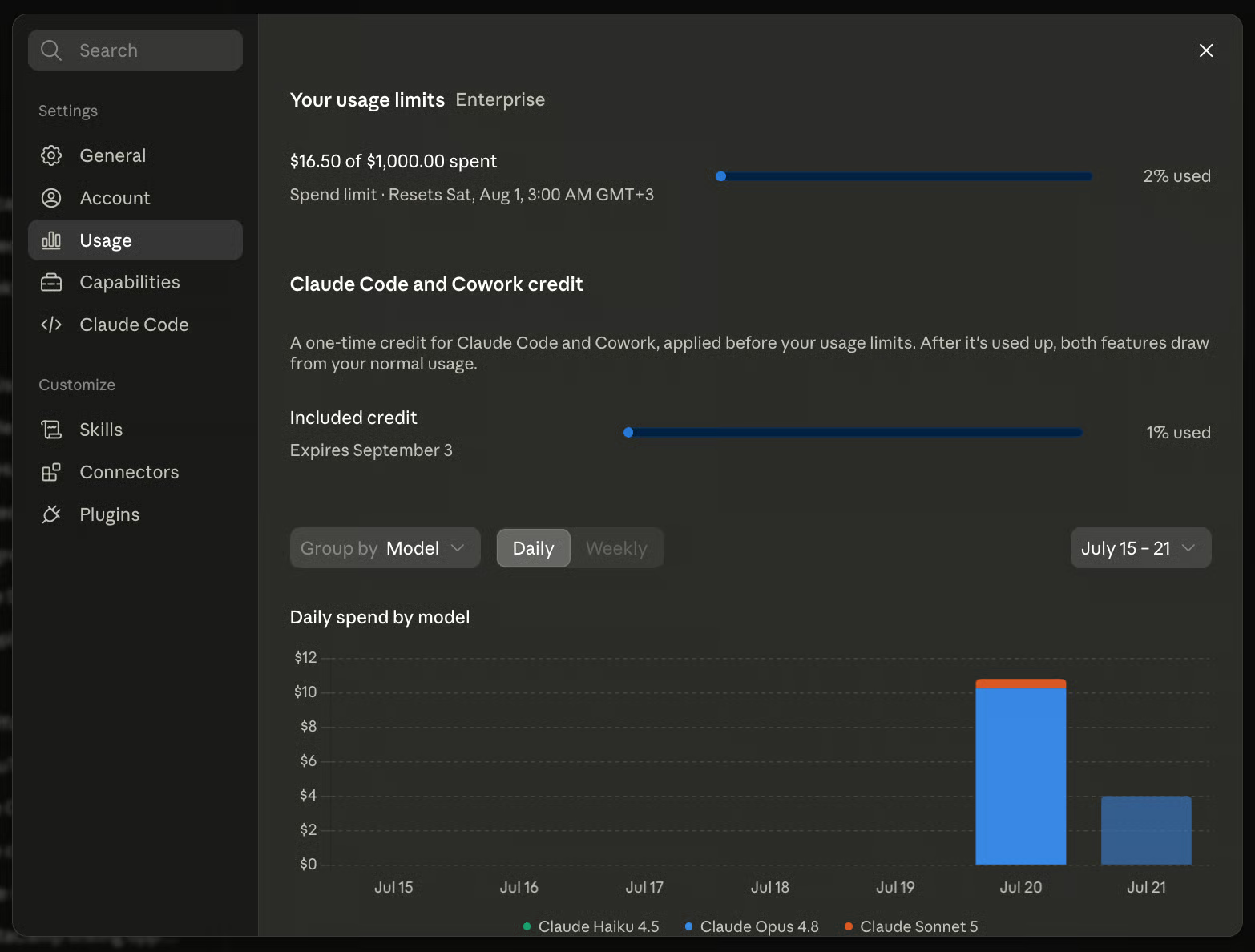
This dashboard combines:
Because multiple limits can exist simultaneously, this dashboard should be treated as the source of truth. A practical habit is checking usage before starting major refactoring work, long debugging sessions, or autonomous coding tasks.
Let’s talk about how we can extend our usage limits without upgrading plans. Sometimes, we can get way more efficient capacity just by reducing the overhead.
Aim for fewer than 200 lines per file to minimize the amount of context you’re sending and the confusion you’re causing the agent. You want to look for:
If instructions only matter for specific directories, use scoped rules with paths frontmatter, so that not all your rules are being used constantly and only within certain pathways. You can also have project-level CLAUDE.md files instead of a global one.
Keep only the MCP servers you're actively using. Every connected server adds schema overhead to every interaction. Treat your MCP configuration like browser tabs. If you're not using it right now, close it.
One good way to manage MCP servers is to install them at the project level when you know you only need certain MCPs for certain projects, rather than at the user level. This way, Claude isn’t trying to load them on every project or every session, only when you need them for a particular use case.
The /compact command summarizes conversation history and reduces future token costs. By reducing the amount of context growth processed with every turn, we reduce quota usage.
While it doesn’t restore the quota that’s already been consumed, it can be helpful if you use /compact before the session becomes overly large.
Not every task needs Opus or Fable. Sometimes, smaller models or clever usage of models can help with managing quota. You can often significantly increase your available capacity by reserving premium models for high-value work.
Here are some model optimization strategies:
But avoid switching models repeatedly within a session. Prompt caches are model-specific, so each switch forces the new model to reprocess the entire conversation history from scratch at full token cost, rather than reading it cheaply from cache. This can burn through your quota faster than staying put, even when you switch to a "cheaper" model.
If subscription quota limits become a bottleneck, the Claude API provides an alternative. API usage does not limit you to five-hour session windows or weekly subscription caps. Instead, you pay based on token consumption.
This model often makes sense for:
Something to watch out for is leaving the ANTHROPIC_API_KEY env var configured in your Claude Code shell. If that key is present in your environment, Claude Code may authenticate through the API rather than your subscription account.
This can result in unexpected API charges, since you are no longer using your subscription limits and are instead paying token costs. Whenever costs look unusual, checking authentication settings should be one of your first troubleshooting steps.
For current model pricing, always refer to Anthropic's official pricing documentation, as rates change frequently and vary by model.
Claude Code usage limits are easier to manage once you understand that they're not simply counting prompts.
The system combines:
The biggest surprise for many developers is that prompts are often a minority of total token usage. Large CLAUDE.md files, MCP tool definitions, auto memory, repository searches, and growing conversation history frequently consume more capacity than the questions themselves.
In practice, most people who hit limits unusually fast have a configuration problem rather than a capacity problem. Before upgrading plans, reduce overhead by cleaning up context rather than purchasing a larger quota.
To continue improving your workflow, I recommend our guide to Claude Code best practices and our Claude Code Hooks tutorial, which both cover techniques for making Claude Code more efficient and resilient during long development sessions.
Learn Using Claude Code with DataCamp!
Course
Course
Course
blog
Khalid Abdelaty
15 min
Tutorial
Khalid Abdelaty
13 min
Tutorial
Aashi Dutt
10 min
Tutorial
Aashi Dutt
12 min
Tutorial
François Aubry
12 min
Tutorial
Bexruz (Bex) Tuychiev
15 min


