लर्निंग पाथ
डीप लर्निंग में Python
18 घंटा
TRIBE v2 (TRImodal Brain Encoder) एक डीप लर्निंग मॉडल है जो नैसर्गिक उद्दीपनों को अनुमानित fMRI मस्तिष्क प्रतिक्रियाओं पर मैप करता है। दिए गए वीडियो क्लिप, ऑडियो फ़ाइल या टेक्स्ट ब्लॉक के लिए, मॉडल fsaverage5 कॉर्टिकल सतह के 20,484 वर्टिस के लिए 1 Hz पर, यानी प्रति सेकंड एक, अनुमानित BOLD सिग्नल आउटपुट करता है।
अनुमान औसत विषय के लिए हैं (किसी विशिष्ट व्यक्ति के मस्तिष्क के लिए नहीं), बल्कि 720 प्रतिभागियों और चार नैसर्गिक डेटासेट्स से TRIBE v2 ने जो कैनॉनिकल समूह‑औसत प्रतिक्रिया सीखी है, उसके लिए। मॉडल की ज़ीरो‑शॉट भविष्यवाणियाँ Human Connectome Project 7T डेटासेट पर सिंगल‑सब्जेक्ट fMRI रेकॉर्डिंग्स से बेहतर हैं, जो प्रशिक्षण सेट में सर्वोच्च सिग्नल गुणवत्ता वाला है।
|
गुण |
विवरण |
|
आउटपुट स्पेस |
fsaverage5 सतह पर 20,484 कॉर्टिकल वर्टिस और पूरे मस्तिष्क में लगभग 70,000 वॉक्सेल्स (कॉर्टेक्स + सबकॉर्टेक्स) पर भविष्यवाणियाँ |
|
टेम्पोरल रेज़ोल्यूशन |
1 Hz (fMRI TR फ़्रीक्वेंसी से मेल खाता है) |
|
इनपुट मॉडैलिटीज़ |
वीडियो (V-JEPA2-Giant), ऑडियो (Wav2Vec-BERT 2.0), टेक्स्ट (LLaMA 3.2-3B) |
|
एन्कोडर पैरामीटर्स |
~1B लर्नेबल पैरामीटर्स ट्रांसफ़ॉर्मर इंटीग्रेशन लेयर में |
|
ट्रेनिंग डेटा |
4 डेटासेट्स पर 720 विषयों के 1,115 घंटे के fMRI |
|
जनरलाइज़ेशन |
नए विषयों, कार्यों और भाषाओं पर ज़ीरो‑शॉट |
|
लाइसेंस |
CC-BY-NC 4.0 (अनुसंधान उपयोग, गैर‑व्यावसायिक) |
मॉडल को A foundation model of vision, audition, and language for in-silico neuroscience नामक पेपर से अनुकूलित किया गया है, जो दिखाता है कि TRIBE v2 चेहरों के लिए फ्यूज़ीफ़ॉर्म फेस एरिया, दृश्यों के लिए पैराहिप्पोकैम्पल प्लेस एरिया, जटिल सिंटैक्स के लिए ब्रॉका का क्षेत्र, और भाषण के लिए बाएँ‑लैटरलाइज़्ड लैंग्वेज नेटवर्क को, इनफ़रेंस समय पर किसी भी fMRI डेटा के बिना, पुनर्प्राप्त करता है।
हर इनफ़रेंस कॉल के लिए TRIBE v2 तीन चरणों में क्रम से चलता है:
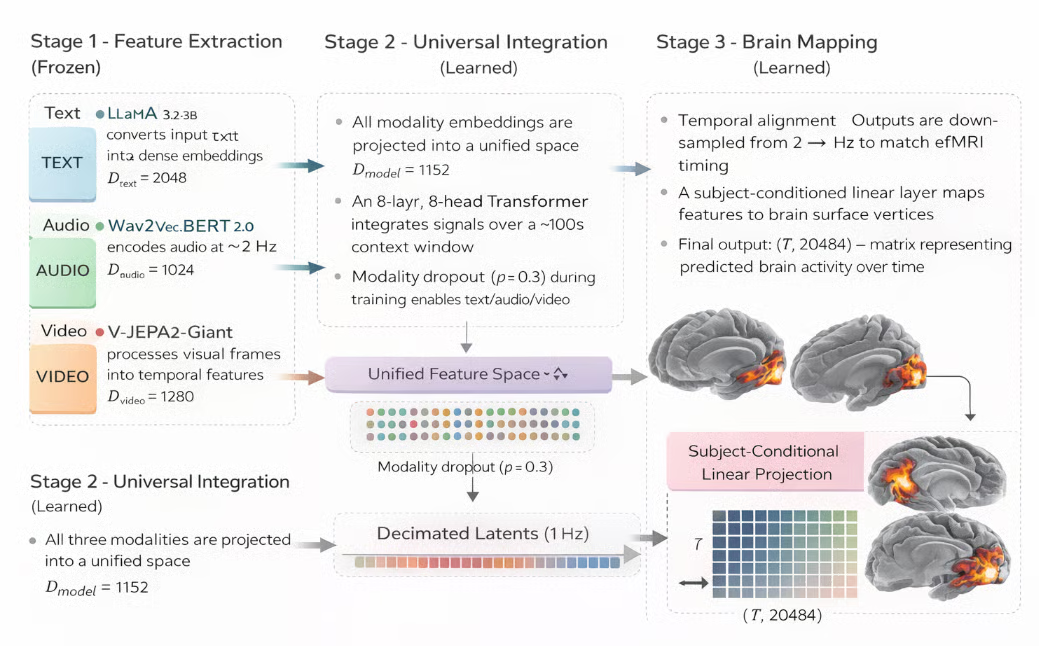
चित्र: TRIBE v2 मस्तिष्क गतिविधि भविष्यवाणी मॉडल (AI द्वारा जनित)
सबसे पहले, तीन अलग‑अलग प्री‑ट्रेन्ड एन्कोडर प्रत्येक इनपुट मॉडैलिटी को स्वतंत्र रूप से डेंस, समय‑संरेखित एम्बेडिंग्स में प्रोसेस करते हैं। इन एन्कोडर्स में से कोई भी ट्रेनिंग के दौरान अपडेट नहीं होता (फ्रोज़न), इसलिए TRIBE v2 उनकी रिप्रेज़ेंटेशंस ज्यों‑का‑त्यों ग्रहण करता है। प्रत्येक मॉडैलिटी के लिए फ़ीचर एक्सट्रैक्शन के कुछ मैट्रिक्स:
टेक्स्ट: LLaMA 3.2-3B इनपुट टेक्स्ट को डेंस एम्बेडिंग्स (D = 2048) में बदलता है
ऑडियो: Wav2Vec-BERT 2.0 ~2 Hz पर ऑडियो सिग्नल एन्कोड करता है (D = 1024)
वीडियो: V-JEPA2-Giant विज़ुअल फ़्रेम्स को टेम्पोरल फ़ीचर्स में प्रोसेस करता है (D = 1280)
तीनों एम्बेडिंग स्ट्रीम्स को एक साझा रिप्रेज़ेंटेशन में जोड़ा जाता है और समय के पार अटेंड करने वाले ट्रांसफ़ॉर्मर से प्रोसेस किया जाता है। यहीं TRIBE v2 के सीखे हुए वेट्स रहते हैं और यहीं क्रॉस‑मॉडल इंटरैक्शंस इस प्रकार कैप्चर होते हैं:
साझा रिप्रेज़ेंटेशन: सभी मॉडैलिटी एम्बेडिंग्स को एकीकृत स्पेस (D_model = 1152) में प्रोजेक्ट किया जाता है
ट्रांसफ़ॉर्मर फ़्यूज़न: 8‑लेयर, 8‑हेड ट्रांसफ़ॉर्मर ~100s के लंबे कॉन्टेक्स्ट विंडो पर सिग्नल्स को इंटीग्रेट करता है
मॉडैलिटी लचीलापन: मॉडैलिटी ड्रॉपआउट (p = 0.3) किसी भी सबसेट (टेक्स्ट/ऑडियो/वीडियो) के साथ इनफ़रेंस सक्षम करता है
फ़्यूज़्ड लैटेंट रिप्रेज़ेंटेशन को कॉर्टिकल सतह पर प्रोजेक्ट किया जाता है ताकि अंतिम fMRI भविष्यवाणी उत्पन्न हो सके। यह चरण अमूर्त मॉडल फ़ीचर्स को स्थानिक और कालगत रूप से सुलझी हुई मस्तिष्क गतिविधि के अनुमानों में बदलता है।
क्योंकि तीनों फ़ीचर एक्सट्रैक्टर्स ट्रेनिंग के दौरान फ्रोज़न रहते हैं, TRIBE v2 केवल उन प्रोजेक्शन लेयर्स और ट्रांसफ़ॉर्मर वेट्स को सीखता है जो उनके आउटपुट्स को इंटीग्रेट करते हैं। यह डिज़ाइन महत्वपूर्ण है क्योंकि इसका मतलब है कि मॉडल आउट‑ऑफ़‑डिस्ट्रिब्यूशन उद्दीपनों के प्रति मज़बूत रहता है—यह तीन बड़े‑पैमाने के प्री‑ट्रेन्ड मॉडलों की जनरलाइज़ेशन विरासत में लेता है, न कि सिर्फ fMRI डेटा पर एंड‑टू‑एंड ट्रेनिंग से।
ध्यान दें: एक प्रमुख ट्रेनिंग ट्रिक है मॉडैलिटी ड्रॉपआउट। ट्रेनिंग के दौरान, प्रत्येक मॉडैलिटी को 0.3 प्रायिकता के साथ स्वतंत्र रूप से ज़ीरो किया जाता है। यह मॉडल को किसी भी मॉडैलिटी सबसेट से सार्थक भविष्यवाणियाँ करने के लिए बाध्य करता है। अतः इनफ़रेंस समय पर, आप केवल ऑडियो या केवल टेक्स्ट पास कर सकते हैं और फिर भी उपयोगी कॉर्टिकल प्रेडिक्शन प्राप्त करेंगे।
इस सेक्शन में, हम एक चरणबद्ध वर्कफ़्लो बनाएँगे जो टेक्स्ट, ऑडियो या वीडियो इनपुट पर TRIBE v2 इनफ़रेंस चलाता है और भविष्यवाणी की गई कॉर्टिकल गतिविधि को इंटरएक्टिव 3D ब्रेन हीटमैप के रूप में विज़ुअलाइज़ करता है। हम एक तुलना प्रयोग भी चलाएँगे जो मूल पेपर के इन‑सिलिको पैरेडाइम को दोहराता है। अंत में, हम एक Gradio ऐप विकसित करेंगे जिसे कोई भी लाइव डेमो एक्सप्लोर करने के लिए उपयोग कर सकता है।
शुरू करने से पहले, अपना Colab रनटाइम कॉन्फ़िगर करें। ध्यान दें कि आप किसी भी अन्य सेवा का भी उपयोग कर सकते हैं जिसमें हाई RAM के साथ स्थिर A100 GPU हो।
TRIBE v2 एक साथ तीन फ्रोज़न एन्कोडर लोड करता है, जिनमें LLaMA 3.2-3B (~7 GB), V-JEPA2-Giant (~14 GB), और Wav2Vec-BERT 2.0 (~1 GB) शामिल हैं, साथ ही TRIBE ट्रांसफ़ॉर्मर वेट्स। कुल VRAM उपयोग 28–32 GB है।
ध्यान दें: model.predict() जब LLaMA लोड करता है तो T4 (16 GB) में मेमोरी ख़त्म हो जाएगी। बेहतर प्रदर्शन के लिए A100 (40 GB) या High RAM (80 GB) के साथ A100 का उपयोग करें।
कुछ भी इंस्टॉल करने से पहले अपना GPU जाँचें—निम्नलिखित चलाएँ:
import subprocess, sys
result = subprocess.run(
    ['nvidia-smi', '--query-gpu=name,memory.total',
     '--format=csv,noheader,nounits'],
    capture_output=True, text=True)
print(result.stdout.strip())
import torch
assert torch.cuda.is_available(), "No GPU detected"
props = torch.cuda.get_device_properties(0)
assert props.total_memory > 30e9, (
    f"Need ≥40 GB VRAM. Got {props.total_memory/1e9:.0f} GB. Switch to A100.")
print(f"GPU: {props.name} — {props.total_memory/1e9:.0f} GB")
subprocess.run() कॉल nvidia-smi को --query-gpu फ़्लैग के साथ चलाती है ताकि GPU का नाम और कुल VRAM निकाला जा सके। दो assert स्टेटमेंट्स जल्दी निकास का काम करते हैं; पहला पुष्टि करता है कि CUDA उपलब्ध है, और दूसरा सत्यापित करता है कि कुल VRAM 30 GB से अधिक है। यहाँ ज़ोर से फ़ेल होना model.predict() के भीतर 10 मिनट बाद एक रहस्यमय CUDA out‑of‑memory त्रुटि से चुपचाप फ़ेल होने से बेहतर है।
यदि आप इसे Google Colab पर नहीं चला रहे हैं तो इस स्टेप को छोड़ दें। यह पहला बग है जिसका आप सामना करेंगे क्योंकि Colab डिफ़ॉल्ट रूप से NumPy 2.x के साथ आता है। TRIBE v2 की कुछ आंतरिक डिपेंडेंसीज़, विशेष रूप से neuralset, को NumPy <2.1 के विरुद्ध संकलित किया गया था, जिसमें numpy._core.umath से _center सिंबल हटा दिया गया। परिणामस्वरूप जब आप import tribev2 करते हैं तो यह त्रुटि आती है:
ImportError
cannot import name '_center' from 'numpy._core.umath'
(/usr/local/lib/python3.12/dist-packages/numpy/_core/umath.py)
उपाय है कि tribev2 या इसकी किसी डिपेंडेंसी के इंस्टॉल होने से पहले NumPy को <2.1 पर पिन करें, फिर रनटाइम रीस्टार्ट करें। बस निम्नलिखित सेल चलाएँ, जो वर्तमान NumPy को अनइंस्टॉल करता है और 2.1 से कम वर्ज़न लगा देता है।
import subprocess, sys
print("Pinning NumPy to <2.1 (required for neuralset compatibility)...")
subprocess.run([sys.executable, '-m', 'pip', 'uninstall', '-y', 'numpy'])
subprocess.run([sys.executable, '-m', 'pip', 'install', '-q',
                'numpy>=1.26.4,<2.1.0'])
एक बार जब पर्यावरण और डिपेंडेंसीज़ अंतिम हो जाएँ, हम TRIBE v2 इंस्टॉल करने के साथ आगे बढ़ सकते हैं।
कर्नेल को अभी‑अभी रीस्टार्ट करने और पिन किए हुए NumPy के लोड होने के साथ, अब हम GitHub से tribev2 पैकेज को विज़ुअलाइज़ेशन और UI लाइब्रेरियों के साथ सुरक्षित रूप से इंस्टॉल कर सकते हैं।
import numpy as np
from packaging.version import Version
assert Version(np.__version__) < Version('2.1.0'), (
    f"NumPy is {np.__version__}. Run Step 2a and restart first.")
print(f"NumPy {np.__version__} Checked")
# Install tribev2 from GitHub
!pip install -q 'tribev2[plotting] @ git+https://github.com/facebookresearch/tribev2.git'
!pip install -q 'gradio>=4.19.0' 'nilearn>=0.10.3' 'plotly>=5.18.0'
tribev2[plotting] एक्स्ट्रा pyvista (3D विज़ुअलाइज़ेशन के लिए) और nilearn (न्यूरोइमेजिंग के लिए) को कोर पैकेज के साथ इंस्टॉल करता है। सीधे GitHub URL से इंस्टॉल करने से आप बिना लोकल रिपॉज़िटरी क्लोन किए नवीनतम कमिट प्राप्त करते हैं।
हम nilearn और gradio को अलग से इंस्टॉल करते हैं क्योंकि उनकी वर्ज़न सीमाएँ अधिक लचीली हैं और tribev2 की डिपेंडेंसी ग्राफ़ से स्वतंत्र रूप से रिज़ॉल्व होने से लाभ मिलता है।
टेक्स्ट एन्कोडर LLaMA 3.2-3B का उपयोग करता है, जो HuggingFace पर एक गेटेड मॉडल है। वेट्स डाउनलोड होने से पहले आपको Meta का लाइसेंस स्पष्ट रूप से स्वीकार करना होगा। यह एक बार करें:
HF टोकन सेट होने के बाद, अपने अकाउंट में लॉग इन करने के लिए निम्न कोड चलाएँ:
import os
# Load token from Colab Secrets
try:
    from google.colab import userdata
    os.environ['HF_TOKEN'] = userdata.get('HF_TOKEN')
    print("HF_TOKEN loaded from Colab Secrets")
except Exception:
    from huggingface_hub import login
    login()
प्राथमिक रास्ता google.colab.userdata.get() का उपयोग करता है, जो Colab के एन्क्रिप्टेड Secrets स्टोर से पढ़ता है, जिसे किसी साझा नोटबुक लिंक में अनजाने में उजागर नहीं किया जा सकता।
फ़ॉलबैक huggingface_hub.login() को कॉल करता है, जो इंटरएक्टिव रूप से प्रॉम्प्ट करता है और टोकन को टाइप करते समय मास्क कर देता है। दोनों रास्ते टोकन को os.environ['HF_TOKEN'] में लिखते हैं, जहाँ से HuggingFace Hub लाइब्रेरी गेटेड मॉडल वेट्स डाउनलोड करते समय इसे स्वतः उठा लेती है।
NumPy पिन करने, ऑथेंटिकेशन कॉन्फ़िगर करने और LLaMA कैश करने के बाद, अब हम HuggingFace से TRIBE v2 एन्कोडर चेकपॉइंट लोड कर सकते हैं। पहली बार में यह लगभग 1 GB डाउनलोड करता है और बाद में कैश से कुछ सेकंड लेता है।
from pathlib import Path
from tribev2.demo_utils import TribeModel
import torch
CACHE_DIR = Path('/content/tribe_cache')
CACHE_DIR.mkdir(exist_ok=True)
print('Loading TRIBE v2 (first run downloads ~1 GB)...')
model = TribeModel.from_pretrained(
    'facebook/tribev2',
    cache_folder=str(CACHE_DIR)
)
print('Model loaded')
if torch.cuda.is_available():
    used  = torch.cuda.memory_allocated() / 1e9
    total = torch.cuda.get_device_properties(0).total_memory / 1e9
    print(f'VRAM after load: {used:.1f} / {total:.1f} GB')
TribeModel.from_pretrained() HuggingFace पर facebook/tribev2 से TRIBE एन्कोडर चेकपॉइंट डाउनलोड करता है और उसे cache_folder में सहेजता है। इस चेकपॉइंट में ट्रांसफ़ॉर्मर इंटीग्रेशन वेट्स और सब्जेक्ट ब्लॉक होते हैं, लेकिन तीन फ़ीचर एक्सट्रैक्टर्स नहीं। वे तब अलग से पुल होते हैं जब model.predict() पहली बार किसी मॉडैलिटी का उपयोग करता है।
सिर्फ TRIBE एन्कोडर लोड करने के बाद लगभग 2–4 GB VRAM आवंटित होती है, जबकि शेष 24–28 GB model.predict() के V-JEPA2-Giant और LLaMA 3.2-3B को पहली बार लोड करने पर उपयोग होगी।
TRIBE मॉडल लोड होने के बाद, पहली बार टेक्स्ट इनपुट पर model.predict() कॉल करने से LLaMA 3.2-3B वेट्स (~6 GB) का लेज़ी डाउनलोड ट्रिगर होता है। HuggingFace Hub का डिफ़ॉल्ट टाइमआउट 10 सेकंड है, जिससे इनफ़रेंस के बीच में यह त्रुटि आती है:
ReadTimeout
The read operation timed out
Computing word embeddings:  0%|  | 0/9 [00:10<?, ?it/s]
इसे ठीक करने के लिए, एन्वायरनमेंट वेरिएबल्स में टाइमआउट बढ़ाएँ, फिर snapshot_download से LLaMA को पहले से डाउनलोड कर लें, ताकि आपको दिखाई देने वाली प्रोग्रेस मिले और रुकावट पर स्वतः रेज़्यूम हो, न कि predict() के अंदर कहीं चुपचाप विफलता।
import os
os.environ['HF_HUB_DOWNLOAD_TIMEOUT'] = '300'
os.environ['HF_HUB_HTTP_TIMEOUT']     = '300'
from huggingface_hub import snapshot_download
print("Pre-downloading LLaMA 3.2-3B (~6 GB)...")
print("Runs once — subsequent calls load from cache.\n")
snapshot_download(
    repo_id        = "meta-llama/Llama-3.2-3B",
    cache_dir      = "/content/tribe_cache/llama",
    ignore_patterns= ["*.bin"],
)
print("\n LLaMA 3.2-3B cached")
snapshot_download() पूरे रिपॉज़िटरी को लोकल कैश में HuggingFace के रेंज‑रिक्वेस्ट प्रोटोकॉल के साथ डाउनलोड करता है, यानी कनेक्शन बीच में छूटने पर यह स्वतः रेज़्यूम हो जाता है। ignore_patterns=["*.bin"] आर्ग्युमेंट पुराने PyTorch बाइनरी फ़ॉर्मेट को स्किप करता है और केवल safetensors फ़ाइलें डाउनलोड करता है, जिससे कुल डाउनलोड आकार ~40% घटता है।
वास्तविक इनफ़रेंस चलाने से पहले, हम विज़ुअलाइज़ेशन लेयर सेट करते हैं। ये हेल्पर फ़ंक्शंस कच्चे (T, 20484) प्रेडिक्शन एरे को nilearn का उपयोग कर इंटरएक्टिव 3D ब्रेन हीटमैप्स में बदलते हैं।
TRIBE v2 भविष्यवाणियाँ NumPy एरे (T, 20484) के रूप में लौटाता है, जहाँ T इनपुट के सेकंडों की संख्या है। पहले 10,242 वर्टिस बाएँ हेमिस्फेयर में होते हैं, और शेष 10,242 दाएँ हेमिस्फेयर में।
हम nilearn.plotting.view_surf का उपयोग करके प्रत्येक हेमिस्फेयर को इंटरएक्टिव WebGL सतह के रूप में रेंडर करते हैं। इन्फ़्लेटेड मेष सल्कल ज्योमेट्री को उजागर करता है जो अन्यथा तहों में छिप जाती, और सल्कल डेप्थ मैप हीटमैप के नीचे एनाटॉमिकल संदर्भ देता है।
fsaverage5 मेष वह मानक FreeSurfer कॉर्टिकल टेम्पलेट है जिसका TRIBE v2 अपने आउटपुट स्पेस के रूप में उपयोग करता है। हम इसे यहाँ एक बार डाउनलोड करते हैं ताकि बाद की सभी विज़ुअलाइज़ेशन कॉल्स नेटवर्क से पुनः फ़ेच किए बिना इसे संदर्भित कर सकें।
import numpy as np
from nilearn import datasets as nl_datasets
from nilearn.plotting import view_surf
from IPython.display import display, HTML
N_PER_HEMI = 10242   # fsaverage5: 10242 vertices per hemisphere
print('Fetching fsaverage5 mesh...')
fsavg = nl_datasets.fetch_surf_fsaverage(mesh='fsaverage5')
print('Mesh ready')
print('Keys:', [k for k in fsavg.keys() if k != 'description'])
fetch_surf_fsaverage(mesh='fsaverage5') nilearn के CDN से FreeSurfer fsaverage5 टेम्पलेट डाउनलोड करता है और कैश करता है। यह एक Bunch (डिक्शनरी) भी लौटाता है, जिसमें infl_left, infl_right, sulc_left, और sulc_right जैसी कीज़ होती हैं।
यह उप‑चरण तीन कोर फ़ंक्शंस परिभाषित करता है जिन पर इस ट्यूटोरियल की सारी विज़ुअलाइज़ेशन निर्भर करती है। split_hemis() वर्टेक्स एरे को पार्टिशन करता है, render_hemi() एक हेमिस्फेयर के लिए इंटरएक्टिव WebGL सतह बनाता है, और show_brain() दोनों को साथ‑साथ लेआउट में असेंबल करता है।
def split_hemis(v):
    n = v.shape[0]
    if n == 2 * N_PER_HEMI:
        return v[:N_PER_HEMI], v[N_PER_HEMI:]
    return v[:n//2], v[n//2:]
def render_hemi(pred_vec, hemi='left', title=''):
    lh, rh = split_hemis(pred_vec)
    data = lh if hemi == 'left' else rh
    vmax = max(float(np.percentile(np.abs(data), 99)), 1e-6)
    return view_surf(
        surf_mesh = fsavg[f'infl_{hemi}'],
        surf_map  = data,
        bg_map    = fsavg[f'sulc_{hemi}'],
        hemi      = hemi,
        threshold = '20%',
        cmap      = 'hot',
        black_bg  = True,
        vmax      = vmax,
        bg_on_data= True,
        colorbar  = True,
        title     = title,
    )
def show_brain(pred_vec, title='', t=None):
    sfx = f' — t={t}s' if t is not None else ''
    lv  = render_hemi(pred_vec, 'left',  f'{title} [Left]{sfx}')
    rv  = render_hemi(pred_vec, 'right', f'{title} [Right]{sfx}')
    html = (
        '<div style="display:flex;gap:10px;background:#000;'
        'border-radius:10px;">'
        f'<div style="flex:1">{lv.get_iframe(width="100%",height="460px")}</div>'
        f'<div style="flex:1">{rv.get_iframe(width="100%",height="460px")}</div>'
        '</div>'
    )
    display(HTML(html))
आइए प्रत्येक हेल्पर फ़ंक्शन की भूमिका संक्षेप में समझें:
split_hemis() फ़ंक्शन प्रेडिक्शन वेक्टर को इंडेक्स 10,242 पर स्लाइस करता है, जो FreeSurfer की परंपरा में fsaverage5 मेष के लिए मानक विभाजन बिंदु है। बायाँ हेमिस्फेयर इंडेक्स 0–10241 और दायाँ 10242–20483 लेता है। नीचे का फ़ॉलबैक ब्रांच उन एज केसों को सँभालता है जहाँ मॉडल गैर‑मानक वर्टेक्स काउंट लौटाता है।
render_hemi() के भीतर, vmax को वास्तविक अधिकतम के बजाय परिमाण मानों के 99वें परसेंटाइल के रूप में निकाला जाता है। यह किसी एक चरम वर्टेक्स को पूरी कलरमैप रेंज को संकुचित करने से रोकता है, जिससे पैटर्न स्पष्ट दिखे।
view_surf() एक SurfaceView ऑब्जेक्ट लौटाता है जिसमें 2.4 MB का स्वायत्त WebGL HTML होता है। get_iframe() इसे दिए गए आयामों के <iframe> में लपेटता है। अतः जब हम दो iframes को साथ‑साथ display(HTML(...)) से दिखाते हैं, तो बाएँ/दाएँ हेमिस्फेयर का स्प्लिट लेआउट बनता है।
मॉडल लोड होने और विज़ुअलाइज़ेशन हेल्पर्स तैयार होने के साथ, अब हम पहला वास्तविक इनफ़रेंस चला सकते हैं।
TRIBE v2 का इनफ़रेंस दो‑कदम प्रक्रिया है। पहले, model.get_events_dataframe() इनपुट से समय‑संरेखित इवेंट्स निकालता है—टेक्स्ट से वर्ड टाइमिंग्स, ऑडियो से 2 Hz पर Wav2Vec एम्बेडिंग्स, या वीडियो फ़्रेम्स से 2 Hz पर V-JEPA2 एम्बेडिंग्स।
बना हुआ इवेंट्स DataFrame फिर model.predict() को पास किया जाता है, जो ट्रांसफ़ॉर्मर और सब्जेक्ट ब्लॉक चलाकर अंतिम कॉर्टिकल भविष्यवाणियाँ पैदा करता है।
import tempfile, os
SAMPLE_TEXT = '''
The brain processes language through a distributed network in the left hemisphere.
Broca's area coordinates syntactic structure, while Wernicke's area handles semantics.
Together they form the language circuit activated when reading or hearing speech.
'''
tmp = tempfile.NamedTemporaryFile(delete=False, suffix='.txt', mode='w')
try:
    tmp.write(SAMPLE_TEXT.strip())
    tmp.flush()
    os.fsync(tmp.fileno())
    tmp.close()
    events = model.get_events_dataframe(text_path=tmp.name)
finally:
    if os.path.exists(tmp.name):
        os.unlink(tmp.name)
print(f'Events: {events.shape}')
print(events[['type', 'start', 'duration']].head(8))
print('\nRunning model.predict()...')
preds, segments = model.predict(events=events)
preds = np.asarray(preds)
print(f'Prediction shape: {preds.shape}')
print(f'  T = {preds.shape[0]}s   (1 Hz fMRI frequency)')
print(f' V = {preds.shape[1]} vertices (fsaverage5 cortical surface)')tmp.write(), tmp.flush(), os.fsync(tmp.fileno()), tmp.close() का यह अनुक्रम एक सूक्ष्म बग के लिए निर्णायक फ़िक्स है। यदि आप फ़ाइल बंद होने से पहले with ब्लॉक के अंदर get_events_dataframe() कॉल करते हैं, तो Python का आंतरिक राइट बफ़र अभी OS तक सिंक न हुआ हो सकता है, और tribev2 खाली फ़ाइल पढ़कर ValueError उठाएगा। os.fsync() यह सुनिश्चित करता है कि tribev2 द्वारा पाथ खोलने से पहले OS पेज कैश डिस्क पर फ़्लश हो।
model.predict() (preds, segments) का ट्यूपल लौटाता है। preds एरे का आकार (T, 20484) होता है—इनपुट के प्रत्येक सेकंड के लिए सभी 20,484 fsaverage5 वर्टिस पर एक कॉर्टिकल भविष्यवाणी। इसे np.asarray() में लपेटने से यह सुनिश्चित होता है कि यह साधारण NumPy एरे हो, चाहे मॉडल आंतरिक रूप से कोई भी प्रकार लौटाए। preds मिलने के बाद, आप किसी भी टाइमस्टेप पर कॉर्टिकल प्रतिक्रिया विज़ुअलाइज़ कर सकते हैं:
T = preds.shape[0]
print(f'Timesteps: 0 to {T-1}')
T_SHOW = min(5, T - 1)
show_brain(preds[T_SHOW], title='Language stimulus', t=T_SHOW)
हम डिफ़ॉल्ट रूप से t=5 दिखाते हैं क्योंकि BOLD (Blood‑Oxygen‑Level‑Dependent) सिग्नल में हेमोडायनमिक देरी होती है, और न्यूरल गतिविधि के प्रति वैस्कुलर प्रतिक्रिया उद्दीपन शुरू होने के लगभग 5–6 सेकंड बाद शिखर पर होती है। t=0 पर विज़ुअलाइज़ करने पर, चाहे उद्दीपन कुछ भी हो, लगभग शून्य सक्रियता दिखती है, क्योंकि मस्तिष्क की वैस्कुलर प्रतिक्रिया अभी बनी नहीं है। min(5, T-1) गार्ड तब इंडेक्स त्रुटि से बचाता है जब इनपुट 6 से कम टाइमस्टेप पैदा करता है।
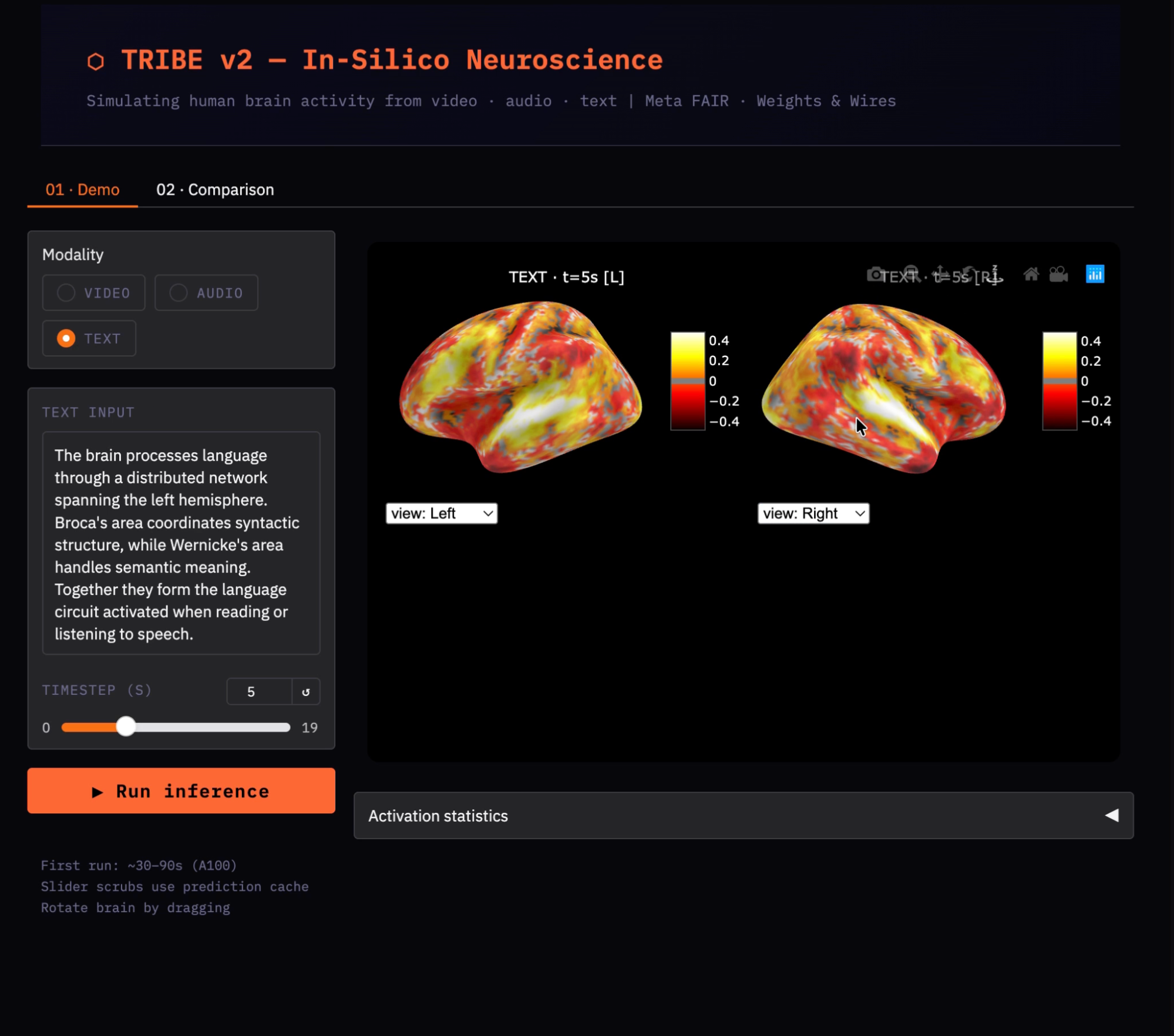
एक एकल सक्रियता मैप बताता है कि कौन‑से क्षेत्र सक्रिय हैं, पर यह नहीं बताता कि एक उद्दीपन दूसरे से कैसे भिन्न है। इस स्टेप में हम दो इनपुट्स को मॉडल से गुज़ारते हैं और एक कॉन्ट्रास्ट मैप (A − B) निकालते हैं ताकि भाषा सामग्री और दृश्य/स्थानिक सामग्री के बीच क्षेत्र‑विशिष्ट अंतर पृथक हों।
प्रत्येक कंडीशन के लिए write → flush → close → infer पैटर्न दोहराने के बजाय, हम इसे एक ही text_to_preds() फ़ंक्शन में लपेटते हैं। यह सुनिश्चित करता है कि किसी कंडीशन में भी महत्वपूर्ण फ़ाइल‑फ़्लशिंग स्टेप्स भूल न जाएँ।
TEXT_A = '''
She spoke slowly and clearly, her voice filling the quiet room.
Every sentence carried meaning, and each word was chosen with care.
Language connects us, the professor said, bridging minds across time.
'''
TEXT_B = '''
The canyon walls rose steeply, layers of red and orange sandstone.
A hawk circled overhead, its wings barely moving in the thermal current.
Shadows shifted as the sun tracked its arc across the open desert sky.
'''
def text_to_preds(text):
    tmp = tempfile.NamedTemporaryFile(
        delete=False, suffix='.txt', mode='w', encoding='utf-8')
    try:
        tmp.write(text.strip())
        tmp.flush()
        os.fsync(tmp.fileno())
        tmp.close()
        evts = model.get_events_dataframe(text_path=tmp.name)
        p, _ = model.predict(events=evts)
        return np.asarray(p)
    finally:
        if os.path.exists(tmp.name):
            os.unlink(tmp.name)
print('Condition A: language content...')
preds_a = text_to_preds(TEXT_A)
print('Condition B: visual/spatial content...')
preds_b = text_to_preds(TEXT_B)
हम दो टेक्स्ट अंशों का उपयोग करते हैं जिनकी सेमांटिक सामग्री भिन्न है—अपेक्षित निष्कर्ष यह कि भाषा सामग्री बाएँ हेमिस्फेयर के टेम्पोरल कॉर्टेक्स को अधिक ड्राइव करती है, जबकि दृश्य/स्थानिक सामग्री ऑक्सिपिटल और पश्च पेरिएटल कॉर्टेक्स को अधिक रिक्रूट करती है।
फ़ंक्शन text_to_preds() पूरी पाइपलाइन को एक पुन: प्रयोज्य फ़ंक्शन में समेटता है, स्टेप 8 के समान सुरक्षित पैटर्न लागू करता है ताकि tribev2 पढ़ने से पहले टेम्प फ़ाइल हमेशा पूरी तरह फ़्लश हो। encoding='utf-8' आर्ग्युमेंट प्लेटफ़ॉर्म‑निर्भर एन्कोडिंग समस्याओं से बचने के लिए स्पष्ट है।
अब जब दोनों कंडीशंस की भविष्यवाणी हो चुकी है, तो हम प्रत्येक को अलग‑अलग विज़ुअलाइज़ करते हैं और फिर वर्टेक्स‑बाय‑वर्टेक्स घटाकर कॉन्ट्रास्ट मैप बनाते हैं।
T_shared = min(preds_a.shape[0], preds_b.shape[0])
t_show   = min(5, T_shared - 1)
print('\n[A] Language content:')
show_brain(preds_a[t_show], title='Condition A: Language', t=t_show)
print('\n[B] Visual/spatial content:')
show_brain(preds_b[t_show], title='Condition B: Visual', t=t_show)
print('\n[A − B] Contrast: Language > Visual')
show_brain(preds_a[t_show] - preds_b[t_show], title='Contrast A − B', t=t_show)
कॉन्ट्रास्ट मैप preds_a[t_show] - preds_b[t_show] प्रत्यक्ष वर्टेक्स‑वाइज़ घटाव है—धनात्मक मान दर्शाते हैं कि कंडीशन A अधिक सक्रिय करती है, और ऋणात्मक मान दर्शाते हैं कि कंडीशन B अधिक सक्रिय करती है।
क्योंकि दोनों कंडीशंस एक ही टेक्स्ट‑प्रोसेसिंग पथ साझा करती हैं, रॉ मैप्स व्यापक रूप से समान दिखेंगे। यह कॉन्ट्रास्ट मैप भाषा और दृश्य सामग्री के बीच डोमेन‑विशिष्ट अंतरों को हाइलाइट करता है।
ब्रेन हीटमैप्स किसी एक क्षण की स्थानिक पैटर्न दिखाते हैं। यह स्टेप समयीय परिप्रेक्ष्य जोड़ता है—जैसे सभी टाइमस्टेप्स में दोनों कंडीशंस की समग्र सक्रियता कैसे तुलना करती है, और वे सबसे अधिक कब भिन्न होती हैं?
import matplotlib.pyplot as plt
diff_norms = [
    np.linalg.norm(preds_a[i] - preds_b[i])
    for i in range(T_shared)
]
fig, (ax1, ax2) = plt.subplots(1, 2, figsize=(14, 3.5))
ax1.plot(np.abs(preds_a).mean(axis=1)[:T_shared],
         color='#e74c3c', linewidth=2, label='A: Language')
ax1.plot(np.abs(preds_b).mean(axis=1)[:T_shared],
         color='#3498db', linewidth=2, label='B: Visual')
ax1.set_title('Mean cortical activation over time')
ax1.set_xlabel('Time (s)'); ax1.legend(); ax1.grid(True, alpha=0.3)
ax2.plot(diff_norms, color='#f39c12', linewidth=2)
ax2.fill_between(range(T_shared), diff_norms, alpha=0.2, color='#f39c12')
ax2.set_title('||A − B|| difference over time')
ax2.set_xlabel('Time (s)'); ax2.grid(True, alpha=0.3)
plt.tight_layout(); plt.show()
बाएँ प्लॉट np.abs(preds).mean(axis=1) को ट्रैक करता है, जो प्रत्येक सेकंड पर सभी 20,484 वर्टिस में संकुचित औसत परिमाण सक्रियता है। यह दिखाता है कि प्रत्येक कंडीशन कॉर्टेक्स को कितनी मज़बूती से एंगेज करती है और प्रतिक्रिया कब शिखर पर होती है। परिमाण लेना महत्वपूर्ण है क्योंकि अनुमानित BOLD मान ऋणात्मक भी हो सकते हैं (डीएक्टिवेशन), और हमें साइन किए हुए औसत से अधिक परिमाण चाहिए।
दाएँ प्लॉट प्रत्येक टाइमस्टेप पर अंतर वेक्टर का L2 नॉर्म, np.linalg.norm(preds_a[i] - preds_b[i]), ट्रैक करता है। t=5–7s के आसपास इस कर्व में पीक हेमोडायनमिक देरी के अनुरूप है—दोनों कंडीशंस को BOLD प्रतिक्रिया बनने के लिए समय चाहिए, उसके बाद वे अलग होती हैं। fill_between() शेडिंग ऑनसेट और पीक को स्पष्ट बनाती है।
यह अंतिम स्टेप इनफ़रेंस और विज़ुअलाइज़ेशन लॉजिक को एक साफ़ UI, टाइमस्टेप स्लाइडर और A/B तुलना टैब वाले Gradio ऐप में लपेटता है।
import gradio as gr
_pred_cache = {}
def _infer(mod, vid, aud, txt):
    """Run inference and cache the result. Subsequent calls return cached array."""
    key = (mod, vid, aud, hash(txt or ''))
    if key not in _pred_cache:
        if mod == 'video':
            evts = model.get_events_dataframe(video_path=vid)
        elif mod == 'audio':
            evts = model.get_events_dataframe(audio_path=aud)
        else:
            tmp = tempfile.NamedTemporaryFile(delete=False, suffix='.txt', mode='w')
            tmp.write((txt or '').strip()); tmp.flush()
            os.fsync(tmp.fileno()); tmp.close()
            evts = model.get_events_dataframe(text_path=tmp.name)
            os.unlink(tmp.name)
        p, _ = model.predict(events=evts)
        _pred_cache[key] = np.asarray(p)
    return _pred_cache[key]
demo.launch(
    share      = True,
    debug      = False,
    server_name= "0.0.0.0",
)
यहाँ Gradio UI और इनफ़रेंस पाइपलाइन कैसे साथ आती है:
_infer() फ़ंक्शन केंद्रीय इनफ़रेंस लेयर की तरह काम करता है—तीनों मॉडैलिटीज़ (वीडियो, ऑडियो और टेक्स्ट) को इनपुट तैयार करके, model.predict() कॉल करके, और अनुमानित मस्तिष्क गतिविधि लौटाकर सँभालता है।
एक प्रेडिक्शन कैश उपयोग होता है जो मॉडैलिटी, इनपुट पाथ्स और टेक्स्ट के हैश से बने की पर परिणाम सहेजता है। इससे समान इनपुट्स पर बार‑बार मॉडल इनफ़रेंस ट्रिगर नहीं होता।
कैशिंग निर्णायक है क्योंकि स्लाइडर जैसे UI कॉम्पोनेंट्स बार‑बार कॉलबैक ट्रिगर करते हैं। बिना कैश के, हर इंटरेक्शन इनफ़रेंस फिर से चलाएगा (लगभग ~60 सेकंड तक), जबकि कैशिंग के साथ पहली रन के बाद परिणाम तुरंत मिलते हैं।
इंटरफ़ेस में दो टैब होते हैं—एक सिंगल‑इनपुट मोड में टाइमस्टेप स्लाइडर के साथ समय के साथ ब्रेन एक्टिविटी एक्सप्लोर करने के लिए, और एक तुलना मोड जो दो इनपुट चलाता है और उनके अंतर को कॉन्ट्रास्ट हीटमैप के रूप में विज़ुअलाइज़ करता है।
अंततः, demo.launch() को share=True के साथ कॉन्फ़िगर किया गया है ताकि एक सार्वजनिक URL बने और server_name="0.0.0.0" बाहरी एक्सेस की अनुमति दे—ऐप को तैनात करना आसान बनाता है।
विभिन्न इनपुट्स (वीडियो, ऑडियो और टेक्स्ट) पर डेमो चलाने के बाद, कुछ सुसंगत पैटर्न उभरते हैं जो TRIBE v2 के आउटपुट की व्याख्या में सहायक हैं। डेमो से कुछ अंतर्दृष्टियाँ:
मॉडल 100% सटीकता का दावा नहीं करता और इसकी अपनी सीमाएँ हैं:
TRIBE v2 एक शक्तिशाली अनुसंधान उपकरण है, पर इसकी महत्वपूर्ण बाधाएँ हैं जो इसके आउटपुट्स की व्याख्या को प्रभावित करती हैं। किसी भी वैज्ञानिक या नैदानिक निष्कर्ष पर पहुँचने से पहले इन सीमाओं को समझना आवश्यक है।
इस ट्यूटोरियल में, हमने Google Colab A100 पर एक कामकाजी TRIBE v2 पाइपलाइन बनाई—दो ठोस बग्स (NumPy 2.x वर्ज़न कॉन्फ्लिक्ट और HuggingFace डाउनलोड टाइमआउट) सुलझाने से लेकर वास्तविक कॉर्टिकल भविष्यवाणियाँ चलाने तक, उन्हें इंटरएक्टिव 3D ब्रेन हीटमैप्स के रूप में विज़ुअलाइज़ करने और पेपर के इन‑सिलिको पैरेडाइम को दोहराने वाले तुलना प्रयोग तक।
इस ट्यूटोरियल से चार सबसे महत्वपूर्ण इंजीनियरिंग सीखें:
tribev2 इंस्टॉल करने से पहले NumPy को <2.1 पर पिन करें और रनटाइम रीस्टार्ट करें
HF_HUB_DOWNLOAD_TIMEOUT=300 सेट करें और model.predict() कॉल से पहले snapshot_download के साथ LLaMA को प्री‑डाउनलोड करें
हमेशा write → flush() → fsync() → close() करें, फिर मॉडल को टेम्प फ़ाइल का पाथ दें
भविष्यवाणियों को डिक्शनरी में कैश करें, ताकि UI स्लाइडर इंटरेक्शन पर इनफ़रेंस फिर से न चले।
यहाँ से दो स्वाभाविक एक्सटेंशंस उभरते हैं। पहला है समृद्ध उद्दीपन: वास्तविक मूवी क्लिप्स या 30–60 सेकंड तक के पॉडकास्ट सेगमेंट्स छोटे टेक्स्ट अंशों की तुलना में कहीं अधिक स्पष्ट समयीय डायनेमिक्स और स्थानिक पैटर्न पैदा करते हैं।
दूसरा है व्यक्तिगत फ़ाइन‑ट्यूनिंग: किसी विशिष्ट विषय के ~1 घंटे के fMRI डेटा के साथ, TRIBE v2 का सब्जेक्ट ब्लॉक एक इपोच में फ़ाइन‑ट्यून होकर वैयक्तिकृत भविष्यवाणियाँ दे सकता है, जो पेपर के परिणामों के अनुसार समूह‑औसत मॉडल से 2–4x बेहतर हैं।
पूरा नोटबुक TRIBE v2 GitHub रिपॉज़िटरी पर उपलब्ध है। पेपर पूरा पढ़ने योग्य है, विशेषकर सेक्शन 2.5 (इन‑सिलिको विज़न प्रयोग) और सेक्शन 2.8 (मल्टिमॉडल इंटीग्रेशन अंतर्दृष्टि), जो दिखाते हैं कि न्यूरोसाइंस अनुसंधान के लिए इस तरह के टूलिंग से क्या संभव होता है।
डीप लर्निंग कोर्सेज़
लर्निंग पाथ
कोर्स
कोर्स