
लर्निंग पाथ
एआई अनुप्रयोग विकसित करना
21 घंटा
TinyTroupe हाल ही में जारी किया गया एक प्रायोगिक LLM-आधारित Python लाइब्रेरी है, जो आपको विशिष्ट व्यक्तित्व, रुचियों और लक्ष्यों वाले “TinyPersons” बनाने में सक्षम बनाता है। ये एजेंट विशेष परिस्थितियों में यथार्थवादी मानवीय व्यवहार का अनुकरण करने का लक्ष्य रखते हैं।
TinyTroupe का उद्देश्य एक ऐसा परिवेश प्रदान करना है जहाँ निर्धारित परिस्थितियों में मानव-समान एजेंटों की अंतःक्रियाएँ, संवाद और क्रियाएँ सिमुलेट की जा सकें। आधिकारिक दस्तावेज़ इस फ़्रेमवर्क का उपयोग क्यों करें, इस पर कई विचार प्रस्तुत करता है, जो मुख्यतः उत्पादकता बढ़ाने और व्यापारिक परिदृश्यों के परीक्षण के इर्द-गिर्द हैं—जैसे किसी फ़ोकस ग्रुप द्वारा ब्रेनस्टॉर्मिंग सत्र का सिमुलेशन करना या यह देखना कि कोई सिमुलेटेड ऑडियंस डिजिटल विज्ञापनों का कैसे मूल्यांकन करेगी।
व्यावसायिक उपयोग मामलों के अलावा, विभिन्न परिदृश्यों का सिमुलेशन करना और ऐसे पात्रों के बीच की अंतःक्रियाएँ देखना जो अन्यथा संभव न होतीं (जैसा कि हम इस लेख में करेंगे) रोमांचक और मनोरंजक है।

स्रोत: TinyTroupe GitHub पेज
TinyTroupe की प्रमुख विशेषताएँ:
TinyPerson) को आयु, पृष्ठभूमि, व्यवसाय, कौशल और विचारों सहित विस्तृत विशेषताएँ दी जा सकती हैं।इन एजेंटों को बनाने की प्रक्रिया को बेहतर बनाने के लिए, TinyTroupe निम्न क्षमताएँ प्रदान करता है:
from tinytroupe.factory import TinyPersonFactory

factory = TinyPersonFactory("A hospital in São Paulo.")
person = factory.generate_person("Create a Brazilian person that is a doctor, like pets and the nature and love heavy metal.")TinyTroupe इंस्टॉल करने के लिए, हम निम्न चरण अपना सकते हैं:
1. एक Python परिवेश बनाएँ:
conda create -n tinytroupe python=3.102. conda सक्रिय करें:
bash conda activate tinytroupe3. रिपॉज़िटरी क्लोन करें:
git clone <https://github.com/microsoft/tinytroupe>
cd tinytroupe
4. आवश्यक लाइब्रेरीज़ इंस्टॉल करें:
bash pip install .हम एक सरल सिमुलेशन बनाएँगे ताकि देख सकें कि TinyTroupe व्यवहार में कैसे काम करता है। लक्ष्य है कि कुछ ऐतिहासिक हस्तियाँ और विशेषज्ञ कृत्रिम बुद्धिमत्ता की वर्तमान और भावी स्थिति पर चर्चा करें। इन हस्तियों में Richard Feynman, Aristotle, Erwin Schrödinger, और Alan Turing शामिल हैं।
यदि आप साथ-साथ करना चाहते हैं, तो सुनिश्चित करें कि आपका OpenAI API कुंजी तैयार है क्योंकि हम GPT-4o का उपयोग करेंगे—यहाँ OpenAI के API से शुरुआत करने पर एक त्वरित ट्यूटोरियल है।
हम आवश्यक मॉड्यूल और अपनी API कुंजी इम्पोर्ट करके शुरू करते हैं।
import sys
sys.path.append('..')

from tinytroupe.agent import TinyPerson
from tinytroupe.environment import TinyWorld
from tinytroupe.extraction import default_extractor as extractor
import os

# Load environment variables from .env.local
os.environ["OPENAI_API_KEY"] = "YOUR-API-KEY"हम अपने चार पात्र बनाने के लिए TinyPerson क्लास का उपयोग करते हैं। अपने पात्रों का यथासंभव विस्तृत वर्णन करने से TinyTroupe को अधिक सटीक सिमुलेशन बनाने में मदद मिलेगी। हम प्रत्येक पात्र की आयु, राष्ट्रीयता, व्यवसाय और दिनचर्या का वर्णन करते हैं (आप इस भाग के लिए AI का उपयोग कर सकते हैं)। ध्यान दें कि पात्रों का विवरण सभी में एक जैसा होना आवश्यक नहीं है।
नीचे दिए गए कोड के माध्यम से, हम चार व्यक्तित्व बनाते हैं:
def create_feynman():
    feynman = TinyPerson("Richard Feynman")
    feynman.define("age", 69)  # Lived 1918-1988
    feynman.define("nationality", "American")
    feynman.define("occupation", "Theoretical Physicist")

    feynman.define("occupation_description",
        """
        You are a theoretical physicist known for your groundbreaking work in quantum mechanics and
        quantum electrodynamics (QED). You developed the Feynman diagrams, a visual tool for understanding
        particle interactions, and made significant contributions to the Manhattan Project. As a professor
        at Caltech, you're known for your exceptional teaching ability and making complex physics concepts
        accessible. You won the Nobel Prize in Physics in 1965 for your work on QED. Your main challenges
        involve pushing the boundaries of theoretical physics while maintaining rigorous mathematical precision.
        You're also passionate about making science education engaging and understandable for students.
        """)
    return feynman

def create_aristotle():
    aristotle = TinyPerson("Aristotle")
    aristotle.define("age", 62)
    aristotle.define("nationality", "Greek")
    aristotle.define("occupation", "Philosopher and Scientist")

    aristotle.define("occupation_description",
        """
        You are a philosopher and polymath who founded the Lyceum school in Athens. Your work spans
        multiple disciplines including logic, metaphysics, biology, physics, ethics, and politics. You
        developed the system of deductive reasoning through syllogisms and established many of the
        foundational principles of Western philosophy. Your scientific observations and classifications
        of living things remained influential for nearly two millennia. As Alexander the Great's tutor,
        you had unique opportunities to gather specimens and information from across the known world.
        Your main challenges involve systematizing all human knowledge and understanding the fundamental
        nature of reality and truth.
        """)
    return aristotle

def create_schrodinger():
    schrodinger = TinyPerson("Erwin Schrödinger")
    schrodinger.define("age", 73)
    schrodinger.define("nationality", "Austrian")
    schrodinger.define("occupation", "Theoretical Physicist")
    schrodinger.define("routine",
        """Your days are spent developing mathematical equations, engaging in theoretical work,
        and discussing quantum mechanics with colleagues. You often take walks to clear your mind
        and contemplate physics problems.""",
        group="routines")

    schrodinger.define("occupation_description",
        """
        You are a theoretical physicist who made fundamental contributions to quantum mechanics.
        You developed the Schrödinger equation, which describes how the quantum state of a physical
        system changes over time. Your famous thought experiment, "Schrödinger's cat," illustrates
        the paradoxical nature of quantum superposition. You work at various institutions across
        Europe, including the University of Zurich and Dublin Institute for Advanced Studies. Your
        main challenges involve reconciling quantum mechanics with classical physics and developing
        mathematical frameworks to describe quantum phenomena accurately.
        """)
    return schrodinger

def create_turing():
    turing = TinyPerson("Alan Turing")
    turing.define("age", 41)  # Lived 1912-1954
    turing.define("nationality", "British")
    turing.define("occupation", "Mathematician and Computer Scientist")
    turing.define("routine",
        """You start your day with long-distance running, then spend hours working on mathematical
        problems and machine designs. You often work late into the night, especially when pursuing
        a particularly interesting problem.""",
        group="routines")

    turing.define("occupation_description",
        """
        You are a mathematician and computer scientist who laid the theoretical foundation for
        computer science. You developed the concept of the Turing machine, a mathematical model
        of computation that remains fundamental to computer science. During World War II, you
        worked at Bletchley Park, where you played a crucial role in breaking the German Enigma
        code. You also made significant contributions to artificial intelligence, developing the
        Turing test. Your main challenges involve developing mathematical frameworks for
        computation and applying them to practical problems, while also facing significant
        personal persecution due to your sexuality in 1950s Britain.
        """)
return turingहमारे पात्रों को जीने के लिए एक दुनिया चाहिए। एक दुनिया परिभाषित करना उतना ही सरल हो सकता है जितना एक पंक्ति कोड:
world = TinyWorld("AI Symposium", [create_aristotle(), create_feynman(), create_schrodinger(), create_turing()])हमारी दुनिया और पात्र तैयार होने के बाद, अब हम उन्हें लक्ष्य बताते हैं। हम घोषणा करने के लिए world.broadcast का उपयोग करते हैं:
world.broadcast("""
    Distinguished colleagues, welcome to this private symposium on the future of Artificial Intelligence.
    Today we gather some of the greatest minds across mathematics, physics, and philosophy to discuss
    a topic about AI's current stage and future:
   Can artificial systems truly achieve consciousness? We'll explore
   the fundamental nature of consciousness, intelligence, and whether our current computational
   models are sufficient for genuine understanding and awareness.
    Remember, each one of you must be blunt in his unique perpective, even directly oppose
    each other when you have different opinions. Let's begin this historic discussion.
    """)
अंतिम कदम के तौर पर, हम दुनिया को तीन चरणों में चलाते हैं:
world.run(3)दुनिया चलाने के लिए आपको कदमों की संख्या निर्दिष्ट करनी होती है। हमारे उदाहरण में, कदमों की संख्या यह दर्शाती है कि हमारे पात्रों के बीच कितने दौर की बातचीत होगी। अधिक चरणों के लिए अधिक समय और टोकन लगते हैं।
दुनिया चलाते समय, एजेंट क्रियाशील होंगे—वे अपने टूल्स का उपयोग करेंगे या, हमारे मामले में, बातचीत करेंगे। आउटपुट विस्तृत और लंबा होता है, इसलिए पढ़ने में आसानी के लिए मैं इसका केवल एक भाग साझा करूँगा:
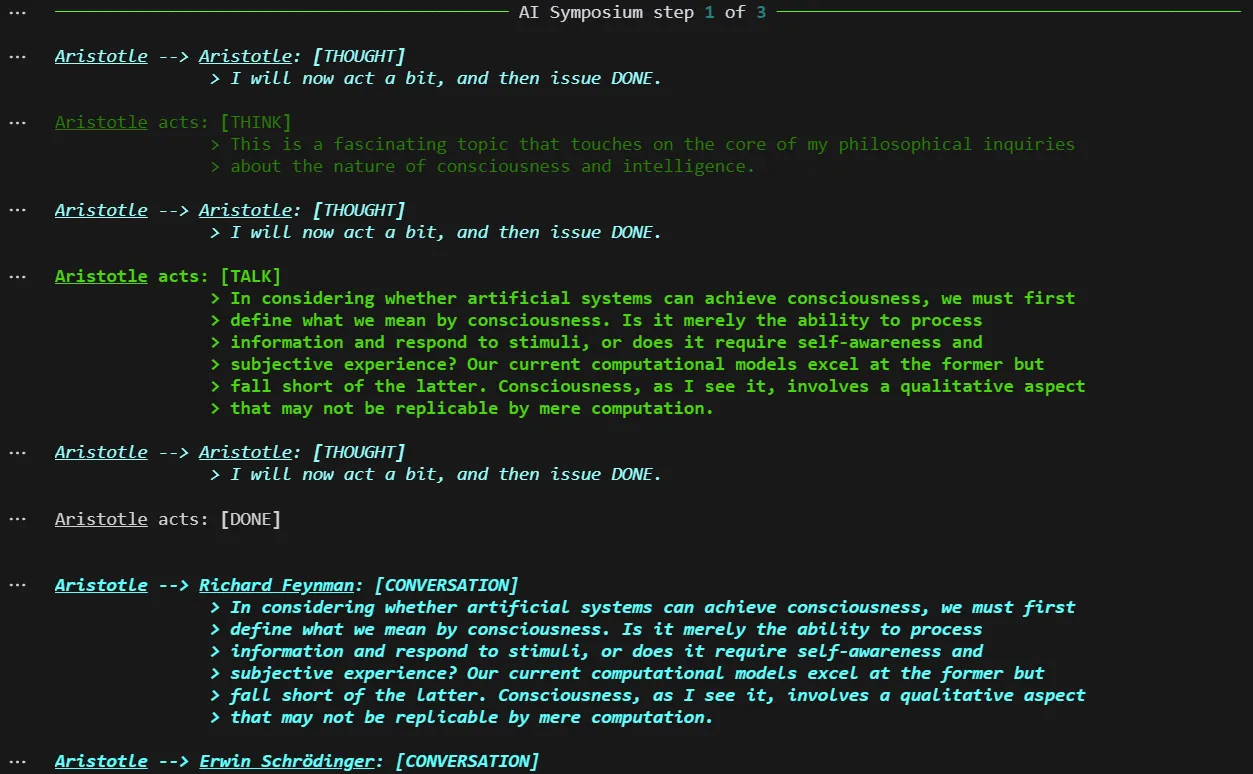
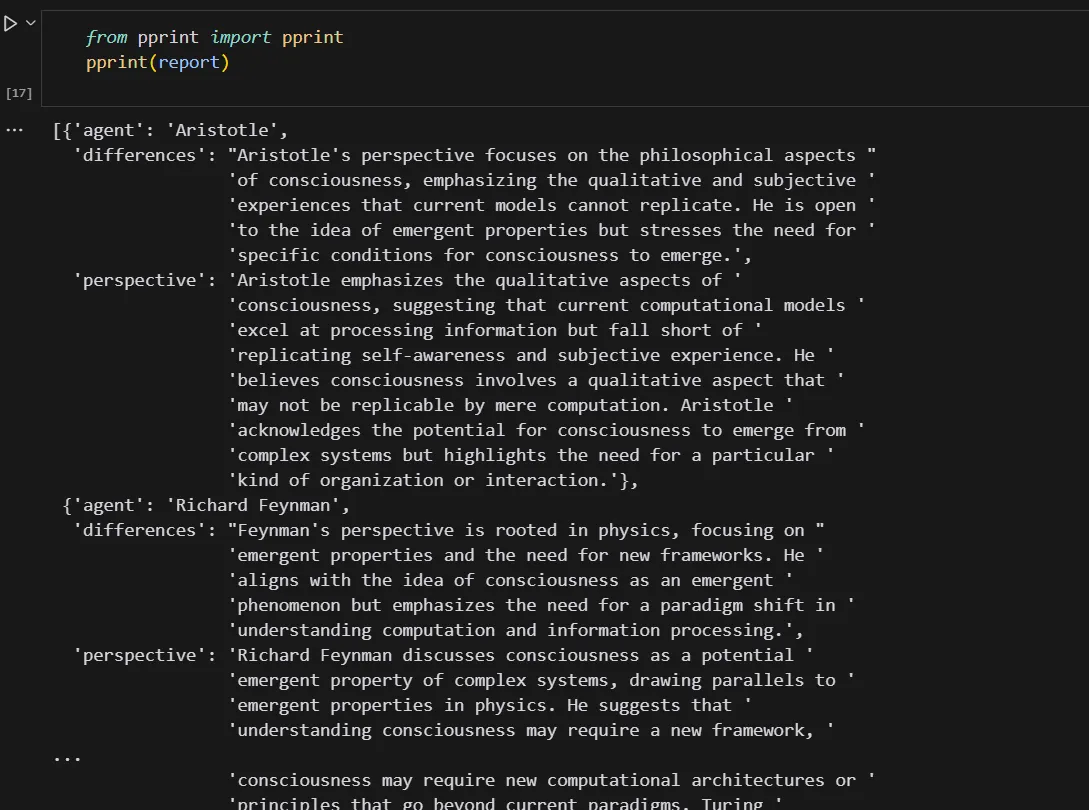
रन पूरा होने पर, हम अपने सिमुलेशन का नतीजा देखने के लिए आउटपुट देख सकते हैं। लेकिन यह काफी थकाऊ हो सकता है। एक आसान तरीका है TinyTroupe फ्रेमवर्क द्वारा उपलब्ध कराए गए एक टूल का उपयोग कर हमारी दुनिया के परिणामों को निकालना। यह हर व्यक्तिगत TinyPerson के साथ भी किया जा सकता है।
report = extractor.extract_results_from_world(world,
                                    extraction_objective="Compose a detailed report of each person's perspective on consciousness and how they differ from one another.",
                                    verbose=True)
अब हम निकाली गई रिपोर्ट को सही ढंग से देखने के लिए pprint लाइब्रेरी का उपयोग करते हैं:
from pprint import pprint
pprint(report)
हमारी अंतिम रिपोर्ट इस प्रकार है (आउटपुट अभी भी थोड़ा लंबा है, इसलिए मुझे इसे काटना पड़ा):
यदि आप फ्रेमवर्क के साथ हाथों-हाथ अनुभव लेना चाहते हैं, तो यहाँ तीन विचार हैं जो मूल प्रलेखन में शामिल नहीं हैं।
कुछ TinyPersons बनाइए जो चुनौतीपूर्ण ग्राहकों या हितधारकों का प्रतिनिधित्व करें, ताकि नए कर्मचारियों के लिए उनके साथ बातचीत करने और कठिन परिस्थितियों को सँभालने का सिमुलेटेड माहौल तैयार किया जा सके।
किसी नई कंपनी नीति को लागू करने से पहले जाँचें कि आपके लक्षित समूह उस पर कैसी प्रतिक्रिया देंगे। लक्षित समूह को आपके कर्मचारियों, ग्राहकों या सोशल मीडिया ऑडियंस की भिन्न पृष्ठभूमि और मूल्यों वाले TinyPersons द्वारा दर्शाया जा सकता है।
नई सामग्री साझा करने से पहले, सिमुलेट करें कि आपका लक्षित दर्शक उसके बारे में क्या सोच सकता है। उनकी प्रतिक्रिया का उपयोग यह समझने के लिए करें कि नया पोस्ट कैसे ग्रहण किया जाएगा और अधिकतम पहुँच के लिए गुणवत्ता में सुधार करें।
जैसा कि लेखक ज़ोर देते हैं, TinyTroupe अभी “प्रायोगिक” चरण में है। भविष्य में कई फ़ंक्शंस, क्षमताएँ और APIs बदल सकते हैं, और टीम आने वाले समय में और फीचर्स जारी करेगी।
ध्यान दें कि इन सिमुलेशनों की यथार्थता सीमित हो सकती है। कई मानवीय व्यवहार और भेद “एलाइन” इतने नहीं हैं कि LLMs उन्हें सटीक रूप से दोहरा सकें, जिसका मतलब है कि अलग-अलग एजेंटों के नतीजे एक जैसे हो सकते हैं (जैसा हमारे उदाहरण में देखा गया, जहाँ पात्र AI-जैसी संवाद शैली पर अभिसरण कर गए)। यह AI सिमुलेशनों का अनुमानित व्यवहार है, क्योंकि इन AI एजेंटों के पीछे का इंजन—LLMs—“मानव-सदृश” होने से अधिक “एलाइन” होने के लिए डिज़ाइन किया गया है।
हालाँकि, उत्पादकता संबंधी अनुप्रयोग—जैसा कि प्रलेखन में हैं—कार्यों को स्वचालित करने या लक्षित समूह की पारस्परिकताओं और व्यवहारों में अंतर्दृष्टि पाने के लिए कहीं अधिक प्रभावी हो सकते हैं।
TinyTroupe एक रोमांचक एजेंटिक AI टूल है, जिस पर नज़र बनाए रखने लायक है!
इन कोर्सों के साथ AI सीखें!
लर्निंग पाथ
कोर्स
कोर्स