
Our biggest-ever sale. 60% off AI & data skills
Buy Now

Öva och håll koll på dina framsteg.
Fortsätt med GoogleGenom att fortsätta godkänner du vår användarvillkor, våra integritetspolicy och att dina uppgifter lagras i USA.Let’s start with the basic interview questions about the key concepts in Snowflake.
Snowflake is a cloud-based data warehousing platform that separates compute from storage, allowing users to scale their processing resources and data storage independently. This process is more cost-effective and produces high performance.
One of the main features is auto-scaling, which allows resources to be adjusted based on the demand of workloads and supports multi-cloud environments. Another essential feature is the platform approach to data sharing, ensuring that access to data across the organization is secure and easy, without any data movement.
Snowflake’s architecture is its unique selling point. It has been designed for the cloud, with features such as multi-cluster, shared data architecture, and amazing storage capabilities. The Snowflake architecture is divided into three layers:
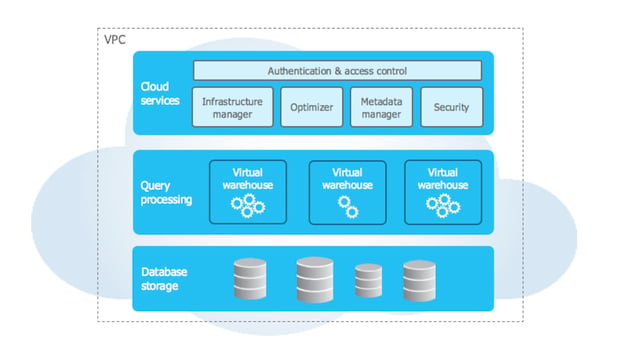
High-level architecture of Snowflake. Image source: Snowflake documentation.
Micro-partitions are a fundamental aspect of Snowflake’s approach to data storage. They are compressed, managed, and columnar storage units that Snowflake uses to store data that range from 50MB to 150MB. The columnar format allows for efficient data compression and encoding schemes.
Micro-partitions' ability to compress data allows for large volumes of data to be efficiently managed as it reduces the physical storage space required, also reducing storage costs. Query performance also improves due to data pruning, which consists of relevant micro-partitions being accessed. This selective access approach is highly beneficial for data retrieval and data analytics.
Micro-partitions are managed automatically by Snowflake, which eliminates the need for manual input of data partitioning or indexing, ensuring optimal data storage and also cutting the cost of administrative labor.
Virtual warehouses are responsible for performing all the data processing tasks. Therefore, they have a profound impact on the scalability, performance, and cost management of data processing tasks.
Their dynamic scalability features allow users to scale up or down their compute resources based on their workload requirements. When your data processing task demand increases, you can provision additional compute resources without any impact on your ongoing operations.
Each virtual warehouse does not impact another, allowing for high performance and consistency when coming to specific data processing tasks such as time-sensitive analytics. When handling data processing tasks, you pay for the compute resources you use, providing cost management features in comparison to traditional data warehousing solutions.
The following table compares virtual warehouses to traditional compute resources:
| Feature | Virtual warehouses (Snowflake) | Traditional compute resources |
|---|---|---|
| Scalability | Auto-scaling, multi-cluster; can adjust size up or down based on workload demand without impacting operations. | Typically fixed capacity, requiring manual upgrades for scaling. |
| Isolation | Isolates compute clusters, so concurrent workloads run independently. | Resource sharing often results in competition between tasks. |
| Cost management | Pay only for the active time and scale up or down as needed, minimizing idle costs. | Fixed costs regardless of workload changes, potentially higher idle costs. |
| Performance optimization | Independent scaling allows separate tuning for specific tasks, maintaining high performance for time-sensitive queries. | Limited tuning options, as scaling affects all workloads equally. |
ANSI SQL stands for American National Standards Institute Structured Query Language and is a standard language for relational database management systems.
This means that Snowflake users can use familiar SQL syntax and operations for querying data, such as JOINs, making this a great feature for SQL-experienced users to transition to Snowflake. Another feature of the compatibility with ANSI SQL is the seamless integration of various data types, allowing users to query their data without the need to transform or load it into a predefined schema first.
If you are looking to get certified in using the Snowflake platform, have a look at Which is the Best Snowflake Certification For 2026?
Snowflake’s Time Travel feature allows users to access and query historical data for a specified period, typically up to 90 days, depending on the account type. This feature is useful for data recovery, audit purposes, and data comparison. For example, users can restore accidentally deleted tables or review previous data states.
Time Travel minimizes the need for external backups and simplifies data versioning, providing built-in data recovery and retrospective analysis capabilities.
Snowflake’s data sharing feature allows organizations to share live data securely and in real time with external users or partners without creating additional data copies. This is achieved through Snowflake’s Secure Data Sharing functionality, which uses Snowflake’s multi-cluster, shared data architecture to provide direct access to data.
The advantages of data sharing include:
Zero-copy cloning is a feature in Snowflake that allows users to create a copy of a database, schema, or table without duplicating the underlying storage. When a zero-copy clone is created, it points to the original data and only stores changes made to the cloned data, resulting in significant storage savings. This feature is valuable for creating development and testing environments or generating historical snapshots without increasing storage costs. It enhances data management efficiency by allowing quick, cost-effective data duplication for various use cases.
Feeling confident about the basic interview questions? Let’s move over to some more advanced questions.
Snowflake aims to ensure the highest level of data protection and security for its users with the implementation of its always-on-encryption process. This is the automatic encryption of data without the need to set or configure users ensuring that all types of data from raw to meta data are encrypted using a strong encryption algorithm. Its encryption is managed through a hierarchical key model in which a master key encrypts the other keys and Snowflake rotates these keys to enhance security.
When transferring data, Snowflake uses the TLS (Transport Layer Security) process to encrypt data transiting between Snowflake and clients. This end-to-end encryption ensures that the data is always encrypted, regardless of where it is in the life cycle, reducing the risk of data leaks and breaches.
The Extract, Transform, Load (ETL) and Extract, Load, Transform (ELT) processes are widely used in the Snowflake platform due to their architecture and capabilities. The platform caters to a wide range of data integration and transformation needs for users, allowing organizations to optimize their data processing workflow more effectively.
In ETL, the data is extracted from a variety of sources and then transformed into the user's desired format before it is loaded into the data warehouse. Snowflake is a powerful SQL engine that allows complex transformations using SQL queries after the data is loaded.
In ELT, the data is loaded into the data warehouse first in its raw form and then transformed in the warehouse. Snowflake's feature of separating its computing and storage capabilities allows for the raw data to be loaded into the data warehouse quickly. Transformations of the data are performed using virtual warehouses. Snowflake also supports semi-structured data formats such as JSON and XML making it an easy transition for raw data to be loaded into the data warehouse without having to transform it.
Snowflake supports a range of ETL tools, allowing organizations to use the tools they prefer when it comes to data integration and transformation tasks. The following tools can be used on Snowflake’s cloud data platform to process and move data into Snowflake for further analysis:
Snowpipe is a continuous data ingestion service provided by Snowflake that can load files within minutes. With Snowpipe you can load data into small groups (micro-batches), allowing users all over the organization to access the data within minutes, making the data easier to analyze.
Users specify the cloud storage path where data files will be placed and also the target table in Snowflake, where the data will be loaded. This is an automated data loading process in which Snowpipe automatically detects when new files have been added to the storage path. Once these new files have been detected, Snowpipe ingests the data into Snowflake and loads it into the specified table.
This near-real-time process ensures the data is available as soon as possible. Snowpipe operates on a serverless architecture, meaning that it automatically manages the compute resources specifically required for the data ingestion process.
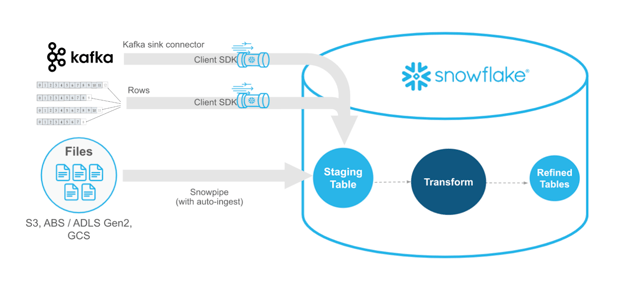
High-level architecture of Snowpipe Streaming. Image source: Snowflake documentation.
Snowflake has been designed as a data warehousing solution that is optimized for Online Analytical Processing (OLAP) workloads. OLAP is a software technology that is used to analyze business data from different points of view. Making Snowflake gold-standard as the design of the architecture along with its features has been catered to support large-scale data tasks, complex queries, and more. Features of Snowflake’s approach to OLAP include the separation of compute and storage, massively parallel processing (MPP), and the support of different data structures to enable efficient analytical processing.
You also have Online Transaction Processing (OLTP) workloads, which Snowflake is not traditionally designed for. OLTP workloads are when a database receives both requests for data and multiple changes to this data from several users over time, and these modifications are called transactions. These are characterized as high volumes of short transactions such as inserts and updates. These features focus more on operational databases than data warehousing solutions such as Snowflake.
In Snowflake, clustering organizes data within micro-partitions to optimize query performance. By default, Snowflake handles clustering automatically, but for large tables with a natural order (e.g., time-series data), manual clustering may be beneficial.
Manual clustering involves creating a cluster key on columns frequently used in queries. This enables more efficient data pruning, as Snowflake can skip irrelevant partitions during queries. However, manual clustering should only be used when query performance benefits outweigh the cost of re-clustering large datasets, as it can impact storage and compute costs.
Fail-safe is a data recovery feature in Snowflake designed to restore data that has been deleted or modified beyond the Time Travel retention period. While Time Travel allows users to access historical data within a set timeframe (up to 90 days), fail-safe is a seven-day period after Time Travel during which Snowflake retains data solely for disaster recovery.
Unlike Time Travel, users cannot access fail-safe data directly as intervention from Snowflake Support is required.
Fail-safe provides an additional layer of data protection but incurs higher costs and should be used as a last resort after Time Travel.
Materialized views in Snowflake store the results of a query physically, allowing faster retrieval for complex or frequently used queries. Unlike standard views, which are re-computed each time they’re queried, materialized views maintain the result set until the data is updated. This can significantly improve query performance, especially for analytics workloads involving large tables.
Use cases for materialized views include reporting dashboards and aggregated query results where data changes infrequently. However, materialized views require periodic maintenance and can increase storage costs, so they are best suited for static or slowly changing datasets.
Here's a table that covers use cases for materialized views vs. standard views in Snowflake:
| Aspect | Standard views | Materialized views |
|---|---|---|
| Data storage | No physical storage; views are computed at query time | Stores query results physically, improving query speed |
| Performance | Suitable for smaller, infrequent queries | Ideal for large or complex datasets with frequent queries |
| Maintenance cost | Minimal, as they don’t need storage | Higher due to storage and periodic refresh requirements |
| Use cases | Ad-hoc queries and data exploration | Reporting dashboards, pre-computed aggregates |
Based on Snowflake’s unique architecture, you must know the ins and outs of it and test your knowledge.
Shared-disk and shared-nothing architectures are two different approaches to database and data warehouse design. The main difference between the two is how they manage the storage and process of data across multiple nodes in a system.
In a shared-disk architecture, the nodes in the system have access to disk storage, which means that any node within that system can read from or write to any disk in this system. This allows for high availability as the failure of a single node does not cause data loss or unavailability. It also allows for a simplified data management process, as the data does not need to be partitioned or replicated across nodes.
On the other hand, shared-nothing architecture is when each node in the system has its own private storage, which is not shared with other nodes. The data is partitioned across the nodes, which means that each node is responsible for a subset of the data. This provides scalability as it offers the ability to add more nodes, each with its own storage, leading to better performance.
When you load data into a stage in Snowflake, it is known as ‘Staging.’ External staging is when the data is kept in another cloud region, and internal staging is when the data is kept inside Snowflake. The internal staging is integrated within the Snowflake environment and stores files and data to load into Snowflake tables. The Snowflake platform uses external storage location providers such as AWS, Google Cloud Platform, and Azure to store data that needs to be loaded or saved.
Snowflake consists of three types of caching. Here's a table comparing them as well as highlighting some use cases for each:
| Cache type | Description | Duration | Use case |
|---|---|---|---|
| Result cache | Caches query results across all virtual warehouses, so repeated queries can retrieve results instantly. | 24 hours | Speeding up identical queries with the same results |
| Local disk cache | Stores recently accessed data on each virtual warehouse's local disk, allowing quicker retrieval for frequently accessed data. | Until the virtual warehouse is suspended | Improves performance of repeated queries on the same warehouse |
| Remote cache | Long-term storage of data on remote disks for durability, allowing data access even after service disruptions. | Permanent, with 99.999999999% durability | Ensures data is available and resilient in case of data center failure |
There are 3 different states of the Snowflake Virtual Warehouse:
Snowflake handles data distribution through micro-partitions, which are automatically created and managed by Snowflake. These micro-partitions are small storage units (50–150 MB each) that store data in a columnar format.
Snowflake’s automatic clustering ensures efficient data distribution, minimizing the need for manual partitioning. The use of micro-partitions allows for data pruning, where only relevant partitions are accessed during queries, improving performance. Unlike traditional databases, Snowflake abstracts data partitioning, so users don’t need to manage data distribution manually, allowing for better scalability and ease of use.
Here's a table that contrasts these mechanisms:
| Mechanism | Description | Benefit |
|---|---|---|
| Micro-partitions | Small, columnar storage units that organize and compress data. | Enables data pruning, reducing the amount of data scanned for faster queries. |
| Automatic clustering | Snowflake automatically maintains clustering of data within micro-partitions, adapting as data changes. | Simplifies data management, no manual re-clustering needed |
| Data pruning | Only relevant micro-partitions are accessed based on metadata, minimizing unnecessary data scanning. | Improves query performance by accessing only needed data |
The Metadata Service in Snowflake is part of the Cloud Services Layer, and it plays a critical role in query optimization and data management. This service tracks data storage locations, access patterns, and metadata for tables, columns, and partitions. By quickly retrieving metadata, it enables data pruning during query execution, which reduces the amount of data scanned and improves performance.
Additionally, the Metadata Service manages and updates the Result Cache, allowing for faster query retrievals when similar queries are executed within a short timeframe. Overall, the Metadata Service enhances query efficiency and reduces resource consumption.
Snowflake’s auto-suspend and auto-resume features help optimize compute resource usage and reduce costs. When a virtual warehouse remains idle for a defined period, auto-suspend will automatically shut down the warehouse to avoid unnecessary compute charges.
Conversely, the auto-resume feature starts the warehouse automatically when a new query is received. This ensures that users only pay for compute time when the warehouse is actively processing queries.
These features are particularly beneficial in environments with sporadic workloads, as they optimize cost efficiency while maintaining availability.
A virtual warehouse can be created through the web interface or using SQL. These are the 3 different methods:
CREATE [ OR REPLACE ] WAREHOUSE [ IF NOT EXISTS ] <name>
[ [ WITH ] objectProperties ]
[ [ WITH ] TAG ( <tag_name> = '<tag_value>' [ , <tag_name> = '<tag_value>' , ... ] ) ]
[ objectParams ]In order to create a Snowflake task, you will have to use the “CREATE TASK”. You will need to define the SQL statement or stored procedure in the task definition and ensure you have the necessary permission to create tasks. These are the following steps:
CREATE TASK’ command, following the name of your task.WAREHOUSE’SCHEDULE’.AS’ keyword.CALL’ using the stored procedure.For example:
CREATE TASK daily_sales_datacamp
WAREHOUSE = 'datacampwarehouse'
SCHEDULE = 'USING CRON 0 1 * * * UTC'
AS
CALL daily_sales_datacamp();This query demonstrates how to work with semi-structured JSON data in Snowflake:
SELECT
feedback_details:customer_id::INT AS customer_id,
feedback_details:feedback_text::STRING AS feedback_text,
feedback_details:timestamp::TIMESTAMP AS feedback_timestamp
FROM
customer_feedback
WHERE
feedback_details:customer_id::INT = 123; -- Replace 123 with the specific customer_id you're interested inIn order to verify the history of a Snowflake task, you can use the ‘TASK_HISTORY’ table function. This will provide you with detailed information about the execution history of tasks within a specific time frame.
SELECT *
FROM TABLE(INFORMATION_SCHEMA.TASK_HISTORY(
TASK_NAME => '<task_name>',
START_TIME => '<start_time>',
END_TIME => '<end_time>'
))
ORDER BY SCHEDULED_TIME DESC;You will need to use the ‘CREATE TEMPORARY TABLE’ statement in Snowflake. This will create a session-specific table that will only exist for the duration set by the user.
CREATE TEMPORARY TABLE table_name (
column_name1 data_type1,
column_name2 data_type2,
...
);Snowflake provides the CONVERT_TIMEZONE function to convert timestamps between time zones. Here’s an example of how to convert a timestamp from UTC to Eastern Standard Time (EST):
SELECT
customer_id,
CONVERT_TIMEZONE('UTC', 'America/New_York', order_timestamp) AS order_timestamp_est
FROM
orders;In this query, replace customer_id and order_timestamp with the specific columns in your table. This function allows for flexible time zone conversions, making it ideal for global reporting.
You can create a zero-copy clone of a table in Snowflake using the CREATE TABLE ... CLONE statement. This clone shares the same underlying storage, saving costs and storage space.
CREATE TABLE cloned_table_name CLONE original_table_name;For example, to clone a table called sales_data, the syntax would be:
CREATE TABLE sales_data_clone CLONE sales_data;This cloned table will have the same data and schema as the original at the time of cloning. Any changes made to the cloned table after creation will not impact the original.
You can use the GROUP BY clause with ORDER BY and LIMIT to retrieve the top 5 most frequently occurring values in a specific column. For example, if you want to find the top 5 most common products in the product_id column:
SELECT
product_id,
COUNT(*) AS frequency
FROM
sales
GROUP BY
product_id
ORDER BY
frequency DESC
LIMIT 5;This query groups the product_id column by frequency, orders them in descending order, and limits the results to the top 5, showing the most frequently sold products.
When preparing for any interview it is important to do the following:
Last but not least, be confident and give it your best!
In this article we have covered Snowflake interview questions for 4 different levels:
If you are looking for resources to brush up or test your Snowflake skills, have a look at our tutorials on Introduction to Snowflake and Getting Started with Data Analysis in Snowflake using Python and SQL and also our Introduction to NoSQL course, where you will learn how to use Snowflake to work with big data.
Also, listen to our podcast episode with former Snowflake CEO Bob Muglia about ‘Why AI will Change Everything’.

A keen learner, seeking to implement my technical data science and strong interpersonal skills, to improve and broaden my tech knowledge and writing skills.
I transitioned into the world of Data Science from Pharmacology, taking a 9-month bootcamp with Lambda school.
I am interested in implementing and improving my technical coding and writing skills in Machine Learning and Artificial Intelligence.
Currently, I am a Data Scientist and a Freelance Technical Writer.
Common Snowflake interview questions cover 4 areas: basic concepts like architecture and micro-partitions, advanced topics such as Snowpipe and clustering, architect-level questions on caching and metadata, and coding tasks like writing CREATE TASK statements or JSON queries. Candidates should expect a mix of conceptual and SQL-based questions.
Snowflake's architecture has 3 layers: the database storage layer, which compresses and organizes data into micro-partitions; the compute layer, made up of independent virtual warehouses that run queries; and the cloud services layer, which manages query optimization, metadata, and security across the platform.
Time Travel lets users query historical data for up to 90 days and restore deleted or modified tables directly. Fail-safe is a separate 7-day period after Time Travel ends, reserved for disaster recovery, and only Snowflake Support can retrieve that data, not the user.
Snowflake integrates with many ETL and ELT tools, including Informatica, Talend, Matillion, Fivetran, Stitch, Apache Airflow, dbt, StreamSets, Microsoft Azure Data Factory, and AWS Glue. These tools move and transform data from various sources into Snowflake's cloud data platform for analysis.
Use the CREATE TABLE ... CLONE statement, for example CREATE TABLE sales_data_clone CLONE sales_data;. The clone shares the original table's underlying storage and only records changes made afterward, so cloning costs almost nothing. It is commonly used for development, testing, or historical snapshots without extra storage costs.

blogg
 Marie Fayard• 15 min

blogg
 Maria Eugenia Inzaugarat• 15 min

blogg
 Matt Crabtree• 11 min
Start Your Snowflake Journey Today!
Kurs
Från Snowflakes grundläggande arkitektur till avancerade SnowSQL-tekniker.
Kurs
Upptäck hur dataingenjörer lägger grunden som gör data science möjlig. Ingen kodning inblandad!
Öva och håll koll på dina framsteg.
Fortsätt med GoogleGenom att fortsätta godkänner du vår användarvillkor, våra integritetspolicy och att dina uppgifter lagras i USA.




Snowflake has transformed the world of data storage, processing, and analytics, making it easier for businesses to manage and analyze their large volumes of data more efficiently.
It can store and analyze all your data records in one place, with the feature of being able to automatically scale up and down in terms of compute resources to load, integrate, and analyze data. With Snowflake, you can create separate virtual warehouses, allowing different teams in the company to use the data without competing for resources. To learn more, check out the Introduction to Snowflake course.
In this article, we will go through Snowflake interview questions based on 4 categories: