%22%3E%3Cpath%20d%3D%22m-369%200h408v79h-408z%22%20fill%3D%22%237933ff%22%2F%3E%3Cpath%20d%3D%22m-148%200h306v45h-306z%22%20fill%3D%22%23974dff%22%2F%3E%3C%2Fg%3E%3C%2Fsvg%3E)
%22%2F%3E%3C%2FclipPath%3E%3Cg%20clip-path%3D%22url(%23a)%22%3E%3Cpath%20d%3D%22m76%200h484v36h-484z%22%20fill%3D%22%23974dff%22%2F%3E%3Cpath%20d%3D%22m0%200h384v24h-384z%22%20fill%3D%22%2306bdfc%22%20transform%3D%22matrix(1%200%200%20-1%200%2060)%22%2F%3E%3C%2Fg%3E%3C%2Fsvg%3E)
DeepSeek V4.1 Flash Nedir?
DeepSeek, V4.1 Flash'ı API üzerinden deepseek-flash model kimliğiyle sunar. Görsel giriş kabul eder, düşünme ve düşünmesiz modları destekler, 1M belirteçlik bir bağlam penceresine sahiptir ve Sohbet Tamamlama ile Responses API üzerinden 384K belirtece kadar çıktı döndürebilir.
Bizim DeepSeek V4.1 Flash genel bakışımız, lansmanı, mimariyi ve kıyaslamaları kapsar.
DeepSeek V4.1 Flash nasıl çalışır?
DeepSeek, V4.1 Flash'ı bir 552B parametreli MoE omurgası olarak tanımlarken, Hugging Face yayınlanan kontrol noktası için 763B parametre bildiriyor. Farkın çoğu, 196B parametreli Engram koşullu bellek ile görsel kodlayıcı ve projektördür; bunların tümü kontrol noktasında bulunur ancak MoE omurgasının dışındadır.
Nedensel Kodlayıcı-Kod Çözücü tasarımı, giriş işlemede belirteç başına 8B, çıkışta 16B etkin parametreyle, önbelleğe alınmış kodlayıcı durumlarını yeniden kullanır.
DeepSeek V4.1 Flash'ta ne yeni?
V4.1 Flash, yeni V4.1 mimari ailesindeki ilk modeldir ve görsel anlama yerel olarak gömülüdür. Görsel ve metin gömme temsilleri, deneysel V4-Flash-Vision-Exp'de olduğu gibi sonradan eklenmek yerine, ön eğitim başlangıcından itibaren birlikte eğitilir.
Responses API, V4.1 Flash'tan önce vardı; DeepSeek, daha önceki V4 sunumu sırasında yerel desteği ekledi. Emekliye ayrılan deepseek-v4-flash ve deepseek-v4-flash-vision-exp model adları artık V4.1 Flash'a yönlendiriliyor.
DeepSeek V4.1 Flash'ın maliyeti nedir?
DeepSeek'in fiyatlandırması yoğun saatlere dayanır ve yoğun olmayan saatler yoğun saate göre %50 indirimlidir. Ajanı çalıştırdığımda, önbelleğe alınmış giriş yoğun olmayan saatte milyon belirteç başına $0,003 ve yoğun saatte $0,006; önbelleksiz giriş yoğun olmayan saatte $0,15 ve yoğun saatte $0,30; çıktı ise yoğun olmayan saatte $0,60 ve yoğun saatte $1,20 idi; DeepSeek'in fiyatlandırma sayfasına göre.
Yoğun saatler Pazartesi-Cuma UTC 01:00-04:00 ve 06:00-10:00 arasıdır, Çin resmi tatilleri hariç. Diğer tüm saatler yoğun olmayan saat kabul edilir ve Çin resmi tatillerinin tamamı yoğun olmayan saattir.
Ne İnşa Edeceğiz: Launch Metrics Görsel Onarım Aracı
Nimbus Analytics Launch Metrics, toplam ziyaretçiler, kayıtlar, dönüşüm oranı, gelir ve günlük kayıtlar için bir Flask gösterge panelidir. Üç hatayı üç dosyaya yerleştirdim ve ajana ne olduklarını söylemedim. Kod ve bozuk gösterge paneli bu GitHub deposunda.
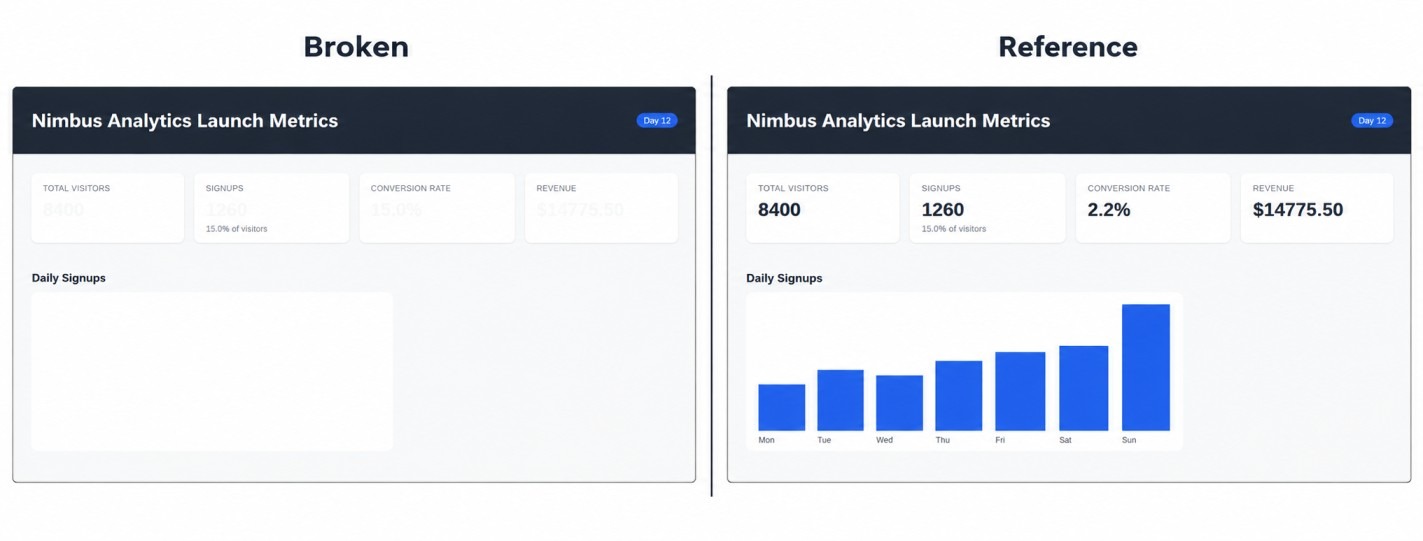
Referans tasarımın yanındaki bozuk gösterge paneli. Görsel: Yazar.
Üç hata farklı kanıtlar gerektirir. Biri ekran görüntüsünde görünür, biri tarayıcı davranışını etkiler ve biri pytest'te başarısız olur. Ajana hata listesi verilmez.
Bunu ajana vermeden önce, "düzeldi"nin ne anlama geldiğini tanımlarım: pytest paketi geçmeli ve yeni bir ekran görüntüsü referans görselle görsel olarak eşleşmelidir. Yalnızca modelin görüşü yeterli değildir; bu yüzden çalıştırıcı her iki kanıt türünü de kontrol eder.
Onarım döngüsü nasıl çalışır
Döngü, bir model isteği ile yerel araç yürütmesi arasında gider gelir. V4.1 Flash, akıl yürütme, bir mesaj veya araç çağrıları döndürür; Python istenen araçları çalıştırır ve sonuçları geçmişe ekler. Model başka bir araç çağrısı olmadan yanıt verdiğinde veya on dört turluk sınıra ulaştığında döngü durur.
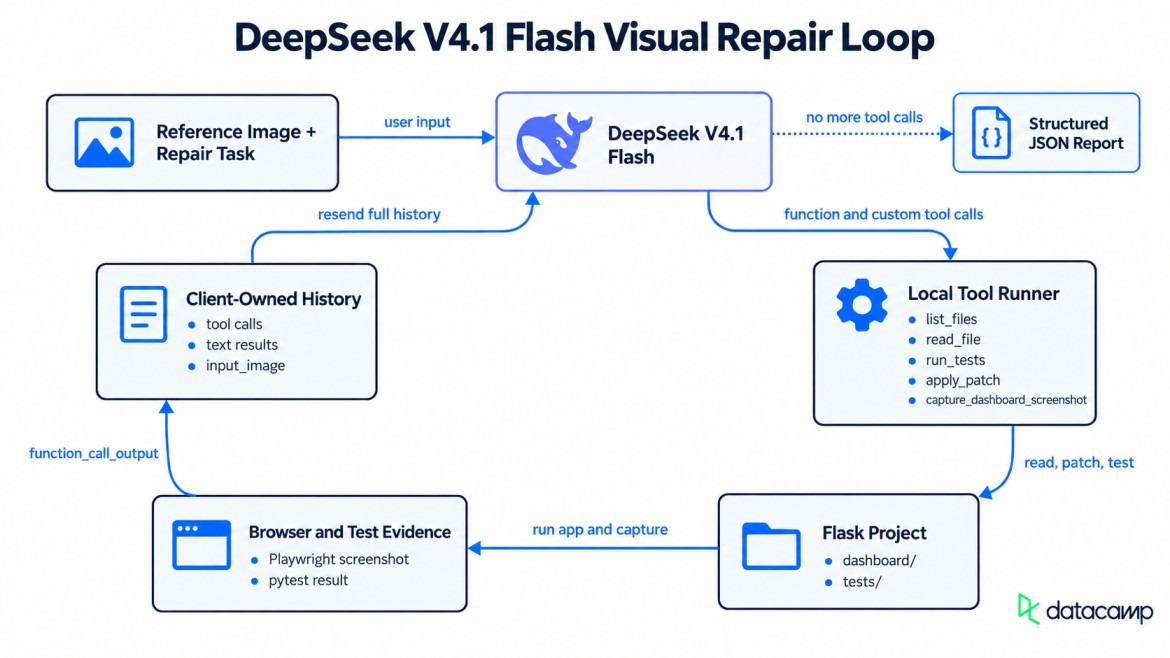
Model, araçlar ve tarayıcıyı bağlayan onarım döngüsü. Görsel: Yazar.
DeepSeek V4.1 Flash API Nasıl Kurulur
Python 3.10 veya üstü ve bakiyesi olan bir DeepSeek API anahtarına ihtiyacınız olacak. DeepSeek'in API'si OpenAI istek formatını izler, bu nedenle bu proje openai Python paketini base_url DeepSeek'e ayarlanmış şekilde kullanır.
Sanal bir ortam oluşturun ve projenin ihtiyaç duyduklarını kurun.
python3 -m venv .venv
source .venv/bin/activate
pip install openai flask playwright pytest python-dotenv requests streamlit
playwright install chromiumopenai 3.14.1, flask 3.1.3 ve playwright 1.63.0 ile test ettim. Anahtarı proje kökünde bir .env dosyasına DEEPSEEK_API_KEY=sk-... olarak kaydedin ve python-dotenv ile yükleyin. Anahtarınız zaten Responses API ile çalışıyorsa, sonraki kod bloğunu atlayın; aksi halde istek anahtarı ve temel URL'yi kontrol eder.
from openai import OpenAI
import os
from dotenv import load_dotenv
load_dotenv()
client = OpenAI(api_key=os.environ["DEEPSEEK_API_KEY"], base_url="https://api.deepseek.com")
response = client.responses.create(model="deepseek-flash", input="Say hi in five words.")
print(response.output_text)Kısa bir selamlama yazdırırsa, anahtar ve temel URL çalışıyor demektir.
Adım 1: Modele "Düzelmiş" Hâlin Nasıl Göründüğünü Gösterin
Ajanın ilk girdisi bir referans ekran görüntüsü, kısa bir görev ve canlı URL içerir. Bu, bir kullanıcı mesajında gönderilen tek görseldir. Sonraki her ekran görüntüsü bir araçtan gelir.
Çalıştırıcı, her istekte referans görseli base64 veri URL'si olarak gönderir. DeepSeek, bir görsel yeniden kullanıldığında Files API'yi önerir. Bir file_id, aynı görsel verisini her seferinde göndermeyi önler.
Herhangi bir değişikliğe izin vermeden önce ilk tepkiyi almak
Ekli görselde, modelin önce neyi kontrol edeceğini sordum, ancak araç yoktu. Bu, bir şeyleri düzenleyebilmeden önce planını görmeme izin verdi. Yanıt, proje dosyalarının listelenmesini, CSS değişkenlerinin izlenmesini ve bir ekran görüntüsü alınmasını önerdi; reasoning: {"effort": "high"}, DeepSeek'in varsayılan düşünme düzeyini kullandım.
Adım 2: Ajana Kullanabileceği Araçlar Verin
Ajan dört fonksiyon aracı ve bir özel araç alır.
-
list_filesveread_file, projeyi inceler; ikisi dedashboard/vetests/ile sınırlandırılmıştır. -
run_tests, pytest'i çalıştırır. -
capture_dashboard_screenshot, Playwright üzerinden başlıksız Chromium'u başlatır.
Özel araç apply_patch'tir; {"type": "custom", "name": "apply_patch"} olarak bildirilir ve "Codex uyumluluğu için" kabul edilir. Başka bir özel araç adı 400 hatası döndürür; web araması ve bilgisayar kullanımı gibi yerleşik türler sessizce yok sayılır.
Fonksiyon argümanları JSON metni olarak gelir ve Python çalıştırmadan önce kontrol edilir. apply_patch özel araç girdisi olarak gelir; bu nedenle kod, dosyalara yazmadan önce yamayı ayrı işle ve kontrol et. Araç hataları, döngüyü durdurmak yerine modele geri döndürülür.
Playwright ekran görüntülerini araç çıktısı olarak geri göndermek
capture_dashboard_screenshot çalıştığında, sonucu diske kaydedilmez. Python, sonucu function_call_output içinde bir input_image parçası olarak döndürür. DeepSeek daha sonra ekran görüntüsünü metin açıklaması yerine görsel olarak okur.
history.append({
"type": "function_call_output",
"call_id": item.call_id,
"output": [{"type": "input_image", "image_url": f"data:image/png;base64,{png_b64}"}],
})Ajan CSS'i yamalayabilir, başka bir ekran görüntüsü alabilir ve sayıların okunabilir olup olmadığını kontrol edebilir.
Adım 3: Ajan Döngüsünü Kurun ve Geçmişi Kendiniz Yönetin
Geçmiş, API previous_response_id veya sunucu tarafı görüşmeleri desteklemediği için bir Python listesinde tutulur. Düşünme modu ayrıca önceki araç turlarından gelen her akıl yürütme öğesini gerektirir.
Önemli: Araç çıktısı aynı turdan iki çağrı arasına eklenirse, bir sonraki istek 400 hatası döndürür. response.output içindeki her öğeyi sırayla ekleyin, sonra araçları çalıştırıp sonuçlarını ekleyin.
Çalıştırıcı, ajanı on dört tur ve dashboard/ ile tests/ diziniyle sınırlar. Kabuk erişimi sağlamaz, araç argümanlarını kontrol eder ve doğrulama için pytest kullanır.
DeepSeek V4.1 Flash yapılandırılmış çıktıyı destekliyor mu?
Evet, Responses API aracılığıyla DeepSeek V4.1 Flash, text.format üzerinden bir JSON Şeması kabul eder. Sohbet Tamamlamaları'nın response_format JSON modunu destekler ancak şemaları desteklemez. Döngü durduktan sonra son istek, hataları, düzeltmeleri, test sonuçlarını, ekran görüntüsü sonuçlarını ve doğrulama yöntemini kaydeder.
Projede ayrıca Streamlit uygulaması app_streamlit.py bulunur. Aynı ajan stream=True ile bir üretici olarak çalışır; böylece sayfa, akıl yürütme metnini ve araç çağrılarını geldikçe gösterir. Kenar çubuğu, düşünme çabasını ve görsel ayrıntıyı değiştirir.
Streamlit arayüzü ajan çalıştırmasını yayınlar. Video: Yazar.
Adım 4: Görsel Hata Giderme Aracını Çalıştırın
Çalışma, tek bir yamadan sonra bitmiş gibi görünüyordu, ancak canlı sayfa aynı fikirde değildi.
Hataları bulmak ve düzeltmek
Ajan, ilk iki turunu bir şeye dokunmadan bakmaya ayırdı: birinci turda dosyaları listeledi ve bir temel ekran görüntüsü aldı; ikinci turda app.py, index.html, style.css ve test dosyasını okudu.
Üçüncü tur pytest'i çalıştırdı, ardından dördüncü turda dönüşüm formülünü düzelten, metrik rengini değiştiren ve JavaScript aramasını canvas kimliğiyle eşleştiren tek bir yama uygulandı.
- conversion_rate = data["conversions"] / data["signups"] * 100
+ conversion_rate = data["conversions"] / data["total_visitors"] * 100Beşinci turda testleri çalıştırmak, beşinin de geçtiğini gösterdi. İşte çalışma burada düzenli olmaktan çıktı. Her yeni ekran görüntüsü hâlâ %15 dönüşüm oranını ve boş bir grafiği gösteriyordu.
Sistem bayatlığını keşfetmek ve düzeltmek
Ajan, diskteki dosyaların düzeltmeleri içerdiğini doğruladı, ekran görüntüsünü yeniden denedi ve sunucunun değişen Python ve şablon dosyalarını yükleyip yüklemediğini araştırdı. İki geçici tazelik kontrolü de canlı sayfada görünmeyi başaramadı.
On dördüncü tura gelindiğinde, döngü bütçesine ulaşmış ve nedeni belirlemişti: run_tests diskteki kodu kontrol ederken, ekran görüntüsü bayat duruma sahip çalışan bir süreci kontrol ediyordu. Flask debug=False ile başlatıldı; bu nedenle hiçbir yeniden yükleyici değişen Python modülünü yüklemedi ve şablon otomatik yeniden yükleme etkin değildi.
CSS değişikliği görünürken, Python kaynaklı değer ve şablon destekli grafik bayat kaldı. Pytest, app.py dosyasını diskten içe aktardı; bu yüzden yeşil testler taze bir sayfayı garanti etmiyordu.
Flask'ı yeniden başlattıktan sonra, gösterge paneli referans görselle eşleşti. Eksik parça, başka bir kod yaması değil, bir restart_server aracıydı.
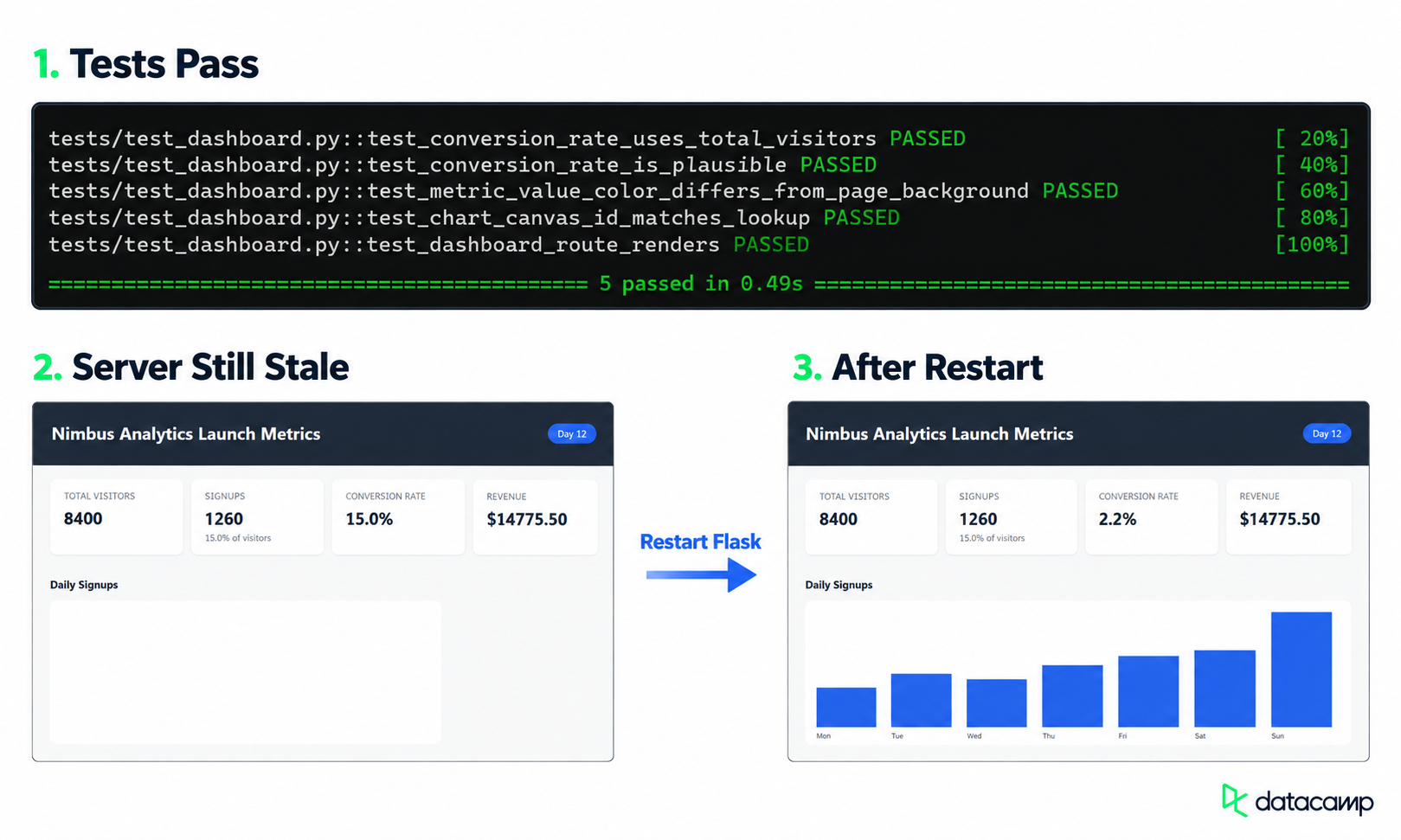
Yeniden başlatma, yamalanan gösterge paneli değişikliklerini görünür kılar. Görsel: Yazar.
Ajan Gösterge Panelini Düzeltti mi?
Evet, ajan gösterge panelini disk üzerinde düzeltti. Yalnızca sorunlu üç dosyayı değiştirdi ve pytest dört hatadan beş geçen teste döndü. Flask yeniden başlatıldıktan sonra canlı sayfa tüm düzeltmeleri gösterdi.
Adım 5: Kullanımı, Önbelleği ve Maliyeti Ölçün
Ajan geçmişini yeniden gönderdiği için, sonraki istekler önceki turlardan gelen girdinin büyük bölümünü tekrarlar. DeepSeek, bu tekrarlanan öneki otomatik önbelleğine karşı kontrol eder. Önbellek en iyi çaba esasına göre çalışır; bu nedenle bu rakamlar yalnızca bu çalışmaya özeldir.
On dört onarım turu ve son JSON rapor isteği boyunca, API 156.724 giriş belirteci bildirdi; bunun 137.088'i önbellekten, yani %87 isabet oranı. Çıktı 9.362'si akıl yürütme olmak üzere 11.497 belirteç oldu. Çalışma yoğun olmayan saatlere denk geldi; bu nedenle tüm on beş istek yaklaşık $0,0103 tuttu.
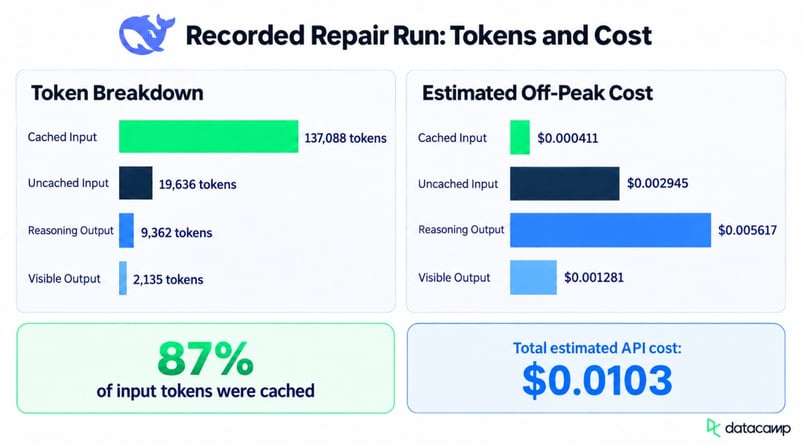
Akıl yürütme çıktısı en büyük maliyet kategorisidir. Görsel: Yazar.
Daha büyük bir kod tabanı, daha fazla ekran görüntüsü veya daha az önbellek isabeti hem belirteç sayısını hem de maliyeti değiştirir.
Bilmeniz Gereken DeepSeek V4.1 Flash API Sınırlamaları
Bu çalıştırıcı demoyu aştığında üç API sınırı önem kazanır.
-
Arka plan yanıtları desteklenmez; bu nedenle uzun turlar bitene kadar bloklanır.
-
parallel_tool_callsvemax_tool_callsyok sayılır; paralel araç çağrısı etkin kalır. -
Otomatik kesme desteklenmez; bu nedenle bağlam sınırını aşan istekler 400 hatası döndürür.
DeepSeek V4.1 Flash Ajan Dağıtım Kontrol Listesi
Bu deseni canlı bir hizmette kullanmadan önce, kontrolleri model talimatları yerine uygulama koduna yerleştirin.
- Tur ve maliyet sınırlarını zorlayın ve herhangi birine ulaşıldığında uyarı verin
- Dosya erişimini kısıtlayın ve her araç argümanını kontrol edin
- Hizmeti yeniden başlatmak ve kontrol etmek için araçlar sağlayın; böylece doğrulama güncel kodu kullanır
- Belirteç kullanımını, araç çağrılarını, test sonuçlarını ve nihai durumu kaydedin
apply_patch Ne Zaman, Düz Fonksiyon Araçları Ne Zaman Kullanılmalı?
apply_patch'i, tek bir değişiklik birden çok dosyayı güncellemek zorunda olduğunda kullanın; burada olduğu gibi. Yamanın ardından testleri çalıştırın; çünkü tek bir hatalı çağrı birden çok dosyaya zarar verebilir.
read_file ve write_file her düzenlemenin ayrı bir kontrol veya onay gerektirdiği durumlarda kullanın. Daha çok tur alırlar; ancak kötü bir düzenleme aynı anda yalnızca bir dosyayı etkiler.
Son Düşünceler
Görsel onarım döngüsü üç hatayı tek bir yamayla düzeltti; ancak çalışma tertemiz bir başarı değildi. Pytest geçerken Flask hâlâ eski Python'u ve şablon çıktısını sunuyordu; bu nedenle sunucuyu ben yeniden başlatana kadar ajan son sayfayı doğrulayamadı.
Daha büyük bir uygulamayı test etmeden önce bir restart_server aracı ve piksel karşılaştırması eklerdim. Dosya sınırını ve tur limitini korur, ardından pytest ve ekran görüntüsü karşılaştırmasını ayrı kontroller olarak ele alırdım. Birinin geçmesi, diğerinin geçmesini asla ikame etmemelidir.
SSS
DeepSeek V4.1 Flash bir URL'den görsel okuyabilir mi?
Evet. Responses API, bir genel görsel URL'si, bir base64 veri URL'si veya bir Files API file_id kabul eder.
Ajanın yaması daha fazla test hatasına neden olursa ne olur?
Sonraki run_tests çağrısı regresyonu gösterir ve döngü durana veya tur limitine ulaşana kadar devam eder. Uygulama ayrıca geri yükleyebileceği bir kopyayı saklamalıdır.
DeepSeek V4 Pro kullanımdan kaldırılıyor mu?
DeepSeek, V4.1 Flash yayınlandıktan kısa süre sonra V4 Pro'yu aşamalı olarak kaldırmayı planlamış, ardından kullanıcı talebi üzerine bu kararı geri almıştır. V4 Pro aynı faturalandırma ile kullanımda kalmaktadır.
apply_patch, DeepSeek dışındaki modellerle kullanılabilir mi?
Format OpenAI'nin Codex araçlarından gelmiştir ve DeepSeek desteğini "Codex uyumluluğu için" olarak tanımlar. Başka bir API, {"type": "custom", "name": "apply_patch"} aracını yalnızca aynı araç bildirimini destekliyorsa kabul eder.
DeepSeek V4.1 Flash'ı yerel olarak çalıştırabilir miyim?
Evet. Model ağırlıkları MIT lisansı altında Hugging Face'te mevcuttur. Bu eğitim, DeepSeek'in barındırılan API'sini kullanır ve model sunumu veya donanım gereksinimlerini kapsamaz.
Veri hatları, bulut ve YZ araçları üzerinde çalışan; aynı zamanda DataCamp ve gelişmekte olan geliştiriciler için pratik, yüksek etkili eğiticiler yazan bir veri mühendisi ve topluluk inşacısıyım.


%22%3E%0A%20%20%20%20%20%20%20%20%3Crect%20fill%3D%22%23EFEBE4%22%20height%3D%22180%22%20width%3D%22336%22%20%2F%3E%0A%20%20%20%20%20%20%20%20%3Crect%0A%20%20%20%20%20%20%20%20%20%20fill%3D%22%23FF931E%22%0A%20%20%20%20%20%20%20%20%20%20height%3D%22106.6%22%0A%20%20%20%20%20%20%20%20%20%20transform%3D%22rotate(-30%20-208.588%20220.18)%22%0A%20%20%20%20%20%20%20%20%20%20width%3D%22456.125%22%0A%20%20%20%20%20%20%20%20%20%20x%3D%22-208.588%22%0A%20%20%20%20%20%20%20%20%20%20y%3D%22220.18%22%0A%20%20%20%20%20%20%20%20%2F%3E%0A%20%20%20%20%20%20%20%20%3Crect%0A%20%20%20%20%20%20%20%20%20%20fill%3D%22%23F7F3EB%22%0A%20%20%20%20%20%20%20%20%20%20height%3D%2235.875%22%0A%20%20%20%20%20%20%20%20%20%20transform%3D%22rotate(-30%20-208.588%20220.18)%22%0A%20%20%20%20%20%20%20%20%20%20width%3D%22347.576%22%0A%20%20%20%20%20%20%20%20%20%20x%3D%22-208.588%22%0A%20%20%20%20%20%20%20%20%20%20y%3D%22220.18%22%0A%20%20%20%20%20%20%20%20%2F%3E%0A%20%20%20%20%20%20%20%20%3Crect%0A%20%20%20%20%20%20%20%20%20%20fill%3D%22%23000820%22%0A%20%20%20%20%20%20%20%20%20%20height%3D%2235.875%22%0A%20%20%20%20%20%20%20%20%20%20transform%3D%22rotate(-30%20-226.525%20189.111)%22%0A%20%20%20%20%20%20%20%20%20%20width%3D%22347.576%22%0A%20%20%20%20%20%20%20%20%20%20x%3D%22-226.525%22%0A%20%20%20%20%20%20%20%20%20%20y%3D%22189.111%22%0A%20%20%20%20%20%20%20%20%2F%3E%0A%20%20%20%20%20%20%20%20%3Crect%0A%20%20%20%20%20%20%20%20%20%20fill%3D%22%23000820%22%0A%20%20%20%20%20%20%20%20%20%20height%3D%22106.6%22%0A%20%20%20%20%20%20%20%20%20%20transform%3D%22rotate(-30%2085.5879%20256.055)%22%0A%20%20%20%20%20%20%20%20%20%20width%3D%22456.125%22%0A%20%20%20%20%20%20%20%20%20%20x%3D%2285.5879%22%0A%20%20%20%20%20%20%20%20%20%20y%3D%22256.055%22%0A%20%20%20%20%20%20%20%20%2F%3E%0A%20%20%20%20%20%20%20%20%3Crect%0A%20%20%20%20%20%20%20%20%20%20fill%3D%22%23D87300%22%0A%20%20%20%20%20%20%20%20%20%20height%3D%2235.875%22%0A%20%20%20%20%20%20%20%20%20%20transform%3D%22rotate(-30%2085.5879%20256.055)%22%0A%20%20%20%20%20%20%20%20%20%20width%3D%22184.5%22%0A%20%20%20%20%20%20%20%20%20%20x%3D%2285.5879%22%0A%20%20%20%20%20%20%20%20%20%20y%3D%22256.055%22%0A%20%20%20%20%20%20%20%20%2F%3E%0A%20%20%20%20%20%20%20%20%3Crect%0A%20%20%20%20%20%20%20%20%20%20fill%3D%22%23FF931E%22%0A%20%20%20%20%20%20%20%20%20%20height%3D%2235.875%22%0A%20%20%20%20%20%20%20%20%20%20transform%3D%22rotate(-30%20227.432%20132.736)%22%0A%20%20%20%20%20%20%20%20%20%20width%3D%22271.625%22%0A%20%20%20%20%20%20%20%20%20%20x%3D%22227.432%22%0A%20%20%20%20%20%20%20%20%20%20y%3D%22132.736%22%0A%20%20%20%20%20%20%20%20%2F%3E%0A%20%20%20%20%20%20%3C%2Fg%3E%0A%20%20%20%20%20%20%3Cdefs%3E%0A%20%20%20%20%20%20%20%20%3CclipPath%20id%3D%22clip%22%3E%0A%20%20%20%20%20%20%20%20%20%20%3Crect%20fill%3D%22white%22%20height%3D%22180%22%20width%3D%22336%22%20%2F%3E%0A%20%20%20%20%20%20%20%20%3C%2FclipPath%3E%0A%20%20%20%20%20%20%3C%2Fdefs%3E%0A%20%20%20%20%3C%2Fsvg%3E)

%22%3E%0A%20%20%20%20%20%20%20%20%3Crect%20fill%3D%22%2305192D%22%20height%3D%22180%22%20width%3D%22336%22%20%2F%3E%0A%20%20%20%20%20%20%20%20%3Crect%0A%20%20%20%20%20%20%20%20%20%20fill%3D%22%23B08EFF%22%0A%20%20%20%20%20%20%20%20%20%20height%3D%22106.6%22%0A%20%20%20%20%20%20%20%20%20%20transform%3D%22rotate(-30%20-208.588%20220.18)%22%0A%20%20%20%20%20%20%20%20%20%20width%3D%22456.125%22%0A%20%20%20%20%20%20%20%20%20%20x%3D%22-208.588%22%0A%20%20%20%20%20%20%20%20%20%20y%3D%22220.18%22%0A%20%20%20%20%20%20%20%20%2F%3E%0A%20%20%20%20%20%20%20%20%3Crect%0A%20%20%20%20%20%20%20%20%20%20fill%3D%22%237933FF%22%0A%20%20%20%20%20%20%20%20%20%20height%3D%2235.875%22%0A%20%20%20%20%20%20%20%20%20%20transform%3D%22rotate(-30%20-208.588%20220.18)%22%0A%20%20%20%20%20%20%20%20%20%20width%3D%22347.576%22%0A%20%20%20%20%20%20%20%20%20%20x%3D%22-208.588%22%0A%20%20%20%20%20%20%20%20%20%20y%3D%22220.18%22%0A%20%20%20%20%20%20%20%20%2F%3E%0A%20%20%20%20%20%20%20%20%3Crect%0A%20%20%20%20%20%20%20%20%20%20fill%3D%22%2372E5FE%22%0A%20%20%20%20%20%20%20%20%20%20height%3D%2235.875%22%0A%20%20%20%20%20%20%20%20%20%20transform%3D%22rotate(-30%20-226.525%20189.111)%22%0A%20%20%20%20%20%20%20%20%20%20width%3D%22347.576%22%0A%20%20%20%20%20%20%20%20%20%20x%3D%22-226.525%22%0A%20%20%20%20%20%20%20%20%20%20y%3D%22189.111%22%0A%20%20%20%20%20%20%20%20%2F%3E%0A%20%20%20%20%20%20%20%20%3Crect%0A%20%20%20%20%20%20%20%20%20%20fill%3D%22%235EB1FF%22%0A%20%20%20%20%20%20%20%20%20%20height%3D%22106.6%22%0A%20%20%20%20%20%20%20%20%20%20transform%3D%22rotate(-30%2085.5879%20256.055)%22%0A%20%20%20%20%20%20%20%20%20%20width%3D%22456.125%22%0A%20%20%20%20%20%20%20%20%20%20x%3D%2285.5879%22%0A%20%20%20%20%20%20%20%20%20%20y%3D%22256.055%22%0A%20%20%20%20%20%20%20%20%2F%3E%0A%20%20%20%20%20%20%20%20%3Crect%0A%20%20%20%20%20%20%20%20%20%20fill%3D%22%23B08EFF%22%0A%20%20%20%20%20%20%20%20%20%20height%3D%2235.875%22%0A%20%20%20%20%20%20%20%20%20%20transform%3D%22rotate(-30%2085.5879%20256.055)%22%0A%20%20%20%20%20%20%20%20%20%20width%3D%22184.5%22%0A%20%20%20%20%20%20%20%20%20%20x%3D%2285.5879%22%0A%20%20%20%20%20%20%20%20%20%20y%3D%22256.055%22%0A%20%20%20%20%20%20%20%20%2F%3E%0A%20%20%20%20%20%20%20%20%3Crect%0A%20%20%20%20%20%20%20%20%20%20fill%3D%22%2372E5FE%22%0A%20%20%20%20%20%20%20%20%20%20height%3D%2235.875%22%0A%20%20%20%20%20%20%20%20%20%20transform%3D%22rotate(-30%20227.432%20132.736)%22%0A%20%20%20%20%20%20%20%20%20%20width%3D%22271.625%22%0A%20%20%20%20%20%20%20%20%20%20x%3D%22227.432%22%0A%20%20%20%20%20%20%20%20%20%20y%3D%22132.736%22%0A%20%20%20%20%20%20%20%20%2F%3E%0A%20%20%20%20%20%20%3C%2Fg%3E%0A%20%20%20%20%20%20%3Cdefs%3E%0A%20%20%20%20%20%20%20%20%3CclipPath%20id%3D%22clip%22%3E%0A%20%20%20%20%20%20%20%20%20%20%3Crect%20fill%3D%22white%22%20height%3D%22180%22%20width%3D%22336%22%20%2F%3E%0A%20%20%20%20%20%20%20%20%3C%2FclipPath%3E%0A%20%20%20%20%20%20%3C%2Fdefs%3E%0A%20%20%20%20%3C%2Fsvg%3E)

%22%3E%0A%20%20%20%20%20%20%20%20%3Crect%20fill%3D%22%23F7F3EB%22%20height%3D%22180%22%20width%3D%22336%22%20%2F%3E%0A%20%20%20%20%20%20%20%20%3Crect%0A%20%20%20%20%20%20%20%20%20%20fill%3D%22%23000820%22%0A%20%20%20%20%20%20%20%20%20%20height%3D%22106.6%22%0A%20%20%20%20%20%20%20%20%20%20transform%3D%22rotate(-30%20-208.588%20220.18)%22%0A%20%20%20%20%20%20%20%20%20%20width%3D%22456.125%22%0A%20%20%20%20%20%20%20%20%20%20x%3D%22-208.588%22%0A%20%20%20%20%20%20%20%20%20%20y%3D%22220.18%22%0A%20%20%20%20%20%20%20%20%2F%3E%0A%20%20%20%20%20%20%20%20%3Crect%0A%20%20%20%20%20%20%20%20%20%20fill%3D%22%2300C74E%22%0A%20%20%20%20%20%20%20%20%20%20height%3D%2235.875%22%0A%20%20%20%20%20%20%20%20%20%20transform%3D%22rotate(-30%20-208.588%20220.18)%22%0A%20%20%20%20%20%20%20%20%20%20width%3D%22347.576%22%0A%20%20%20%20%20%20%20%20%20%20x%3D%22-208.588%22%0A%20%20%20%20%20%20%20%20%20%20y%3D%22220.18%22%0A%20%20%20%20%20%20%20%20%2F%3E%0A%20%20%20%20%20%20%20%20%3Crect%0A%20%20%20%20%20%20%20%20%20%20fill%3D%22%23FF931E%22%0A%20%20%20%20%20%20%20%20%20%20height%3D%2235.875%22%0A%20%20%20%20%20%20%20%20%20%20transform%3D%22rotate(-30%20-226.525%20189.111)%22%0A%20%20%20%20%20%20%20%20%20%20width%3D%22347.576%22%0A%20%20%20%20%20%20%20%20%20%20x%3D%22-226.525%22%0A%20%20%20%20%20%20%20%20%20%20y%3D%22189.111%22%0A%20%20%20%20%20%20%20%20%2F%3E%0A%20%20%20%20%20%20%20%20%3Crect%0A%20%20%20%20%20%20%20%20%20%20fill%3D%22%23D87300%22%0A%20%20%20%20%20%20%20%20%20%20height%3D%22106.6%22%0A%20%20%20%20%20%20%20%20%20%20transform%3D%22rotate(-30%2085.5879%20256.055)%22%0A%20%20%20%20%20%20%20%20%20%20width%3D%22456.125%22%0A%20%20%20%20%20%20%20%20%20%20x%3D%2285.5879%22%0A%20%20%20%20%20%20%20%20%20%20y%3D%22256.055%22%0A%20%20%20%20%20%20%20%20%2F%3E%0A%20%20%20%20%20%20%20%20%3Crect%0A%20%20%20%20%20%20%20%20%20%20fill%3D%22%23000820%22%0A%20%20%20%20%20%20%20%20%20%20height%3D%2235.875%22%0A%20%20%20%20%20%20%20%20%20%20transform%3D%22rotate(-30%2085.5879%20256.055)%22%0A%20%20%20%20%20%20%20%20%20%20width%3D%22184.5%22%0A%20%20%20%20%20%20%20%20%20%20x%3D%2285.5879%22%0A%20%20%20%20%20%20%20%20%20%20y%3D%22256.055%22%0A%20%20%20%20%20%20%20%20%2F%3E%0A%20%20%20%20%20%20%20%20%3Crect%0A%20%20%20%20%20%20%20%20%20%20fill%3D%22%2300C74E%22%0A%20%20%20%20%20%20%20%20%20%20height%3D%2235.875%22%0A%20%20%20%20%20%20%20%20%20%20transform%3D%22rotate(-30%20227.432%20132.736)%22%0A%20%20%20%20%20%20%20%20%20%20width%3D%22271.625%22%0A%20%20%20%20%20%20%20%20%20%20x%3D%22227.432%22%0A%20%20%20%20%20%20%20%20%20%20y%3D%22132.736%22%0A%20%20%20%20%20%20%20%20%2F%3E%0A%20%20%20%20%20%20%3C%2Fg%3E%0A%20%20%20%20%20%20%3Cdefs%3E%0A%20%20%20%20%20%20%20%20%3CclipPath%20id%3D%22clip%22%3E%0A%20%20%20%20%20%20%20%20%20%20%3Crect%20fill%3D%22white%22%20height%3D%22180%22%20width%3D%22336%22%20%2F%3E%0A%20%20%20%20%20%20%20%20%3C%2FclipPath%3E%0A%20%20%20%20%20%20%3C%2Fdefs%3E%0A%20%20%20%20%3C%2Fsvg%3E)

%22%3E%0A%20%20%20%20%20%20%20%20%3Crect%20fill%3D%22%2372E5FE%22%20height%3D%22180%22%20width%3D%22336%22%20%2F%3E%0A%20%20%20%20%20%20%20%20%3Crect%0A%20%20%20%20%20%20%20%20%20%20fill%3D%22%237933FF%22%0A%20%20%20%20%20%20%20%20%20%20height%3D%22106.6%22%0A%20%20%20%20%20%20%20%20%20%20transform%3D%22rotate(-30%20-208.588%20220.18)%22%0A%20%20%20%20%20%20%20%20%20%20width%3D%22456.125%22%0A%20%20%20%20%20%20%20%20%20%20x%3D%22-208.588%22%0A%20%20%20%20%20%20%20%20%20%20y%3D%22220.18%22%0A%20%20%20%20%20%20%20%20%2F%3E%0A%20%20%20%20%20%20%20%20%3Crect%0A%20%20%20%20%20%20%20%20%20%20fill%3D%22%235EB1FF%22%0A%20%20%20%20%20%20%20%20%20%20height%3D%2235.875%22%0A%20%20%20%20%20%20%20%20%20%20transform%3D%22rotate(-30%20-208.588%20220.18)%22%0A%20%20%20%20%20%20%20%20%20%20width%3D%22347.576%22%0A%20%20%20%20%20%20%20%20%20%20x%3D%22-208.588%22%0A%20%20%20%20%20%20%20%20%20%20y%3D%22220.18%22%0A%20%20%20%20%20%20%20%20%2F%3E%0A%20%20%20%20%20%20%20%20%3Crect%0A%20%20%20%20%20%20%20%20%20%20fill%3D%22%23000820%22%0A%20%20%20%20%20%20%20%20%20%20height%3D%2235.875%22%0A%20%20%20%20%20%20%20%20%20%20transform%3D%22rotate(-30%20-226.525%20189.111)%22%0A%20%20%20%20%20%20%20%20%20%20width%3D%22347.576%22%0A%20%20%20%20%20%20%20%20%20%20x%3D%22-226.525%22%0A%20%20%20%20%20%20%20%20%20%20y%3D%22189.111%22%0A%20%20%20%20%20%20%20%20%2F%3E%0A%20%20%20%20%20%20%20%20%3Crect%0A%20%20%20%20%20%20%20%20%20%20fill%3D%22%237933FF%22%0A%20%20%20%20%20%20%20%20%20%20height%3D%22106.6%22%0A%20%20%20%20%20%20%20%20%20%20transform%3D%22rotate(-30%2085.5879%20256.055)%22%0A%20%20%20%20%20%20%20%20%20%20width%3D%22456.125%22%0A%20%20%20%20%20%20%20%20%20%20x%3D%2285.5879%22%0A%20%20%20%20%20%20%20%20%20%20y%3D%22256.055%22%0A%20%20%20%20%20%20%20%20%2F%3E%0A%20%20%20%20%20%20%20%20%3Crect%0A%20%20%20%20%20%20%20%20%20%20fill%3D%22%235EB1FF%22%0A%20%20%20%20%20%20%20%20%20%20height%3D%2235.875%22%0A%20%20%20%20%20%20%20%20%20%20transform%3D%22rotate(-30%2085.5879%20256.055)%22%0A%20%20%20%20%20%20%20%20%20%20width%3D%22184.5%22%0A%20%20%20%20%20%20%20%20%20%20x%3D%2285.5879%22%0A%20%20%20%20%20%20%20%20%20%20y%3D%22256.055%22%0A%20%20%20%20%20%20%20%20%2F%3E%0A%20%20%20%20%20%20%20%20%3Crect%0A%20%20%20%20%20%20%20%20%20%20fill%3D%22%23000820%22%0A%20%20%20%20%20%20%20%20%20%20height%3D%2235.875%22%0A%20%20%20%20%20%20%20%20%20%20transform%3D%22rotate(-30%20227.432%20132.736)%22%0A%20%20%20%20%20%20%20%20%20%20width%3D%22271.625%22%0A%20%20%20%20%20%20%20%20%20%20x%3D%22227.432%22%0A%20%20%20%20%20%20%20%20%20%20y%3D%22132.736%22%0A%20%20%20%20%20%20%20%20%2F%3E%0A%20%20%20%20%20%20%3C%2Fg%3E%0A%20%20%20%20%20%20%3Cdefs%3E%0A%20%20%20%20%20%20%20%20%3CclipPath%20id%3D%22clip%22%3E%0A%20%20%20%20%20%20%20%20%20%20%3Crect%20fill%3D%22white%22%20height%3D%22180%22%20width%3D%22336%22%20%2F%3E%0A%20%20%20%20%20%20%20%20%3C%2FclipPath%3E%0A%20%20%20%20%20%20%3C%2Fdefs%3E%0A%20%20%20%20%3C%2Fsvg%3E)

Bir gösterge paneli hatayla birlikte yayınlandığında, hata ayıklama döngüsü hep aynıdır. Ekrana bakarsınız, sorumlu dosyayı bulursunuz, düzenlersiniz, testleri yeniden çalıştırırsınız, sayfayı yenilersiniz ve tekrar kontrol edersiniz. Yorucudur ve kanıtların yarısı yığın izleri yerine ekran görüntülerinde kalır.
Bu deneye, DeepSeek DeepSeek V4.1 Flash'ı yayınladıktan hemen sonra başladım. Yeni mimari ailesinin en küçük üyesidir ve görsel girdi kabul eder. Bozuk bir web uygulamasını inceleyip kodu yamalayabilir mi ve işinin bittiğini anlayabilir mi, bunu görmek istedim.
Bu eğitim tek bir projeye odaklanıyor: bir ajanın DeepSeek'in Responses API formatı yoluyla bulup düzeltebileceği üç hataya sahip Nimbus Analytics Launch Metrics adlı küçük bir Flask gösterge paneli. Kayıtlı çalışma ayrıca ajanın araçlarındaki bir boşluğu da ortaya koyuyor.
Şunları nasıl yapacağımızı ele alacağız:
Responses API üzerinden DeepSeek V4.1 Flash'a ilk çağrıyı yapmak
Modele bir referans ekran görüntüsü vermek ve ardından araç çıktısı olarak taze Playwright ekran görüntülerini beslemek
Ajana dosyaları listeleme, dosya okuma, pytest çalıştırma ve
apply_patchile tek çağrıda birden çok dosya üzerinde kod yama araçları sağlamakAPI durum bilgisi taşımadığından görüşme geçmişini saklamak ve yeniden göndermek
Yapılandırılmış bir JSON onarım raporu döndürmek
Önbelleğe alınmış girdi, akıl yürütme ve çıktı belirteçlerinden maliyet hesaplamak
Kısa Özet
DeepSeek V4.1 Flash'ın Responses API'si durum bilgisizdir; bu nedenle Python kodu görüşmeyi saklar ve her turda yeniden gönderir. Aynı döngü, referans görsel ve araç ekran görüntüleri için görme yeteneğini, birden fazla dosyayı incelemek için düşünme modunu ve düzenlemeler için
apply_patchkullanır. Çalışmadan çıkan dört ayrıntı, bir sonraki sürümü nasıl inşa edeceğimi değiştirdi.Bu rakamlar bir kıyaslama değil, küçük bir gösterge paneli üzerinde tek bir çalışmadan geliyor. Tur sayısı, önbellek isabet oranı ve maliyet, daha büyük bir uygulama veya farklı bir hata kümesiyle değişecektir.