

What Is the Gemini 4 Neon API?
The Gemini 4 Neon API gives you paid application programming interface (API) access to gemini-4-neon, with no free tier. Google's launch post positions it for multi-step coding and analysis that follows user corrections, and the model page lists a 1,048,576-token window shared across input, internal reasoning ("thinking tokens"), and output.
You call it through Google's Interactions API, which manages multi-turn conversation history on the server. Benchmarks and model comparisons live in our Gemini 4 Neon overview.
How to Set Up the Gemini 4 Neon API in Python
Before you clone the project, make sure you have three things ready:
-
Python 3.11 or newer
-
The Google Gen AI software development kit (SDK),
google-genai3.6.1 -
A paid Google AI Studio API key
If you read our earlier Gemini 4 tutorials, this setup will look familiar, so skip ahead; otherwise, Google's quickstart covers accounts and billing.
Install google-genai and load your API key
Clone the project repository into a fresh virtual environment and install the pinned packages:
git clone https://github.com/KhalidAbdelaty/gemini-4-neon-text-to-sql-agent.git
cd gemini-4-neon-text-to-sql-agent
python -m venv .venv
.venv\Scripts\Activate.ps1 # macOS or Linux: source .venv/bin/activate
pip install -r requirements.txtSave GEMINI_API_KEY=your-key in a .env file. The code reads it and passes it to the client as api_key, which is safer than relying on environment variables: the API key page notes that GOOGLE_API_KEY overrides GEMINI_API_KEY if both are set.
Initialize the client and request settings
The thinking level sets how much Neon reasons before answering (low, medium, high, or xhigh). Initialize the client and wrap the shared request settings in a small helper:
from dotenv import dotenv_values
from google import genai
client = genai.Client(api_key=dotenv_values(".env")["GEMINI_API_KEY"])
def build_request(system_instruction, tool):
return dict(
model="gemini-4-neon",
system_instruction=system_instruction,
tools=[tool],
generation_config={"thinking_level": "high"},
)high is the default thinking level for gemini-4-neon, and I like passing it explicitly so anyone reading the code sees what's running. If you're wondering why I left out temperature=0, I cover that in the FAQs.
Build the LearnFlow SQLite Database and Metric Rules
LearnFlow is a synthetic SQLite database of learners, enrollments, and lesson activity built with a fixed random seed so anyone can recreate the exact same numbers.
Structure the three SQLite tables
Three SQLite tables hold learners, course enrollments, and lesson events. If sqlite3 is new to you, our SQLite in Python tutorial covers the basics.
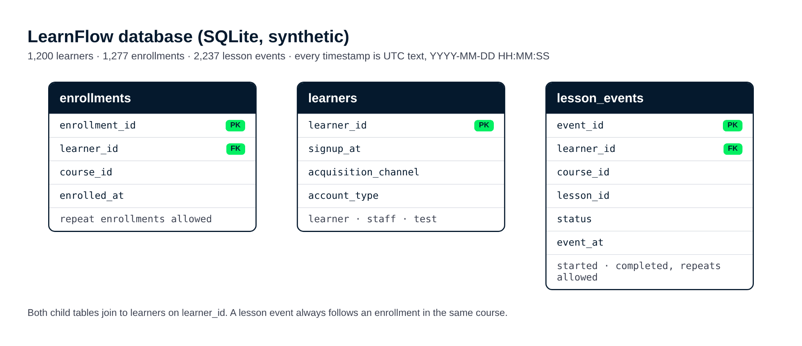
Three tables joined on learner ID. Image by Author.
The database holds 1,200 learners across five channels (971 eligible October signups), plus common SQL traps like repeat enrollments, duplicate completions, unfinished lessons, and events on the seven-day cutoff. I intentionally gave channels different enrollment and completion rates, so changing the rule shifts the rankings. Every lesson event follows a same-course enrollment so completions never exceed enrollments.
Define the initial activation metric
A cohort is the group you measure; activation rate is the share meeting the rule inside the seven-day window (from signup up to, but not including, seven days later). The first prompt set these rules:
- Cohort: October 2026 signups, measured in Coordinated Universal Time (UTC)
- Exclusions: staff and test accounts
- Activated: at least one enrollment inside the seven-day window
- Rate: activated eligible learners divided by eligible learners, per channel, each learner counted once
Activity records extend well past the end of the month, so even late-October signups get a full seven-day window.
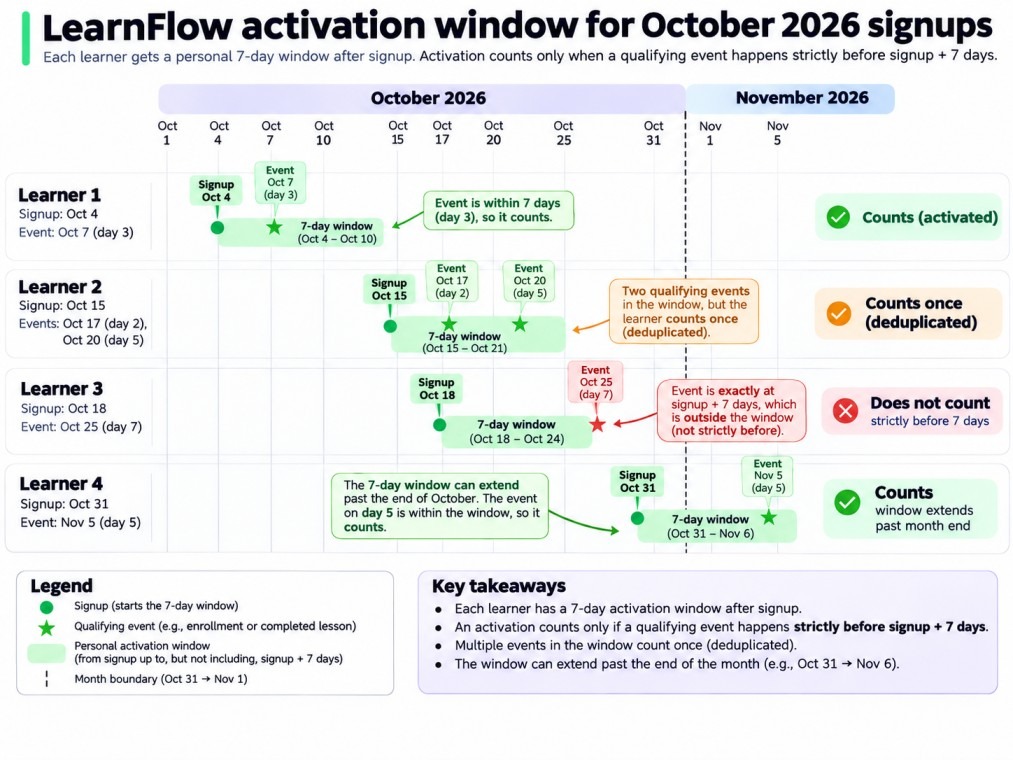
How each signup window handles cutoffs. Image by Author.
Build a Text-to-SQL Agent With Gemini 4 Neon Function Calling
A text-to-SQL agent turns plain questions into SQL and runs them for answers. With Gemini 4 Neon function calling, Neon writes SQL while your Python code (the agent harness managing model and tool calls) controls database access.
Keep schema facts separate from business rules
Put static schema facts (tables, allowed values, timestamp format) in the system instruction and business rules in user prompts. Since the system instruction repeats every turn, putting metric rules there creates conflicts when definitions change.
Build a read-only SQLite tool
With function calling, the model asks for a function by name, and your code runs it. Here's the only tool:
RUN_SQL = {
"type": "function",
"name": "run_sql",
"description": "Run one read-only SQLite SELECT query on the LearnFlow database. "
"Returns the column names and rows, or an error message. At most 200 rows.",
"parameters": {"type": "object",
"properties": {"sql": {"type": "string", "description": "One SQLite SELECT statement."}},
"required": ["sql"]},
}A prompt alone can't protect a database, and SQLite's URI docs note that read-only mode (mode=ro) doesn't cover attached databases. Using Python's sqlite3 module, our tool blocks writes, allows only read-only SELECT queries (WITH subqueries and standard SQL functions included) on the three LearnFlow tables, and enforces a 5-second execution limit and 200-row cap (full code on GitHub).
Return function call results in a bounded loop
Here is one tool-call round-trip from the full runnable loop on GitHub (where the prompts and SQL helper live). When Neon needs data, it returns a function_call with SQL and an ID; Python runs the query and sends the rows back as a function_result with the same ID and settings:
import json
request = build_request(SYSTEM_INSTRUCTION, RUN_SQL)
# Allow up to 15 minutes (900 seconds) for long reasoning turns
interaction = client.interactions.create(input=ORIGINAL_TASK, timeout=900, **request)
results = []
for call in [s for s in interaction.steps if s.type == "function_call"]:
out = execute_readonly(DB_PATH, call.arguments.get("sql", ""))
results.append({"type": "function_result", "name": call.name, "call_id": call.id,
"is_error": "error" in out,
"result": [{"type": "text", "text": json.dumps(out, default=str)}]})
interaction = client.interactions.create(input=results, previous_interaction_id=interaction.id,
timeout=900, **request)The model can keep asking for SQL queries, so our Python code stops before starting a new request once it hits 20 requests, 24 SQL calls, 20 minutes, or a $2.00 spend threshold.
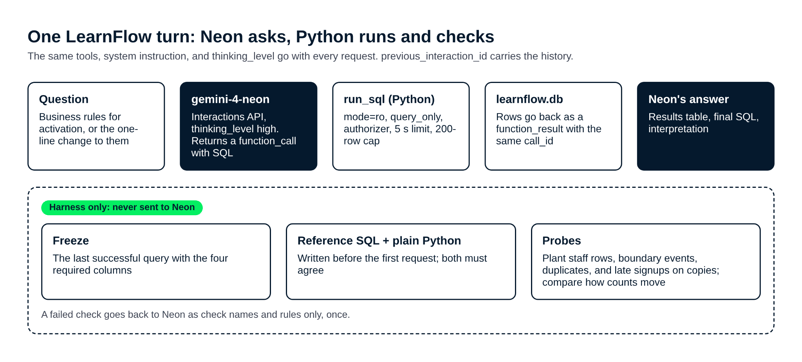
Neon asks, Python runs and checks. Image by Author.
Generate and Run SQL From Natural Language With Gemini 4 Neon
Neon used 6 API requests and 5 read-only SQL calls for the enrollment question, inspecting the tables first before computing the final rates.
Profile the tables before answering
Three quick profiling queries checked account types, timestamps, and boundary rows before the channel query, followed by a fifth query for totals. Checking live data first catches edge cases early.
Review the generated enrollment SQL
Here is the exact executed SQL from Neon's completed first turn:
WITH eligible_learners AS (
SELECT learner_id, signup_at, acquisition_channel
FROM learners
WHERE signup_at >= '2026-10-01 00:00:00'
AND signup_at <= '2026-10-31 23:59:59'
AND account_type = 'learner'
),
activated_learners AS (
SELECT DISTINCT el.learner_id
FROM eligible_learners el
JOIN enrollments e
ON e.learner_id = el.learner_id
AND e.enrolled_at >= el.signup_at
AND e.enrolled_at < datetime(el.signup_at, '+7 days')
)
SELECT el.acquisition_channel,
COUNT(el.learner_id) AS eligible_learners,
COUNT(al.learner_id) AS activated_learners,
ROUND(1.0 * COUNT(al.learner_id) / COUNT(el.learner_id), 4) AS activation_rate
FROM eligible_learners el
LEFT JOIN activated_learners al ON al.learner_id = el.learner_id
GROUP BY el.acquisition_channel
ORDER BY activation_rate DESC, el.acquisition_channel ASC;Four details keep this query accurate:
-
Each
WITHblock is a common table expression (CTE), a named subquery separating eligible learners from activated ones -
DISTINCTcounts each learner once despite repeat enrollments -
The
LEFT JOINkeeps non-activated learners in the total -
Multiplying by
1.0avoids integer division in SQLite
Every count matched my check (604 of 971 learners, 0.6220), setting our baseline. If you adapt this for production, filtering strictly before next month (< '2026-11-01 00:00:00') is safer when timestamps store fractional seconds.
Update the SQL Metric With the Gemini Interactions API
Each completed turn returns an interaction ID, so passing it as previous_interaction_id continues the conversation on the server while you resend tools and settings.
Send a follow-up prompt with previous_interaction_id
Write the follow-up in plain business terms without naming tables or columns, just as a product manager would:
The product team has changed the definition of activation. Enrolling in a course is no
longer enough: a learner now counts as activated only after completing at least one lesson
within the same seven-day window. Keep everything else in the analysis the same, rerun it,
and tell me what changed.Save original_id = interaction.id from the completed first analysis, then pass it in one more create() call:
revision = client.interactions.create(input=REVISION_TASK, timeout=900,
previous_interaction_id=original_id, **request)This sends the new rule as a follow-up to the completed first turn.
Inspect the revised SQL query
Before editing the SQL, Neon checked lesson_events for status values and seven-day boundary rows. The cohort block (eligible_learners) stayed unchanged; Neon updated only activated_learners:
activated_learners AS (
SELECT DISTINCT el.learner_id
FROM eligible_learners el
JOIN lesson_events le
ON le.learner_id = el.learner_id
AND le.status = 'completed'
AND le.event_at >= el.signup_at
AND le.event_at < datetime(el.signup_at, '+7 days')
)Just swapping the table name would have failed twice. Without status = 'completed', unfinished lessons would count, and without DISTINCT, repeat completions would count the same learner twice. Neon handled both.
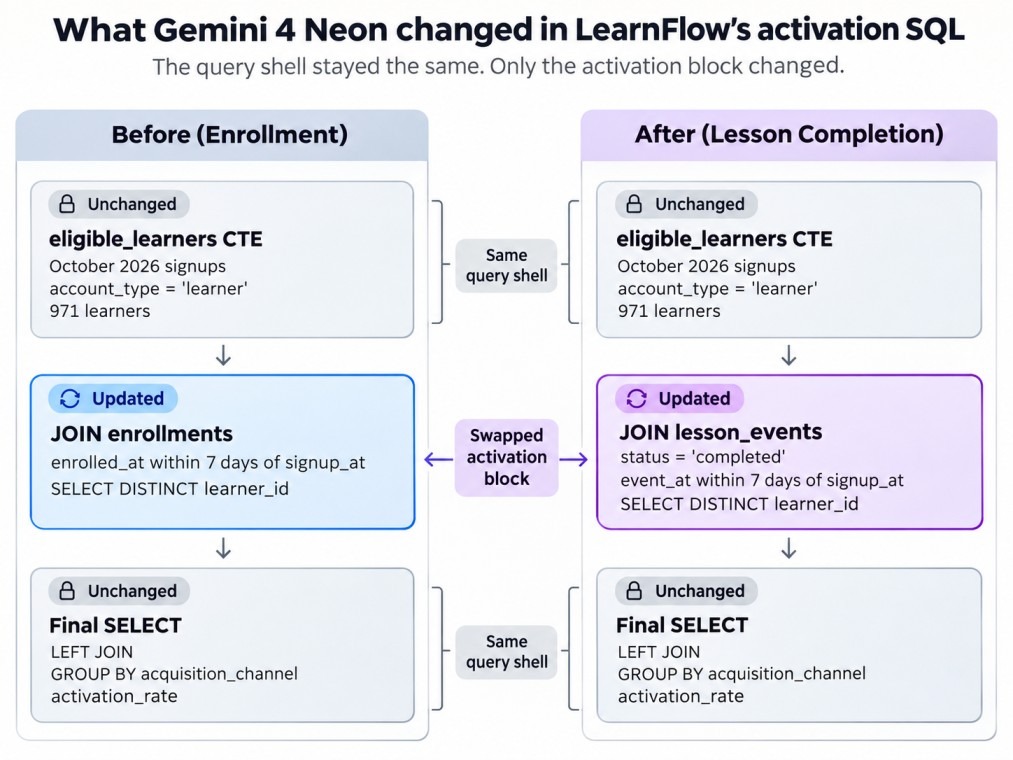
Only the activation clause changed here. Image by Author.
Verify the Revised SQL Against a Reference Query
To verify AI-generated SQL, check the final executed query against rules you wrote ahead of time, the same pattern from our Claude Fable 5.2 API tutorial.
Check business rules alongside SQL syntax
Valid SQL can still drop filters or double-count rows, so our validator checks the executed query three ways:
- Compare results against an independent reference query and plain Python
- Test edge cases on database copies (exclusions, cutoffs, duplicates, statuses)
- Return only broken rule names on failure, capped at one retry
Neon passed all 23 checks (10 original, 13 revised) with no retry, keeping eligible counts identical across all five channels.
Original vs. revised activation rates
The chart below compares Neon's enrollment-based and lesson-completion activation rates across all five channels on the same 971 eligible learners.
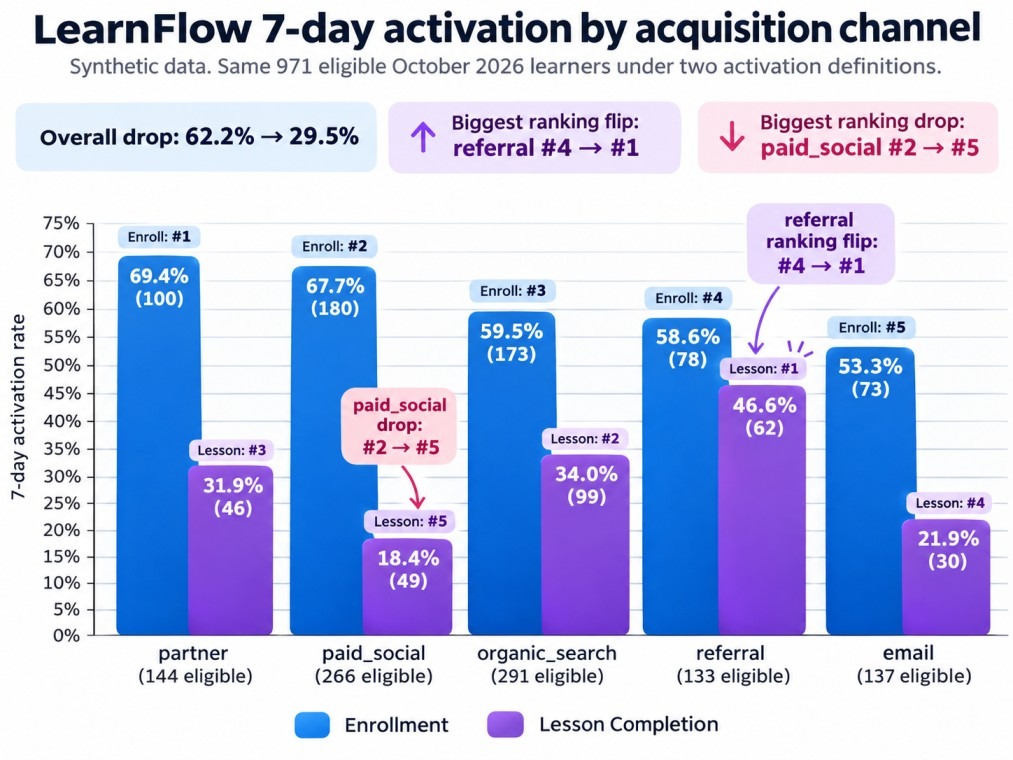
Completion metric reshuffles channel activation rankings. Image by Author.
Overall activation fell from 604 learners (0.6220) to 286 (0.2945), down 32.75 percentage points. By channel:
-
partnerdropped from 0.6944 to 0.3194 (1st to 3rd) -
paid_socialfell from 0.6767 to 0.1842 (2nd to 5th) -
organic_searchshifted from 0.5945 to 0.3402 (3rd to 2nd) -
referralrose from 0.5865 to 0.4662 (4th to 1st) -
emailmoved from 0.5328 to 0.2190 (5th to 4th)
Because those patterns are synthetic, the takeaway is how dramatically one rule change can reshuffle rankings on the same learners.
Separate SQL accuracy from prose claims
This split is our main finding: Neon passed every numerical SQL check, while its explanation went past what the data could prove. On the SQL side, it kept the cohort, exclusions, and channel totals unchanged and swapped only activation.
On the prose side, noting that 49 of paid_social's 180 enrollees finished a lesson (27.2%) comes straight from the query, while calling that drop "indicating high enrollment drop-off and lower learner intent" claims a motive three tables cannot show. Code can check SQL math, while written explanations still need human review.
Gemini 4 Neon Results: Time, Tokens, and API Cost
The workflow finished in 134.0 seconds across 12 API requests and 10 SQL calls for an estimated $0.2081, with no correction turns. The recorded run on GitHub holds every query, check, token count, and written summary.
Token usage and API cost
Cost is estimated from reported usage at Google's paid Standard rates (pricing page): $3.00 per million input tokens, $0.15 cached, and $15.00 output including thinking. Usage totaled 61,986 input tokens (34,056 cached), 5,486 output, and 2,460 thinking.
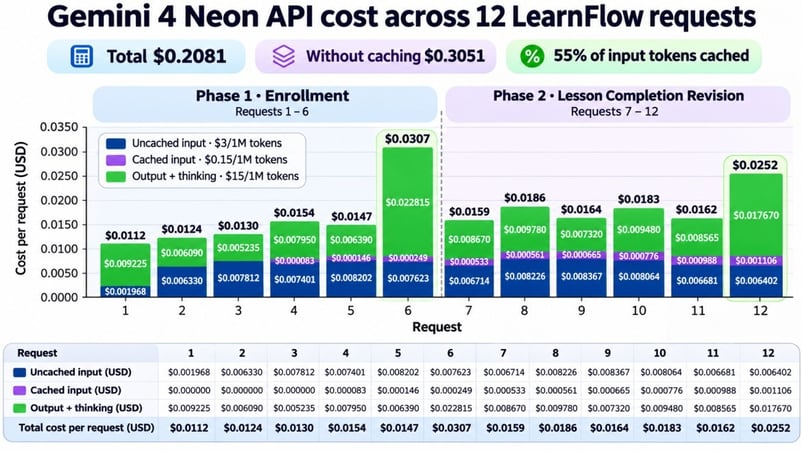
Implicit caching grows across twelve requests. Image by Author.
Automatic prompt caching covered 55% of input tokens at $0.15, lowering the estimate from $0.3051 to $0.2081.
Watch the workflow in Streamlit
In the video, I open the analysis in the Streamlit app, follow the tool log, and step through the Report, SQL, Channels, Reference, and Cost tabs.
The Streamlit app replays one analysis. Video by Author.
Limitations of a Text-to-SQL Agent
LearnFlow tests one metric change on a small database, so keep these limits in mind:
-
LearnFlow has three tables and 1,200 learners, while real warehouses spread logic across dozens of messier tables
-
One run at
highthinking can't show pass rates across repeated runs or lower levels -
The rule change ("completed at least one lesson") was clear, while real stakeholders often ask vaguer questions like "who is engaged?"
This setup fits recurring metrics you can test in code. For open-ended exploration with no fixed answer yet, keep a human analyst in the loop.
Final Thoughts
With text-to-SQL agents, writing a fresh query is rarely the hard part. The harder test arrives when a team redefines a metric, and the agent has to update finished SQL while leaving every other filter alone.
Gemini 4 Neon handled LearnFlow's update cleanly. It kept the October cohort, exclusions, and channel totals unchanged, matching my reference without a retry, yet still guessed at "lower learner intent" for paid_social with no proof in the data.
For recurring analytics work, pair Neon with a read-only SQL tool and automated checks outside the model so code confirms every edit still answers the right business question.
If you’re interested in building AI-based systems, I highly recommend enrolling in one of our AI Engineer career tracks (for developers or data scientists).
FAQs
How do I access the Gemini 4 Neon API?
Use gemini-4-neon with a paid Google AI Studio key via the Interactions API or generateContent. It is also available on Google Cloud's Gemini Enterprise Agent Platform (global, us, and eu) with separate auth and billing.
Is the Gemini 4 Neon API free, or included with Google AI Pro and Ultra?
No. gemini-4-neon requires paid API billing; Pro and Ultra plans cover the Gemini app and AI Studio chat UI, while your API project needs its own billing account. On the paid tier, Google says prompts and responses are not used to improve its products.
Can I set temperature to 0 or a thinking budget on Gemini 4 Neon?
No. Neon ignores in-range temperature, top_p, and top_k values and returns HTTP 400 for out-of-range numbers, thinking_budget, or thinking_level="minimal". Use thinking_level (low, medium, high, or xhigh) and automated SQL tests for repeatability.
How long does the Gemini Interactions API store conversation history?
Paid-tier interactions are stored for 55 days by default (or 7, 14, or 28 days in AI Studio). Passing store=false disables storage and turns off previous_interaction_id.
Can the Batch API run this text-to-SQL agent loop?
Not directly, since each SQL call depends on the previous step's rows. Neon supports Batch and Flex at half price ($1.50 input, $7.50 output, and $0.075 cached per million tokens), which fits offline evaluation of independent SQL prompts.

Veri hatları, bulut ve YZ araçları üzerinde çalışan; aynı zamanda DataCamp ve gelişmekte olan geliştiriciler için pratik, yüksek etkili eğiticiler yazan bir veri mühendisi ve topluluk inşacısıyım.
A query written in structured query language (SQL) can run without errors and still measure the wrong thing. When a business metric changes, a small edit can accidentally alter the reporting period or the group of users you are counting.
A learning platform, for example, might first define early activation as enrolling in a course after signing up, then switch to completing a lesson. Even when the revised query runs cleanly, it can change more of the original analysis than you intended.
For this tutorial, we'll build a text-to-SQL AI agent in Python with the Gemini 4 Neon API, pairing Neon with a read-only SQLite tool and an independent Python checker. It joins our Argon, Carbon, and Hydrogen API tutorials, focusing on editing SQL that already works.
TL;DR
I tested Gemini 4 Neon on LearnFlow, a fictional learning platform, measuring first-week activation by channel and then switching the rule from course enrollment to lesson completion.
Keep in mind this is a single walkthrough on fictional data.