A language model can answer general questions, but it cannot reliably look up a private knowledge base unless an application retrieves the relevant information first. For JavaScript developers, LangChain.js provides familiar abstractions for documents, embeddings, and retrieval. The missing piece is a persistent place to store and search the resulting vectors.
Oracle AI Database fills that role through the @oracle/langchain-oracledb integration. In this guide, you will connect a small TypeScript workflow to Oracle, store text with metadata, run similarity search, and improve retrieval with filters and maximal marginal relevance (MMR). The tutorial focuses on the retrieval workflow; the companion TypeScript application adds the same integration to an interactive browser UI.
For the integration details, see the official Oracle LangChain JavaScript integration guide.
What Is the LangChain.js and Oracle AI Database Integration?
LangChain.js standardizes how an application works with embedding models and vector stores. The Oracle integration package supplies OracleVS, a vector-store implementation that persists document text, metadata, and vector embeddings in Oracle AI Database. Your application calls LangChain.js methods rather than manually writing SQL for each similarity query.
The same integration package also includes OracleDocLoader, OracleTextSplitter, OracleEmbeddings, and OracleSummary. Those are useful optional building blocks; the example below focuses on OracleVS and keeps embedding generation separate so that the flow remains easy to understand.
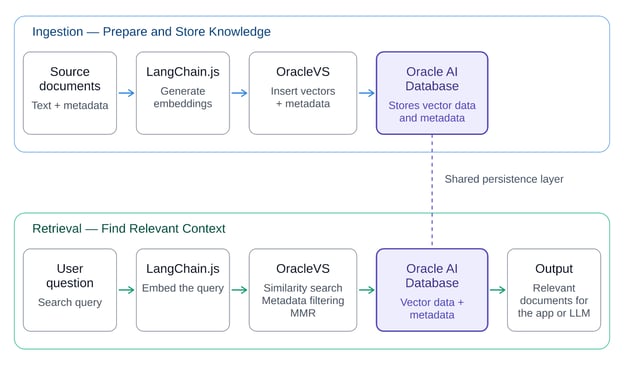
Document ingestion and retrieval using LangChain.js, OracleVS, and Oracle AI Database
Key Features of the Integration
An embedding model turns text into numeric vectors. OracleVS stores these vectors with the source text and structured metadata. Metadata such as document category or source helps the application constrain searches without discarding useful context.
Retrieve relevant passages using vector similarity
At query time, the same embedding model converts the question into a vector. Oracle compares it with the stored vectors using a configured distance strategy, such as cosine distance, and returns the closest documents. The results remain LangChain Document objects, ready for downstream processing.
Control the results with filtering and MMR
Similarity search answers “which items are closest to this question?” A metadata filter narrows eligible documents. MMR adds a different objective: keep the selected passages relevant while reducing near-duplicate results. These operations are complementary rather than interchangeable.
Getting Started With LangChain.js and Oracle AI Database
Prerequisites
For this TypeScript example, you need Node.js 24.13.0, npm 11.6.2, a local Oracle AI Database 26ai Free instance with vector support, and a schema that can create, insert into, query, and drop the demonstration table and its vector index. You also need an OpenAI API key for the embedding example. OpenAIEmbeddings is a LangChain-compatible choice, not a requirement of OracleVS.
Install Node.js from the official Node.js downloads page.
For the primary local route, follow Oracle's Oracle AI Database Free quick start. After the database is running, use a service such as localhost:1521/FREEPDB1 and a schema with the permissions listed above.
Create a TypeScript project
mkdir langchain-oracle-demo
cd langchain-oracle-demo
npm init -y
npm pkg set type=module
npm install @oracle/[email protected] @langchain/[email protected] @langchain/[email protected] [email protected] [email protected]
npm install --save-dev [email protected] [email protected] @types/[email protected]
Create a file named index.ts in this folder. Add the executable TypeScript snippets below to the same file, in the order shown. Do not create a separate file for each snippet. Copy only the executable TypeScript snippets: the SQL and representative-output blocks are explanatory examples and should not be pasted into index.ts.
The package.json setting type=module allows the top-level await used by the examples. The Node.js package configuration is documented in the official Node.js packages guide.
The Oracle integration package implements the vector store, @langchain/core supplies Document, @langchain/openai supplies the example embedding model, and oracledb manages the database connection. The versions above match the companion application; tsx runs the TypeScript example directly without a separate build step.
ORACLE_USER=your_schema
ORACLE_PASSWORD=your_password
ORACLE_CONNECT_STRING=localhost:1521/FREEPDB1
OPENAI_API_KEY=your_api_key
Save these values in a local .env file and add .env to .gitignore. This article uses local Oracle AI Database Free as the primary setup so the steps are reproducible. Autonomous AI Database is a valid deployment alternative, but it requires the service descriptor and wallet or TLS configuration for that environment.
import "dotenv/config";
import oracledb from "oracledb";
import { Document } from "@langchain/core/documents";
import { OpenAIEmbeddings } from "@langchain/openai";
import { OracleVS, DistanceStrategy, VectorElementFormat }
  from "@oracle/langchain-oracledb";

const pool = await oracledb.createPool({
  user: process.env.ORACLE_USER,
  password: process.env.ORACLE_PASSWORD,
  connectString: process.env.ORACLE_CONNECT_STRING,
  poolMin: 1,
  poolMax: 4,
});
The pool lets OracleVS reuse database sessions. Keep all ingestion, retrieval, and verification statements inside the try block. The next code block starts that block, and the later snippets continue it. The pool is closed only after verification in the cleanup section below. In a server application, initialize the pool once and close it during graceful shutdown rather than opening a new connection for every user request.
How to Build Document Search With LangChain.js
We will use 10 short knowledge-base notes, including overlapping retrieval passages. The corpus is intentionally small, but it makes it possible to compare ordinary similarity search with metadata filtering and MMR.
Define your knowledge documents
try {
  const documents = [
    ["database-guide", "database", "Oracle AI Database stores vector embeddings alongside application data."],
    ["connection-pooling", "operations", "A connection pool reuses Oracle database sessions across requests."],
    ["vector-indexes", "performance", "HNSW vector indexes can improve nearest-neighbor search as a table grows."],
    ["metadata-filtering", "retrieval", "Metadata filters restrict retrieval to matching categories or sources."],
    ["similarity-search", "retrieval", "Similarity search returns chunks closest to the query embedding."],
    ["mmr-retrieval", "retrieval", "MMR reduces repeated content while keeping results relevant."],
    ["retrieval-overlap-1", "retrieval", "Similarity search may return several near-duplicate passages when multiple notes explain the same retrieval strategy."],
    ["retrieval-overlap-2", "retrieval", "Several notes about the same retrieval strategy can produce repetitive top matches; MMR selects a more diverse set while preserving relevance."],
    ["troubleshooting", "troubleshooting", "For empty results, check ingestion, embeddings, and filters."],
    ["embedding-compatibility", "retrieval", "Ingestion and query retrieval must use compatible dimensions."],
  ].map(([source, category, pageContent]) =>
    new Document({ pageContent, metadata: { source, category } }));
Each Document has pageContent and metadata. The source and category fields travel with the document through ingestion and retrieval, so the application can explain where a result came from and restrict searches to a relevant subset.
  const embeddings = new OpenAIEmbeddings({
    model: "text-embedding-3-small",
  });

  const vectorStore = await OracleVS.fromDocuments(documents, embeddings, {
    client: pool,
    tableName: "LC_JS_RAG_DEMO",
    query: "Oracle AI Database document search",
    distanceStrategy: DistanceStrategy.COSINE,
    format: VectorElementFormat.FLOAT32,
  });
OracleVS.fromDocuments() is the central integration call. It initializes the vector store, generates embeddings for the supplied documents, and stores their content, vectors, and metadata in Oracle AI Database.
The query parameter provides sample text that is embedded during initialization to determine the vector dimension required for the database table. It is not used to search the stored documents. DistanceStrategy.COSINE specifies the vector distance metric, while VectorElementFormat.FLOAT32 sets the vector element format.
Before rerunning ingestion, use a new demonstration table name or clear the existing data to avoid inserting duplicate documents.
OracleVS accepts a LangChain-compatible embedding implementation, so developers can switch embedding providers without changing the overall vector-store workflow. However, the embeddings used for ingestion and retrieval must remain compatible with the Oracle vector column.
OracleVS determines the vector dimension during initialization using the configured embedding model. To inspect the dimensions and storage format of a vector already stored in Oracle AI Database, run the following SQL query:
SELECT
    VECTOR_DIMENSION_COUNT(embedding) AS vector_dimensions,
    VECTOR_DIMENSION_FORMAT(embedding) AS vector_format
FROM LC_JS_RAG_DEMO
FETCH FIRST 1 ROW ONLY;
If you switch to an embedding model with a different dimension, create a compatible vector table and regenerate the document embeddings. Even if two models produce vectors with the same dimensions, their embedding spaces may differ, so existing documents should be re-embedded before using the new model for retrieval.
For the vector-store method signatures and retrieval options, see the official LangChain.js VectorStore reference.
Retrieve documents with similarity search
For example, the following call asks the OracleVS vector store for the 3 closest documents and prints the source metadata together with each chunk's text:
  const retrievalQuestion =
    "How can vector retrieval reduce repetitive results?";
  const results = await vectorStore.similaritySearch(
    retrievalQuestion,
    3
  );
  console.log(results.map((doc) => ({
    source: doc.metadata.source,
    text: doc.pageContent,
  })));
The code maps each LangChain Document to a plain object containing its source and pageContent for display. A representative output is shown below; the exact order can vary with the embedding model and query:
[
  { source: "retrieval-overlap-2", text: "Several notes about the same retrieval strategy can produce repetitive top matches; MMR selects a more diverse set while preserving relevance." },
  { source: "retrieval-overlap-1", text: "Similarity search may return several near-duplicate passages when multiple notes explain the same retrieval strategy." },
  { source: "mmr-retrieval", text: "MMR reduces repeated content while keeping results relevant." }
]
The first argument is the user question, and the second is k, the maximum number of documents to retrieve. LangChain.js uses the configured embedding model to convert the question into a vector, and Oracle AI Database performs similarity search to find the closest matching documents.
If fewer than k documents are available after applying the search conditions and metadata filters, the method returns only the available results. The retrieved Document objects contain text and metadata that can be displayed with source attribution or passed to a later answer-generation step.
Inspect retrieval scores
For example, use similaritySearchWithScore when you want to inspect the distance associated with each retrieved document:
  const scored = await vectorStore.similaritySearchWithScore(
    "Where are document embeddings stored?",
    3
  );

  for (const [doc, score] of scored) {
    console.log({
      text: doc.pageContent,
      source: doc.metadata.source,
      score,
    });
  }
similaritySearchWithScore returns a distance with each match. Its numeric value and direction depend on the configured distance strategy, so it is not a universal confidence percentage. Compare scores only when using the same embedding model and distance strategy, and inspect the retrieved passage before choosing a threshold.
  const databaseOnly = await vectorStore.similaritySearch(
    "Where are vector embeddings stored?",
    3,
    { category: { $eq: "database" } }
  );

  console.log(databaseOnly.map((doc) => doc.metadata.source));
Example output:
The third argument restricts the search to items with category = database. In this corpus, the predictable filtered result is ["database-guide"]. A filter changes which documents are eligible; vector similarity still ranks the eligible documents.
Use MMR to reduce repetitive results
  const diverse = await vectorStore.maxMarginalRelevanceSearch(
    retrievalQuestion,
    {
      k: 3,
      fetchK: 6,
      lambda: 0.5,
    }
  );
  console.log(diverse.map((doc) => doc.metadata.source));
Representative output from an overlapping corpus (ordering can vary across embedding models and runs):
["retrieval-overlap-2", "mmr-retrieval", "metadata-filtering"]
MMR first considers a candidate pool (fetchK) and then selects k documents by balancing query relevance with diversity. A lower lambda emphasizes diversity more; a higher value emphasizes relevance more. With the overlapping corpus above, the selected sources can differ from ordinary similarity search, making the retrieval trade-off visible.
Pass retrieved context to an AI application
  const question = "How does LangChain.js retrieve Oracle documents?";
  const contextDocs = await vectorStore.similaritySearch(question, 3);

  const context = contextDocs
    .map((doc, i) => `[${i + 1}] ${doc.pageContent}`)
    .join("\n\n");

  console.log({ question, context });
This is the handoff point between LangChain.js retrieval and a large language model (LLM) call: the application has a question plus inspectable evidence, ready for a prompt that asks the model to answer from that context.
Retrieval and generation are separate responsibilities. At this point, context is a plain text string that a chat model can consume. You could now supply it to a model with an instruction to answer only from the retrieved material and cite source identifiers. The database integration itself works even without a chat model.
How to Verify the Integration
A useful validation checks ingestion and each retrieval strategy separately. First, confirm that the vector store was created without a database error. Then inspect the source metadata returned by similarity search, the filtered result, and the MMR result.
  const check = await vectorStore.similaritySearch(
    "How does OracleVS connect to LangChain.js?",
    3
  );

  if (check.length === 0) {
    throw new Error("No documents retrieved; inspect ingestion and filters.");
  }

  console.log({
    similarity: check.map((doc) => doc.metadata.source),
    filtered: databaseOnly.map((doc) => doc.metadata.source),
    mmr: diverse.map((doc) => doc.metadata.source),
  });
Close the connection pool after verification
} finally {
  await pool.close(10);
}
The cleanup runs only after ingestion, retrieval, and verification have finished. The drain time gives in-use connections a short window to complete. In a long-running server, keep the pool open until graceful shutdown. See the node-oracledb pool.close() documentation for the lifecycle details.
At this point, the complete index.ts file can be executed with:
A representative validation output is:
{
  similarity: ["retrieval-overlap-1", "retrieval-overlap-2", "mmr-retrieval"],
  filtered: ["database-guide"],
  mmr: ["retrieval-overlap-2", "mmr-retrieval", "metadata-filtering"]
}
The exact similarity order and distance values can vary with the embedding model and provider. The filtered result should contain database-guide, while the MMR result should show a varied set of retrieval sources from the overlapping corpus.
Tips and Troubleshooting
The database connection fails
Verify the connection string, credentials, reachable service, and schema privileges. If you use Autonomous AI Database, confirm its required wallet or TLS setup. Test the database connection independently before debugging retrieval.
An embedding dimension mismatch occurs
The vectors created during ingestion and the query vectors must use compatible dimensions. Using different embedding models for inserts and queries can break search or degrade results. Keep model selection consistent for a table.
A search returns no documents
Confirm that ingestion inserted rows, then retry without restrictive metadata filters. For small corpora, experiment with broader queries and inspect the stored content.
The results are relevant but repetitive
Compare similarity search against MMR using a corpus with overlapping chunks. Tune k, fetchK, and lambda while checking whether diversity comes at the cost of missing important passages.
Should you create a vector index?
For a small sample dataset, start by validating correctness without tuning indexing. As data grows, evaluate Oracle vector indexes such as Hierarchical Navigable Small World (HNSW) or Inverted File (IVF) indexes, based on your performance and accuracy requirements. Index creation is an optimization, not a prerequisite for understanding the basic integration.
For more detail about Oracle vector indexes, see Oracle's vector indexes documentation.
Explore a Complete TypeScript Reference Implementation
To see how these concepts come together in a working application, explore the LangChain.js and Oracle AI Database reference implementation.
Built with TypeScript, the application brings together document ingestion, vector storage, similarity search, metadata filtering, and MMR using LangChain.js and Oracle AI Database. It also provides an interactive interface for experimenting with retrieval settings, inspecting retrieved documents, and understanding how different search strategies affect the context returned to the application.
The repository includes the source code and setup instructions, allowing you to explore the complete integration and adapt the implementation to your own projects.
Conclusion and Next Steps
You have connected LangChain.js to Oracle AI Database through OracleVS, represented knowledge as Document objects, created persistent vector embeddings, and compared similarity search, metadata filtering, and MMR. For the next step, read the official LangChain.js documentation and the official Oracle LangChain JavaScript integration guide.
If you work in other languages, our Oracle AI Vector Search tutorial covers the same storage and query steps in Python, and our LangChain4j tutorial builds a Java agent with Oracle AI Database.
Our Retrieval Augmented Generation (RAG) with LangChain course is an optional retrieval-focused follow-up; its examples are in Python, but the workflow concepts apply to this TypeScript implementation.








A language model can answer general questions, but it cannot reliably look up a private knowledge base unless an application retrieves the relevant information first. For JavaScript developers, LangChain.js provides familiar abstractions for documents, embeddings, and retrieval. The missing piece is a persistent place to store and search the resulting vectors.
Oracle AI Database fills that role through the
@oracle/langchain-oracledbintegration. In this guide, you will connect a small TypeScript workflow to Oracle, store text with metadata, run similarity search, and improve retrieval with filters and maximal marginal relevance (MMR). The tutorial focuses on the retrieval workflow; the companion TypeScript application adds the same integration to an interactive browser UI.For the integration details, see the official Oracle LangChain JavaScript integration guide.
What Is the LangChain.js and Oracle AI Database Integration?
LangChain.js standardizes how an application works with embedding models and vector stores. The Oracle integration package supplies
OracleVS, a vector-store implementation that persists document text, metadata, and vector embeddings in Oracle AI Database. Your application calls LangChain.js methods rather than manually writing SQL for each similarity query.The same integration package also includes
OracleDocLoader,OracleTextSplitter,OracleEmbeddings, andOracleSummary. Those are useful optional building blocks; the example below focuses onOracleVSand keeps embedding generation separate so that the flow remains easy to understand.Document ingestion and retrieval using LangChain.js, OracleVS, and Oracle AI Database
Key Features of the Integration
Store embeddings alongside document metadata
An embedding model turns text into numeric vectors.
OracleVSstores these vectors with the source text and structured metadata. Metadata such as document category or source helps the application constrain searches without discarding useful context.Retrieve relevant passages using vector similarity
At query time, the same embedding model converts the question into a vector. Oracle compares it with the stored vectors using a configured distance strategy, such as cosine distance, and returns the closest documents. The results remain LangChain
Documentobjects, ready for downstream processing.Control the results with filtering and MMR
Similarity search answers “which items are closest to this question?” A metadata filter narrows eligible documents. MMR adds a different objective: keep the selected passages relevant while reducing near-duplicate results. These operations are complementary rather than interchangeable.
Getting Started With LangChain.js and Oracle AI Database
Prerequisites
For this TypeScript example, you need Node.js 24.13.0, npm 11.6.2, a local Oracle AI Database 26ai Free instance with vector support, and a schema that can create, insert into, query, and drop the demonstration table and its vector index. You also need an OpenAI API key for the embedding example.
OpenAIEmbeddingsis a LangChain-compatible choice, not a requirement ofOracleVS.Install Node.js from the official Node.js downloads page.
For the primary local route, follow Oracle's Oracle AI Database Free quick start. After the database is running, use a service such as
localhost:1521/FREEPDB1and a schema with the permissions listed above.Create a TypeScript project
Create a file named
index.tsin this folder. Add the executable TypeScript snippets below to the same file, in the order shown. Do not create a separate file for each snippet. Copy only the executable TypeScript snippets: the SQL and representative-output blocks are explanatory examples and should not be pasted intoindex.ts.The
package.jsonsettingtype=moduleallows the top-levelawaitused by the examples. The Node.js package configuration is documented in the official Node.js packages guide.The Oracle integration package implements the vector store,
@langchain/coresuppliesDocument,@langchain/openaisupplies the example embedding model, andoracledbmanages the database connection. The versions above match the companion application;tsxruns the TypeScript example directly without a separate build step.Configure the connection
Save these values in a local
.envfile and add.envto.gitignore. This article uses local Oracle AI Database Free as the primary setup so the steps are reproducible. Autonomous AI Database is a valid deployment alternative, but it requires the service descriptor and wallet or TLS configuration for that environment.The pool lets
OracleVSreuse database sessions. Keep all ingestion, retrieval, and verification statements inside thetryblock. The next code block starts that block, and the later snippets continue it. The pool is closed only after verification in the cleanup section below. In a server application, initialize the pool once and close it during graceful shutdown rather than opening a new connection for every user request.How to Build Document Search With LangChain.js
We will use 10 short knowledge-base notes, including overlapping retrieval passages. The corpus is intentionally small, but it makes it possible to compare ordinary similarity search with metadata filtering and MMR.
Define your knowledge documents
Each
DocumenthaspageContentandmetadata. Thesourceandcategoryfields travel with the document through ingestion and retrieval, so the application can explain where a result came from and restrict searches to a relevant subset.Configure embeddings and create OracleVS
OracleVS.fromDocuments()is the central integration call. It initializes the vector store, generates embeddings for the supplied documents, and stores their content, vectors, and metadata in Oracle AI Database.The
queryparameter provides sample text that is embedded during initialization to determine the vector dimension required for the database table. It is not used to search the stored documents.DistanceStrategy.COSINEspecifies the vector distance metric, whileVectorElementFormat.FLOAT32sets the vector element format.Before rerunning ingestion, use a new demonstration table name or clear the existing data to avoid inserting duplicate documents.
OracleVSaccepts a LangChain-compatible embedding implementation, so developers can switch embedding providers without changing the overall vector-store workflow. However, the embeddings used for ingestion and retrieval must remain compatible with the Oracle vector column.OracleVSdetermines the vector dimension during initialization using the configured embedding model. To inspect the dimensions and storage format of a vector already stored in Oracle AI Database, run the following SQL query:If you switch to an embedding model with a different dimension, create a compatible vector table and regenerate the document embeddings. Even if two models produce vectors with the same dimensions, their embedding spaces may differ, so existing documents should be re-embedded before using the new model for retrieval.
For the vector-store method signatures and retrieval options, see the official LangChain.js VectorStore reference.
Retrieve documents with similarity search
For example, the following call asks the
OracleVSvector store for the 3 closest documents and prints the source metadata together with each chunk's text:The code maps each LangChain
Documentto a plain object containing itssourceandpageContentfor display. A representative output is shown below; the exact order can vary with the embedding model and query:The first argument is the user question, and the second is
k, the maximum number of documents to retrieve. LangChain.js uses the configured embedding model to convert the question into a vector, and Oracle AI Database performs similarity search to find the closest matching documents.If fewer than
kdocuments are available after applying the search conditions and metadata filters, the method returns only the available results. The retrievedDocumentobjects contain text and metadata that can be displayed with source attribution or passed to a later answer-generation step.Inspect retrieval scores
For example, use
similaritySearchWithScorewhen you want to inspect the distance associated with each retrieved document:similaritySearchWithScorereturns a distance with each match. Its numeric value and direction depend on the configured distance strategy, so it is not a universal confidence percentage. Compare scores only when using the same embedding model and distance strategy, and inspect the retrieved passage before choosing a threshold.Limit results with metadata filters
Example output:
The third argument restricts the search to items with
category = database. In this corpus, the predictable filtered result is["database-guide"]. A filter changes which documents are eligible; vector similarity still ranks the eligible documents.Use MMR to reduce repetitive results
Representative output from an overlapping corpus (ordering can vary across embedding models and runs):
MMR first considers a candidate pool (
fetchK) and then selectskdocuments by balancing query relevance with diversity. A lowerlambdaemphasizes diversity more; a higher value emphasizes relevance more. With the overlapping corpus above, the selected sources can differ from ordinary similarity search, making the retrieval trade-off visible.Pass retrieved context to an AI application
This is the handoff point between LangChain.js retrieval and a large language model (LLM) call: the application has a question plus inspectable evidence, ready for a prompt that asks the model to answer from that context.
Retrieval and generation are separate responsibilities. At this point,
contextis a plain text string that a chat model can consume. You could now supply it to a model with an instruction to answer only from the retrieved material and cite source identifiers. The database integration itself works even without a chat model.How to Verify the Integration
A useful validation checks ingestion and each retrieval strategy separately. First, confirm that the vector store was created without a database error. Then inspect the source metadata returned by similarity search, the filtered result, and the MMR result.
Close the connection pool after verification
The cleanup runs only after ingestion, retrieval, and verification have finished. The drain time gives in-use connections a short window to complete. In a long-running server, keep the pool open until graceful shutdown. See the node-oracledb
pool.close()documentation for the lifecycle details.At this point, the complete
index.tsfile can be executed with:A representative validation output is:
The exact similarity order and distance values can vary with the embedding model and provider. The filtered result should contain
database-guide, while the MMR result should show a varied set of retrieval sources from the overlapping corpus.Tips and Troubleshooting
The database connection fails
Verify the connection string, credentials, reachable service, and schema privileges. If you use Autonomous AI Database, confirm its required wallet or TLS setup. Test the database connection independently before debugging retrieval.
An embedding dimension mismatch occurs
The vectors created during ingestion and the query vectors must use compatible dimensions. Using different embedding models for inserts and queries can break search or degrade results. Keep model selection consistent for a table.
A search returns no documents
Confirm that ingestion inserted rows, then retry without restrictive metadata filters. For small corpora, experiment with broader queries and inspect the stored content.
The results are relevant but repetitive
Compare similarity search against MMR using a corpus with overlapping chunks. Tune
k,fetchK, andlambdawhile checking whether diversity comes at the cost of missing important passages.Should you create a vector index?
For a small sample dataset, start by validating correctness without tuning indexing. As data grows, evaluate Oracle vector indexes such as Hierarchical Navigable Small World (HNSW) or Inverted File (IVF) indexes, based on your performance and accuracy requirements. Index creation is an optimization, not a prerequisite for understanding the basic integration.
For more detail about Oracle vector indexes, see Oracle's vector indexes documentation.
Explore a Complete TypeScript Reference Implementation
To see how these concepts come together in a working application, explore the LangChain.js and Oracle AI Database reference implementation.
Built with TypeScript, the application brings together document ingestion, vector storage, similarity search, metadata filtering, and MMR using LangChain.js and Oracle AI Database. It also provides an interactive interface for experimenting with retrieval settings, inspecting retrieved documents, and understanding how different search strategies affect the context returned to the application.
The repository includes the source code and setup instructions, allowing you to explore the complete integration and adapt the implementation to your own projects.
Conclusion and Next Steps
You have connected LangChain.js to Oracle AI Database through
OracleVS, represented knowledge asDocumentobjects, created persistent vector embeddings, and compared similarity search, metadata filtering, and MMR. For the next step, read the official LangChain.js documentation and the official Oracle LangChain JavaScript integration guide.If you work in other languages, our Oracle AI Vector Search tutorial covers the same storage and query steps in Python, and our LangChain4j tutorial builds a Java agent with Oracle AI Database.
Our Retrieval Augmented Generation (RAG) with LangChain course is an optional retrieval-focused follow-up; its examples are in Python, but the workflow concepts apply to this TypeScript implementation.