In this tutorial, we’ll build a local semantic search demo with Oracle AI Vector Search, Python, and Oracle Database Free 26ai.
We’ll start with handwritten three-dimensional vectors so the distance calculation is visible, then generate text embeddings and query them from Oracle Database with SQL.
This tutorial is for Python and SQL developers who are new to vector search and comfortable with Docker, environment variables, Python packages, and local database setup.
AI-powered applications need search that understands meaning, not only exact words. A support app, documentation portal, or internal knowledge tool should be able to find “database storage for AI search” even when the best matching document says “store vector embeddings in native columns.”
Vector embeddings make that possible by representing text as numeric vectors. Oracle AI Vector Search lets us store those vectors directly in Oracle Database, query them with SQL, and keep embeddings beside relational application data.
For this local workflow, we do not need a separate vector database.
We’ll run Oracle Database Free 26ai locally, connect from Python with oracledb Thin mode, store manual vectors first, store OpenAI embeddings next, run semantic search, compare semantic retrieval with a simple exact phrase predicate, and create a vector index validated through USER_INDEXES.
By the end, we’ll have a working Python-powered semantic search workflow that stores embeddings in Oracle Database and retrieves the most similar documents locally.
What Is Oracle AI Vector Search?
Oracle AI Vector Search is a set of Oracle Database capabilities for storing, indexing, and querying vector embeddings. A vector embedding is a fixed-size list of numbers that represents the meaning of text, images, or other data in a form that a database can compare mathematically.
An embedding model creates the numeric vectors. It takes input such as a sentence, paragraph, image description, or code snippet and returns a vector with a fixed number of dimensions.
Similar inputs should produce vectors that are close together, while unrelated inputs should land farther apart. We must therefore use the same embedding model for stored documents and incoming queries because distances are meaningful only when vectors share the same coordinate system.
In this tutorial, the manual vectors are deliberately small so we can inspect the math. The real text embeddings are much larger because the model needs enough dimensions to encode more subtle relationships between words, phrases, and topics.
Vector search ranks rows by distance between vectors. For Euclidean and cosine distance queries, smaller distance values mean closer matches. In this tutorial, we’ll start with a small VECTOR(3, FLOAT32) column so we can see distance behavior directly, then move to VECTOR(1536, FLOAT32) embeddings generated from text.
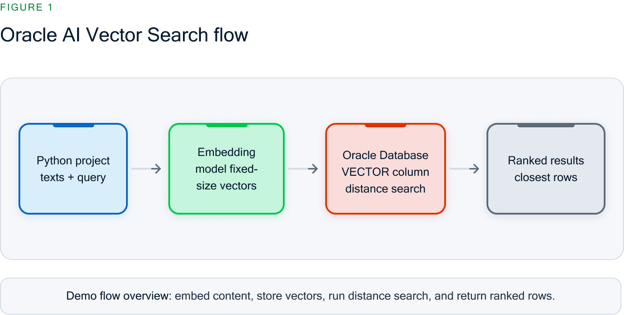
Figure 1. Oracle AI Vector Search flow
Oracle AI Vector Search stores embeddings in a native VECTOR column and ranks results by vector distance.
Oracle Database is useful when embeddings belong beside relational application data such as document IDs, titles, content, users, products, tickets, or metadata.
Some applications use a separate vector database or search engine for specialized retrieval workloads, but for this tutorial’s local semantic search workflow, Oracle Database provides the vector storage and search features we need.
Key Features of Oracle AI Vector Search
We’ll use four Oracle AI Vector Search features in the demo: native vector storage, distance functions, vector indexes, and relational integration.
Native vector data type
Oracle Database supports native VECTOR columns with explicit dimensions and element formats. In the demo, we’ll use VECTOR(3, FLOAT32) for manual vectors and VECTOR(1536, FLOAT32) for the default text-embedding-3-small embedding model.
Distance functions and operators
The runnable examples use VECTOR_DISTANCE() because it keeps the distance metric explicit in SQL.
We’ll use Euclidean distance for the manual vector example and cosine distance for text embeddings.
Oracle Database also includes shorthand vector distance operators and dot-product-related distance behavior, but this tutorial keeps runnable SQL on the explicit VECTOR_DISTANCE() path.
Different distance metrics answer slightly different questions about “closeness.”
For a small tutorial, cosine distance is a good default for text embeddings because it focuses on direction, which often maps well to semantic similarity.
Euclidean distance is easier to visualize with handwritten vectors, and dot-product-style comparisons are useful in some retrieval systems when vector magnitude or normalized vectors are part of the model design.
|
Metric
|
What It Compares
|
Good Fit
|
Watch For
|
|
Cosine
|
Vector direction
|
Text embeddings and semantic similarity
|
Results depend on using the same embedding model and consistent preprocessing
|
|
Euclidean
|
Straight-line distance
|
Small examples, geometry intuition, some numeric feature vectors
|
Magnitude affects the distance, so scaling can matter
|
|
Dot product
|
Direction and magnitude together
|
Workflows designed around normalized vectors or inner-product scoring
|
Score direction and normalization rules need to be understood before comparing results
|
Vector indexes
Exact vector search is useful for correctness and small datasets. As datasets grow, vector indexes support approximate nearest-neighbor search workflows.
Oracle AI Vector Search includes in-memory neighbor graph indexes, often associated with HNSW-style search, and neighbor-partitions indexes, often associated with IVF-style partitioning.
In this local demo, we use ORGANIZATION NEIGHBOR PARTITIONS and validate the index with USER_INDEXES.
Approximate indexes trade a small amount of exhaustive-search certainty for faster retrieval at scale.
The right index family depends on the workload, data volume, update pattern, and recall target.
This tutorial uses an IVF-style neighbor-partitions index because it keeps the local setup simple and provides a concrete index-creation step without turning the tutorial into an index-tuning guide.
|
Index Family
|
Basic Idea
|
Strengths
|
Tradeoffs
|
When We Might Use It
|
|
IVF / neighbor partitions
|
Partition the vector space, then search likely partitions
|
Simple mental model, practical for many batch-loaded datasets
|
Recall and speed depend on partitioning and search settings
|
We want a straightforward approximate-search path for a growing dataset
|
|
HNSW / neighbor graph
|
Build a graph that links nearby vectors for fast traversal
|
Strong recall and latency profile for many nearest-neighbor workloads
|
More memory-oriented, and configuration can matter more
|
We need low-latency search and can budget memory and tuning effort
|
Integration with relational queries
A vector column can live beside ordinary relational columns. Our documents table will store title, content, and embedding together, so SQL can return both the similarity score and the original document text.
How to Get Started With Oracle AI Vector Search
We’ll use one local setup path: Oracle Database Free 26ai in Docker, the FREEPDB1 service, and a dedicated vector_demo application user.
The vector-search concepts are approachable, but the setup is intermediate because we use Docker, a database schema, Python packages, environment variables, and an embedding API key.
Prerequisites
We’ll need:
- Docker Desktop or Docker Engine.
- Access to Oracle Container Registry.
- Local ports 1521 and 5500 available.
- Python 3.10 or later.
- Basic Python and SQL knowledge.
- Basic Docker and environment-variable familiarity.
- An OpenAI API key for the embedding steps.
This demo requires an Oracle Database version or environment that includes the vector features used here, including native VECTOR columns, VECTOR_DISTANCE(), and CREATE VECTOR INDEX.
The local path uses Oracle Database Free 26ai with the image tag shown below, and the DSN uses the FREEPDB1 pluggable database service.
The manual vector steps do not require an OpenAI API key. The semantic steps send the sample document text and query text to the configured embedding provider, so we’ll use only sample or non-sensitive text.
This tutorial uses oracledb, the current Python driver for Oracle Database. python-oracledb runs in Thin mode by default, so this local demo does not require Oracle Client libraries. Thick mode is useful in other Oracle Database deployments, but we will not call oracledb.init_oracle_client() here.
Start Oracle Database Free 26ai locally
Create a project directory for the scripts we’ll build.
mkdir oracle-ai-vector-search-python
 cd oracle-ai-vector-search-python
|
Start Oracle Database Free 26ai with the local container image.
docker run --name oracle-free-26ai-vector \
   --detach \
   --publish 1521:1521 \
   --publish 5500:5500 \
   --shm-size=1g \
   --env ORACLE_PWD="replace-with-a-strong-password" \
   container-registry.oracle.com/database/free:23.26.1.0-lite-amd64
|
Check the container logs and wait until the database reports that startup is complete.
docker logs oracle-free-26ai-vector
|
FREEPDB1 is the pluggable database service used by this local Oracle Database Free container path. Our Python DSN will be localhost:1521/FREEPDB1.
Create the vector_demo schema in FREEPDB1
Use SYS only for the schema setup step. The password in the sqlplus command is the ORACLE_PWD value from the docker run command; the password in CREATE USER is the application password we will export as DB_PASSWORD.
Run the setup inside the database container.
docker exec -i oracle-free-26ai-vector \
sqlplus -s 'sys/"replace-with-oracle-pwd"@FREEPDB1 as sysdba' <<'SQL'
WHENEVER SQLERROR EXIT SQL.SQLCODE
CREATE USER vector_demo IDENTIFIED BY "replace-with-vector-demo-password";
GRANT CREATE SESSION, CREATE TABLE, CREATE SEQUENCE, UNLIMITED TABLESPACE TO vector_demo;
EXIT
SQL
|
This is a local development shortcut for the demo container. CREATE SEQUENCE is needed because the tables use identity columns.
For production, we would review privileges with a database administrator and apply least privilege for the exact application workload.
Install Python dependencies
Create and activate a virtual environment.
python -m venv .venv
 source .venv/bin/activate
 python -m pip install --upgrade pip
|
Install the Python packages used by the demo.
python -m pip install oracledb openai
|
Set environment variables
Store database credentials and embedding settings in environment variables instead of hard-coding them in Python files.
export DB_USER="vector_demo"
 export DB_PASSWORD="replace-with-vector-demo-password"
 export DB_DSN="localhost:1521/FREEPDB1"
 export OPENAI_API_KEY="replace-with-your-api-key"
 export EMBEDDING_MODEL="text-embedding-3-small"
 export EMBEDDING_DIM="1536"
|
OPENAI_API_KEY is required only for the embedding and semantic search steps. EMBEDDING_DIM must match the number of dimensions returned by the selected embedding model.
Oracle AI Vector Search Demo Project
We’ll build the demo in eight checkpoints. Each script adds one concept and produces output we can verify before moving on.
The database-only checkpoint is complete after Steps 1–3. At that point, we will have connected to Oracle Database, stored manual vectors, queried them by distance, and created the semantic table. The OpenAI API key becomes required in Step 4.
Step 1: Connect to the local database
First, we’ll verify that Python can connect to Oracle Database as the vector_demo application user. This script reads DB_USER, DB_PASSWORD, and DB_DSN from the environment and prints the driver mode and database version.
Create the script
Save the following code as 01_check_connection.py.
import os
import oracledb
ADMIN_USERS = {"SYS", "SYSTEM", "PDBADMIN"}
def required_env(name):
value = os.getenv(name)
if not value:
raise SystemExit(f"Set {name} before running this script.")
return value
def main():
user = required_env("DB_USER")
password = required_env("DB_PASSWORD")
dsn = required_env("DB_DSN")
if user.upper() in ADMIN_USERS:
raise SystemExit(
"Use the vector_demo application user, not an admin user."
)
with oracledb.connect(user=user, password=password, dsn=dsn) as connection:
mode = "thin" if oracledb.is_thin_mode() else "thick"
print("Connected to Oracle Database.")
print(f"Driver mode: {mode}")
print(f"Database version: {connection.version}")
if __name__ == "__main__":
main()
|
Run the script
Run the connection check.
python 01_check_connection.py
|
Expected output
The output should confirm that the connection works and that the driver is in Thin mode.
Connected to Oracle Database.
 Driver mode: thin
 Database version: 23.26.1.0.0
|
We now know that the local database, service name, credentials, and Python driver are working before we create any vector tables.
Step 2: Build intuition with manual vectors
Before we introduce embedding models, let’s store three small vectors we can reason about. The array.array("f", values) call creates a 32-bit floating-point array that python-oracledb can bind into a VECTOR(..., FLOAT32) column.
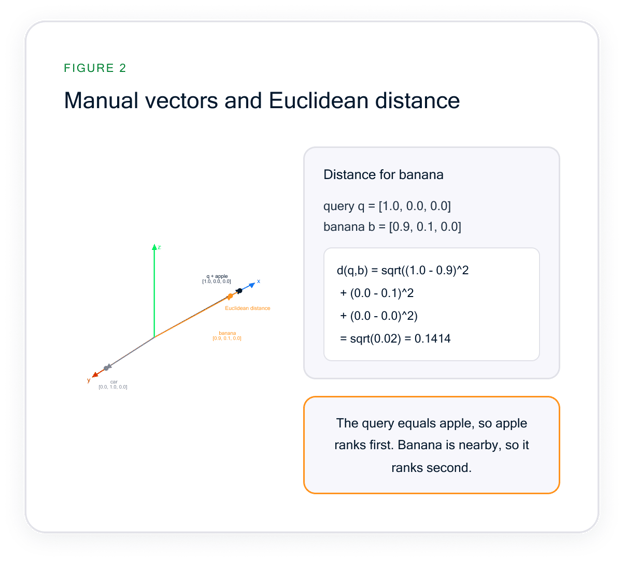
Figure 2. Manual vectors and Euclidean distance.
The manual example uses Euclidean distance. The apple vector has a distance of 0.0000 because it matches the query vector. The banana vector ranks second because sqrt((1.0 - 0.9)^2 + (0.0 - 0.1)^2 + (0.0 - 0.0)^2) = 0.1414.
Create the script
Save the following code as 02_manual_vectors.py.
import array
import os
import oracledb
ADMIN_USERS = {"SYS", "SYSTEM", "PDBADMIN"}
def required_env(name):
value = os.getenv(name)
if not value:
raise SystemExit(f"Set {name} before running this script.")
return value
def main():
user = required_env("DB_USER")
if user.upper() in ADMIN_USERS:
raise SystemExit(
"Use the vector_demo application user, not an admin user."
)
rows = [
("apple", array.array("f", [1.0, 0.0, 0.0])),
("banana", array.array("f", [0.9, 0.1, 0.0])),
("car", array.array("f", [0.0, 1.0, 0.0])),
]
with oracledb.connect(
user=user,
password=required_env("DB_PASSWORD"),
dsn=required_env("DB_DSN"),
) as connection:
with connection.cursor() as cursor:
cursor.execute(
"""
BEGIN
EXECUTE IMMEDIATE 'DROP TABLE manual_vectors PURGE';
EXCEPTION
WHEN OTHERS THEN
IF SQLCODE <> -942 THEN
RAISE;
END IF;
END;
"""
)
cursor.execute(
"""
CREATE TABLE manual_vectors (
id NUMBER GENERATED BY DEFAULT AS IDENTITY PRIMARY KEY,
label VARCHAR2(100),
embedding VECTOR(3, FLOAT32)
)
"""
)
cursor.executemany(
"""
INSERT INTO manual_vectors (label, embedding)
VALUES (:1, :2)
""",
rows,
)
connection.commit()
cursor.execute(
"""
SELECT label,
VECTOR_DISTANCE(
embedding,
:query_vector,
EUCLIDEAN
) AS distance
FROM manual_vectors
ORDER BY distance
FETCH EXACT FIRST 2 ROWS ONLY
""",
query_vector=array.array("f", [1.0, 0.0, 0.0]),
)
print("Created manual_vectors.")
print("Inserted 3 manual vectors.")
print("\nNearest manual vectors:")
for rank, (label, distance) in enumerate(cursor, start=1):
print(f"{rank}. {label:<6} distance={float(distance):.4f}")
if __name__ == "__main__":
main()
|
Run the script
Run the manual vector script.
python 02_manual_vectors.py
|
Expected output
The identical vector appears first with distance 0.0000, and the nearby banana vector appears second.
Created manual_vectors.
 Inserted 3 manual vectors.

 Nearest manual vectors:
 1. apple  distance=0.0000
 2. banana distance=0.1414
|
This is the core idea behind vector search: rows are ranked by mathematical closeness to a query vector. Embedding models will generate larger vectors, but the database behavior is the same.
Step 3: Create the semantic documents table
Now that we know vectors work, we’ll create a real application-style table. The important detail is that the vector column dimension must match the embedding model output dimension.
The dimension is part of the table contract. If an embedding model returns 1,536 numbers, the column must be declared as VECTOR(1536, FLOAT32).
If we later switch to a model with a different output length, we need to recreate or migrate the vector column so inserts and queries continue to use compatible vectors.
Because DDL cannot bind the vector dimension as a regular SQL bind variable, the script converts EMBEDDING_DIM to an integer before using it in the CREATE TABLE statement.
Create the script
Save the following code as 03_create_documents_table.py.
import os
import oracledb
ADMIN_USERS = {"SYS", "SYSTEM", "PDBADMIN"}
def required_env(name):
value = os.getenv(name)
if not value:
raise SystemExit(f"Set {name} before running this script.")
return value
def configured_dimension():
try:
dimension = int(required_env("EMBEDDING_DIM"))
except ValueError as exc:
raise SystemExit("EMBEDDING_DIM must be an integer.") from exc
if dimension <= 0:
raise SystemExit("EMBEDDING_DIM must be a positive integer.")
return dimension
def main():
user = required_env("DB_USER")
if user.upper() in ADMIN_USERS:
raise SystemExit(
"Use the vector_demo application user, not an admin user."
)
model_name = required_env("EMBEDDING_MODEL")
dimension = configured_dimension()
with oracledb.connect(
user=user,
password=required_env("DB_PASSWORD"),
dsn=required_env("DB_DSN"),
) as connection:
with connection.cursor() as cursor:
cursor.execute(
"""
BEGIN
EXECUTE IMMEDIATE 'DROP TABLE documents PURGE';
EXCEPTION
WHEN OTHERS THEN
IF SQLCODE <> -942 THEN
RAISE;
END IF;
END;
"""
)
cursor.execute(
f"""
CREATE TABLE documents (
id NUMBER GENERATED BY DEFAULT AS IDENTITY PRIMARY KEY,
title VARCHAR2(200) NOT NULL,
content VARCHAR2(1000) NOT NULL,
embedding VECTOR({dimension}, FLOAT32)
)
"""
)
print(f"Embedding model: {model_name}")
print(f"Embedding dimension: {dimension}")
print("Recreated documents table.")
if __name__ == "__main__":
main()
|
Run the script
Run the table creation script.
python 03_create_documents_table.py
|
Expected output
The output should show the configured embedding model and vector dimension.
Embedding model: text-embedding-3-small
 Embedding dimension: 1536
 Recreated documents table.
|
We have completed the database-only portion. Oracle Database can store and compare vectors locally; next, we’ll replace handwritten vectors with embeddings generated from text.
Step 4: Verify the embedding model dimension
Before we insert embeddings, we’ll ask the embedding model for one vector and verify its length. This prevents the most common vector-table error: inserting a vector whose length does not match the VECTOR column dimension.
An embedding model is not just a text-to-number converter; it defines the meaning space for the application. All document and query embeddings in this demo must come from the same model.
Using one model ensures that a small distance represents similar meaning rather than two unrelated vectors that happen to have similar shapes. The model also determines the vector length, which is why we check the returned dimension before loading data.
Create the script
Save the following code as 04_check_embedding_dimension.py.
import os
from openai import OpenAI
def required_env(name):
value = os.getenv(name)
if not value:
raise SystemExit(f"Set {name} before running this script.")
return value
def configured_dimension():
try:
return int(required_env("EMBEDDING_DIM"))
except ValueError as exc:
raise SystemExit("EMBEDDING_DIM must be an integer.") from exc
def main():
required_env("OPENAI_API_KEY")
model_name = required_env("EMBEDDING_MODEL")
expected_dimension = configured_dimension()
client = OpenAI()
response = client.embeddings.create(
model=model_name,
input="Oracle AI Vector Search dimension check",
)
returned_dimension = len(response.data[0].embedding)
print(f"Embedding model: {model_name}")
print(f"Returned embedding length: {returned_dimension}")
print(f"Configured EMBEDDING_DIM: {expected_dimension}")
if returned_dimension != expected_dimension:
raise SystemExit(
"Dimension check failed. Update EMBEDDING_DIM, rerun "
"03_create_documents_table.py, and try again."
)
print("Dimension check passed.")
if __name__ == "__main__":
main()
|
Run the script
Run the dimension check.
python 04_check_embedding_dimension.py
|
Expected output
For the default model and dimension, the output should look like this.
Embedding model: text-embedding-3-small
 Returned embedding length: 1536
 Configured EMBEDDING_DIM: 1536
 Dimension check passed.
|
If we choose a different embedding model later, we should update EMBEDDING_MODEL, set EMBEDDING_DIM to the returned vector length, and recreate the documents table.
Step 5: Generate and insert document embeddings
Now we’ll generate embeddings for a small self-contained dataset and insert them into Oracle Database.
Each embedding is converted to array.array("f", embedding) before binding so it matches the FLOAT32 vector column.
Create the script
Save the following code as 05_insert_embeddings.py.
import array
import os
import oracledb
from openai import OpenAI
DOCUMENTS = [
(
"Oracle AI Vector Search",
"Oracle Database can store vector embeddings in native VECTOR "
"columns and query them with SQL similarity search.",
),
(
"Semantic Search for Applications",
"Semantic search ranks results by meaning, helping applications "
"find related content even when exact words differ.",
),
(
"Vector Index Workflow",
"Vector indexes help approximate nearest-neighbor search scale "
"when datasets grow beyond small examples.",
),
(
"Local Docker Development",
"Docker containers make it practical to run a local database for "
"development and repeatable tutorials.",
),
(
"Python Database Code",
"Python applications can connect to Oracle Database with the "
"oracledb driver and use environment variables for credentials.",
),
(
"Acoustic Guitar Practice",
"Daily guitar practice improves timing, chord transitions, and "
"confidence when learning new songs.",
),
(
"Weeknight Vegetable Soup",
"A simple soup can combine onions, carrots, beans, herbs, and "
"broth for an easy weeknight meal.",
),
]
ADMIN_USERS = {"SYS", "SYSTEM", "PDBADMIN"}
def required_env(name):
value = os.getenv(name)
if not value:
raise SystemExit(f"Set {name} before running this script.")
return value
def configured_dimension():
try:
return int(required_env("EMBEDDING_DIM"))
except ValueError as exc:
raise SystemExit("EMBEDDING_DIM must be an integer.") from exc
def main():
user = required_env("DB_USER")
if user.upper() in ADMIN_USERS:
raise SystemExit(
"Use the vector_demo application user, not an admin user."
)
required_env("OPENAI_API_KEY")
model_name = required_env("EMBEDDING_MODEL")
expected_dimension = configured_dimension()
client = OpenAI()
response = client.embeddings.create(
model=model_name,
input=[content for _, content in DOCUMENTS],
)
embeddings = [
item.embedding
for item in sorted(
response.data,
key=lambda item: item.index,
)
]
if any(len(embedding) != expected_dimension for embedding in embeddings):
raise SystemExit(
"An embedding length did not match EMBEDDING_DIM. "
"Rerun 04_check_embedding_dimension.py."
)
rows = [
(title, content, array.array("f", embedding))
for (title, content), embedding in zip(DOCUMENTS, embeddings)
]
with oracledb.connect(
user=user,
password=required_env("DB_PASSWORD"),
dsn=required_env("DB_DSN"),
) as connection:
with connection.cursor() as cursor:
cursor.execute("DELETE FROM documents")
cursor.executemany(
"""
INSERT INTO documents (title, content, embedding)
VALUES (:1, :2, :3)
""",
rows,
)
cursor.execute("SELECT COUNT(*) FROM documents")
row_count = cursor.fetchone()[0]
connection.commit()
print(f"Embedding model: {model_name}")
print(f"Generated embeddings for {len(DOCUMENTS)} documents.")
print(f"Inserted {len(DOCUMENTS)} documents.")
print(f"documents row count: {row_count}")
if __name__ == "__main__":
main()
|
Run the script
Run the insert script.
python 05_insert_embeddings.py
|
Expected output
The row count should match the seven inline documents.
Embedding model: text-embedding-3-small
 Generated embeddings for 7 documents.
 Inserted 7 documents.
 documents row count: 7
|
We now have text and embeddings stored together in Oracle Database. The unrelated documents about guitar and soup are included, so the search results have obvious near and far matches.
Step 6: Run a semantic search query
Next, we’ll embed a natural-language query and compare it with stored document embeddings. This script uses cosine distance, which is commonly used for text embeddings because it focuses on vector direction rather than raw magnitude.
For semantic search, the query goes through the same embedding model as the documents. We are not asking SQL to understand the English sentence directly.
We are asking the embedding model to turn the sentence into a vector, then asking Oracle Database to rank stored vectors by their distance from that query vector.
Create the script
Save the following code as 06_semantic_search.py.
import array
import os
import oracledb
from openai import OpenAI
QUERY_TEXT = "Where should an AI app keep meaning-based search data?"
ADMIN_USERS = {"SYS", "SYSTEM", "PDBADMIN"}
def required_env(name):
value = os.getenv(name)
if not value:
raise SystemExit(f"Set {name} before running this script.")
return value
def main():
user = required_env("DB_USER")
if user.upper() in ADMIN_USERS:
raise SystemExit(
"Use the vector_demo application user, not an admin user."
)
required_env("OPENAI_API_KEY")
client = OpenAI()
response = client.embeddings.create(
model=required_env("EMBEDDING_MODEL"),
input=QUERY_TEXT,
)
query_vector = array.array("f", response.data[0].embedding)
with oracledb.connect(
user=user,
password=required_env("DB_PASSWORD"),
dsn=required_env("DB_DSN"),
) as connection:
with connection.cursor() as cursor:
cursor.execute(
"""
SELECT title,
content,
VECTOR_DISTANCE(
embedding,
:query_vector,
COSINE
) AS distance
FROM documents
ORDER BY distance
FETCH EXACT FIRST 5 ROWS ONLY
""",
query_vector=query_vector,
)
rows = cursor.fetchall()
if not rows:
raise SystemExit("No documents found. Run 05_insert_embeddings.py first.")
print(f"Query: {QUERY_TEXT}")
print("\nTop 5 results:")
for rank, (title, content, distance) in enumerate(rows, start=1):
print(f"{rank}. {title}")
print(f" distance: {float(distance):.6f}")
print(f" {content[:90]}...")
if __name__ == "__main__":
main()
|
Run the script
Run the semantic search script.
python 06_semantic_search.py
|
Expected output
Exact rankings and distances can vary when the embedding model changes. However, documents about Oracle AI Vector Search, semantic search, Python database code, and vector indexing should rank near the top.
Query: Where should an AI app keep meaning-based search data?

 Top 5 results:
 1. Oracle AI Vector Search
    distance: <cosine distance from your run>
    Oracle Database can store vector embeddings in native VECTOR columns and query them with SQL...

 2. Semantic Search for Applications
    distance: <cosine distance from your run>
    Semantic search ranks results by meaning, helping applications find related content even when...

 3. Python Database Code
    distance: <cosine distance from your run>
    Python applications can connect to Oracle Database with the oracledb driver and use environment...

 4. Vector Index Workflow
    distance: <cosine distance from your run>
    Vector indexes help approximate nearest-neighbor search scale when datasets grow beyond small...

 5. Local Docker Development
    distance: <cosine distance from your run>
    Docker containers make it practical to run a local database for development and repeatable...
|
For the Euclidean and cosine distance queries in this tutorial, smaller values indicate closer matches.
Dot product is another useful vector comparison approach in many vector-search workflows, especially when magnitude or normalized vectors matter, but score direction and normalization need careful handling.
We’ll keep the runnable code on Euclidean and cosine distance so the result interpretation stays simple.
If we normalize embeddings ourselves in a future application, we need to normalize both stored document embeddings and query embeddings consistently; otherwise, distances and rankings can change.
Step 7: Compare semantic search with a phrase match
Semantic search is useful because it does not require the exact same phrase to appear in the document.
Let’s compare the semantic query with a simple exact phrase predicate.
This is not a full-text search engine demo; it is a small SQL comparison that makes the difference between literal matching and meaning-based ranking visible.
Create the script
Save the following code as 07_semantic_vs_keyword.py.
import array
import os
import oracledb
from openai import OpenAI
SEMANTIC_QUERY = "Where should an AI app keep meaning-based search data?"
KEYWORD_PHRASE = "meaning-based search data"
ADMIN_USERS = {"SYS", "SYSTEM", "PDBADMIN"}
def required_env(name):
value = os.getenv(name)
if not value:
raise SystemExit(f"Set {name} before running this script.")
return value
def main():
user = required_env("DB_USER")
if user.upper() in ADMIN_USERS:
raise SystemExit(
"Use the vector_demo application user, not an admin user."
)
required_env("OPENAI_API_KEY")
client = OpenAI()
response = client.embeddings.create(
model=required_env("EMBEDDING_MODEL"),
input=SEMANTIC_QUERY,
)
query_vector = array.array("f", response.data[0].embedding)
with oracledb.connect(
user=user,
password=required_env("DB_PASSWORD"),
dsn=required_env("DB_DSN"),
) as connection:
with connection.cursor() as cursor:
cursor.execute(
"""
SELECT title,
VECTOR_DISTANCE(embedding, :query_vector, COSINE)
FROM documents
ORDER BY VECTOR_DISTANCE(embedding, :query_vector, COSINE)
FETCH EXACT FIRST 3 ROWS ONLY
""",
query_vector=query_vector,
)
semantic_rows = cursor.fetchall()
cursor.execute(
"""
SELECT title
FROM documents
WHERE LOWER(title || ' ' || content)
LIKE '%' || :phrase || '%'
ORDER BY title
FETCH FIRST 3 ROWS ONLY
""",
phrase=KEYWORD_PHRASE.lower(),
)
keyword_rows = cursor.fetchall()
print(f"Semantic query: {SEMANTIC_QUERY}")
print(f"Keyword phrase: {KEYWORD_PHRASE}")
print("\nSemantic results:")
for rank, (title, distance) in enumerate(semantic_rows, start=1):
print(f"{rank}. {title}")
print(f" distance: {float(distance):.6f}")
print("\nKeyword results:")
if keyword_rows:
for rank, (title,) in enumerate(keyword_rows, start=1):
print(f"{rank}. {title}")
else:
print("0 exact phrase matches")
if __name__ == "__main__":
main()
|
Run the script
Run the comparison script.
python 07_semantic_vs_keyword.py
|
Expected output
The semantic search should return relevant documents even though the exact keyword phrase is not present.
Semantic query: Where should an AI app keep meaning-based search data?
 Keyword phrase: meaning-based search data

 Semantic results:
 1. Oracle AI Vector Search
    distance: <cosine distance from your run>
 2. Semantic Search for Applications
    distance: <cosine distance from your run>
 3. Python Database Code
    distance: <cosine distance from your run>

 Keyword results:
 0 exact phrase matches
|
Traditional SQL predicates are still important for filters, joins, permissions, and exact matching. Vector search adds a meaning-based ranking signal that we can combine with relational data when an application needs semantic retrieval.
Step 8: Add and validate a vector index
Finally, we’ll create a vector index and validate that Oracle Database reports it as a valid index owned by the demo schema.
This step demonstrates the index creation workflow; our tiny dataset is not large enough for meaningful performance conclusions.
Without an index, Oracle Database can compare the query vector with each stored vector exactly. That approach is suitable for tiny datasets and useful while learning.
With larger datasets, approximate vector indexes reduce the search space so queries can return quickly while still finding close neighbors.
Choose the index family after considering data size, latency goals, recall requirements, memory budget, and how often vectors change.
The query at the end confirms that semantic search still returns results after index creation.
We will not use EXPLAIN PLAN or DBMS_XPLAN here because this tutorial validates index creation with schema metadata, not query-plan behavior.
Create the script
Save the following code as 08_create_vector_index.py.
import array
import os
import oracledb
from openai import OpenAI
INDEX_NAME = "DOCUMENT_EMBEDDING_IDX"
QUERY_TEXT = "Where should an AI app keep meaning-based search data?"
ADMIN_USERS = {"SYS", "SYSTEM", "PDBADMIN"}
def required_env(name):
value = os.getenv(name)
if not value:
raise SystemExit(f"Set {name} before running this script.")
return value
def main():
user = required_env("DB_USER")
if user.upper() in ADMIN_USERS:
raise SystemExit(
"Use the vector_demo application user, not an admin user."
)
required_env("OPENAI_API_KEY")
client = OpenAI()
response = client.embeddings.create(
model=required_env("EMBEDDING_MODEL"),
input=QUERY_TEXT,
)
query_vector = array.array("f", response.data[0].embedding)
with oracledb.connect(
user=user,
password=required_env("DB_PASSWORD"),
dsn=required_env("DB_DSN"),
) as connection:
with connection.cursor() as cursor:
try:
cursor.execute(f"DROP INDEX {INDEX_NAME}")
except oracledb.DatabaseError as exc:
error = exc.args[0]
if error.code != 1418:
raise
cursor.execute(
"""
CREATE VECTOR INDEX document_embedding_idx
ON documents (embedding)
ORGANIZATION NEIGHBOR PARTITIONS
DISTANCE COSINE
WITH TARGET ACCURACY 95
"""
)
cursor.execute(
"""
SELECT index_name, index_type, status
FROM user_indexes
WHERE index_name = :index_name
""",
index_name=INDEX_NAME,
)
index_row = cursor.fetchone()
cursor.execute(
"""
SELECT title
FROM documents
ORDER BY VECTOR_DISTANCE(embedding, :query_vector, COSINE)
FETCH EXACT FIRST 3 ROWS ONLY
""",
query_vector=query_vector,
)
rows = cursor.fetchall()
if not index_row:
raise SystemExit("Vector index was not found in USER_INDEXES.")
print("Created vector index DOCUMENT_EMBEDDING_IDX.")
print("\nIndex validation:")
print(f"Index name: {index_row[0]}")
print(f"Index type: {index_row[1]}")
print(f"Status: {index_row[2]}")
result_count = len(rows)
print(
"\nSemantic search still returns "
f"{result_count} results after index creation."
)
if __name__ == "__main__":
main()
|
Run the script
Run the index script.
python 08_create_vector_index.py
|
Expected output
The output should include a row for DOCUMENT_EMBEDDING_IDX, with INDEX_TYPE set to VECTOR and STATUS set to VALID.
Created vector index DOCUMENT_EMBEDDING_IDX.

 Index validation:
 Index name: DOCUMENT_EMBEDDING_IDX
 Index type: VECTOR
 Status: VALID

 Semantic search still returns 3 results after index creation.
|
USER_INDEXES confirms that the index exists and is valid. It does not prove that a specific query used the index, and this tutorial does not use execution-plan output as a validation method.
For production workloads, we would test with realistic data volume, query patterns, and performance goals.
Oracle AI Vector Search Tips and Troubleshooting
The database container is still starting
Wait until startup completes, then run docker logs oracle-free-26ai-vector again. The database must be ready before Python can connect to localhost:1521/FREEPDB1.
Port 1521 is already in use
Stop the conflicting local service or change the Docker port mapping. Update DB_DSN if the host port changes.
The database connection fails
Verify DB_USER, DB_PASSWORD, and DB_DSN. Use FREEPDB1 in the DSN, and connect application scripts as vector_demo, not SYS, SYSTEM, or PDBADMIN.
The embedding API key is missing
Steps 1-3 are database-only. Steps 4-8 require OPENAI_API_KEY and may incur API costs.
A vector dimension does not match
Run 04_check_embedding_dimension.py, update EMBEDDING_DIM, rerun 03_create_documents_table.py, and reload the embeddings with 05_insert_embeddings.py.
A vector bind fails
Ensure every FLOAT32 vector bind uses array.array("f", values). The tutorial uses this format for manual vectors, stored document embeddings, and query embeddings.
Semantic rankings differ from the example
This is expected. Embedding providers can update models, and floating-point distances can vary between runs.
Vector index creation fails
Confirm that the documents table exists, the vector_demo schema owns it, and DOCUMENT_EMBEDDING_IDX is not left over from a partially completed run.
Preparing for production
Use oracledb.create_pool() for connection pooling, benchmark realistic data volumes, review security and secret management, and tune indexes against real query patterns.
Stop and remove the container
When the tutorial is complete, stop and remove the local container.
docker stop oracle-free-26ai-vector
docker rm oracle-free-26ai-vector
|
Conclusion
We built a local semantic search workflow with Oracle AI Vector Search, Oracle Database Free 26ai, and Python.
We started with handwritten VECTOR(3, FLOAT32) values, inserted model-generated embeddings with array.array("f", values), queried similar documents with VECTOR_DISTANCE(), compared semantic retrieval with a simple exact phrase predicate, and validated a vector index through USER_INDEXES.
This approach fits well when embeddings belong beside relational data and we want SQL-visible storage and search without adding a separate vector database for the local workflow.
The demo is intentionally small: it teaches the primitives, not production scale. Larger applications should benchmark with realistic data, review security and privileges, use connection pooling, and validate indexing choices under real query patterns.
Next, we can deepen the implementation with these resources:
%22%3E%3Cpath%20d%3D%22m-369%200h408v79h-408z%22%20fill%3D%22%237933ff%22%2F%3E%3Cpath%20d%3D%22m-148%200h306v45h-306z%22%20fill%3D%22%23974dff%22%2F%3E%3C%2Fg%3E%3C%2Fsvg%3E)
%22%2F%3E%3C%2FclipPath%3E%3Cg%20clip-path%3D%22url(%23a)%22%3E%3Cpath%20d%3D%22m76%200h484v36h-484z%22%20fill%3D%22%23974dff%22%2F%3E%3Cpath%20d%3D%22m0%200h384v24h-384z%22%20fill%3D%22%2306bdfc%22%20transform%3D%22matrix(1%200%200%20-1%200%2060)%22%2F%3E%3C%2Fg%3E%3C%2Fsvg%3E)

%22%3E%0A%20%20%20%20%20%20%20%20%3Crect%20fill%3D%22%23EFEBE4%22%20height%3D%22180%22%20width%3D%22336%22%20%2F%3E%0A%20%20%20%20%20%20%20%20%3Crect%0A%20%20%20%20%20%20%20%20%20%20fill%3D%22%23DD3400%22%0A%20%20%20%20%20%20%20%20%20%20height%3D%22106.6%22%0A%20%20%20%20%20%20%20%20%20%20transform%3D%22rotate(-30%20-208.588%20220.18)%22%0A%20%20%20%20%20%20%20%20%20%20width%3D%22456.125%22%0A%20%20%20%20%20%20%20%20%20%20x%3D%22-208.588%22%0A%20%20%20%20%20%20%20%20%20%20y%3D%22220.18%22%0A%20%20%20%20%20%20%20%20%2F%3E%0A%20%20%20%20%20%20%20%20%3Crect%0A%20%20%20%20%20%20%20%20%20%20fill%3D%22%23FFEC3C%22%0A%20%20%20%20%20%20%20%20%20%20height%3D%2235.875%22%0A%20%20%20%20%20%20%20%20%20%20transform%3D%22rotate(-30%20-208.588%20220.18)%22%0A%20%20%20%20%20%20%20%20%20%20width%3D%22347.576%22%0A%20%20%20%20%20%20%20%20%20%20x%3D%22-208.588%22%0A%20%20%20%20%20%20%20%20%20%20y%3D%22220.18%22%0A%20%20%20%20%20%20%20%20%2F%3E%0A%20%20%20%20%20%20%20%20%3Crect%0A%20%20%20%20%20%20%20%20%20%20fill%3D%22%23FF931E%22%0A%20%20%20%20%20%20%20%20%20%20height%3D%2235.875%22%0A%20%20%20%20%20%20%20%20%20%20transform%3D%22rotate(-30%20-226.525%20189.111)%22%0A%20%20%20%20%20%20%20%20%20%20width%3D%22347.576%22%0A%20%20%20%20%20%20%20%20%20%20x%3D%22-226.525%22%0A%20%20%20%20%20%20%20%20%20%20y%3D%22189.111%22%0A%20%20%20%20%20%20%20%20%2F%3E%0A%20%20%20%20%20%20%20%20%3Crect%0A%20%20%20%20%20%20%20%20%20%20fill%3D%22%23DD3400%22%0A%20%20%20%20%20%20%20%20%20%20height%3D%22106.6%22%0A%20%20%20%20%20%20%20%20%20%20transform%3D%22rotate(-30%2085.5879%20256.055)%22%0A%20%20%20%20%20%20%20%20%20%20width%3D%22456.125%22%0A%20%20%20%20%20%20%20%20%20%20x%3D%2285.5879%22%0A%20%20%20%20%20%20%20%20%20%20y%3D%22256.055%22%0A%20%20%20%20%20%20%20%20%2F%3E%0A%20%20%20%20%20%20%20%20%3Crect%0A%20%20%20%20%20%20%20%20%20%20fill%3D%22%23FFEC3C%22%0A%20%20%20%20%20%20%20%20%20%20height%3D%2235.875%22%0A%20%20%20%20%20%20%20%20%20%20transform%3D%22rotate(-30%2085.5879%20256.055)%22%0A%20%20%20%20%20%20%20%20%20%20width%3D%22184.5%22%0A%20%20%20%20%20%20%20%20%20%20x%3D%2285.5879%22%0A%20%20%20%20%20%20%20%20%20%20y%3D%22256.055%22%0A%20%20%20%20%20%20%20%20%2F%3E%0A%20%20%20%20%20%20%20%20%3Crect%0A%20%20%20%20%20%20%20%20%20%20fill%3D%22%23FF931E%22%0A%20%20%20%20%20%20%20%20%20%20height%3D%2235.875%22%0A%20%20%20%20%20%20%20%20%20%20transform%3D%22rotate(-30%20227.432%20132.736)%22%0A%20%20%20%20%20%20%20%20%20%20width%3D%22271.625%22%0A%20%20%20%20%20%20%20%20%20%20x%3D%22227.432%22%0A%20%20%20%20%20%20%20%20%20%20y%3D%22132.736%22%0A%20%20%20%20%20%20%20%20%2F%3E%0A%20%20%20%20%20%20%3C%2Fg%3E%0A%20%20%20%20%20%20%3Cdefs%3E%0A%20%20%20%20%20%20%20%20%3CclipPath%20id%3D%22clip%22%3E%0A%20%20%20%20%20%20%20%20%20%20%3Crect%20fill%3D%22white%22%20height%3D%22180%22%20width%3D%22336%22%20%2F%3E%0A%20%20%20%20%20%20%20%20%3C%2FclipPath%3E%0A%20%20%20%20%20%20%3C%2Fdefs%3E%0A%20%20%20%20%3C%2Fsvg%3E)

%22%3E%0A%20%20%20%20%20%20%20%20%3Crect%20fill%3D%22%23EFEBE4%22%20height%3D%22180%22%20width%3D%22336%22%20%2F%3E%0A%20%20%20%20%20%20%20%20%3Crect%0A%20%20%20%20%20%20%20%20%20%20fill%3D%22%23FF931E%22%0A%20%20%20%20%20%20%20%20%20%20height%3D%22106.6%22%0A%20%20%20%20%20%20%20%20%20%20transform%3D%22rotate(-30%20-208.588%20220.18)%22%0A%20%20%20%20%20%20%20%20%20%20width%3D%22456.125%22%0A%20%20%20%20%20%20%20%20%20%20x%3D%22-208.588%22%0A%20%20%20%20%20%20%20%20%20%20y%3D%22220.18%22%0A%20%20%20%20%20%20%20%20%2F%3E%0A%20%20%20%20%20%20%20%20%3Crect%0A%20%20%20%20%20%20%20%20%20%20fill%3D%22%23F7F3EB%22%0A%20%20%20%20%20%20%20%20%20%20height%3D%2235.875%22%0A%20%20%20%20%20%20%20%20%20%20transform%3D%22rotate(-30%20-208.588%20220.18)%22%0A%20%20%20%20%20%20%20%20%20%20width%3D%22347.576%22%0A%20%20%20%20%20%20%20%20%20%20x%3D%22-208.588%22%0A%20%20%20%20%20%20%20%20%20%20y%3D%22220.18%22%0A%20%20%20%20%20%20%20%20%2F%3E%0A%20%20%20%20%20%20%20%20%3Crect%0A%20%20%20%20%20%20%20%20%20%20fill%3D%22%23000820%22%0A%20%20%20%20%20%20%20%20%20%20height%3D%2235.875%22%0A%20%20%20%20%20%20%20%20%20%20transform%3D%22rotate(-30%20-226.525%20189.111)%22%0A%20%20%20%20%20%20%20%20%20%20width%3D%22347.576%22%0A%20%20%20%20%20%20%20%20%20%20x%3D%22-226.525%22%0A%20%20%20%20%20%20%20%20%20%20y%3D%22189.111%22%0A%20%20%20%20%20%20%20%20%2F%3E%0A%20%20%20%20%20%20%20%20%3Crect%0A%20%20%20%20%20%20%20%20%20%20fill%3D%22%23000820%22%0A%20%20%20%20%20%20%20%20%20%20height%3D%22106.6%22%0A%20%20%20%20%20%20%20%20%20%20transform%3D%22rotate(-30%2085.5879%20256.055)%22%0A%20%20%20%20%20%20%20%20%20%20width%3D%22456.125%22%0A%20%20%20%20%20%20%20%20%20%20x%3D%2285.5879%22%0A%20%20%20%20%20%20%20%20%20%20y%3D%22256.055%22%0A%20%20%20%20%20%20%20%20%2F%3E%0A%20%20%20%20%20%20%20%20%3Crect%0A%20%20%20%20%20%20%20%20%20%20fill%3D%22%23D87300%22%0A%20%20%20%20%20%20%20%20%20%20height%3D%2235.875%22%0A%20%20%20%20%20%20%20%20%20%20transform%3D%22rotate(-30%2085.5879%20256.055)%22%0A%20%20%20%20%20%20%20%20%20%20width%3D%22184.5%22%0A%20%20%20%20%20%20%20%20%20%20x%3D%2285.5879%22%0A%20%20%20%20%20%20%20%20%20%20y%3D%22256.055%22%0A%20%20%20%20%20%20%20%20%2F%3E%0A%20%20%20%20%20%20%20%20%3Crect%0A%20%20%20%20%20%20%20%20%20%20fill%3D%22%23FF931E%22%0A%20%20%20%20%20%20%20%20%20%20height%3D%2235.875%22%0A%20%20%20%20%20%20%20%20%20%20transform%3D%22rotate(-30%20227.432%20132.736)%22%0A%20%20%20%20%20%20%20%20%20%20width%3D%22271.625%22%0A%20%20%20%20%20%20%20%20%20%20x%3D%22227.432%22%0A%20%20%20%20%20%20%20%20%20%20y%3D%22132.736%22%0A%20%20%20%20%20%20%20%20%2F%3E%0A%20%20%20%20%20%20%3C%2Fg%3E%0A%20%20%20%20%20%20%3Cdefs%3E%0A%20%20%20%20%20%20%20%20%3CclipPath%20id%3D%22clip%22%3E%0A%20%20%20%20%20%20%20%20%20%20%3Crect%20fill%3D%22white%22%20height%3D%22180%22%20width%3D%22336%22%20%2F%3E%0A%20%20%20%20%20%20%20%20%3C%2FclipPath%3E%0A%20%20%20%20%20%20%3C%2Fdefs%3E%0A%20%20%20%20%3C%2Fsvg%3E)

%22%3E%0A%20%20%20%20%20%20%20%20%3Crect%20fill%3D%22%2305192D%22%20height%3D%22180%22%20width%3D%22336%22%20%2F%3E%0A%20%20%20%20%20%20%20%20%3Crect%0A%20%20%20%20%20%20%20%20%20%20fill%3D%22%23B08EFF%22%0A%20%20%20%20%20%20%20%20%20%20height%3D%22106.6%22%0A%20%20%20%20%20%20%20%20%20%20transform%3D%22rotate(-30%20-208.588%20220.18)%22%0A%20%20%20%20%20%20%20%20%20%20width%3D%22456.125%22%0A%20%20%20%20%20%20%20%20%20%20x%3D%22-208.588%22%0A%20%20%20%20%20%20%20%20%20%20y%3D%22220.18%22%0A%20%20%20%20%20%20%20%20%2F%3E%0A%20%20%20%20%20%20%20%20%3Crect%0A%20%20%20%20%20%20%20%20%20%20fill%3D%22%237933FF%22%0A%20%20%20%20%20%20%20%20%20%20height%3D%2235.875%22%0A%20%20%20%20%20%20%20%20%20%20transform%3D%22rotate(-30%20-208.588%20220.18)%22%0A%20%20%20%20%20%20%20%20%20%20width%3D%22347.576%22%0A%20%20%20%20%20%20%20%20%20%20x%3D%22-208.588%22%0A%20%20%20%20%20%20%20%20%20%20y%3D%22220.18%22%0A%20%20%20%20%20%20%20%20%2F%3E%0A%20%20%20%20%20%20%20%20%3Crect%0A%20%20%20%20%20%20%20%20%20%20fill%3D%22%2372E5FE%22%0A%20%20%20%20%20%20%20%20%20%20height%3D%2235.875%22%0A%20%20%20%20%20%20%20%20%20%20transform%3D%22rotate(-30%20-226.525%20189.111)%22%0A%20%20%20%20%20%20%20%20%20%20width%3D%22347.576%22%0A%20%20%20%20%20%20%20%20%20%20x%3D%22-226.525%22%0A%20%20%20%20%20%20%20%20%20%20y%3D%22189.111%22%0A%20%20%20%20%20%20%20%20%2F%3E%0A%20%20%20%20%20%20%20%20%3Crect%0A%20%20%20%20%20%20%20%20%20%20fill%3D%22%235EB1FF%22%0A%20%20%20%20%20%20%20%20%20%20height%3D%22106.6%22%0A%20%20%20%20%20%20%20%20%20%20transform%3D%22rotate(-30%2085.5879%20256.055)%22%0A%20%20%20%20%20%20%20%20%20%20width%3D%22456.125%22%0A%20%20%20%20%20%20%20%20%20%20x%3D%2285.5879%22%0A%20%20%20%20%20%20%20%20%20%20y%3D%22256.055%22%0A%20%20%20%20%20%20%20%20%2F%3E%0A%20%20%20%20%20%20%20%20%3Crect%0A%20%20%20%20%20%20%20%20%20%20fill%3D%22%23B08EFF%22%0A%20%20%20%20%20%20%20%20%20%20height%3D%2235.875%22%0A%20%20%20%20%20%20%20%20%20%20transform%3D%22rotate(-30%2085.5879%20256.055)%22%0A%20%20%20%20%20%20%20%20%20%20width%3D%22184.5%22%0A%20%20%20%20%20%20%20%20%20%20x%3D%2285.5879%22%0A%20%20%20%20%20%20%20%20%20%20y%3D%22256.055%22%0A%20%20%20%20%20%20%20%20%2F%3E%0A%20%20%20%20%20%20%20%20%3Crect%0A%20%20%20%20%20%20%20%20%20%20fill%3D%22%2372E5FE%22%0A%20%20%20%20%20%20%20%20%20%20height%3D%2235.875%22%0A%20%20%20%20%20%20%20%20%20%20transform%3D%22rotate(-30%20227.432%20132.736)%22%0A%20%20%20%20%20%20%20%20%20%20width%3D%22271.625%22%0A%20%20%20%20%20%20%20%20%20%20x%3D%22227.432%22%0A%20%20%20%20%20%20%20%20%20%20y%3D%22132.736%22%0A%20%20%20%20%20%20%20%20%2F%3E%0A%20%20%20%20%20%20%3C%2Fg%3E%0A%20%20%20%20%20%20%3Cdefs%3E%0A%20%20%20%20%20%20%20%20%3CclipPath%20id%3D%22clip%22%3E%0A%20%20%20%20%20%20%20%20%20%20%3Crect%20fill%3D%22white%22%20height%3D%22180%22%20width%3D%22336%22%20%2F%3E%0A%20%20%20%20%20%20%20%20%3C%2FclipPath%3E%0A%20%20%20%20%20%20%3C%2Fdefs%3E%0A%20%20%20%20%3C%2Fsvg%3E)

%22%3E%0A%20%20%20%20%20%20%20%20%3Crect%20fill%3D%22%23F7F3EB%22%20height%3D%22180%22%20width%3D%22336%22%20%2F%3E%0A%20%20%20%20%20%20%20%20%3Crect%0A%20%20%20%20%20%20%20%20%20%20fill%3D%22%23000820%22%0A%20%20%20%20%20%20%20%20%20%20height%3D%22106.6%22%0A%20%20%20%20%20%20%20%20%20%20transform%3D%22rotate(-30%20-208.588%20220.18)%22%0A%20%20%20%20%20%20%20%20%20%20width%3D%22456.125%22%0A%20%20%20%20%20%20%20%20%20%20x%3D%22-208.588%22%0A%20%20%20%20%20%20%20%20%20%20y%3D%22220.18%22%0A%20%20%20%20%20%20%20%20%2F%3E%0A%20%20%20%20%20%20%20%20%3Crect%0A%20%20%20%20%20%20%20%20%20%20fill%3D%22%2300C74E%22%0A%20%20%20%20%20%20%20%20%20%20height%3D%2235.875%22%0A%20%20%20%20%20%20%20%20%20%20transform%3D%22rotate(-30%20-208.588%20220.18)%22%0A%20%20%20%20%20%20%20%20%20%20width%3D%22347.576%22%0A%20%20%20%20%20%20%20%20%20%20x%3D%22-208.588%22%0A%20%20%20%20%20%20%20%20%20%20y%3D%22220.18%22%0A%20%20%20%20%20%20%20%20%2F%3E%0A%20%20%20%20%20%20%20%20%3Crect%0A%20%20%20%20%20%20%20%20%20%20fill%3D%22%23FF931E%22%0A%20%20%20%20%20%20%20%20%20%20height%3D%2235.875%22%0A%20%20%20%20%20%20%20%20%20%20transform%3D%22rotate(-30%20-226.525%20189.111)%22%0A%20%20%20%20%20%20%20%20%20%20width%3D%22347.576%22%0A%20%20%20%20%20%20%20%20%20%20x%3D%22-226.525%22%0A%20%20%20%20%20%20%20%20%20%20y%3D%22189.111%22%0A%20%20%20%20%20%20%20%20%2F%3E%0A%20%20%20%20%20%20%20%20%3Crect%0A%20%20%20%20%20%20%20%20%20%20fill%3D%22%23D87300%22%0A%20%20%20%20%20%20%20%20%20%20height%3D%22106.6%22%0A%20%20%20%20%20%20%20%20%20%20transform%3D%22rotate(-30%2085.5879%20256.055)%22%0A%20%20%20%20%20%20%20%20%20%20width%3D%22456.125%22%0A%20%20%20%20%20%20%20%20%20%20x%3D%2285.5879%22%0A%20%20%20%20%20%20%20%20%20%20y%3D%22256.055%22%0A%20%20%20%20%20%20%20%20%2F%3E%0A%20%20%20%20%20%20%20%20%3Crect%0A%20%20%20%20%20%20%20%20%20%20fill%3D%22%23000820%22%0A%20%20%20%20%20%20%20%20%20%20height%3D%2235.875%22%0A%20%20%20%20%20%20%20%20%20%20transform%3D%22rotate(-30%2085.5879%20256.055)%22%0A%20%20%20%20%20%20%20%20%20%20width%3D%22184.5%22%0A%20%20%20%20%20%20%20%20%20%20x%3D%2285.5879%22%0A%20%20%20%20%20%20%20%20%20%20y%3D%22256.055%22%0A%20%20%20%20%20%20%20%20%2F%3E%0A%20%20%20%20%20%20%20%20%3Crect%0A%20%20%20%20%20%20%20%20%20%20fill%3D%22%2300C74E%22%0A%20%20%20%20%20%20%20%20%20%20height%3D%2235.875%22%0A%20%20%20%20%20%20%20%20%20%20transform%3D%22rotate(-30%20227.432%20132.736)%22%0A%20%20%20%20%20%20%20%20%20%20width%3D%22271.625%22%0A%20%20%20%20%20%20%20%20%20%20x%3D%22227.432%22%0A%20%20%20%20%20%20%20%20%20%20y%3D%22132.736%22%0A%20%20%20%20%20%20%20%20%2F%3E%0A%20%20%20%20%20%20%3C%2Fg%3E%0A%20%20%20%20%20%20%3Cdefs%3E%0A%20%20%20%20%20%20%20%20%3CclipPath%20id%3D%22clip%22%3E%0A%20%20%20%20%20%20%20%20%20%20%3Crect%20fill%3D%22white%22%20height%3D%22180%22%20width%3D%22336%22%20%2F%3E%0A%20%20%20%20%20%20%20%20%3C%2FclipPath%3E%0A%20%20%20%20%20%20%3C%2Fdefs%3E%0A%20%20%20%20%3C%2Fsvg%3E)


In this tutorial, we’ll build a local semantic search demo with Oracle AI Vector Search, Python, and Oracle Database Free 26ai.
We’ll start with handwritten three-dimensional vectors so the distance calculation is visible, then generate text embeddings and query them from Oracle Database with SQL.
This tutorial is for Python and SQL developers who are new to vector search and comfortable with Docker, environment variables, Python packages, and local database setup.
AI-powered applications need search that understands meaning, not only exact words. A support app, documentation portal, or internal knowledge tool should be able to find “database storage for AI search” even when the best matching document says “store vector embeddings in native columns.”
Vector embeddings make that possible by representing text as numeric vectors. Oracle AI Vector Search lets us store those vectors directly in Oracle Database, query them with SQL, and keep embeddings beside relational application data.
For this local workflow, we do not need a separate vector database.
We’ll run Oracle Database Free 26ai locally, connect from Python with
oracledbThin mode, store manual vectors first, store OpenAI embeddings next, run semantic search, compare semantic retrieval with a simple exact phrase predicate, and create a vector index validated throughUSER_INDEXES.By the end, we’ll have a working Python-powered semantic search workflow that stores embeddings in Oracle Database and retrieves the most similar
documentslocally.What Is Oracle AI Vector Search?
Oracle AI Vector Search is a set of Oracle Database capabilities for storing, indexing, and querying vector embeddings. A vector embedding is a fixed-size list of numbers that represents the meaning of text, images, or other data in a form that a database can compare mathematically.
An embedding model creates the numeric vectors. It takes input such as a sentence, paragraph, image description, or code snippet and returns a vector with a fixed number of dimensions.
Similar inputs should produce vectors that are close together, while unrelated inputs should land farther apart. We must therefore use the same embedding model for stored documents and incoming queries because distances are meaningful only when vectors share the same coordinate system.
In this tutorial, the manual vectors are deliberately small so we can inspect the math. The real text embeddings are much larger because the model needs enough dimensions to encode more subtle relationships between words, phrases, and topics.
Vector search ranks rows by distance between vectors. For Euclidean and cosine distance queries, smaller distance values mean closer matches. In this tutorial, we’ll start with a small
VECTOR(3, FLOAT32)column so we can see distance behavior directly, then move toVECTOR(1536, FLOAT32)embeddings generated from text.Figure 1. Oracle AI Vector Search flow
Oracle AI Vector Search stores embeddings in a native VECTOR column and ranks results by vector distance.
Oracle Database is useful when embeddings belong beside relational application data such as document IDs, titles, content, users, products, tickets, or metadata.
Some applications use a separate vector database or search engine for specialized retrieval workloads, but for this tutorial’s local semantic search workflow, Oracle Database provides the vector storage and search features we need.
Key Features of Oracle AI Vector Search
We’ll use four Oracle AI Vector Search features in the demo: native vector storage, distance functions, vector indexes, and relational integration.
Native vector data type
Oracle Database supports native
VECTORcolumns with explicit dimensions and element formats. In the demo, we’ll useVECTOR(3, FLOAT32)for manual vectors andVECTOR(1536, FLOAT32)for the defaulttext-embedding-3-smallembedding model.Distance functions and operators
The runnable examples use
VECTOR_DISTANCE()because it keeps the distance metric explicit in SQL.We’ll use Euclidean distance for the manual vector example and cosine distance for text embeddings.
Oracle Database also includes shorthand vector distance operators and dot-product-related distance behavior, but this tutorial keeps runnable SQL on the explicit
VECTOR_DISTANCE()path.Different distance metrics answer slightly different questions about “closeness.”
For a small tutorial, cosine distance is a good default for text embeddings because it focuses on direction, which often maps well to semantic similarity.
Euclidean distance is easier to visualize with handwritten vectors, and dot-product-style comparisons are useful in some retrieval systems when vector magnitude or normalized vectors are part of the model design.
Metric
What It Compares
Good Fit
Watch For
Cosine
Vector direction
Text embeddings and semantic similarity
Results depend on using the same embedding model and consistent preprocessing
Euclidean
Straight-line distance
Small examples, geometry intuition, some numeric feature vectors
Magnitude affects the distance, so scaling can matter
Dot product
Direction and magnitude together
Workflows designed around normalized vectors or inner-product scoring
Score direction and normalization rules need to be understood before comparing results
Vector indexes
Exact vector search is useful for correctness and small datasets. As datasets grow, vector indexes support approximate nearest-neighbor search workflows.
Oracle AI Vector Search includes in-memory neighbor graph indexes, often associated with HNSW-style search, and neighbor-partitions indexes, often associated with IVF-style partitioning.
In this local demo, we use
ORGANIZATION NEIGHBOR PARTITIONSand validate the index withUSER_INDEXES.Approximate indexes trade a small amount of exhaustive-search certainty for faster retrieval at scale.
The right index family depends on the workload, data volume, update pattern, and recall target.
This tutorial uses an IVF-style neighbor-partitions index because it keeps the local setup simple and provides a concrete index-creation step without turning the tutorial into an index-tuning guide.
Index Family
Basic Idea
Strengths
Tradeoffs
When We Might Use It
IVF / neighbor partitions
Partition the vector space, then search likely partitions
Simple mental model, practical for many batch-loaded datasets
Recall and speed depend on partitioning and search settings
We want a straightforward approximate-search path for a growing dataset
HNSW / neighbor graph
Build a graph that links nearby vectors for fast traversal
Strong recall and latency profile for many nearest-neighbor workloads
More memory-oriented, and configuration can matter more
We need low-latency search and can budget memory and tuning effort
Integration with relational queries
A vector column can live beside ordinary relational columns. Our documents table will store title, content, and embedding together, so SQL can return both the similarity score and the original document text.
How to Get Started With Oracle AI Vector Search
We’ll use one local setup path: Oracle Database Free 26ai in Docker, the
FREEPDB1service, and a dedicatedvector_demoapplication user.The vector-search concepts are approachable, but the setup is intermediate because we use Docker, a database schema, Python packages, environment variables, and an embedding API key.
Prerequisites
We’ll need:
This demo requires an Oracle Database version or environment that includes the vector features used here, including native
VECTORcolumns,VECTOR_DISTANCE(), andCREATE VECTOR INDEX.The local path uses Oracle Database Free 26ai with the image tag shown below, and the DSN uses the
FREEPDB1pluggable database service.The manual vector steps do not require an
OpenAIAPI key. The semantic steps send the sample document text and query text to the configured embedding provider, so we’ll use only sample or non-sensitive text.This tutorial uses
oracledb, the current Python driver for Oracle Database.python-oracledbruns in Thin mode by default, so this local demo does not require Oracle Client libraries. Thick mode is useful in other Oracle Database deployments, but we will not calloracledb.init_oracle_client()here.Start Oracle Database Free 26ai locally
Create a project directory for the scripts we’ll build.
Start Oracle Database Free 26ai with the local container image.
Check the container logs and wait until the database reports that startup is complete.
FREEPDB1is the pluggable database service used by this local Oracle Database Free container path. Our Python DSN will belocalhost:1521/FREEPDB1.Create the vector_demo schema in FREEPDB1
Use
SYSonly for the schema setup step. The password in the sqlplus command is the ORACLE_PWD value from the docker run command; the password in CREATE USER is the application password we will export asDB_PASSWORD.Run the setup inside the database container.
This is a local development shortcut for the demo container. CREATE SEQUENCE is needed because the tables use identity columns.
For production, we would review privileges with a database administrator and apply least privilege for the exact application workload.
Install Python dependencies
Create and activate a virtual environment.
Install the Python packages used by the demo.
Set environment variables
Store database credentials and embedding settings in environment variables instead of hard-coding them in Python files.
OPENAI_API_KEYis required only for the embedding and semantic search steps.EMBEDDING_DIMmust match the number of dimensions returned by the selected embedding model.Oracle AI Vector Search Demo Project
We’ll build the demo in eight checkpoints. Each script adds one concept and produces output we can verify before moving on.
The database-only checkpoint is complete after Steps 1–3. At that point, we will have connected to Oracle Database, stored manual vectors, queried them by distance, and created the semantic table. The
OpenAIAPI key becomes required in Step 4.Step 1: Connect to the local database
First, we’ll verify that Python can connect to Oracle Database as the
vector_demoapplication user. This script readsDB_USER, DB_PASSWORD, andDB_DSNfrom the environment and prints the driver mode and database version.Create the script
Save the following code as
01_check_connection.py.Run the script
Run the connection check.
Expected output
The output should confirm that the connection works and that the driver is in Thin mode.
We now know that the local database, service name, credentials, and Python driver are working before we create any vector tables.
Step 2: Build intuition with manual vectors
Before we introduce embedding models, let’s store three small vectors we can reason about. The
array.array("f", values)call creates a 32-bit floating-point array thatpython-oracledbcan bind into aVECTOR(..., FLOAT32)column.Figure 2. Manual vectors and Euclidean distance.
The manual example uses Euclidean distance. The apple vector has a distance of 0.0000 because it matches the query vector. The banana vector ranks second because sqrt((1.0 - 0.9)^2 + (0.0 - 0.1)^2 + (0.0 - 0.0)^2) = 0.1414.
Create the script
Save the following code as
02_manual_vectors.py.Run the script
Run the manual vector script.
Expected output
The identical vector appears first with distance 0.0000, and the nearby banana vector appears second.
This is the core idea behind vector search: rows are ranked by mathematical closeness to a query vector. Embedding models will generate larger vectors, but the database behavior is the same.
Step 3: Create the semantic documents table
Now that we know vectors work, we’ll create a real application-style table. The important detail is that the vector column dimension must match the embedding model output dimension.
The dimension is part of the table contract. If an embedding model returns 1,536 numbers, the column must be declared as
VECTOR(1536, FLOAT32).If we later switch to a model with a different output length, we need to recreate or migrate the vector column so inserts and queries continue to use compatible vectors.
Because DDL cannot bind the vector dimension as a regular SQL bind variable, the script converts
EMBEDDING_DIMto an integer before using it in the CREATE TABLE statement.Create the script
Save the following code as
03_create_documents_table.py.Run the script
Run the table creation script.
Expected output
The output should show the configured embedding model and vector dimension.
We have completed the database-only portion. Oracle Database can store and compare vectors locally; next, we’ll replace handwritten vectors with embeddings generated from text.
Step 4: Verify the embedding model dimension
Before we insert embeddings, we’ll ask the embedding model for one vector and verify its length. This prevents the most common vector-table error: inserting a vector whose length does not match the
VECTORcolumn dimension.An embedding model is not just a text-to-number converter; it defines the meaning space for the application. All document and query embeddings in this demo must come from the same model.
Using one model ensures that a small distance represents similar meaning rather than two unrelated vectors that happen to have similar shapes. The model also determines the vector length, which is why we check the returned dimension before loading data.
Create the script
Save the following code as
04_check_embedding_dimension.py.Run the script
Run the dimension check.
Expected output
For the default model and dimension, the output should look like this.
If we choose a different embedding model later, we should update
EMBEDDING_MODEL, setEMBEDDING_DIMto the returned vector length, and recreate thedocumentstable.Step 5: Generate and insert document embeddings
Now we’ll generate embeddings for a small self-contained dataset and insert them into Oracle Database.
Each embedding is converted to
array.array("f", embedding)before binding so it matches theFLOAT32vector column.Create the script
Save the following code as
05_insert_embeddings.py.Run the script
Run the insert script.
Expected output
The row count should match the seven inline
documents.We now have text and embeddings stored together in Oracle Database. The unrelated
documentsabout guitar and soup are included, so the search results have obvious near and far matches.Step 6: Run a semantic search query
Next, we’ll embed a natural-language query and compare it with stored document embeddings. This script uses cosine distance, which is commonly used for text embeddings because it focuses on vector direction rather than raw magnitude.
For semantic search, the query goes through the same embedding model as the
documents. We are not asking SQL to understand the English sentence directly.We are asking the embedding model to turn the sentence into a vector, then asking Oracle Database to rank stored vectors by their distance from that query vector.
Create the script
Save the following code as
06_semantic_search.py.Run the script
Run the semantic search script.
Expected output
Exact rankings and distances can vary when the embedding model changes. However,
documentsabout Oracle AI Vector Search, semantic search, Python database code, and vector indexing should rank near the top.For the Euclidean and cosine distance queries in this tutorial, smaller values indicate closer matches.
Dot product is another useful vector comparison approach in many vector-search workflows, especially when magnitude or normalized vectors matter, but score direction and normalization need careful handling.
We’ll keep the runnable code on Euclidean and cosine distance so the result interpretation stays simple.
If we normalize embeddings ourselves in a future application, we need to normalize both stored document embeddings and query embeddings consistently; otherwise, distances and rankings can change.
Step 7: Compare semantic search with a phrase match
Semantic search is useful because it does not require the exact same phrase to appear in the document.
Let’s compare the semantic query with a simple exact phrase predicate.
This is not a full-text search engine demo; it is a small SQL comparison that makes the difference between literal matching and meaning-based ranking visible.
Create the script
Save the following code as
07_semantic_vs_keyword.py.Run the script
Run the comparison script.
Expected output
The semantic search should return relevant
documentseven though the exact keyword phrase is not present.Traditional SQL predicates are still important for filters, joins, permissions, and exact matching. Vector search adds a meaning-based ranking signal that we can combine with relational data when an application needs semantic retrieval.
Step 8: Add and validate a vector index
Finally, we’ll create a vector index and validate that Oracle Database reports it as a valid index owned by the demo schema.
This step demonstrates the index creation workflow; our tiny dataset is not large enough for meaningful performance conclusions.
Without an index, Oracle Database can compare the query vector with each stored vector exactly. That approach is suitable for tiny datasets and useful while learning.
With larger datasets, approximate vector indexes reduce the search space so queries can return quickly while still finding close neighbors.
Choose the index family after considering data size, latency goals, recall requirements, memory budget, and how often vectors change.
The query at the end confirms that semantic search still returns results after index creation.
We will not use EXPLAIN PLAN or DBMS_XPLAN here because this tutorial validates index creation with schema metadata, not query-plan behavior.
Create the script
Save the following code as
08_create_vector_index.py.Run the script
Run the index script.
Expected output
The output should include a row for
DOCUMENT_EMBEDDING_IDX, withINDEX_TYPEset toVECTORandSTATUSset toVALID.USER_INDEXESconfirms that the index exists and is valid. It does not prove that a specific query used the index, and this tutorial does not use execution-plan output as a validation method.For production workloads, we would test with realistic data volume, query patterns, and performance goals.
Oracle AI Vector Search Tips and Troubleshooting
The database container is still starting
Wait until startup completes, then run
docker logs oracle-free-26ai-vectoragain. The database must be ready before Python can connect tolocalhost:1521/FREEPDB1.Port 1521 is already in use
Stop the conflicting local service or change the Docker port mapping. Update
DB_DSNif the host port changes.The database connection fails
Verify
DB_USER, DB_PASSWORD, andDB_DSN. UseFREEPDB1in the DSN, and connect application scripts asvector_demo, notSYS, SYSTEM, orPDBADMIN.The embedding API key is missing
Steps 1-3 are database-only. Steps 4-8 require
OPENAI_API_KEYand may incur API costs.A vector dimension does not match
Run
04_check_embedding_dimension.py, updateEMBEDDING_DIM, rerun03_create_documents_table.py, and reload the embeddings with05_insert_embeddings.py.A vector bind fails
Ensure every
FLOAT32vector bind usesarray.array("f", values). The tutorial uses this format for manual vectors, stored document embeddings, and query embeddings.Semantic rankings differ from the example
This is expected. Embedding providers can update models, and floating-point distances can vary between runs.
Vector index creation fails
Confirm that the
documentstable exists, thevector_demoschema owns it, andDOCUMENT_EMBEDDING_IDXis not left over from a partially completed run.Preparing for production
Use
oracledb.create_pool()for connection pooling, benchmark realistic data volumes, review security and secret management, and tune indexes against real query patterns.Stop and remove the container
When the tutorial is complete, stop and remove the local container.
Conclusion
We built a local semantic search workflow with Oracle AI Vector Search, Oracle Database Free 26ai, and Python.
We started with handwritten
VECTOR(3, FLOAT32)values, inserted model-generated embeddings witharray.array("f", values), queried similardocumentswithVECTOR_DISTANCE(), compared semantic retrieval with a simple exact phrase predicate, and validated a vector index throughUSER_INDEXES.This approach fits well when embeddings belong beside relational data and we want SQL-visible storage and search without adding a separate vector database for the local workflow.
The demo is intentionally small: it teaches the primitives, not production scale. Larger applications should benchmark with realistic data, review security and privileges, use connection pooling, and validate indexing choices under real query patterns.
Next, we can deepen the implementation with these resources: