
Lộ trình
Phát triển các ứng dụng trí tuệ nhân tạo
21 giờ
Tôi sẽ hướng dẫn bạn từng bước những gì chúng ta sẽ xây dựng. Mục tiêu là tạo một pipeline RAG dựa trên kiến trúc dưới đây:
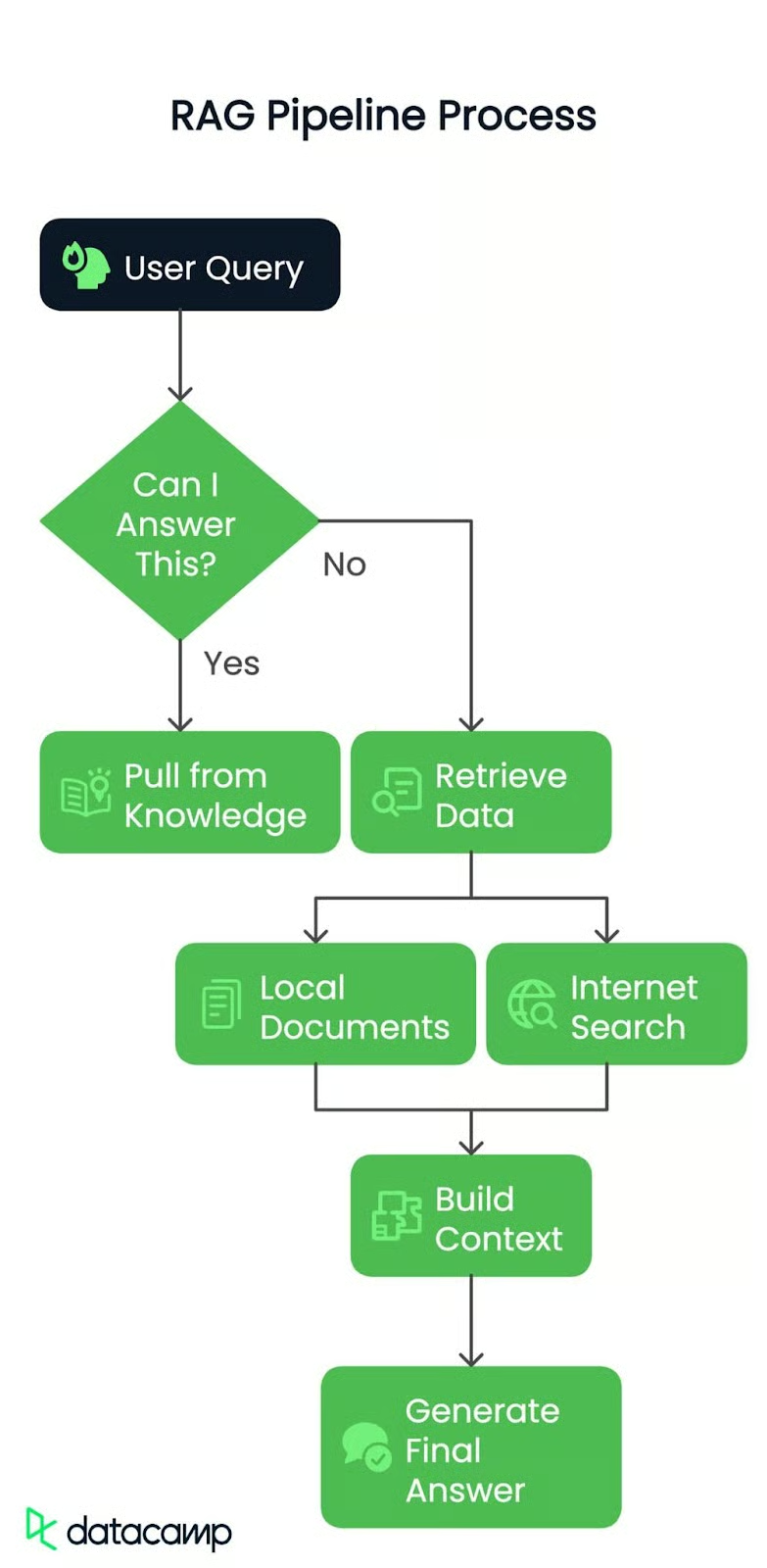
Dù là câu hỏi đơn giản hay vấn đề phức tạp, mọi thứ đều bắt đầu từ câu hỏi của người dùng. Đây là tia lửa khởi động pipeline.
Tiếp theo, hệ thống kiểm tra: Tôi có thể trả lời không?
Có? Hệ thống sẽ lấy từ kiến thức sẵn có và trả lời ngay lập tức.
Không? Đến lúc đào sâu hơn! Truy vấn sẽ được chuyển sang bước tiếp theo.
Nếu câu trả lời chưa sẵn có, pipeline sẽ tìm vào hai nguồn có thể:
Dữ liệu truy xuất được — từ PDF hoặc web — sẽ được tổng hợp thành một ngữ cảnh mạch lạc. Hãy hình dung như gom đủ các mảnh ghép trước khi lắp chúng lại.
Cuối cùng, ngữ cảnh này được chuyển cho một mô hình ngôn ngữ lớn (LLM) để soạn câu trả lời rõ ràng và chính xác. Không chỉ là truy xuất dữ liệu, mà còn là hiểu và trình bày theo cách tốt nhất.
Kết thúc, chúng ta sẽ có một pipeline RAG thông minh, hiệu quả, có thể phản hồi truy vấn một cách linh hoạt với ngữ cảnh thực tế.
Đầu tiên, tôi sẽ dùng một tài liệu thực tế làm nguồn dữ liệu cục bộ. Tài liệu chúng ta sẽ làm việc cùng chính là Generative AI Principles. Nó chứa nhiều insight giá trị, nên sẽ là ca thử nghiệm hoàn hảo cho pipeline của chúng ta. Bạn cũng sẽ cần một bản tóm tắt của tệp mà tôi dùng cho mục đích định tuyến. Bạn có thể lấy tệp tóm tắt tại đây.
Sau đây là mọi thứ bạn cần để bắt đầu, từng bước một.
Trước khi bắt đầu, có vài thứ bạn cần chuẩn bị:
Hãy đảm bảo bạn đã cài đúng công cụ. Mở terminal và chạy các lệnh sau để cài đặt những gói Python cần thiết:
pip install langchain-groq faiss-cpu crewai serper pypdf2 python-dotenv setuptools sentence-transformers huggingface distutils`Khi đã có khóa và gói, bạn có thể bắt đầu! Tôi khuyến nghị lưu khóa API trong tệp .env hoặc an toàn trong codebase của bạn. Đây là ví dụ về tệp .env của bạn có thể trông như thế nào:
import os from dotenv
import load_dotenv from langchain.vectorstores
import FAISS from langchain.document_loaders
import PyPDFLoader
from langchain.text_splitter import RecursiveCharacterTextSplitter
from langchain_huggingface.embeddings import HuggingFaceEmbeddings
from langchain_groq import ChatGroq
from crewai_tools import SerperDevTool
from crewai import Agent, Task, Crew, LLM

load_dotenv()
GROQ_API_KEY = os.getenv("GROQ_API_KEY")
SERPER_API_KEY = os.getenv("SERPER_API_KEY")
GEMINI=os.getenv("GEMINI")
Tôi tải các biến môi trường để quản lý an toàn khóa API và dữ liệu nhạy cảm mà không hardcode chúng. Cách này giúp script bảo mật và tôi có thể thay đổi khóa tại một nơi (tệp .env) khi cần.
Tóm lược, các gói và hàm import này sẽ làm gì:
.env.Chúng ta bắt đầu bằng việc khởi tạo hai mô hình ngôn ngữ:
llm: Cho các tác vụ chung như định tuyến và tạo câu trả lời. Chúng ta sẽ dùng model llama-3.3-70b-specdec.crew_llm: Dành riêng cho tác tử web scraping, vì nó cần cấu hình hơi khác (như temperature cho đầu ra sáng tạo hơn). Chúng ta sẽ dùng model gemini/gemini-1.5-flash.# Initialize LLM
llm = ChatGroq(
model="llama-3.3-70b-specdec",
temperature=0,
max_tokens=500,
timeout=None,
max_retries=2,
)
crew_llm = LLM(
model="gemini/gemini-1.5-flash",
api_key=GEMINI,
max_tokens=500,
temperature=0.7
)Hàm check_local_knowledge() bên dưới hoạt động như một bộ ra quyết định. Tôi tạo một prompt truyền vào truy vấn của người dùng và một ít ngữ cảnh cục bộ (từ PDF). Mô hình phản hồi bằng "Yes" hoặc "No", cho biết liệu có đủ thông tin cục bộ để trả lời truy vấn hay không. Nếu không, chúng ta sẽ dùng web scraping.
def check_local_knowledge(query, context):
    """Router function to determine if we can answer from local knowledge"""
    prompt = '''Role: Question-Answering Assistant
Task: Determine whether the system can answer the user's question based on the provided text.
Instructions:
    - Analyze the text and identify if it contains the necessary information to answer the user's question.
    - Provide a clear and concise response indicating whether the system can answer the question or not.
    - Your response should include only a single word. Nothing else, no other text, information, header/footer.
Output Format:
    - Answer: Yes/No
Study the below examples and based on that, respond to the last question.
Examples:
    Input:
        Text: The capital of France is Paris.
        User Question: What is the capital of France?
    Expected Output:
        Answer: Yes
    Input:
        Text: The population of the United States is over 330 million.
        User Question: What is the population of China?
    Expected Output:
        Answer: No
    Input:
        User Question: {query}
        Text: {text}
'''
    formatted_prompt = prompt.format(text=context, query=query)
    response = llm.invoke(formatted_prompt)
return response.content.strip().lower() == "yes"Tiếp theo, chúng ta thiết lập một tác tử tìm kiếm và trích xuất web bằng thư viện crewai . Tác tử này dùng công cụ tìm kiếm (SerperDevTool) để tìm bài viết liên quan đến truy vấn của người dùng. Mô tả nhiệm vụ đảm bảo tác tử biết cần truy xuất những gì và tóm tắt nội dung web liên quan. Nó giống như cử một “chuyên viên” đi lấy dữ liệu từ Internet.
Sau đó, hàm get_web_content() chạy tác tử web scraping. Hàm gửi truy vấn làm đầu vào và lấy về một bản tóm tắt ngắn gọn của bài viết liên quan nhất. Hàm trả về kết quả thô, trở thành ngữ cảnh của chúng ta nếu bộ định tuyến quyết định rằng thông tin cục bộ chưa đủ.
def setup_web_scraping_agent():
    """Setup the web scraping agent and related components"""
    search_tool = SerperDevTool()  # Tool for performing web searches
    scrape_website = ScrapeWebsiteTool()  # Tool for extracting data from websites

    # Define the web search agent
    web_search_agent = Agent(
        role="Expert Web Search Agent",
        goal="Identify and retrieve relevant web data for user queries",
        backstory="An expert in identifying valuable web sources for the user's needs",
        allow_delegation=False,
        verbose=True,
        llm=crew_llm
    )

    # Define the web scraping agent
    web_scraper_agent = Agent(
        role="Expert Web Scraper Agent",
        goal="Extract and analyze content from specific web pages identified by the search agent",
        backstory="A highly skilled web scraper, capable of analyzing and summarizing website content accurately",
        allow_delegation=False,
        verbose=True,
        llm=crew_llm
    )

    # Define the web search task
    search_task = Task(
        description=(
            "Identify the most relevant web page or article for the topic: '{topic}'. "
            "Use all available tools to search for and provide a link to a web page "
            "that contains valuable information about the topic. Keep your response concise."
        ),
        expected_output=(
            "A concise summary of the most relevant web page or article for '{topic}', "
            "including the link to the source and key points from the content."
        ),
        tools=[search_tool],
        agent=web_search_agent,
    )

    # Define the web scraping task
    scraping_task = Task(
        description=(
            "Extract and analyze data from the given web page or website. Focus on the key sections "
            "that provide insights into the topic: '{topic}'. Use all available tools to retrieve the content, "
            "and summarize the key findings in a concise manner."
        ),
        expected_output=(
            "A detailed summary of the content from the given web page or website, highlighting the key insights "
            "and explaining their relevance to the topic: '{topic}'. Ensure clarity and conciseness."
        ),
        tools=[scrape_website],
        agent=web_scraper_agent,
    )

    # Define the crew to manage agents and tasks
    crew = Crew(
        agents=[web_search_agent, web_scraper_agent],
        tasks=[search_task, scraping_task],
        verbose=1,
        memory=False,
    )
    return crew

def get_web_content(query):
    """Get content from web scraping"""
    crew = setup_web_scraping_agent()
    result = crew.kickoff(inputs={"topic": query})
return result.rawHàm setup_vector_db() thiết lập cơ sở dữ liệu vector từ một tệp PDF. Tôi thực hiện từng bước như sau:
PyPDFLoader để trích xuất nội dung.RecursiveCharacterTextSplitter. Điều này giúp dữ liệu dễ quản lý và tìm kiếm.Sau đó, hàm get_local_content() truy vấn cơ sở dữ liệu vector để lấy 5 đoạn liên quan nhất đến truy vấn của người dùng. Hàm kết hợp các đoạn này thành một chuỗi ngữ cảnh duy nhất.
def setup_vector_db(pdf_path):
    """Setup vector database from PDF"""
    # Load and chunk PDF
    loader = PyPDFLoader(pdf_path)
    documents = loader.load()

    text_splitter = RecursiveCharacterTextSplitter(
        chunk_size=1000,
        chunk_overlap=50
    )
    chunks = text_splitter.split_documents(documents)

    # Create vector database
    embeddings = HuggingFaceEmbeddings(
        model_name="sentence-transformers/all-mpnet-base-v2"
    )
    vector_db = FAISS.from_documents(chunks, embeddings)

    return vector_db

def get_local_content(vector_db, query):
    """Get content from vector database"""
    docs = vector_db.similarity_search(query, k=5)
return " ".join([doc.page_content for doc in docs])Khi đã có ngữ cảnh (từ tài liệu cục bộ hoặc web scraping), tôi chuyển nó vào mô hình ngôn ngữ cùng với truy vấn của người dùng. LLM tạo câu trả lời cuối bằng cách kết hợp cả ngữ cảnh và truy vấn theo định dạng hội thoại.
Luồng xử lý truy vấn chính như sau:
check_local_knowledge() để quyết định nội dung PDF cục bộ có đủ dữ liệu để trả lời hay không.def generate_final_answer(context, query):
"""Generate final answer using LLM"""
messages = [
(
"system",
"You are a helpful assistant. Use the provided context to answer the query accurately.",
),
("system", f"Context: {context}"),
("human", query),
]
response = llm.invoke(messages)
return response.content
def process_query(query, vector_db, local_context):
"""Main function to process user query"""
print(f"Processing query: {query}")
# Step 1: Check if we can answer from local knowledge
can_answer_locally = check_local_knowledge(query, local_context)
print(f"Can answer locally: {can_answer_locally}")
# Step 2: Get context either from local DB or web
if can_answer_locally:
context = get_local_content(vector_db, query)
print("Retrieved context from local documents")
else:
context = get_web_content(query)
print("Retrieved context from web scraping")
# Step 3: Generate final answer
answer = generate_final_answer(context, query)
return answerCuối cùng, chúng ta ghép mọi thứ lại với hàm main():
def main():
    # Setup
    pdf_path = "genai-principles.pdf"

    # Initialize vector database
    print("Setting up vector database...")
    vector_db = setup_vector_db(pdf_path)

    # Get initial context from PDF for routing
    local_context = get_local_content(vector_db, "")

    # Example usage
    query = "What is Agentic RAG?"
    result = process_query(query, vector_db, local_context)
    print("\nFinal Answer:")
    print(result)
if __name__ == "__main__":
    main()
Ở trên, chúng ta đã:
"What is Agentic RAG?") và in ra câu trả lời cuối.Đây là đầu ra của chương trình:
Agentic RAG is a technique for building Large Language Model (LLM) powered applications that incorporates AI agents. It is an extension of the traditional Retrieval-Augmented Generation (RAG) approach, which uses an external knowledge source to provide the LLM with relevant context and reduce hallucinations.
In traditional RAG pipelines, the retrieval component is typically composed of an embedding model and a vector database, and the generative component is an LLM. At inference time, the user query is used to run a similarity search over the indexed documents to retrieve the most similar documents to the query and provide the LLM with additional context.
Agentic RAG, on the other hand, introduces AI agents that are designed to interact with the user query and provide additional context to the LLM. These agents can be thought of as "virtual assistants" that help the LLM to better understand the user's intent and retrieve relevant documents.

The key components of Agentic RAG include:
1. AI agents: These are the virtual assistants that interact with the user query and provide additional context to the LLM.
2. Retrieval component: This is the component that retrieves the most similar documents to the user query.
3. Generative component: This is the component that uses the retrieved documents to generate the final output.

Agentic RAG has several benefits, including:
1. Improved accuracy: By providing additional context to the LLM, Agentic RAG can improve the accuracy of the generated output.
2. Enhanced user experience: Agentic RAG can help to reduce the complexity of the user interface and provide a more natural and intuitive experience.
3. Increased flexibility: Agentic RAG can be easily extended to support new use cases and applications.

However, Agentic RAG also has some limitations, including:
1. Increased complexity: Agentic RAG requires additional components and infrastructure, which can increase the complexity of the system.
2. Higher computational requirements: Agentic RAG requires more computational resources to handle the additional complexity of the AI agents and the retrieval component.
3. Training requirements: Agentic RAG requires more data and training to learn the behaviour of the AI agents and the retrieval component.Khi tôi hỏi câu "What is Agentic RAG?" vốn không có rõ ràng trong tài liệu được cung cấp, hệ thống đã thể hiện tính linh hoạt và thông minh. Các tác tử crewAI đã định tuyến truy vấn chính xác, dựa trên hiểu biết của bộ định tuyến rằng cần ngữ cảnh bên ngoài. Các tác tử phối hợp để trích xuất bài viết liên quan nhất từ web, phân tích nội dung và tạo ra câu trả lời có cơ sở.
Hệ thống đưa ra lời giải thích rõ ràng về agentic RAG, các thành phần của nó (tác tử AI, phần truy xuất và phần sinh), lợi ích (độ chính xác, trải nghiệm người dùng và tính linh hoạt), cùng hạn chế (độ phức tạp, nhu cầu tính toán và yêu cầu huấn luyện).
Điều này cho thấy khả năng của pipeline trong việc lấy ngữ cảnh một cách động và cung cấp insight chính xác, ngắn gọn, giá trị, ngay cả khi gặp truy vấn vượt ra ngoài bộ dữ liệu ban đầu.
Pipeline mà chúng ta xây dựng là một quy trình nhiều bước, năng động, xử lý hiệu quả truy vấn của người dùng bằng cách kết hợp kiến thức sẵn có và nguồn bên ngoài.
Hệ thống có thể thích ứng linh hoạt với nhiều truy vấn và cung cấp câu trả lời chính xác, thân thiện với người dùng. Với việc tích hợp dữ liệu cục bộ, tìm kiếm Internet trực tiếp và giao diện liền mạch, pipeline RAG chứng tỏ là một giải pháp vững chắc và thực tiễn cho các ứng dụng đời thực. Bước tiếp theo, hãy thử tự xây dựng thứ gì đó của riêng bạn dựa trên quy trình làm việc đã đề cập.
Học AI với các khóa học này!
Lộ trình
Khóa học
Khóa học
blog
Matt Crabtree
10 phút
