

开始使用 BentoML
本节我们将服务化一个简单的 AI 应用,从用户接收问题与上下文并生成回答。
我们先使用 pip 安装 BentoML、PyTorch 和 Transformers 库。在终端运行以下命令:
$ pip install bentoml
$ pip install torch
$ pip install transformers接着,创建一个 service.py 文件来定义 AI 服务器。
通过 BentoML 命令,我们将导入 Transformers 的 pipeline,仅用两行代码即可加载模型并执行推理。
我们将设置示例文本输入与上下文,配置 BentoML 服务参数(如 CPU 数量与流量超时),并使用 Transformers pipeline 初始化 Question_Answering 类。
最后创建一个名为 generate() 的 API,接收输入并返回生成的答案。
from __future__ import annotations
import bentoml
with bentoml.importing():
from transformers import pipeline
EXAMPLE_INPUT = "How can I generate a secure password?"
EXAMPLE_CONTEXT = """
To generate a secure password, you can use tools like the LastPass Password Generator.
These tools create strong, random passwords that help prevent security threats by ensuring your accounts are protected against hacking attempts.
A secure password typically includes a mix of uppercase and lowercase letters, numbers, and special characters. Avoid using easily guessable information like names or birthdays.
Using a password manager like LastPass can also help you store and manage these secure passwords effectively.
"""
@bentoml.service(
resources={"cpu": "4"},
traffic={"timeout": 10},
)
class Question_Answering:
def __init__(self) -> None:
# Load model into pipeline
self.pipe = pipeline(
"question-answering",
model="deepset/roberta-base-squad2",
)
@bentoml.api
def generate(
self,
text: str =EXAMPLE_INPUT,
doc: str = EXAMPLE_CONTEXT,
) -> str:
result = self.pipe(question=text, context=doc)
return result["answer"]在终端输入以下命令本地启动 AI 服务:
$ bentoml serve service:Question_Answering 如上所示,我们提供了文件名(service)和用于 AI 模型推理的 Python 类名(Question_Answering )。
几秒钟内,您将获得一个 URL,复制并粘贴到浏览器即可访问 BentoML 服务器:
[cli] Starting production HTTP BentoServer from "app:Question_Answering" listening on http://localhost:3000 (Press CTRL+C to quit)BentoML 服务器与 FastAPI swagger UI 十分类似。
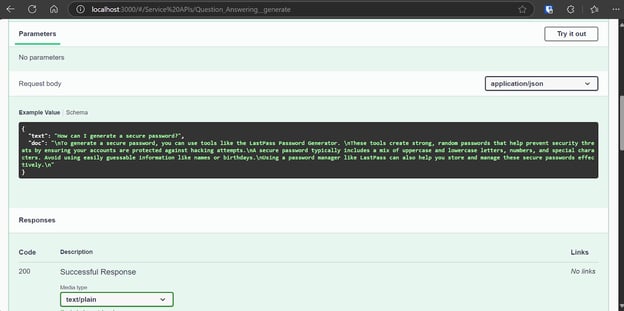
让我们使用“Try it out”选项测试服务器。
我们的 AI 服务运行正常,并生成了准确的响应:
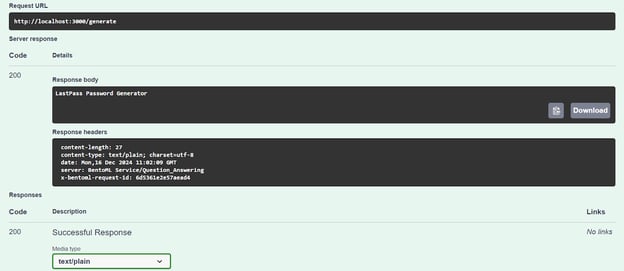
我们也可以通过 CURL 命令访问 AI 服务器。让我们换个问题,并提供上下文:
curl -X 'POST' \
'http://localhost:3000/generate' \
-H 'accept: text/plain' \
-H 'Content-Type: application/json' \
-d '{
"text": "How can I buy a cheap car?",
"doc": "Start by setting a budget and exploring sources like online marketplaces (Craigslist, Facebook Marketplace, Cars.com), local dealerships, or government auctions. Inspect the car thoroughly for issues like rust or mechanical problems, and consider bringing a trusted mechanic to avoid future repair costs. Research the reliability of specific brands and models using tools like Kelley Blue Book or Consumer Reports. Finally, negotiate the price to secure the best deal. Following these steps can help you find a dependable car within your budget."
}'我们的 AI 服务运行流畅,即使在 CPU 上也仅用 1 秒就生成了响应:
negotiate the price在 BentoCloud 上部署 Phi 3 Mini 4k Instruct
现在是构建一个真正的大语言模型(LLM)应用,并以最小成本在 BentoML 上部署它的时候了。
我们将使用 vLLM 框架创建高吞吐的 LLM 推理,并在 BentoCloud 的 GPU 实例上部署。尽管听起来复杂,BentoCloud 会处理大部分繁重工作,包括基础设施搭建,让您专注于构建与部署服务。
1. 克隆 BentoML vLLM 项目
BentoML 为各类 LLM 项目提供了大量示例代码与资源。首先,我们将克隆 BentoVLLM 仓库。
前往 Phi 3 Mini 4k 项目,并安装所有必需的 Python 库:
$ git clone https://github.com/bentoml/BentoVLLM.git
$ cd BentoVLLM/phi-3-mini-4k-instruct
$ pip install -r requirements.txt以下是包含全部文件的项目目录结构:
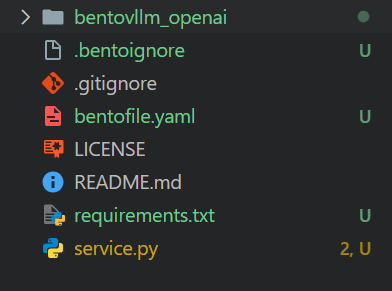
2. 修改 bentofile.yaml
我们将修改 bentofile.yaml,更改所有者与阶段名称。
bentofile.yaml 比 Dockerfile 更简单,它使用不同的命令来配置基础设施、环境与服务器设置;您可在 Bento 构建选项中学习全部命令。
service: 'service:VLLM'
labels:
owner: Abid
stage: Guide
include:
- '*.py'
- 'bentovllm_openai/*.py'
python:
requirements_txt: './requirements.txt'
lock_packages: false
docker:
python_version: "3.11"3. 了解 service.py 文件
我们不会更改 service.py,而是先了解其作用。
- 该代码创建了一个服务器,可接收用户的问题或提示,并使用预训练 AI 模型(Phi-3-mini-4k-instruct)生成回答。
- 它使用
@bentoml.service处理部署与资源管理,例如配置 GPU 并管理流量。 - 使用
@bentoml.api装饰器定义generateAPI。它接收用户提示、可选的系统提示和最大 token 限制作为输入,然后传给 vLLM 推理引擎生成响应。 generate方法以流式方式分块返回模型输出,一有可用 token 就立即生成。
import uuid
from typing import AsyncGenerator, Optional
import bentoml
from annotated_types import Ge, Le
from typing_extensions import Annotated
from bentovllm_openai.utils import openai_endpoints
MAX_TOKENS = 1024
PROMPT_TEMPLATE = """<|system|>
{system_prompt}<|end|>
<|user|>
{user_prompt}<|end|>
<|assistant|>
"""
SYSTEM_PROMPT = """You are a helpful, respectful and honest assistant. Always answer as helpfully as possible, while being safe. Your answers should not include any harmful, unethical, racist, sexist, toxic, dangerous, or illegal content. Please ensure that your responses are socially unbiased and positive in nature.
If a question does not make any sense, or is not factually coherent, explain why instead of answering something not correct. If you don't know the answer to a question, please don't share false information."""
MODEL_ID = "microsoft/Phi-3-mini-4k-instruct"
@openai_endpoints(model_id=MODEL_ID)
@bentoml.service(
name="bentovllm-phi-3-mini-4k-instruct-service",
traffic={
"timeout": 300,
"concurrency": 256, # Matches the default max_num_seqs in the VLLM engine
},
resources={
"gpu": 1,
"gpu_type": "nvidia-tesla-t4",
},
)
class VLLM:
def __init__(self) -> None:
from transformers import AutoTokenizer
from vllm import AsyncEngineArgs, AsyncLLMEngine
ENGINE_ARGS = AsyncEngineArgs(
model=MODEL_ID,
max_model_len=MAX_TOKENS,
dtype="half",
enable_prefix_caching=True,
disable_sliding_window=True,
)
self.engine = AsyncLLMEngine.from_engine_args(ENGINE_ARGS)
self.tokenizer = AutoTokenizer.from_pretrained(MODEL_ID)
@bentoml.api
async def generate(
self,
prompt: str = "Explain superconductors in plain English",
system_prompt: Optional[str] = SYSTEM_PROMPT,
max_tokens: Annotated[int, Ge(128), Le(MAX_TOKENS)] = MAX_TOKENS,
) -> AsyncGenerator[str, None]:
from vllm import SamplingParams
SAMPLING_PARAM = SamplingParams(max_tokens=max_tokens)
if system_prompt is None:
system_prompt = SYSTEM_PROMPT
prompt = PROMPT_TEMPLATE.format(user_prompt=prompt, system_prompt=system_prompt)
stream = await self.engine.add_request(uuid.uuid4().hex, prompt, SAMPLING_PARAM)
cursor = 0
async for request_output in stream:
text = request_output.outputs[0].text
yield text[cursor:]
cursor = len(text)建议学习技能路径 Developing AI Applications,掌握使用 OpenAI API、Hugging Face 和 LangChain 等最新 AI 开发工具构建 AI 驱动应用。
4. 为 BentoCloud 做准备
打开 bentofile.yaml,在最后一行添加 Hugging Face 令牌的环境变量。这将帮助我们从 Hugging Face 服务器安全加载模型:
envs:
- name: HF_TOKEN使用 CLI 登录 BentoCloud:
$ bentoml cloud login随后系统会引导您创建账户,并创建 API 令牌。
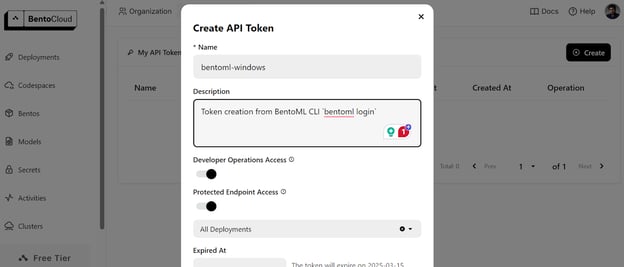
成功创建 API 令牌后,您将在终端看到成功提示:

5. 在 BentoCloud 上部署
在 BentoCloud 部署 AI 服务前,需要先在 “Secrets” 选项卡创建一个环境变量,填写键名与 Hugging Face API 密钥。
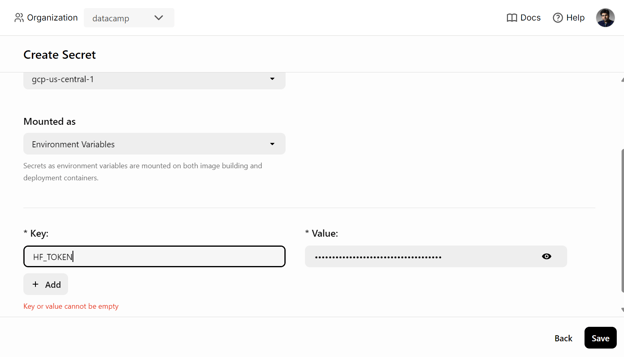
然后使用以下命令部署 AI 服务:
$ bentoml deploy . --secret huggingface下载模型并搭建运行服务器所需的环境需要几分钟时间。
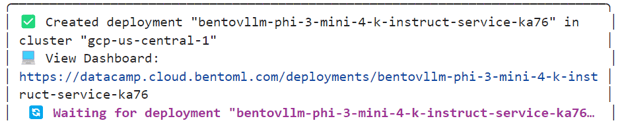
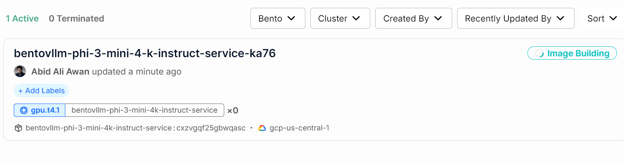
您可以在 “Deployments” 选项卡查看 AI 服务的状态。
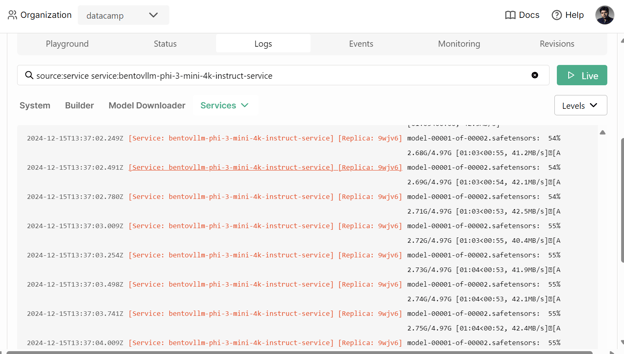
您还可以查看所有日志,观察后台的具体过程。
6. 访问已部署的 AI 服务
AI 服务成功部署后,我们将开始测试 Phi 3 Mini vLLM 服务。
首先,只需在 “Deployments” 下点击 “Playground” 选项卡,输入提示词并点击 “submit” 按钮即可生成响应。响应会以实时流式返回。
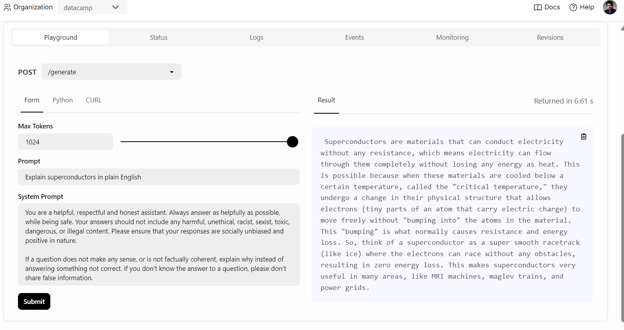 我们也可以使用 BentoML Python 客户端访问已部署的模型并生成响应,这有助于将 AI 服务集成到您的应用中:
import bentoml
with bentoml.SyncHTTPClient(
"https://bentovllm-phi-3-mini-4-k-instruct-service-ka76-39800880.mt-guc1.bentoml.ai"
) as client:
response = client.generate(
prompt="What is the largest lake in the world?"
)
for chunk in response:
print(chunk, end="", flush=True)
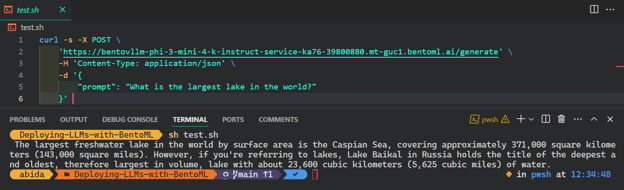
从任意操作系统访问 AI 服务最常用且最简单的方式,是在终端使用 CURL 命令:
$ curl -s -X POST \
'https://bentovllm-phi-3-mini-4-k-instruct-service-ka76-39800880.mt-guc1.bentoml.ai/generate' \
-H 'Content-Type: application/json' \
-d '{
"prompt": "What is the largest lake in the world?"
}' 
7. 可观测性
前往“Monitoring”选项卡,查看与 LLM、用户请求、硬件及其他监控分析相关的所有统计信息,帮助您评估 AI 服务器性能。
您也可以查看“Logs”选项卡,或使用 BentoML CLI 生成实时日志。
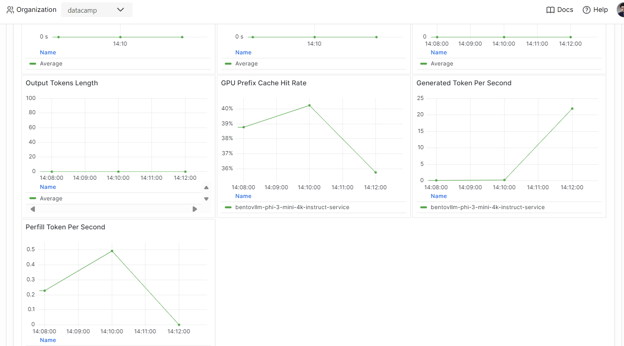
服务与部署模型只是 MLOps 流水线的一部分。完成 Fully Automated MLOps 课程,您将学习搭建 MLOps 架构、CI/CD/CM/CT 技术与自动化模式,以部署能长期创造价值的 ML 系统。
结语
若想进一步了解 BentoML 生态,最好的方式是亲手开始构建并部署您的 AI 服务。您将获得免费额度,可使用 GPU 与 CPU 探索多种服务,包括检索增强生成(RAG)应用、函数调用、Agentic LLM,或处理图像与文本生成响应的多模态应用。
在这篇动手教程中,我们了解了 BentoML,并学习了如何仅用几行代码在本地服务化任意 AI 应用。随后,我们使用 vLLM 推理引擎构建了 BentoML 服务,并通过几个简单步骤将其部署到 BentoCloud。
不妨学习职业路径 Associate AI Engineer for Developers,掌握如何使用 API 与开源库将 AI 集成进软件应用。

作为一名持证的数据科学家,我热衷于利用前沿技术打造创新的机器学习应用。凭借在语音识别、数据分析与报告、MLOps、对话式人工智能以及自然语言处理方面的扎实背景,我不断打磨构建智能系统的能力,力求带来切实影响。除技术专长外,我也擅长沟通,能够将复杂概念提炼为清晰、简明的表述。因此,我成为数据科学领域备受关注的博主,与不断壮大的数据专业人士社区分享洞见与实践经验。目前,我专注于内容创作与编辑,借助大语言模型打造有力且吸引人的内容,帮助企业与个人更好地发挥数据价值。
许多数据科学家和机器学习工程师在使用 Docker、Kubernetes 和 Terraform 等工具,以及为 AI 模型构建安全基础设施时面临挑战。
BentoML 简化了这一过程,您只需几行 Python 代码即可构建、服务和部署 AI 应用。
本教程为希望部署自有 AI 应用的个人提供分步指导,通过简单的 CURL 命令即可随处访问。您将了解 BentoML 框架、在本地创建问答式 AI 应用,并在 BentoCloud 上部署 Phi 3 mini 模型。
什么是 BentoML?
BentoML 是一个机器学习服务与部署框架,可简化 AI 模型的部署与扩展。它会自动化 Docker 镜像创建、实例配置、基础设施与安全管理,以及构建生产级服务器所需的关键功能。
借助 BentoML,您可以用简单的 Python 代码在数分钟内开发并部署自定义 AI 模型、预训练模型或微调方案。它可在您的云环境中高效扩展,同时确保您对安全与合规拥有完全掌控。
BentoML 属于 MLOps 工具集的一部分。阅读博客2024 年构建 AI 应用的 15 大 LLMOps 工具,了解用于训练、跟踪、部署、编排、测试、监控与基础设施管理的一流 MLOps 工具。
BentoML 的工作方式 | 图片来源:BentoML
Bento 生态的亮点是其云端:BentoCloud 是 BentoML 的扩展,提供更多工具与服务,让部署、监控和扩展 AI 模型更加容易。
注册后,用户可获得免费额度上手,对开发者和企业而言都很有吸引力。
如果您是非技术背景,希望用零代码到低代码的方式开发 LLM 应用,建议参考指南 Local AI with Docker, n8n, Qdrant, and Ollama。