Curso
Trabajar con DeepSeek en Python
3 h
1.3K
DeepSeek-OCR 2 es un modelo de lenguaje visión-OCR de lectura de documentos de extremo a extremo, diseñado para gestionar maquetaciones complejas (páginas multicolumna, formularios, tablas, fórmulas) aprendiendo un mejor orden de lectura en lugar de aplanar parches de imagen con un barrido fijo de arriba-izquierda a abajo-derecha.
La idea clave es el Visual Causal Flow, es decir, el modelo intenta imitar cómo leemos los humanos: de forma progresiva y semántica, en lugar de tratar la página como una cuadrícula uniforme. A nivel de arquitectura, DeepSeek-OCR 2 mantiene el esquema codificador–decodificador de DeepSeek-OCR, pero actualiza el codificador a DeepEncoder V2, que introduce un mecanismo causal de reordenación de tokens antes de que el decodificador genere texto.
A alto nivel, DeepSeek OCR-2 convierte un documento en texto mediante una canalización visión-lenguaje que aprende el orden de lectura en lugar de basarse en un orden por coordenadas fijas. Esto incluye:
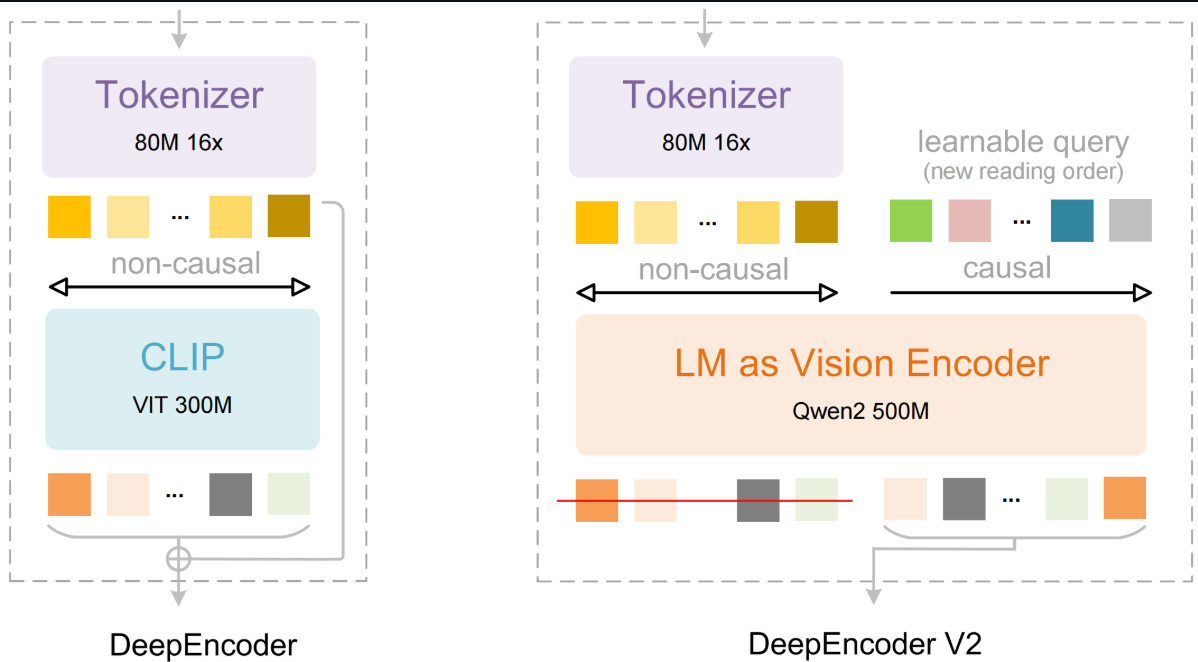
Figura: DeepSeek-OCR 2: Visual Causal Flow
Puedes consultar el repositorio de GitHub de DeepSeek OCR-2 para explorar el código en detalle.
En esta sección, crearemos una aplicación de inteligencia documental en tiempo real que te permite subir un PDF, extraer su contenido con DeepSeek OCR-2 y empezar a hacer preguntas mientras el documento aún se está procesando. En lugar de esperar a que termine todo el OCR, las páginas pasan a ser consultables por lotes, logrando una experiencia más rápida e interactiva.
A grandes rasgos, el sistema realiza cuatro tareas clave:
La aplicación produce dos salidas principales:
Nota: este tutorial se basa en el código de demo oficial de OCR-2 con vLLM de DeepSeek, incluyendo la ayuda para renderizar PDFs, el empaquetado de entradas multimodales, la limpieza del texto OCR y la configuración del motor/ muestreo de vLLM. Sobre esto, añadimos una capa RAG ligera, procesamiento OCR en mini-lotes para habilitar la indexación incremental y una app en Gradio.
Antes de ejecutar DeepSeek OCR-2 con vLLM, debemos asegurarnos de que el entorno de ejecución esté listo. En este tutorial asumimos un entorno con GPU, como Google Colab con una A100 o una T4, ya que tanto vLLM como DeepSeek OCR-2 requieren CUDA para una inferencia eficiente.
En este paso vamos a:
Esto garantiza que el resto de la canalización pueda cargar el modelo y las utilidades de soporte sin problemas de rutas o dependencias.
import subprocess
gpu = subprocess.run(['nvidia-smi', '--query-gpu=name,memory.total', '--format=csv,noheader'],
                     capture_output=True, text=True).stdout.strip()
print(f"GPU: {gpu}")
import os, sys
REPO_ROOT = '/content/DeepSeek-OCR-2-main'
VLLM_DIR  = f'{REPO_ROOT}/DeepSeek-OCR2-master/DeepSeek-OCR2-vllm'
if not os.path.isdir(VLLM_DIR):
    zip_candidates = [
        '/content/DeepSeek-OCR-2-main.zip',
    ]
    found_zip = None
    for zp in zip_candidates:
        if os.path.isfile(zp):
            found_zip = zp
            break
    if found_zip:
        !unzip -qo {found_zip} -d /content/
        print(f'Extracted {found_zip}')
    else:
        !git clone https://github.com/deepseek-ai/DeepSeek-OCR-2.git {REPO_ROOT} 2>/dev/null || echo 'Already cloned'
assert os.path.isdir(VLLM_DIR), f'Repo not found at {VLLM_DIR}'
print(f'Repo OK: {VLLM_DIR}')
Este paso verifica que haya GPU disponible y prepara localmente el código de DeepSeek OCR-2. El script anterior comprueba primero la GPU y su memoria con nvidia-smi para asegurar que hay VRAM suficiente para la inferencia con vLLM.
Luego define las rutas del repositorio y comprueba si ya existe el directorio de integración con vLLM. Si no, extrae el repositorio desde un ZIP local o clona el repositorio oficial de DeepSeek OCR-2 desde GitHub.
En el siguiente paso, instalaremos las dependencias necesarias y prepararemos el runtime para la inferencia con vLLM.
DeepSeek OCR-2 y vLLM son muy sensibles a las versiones, así que en este paso fijamos un conjunto de paquetes que funcionan con CUDA 11.8, instalamos una rueda de vLLM compatible y añadimos flash-attn para kernels de atención más rápidos.
!pip install torch==2.6.0 torchvision==0.21.0 torchaudio==2.6.0 \
    --index-url https://download.pytorch.org/whl/cu118 2>&1 | tail -3
!pip install https://github.com/vllm-project/vllm/releases/download/v0.8.5/vllm-0.8.5+cu118-cp38-abi3-manylinux1_x86_64.whl 2>&1 | tail -3
!pip install flash-attn==2.7.3 --no-build-isolation 2>&1 | tail -3
!pip install "pydantic==2.10.6" "gradio==5.23.0" "gradio_client==1.7.2"
!pip install transformers==4.46.3 tokenizers==0.20.3 2>&1 | tail -3
!pip install addict einops tiktoken easydict pymupdf img2pdf pillow 2>&1 | tail -3
!pip install sentence-transformers faiss-cpu gradio 2>&1 | tail -3
os.environ['VLLM_USE_V1'] = '0'
os.environ['CUDA_VISIBLE_DEVICES'] = '0'
import torch
if torch.version.cuda == '11.8':
    os.environ['TRITON_PTXAS_PATH'] = '/usr/local/cuda-11.8/bin/ptxas'
if VLLM_DIR not in sys.path:
    sys.path.insert(0, VLLM_DIR)
import os, sys, re, io, time, threading
import numpy as np
import faiss
import fitz
import gradio as gr
from PIL import Image
from concurrent.futures import ThreadPoolExecutor
from functools import partial
from sentence_transformers import SentenceTransformer
VLLM_DIR = '/content/DeepSeek-OCR-2-main/DeepSeek-OCR2-master/DeepSeek-OCR2-vllm'
if VLLM_DIR not in sys.path:
    sys.path.insert(0, VLLM_DIR)
import config
from vllm import LLM, SamplingParams
from vllm.model_executor.models.registry import ModelRegistry
from process.ngram_norepeat import NoRepeatNGramLogitsProcessor
from process.image_process import DeepseekOCR2Processor
from deepseek_ocr2 import DeepseekOCR2ForCausalLM
print('Loading embedding model...')
EMBED_MODEL = SentenceTransformer('all-MiniLM-L6-v2')
EMBED_DIM = EMBED_MODEL.get_sentence_embedding_dimension()
print(f'Embedding model ready (dim={EMBED_DIM})')
El fragmento anterior instala un entorno compatible para DeepSeek OCR-2 con vLLM. También instala el stack de soporte de la aplicación, incluyendo Transformers, Gradio para la UI, PyMuPDF y Pillow para el procesamiento de PDF/imagen, y SentenceTransformers con FAISS para construir el índice de recuperación.
Tras la instalación, se configuran variables de entorno para una ejecución estable de vLLM y compatibilidad con Triton. Se añade la integración con vLLM del repositorio a sys.path para poder importar el modelo personalizado DeepSeek OCR-2 y sus módulos de preprocesamiento, y finalmente se carga un modelo de embeddings ligero (all-MiniLM-L6-v2) para dar soporte a la indexación RAG incremental a nivel de página.
En el siguiente paso, implementaremos utilidades de preprocesado para convertir un PDF en imágenes de página, empaquetar cada página en el formato de entrada multimodal que espera DeepSeek OCR-2 y limpiar las salidas de OCR para su recuperación.
Antes de ejecutar DeepSeek OCR-2, necesitamos un pequeño conjunto de utilidades de preprocesado que conviertan un PDF en entradas listas para el modelo y limpien la salida OCR en bruto para su recuperación.
BATCH_SIZE = 5
def pdf_to_images_high_quality(pdf_path, dpi=144, image_format='PNG'):
    images = []
    pdf_document = fitz.open(pdf_path)
    zoom = dpi / 72.0
    matrix = fitz.Matrix(zoom, zoom)
    for page_num in range(pdf_document.page_count):
        page = pdf_document[page_num]
        pixmap = page.get_pixmap(matrix=matrix, alpha=False)
        Image.MAX_IMAGE_PIXELS = None
        if image_format.upper() == 'PNG':
            img_data = pixmap.tobytes('png')
            img = Image.open(io.BytesIO(img_data))
        else:
            img_data = pixmap.tobytes('png')
            img = Image.open(io.BytesIO(img_data))
            if img.mode in ('RGBA', 'LA'):
                background = Image.new('RGB', img.size, (255, 255, 255))
                background.paste(img, mask=img.split()[-1] if img.mode == 'RGBA' else None)
                img = background
        images.append(img)
    pdf_document.close()
    return images
def process_single_image(image, prompt_str):
    return {
        'prompt': prompt_str,
        'multi_modal_data': {
            'image': DeepseekOCR2Processor().tokenize_with_images(
                images=[image], bos=True, eos=True, cropping=config.CROP_MODE
            )
        },
    }
def clean_ocr_output(content):
    if '<|end▁of▁sentence|>' in content:
        content = content.replace('<|end▁of▁sentence|>', '')
    else:
        if config.SKIP_REPEAT:
            return ''
    content = re.sub(r'<\|ref\|>image<\|/ref\|><\|det\|>.*?<\|/det\|>', '', content)
    content = re.sub(r'<\|ref\|>.*?<\|/ref\|><\|det\|>.*?<\|/det\|>', '', content)
    content = content.replace('\\coloneqq', ':=').replace('\\eqqcolon', '=:')
    content = content.replace('\n\n\n\n', '\n\n').replace('\n\n\n', '\n\n')
    return content.strip()
Las utilidades anteriores definen tres componentes clave:
Establecemos BATCH_SIZE = 5 para equilibrar lo rápido que aparecen los primeros resultados con la eficiencia de uso de la GPU. En un PDF de 20 páginas, el progreso avanza por pasos del 0% al 25%, 50%, 75% y 100%, en lugar de saltar del 0% al 100%.
Esto permite empezar a hacer preguntas en cuanto se indexan las primeras 5 páginas. Lotes más pequeños mejoran el tiempo hasta el primer resultado; lotes más grandes mejoran el rendimiento y el uso de la GPU.
Usamos la función nativa pdf_to_images_high_quality() del código original con la librería PyMuPDF para renderizar cada página como imagen PIL a 144 DPI (proviene de zoom = 144 / 72.0 = 2.0, que duplica la resolución por defecto de 72 DPI).
La matriz de zoom dpi/72 controla la calidad de rasterización y alpha=False evita artefactos de transparencia. Si una imagen conserva un canal alfa, la función la aplana sobre fondo blanco para evitar mezclas extrañas que puedan degradar el OCR.
La función process_single_image() (del repositorio original) envuelve cada imagen de página en la estructura de diccionario exacta que espera vLLM (prompt + multi_modal_data.image), usando DeepseekOCR2Processor().tokenize_with_images(), que gestiona toda la canalización de preprocesado de imagen, incluyendo dividir imágenes grandes en 2–6 teselas con dynamic_preprocess() según la relación de aspecto, crear una vista global acolchada de 1024×1024, aplicar normalización de tensores y generar la secuencia completa de tokens con máscaras de imagen que consume DeepseekOCR2ForCausalLM.
El config.CROP_MODE del repositorio controla si se aplica este teselado dinámico, lo que mejora la precisión en maquetaciones densas con texto pequeño.
Tras la generación, clean_ocr_output() elimina tokens especiales de fin de frase, borra bloques de marcado de detección (<|ref|>...<|/ref|><|det|>...<|/det|>), normaliza algunos operadores tipo LaTeX y reduce saltos de línea excesivos, produciendo un texto más limpio que se trocea mejor y se recupera con más fiabilidad en el índice RAG posterior.
A continuación, usaremos esta salida limpia para construir un índice RAG ligero a nivel de página, de modo que las páginas sean consultables en cuanto finaliza cada lote.
Ahora que podemos extraer texto limpio de cada página, el siguiente paso es hacerlo consultable de inmediato. En lugar de esperar a que termine el documento completo, construimos un motor RAG (Retrieval-Augmented Generation) ligero a nivel de página que indexa el contenido de forma incremental.
A medida que se procesa cada lote de páginas, su texto se convierte en embeddings y se añade a un índice FAISS, lo que permite a los usuarios consultar el documento mientras la indexación sigue en curso.
class PageRAG:
    def __init__(self, chunk_size=1000):
        self.chunk_size = chunk_size
        self.index = faiss.IndexFlatIP(EMBED_DIM)
        self.chunks = []
        self.page_count = 0
        self._lock = threading.Lock()
    def reset(self):
        with self._lock:
            self.index = faiss.IndexFlatIP(EMBED_DIM)
            self.chunks, self.page_count = [], 0
    def add_page(self, page_num, text):
        if not text or not text.strip():
            with self._lock: self.page_count += 1
            return
        new_chunks = self._split(text, page_num)
        texts = [c[1] for c in new_chunks]
        embs = EMBED_MODEL.encode(texts, normalize_embeddings=True)
        with self._lock:
            self.index.add(np.array(embs, dtype=np.float32))
            self.chunks.extend(new_chunks)
            self.page_count += 1
    def query(self, question, top_k=5):
        with self._lock:
            if self.index.ntotal == 0: return []
            q = EMBED_MODEL.encode([question], normalize_embeddings=True)
            k = min(top_k, self.index.ntotal)
            scores, ids = self.index.search(np.array(q, dtype=np.float32), k)
        return [{'page': self.chunks[i][0], 'score': float(s), 'text': self.chunks[i][1]}
                for s, i in zip(scores[0], ids[0]) if i >= 0]
    def _split(self, text, pn):
        if len(text) <= self.chunk_size: return [(pn, text)]
        parts, cur = [], ''
        for p in re.split(r'\n{2,}', text):
            if len(cur) + len(p) > self.chunk_size and cur:
                parts.append((pn, cur.strip())); cur = p
            else: cur += ('\n\n' + p if cur else p)
        if cur.strip(): parts.append((pn, cur.strip()))
        return parts or [(pn, text[:self.chunk_size])]
    @property
    def indexed_pages(self):
        with self._lock: return self.page_count
La clase anterior define cuatro componentes clave:
faiss.IndexFlatIP para búsquedas de similitud rápidas sobre embeddings normalizados. A medida que se procesa cada página, su contenido se convierte en embeddings y se añade al índice de inmediato, habilitando recuperación en tiempo real sin reconstruir el índice._split() divide el texto largo de una página en fragmentos de ~1000 caracteres según límites de párrafo. Esto mejora el emparejamiento semántico y evita embeddings con contextos demasiado largos o ruidosos, manteniendo a la vez los números de página para la atribución de fuentes.threading.Lock() protege las actualizaciones y lecturas del índice. query() convierte la pregunta del usuario en embeddings, recupera los top-k fragmentos similares y devuelve el texto con números de página y puntuaciones de similitud. La propiedad indexed_pages controla el progreso para que la UI muestre cuántas páginas ya son consultables.En este paso inicializamos el motor de inferencia de DeepSeek OCR-2 usando vLLM. Es el componente central que realiza la generación multimodal tomando las imágenes tokenizadas de página y produciendo texto OCR estructurado. La configuración sigue la referencia oficial de DeepSeek OCR-2 con vLLM, pero la encapsulamos en un cargador perezoso load_ocr_engine() para que el modelo se cargue solo cuando empiece el procesamiento, reduciendo el tiempo de arranque y evitando reservar GPU innecesariamente.
ocr_llm = None
ocr_sampling_params = None
def load_ocr_engine():
    global ocr_llm, ocr_sampling_params
    if ocr_llm is not None:
        return
    print(f'Loading {config.MODEL_PATH} via vLLM...')
    ModelRegistry.register_model('DeepseekOCR2ForCausalLM', DeepseekOCR2ForCausalLM)
    ocr_llm = LLM(
        model=config.MODEL_PATH,
        hf_overrides={'architectures': ['DeepseekOCR2ForCausalLM']},
        block_size=256,
        enforce_eager=False,
        trust_remote_code=True,
        max_model_len=8192,
        swap_space=0,
        max_num_seqs=config.MAX_CONCURRENCY,
        tensor_parallel_size=1,
        gpu_memory_utilization=0.9,
        disable_mm_preprocessor_cache=True,
    )
    ocr_sampling_params = SamplingParams(
        temperature=0.0,
        max_tokens=8192,
        logits_processors=[
            NoRepeatNGramLogitsProcessor(
                ngram_size=20, window_size=50,
                whitelist_token_ids={128821, 128822},
            )
        ],
        skip_special_tokens=False,
        include_stop_str_in_output=True,
    )
    print('vLLM engine loaded')
Este fragmento define los siguientes componentes clave:
DeepseekOCR2ForCausalLM del repositorio con vLLM para que pueda manejar entradas de tokens de imagen producidas por DeepseekOCR2Processor.LLM() coinciden con los ajustes de referencia del repositorio, incluyendo block_size=256, max_model_len=8192, gpu_memory_utilization=0.9 y disable_mm_preprocessor_cache=True. Estos ajustes están orientados a una inferencia OCR estable y de alto rendimiento, manteniendo un uso de memoria de GPU predecible.temperature=0.0, límites amplios de salida y un NoRepeatNGramLogitsProcessor para evitar patrones de texto repetitivos, un problema común en OCR de texto largo.load_ocr_engine(). Las siguientes llamadas reutilizan la misma instancia, evitando inicializaciones repetidas de GPU y manteniendo la UI ágil.Ahora conectaremos este motor a un bucle de procesamiento por lotes que ejecute OCR página a página y envíe los resultados al índice RAG para consultas en tiempo real.
Este paso es el corazón de la app. Implementamos un trabajador en segundo plano que toma un PDF subido y lo convierte progresivamente en un índice consultable, en lugar de esperar a que termine el documento completo.
rag = PageRAG()
total_pages = 0
is_processing = False
processing_error = None
stop_requested = False
def process_pdf_background(pdf_path):
    global total_pages, is_processing, processing_error, stop_requested
    try:
        is_processing = True
        processing_error = None
        stop_requested = False
        load_ocr_engine()
        if stop_requested: return
        print('PDF loading...')
        images = pdf_to_images_high_quality(pdf_path)
        total_pages = len(images)
        print(f'Rendered {total_pages} pages.')
        if stop_requested: return
        print('Preprocessing all images with DeepseekOCR2Processor...')
        prompt = config.PROMPT
        preprocess_fn = partial(process_single_image, prompt_str=prompt)
        with ThreadPoolExecutor(max_workers=config.NUM_WORKERS) as executor:
            all_inputs = list(executor.map(preprocess_fn, images))
        print(f'Preprocessed {len(all_inputs)} pages.')
        if stop_requested: return
        num_batches = (total_pages + BATCH_SIZE - 1) // BATCH_SIZE
        print(f'Running inference in {num_batches} batches of up to {BATCH_SIZE} pages...')
        for batch_idx in range(num_batches):
            if stop_requested:
                print(f'Stopped before batch {batch_idx + 1}.')
                return
            start = batch_idx * BATCH_SIZE
            end = min(start + BATCH_SIZE, total_pages)
            batch_inputs = all_inputs[start:end]
            print(f'  Batch {batch_idx + 1}/{num_batches}: pages {start+1}-{end}...')
            outputs_list = ocr_llm.generate(
                batch_inputs,
                sampling_params=ocr_sampling_params,
            )
            for i, output in enumerate(outputs_list):
                page_num = start + i + 1
                cleaned = clean_ocr_output(output.outputs[0].text)
                rag.add_page(page_num, cleaned)
                print(f'    Page {page_num}/{total_pages} ({len(cleaned)} chars)')
            print(f'  Batch {batch_idx + 1} done. {rag.indexed_pages} pages now searchable.')
    except Exception as e:
        import traceback
        processing_error = f'{e}\n\n{traceback.format_exc()}'
        print(f'ERROR: {processing_error}')
    finally:
        is_processing = False
        if stop_requested:
            print(f'Stopped. {rag.indexed_pages} pages indexed.')
        else:
            print('Processing complete.')
El flujo de la canalización incluye renderizar páginas, preprocesar entradas, ejecutar la inferencia de vLLM en mini-lotes, limpiar la salida del OCR y, por último, añadir cada página a PageRAG respaldado por FAISS. Detalle de cada paso:
total_pages, is_processing, processing_error, stop_requested) siguen el progreso y los fallos para que la UI pueda mostrar estado en vivo, gestionar parada/reinicio y evitar ejecuciones en conflicto.ThreadPoolExecutor(max_workers=config.NUM_WORKERS) convierte imágenes de página en entradas multimodales listas para el modelo en paralelo. Así mantenemos la GPU ocupada después, asegurando que las entradas estén listas antes de la inferencia.ocr_llm.generate() sobre todas las páginas de una vez (comportamiento por defecto del script oficial), el código calcula num_batches y procesa páginas en bloques de BATCH_SIZE. Así habilitamos la indexación progresiva, para que los usuarios puedan empezar a preguntar tras indexar las primeras 5 páginas (BATCH_SIZE = 5), en lugar de esperar al documento completo.stop_requested antes de etapas costosas y al inicio de cada lote. Esto hace que el botón de parar sea predecible: se detiene entre lotes, tras terminar el lote actual, evitando estados a medio escribir o salidas parciales.A estas alturas, ya tenemos una canalización de extremo a extremo que convierte un PDF en un índice de búsqueda creciente, de modo que los usuarios pueden consultar el documento mientras el procesamiento continúa en segundo plano. Ahora añadiremos las devoluciones de llamada (callbacks) de la UI que conectan este worker con la aplicación de Gradio.
En este punto, la canalización de OCR e indexación funciona en segundo plano, pero la aplicación aún necesita una capa de control que conecte las acciones del usuario con la lógica de procesamiento.
def start_processing(pdf_file):
    global total_pages
    if pdf_file is None: return 'Upload a PDF first.'
    if is_processing: return 'Already processing.'
    rag.reset()
    total_pages = 0
    threading.Thread(
        target=process_pdf_background,
        args=(pdf_file.name,),
        daemon=True,
    ).start()
    return 'Processing started! Pages become searchable in batches.'
def stop_processing():
    global stop_requested
    if not is_processing:
        return 'Nothing is running.'
    stop_requested = True
    return 'Stop requested. Will halt after current batch.'
def reset_all():
    global total_pages, processing_error, stop_requested
    if is_processing:
        return 'Cannot reset while processing. Stop first.'
    rag.reset()
    total_pages = 0
    processing_error = None
    stop_requested = False
    return 'Reset complete. Upload a new PDF.'
def refresh_progress():
    idx, tp = rag.indexed_pages, total_pages
    if processing_error:
        msg, pct, c = f'Error: {processing_error[:200]}', 100, '#ef4444'
    elif stop_requested and is_processing:
        pct = int(idx / tp * 100) if tp > 0 else 0
        msg, c = 'Stopping after current batch...', '#f59e0b'
    elif not is_processing and stop_requested:
        pct = int(idx / tp * 100) if tp > 0 else 0
        msg, c = f'Stopped. {idx} pages indexed -- you can still ask questions.', '#f59e0b'
    elif not is_processing and idx == 0:
        msg, pct, c = 'Upload a PDF and click Process.', 0, '#6b7280'
    elif is_processing and tp == 0:
        msg, pct, c = 'Loading vLLM engine & rendering pages...', 0, '#3b82f6'
    elif is_processing:
        pct = int(idx / tp * 100)
        msg, c = f'{idx}/{tp} pages indexed -- ask questions now!', '#3b82f6'
    else:
        msg, pct, c = f'All {idx} pages indexed.', 100, '#10b981'
    bar_min = '32px' if pct > 0 else '0'
    pct_text = f'{pct}%' if pct > 5 else ''
    return (f'<div style=">'
            f'<div style="font-weight:500">{msg}</div>'
            f'<div style="background:#1f2937;border-radius:10px;overflow:hidden;height:28px">'
            f'<div style="width:{pct}%;background:{c};height:100%;border-radius:10px;'
            f'transition:width .6s;display:flex;align-items:center;'
            f'justify-content:center;color:white;font-weight:600;'
            f'min-width:{bar_min}">{pct_text}</div></div></div>')
def answer_question(question):
    if not question.strip(): return ''
    idx = rag.indexed_pages
    if idx == 0:
        if is_processing:
            return ('**Processing in progress -- first batch not done yet.**\n\n'
                    'Pages become searchable in batches of ' + str(BATCH_SIZE) + '.\n'
                    'Try again shortly!')
        return 'Upload a PDF and click **Process** first.'
    results = rag.query(question, top_k=5)
    if not results: return 'No relevant results found.'
    lines = []
    if is_processing:
        lines.append(f'> *Searched {idx} of {total_pages} pages (still processing).*\n')
    lines.append(f'**Source pages: {list(dict.fromkeys(r["page"] for r in results))}**\n')
    for i, r in enumerate(results, 1):
        lines += ['---', f'**Result {i}** | Page {r["page"]} | score: {r["score"]:.3f}\n',
                  r['text'][:600]]
        if len(r['text']) > 600: lines.append(f'\n*...{len(r["text"]):,} chars total*')
    return '\n'.join(lines)
Esta capa de control gestiona cinco responsabilidades clave:
start_processing() valida la entrada, reinicia el índice RAG y lanza process_pdf_background() en un hilo daemon. stop_processing() establece una marca stop_requested en lugar de terminar de inmediato. El worker en segundo plano comprueba esta marca entre lotes, asegurando una parada limpia sin corromper el índice.reset_all() limpia el índice FAISS, los contadores de progreso y el estado de error. Además, evita reinicios accidentales mientras hay procesamiento activo, lo que protege frente a estados inconsistentes.refresh_progress() para leer el número de páginas indexadas desde PageRAG y generar una barra de progreso HTML dinámica. También comunica estados como carga, procesamiento activo, detención, finalización o error.En el paso final, conectaremos estos callbacks a una interfaz en Gradio para exponer todo el flujo de trabajo mediante una sencilla web.
En este último paso, empaquetamos todo en una aplicación simple con Gradio. La UI está pensada para que los usuarios suban un PDF, inicien el procesamiento y empiecen a hacer preguntas antes de que finalice la indexación.
with gr.Blocks(title='DeepSeek OCR-2', theme=gr.themes.Soft()) as demo:
    gr.Markdown('# DeepSeek OCR-2 -- Ask While Indexing\n')
    with gr.Row(equal_height=True):
        with gr.Column(scale=1, min_width=250):
            pdf_input = gr.File(label='Upload PDF', file_types=['.pdf'])
            process_btn = gr.Button('Process PDF', variant='primary', size='lg')
            with gr.Row():
                stop_btn = gr.Button('Stop', variant='stop', size='sm')
                reset_btn = gr.Button('Reset', variant='secondary', size='sm')
            status_output = gr.Markdown()
        with gr.Column(scale=2):
            progress_bar = gr.HTML(
                value='<div style=">Upload a PDF and click Process.</div>')
    gr.Markdown('---')
    with gr.Row(equal_height=True):
        question_input = gr.Textbox(
            label='Ask a Question',
            placeholder='What is this document about?',
            lines=1, scale=4)
        ask_btn = gr.Button('Ask', variant='secondary', scale=1, min_width=100)
    answer_output = gr.Markdown()
    timer = gr.Timer(2)
    timer.tick(fn=refresh_progress, outputs=progress_bar)
    process_btn.click(fn=start_processing, inputs=pdf_input, outputs=status_output)
    stop_btn.click(fn=stop_processing, outputs=status_output)
    reset_btn.click(fn=reset_all, outputs=status_output)
    ask_btn.click(fn=answer_question, inputs=question_input, outputs=answer_output)
    question_input.submit(fn=answer_question, inputs=question_input, outputs=answer_output)
print('Launching demo...')
demo.queue()
demo.launch(debug=True, share=True)
La aplicación de Gradio consta de dos columnas. La columna izquierda incluye el widget para subir el PDF y los botones Procesar/Parar/Reiniciar, mientras que la derecha muestra una barra de progreso HTML en vivo. Así la app se mantiene ágil incluso cuando el OCR sigue ejecutándose. Algunas características clave:
gr.Timer(2) llama a refresh_progress() cada dos segundos y actualiza el HTML de la barra de progreso. Como la indexación ocurre por lotes, los usuarios ven el progreso a saltos (y los mensajes cambian según estados como carga, detención, error o finalización)..click() de los botones conectan las acciones de la UI directamente con tus funciones backend: start_processing() lanza el worker en segundo plano, stop_processing() solicita una parada limpia, reset_all() limpia el estado y answer_question() realiza recuperación sobre las páginas ya indexadas.Finalmente, demo.launch() lanza la app en Colab, ofrece un enlace compartible, la renderiza inline y habilita logs de depuración para ayudar a diagnosticar incidencias durante el desarrollo.
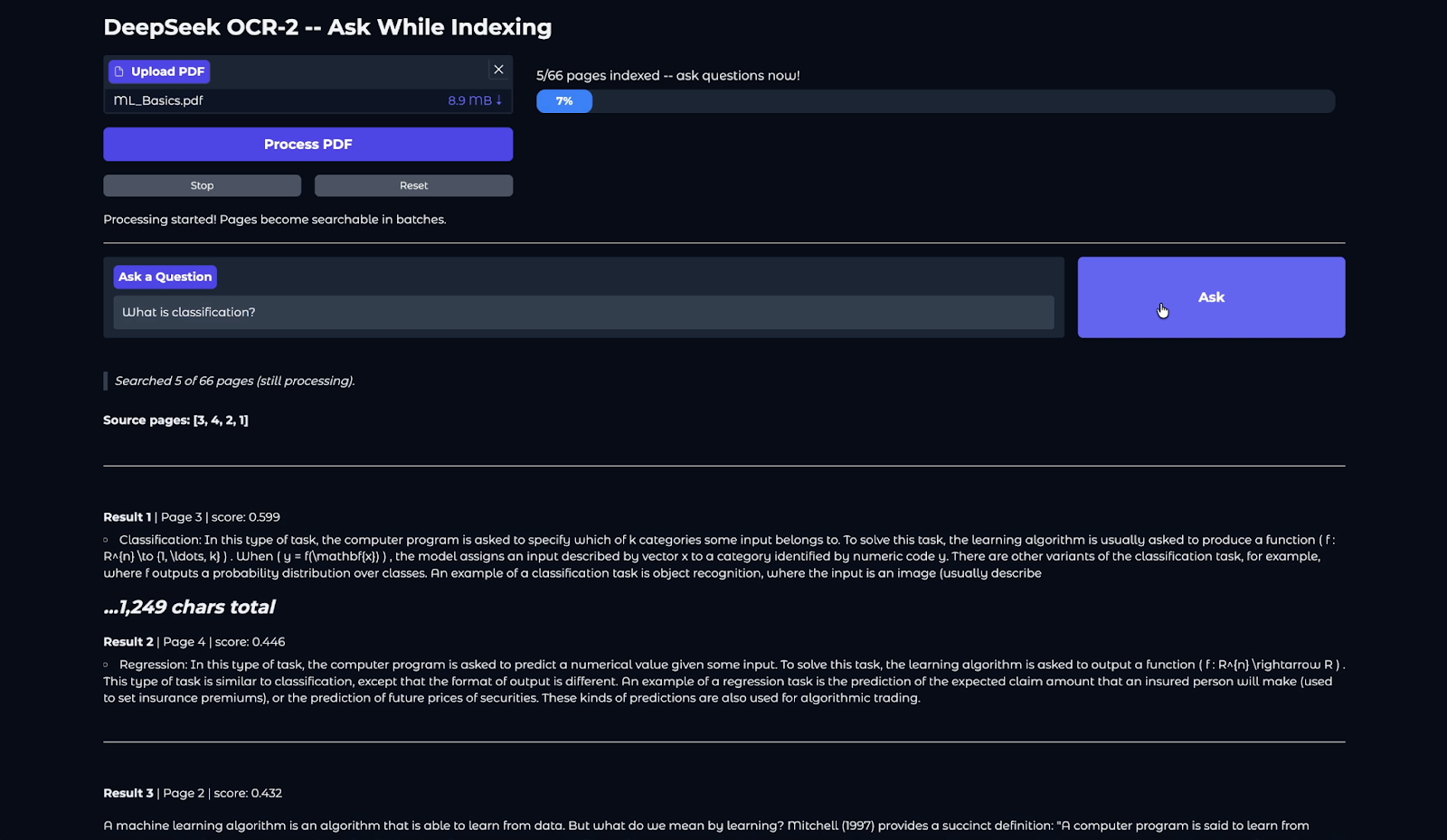
En este tutorial hemos construido una canalización completa de inteligencia documental con enfoque visual usando DeepSeek OCR-2. Partiendo de un PDF en bruto, renderizamos páginas a imágenes de alta calidad, ejecutamos OCR multimodal con vLLM, limpiamos y estructuramos el texto extraído y lo indexamos de forma incremental en un almacén RAG basado en FAISS.
Al procesar páginas en mini-lotes, la aplicación permite una experiencia de «pregunta mientras se indexa», en la que puedes empezar a consultar el documento tras el primer lote, sin esperar a que termine por completo.
Sin embargo, durante las pruebas surgieron dos limitaciones notables. Las zonas con muchas fórmulas no siempre se transcriben con precisión, un reto conocido en modelos visión-lenguaje para OCR, incluso con prompts de grounding.
Además, algunas páginas largas muestran patrones de salida repetitivos. La canalización oficial mitiga esto con NoRepeatNGramLogitsProcessor (ngram_size=20), pero las tablas densas y las maquetaciones multicolumna pueden seguir provocando bucles de generación; en ese caso, la página se omite silenciosamente mediante la marca SKIP_REPEAT.
Para ir más allá, puedes probar a añadir una capa LLM ligera (por ejemplo, llamando a la API de Anthropic u OpenAI) para resumir los fragmentos recuperados en lugar de devolver snippets en bruto.
Otras mejoras prácticas incluyen persistir el índice FAISS en disco para reutilizarlo entre sesiones, soportar múltiples PDFs en un mismo índice, exponer parámetros ajustables como BATCH_SIZE y top_k directamente en la UI de Gradio, o añadir troceado consciente de la estructura (títulos, tablas y límites de secciones) para mejorar la precisión de la recuperación.
Top DataCamp Courses
Curso
Curso
Curso
blog
Abid Ali Awan
10 min
Tutorial
Dimitri Didmanidze
8 min
Tutorial
Abid Ali Awan
12 min
Tutorial
Moez Ali
12 min
Tutorial
Zoumana Keita
15 min
Tutorial
Abid Ali Awan
12 min