

Cours
Développement logiciel avec Cursor
1 h 30 min
4.4K
S'entraîner et cursus vos progrès.
Continuer Avec GoogleEn 2026, la question n’est plus d’utiliser ou non l’IA pour coder, mais de savoir quel type d’IA s’intègre le mieux à votre workflow. Codex et Cursor ont tous deux publié d’importantes mises à jour récemment : Codex a lancé une application de bureau et une extension d’IDE, et Cursor a livré une interface centrée agent avec Cursor 3.
La frontière entre « assistant de code » et « agent autonome » s’estompe, et les deux outils convergent plus vite que ne le laissent entendre la plupart des comparatifs. Ce comparatif OpenAI Codex vs Cursor vous aide à aller à l’essentiel et à décider lequel mérite réellement une place dans votre environnement.
OpenAI Codex est un agent IA de codage autonome, basé dans le cloud, capable d’écrire et d’éditer du code, d’exécuter des tests, de corriger des bugs et même de proposer des pull requests. Il est propulsé par GPT-5.5, le modèle d’OpenAI optimisé pour les tâches d’ingénierie logicielle.
Il s’appuie sur la famille GPT-5 (principalement GPT-5.5 pour les workflows généraux/agents, GPT-5.3-codex pour l’ingénierie logicielle, et GPT-5.4 mini pour les tâches plus légères).
Codex se décline en quatre formes : en extension VS Code, Codex CLI (pour les utilisateurs du terminal), Codex Web (dans ChatGPT) et une application de bureau (macOS uniquement), pour l’utiliser là où vous travaillez déjà.
Vous êtes dans votre éditeur, au milieu d’une fonctionnalité. Vous appuyez sur Tab, et le prochain bloc de code se complète tout seul. Vous sélectionnez une fonction, pressez Cmd+K, et vous la réécrivez en ligne. Puis vous passez en mode agent et demandez un refactor complet. Le diff s’affiche dans la même fenêtre.
C’est Cursor. Au cœur, Cursor est un fork de VS Code axé sur l’IA, l’interface vous semblera donc familière si vous avez déjà utilisé VS Code.
En avril 2026, Cursor 3 a lancé une nouvelle interface agent-first aux côtés de l’IDE classique. Consultez notre guide Cursor 3 pour découvrir comment déléguer de plus grosses tâches à des agents sans quitter l’interface Cursor.
Avec Codex, vous décrivez la tâche, vous le laissez tourner en arrière-plan, et vous revenez à une pull request. Avec Cursor, vous restez dans l’éditeur et vous pilotez l’IA pendant l’écriture. Voyons ces différences de plus près.
Vous décrivez une tâche, Codex lance un bac à sable cloud, clone votre dépôt, écrit le code, exécute les tests et produit un diff. Une fois terminé, vous relisez le résultat et choisissez d’ouvrir une PR, de demander des modifications ou de récupérer le diff en local.
L’avantage est que Codex fonctionne sans vous. Pendant qu’il travaille, vous pouvez faire autre chose : relire une autre PR, rédiger de la documentation ou démarrer une autre tâche. Les grands refactors, migrations et mises à jour multi-fichiers ne demandent pas d’intervention constante, Codex y est donc naturellement à l’aise.
La contrepartie, c’est la visibilité. Codex s’exécute dans un conteneur isolé sans accès internet, et votre sortie reste dans la VM cloud jusqu’à synchronisation via GitHub. Si la tâche dérive ou si l’agent a mal compris le besoin, vous ne le découvrez qu’à la fin.
Vous et l’agent travaillez dans le même éditeur. Vous voyez les diffs au fil de l’eau, vous approuvez ou rejetez les changements en ligne et vous redirigez l’agent en cours de route s’il s’éloigne. C’est crucial pour les travaux dépendants du contexte, comme les bugs où la correction dépend du code environnant, ou les fonctionnalités qui touchent plusieurs composants.
Cursor 3 étend ce modèle avec des agents en arrière-plan. Vous pouvez lancer des tâches plus longues dans le cloud tout en continuant à travailler localement. Une fois terminées, vous récupérez les changements et les affinez si besoin.
En 2026, les deux outils sont pleinement agentiques. Ils prennent des tâches, décident et exécutent sur plusieurs étapes. La différence tient à l’endroit où les agents s’exécutent et au degré de supervision attendu.
Codex est cloud-first par conception, chaque tâche s’exécute donc dans son conteneur isolé. À l’intérieur, l’agent peut lire et éditer des fichiers, lancer tests, linters et vérifications de types, et travailler de façon autonome pendant des heures sur des tâches complexes.
L’application de bureau va plus loin en permettant d’exécuter plusieurs agents en parallèle sur différents dépôts. Vous pouvez mettre plusieurs tâches en file et les laisser progresser indépendamment.
Codex utilise les modèles de la famille GPT-5 pour sa couche de raisonnement en mode agent. Ils tournent en arrière-plan lorsque vous lancez une tâche depuis l’application de bureau ou le CLI. Avant d’écrire la moindre ligne, il planifie l’approche, vérifie les cas limites et décide de la structuration du changement. Cette étape de planification prend généralement quelques secondes et produit des résultats plus propres que de générer directement.
Par défaut, les agents de Cursor s’exécutent localement, dans votre environnement de développement, avec accès à vos fichiers, votre contexte et vos outils. Pour les tâches plus longues, vous déportez sur des agents cloud.
Cursor 3 introduit la fenêtre Agents pour gérer les agents parallèles. Tous les agents locaux et cloud apparaissent dans un même volet, y compris ceux lancés depuis mobile, Slack, GitHub, Linear, et autres.
Codex convient mieux aux tâches « fire-and-forget » : des besoins bien cadrés que vous déléguez totalement et que vous relisez une fois terminés. Cursor est préférable si vous souhaitez rester aux commandes.
Mais avec Cursor 3, l’écart se réduit. Il exécute des agents en parallèle pendant que vous continuez à coder, et vous pouvez reprendre à tout moment une tâche en mode interactif.
À première vue, Codex est un produit OpenAI qui n’exécute que des modèles OpenAI, tandis que Cursor vous laisse choisir parmi les principaux fournisseurs et basculer par tâche.
Codex est optimisé pour sa propre gamme : gpt-5.3-codex gère les tâches complexes d’ingénierie logicielle, gpt-5.5 couvre le codage général et les workflows agents, et gpt-5.4-mini traite les tâches rapides à moindre coût et les sous-agents.
Vous pouvez pointer le CLI Codex vers d’autres modèles compatibles avec l’API Responses, mais l’expérience est optimisée pour la pile d’OpenAI. Codex prend en charge MCP et dispose d’une place de marché de plugins, ce qui facilite la connexion d’outils externes.
Cursor vous laisse choisir entre des modèles d’OpenAI, Anthropic, Gemini et d’autres. Il propose aussi Composer 2.5, son modèle IA intégré.
Cursor MCP connecte des outils et sources de données externes directement à l’agent. Le Marketplace étend encore les agents avec plus de 30 intégrations partenaires (Atlassian, Datadog, GitLab, Hugging Face) et la prise en charge des marketplaces privées.
La performance des modèles IA évolue si vite que le leader d’il y a six mois n’est pas forcément le meilleur aujourd’hui. Les utilisateurs de Cursor s’y adaptent. Si Anthropic sort un modèle nettement supérieur sur une tâche donnée, vous basculez. Si c’est OpenAI, vous revenez. Si Composer 2 est l’outil le plus adapté, vous l’utilisez.
Les utilisateurs de Codex restent en revanche dans la pile OpenAI et profitent des avancées au rythme des sorties d’OpenAI.
La tarification de Codex est simple si votre équipe utilise déjà ChatGPT. Cursor est un abonnement séparé avec ses propres paliers. Voici la comparaison.
Codex est inclus dans les offres ChatGPT :
Le Codex CLI est gratuit et open source sans abonnement requis — vous vous authentifiez avec un compte ChatGPT ou une clé API existants.
Cursor adopte une structure SaaS plus traditionnelle. Cursor facture à base de crédits plutôt qu’un nombre fixe de requêtes. Chaque formule payante inclut un pool mensuel de crédits proportionnel au prix.
Voici ce que paie annuellement une équipe de 10 développeurs sur les principaux paliers de chaque outil :
|
Offre |
Codex |
Cursor |
|
Free / Hobby |
0 $ |
0 $ |
|
Standard |
2 400 $/an (20 $/mois × 10) |
2 400 $/an (Pro, 20 $/mois × 10) |
|
Power user |
12 000 $/an (Pro, 100 $/mois × 10) |
7 200 $/an (Pro+, 60 $/mois × 10) |
|
Ultra |
— |
24 000 $/an (Ultra, 200 $/mois × 10) |
|
Petites équipes |
Sur mesure |
4 800 $/an (Teams, 40 $/utilisateur/mois) |
|
Business |
Sur mesure |
Sur mesure |
Enfin, regardons comment l’expérience diffère entre les deux en matière de mise en route et d’usage au quotidien.
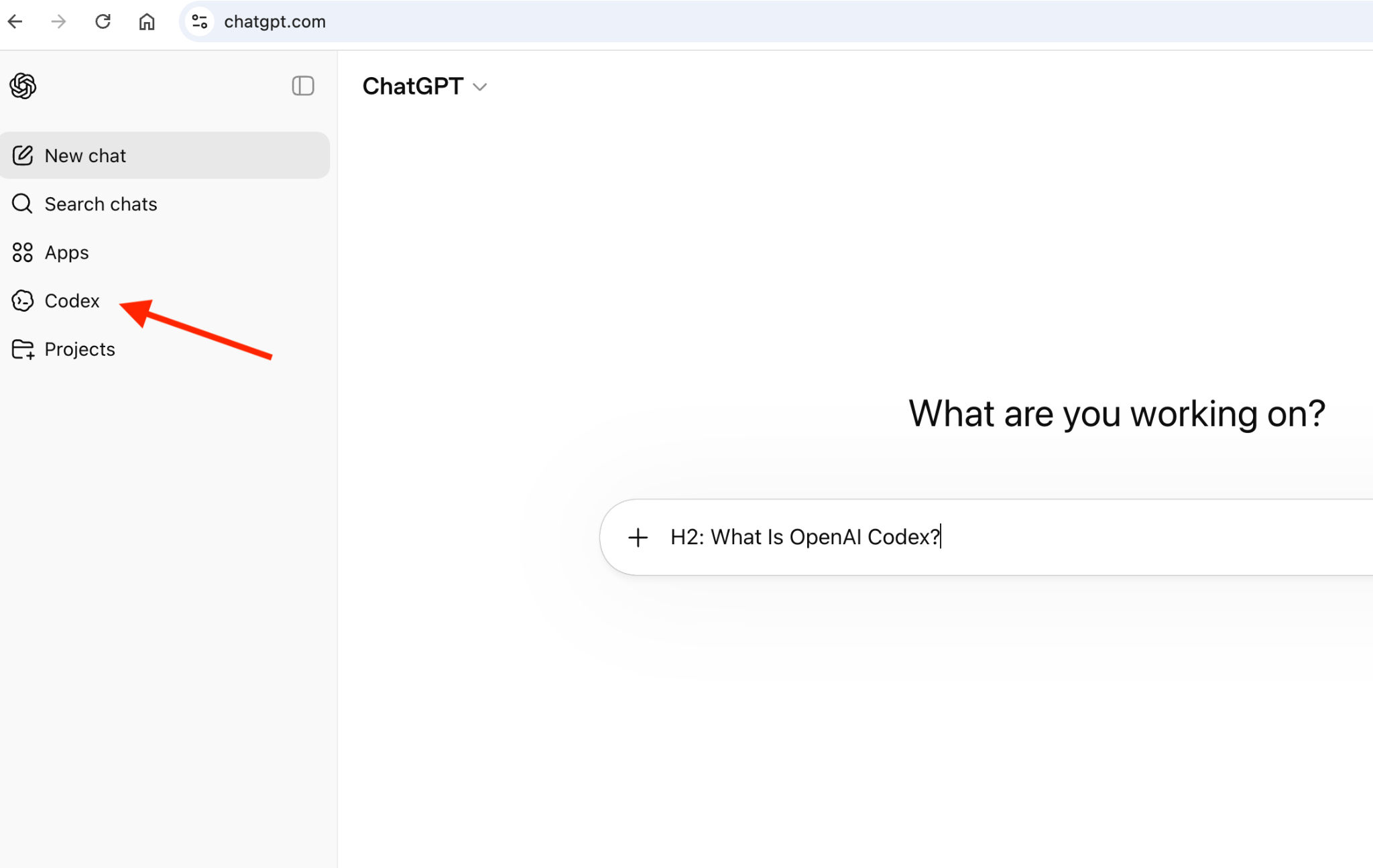
Codex ne demande quasiment aucune configuration. Si vous avez déjà un compte ChatGPT, vous le trouverez dans la barre latérale de gauche. Ouvrez les paramètres, allez dans intégrations et connectez votre dépôt GitHub.
L’installation de Cursor est similaire à VS Code. Vous téléchargez l’application et lancez l’installeur. Si vous utilisez déjà VS Code, la migration est également simple.
Au premier lancement, Cursor vous propose d’importer votre configuration VS Code.
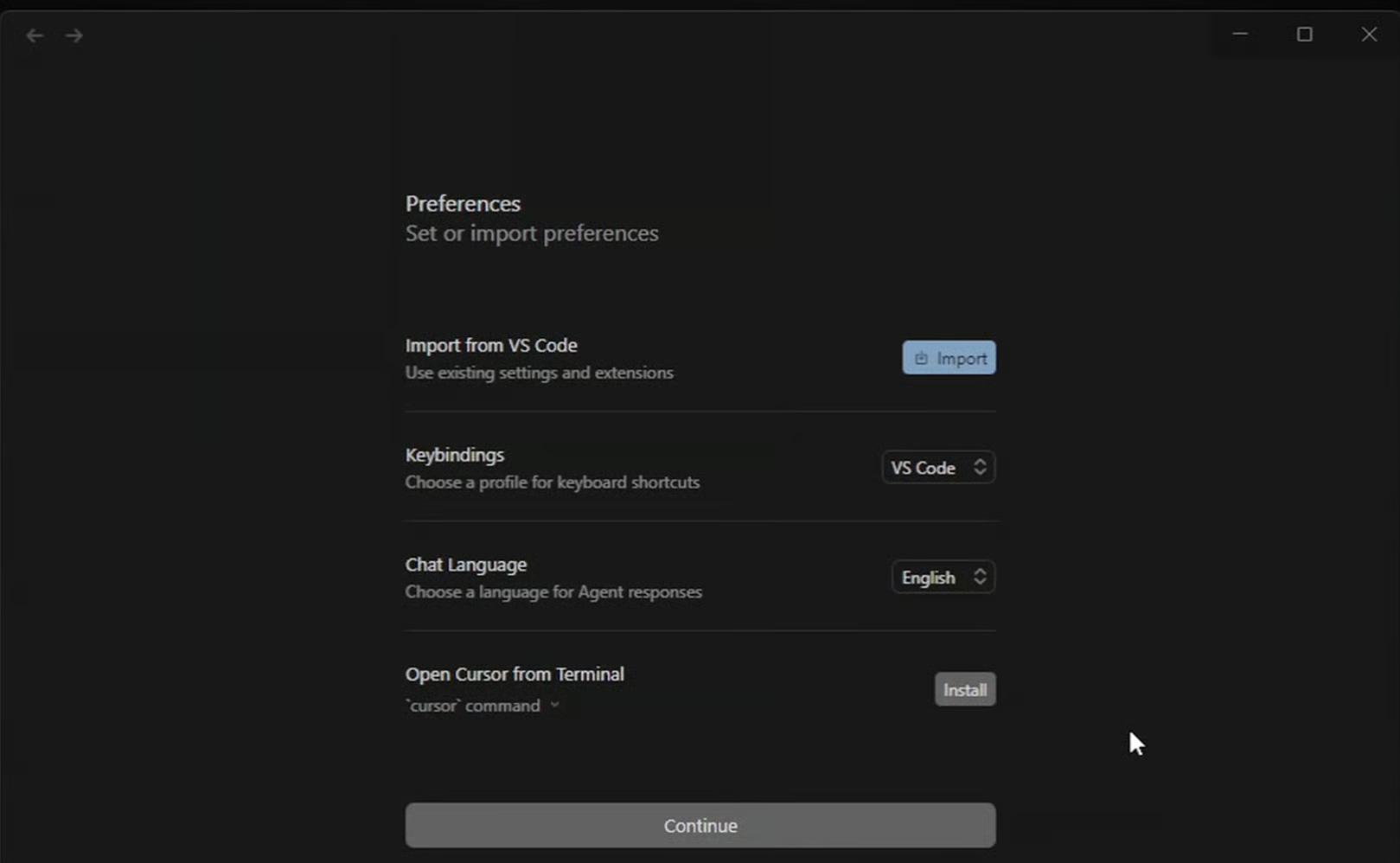
Cliquez sur Import, choisissez ce que vous souhaitez récupérer (extensions, thèmes, paramètres, raccourcis) et suivez les étapes. Cursor reconstitue ensuite votre environnement automatiquement, pour reprendre le travail sans tout reconstruire.
Avec Codex, vous décrivez le besoin et vous passez à autre chose. Il découpe la tâche en sous-étapes, l’exécute dans un bac à sable cloud, et revient avec un diff type PR, des logs terminal et des résultats de tests. Vous relisez, demandez des ajustements si nécessaire et ouvrez une PR GitHub depuis là.
Cursor vous montre les changements à mesure qu’ils arrivent. La complétion Tab gère les petites choses pendant que vous tapez. Pour une demande plus conséquente, vous passez en mode agent, décrivez le changement et suivez son exécution en temps réel à travers vos fichiers. Avec GitHub connecté, il peut ouvrir la PR finale pour relecture une fois terminé. Cursor propose aussi les modes Ask, Plan et Debug en plus d’Agent, pour adapter l’outil à la tâche.
Décomposons par cas d’usage.
Codex gère les tâches de fond comme un grand refactor, une suite de tests ou une migration, tandis que Cursor prend en charge le travail interactif en parallèle. Codex Web et l’IDE Cursor ne se gênent pas, et leurs workflows sont suffisamment différents pour que l’utilisation conjointe ne soit pas redondante. Vous déléguez à l’un et vous collaborez avec l’autre.
|
Fonctionnalité |
Codex |
Cursor |
|
Architecture |
Cloud-first, bac à sable isolé par tâche |
IDE local-first, agents cloud disponibles |
|
Modèle principal |
Modèles OpenAI (famille GPT-5) |
Composer 2.5 + modèles externes |
|
Choix de modèles |
OpenAI uniquement |
Multi-modèles (Claude, GPT, Gemini) |
|
Mode agentique |
Agents entièrement autonomes |
Agents interactifs + autonomes |
|
Agents en arrière-plan |
Oui, via Codex Web et l’app de bureau |
Oui, via la fenêtre Agents (Cursor 3) |
|
Support MCP / plugins |
MCP local uniquement, marketplace de plugins |
Oui — Marketplace, MCP, Cursor Rules |
|
Autocomplétion |
Pas d’autocomplétion dans l’éditeur |
Complétion par Tab dans l’IDE |
|
Expérience IDE |
Chat, CLI, application de bureau |
IDE complet (basé sur VS Code) |
|
Idéal pour |
Délégation asynchrone, tâches de fond, utilisateurs ChatGPT |
Développement interactif, flexibilité multi-modèles, workflows d’équipe |
Codex et Cursor partent d’hypothèses différentes sur ce que doit être le codage assisté par l’IA. Codex part du principe que vous voulez déléguer. Cursor part du principe que vous voulez collaborer. Les deux postures sont valides — elles correspondent à des profils et des travaux différents.
Le bon choix ne tient pas à l’outil le plus puissant, mais à la façon dont vous souhaitez utiliser l’IA dans le développement logiciel.
Vous voulez aller plus loin sur le développement assisté par l’IA ? Découvrez ce cours complet sur le développement logiciel avec Cursor.
Meilleures formations en IA
Cours
Cours
S'entraîner et cursus vos progrès.
Continuer Avec Google