Course
Software Development with Cursor
1 hr 30 min
4.4K
Practice and track your progress.
Continue with GoogleIn 2026, the question isn't whether to use AI for coding; it's which kind of AI fits your workflow. Codex and Cursor have both shipped major updates recently: Codex launched a desktop app and IDE extension, and Cursor shipped an agent-first interface in Cursor 3.
The line between "coding assistant" and "autonomous agent" is blurring, and the two tools are converging faster than most comparisons acknowledge. This OpenAI Codex vs Cursor comparison helps you cut through that and figure out which one actually belongs in your setup.
OpenAI Codex is a cloud-based autonomous coding AI agent that can write and edit code, run tests, fix bugs, and even propose pull requests. It's powered by GPT-5.5, OpenAI's model optimized for software engineering tasks.
It's powered by the GPT-5 family (primarily GPT-5.5 for general/agent workflows, GPT-5.3-codex for software engineering, and GPT-5.4 mini for lighter tasks).
Codex comes in four forms: as a VS Code extension, Codex CLI (for terminal users), Codex Web (within ChatGPT), and a desktop application (macOS only), so you can use it from whichever environment you're already in.
You’re in your editor, halfway through a feature. You hit Tab, and the next block of code completes itself. You select a function, press Cmd+K, and rewrite it inline. Then switch to agent mode and request a full refactor. The diff shows up in the same window.
That’s Cursor. At its core, Cursor is a VS Code fork built around AI, so the interface feels familiar if you’ve used VS Code before.
In April 2026, Cursor 3 shipped a new agent-first interface alongside the classic IDE. Check out our Cursor 3 guide for full details on how you can delegate larger tasks to agents without leaving the Cursor interface.
In Codex, you describe the task, let it run in the background, and come back to a pull request. In Cursor, you stay in the editor and steer the AI as it writes. Let’s see these differences in more detail.
You describe a task, Codex spins up a cloud sandbox, clones your repo, writes code, runs tests, and produces a diff. When it's done, you review the output and decide whether to open a PR, request changes, or pull the diff locally.
The upside is that Codex runs without you. While it's working, you're free to do something else, review another PR, write docs, or start a different task. Large refactors, migrations, and multi-file updates don’t require constant input, so Codex fits naturally here.
The tradeoff is visibility. Codex runs in an isolated container with internet access disabled, and your output stays in the cloud VM until you sync it through GitHub. If the task drifts or the agent misunderstood the requirements, you find out only at the end.
You and the agent work in the same editor. You see diffs as they appear, approve or reject changes inline, and redirect the agent mid-task if it's heading somewhere wrong. This matters most for context-dependent work like bugs, where the fix depends on understanding surrounding code or features that touch multiple components.
Cursor 3 extends this model with background agents. You can run longer tasks in the cloud while continuing to work locally on other things. Once those agents finish, you pull the changes and refine them if needed.
Both tools are fully agentic in 2026. They take on tasks, make decisions, and execute work across multiple steps. The difference is in where the agents run and how much you're expected to supervise them.
Codex is cloud-first by design, so every task runs in its own isolated container. Inside that environment, the agent can read and edit files, run tests, linters, and type checkers, and work autonomously on complex tasks for hours.
The desktop app extends this by letting you run multiple agents in parallel across different repos. You can queue up several tasks and let them progress independently.
Codex uses the GPT-5 family models for its reasoning layer in agent mode. They run underneath when you kick off a task in the desktop app or CLI. Before writing a single line, it plans the approach, checks edge cases, and decides how to structure the change. That planning step typically takes a few seconds but produces cleaner results than jumping straight into generation.
Cursor's agents run locally, in your development environment by default, with access to your files, context, and tooling. For longer tasks, you offload work to cloud agents.
Cursor 3 introduces the Agents Window for parallel agents. With this, all local and cloud agents appear in one sidebar, including agents kicked off from mobile, Slack, GitHub, Linear, and others.
Codex is the better fit for fire-and-forget work: well-scoped tasks you can hand off completely and review when they're done. Cursor is better when you want to stay in the loop.
But with Cursor 3, the gap is narrowed down. It runs agents in parallel while you keep coding, and you can pull any task back into a hands-on session when needed.
At a glance, Codex is an OpenAI product that runs only OpenAI models, while Cursor lets you pick from any major frontier provider and switch between them per task.
Codex works best with its own model lineup: gpt-5.3-codex handles complex software engineering tasks, gpt-5.5 supports general coding and agent workflows, and gpt-5.4-mini covers faster, lower-cost tasks and subagents.
You can point the Codex CLI to other models that support the Responses API, but the experience is optimized for OpenAI’s stack. Codex does support MCP and has a plugin marketplace, so connecting external tools is possible.
Cursor lets you choose between models from OpenAI, Anthropic, Gemini, and others. It also offers Composer 2.5, its built-in AI model.
Cursor MCP connects external tools and data sources directly to the agent. The plugin Marketplace extends agents further with 30+ partner integrations from Atlassian, Datadog, GitLab, and Hugging Face, along with support for private marketplaces.
AI model performance has shifted fast enough that the leader six months ago isn't necessarily the best today. Cursor users adapt to that. If Anthropic ships a model that's significantly better on a specific task, you switch. If OpenAI does, you switch back. If Composer 2 is the right tool for a given job, you use that.
But Codex users stay within the OpenAI stack and adopt improvements only when OpenAI releases.
Codex pricing is straightforward if your team already uses ChatGPT. Cursor is a separate subscription with its own tier structure. Here's how they compare.
Codex is included in ChatGPT plans:
The Codex CLI is free and open-source with no subscription required — you authenticate with an existing ChatGPT account or API key.
Cursor follows a more traditional SaaS structure. Cursor uses credit-based billing rather than fixed request counts. Each paid plan includes a monthly credit pool according to the plan price.
Here's what a 10-developer team pays annually on each tool's main tiers:
|
Tier |
Codex |
Cursor |
|
Free / Hobby |
$0 |
$0 |
|
Standard |
$2,400/yr ($20/mo × 10) |
$2,400/yr (Pro, $20/mo × 10) |
|
Power user |
$12,000/yr (Pro, $100/mo × 10) |
$7,200/yr (Pro+, $60/mo × 10) |
|
Ultra tier |
— |
$24,000/yr (Ultra, $200/mo × 10) |
|
Small teams |
Custom |
$4,800/yr (Teams, $40/user/mo) |
|
Business |
Custom |
Custom |
Finally, let’s take a look at how the developer experience differs between the two in terms of setting them up and using them for day-to-day work.
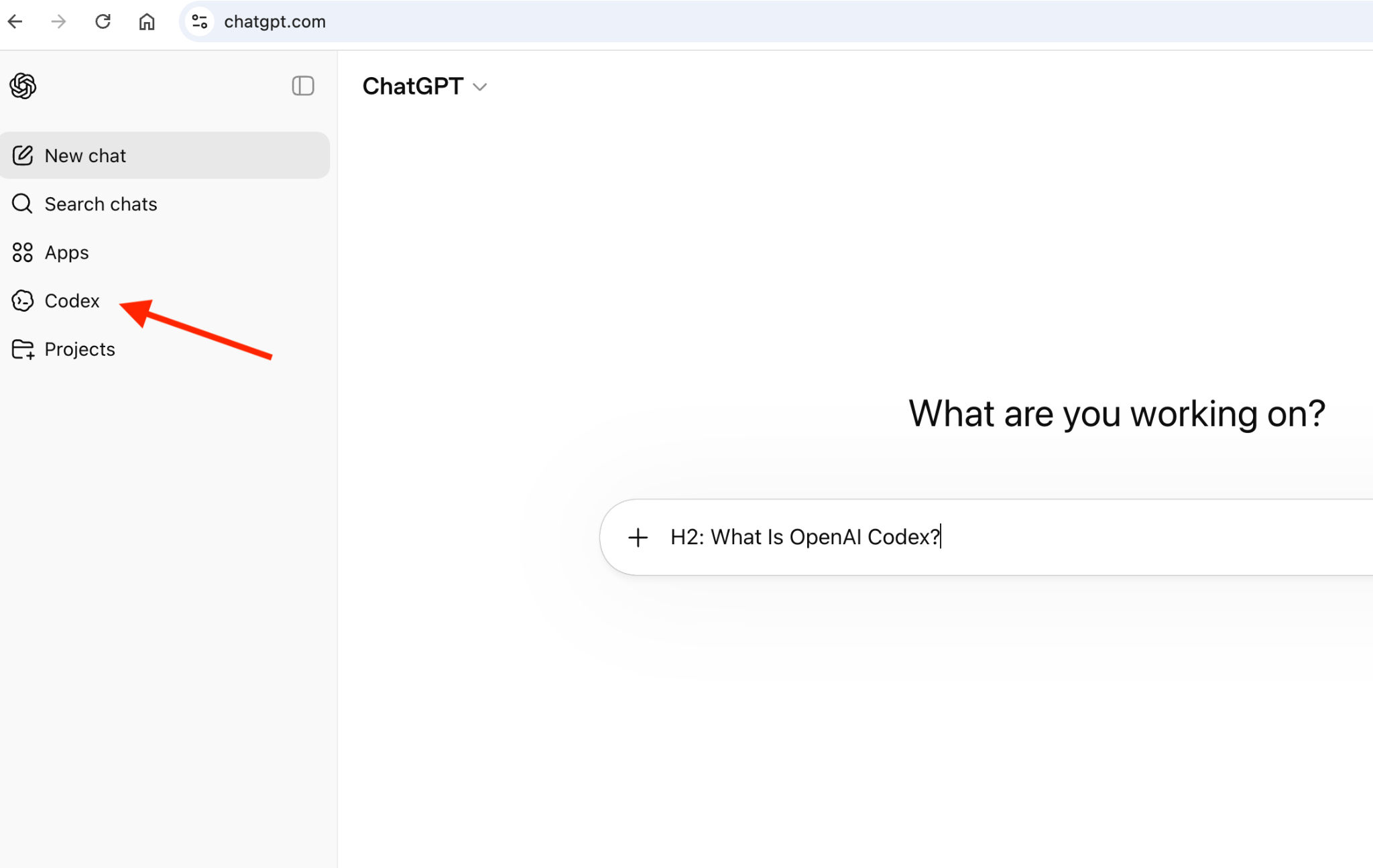
Codex requires almost no setup. If you already have a ChatGPT account, you’ll find it in the left sidebar. Open settings, go to integrations, and connect your GitHub repository.
Cursor setup is similar to VS Code. You download the application and run the installer. If you’re already using VS Code, the migration from VS Code is also straightforward.
On first launch, Cursor prompts you to import your VS Code setup.
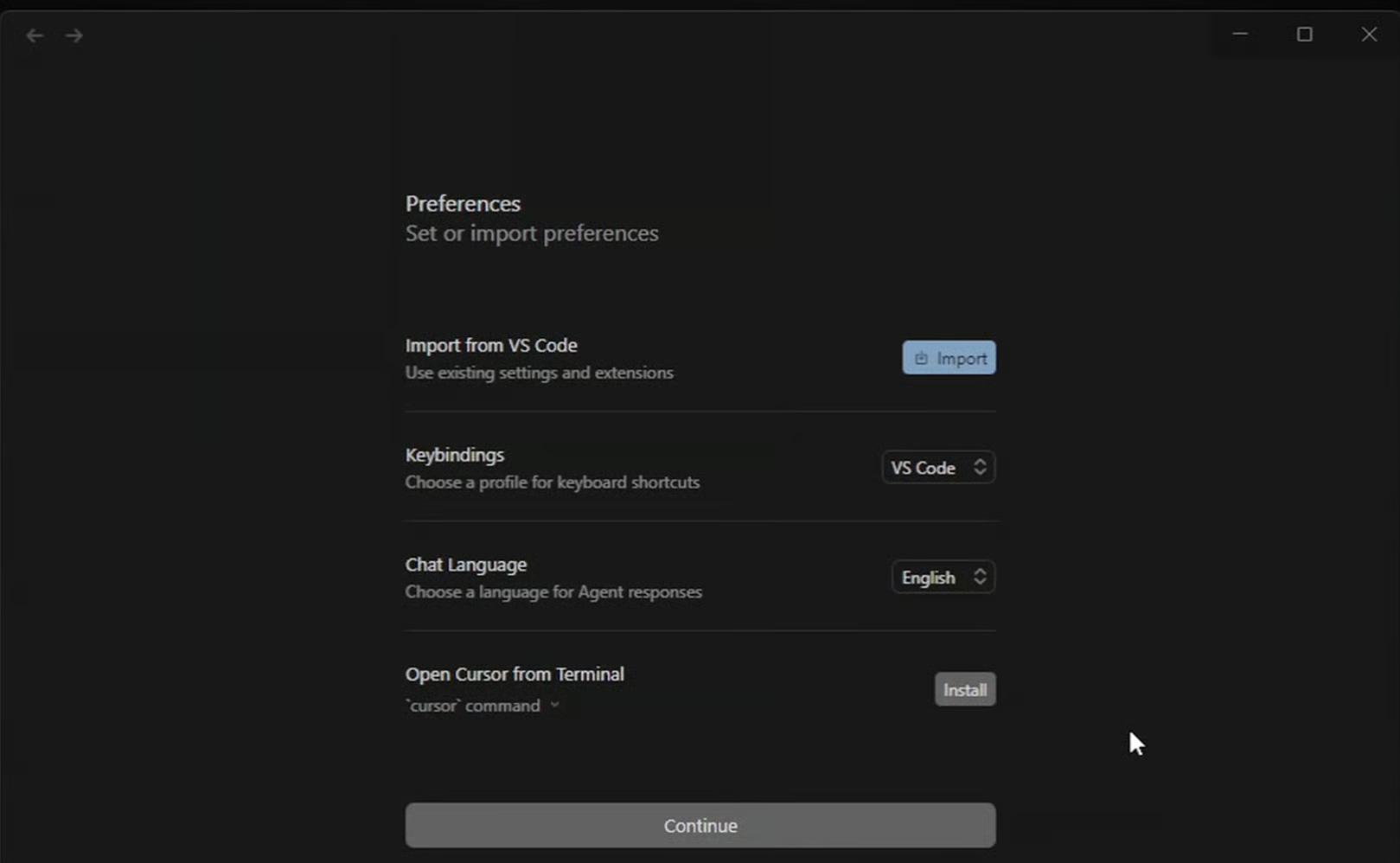
Click Import, choose what you want to bring over, like extensions, themes, settings, and keybindings, and follow the steps. Cursor then recreates your setup automatically, so you can start working without rebuilding your environment.
With Codex, you describe what you need and step away. It breaks the work into subtasks, executes them in a cloud sandbox, and comes back with a PR-style diff, terminal logs, and test results. You review the output, request changes if needed, and open a GitHub PR from there.
Cursor shows you changes as they happen. Tab autocomplete handles the small stuff as you type. When you need something bigger, you switch to agent mode, describe the change, and watch it execute across your files in real time. With GitHub connected, it can open the final PR for your review when it's done. Cursor also offers Ask, Plan, and Debug modes alongside Agent, so you can switch to whatever the task calls for.
Let's break it down into use cases.
Codex handles background tasks like a large refactor, a test suite, or a migration, while Cursor handles the interactive work happening in parallel. Codex Web and the Cursor IDE don't conflict, and the workflows are different enough that using both doesn't feel redundant. You're delegating to one and collaborating with the other.
|
Feature |
Codex |
Cursor |
|
Architecture |
Cloud-first, isolated sandbox per task |
Local-first IDE, cloud agents available |
|
Core model |
OpenAI models (GPT-5 family) |
Composer 2.5 + external models |
|
Model choice |
OpenAI only |
Multi-model (Claude, GPT, Gemini) |
|
Agentic mode |
Fully autonomous agents |
Interactive + autonomous agents |
|
Background agents |
Yes, via Codex Web and desktop app |
Yes, via Agents Window (Cursor 3) |
|
MCP / plugin support |
Local MCP only, plugin marketplace |
Yes — Marketplace, MCP, Cursor Rules |
|
Autocomplete |
No in-editor autocomplete |
Tab autocomplete in the IDE |
|
IDE experience |
Chat, CLI, desktop app |
Full IDE (VS Code–based) |
|
Best For |
Async delegation, background tasks, ChatGPT users |
Interactive development, multi-model flexibility, team workflows |
Codex and Cursor are built on different assumptions about what AI-assisted coding should feel like. Codex assumes you want to delegate. Cursor assumes you want to collaborate. Both assumptions are valid — they just describe different developers and different kinds of work.
The right pick isn't about which tool is more capable. It's about how you want to use AI in software development.
Want to go deeper on AI-assisted development? Check out this full course on software development with Cursor.
Top AI Courses
Course
Course
Practice and track your progress.
Continue with Googleblog
Derrick Mwiti
10 min
blog
Khalid Abdelaty
15 min
blog
Khalid Abdelaty
15 min
blog
Khalid Abdelaty
15 min
blog
Nikhil Adithyan
13 min
Tutorial
Khalid Abdelaty
12 min