
Corso
Lavorare con l'API di OpenAI
3 ore
184.5K
OpenAI ha rilasciato in sordina GPT-5.1-Codex sulla piattaforma per sviluppatori, e molti lo considerano già il miglior modello di coding disponibile oggi. A differenza delle versioni Codex precedenti, GPT-5.1-Codex è progettato per la vera ingegneria del software, per ragionamenti di lunga durata e per agenti che usano strumenti.
In questo tutorial costruiremo un GitHub Issue Analyzer Agent completo usando OpenAI Agents e GPT-5.1 Codex.
Il nostro agente sarà in grado di:
Questo agente si comporta come un ingegnere senior: prima fa ricerca, legge, ragiona e pianifica, e solo dopo scrive. Dai un’occhiata anche alla nostra guida su GPT-5.1 per scoprire cos’altro c’è di nuovo.
GPT-5.1 Codex è una versione specializzata di GPT-5.1, pensata per compiti di coding agentico e di lunga durata, non solo per l’autocompletamento di snippet. È costruita per la vera ingegneria del software e per flussi di lavoro basati su agenti, il che la rende il motore perfetto dietro al nostro workflow di automazione Issue-to-Plan.
A differenza dei modelli generici, Codex comprende i codebase come farebbe un ingegnere senior: legge le issue, ragiona sull’architettura, identifica le directory giuste e ispeziona solo i file che contano davvero. Questo rende l’agente più veloce, più intelligente e molto più conveniente.
Codex è ottimizzato per compiti di coding agentico e di lunga durata. Si integra in modo naturale con tool per sviluppatori come GitHub CLI e Firecrawl API, permettendo al nostro agente di recuperare issue, esplorare online le strutture dei progetti, leggere file specifici e raccogliere documentazione quando serve. Segue le istruzioni con attenzione, produce analisi pulite e affidabili e adatta lo sforzo di ragionamento: va veloce sui compiti semplici e approfondisce quelli complessi.
Combinando una forte comprensione del codice con un ragionamento consapevole degli strumenti, GPT-5.1 Codex dà al nostro agente la capacità di trasformare una issue di GitHub in un piano di ingegneria accurato e attuabile, senza scansionare l’intero repo o allucinare codice. È la spina dorsale del workflow perché porta l’intuizione, la struttura e la precisione ingegneristica di cui il progetto ha bisogno.
Prima di iniziare con il progetto, assicuriamoci che l’ambiente sia pronto. Ti serve Git installato sulla tua macchina. Se non sei sicuro, esegui git --version per confermare. Ti serve anche un account OpenAI Developer Platform con almeno 6 $ di credito, così le chiamate API possono funzionare senza interruzioni.
Poi crea un account gratuito su Firecrawl e imposta le tue chiavi API come variabili d’ambiente. Sono quelle che permettono al tuo analyzer di comunicare con OpenAI e Firecrawl:
export OPENAI_API_KEY=sk-...
export FIRECRAWL_API_KEY="fc-..."
Una volta fatto, installa i pacchetti Python che alimentano il workflow. Il primo, openai-agents, è un framework leggero che rende sorprendentemente semplice costruire pipeline multi-agente. Il secondo, firecrawl-py, si occupa di effettuare crawling ed estrarre informazioni utili dai tuoi repository o dalla documentazione.
pip install openai-agents
pip install firecrawl-py
Infine, assicurati che la tua GitHub CLI sia installata e configurata. Il seguente comando ti aiuterà ad accedere al tuo account GitHub.
gh auth login
Creeremo una cartella chiamata "src" che conterrà tutti i file di codice. La cartella "agents_pkg" conterrà tutti i file degli agenti, mentre la cartella "tools" conterrà tutti i file degli strumenti.
L’applicazione principale, "app.py", offre un’interfaccia a riga di comando (CLI) che utilizza gli agenti di pianificazione per generare un report sull’issue di GitHub in base agli input dell’utente.
Ecco come dovrebbe apparire la directory del progetto:
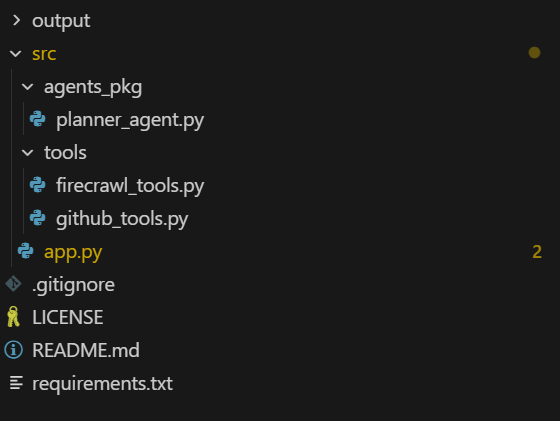
Per prima cosa, creeremo un file di strumenti agentici che aiuterà l’agente ad accedere a GitHub e all’API Firecrawl usando semplici funzioni Python.
Partiremo dagli strumenti. Crea un file chiamato firecrawl_tools.py nella directory src/tools e aggiungi il seguente codice.
1. Crea e restituisce un client Firecrawl usando la variabile d’ambiente FIRECRAWL_API_KEY e genera un errore se la chiave manca.
import json
import os

from agents import function_tool
from firecrawl import firecrawl


def _get_firecrawl_client():
    api_key = os.getenv("FIRECRAWL_API_KEY")
    if not api_key:
        raise RuntimeError("FIRECRAWL_API_KEY is not set")
    return firecrawl(api_key=api_key)
2. Usa Firecrawl per eseguire una ricerca web mirata (ad esempio, documentazione, post di blog, errori) e restituisce i risultati in JSON per fornire contesto esterno all’agente.
@function_tool
def firecrawl_search(query: str, limit: int = 3) -> str:
    """
    Run a Firecrawl search for docs related to the issue or tech stack.

    Args:
        query: Search query (usually based on issue title / framework / error message).
        limit: Max number of results to return.

    Returns:
        JSON string of Firecrawl search results.
    """
    client = _get_firecrawl_client()
    results = client.search(query=query, limit=limit)
    return json.dumps(results)
3. Effettua lo scraping di un singolo URL con Firecrawl (in formato markdown) e restituisce il contenuto strutturato della pagina in JSON per ricerche tecniche più approfondite.
@function_tool
def firecrawl_scrape(url: str) -> str:
    """
    Scrape a single URL using Firecrawl for deeper research.

    Args:
        url: URL to scrape (docs, blog, README in another repo, etc.).

    Returns:
        JSON (markdown/structured) content from Firecrawl scrape.
    """
    client = _get_firecrawl_client()
    result = client.scrape(url=url, params={"formats": ["markdown"]})
return json.dumps(result)Poi creeremo un file chiamato github_tools.py nella directory src/tools e aggiungeremo il seguente codice.
1. Recupera una specifica issue GitHub tramite la GitHub CLI e restituisce i suoi dettagli in JSON per la lettura da parte dell’agente.
import base64
import json
import subprocess
from typing import List, Optional

from agents import function_tool


@function_tool
def get_github_issue(repo: str, issue_number: int) -> str:
    """
    Fetch a GitHub issue using the GitHub CLI.

    Args:
        repo: Repository in 'owner/name' format.
        issue_number: The issue number to fetch.

    Returns:
        A JSON string containing the issue fields (title, body, labels, URL, etc.),
        or an error payload if the command fails.
    """
    try:
        result = subprocess.run(
            [
                "gh",
                "issue",
                "view",
                str(issue_number),
                "--repo",
                repo,
                "--json",
                "number,title,body,labels,url,author,createdAt,state,assignees",
            ],
            capture_output=True,
            text=True,
            check=True,
        )
        return result.stdout
    except subprocess.CalledProcessError as e:
        return json.dumps(
            {
                "error": "Failed to fetch issue via GitHub CLI",
                "stderr": e.stderr,
                "repo": repo,
                "issue_number": issue_number,
            }
        )
2. Elenca solo i file rilevanti in un repo GitHub remoto (facoltativamente filtrati per percorso ed estensione) così l’agente non scansiona l’intero progetto.
@function_tool
def list_repo_files_gh(
    repo: str,
    max_files: int = 80,
    extensions: Optional[List[str]] = None,
    path_prefixes: Optional[List[str]] = None,
) -> str:
    """
    List *relevant* files in the remote repo using GitHub CLI.

    Uses:
        gh api repos/{repo}/git/trees/HEAD?recursive=1

    The agent is expected to reason first which areas of the codebase are likely relevant
    (e.g. 'src/', 'app/', 'backend/api/', 'cli/'), and then call this tool with a small
    set of path_prefixes instead of scanning the entire project.

    Args:
        repo: Repository in 'owner/name' format (e.g. openai/openai-agents-python).
        max_files: Max number of files to return.
        extensions: Optional list of file extensions to keep (e.g. [".py", ".ts"]).
        path_prefixes: Optional list of path prefixes to include (e.g. ["src/", "app/api/"]).

    Returns:
        JSON string with file paths and filters applied.
    """
    try:
        result = subprocess.run(
            [
                "gh",
                "api",
                f"repos/{repo}/git/trees/HEAD?recursive=1",
            ],
            capture_output=True,
            text=True,
            check=True,
        )
    except subprocess.CalledProcessError as e:
        return json.dumps(
            {
                "error": "Failed to list repo files via GitHub CLI",
                "stderr": e.stderr,
                "repo": repo,
            }
        )

    try:
        data = json.loads(result.stdout)
    except json.JSONDecodeError:
        return json.dumps(
            {
                "error": "Failed to parse JSON from gh api",
                "raw": result.stdout[:2000],
                "repo": repo,
            }
        )

    tree = data.get("tree", [])

    if extensions is not None and not isinstance(extensions, list):
        extensions = [str(extensions)]
    exts = [e.lower() for e in (extensions or [])]

    if path_prefixes is not None and not isinstance(path_prefixes, list):
        path_prefixes = [str(path_prefixes)]
    prefixes = [p.strip() for p in (path_prefixes or []) if p.strip()]

    paths: List[str] = []
    for entry in tree:
        if entry.get("type") != "blob":
            continue  # only files
        path = entry.get("path", "")
        if not path:
            continue

        # If prefixes are provided, only keep files under those subtrees
        if prefixes and not any(path.startswith(pref) for pref in prefixes):
            continue

        if exts:
            suffix = "." + path.split(".")[-1].lower() if "." in path else ""
            if suffix not in exts:
                continue

        paths.append(path)
        if len(paths) >= max_files:
            break

    return json.dumps(
        {
            "repo": repo,
            "count": len(paths),
            "files": paths,
            "filtered_by_extensions": bool(exts),
            "filtered_by_prefixes": bool(prefixes),
        }
    )
3. Scarica e decodifica il contenuto di un singolo file dal repo usando la GitHub CLI, restituendo il testo (troncato se necessario) in JSON.
@function_tool
def get_repo_file_gh(
    repo: str,
    path: str,
    ref: str = "",
    max_chars: int = 8000,
) -> str:
    """
    Read a file's contents from the remote repo using GitHub CLI.

    Uses:
        gh api repos/{repo}/contents/{path} [ -F ref=<branch> ]

    Args:
        repo: Repository in 'owner/name' format.
        path: File path in the repo (e.g. 'src/main.py').
        ref: Optional branch / commit / tag ref (default: repo's default branch).
        max_chars: Max characters of decoded content to return.

    Returns:
        JSON with file metadata and decoded content (truncated if needed),
        or an error payload if anything fails.
    """
    cmd = ["gh", "api", f"repos/{repo}/contents/{path}"]
    # Only add ref when explicitly set (GitHub default branch otherwise)
    if ref:
        cmd += ["-F", f"ref={ref}"]

    try:
        result = subprocess.run(
            cmd,
            capture_output=True,
            text=True,
            check=True,
        )
    except subprocess.CalledProcessError as e:
        return json.dumps(
            {
                "error": "Failed to fetch file via GitHub CLI",
                "stderr": e.stderr,
                "repo": repo,
                "path": path,
                "ref": ref or "DEFAULT_BRANCH",
            }
        )

    try:
        data = json.loads(result.stdout)
    except json.JSONDecodeError:
        return json.dumps(
            {
                "error": "Failed to parse JSON from gh api (contents)",
                "raw": result.stdout[:2000],
                "repo": repo,
                "path": path,
            }
        )

    if data.get("type") != "file":
        return json.dumps(
            {
                "error": "Path is not a file",
                "repo": repo,
                "path": path,
                "data_type": data.get("type"),
            }
        )

    encoding = data.get("encoding")
    content_b64 = data.get("content", "")

    if encoding != "base64":
        return json.dumps(
            {
                "error": "Unexpected encoding",
                "repo": repo,
                "path": path,
                "encoding": encoding,
            }
        )

    try:
        # GitHub often includes newlines in base64 payload
        raw_bytes = base64.b64decode(content_b64)
        text = raw_bytes.decode("utf-8", errors="replace")
    except Exception as e:  # noqa: BLE001
        return json.dumps(
            {
                "error": f"Failed to decode file content: {e}",
                "repo": repo,
                "path": path,
                "encoding": encoding,
            }
        )

    truncated = text[:max_chars]
    return json.dumps(
        {
            "repo": repo,
            "path": path,
            "ref": ref or "DEFAULT_BRANCH",
            "truncated": len(text) > max_chars,
            "content": truncated,
        }
)Qui definiamo un agente Issue Planner che sa come:
Colleghiamo gli strumenti GitHub e Firecrawl, forniamo all’agente istruzioni dettagliate su come lavorare in modo attento ai costi e gli diciamo di usare il modello gpt-5.1-codex.
Crea il file planner_agent.py nella directory src/agents_pkg e aggiungi il seguente codice:
from agents import Agent

from tools.github_tools import (
    get_github_issue,
    list_repo_files_gh,
    get_repo_file_gh,
)
from tools.firecrawl_tools import (
    firecrawl_search,
    firecrawl_scrape,
)


def build_planner_agent() -> Agent:
    """
    Issue Planner agent that:
    - Reads the GitHub issue
    - Reasons about which parts of the repo are relevant
    - Uses GitHub CLI to inspect a *small* set of files online
    - Uses Firecrawl for external research
    - Outputs a concrete, step-by-step execution plan
    """
    return Agent(
        name="Issue Planner",
        instructions=(
            "You are a senior software engineer.\n"
            "Goal: Given a GitHub issue and the online repo (structure + files), plus optional "
            "external research, produce a clear, step-by-step execution plan to resolve the issue.\n\n"
            "CONTEXT:\n"
            "- All repository interaction must be done *online* via GitHub CLI tools.\n"
            "- You have tools to: read the issue, list files under certain paths, read specific files, "
            "  and call Firecrawl search/scrape for docs.\n\n"
            "IMPORTANT STRATEGY (BE SMART):\n"
            "- Be selective and cost-aware. Do NOT scan the whole project.\n"
            "- First, deeply read the issue and infer which part of the system it affects:\n"
            "  routing layer, CLI, API handlers, DB layer, tests, etc.\n"
            "- Based on this reasoning, decide a small list of path prefixes and file types.\n\n"
            "RECOMMENDED WORKFLOW:\n"
            "1. Call get_github_issue(repo, issue_number) to fully understand the problem.\n"
            "2. From the issue, infer a small list of path prefixes where relevant code likely lives,\n"
            "   e.g. ['src/', 'app/', 'backend/api/', 'cli/'] depending on the project style.\n"
            "3. Call list_repo_files_gh with:\n"
            "   - extensions like ['.py', '.ts', '.js', '.tsx', '.jsx']\n"
            "   - path_prefixes set to that small, targeted list\n"
            "   This keeps the search focused instead of scanning the entire project.\n"
            "4. From the returned file list, pick at most ~5-15 key files that are most likely related\n"
            "   (entrypoints, routers, handlers, services, tests).\n"
            "5. Call get_repo_file_gh(repo, path=...) only on those selected files to inspect the "
            "   actual implementation.\n"
            "6. If you need framework or library context (FastAPI, Click, React, etc.), use\n"
            "   firecrawl_search and firecrawl_scrape to pull official docs or good examples.\n\n"
            "OUTPUT FORMAT (execution plan):\n"
            "After you have enough context from the issue + targeted code inspection (+ optional research), "
            "output a concise but concrete plan with sections:\n"
            "   - Issue summary\n"
            "   - Project/codebase understanding (where this issue lives in the architecture)\n"
            "   - Key files / components to touch (with file paths)\n"
            "   - Step-by-step implementation plan (Step 1, Step 2, ...)\n"
            "   - Testing strategy (unit / integration / manual)\n"
            "   - Edge cases, risks, and any open questions\n\n"
            "The plan must be actionable for a mid-level developer. Avoid generic advice; tie your steps "
            "to the actual files and modules you inspected.\n"
        ),
        tools=[
            get_github_issue,
            list_repo_files_gh,
            get_repo_file_gh,
            firecrawl_search,
            firecrawl_scrape,
        ],
        model="gpt-5.1-codex",
)Questo è il file Python principale che fornisce una CLI e integra tutta la logica, le callback e la gestione degli errori in un unico file completo. Usa in modo efficiente strumenti e agenti definiti negli altri file.
1. Per prima cosa configuriamo e importiamo tutto ciò che serve alla CLI. Includiamo le librerie standard, garantiamo l’output Unicode corretto su Windows così emoji e simboli vengono stampati correttamente, e importiamo il runner di OpenAI insieme al nostro agente planner.
2. Poi definiamo le opzioni a riga di comando, permettendoti di passare un repository GitHub e un numero di issue quando esegui lo strumento.
src/app.py:
import argparse
import asyncio
import json
import os
import pathlib
import sys
from datetime import datetime

# Set UTF-8 encoding for stdout to handle Unicode characters
if sys.platform == "win32":
    import codecs
    sys.stdout = codecs.getwriter("utf-8")(sys.stdout.detach())
    sys.stderr = codecs.getwriter("utf-8")(sys.stderr.detach())

from agents import Runner, ItemHelpers
from openai.types.responses import ResponseTextDeltaEvent

from agents_pkg.planner_agent import build_planner_agent


def parse_args() -> argparse.Namespace:
    parser = argparse.ArgumentParser(
        description=(
            "Issue Planner: GPT-5.1-Codex + OpenAI Agents + GitHub CLI + Firecrawl\n"        )
    )
    parser.add_argument(
        "--repo",
        help="GitHub repo in 'owner/name' format (e.g. openai/openai-agents-python).",
    )
    parser.add_argument(
        "--issue",
        type=int,
        help="Issue number to plan for.",
    )
    return parser.parse_args()
3. Poi raccogliamo gli input e prepariamo il contesto. Leggiamo repo e issue dagli argomenti, verifichiamo che la chiave API di OpenAI sia impostata, costruiamo un prompt chiaro che dice all’agente come analizzare passo-passo l’issue e creiamo un file markdown con timestamp dove salvare il piano finale.
def get_user_input(args: argparse.Namespace) -> tuple[str, int]:
    """Get repository and issue number from arguments or user input."""
    repo = args.repo or input("GitHub repo (owner/name): ").strip()
    issue_number = args.issue or int(input("Issue number: ").strip())
    return repo, issue_number


def validate_environment() -> None:
    """Validate that required environment variables are set."""
    if not os.getenv("OPENAI_API_KEY"):
        raise RuntimeError("OPENAI_API_KEY is not set")


def build_user_prompt(repo: str, issue_number: int) -> str:
    """Build the user prompt for the agent."""
    return (
        f"You are helping me plan how to implement GitHub issue #{issue_number} "
        f"in repo '{repo}'.\n\n"
        "Be selective and cost-aware:\n"
        "1. Use get_github_issue(repo, issue_number) to understand the problem.\n"
        "2. Based on the issue text, first reason about which directories and components "
        "   are likely relevant.\n"
        "3. Call list_repo_files_gh(repo, extensions=['.py', '.ts', '.js', '.tsx', '.jsx'], "
        "   path_prefixes=[<your inferred prefixes>]) to only explore those areas.\n"
        "4. From those results, choose a small set of the most relevant files and call "
        "   get_repo_file_gh(repo, path=...) on them.\n"
        "5. Optionally, use firecrawl_search and firecrawl_scrape if you need external docs.\n"
        "6. Finally, generate the execution plan in the structured format from your instructions."
    )


def setup_output_file(repo: str, issue_number: int) -> pathlib.Path:
    """Create output directory and return the markdown file path."""
    output_dir = pathlib.Path("output")
    output_dir.mkdir(exist_ok=True)
    timestamp = datetime.now().strftime("%Y%m%d_%H%M%S")
    markdown_file = output_dir / f"execution_plan_{repo.replace('/', '_')}_issue_{issue_number}_{timestamp}.md"
    return markdown_file
4. Ora rendiamo visibile il ragionamento dell’agente. Cerchiamo di estrarre uno snippet pulito di ragionamento da ogni evento e stampiamo una breve riga “💭 Reasoning…” così, invece degli interni grezzi, vedi un indizio leggibile di cosa sta elaborando il modello in background.
def extract_reasoning_text(event_item) -> str | None:
    """Extract reasoning text from a reasoning event item."""
    reasoning_text = None

    if hasattr(event_item, 'raw_item'):
        raw = event_item.raw_item
        # Try multiple attribute names
        for attr_name in ['content', 'text', 'reasoning', 'message', 'delta']:
            if hasattr(raw, attr_name):
                val = getattr(raw, attr_name)
                if val and str(val).strip() and str(val) != 'None':
                    reasoning_text = str(val)
                    break

        # If still not found, try to access as dict-like
        if not reasoning_text:
            try:
                if hasattr(raw, '__dict__'):
                    for key, val in raw.__dict__.items():
                        if val and str(val).strip() and str(val) != 'None' and key in ['content', 'text', 'reasoning', 'message', 'delta']:
                            reasoning_text = str(val)
                            break
            except:
                pass

    # Also try direct attributes on event.item
    if not reasoning_text:
        for attr_name in ['content', 'text', 'reasoning', 'message']:
            if hasattr(event_item, attr_name):
                val = getattr(event_item, attr_name)
                if val and str(val).strip() and str(val) != 'None':
                    reasoning_text = str(val)
                    break

    return reasoning_text


def handle_reasoning_event(event_item) -> None:
    """Handle and display reasoning events."""
    reasoning_text = extract_reasoning_text(event_item)

    if reasoning_text and reasoning_text.strip():
        # Show first line or first 100 chars
        first_line = reasoning_text.split('\n')[0].strip()[:100]
        if len(reasoning_text.split('\n')[0].strip()) > 100:
            first_line += "..."
        print(f"\n💭 Reasoning: {first_line}", flush=True)
    else:
        # Don't show "None" - just show that reasoning is happening
        print(f"\n💭 Reasoning...", flush=True)
5. Dopo, gestiamo le chiamate agli strumenti e il tracciamento. Rileviamo quale strumento sta usando l’agente, formattiamo i suoi argomenti (come repo, path o query) in una stringa compatta, stampiamo un messaggio “🔧 Calling…” e manteniamo una mappa interna degli strumenti attivi per poterli segnare come completati e in seguito riassumere tutto ciò che è stato eseguito.
def extract_tool_info(event_item) -> tuple[str | None, str | None]:
    """Extract tool name and ID from a tool call event item."""
    tool_name = None
    tool_id = None

    # First try raw_item which contains the actual tool call data
    if hasattr(event_item, 'raw_item'):
        raw = event_item.raw_item
        # Try accessing tool_call through various paths
        tool_call = None
        if hasattr(raw, 'tool_call'):
            tool_call = raw.tool_call
        elif hasattr(raw, 'function_call'):
            tool_call = raw.function_call

        if tool_call:
            # Try to get name from tool_call
            if hasattr(tool_call, 'name'):
                tool_name = tool_call.name
            elif hasattr(tool_call, 'function') and hasattr(tool_call.function, 'name'):
                tool_name = tool_call.function.name
            # Try to get ID
            if hasattr(tool_call, 'id'):
                tool_id = tool_call.id
            elif hasattr(tool_call, 'tool_call_id'):
                tool_id = tool_call.tool_call_id

        # Fallback: try direct attributes on raw
        if not tool_name:
            if hasattr(raw, 'name'):
                tool_name = getattr(raw, 'name')
            elif hasattr(raw, 'function') and hasattr(raw.function, 'name'):
                tool_name = raw.function.name
            # Try using getattr with different possible attribute names
            for attr_name in ['tool_name', 'function_name', 'name']:
                if hasattr(raw, attr_name):
                    tool_name = getattr(raw, attr_name, None)
                    if tool_name:
                        break

    # Fallback to direct attributes
    if not tool_name and hasattr(event_item, 'tool_call'):
        tool_call = event_item.tool_call
        if hasattr(tool_call, 'name'):
            tool_name = tool_call.name
        if hasattr(tool_call, 'id'):
            tool_id = tool_call.id
        elif hasattr(tool_call, 'function') and hasattr(tool_call.function, 'name'):
            tool_name = tool_call.function.name
    if not tool_name and hasattr(event_item, 'name'):
        tool_name = event_item.name
    if not tool_name and hasattr(event_item, 'function'):
        func = event_item.function
        if hasattr(func, 'name'):
            tool_name = func.name

    return tool_name, tool_id


def format_tool_arguments(tool_call_obj) -> str:
    """Format tool arguments for display."""
    if not tool_call_obj or not hasattr(tool_call_obj, 'arguments'):
        return ""

    try:
        args_dict = json.loads(tool_call_obj.arguments) if isinstance(tool_call_obj.arguments, str) else tool_call_obj.arguments
        if 'repo' in args_dict:
            tool_args = f" → {args_dict['repo']}"
            if 'issue_number' in args_dict:
                tool_args += f"#{args_dict['issue_number']}"
            return tool_args
        elif 'path' in args_dict:
            return f" → {args_dict['path']}"
        elif 'query' in args_dict:
            q = str(args_dict['query'])
            return f" → {q[:40]}..." if len(q) > 40 else f" → {q}"
        elif 'url' in args_dict:
            return f" → {args_dict['url']}"
        elif 'extensions' in args_dict or 'path_prefixes' in args_dict:
            parts = []
            if 'extensions' in args_dict:
                parts.append(f"ext={args_dict['extensions']}")
            if 'path_prefixes' in args_dict:
                parts.append(f"paths={args_dict['path_prefixes']}")
            return f" → {', '.join(parts)}"
    except:
        pass

    return ""


def handle_tool_call_event(event_item, active_tools: dict, tool_counter: int) -> tuple[int, bool]:
    """Handle tool call events and return updated tool_counter and whether event was handled."""
    tool_name, tool_id = extract_tool_info(event_item)

    if tool_name:
        tool_counter += 1
        tool_id = tool_id or f"tool_{tool_counter}"
        active_tools[tool_id] = tool_name

        # Get tool arguments if available
        tool_call_obj = None
        if hasattr(event_item, 'raw_item') and hasattr(event_item.raw_item, 'tool_call'):
            tool_call_obj = event_item.raw_item.tool_call
        elif hasattr(event_item, 'tool_call'):
            tool_call_obj = event_item.tool_call

        tool_args = format_tool_arguments(tool_call_obj)
        print(f"\n[{tool_counter}] 🔧 Calling: {tool_name}{tool_args}...", flush=True)
        return tool_counter, True
    else:
        # Still couldn't extract - try to inspect raw_item structure
        if hasattr(event_item, 'raw_item'):
            raw = event_item.raw_item
            try:
                raw_attrs = [attr for attr in dir(raw) if not attr.startswith('_')]
                # Look for attributes that might contain the tool name
                for attr in raw_attrs:
                    try:
                        val = getattr(raw, attr)
                        if isinstance(val, str) and ('get_github' in val.lower() or 'list_repo' in val.lower() or 'firecrawl' in val.lower()):
                            tool_name = val
                            break
                        # Check if it's a dict-like object with name
                        if hasattr(val, 'name'):
                            tool_name = val.name
                            break
                    except:
                        continue

                if tool_name:
                    tool_counter += 1
                    tool_id = tool_id or f"tool_{tool_counter}"
                    active_tools[tool_id] = tool_name
                    print(f"\n[{tool_counter}] 🔧 Calling: {tool_name}...", flush=True)
                    return tool_counter, True
                else:
                    # Print raw_item structure for debugging
                    print(f"\n[DEBUG] raw_item attrs: {raw_attrs[:10]}", flush=True)
            except Exception as e:
                print(f"\n[DEBUG] Error inspecting raw_item: {e}", flush=True)

    return tool_counter, False


def handle_tool_output_event(event_item, active_tools: dict, completed_tools: list) -> None:
    """Handle tool output events and track completed tools."""
    tool_id = None

    # Try raw_item first
    if hasattr(event_item, 'raw_item') and hasattr(event_item.raw_item, 'tool_call_id'):
        tool_id = event_item.raw_item.tool_call_id
    elif hasattr(event_item, 'tool_call_id'):
        tool_id = event_item.tool_call_id
    elif hasattr(event_item, 'raw_item') and hasattr(event_item.raw_item, 'tool_call'):
        if hasattr(event_item.raw_item.tool_call, 'id'):
            tool_id = event_item.raw_item.tool_call.id
    elif hasattr(event_item, 'tool_call'):
        if hasattr(event_item.tool_call, 'id'):
            tool_id = event_item.tool_call.id
        elif hasattr(event_item.tool_call, 'function') and hasattr(event_item.tool_call.function, 'name'):
            # Try to match by name if ID not available
            tool_name_match = event_item.tool_call.function.name
            for tid, tname in active_tools.items():
                if tname == tool_name_match:
                    tool_id = tid
                    break

    if tool_id and tool_id in active_tools:
        tool_name = active_tools.pop(tool_id)
        completed_tools.append(tool_name)
    elif active_tools:
        # Fallback: use the first active tool
        tool_id, tool_name = next(iter(active_tools.items()))
        active_tools.pop(tool_id)
        completed_tools.append(tool_name)
6. Ora colleghiamo il loop di streaming e la persistenza. Elaboriamo gli eventi in streaming dell’agente, stampiamo i token man mano che arrivano, mostriamo ragionamento e chiamate agli strumenti in tempo reale, facciamo fallback con grazia a un’esecuzione non in streaming se qualcosa va storto e infine scriviamo il piano di esecuzione completo in un file markdown con qualche metadato utile.
async def process_streaming_events(result, repo: str, issue_number: int) -> str:
    """Process streaming events from the agent execution."""
    final_output = ""
    active_tools = {}  # Track active tool calls by ID
    tool_counter = 0
    completed_tools = []
    first_event_received = False

    # Stream the events as they come in
    async for event in result.stream_events():
        # Handle raw response events (token-by-token streaming) - print immediately
        if event.type == "raw_response_event" and isinstance(event.data, ResponseTextDeltaEvent):
            if not first_event_received:
                first_event_received = True
            delta = event.data.delta
            print(delta, end="", flush=True)
            final_output += delta
        # Handle run item events (higher level updates)
        elif event.type == "run_item_stream_event":
            item_type = getattr(event.item, 'type', 'unknown')

            # Show reasoning events
            if item_type == "reasoning_item":
                handle_reasoning_event(event.item)
            elif item_type == "tool_call_item":
                tool_counter, handled = handle_tool_call_event(event.item, active_tools, tool_counter)
                if handled:
                    first_event_received = True
            elif item_type == "tool_call_output_item":
                handle_tool_output_event(event.item, active_tools, completed_tools)
            elif item_type == "message_output_item":
                message_text = ItemHelpers.text_message_output(event.item)
                if message_text and (not final_output or message_text not in final_output):
                    print(f"\n{message_text}", flush=True)
                    final_output += message_text

    print()  # Add newline after streaming

    # Show summary of tools used
    if completed_tools:
        print(f"---\n\n📊 Tools used ({len(completed_tools)}): {', '.join(completed_tools)}", flush=True)

    # If no streaming events occurred, fall back to final output
    if not final_output:
        final_output = result.final_output
        if final_output:
            print(final_output, flush=True)

    return final_output

async def run_agent_with_streaming(agent, user_prompt: str, repo: str, issue_number: int) -> str:
    """Run the agent with streaming support and fallback handling."""
    try:
        # Run agent with streaming (run_streamed is synchronous, returns immediately)
        result = Runner.run_streamed(
            agent,
            input=user_prompt,
            context={"repo": repo, "issue_number": issue_number},
        )

        return await process_streaming_events(result, repo, issue_number)

    except Exception as e:
        print(f"⚠️  Error: {e}", flush=True)
        # Fallback to standard async run
        result = await Runner.run(
            agent,
            input=user_prompt,
            context={"repo": repo, "issue_number": issue_number},
        )
        print(result.final_output, flush=True)
        return result.final_output

def save_output_to_file(markdown_file: pathlib.Path, repo: str, issue_number: int, final_output: str) -> None:
    """Save the final output to a markdown file."""
    with open(markdown_file, 'w', encoding='utf-8') as f:
        f.write(f"# GitHub Issue Analysis: {repo}#{issue_number}\n\n")
        f.write(f"**Generated on:** {datetime.now().strftime('%Y-%m-%d %H:%M:%S')}\n\n")
        f.write(f"**Repository:** {repo}\n")
        f.write(f"**Issue Number:** {issue_number}\n\n")
        f.write("---\n\n")
        f.write(final_output)

    print(f"---\n\n✅ Saved: {markdown_file}", flush=True)
7. Infine, mettiamo tutto insieme nel punto di ingresso principale. Analizziamo gli argomenti, otteniamo repo e issue, validiamo l’ambiente, costruiamo l’agente e il suo prompt, eseguiamo il planner con streaming (con fallback a un’esecuzione sincrona se necessario) e salviamo il risultato.
async def main() -> None:
    """Main entry point for the application."""
    args = parse_args()
    repo, issue_number = get_user_input(args)
    validate_environment()

    agent = build_planner_agent()
    user_prompt = build_user_prompt(repo, issue_number)
    markdown_file = setup_output_file(repo, issue_number)

    print(f"\n🔍 Analyzing {repo}#{issue_number}...\n")

    # Run the agent with streaming support
    try:
        final_output = await run_agent_with_streaming(agent, user_prompt, repo, issue_number)
    except Exception as e:
        print(f"⚠️  Error: {e}", flush=True)
        # Final fallback to standard sync run
        result = Runner.run_sync(
            agent,
            input=user_prompt,
            context={"repo": repo, "issue_number": issue_number},
        )
        print(result.final_output, flush=True)
        final_output = result.final_output

    # Save output to file
    save_output_to_file(markdown_file, repo, issue_number, final_output)


if __name__ == "__main__":
    asyncio.run(main())
Nota: Il codice sorgente, la configurazione e la documentazione sono disponibili nel repository GitHub: kingabzpro/Issue-Analyzer. Per favore, consultalo e usalo come guida quando replichi i risultati.
Ci sono due modi per usare la nostra app CLI: la modalità interattiva, in cui l’app ti chiederà uno per volta il nome del repository e il numero dell’issue, e la modalità CLI, in cui devi fornire tutte le informazioni al momento dell’avvio.
Per avviare la modalità interattiva, digita il seguente comando:
python src/app.pyUna volta avviata, ti verrà chiesto di fornire il nome del repository e il numero dell’issue, e l’app inizierà a usare strumenti e ragionamento per aiutarti.
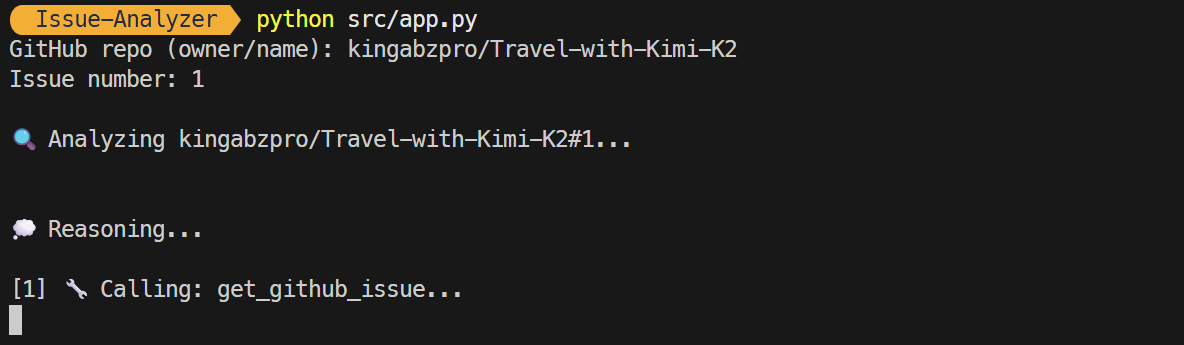
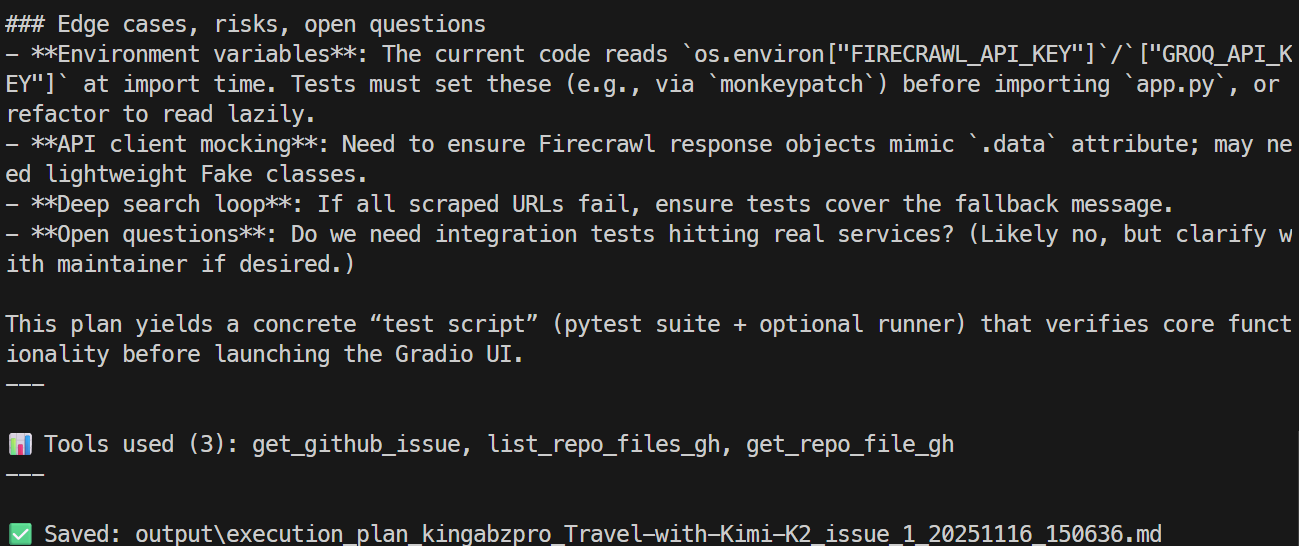
Nel giro di pochi secondi riceverai un riepilogo dell’issue e dei modi per risolverla. Il riepilogo include i dettagli sugli strumenti usati e il percorso del file markdown in cui sono state salvate le informazioni.
Puoi aprire il file markdown per rivedere un piano dettagliato dell’issue.
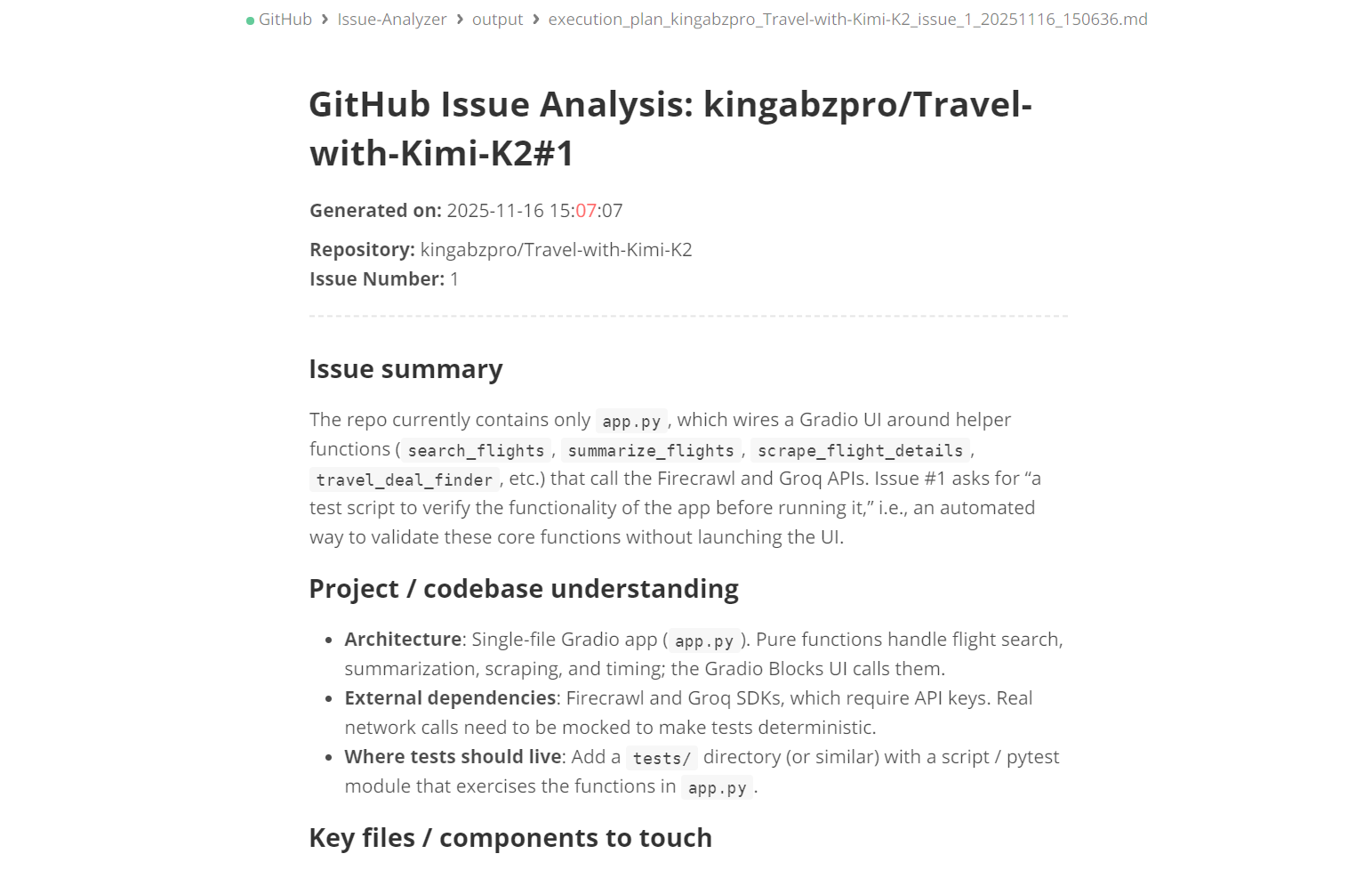
La modalità CLI richiede che il nome del repository e l’argomento issue siano inclusi direttamente nel comando, come mostrato di seguito:
python src/app.py --repo kingabzpro/Travel-with-Kimi-K2 --issue 1L’intero processo è in streaming: vedrai quali strumenti l’agente sta usando e se sta ragionando in modo efficace o meno. Alla fine verrà anche trasmessa la risposta generata.
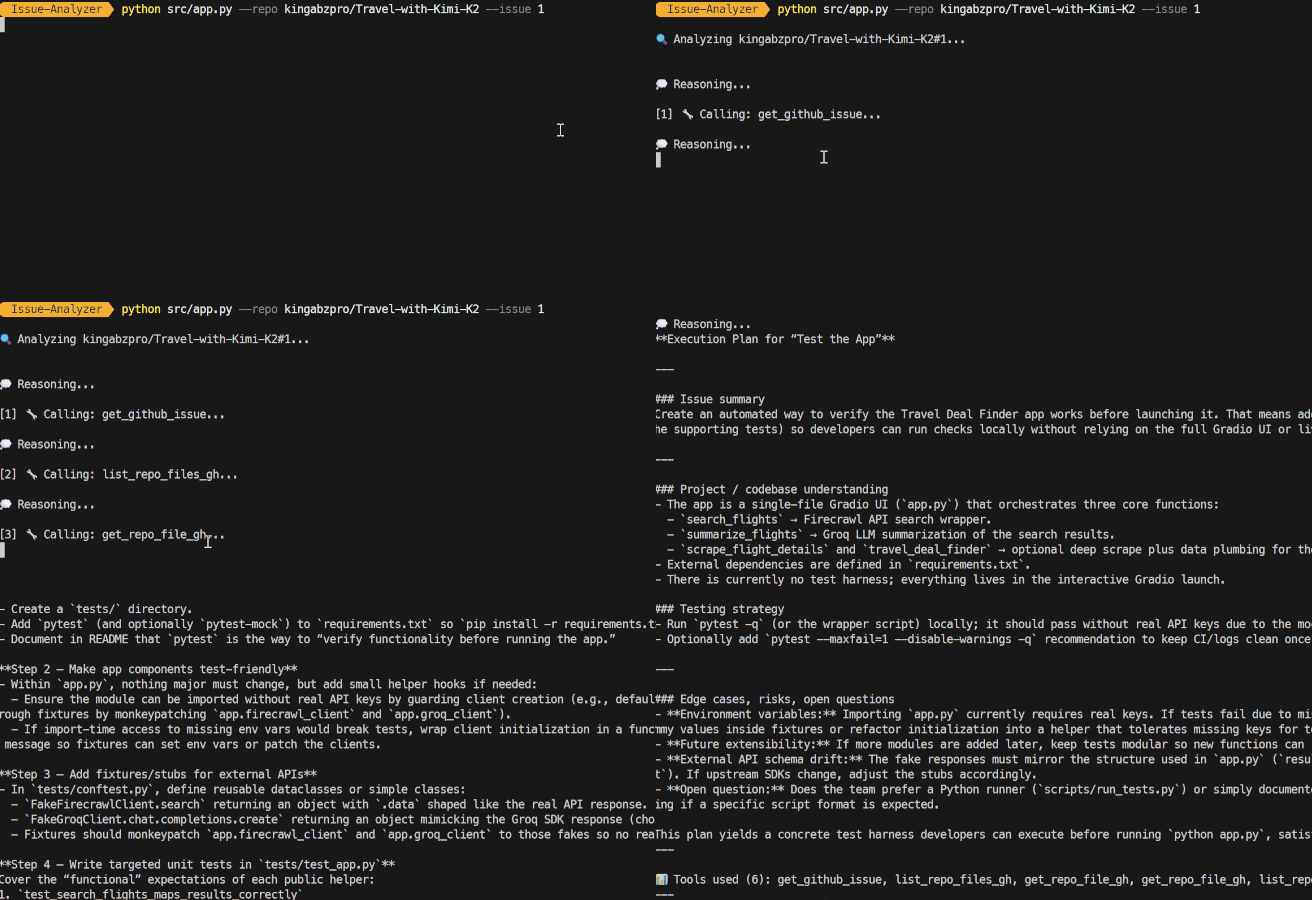
L’attuale versione del GitHub Issue Analyzer è progettata per comprendere le issue e generare piani di esecuzione accurati.
Tuttavia, il vero potenziale di un workflow agentico sta nell’automatizzare tutti i passaggi successivi alla creazione del piano. Ecco alcuni upgrade principali che puoi implementare nel sistema:
L’obiettivo del progetto è trasformare automaticamente un piano in una pull request funzionante. Questo ottimizzerà il processo di sviluppo, consentendo un flusso di lavoro più efficiente.
Questa funzionalità includerà la possibilità di creare un nuovo branch direttamente dall’agente, facilitando l’implementazione delle modifiche. Inoltre, l’agente applicherà modifiche al codice basandosi sul piano generato ed eseguirà workflow GitHub CLI, come gh pr create e gh pr view.
Inoltre, il sistema genererà automaticamente descrizioni delle pull request, changelog e riferimenti alle issue collegate. Applicherà anche etichette in modo intelligente, classificandole come bugfix, miglioramenti o refactoring.
In sintesi, questa iniziativa trasforma l’agente in un sistema completamente autonomo di automazione da Issue a Pull Request, migliorando notevolmente produttività e coerenza nel ciclo di sviluppo.
Questo upgrade migliorerà il processo di analisi introducendo la capacità di gestire le issue GitHub in batch. Invece di concentrarsi su singoli problemi, i team potranno effettuare scansioni in batch su più issue contemporaneamente. Questa nuova funzione permette analisi parallele o in coda di interi backlog, semplificando la gestione di grandi volumi di issue.
Inoltre, questo upgrade faciliterà l’identificazione di issue duplicate o correlate, migliorandone l’organizzazione. Le issue potranno essere classificate in base a criteri come complessità, sottosistema o impatto.
Per snellire ulteriormente le operazioni, i team potranno eseguire strumenti GitHub o Firecrawl in modalità batch, migliorando sensibilmente l’efficienza. In definitiva, questo upgrade offre ai team un unico comando capace di classificare automaticamente decine o addirittura centinaia di issue in una volta sola.
Prima di creare una pull request (PR), è essenziale che l’agente validi a fondo le modifiche proposte, invece di limitarsi a generarle. Questo processo di validazione dovrebbe includere varie funzionalità pianificate, tra cui l’esecuzione di unit test tramite GitHub Actions o runner locali per verificare che il codice si comporti come previsto.
La validazione delle dipendenze è altrettanto cruciale. Si tratta di controllare la correttezza degli import, identificare eventuali moduli mancanti e risolvere incompatibilità di versione che potrebbero incidere sul progetto. Inoltre, linting, formattazione e type checking svolgono un ruolo fondamentale nel mantenere alta la qualità del codice.
È vitale assicurarsi che le modifiche non interrompano le pipeline di build esistenti e rilevare eventuali breaking change alle API o regressioni. Seguendo questi passaggi, possiamo garantire che la PR rimanga pulita, sicura e pronta per la messa in produzione.
Creare agenti avanzati e multi-step con GPT-5.1 Codex e openai-agents è sorprendentemente semplice. In pratica, ti basta definire i tuoi strumenti e dare al modello istruzioni chiare su quando e come usarli.
In questo tutorial ho usato la GitHub CLI perché è veloce, intuitiva e facile da integrare, ma potresti altrettanto facilmente usare il GitHub Python SDK, chiamate API dirette o qualsiasi altra utility CLI o Bash. La flessibilità è il vero punto di forza.
Puoi estendere questa configurazione quanto vuoi.
Per esempio, potresti creare:
L’obiettivo di questo tutorial era mostrare cosa GPT-5.1 Codex può davvero fare: gestisce le chiamate agli strumenti senza sforzo, comprende grandi codebase, esegue ragionamenti strutturati e può far girare lunghe catene di automazione senza input continui dell’utente.
Se vuoi approfondire la creazione di agenti AI, ti consiglio di dare un’occhiata al nostro corso AI Agents with Google ADK, oltre alla nostra lista di progetti di agenti AI da realizzare.
I migliori corsi DataCamp
Corso
Corso
Corso
blog
Abid Ali Awan
10 min
blog
Abid Ali Awan
15 min
blog
Tim Lu
12 min