
Curso
Trabalhar com a API da OpenAI
3 h
174.6K
OpenAI lançou discretamente o GPT-5.1-Codex na plataforma para desenvolvedores, e a comunidade já o chama de melhor modelo de código disponível hoje. Diferente das versões anteriores do Codex, o GPT-5.1-Codex foi projetado para engenharia de software de verdade, raciocínio de longa duração e agentes que usam ferramentas.
Neste tutorial, vamos construir um agente analisador de issues do GitHub completo usando OpenAI Agents e GPT-5.1 Codex.
Nosso agente vai:
Esse agente se comporta como um engenheiro sênior: pesquisa, lê, raciocina e planeja antes de escrever qualquer coisa. Você pode conferir nosso guia sobre o GPT-5.1 para ver o que mais há de novo.
O GPT-5.1 Codex é uma versão especializada do GPT-5.1, feita para tarefas de codificação agentivas e de longa duração, e não apenas autocompletar trechos. Ele é focado em engenharia de software real e fluxos agentivos, o que o torna o motor perfeito por trás do nosso fluxo de automação de Issue para Plano.
Ao contrário dos modelos gerais, o Codex entende bases de código como um engenheiro sênior: lê issues, raciocina sobre a arquitetura, identifica os diretórios corretos e só inspeciona os arquivos que realmente importam. Isso torna o agente mais rápido, inteligente e muito mais econômico.
O Codex é otimizado para tarefas de codificação agentivas e de longa duração. Ele se integra naturalmente com ferramentas de desenvolvedor como o GitHub CLI e a Firecrawl API, permitindo que nosso agente busque issues, explore estruturas de projetos online, leia arquivos específicos e reúna documentação conforme necessário. Segue instruções à risca, produz análises limpas e confiáveis e ajusta o esforço de raciocínio para avançar rápido em tarefas simples e ir mais fundo nas complexas.
Ao combinar forte compreensão de código com raciocínio consciente de ferramentas, o GPT-5.1 Codex dá ao nosso agente a capacidade de transformar uma issue do GitHub em um plano de engenharia preciso e acionável, sem escanear o repositório inteiro ou alucinar código. Ele é a espinha dorsal do fluxo porque traz a intuição, a estrutura e a precisão de engenharia de que o projeto depende.
Antes de mergulhar no projeto, vamos garantir que seu ambiente está pronto. Você vai precisar do Git instalado na sua máquina. Se não tiver certeza, rode git --version para confirmar. Você também vai precisar de uma conta na OpenAI Developer Platform com pelo menos US$ 6 de crédito para que as chamadas à API rodem sem interrupções.
Em seguida, crie uma conta gratuita no Firecrawl e defina suas chaves de API como variáveis de ambiente. É isso que permite seu analisador conversar com a OpenAI e a Firecrawl:
export OPENAI_API_KEY=sk-...
export FIRECRAWL_API_KEY="fc-..."
Com isso pronto, instale os pacotes Python que alimentam o fluxo. O primeiro, openai-agents, é um framework leve que torna surpreendentemente fácil criar pipelines multiagente. O segundo, firecrawl-py, faz o crawling e extrai informações úteis de seus repositórios ou documentações.
pip install openai-agents
pip install firecrawl-py
Por fim, garanta que o GitHub CLI está instalado e configurado. O comando a seguir ajuda você a fazer login na sua conta do GitHub.
gh auth login
Vamos criar uma pasta chamada "src" que conterá todos os arquivos de código. A pasta "agents_pkg" vai reunir todos os arquivos dos agentes, enquanto a pasta "tools" vai conter todos os arquivos de ferramentas.
O aplicativo principal, "app.py", traz uma interface de linha de comando (CLI) que usa os agentes de planejamento para gerar um relatório de issue do GitHub com base nas entradas do usuário.
Veja como deve ficar o diretório do seu projeto:
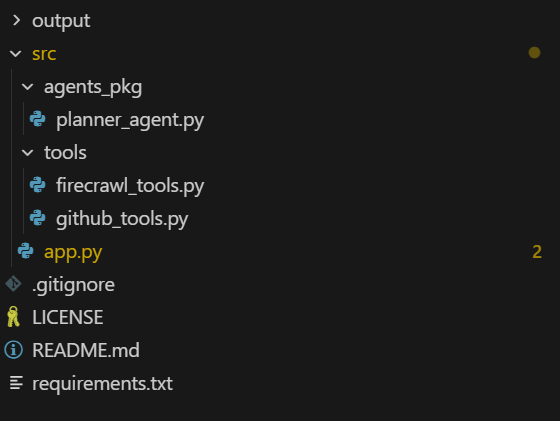
Primeiro, vamos criar um arquivo de ferramentas agentivas que ajudará o agente a acessar o GitHub e a Firecrawl API usando funções simples em Python.
Vamos começar pelas ferramentas. Crie um arquivo chamado firecrawl_tools.py no diretório src/tools e adicione o código a seguir.
1. Criar e retornar um cliente Firecrawl usando a FIRECRAWL_API_KEY do seu ambiente, gerando erro se a chave não existir.
import json
import os

from agents import function_tool
from firecrawl import firecrawl


def _get_firecrawl_client():
    api_key = os.getenv("FIRECRAWL_API_KEY")
    if not api_key:
        raise RuntimeError("FIRECRAWL_API_KEY is not set")
    return firecrawl(api_key=api_key)
2. Usar o Firecrawl para rodar uma busca web focada (por exemplo, docs, posts de blog, erros) e retornar os resultados como JSON para o agente usar como contexto externo.
@function_tool
def firecrawl_search(query: str, limit: int = 3) -> str:
    """
    Run a Firecrawl search for docs related to the issue or tech stack.

    Args:
        query: Search query (usually based on issue title / framework / error message).
        limit: Max number of results to return.

    Returns:
        JSON string of Firecrawl search results.
    """
    client = _get_firecrawl_client()
    results = client.search(query=query, limit=limit)
    return json.dumps(results)
3. Fazer o scrape de uma única URL com o Firecrawl (em formato markdown) e retornar o conteúdo estruturado da página como JSON para pesquisa técnica mais profunda.
@function_tool
def firecrawl_scrape(url: str) -> str:
    """
    Scrape a single URL using Firecrawl for deeper research.

    Args:
        url: URL to scrape (docs, blog, README in another repo, etc.).

    Returns:
        JSON (markdown/structured) content from Firecrawl scrape.
    """
    client = _get_firecrawl_client()
    result = client.scrape(url=url, params={"formats": ["markdown"]})
return json.dumps(result)Depois, vamos criar um arquivo chamado github_tools.py no diretório src/tools e inserir o código a seguir.
1. Buscar uma issue específica do GitHub via GitHub CLI e retornar os detalhes como JSON para o agente ler.
import base64
import json
import subprocess
from typing import List, Optional

from agents import function_tool


@function_tool
def get_github_issue(repo: str, issue_number: int) -> str:
    """
    Fetch a GitHub issue using the GitHub CLI.

    Args:
        repo: Repository in 'owner/name' format.
        issue_number: The issue number to fetch.

    Returns:
        A JSON string containing the issue fields (title, body, labels, URL, etc.),
        or an error payload if the command fails.
    """
    try:
        result = subprocess.run(
            [
                "gh",
                "issue",
                "view",
                str(issue_number),
                "--repo",
                repo,
                "--json",
                "number,title,body,labels,url,author,createdAt,state,assignees",
            ],
            capture_output=True,
            text=True,
            check=True,
        )
        return result.stdout
    except subprocess.CalledProcessError as e:
        return json.dumps(
            {
                "error": "Failed to fetch issue via GitHub CLI",
                "stderr": e.stderr,
                "repo": repo,
                "issue_number": issue_number,
            }
        )
2. Listar apenas os arquivos relevantes em um repositório remoto do GitHub (opcionalmente filtrando por caminho e extensão) para o agente não varrer o projeto inteiro.
@function_tool
def list_repo_files_gh(
    repo: str,
    max_files: int = 80,
    extensions: Optional[List[str]] = None,
    path_prefixes: Optional[List[str]] = None,
) -> str:
    """
    List *relevant* files in the remote repo using GitHub CLI.

    Uses:
        gh api repos/{repo}/git/trees/HEAD?recursive=1

    The agent is expected to reason first which areas of the codebase are likely relevant
    (e.g. 'src/', 'app/', 'backend/api/', 'cli/'), and then call this tool with a small
    set of path_prefixes instead of scanning the entire project.

    Args:
        repo: Repository in 'owner/name' format (e.g. openai/openai-agents-python).
        max_files: Max number of files to return.
        extensions: Optional list of file extensions to keep (e.g. [".py", ".ts"]).
        path_prefixes: Optional list of path prefixes to include (e.g. ["src/", "app/api/"]).

    Returns:
        JSON string with file paths and filters applied.
    """
    try:
        result = subprocess.run(
            [
                "gh",
                "api",
                f"repos/{repo}/git/trees/HEAD?recursive=1",
            ],
            capture_output=True,
            text=True,
            check=True,
        )
    except subprocess.CalledProcessError as e:
        return json.dumps(
            {
                "error": "Failed to list repo files via GitHub CLI",
                "stderr": e.stderr,
                "repo": repo,
            }
        )

    try:
        data = json.loads(result.stdout)
    except json.JSONDecodeError:
        return json.dumps(
            {
                "error": "Failed to parse JSON from gh api",
                "raw": result.stdout[:2000],
                "repo": repo,
            }
        )

    tree = data.get("tree", [])

    if extensions is not None and not isinstance(extensions, list):
        extensions = [str(extensions)]
    exts = [e.lower() for e in (extensions or [])]

    if path_prefixes is not None and not isinstance(path_prefixes, list):
        path_prefixes = [str(path_prefixes)]
    prefixes = [p.strip() for p in (path_prefixes or []) if p.strip()]

    paths: List[str] = []
    for entry in tree:
        if entry.get("type") != "blob":
            continue  # only files
        path = entry.get("path", "")
        if not path:
            continue

        # If prefixes are provided, only keep files under those subtrees
        if prefixes and not any(path.startswith(pref) for pref in prefixes):
            continue

        if exts:
            suffix = "." + path.split(".")[-1].lower() if "." in path else ""
            if suffix not in exts:
                continue

        paths.append(path)
        if len(paths) >= max_files:
            break

    return json.dumps(
        {
            "repo": repo,
            "count": len(paths),
            "files": paths,
            "filtered_by_extensions": bool(exts),
            "filtered_by_prefixes": bool(prefixes),
        }
    )
3. Baixar e decodificar o conteúdo de um único arquivo do repositório usando o GitHub CLI, retornando o texto (truncado se necessário) como JSON.
@function_tool
def get_repo_file_gh(
    repo: str,
    path: str,
    ref: str = "",
    max_chars: int = 8000,
) -> str:
    """
    Read a file's contents from the remote repo using GitHub CLI.

    Uses:
        gh api repos/{repo}/contents/{path} [ -F ref=<branch> ]

    Args:
        repo: Repository in 'owner/name' format.
        path: File path in the repo (e.g. 'src/main.py').
        ref: Optional branch / commit / tag ref (default: repo's default branch).
        max_chars: Max characters of decoded content to return.

    Returns:
        JSON with file metadata and decoded content (truncated if needed),
        or an error payload if anything fails.
    """
    cmd = ["gh", "api", f"repos/{repo}/contents/{path}"]
    # Only add ref when explicitly set (GitHub default branch otherwise)
    if ref:
        cmd += ["-F", f"ref={ref}"]

    try:
        result = subprocess.run(
            cmd,
            capture_output=True,
            text=True,
            check=True,
        )
    except subprocess.CalledProcessError as e:
        return json.dumps(
            {
                "error": "Failed to fetch file via GitHub CLI",
                "stderr": e.stderr,
                "repo": repo,
                "path": path,
                "ref": ref or "DEFAULT_BRANCH",
            }
        )

    try:
        data = json.loads(result.stdout)
    except json.JSONDecodeError:
        return json.dumps(
            {
                "error": "Failed to parse JSON from gh api (contents)",
                "raw": result.stdout[:2000],
                "repo": repo,
                "path": path,
            }
        )

    if data.get("type") != "file":
        return json.dumps(
            {
                "error": "Path is not a file",
                "repo": repo,
                "path": path,
                "data_type": data.get("type"),
            }
        )

    encoding = data.get("encoding")
    content_b64 = data.get("content", "")

    if encoding != "base64":
        return json.dumps(
            {
                "error": "Unexpected encoding",
                "repo": repo,
                "path": path,
                "encoding": encoding,
            }
        )

    try:
        # GitHub often includes newlines in base64 payload
        raw_bytes = base64.b64decode(content_b64)
        text = raw_bytes.decode("utf-8", errors="replace")
    except Exception as e:  # noqa: BLE001
        return json.dumps(
            {
                "error": f"Failed to decode file content: {e}",
                "repo": repo,
                "path": path,
                "encoding": encoding,
            }
        )

    truncated = text[:max_chars]
    return json.dumps(
        {
            "repo": repo,
            "path": path,
            "ref": ref or "DEFAULT_BRANCH",
            "truncated": len(text) > max_chars,
            "content": truncated,
        }
)Aqui, definimos um agente Issue Planner que sabe como:
Conectamos as ferramentas do GitHub e do Firecrawl, damos instruções detalhadas ao agente sobre como trabalhar de forma econômica e dizemos para rodar no modelo gpt-5.1-codex.
Crie o arquivo planner_agent.py no diretório src/agents_pkg e adicione o seguinte código:
from agents import Agent

from tools.github_tools import (
    get_github_issue,
    list_repo_files_gh,
    get_repo_file_gh,
)
from tools.firecrawl_tools import (
    firecrawl_search,
    firecrawl_scrape,
)


def build_planner_agent() -> Agent:
    """
    Issue Planner agent that:
    - Reads the GitHub issue
    - Reasons about which parts of the repo are relevant
    - Uses GitHub CLI to inspect a *small* set of files online
    - Uses Firecrawl for external research
    - Outputs a concrete, step-by-step execution plan
    """
    return Agent(
        name="Issue Planner",
        instructions=(
            "You are a senior software engineer.\n"
            "Goal: Given a GitHub issue and the online repo (structure + files), plus optional "
            "external research, produce a clear, step-by-step execution plan to resolve the issue.\n\n"
            "CONTEXT:\n"
            "- All repository interaction must be done *online* via GitHub CLI tools.\n"
            "- You have tools to: read the issue, list files under certain paths, read specific files, "
            "  and call Firecrawl search/scrape for docs.\n\n"
            "IMPORTANT STRATEGY (BE SMART):\n"
            "- Be selective and cost-aware. Do NOT scan the whole project.\n"
            "- First, deeply read the issue and infer which part of the system it affects:\n"
            "  routing layer, CLI, API handlers, DB layer, tests, etc.\n"
            "- Based on this reasoning, decide a small list of path prefixes and file types.\n\n"
            "RECOMMENDED WORKFLOW:\n"
            "1. Call get_github_issue(repo, issue_number) to fully understand the problem.\n"
            "2. From the issue, infer a small list of path prefixes where relevant code likely lives,\n"
            "   e.g. ['src/', 'app/', 'backend/api/', 'cli/'] depending on the project style.\n"
            "3. Call list_repo_files_gh with:\n"
            "   - extensions like ['.py', '.ts', '.js', '.tsx', '.jsx']\n"
            "   - path_prefixes set to that small, targeted list\n"
            "   This keeps the search focused instead of scanning the entire project.\n"
            "4. From the returned file list, pick at most ~5-15 key files that are most likely related\n"
            "   (entrypoints, routers, handlers, services, tests).\n"
            "5. Call get_repo_file_gh(repo, path=...) only on those selected files to inspect the "
            "   actual implementation.\n"
            "6. If you need framework or library context (FastAPI, Click, React, etc.), use\n"
            "   firecrawl_search and firecrawl_scrape to pull official docs or good examples.\n\n"
            "OUTPUT FORMAT (execution plan):\n"
            "After you have enough context from the issue + targeted code inspection (+ optional research), "
            "output a concise but concrete plan with sections:\n"
            "   - Issue summary\n"
            "   - Project/codebase understanding (where this issue lives in the architecture)\n"
            "   - Key files / components to touch (with file paths)\n"
            "   - Step-by-step implementation plan (Step 1, Step 2, ...)\n"
            "   - Testing strategy (unit / integration / manual)\n"
            "   - Edge cases, risks, and any open questions\n\n"
            "The plan must be actionable for a mid-level developer. Avoid generic advice; tie your steps "
            "to the actual files and modules you inspected.\n"
        ),
        tools=[
            get_github_issue,
            list_repo_files_gh,
            get_repo_file_gh,
            firecrawl_search,
            firecrawl_scrape,
        ],
        model="gpt-5.1-codex",
)Este é o arquivo Python principal que fornece uma interface de linha de comando (CLI) e integra toda a lógica, callbacks e tratamento de erros em um único arquivo completo. Ele usa, de forma eficiente, as ferramentas e agentes definidos nos outros arquivos.
1. Primeiro, configuramos e importamos tudo o que a CLI precisa. Incluímos bibliotecas padrão, garantimos saída Unicode adequada no Windows para que emojis e símbolos sejam impressos corretamente e importamos o runner do OpenAI junto com nosso agente planner.
2. Em seguida, definimos as opções de linha de comando, permitindo passar um repositório do GitHub e o número da issue ao executar a ferramenta.
src/app.py:
import argparse
import asyncio
import json
import os
import pathlib
import sys
from datetime import datetime

# Set UTF-8 encoding for stdout to handle Unicode characters
if sys.platform == "win32":
    import codecs
    sys.stdout = codecs.getwriter("utf-8")(sys.stdout.detach())
    sys.stderr = codecs.getwriter("utf-8")(sys.stderr.detach())

from agents import Runner, ItemHelpers
from openai.types.responses import ResponseTextDeltaEvent

from agents_pkg.planner_agent import build_planner_agent


def parse_args() -> argparse.Namespace:
    parser = argparse.ArgumentParser(
        description=(
            "Issue Planner: GPT-5.1-Codex + OpenAI Agents + GitHub CLI + Firecrawl\n"        )
    )
    parser.add_argument(
        "--repo",
        help="GitHub repo in 'owner/name' format (e.g. openai/openai-agents-python).",
    )
    parser.add_argument(
        "--issue",
        type=int,
        help="Issue number to plan for.",
    )
    return parser.parse_args()
3. Depois, coletamos as entradas e preparamos o contexto. Lemos o repo e a issue dos argumentos, garantimos que a chave da OpenAI esteja definida, construímos um prompt claro que orienta o agente a analisar a issue passo a passo e criamos um arquivo markdown com timestamp onde o plano final será salvo.
def get_user_input(args: argparse.Namespace) -> tuple[str, int]:
    """Get repository and issue number from arguments or user input."""
    repo = args.repo or input("GitHub repo (owner/name): ").strip()
    issue_number = args.issue or int(input("Issue number: ").strip())
    return repo, issue_number


def validate_environment() -> None:
    """Validate that required environment variables are set."""
    if not os.getenv("OPENAI_API_KEY"):
        raise RuntimeError("OPENAI_API_KEY is not set")


def build_user_prompt(repo: str, issue_number: int) -> str:
    """Build the user prompt for the agent."""
    return (
        f"You are helping me plan how to implement GitHub issue #{issue_number} "
        f"in repo '{repo}'.\n\n"
        "Be selective and cost-aware:\n"
        "1. Use get_github_issue(repo, issue_number) to understand the problem.\n"
        "2. Based on the issue text, first reason about which directories and components "
        "   are likely relevant.\n"
        "3. Call list_repo_files_gh(repo, extensions=['.py', '.ts', '.js', '.tsx', '.jsx'], "
        "   path_prefixes=[<your inferred prefixes>]) to only explore those areas.\n"
        "4. From those results, choose a small set of the most relevant files and call "
        "   get_repo_file_gh(repo, path=...) on them.\n"
        "5. Optionally, use firecrawl_search and firecrawl_scrape if you need external docs.\n"
        "6. Finally, generate the execution plan in the structured format from your instructions."
    )


def setup_output_file(repo: str, issue_number: int) -> pathlib.Path:
    """Create output directory and return the markdown file path."""
    output_dir = pathlib.Path("output")
    output_dir.mkdir(exist_ok=True)
    timestamp = datetime.now().strftime("%Y%m%d_%H%M%S")
    markdown_file = output_dir / f"execution_plan_{repo.replace('/', '_')}_issue_{issue_number}_{timestamp}.md"
    return markdown_file
4. Agora, tornamos o raciocínio do agente visível. Tentamos extrair um trecho limpo de raciocínio de cada evento e imprimimos uma linha curta “💭 Raciocinando…” para que, em vez de internals brutos, você veja uma dica legível do que o modelo está processando em segundo plano.
def extract_reasoning_text(event_item) -> str | None:
    """Extract reasoning text from a reasoning event item."""
    reasoning_text = None

    if hasattr(event_item, 'raw_item'):
        raw = event_item.raw_item
        # Try multiple attribute names
        for attr_name in ['content', 'text', 'reasoning', 'message', 'delta']:
            if hasattr(raw, attr_name):
                val = getattr(raw, attr_name)
                if val and str(val).strip() and str(val) != 'None':
                    reasoning_text = str(val)
                    break

        # If still not found, try to access as dict-like
        if not reasoning_text:
            try:
                if hasattr(raw, '__dict__'):
                    for key, val in raw.__dict__.items():
                        if val and str(val).strip() and str(val) != 'None' and key in ['content', 'text', 'reasoning', 'message', 'delta']:
                            reasoning_text = str(val)
                            break
            except:
                pass

    # Also try direct attributes on event.item
    if not reasoning_text:
        for attr_name in ['content', 'text', 'reasoning', 'message']:
            if hasattr(event_item, attr_name):
                val = getattr(event_item, attr_name)
                if val and str(val).strip() and str(val) != 'None':
                    reasoning_text = str(val)
                    break

    return reasoning_text


def handle_reasoning_event(event_item) -> None:
    """Handle and display reasoning events."""
    reasoning_text = extract_reasoning_text(event_item)

    if reasoning_text and reasoning_text.strip():
        # Show first line or first 100 chars
        first_line = reasoning_text.split('\n')[0].strip()[:100]
        if len(reasoning_text.split('\n')[0].strip()) > 100:
            first_line += "..."
        print(f"\n💭 Reasoning: {first_line}", flush=True)
    else:
        # Don't show "None" - just show that reasoning is happening
        print(f"\n💭 Reasoning...", flush=True)
5. Em seguida, tratamos chamadas de ferramentas e o tracking. Detectamos qual ferramenta o agente está usando, formatamos os argumentos (como repo, path ou query) em uma string compacta, imprimimos uma mensagem “🔧 Chamando…” e mantemos um mapa interno de ferramentas ativas para marcá-las como concluídas e, depois, resumir tudo o que rodou.
def extract_tool_info(event_item) -> tuple[str | None, str | None]:
    """Extract tool name and ID from a tool call event item."""
    tool_name = None
    tool_id = None

    # First try raw_item which contains the actual tool call data
    if hasattr(event_item, 'raw_item'):
        raw = event_item.raw_item
        # Try accessing tool_call through various paths
        tool_call = None
        if hasattr(raw, 'tool_call'):
            tool_call = raw.tool_call
        elif hasattr(raw, 'function_call'):
            tool_call = raw.function_call

        if tool_call:
            # Try to get name from tool_call
            if hasattr(tool_call, 'name'):
                tool_name = tool_call.name
            elif hasattr(tool_call, 'function') and hasattr(tool_call.function, 'name'):
                tool_name = tool_call.function.name
            # Try to get ID
            if hasattr(tool_call, 'id'):
                tool_id = tool_call.id
            elif hasattr(tool_call, 'tool_call_id'):
                tool_id = tool_call.tool_call_id

        # Fallback: try direct attributes on raw
        if not tool_name:
            if hasattr(raw, 'name'):
                tool_name = getattr(raw, 'name')
            elif hasattr(raw, 'function') and hasattr(raw.function, 'name'):
                tool_name = raw.function.name
            # Try using getattr with different possible attribute names
            for attr_name in ['tool_name', 'function_name', 'name']:
                if hasattr(raw, attr_name):
                    tool_name = getattr(raw, attr_name, None)
                    if tool_name:
                        break

    # Fallback to direct attributes
    if not tool_name and hasattr(event_item, 'tool_call'):
        tool_call = event_item.tool_call
        if hasattr(tool_call, 'name'):
            tool_name = tool_call.name
        if hasattr(tool_call, 'id'):
            tool_id = tool_call.id
        elif hasattr(tool_call, 'function') and hasattr(tool_call.function, 'name'):
            tool_name = tool_call.function.name
    if not tool_name and hasattr(event_item, 'name'):
        tool_name = event_item.name
    if not tool_name and hasattr(event_item, 'function'):
        func = event_item.function
        if hasattr(func, 'name'):
            tool_name = func.name

    return tool_name, tool_id


def format_tool_arguments(tool_call_obj) -> str:
    """Format tool arguments for display."""
    if not tool_call_obj or not hasattr(tool_call_obj, 'arguments'):
        return ""

    try:
        args_dict = json.loads(tool_call_obj.arguments) if isinstance(tool_call_obj.arguments, str) else tool_call_obj.arguments
        if 'repo' in args_dict:
            tool_args = f" → {args_dict['repo']}"
            if 'issue_number' in args_dict:
                tool_args += f"#{args_dict['issue_number']}"
            return tool_args
        elif 'path' in args_dict:
            return f" → {args_dict['path']}"
        elif 'query' in args_dict:
            q = str(args_dict['query'])
            return f" → {q[:40]}..." if len(q) > 40 else f" → {q}"
        elif 'url' in args_dict:
            return f" → {args_dict['url']}"
        elif 'extensions' in args_dict or 'path_prefixes' in args_dict:
            parts = []
            if 'extensions' in args_dict:
                parts.append(f"ext={args_dict['extensions']}")
            if 'path_prefixes' in args_dict:
                parts.append(f"paths={args_dict['path_prefixes']}")
            return f" → {', '.join(parts)}"
    except:
        pass

    return ""


def handle_tool_call_event(event_item, active_tools: dict, tool_counter: int) -> tuple[int, bool]:
    """Handle tool call events and return updated tool_counter and whether event was handled."""
    tool_name, tool_id = extract_tool_info(event_item)

    if tool_name:
        tool_counter += 1
        tool_id = tool_id or f"tool_{tool_counter}"
        active_tools[tool_id] = tool_name

        # Get tool arguments if available
        tool_call_obj = None
        if hasattr(event_item, 'raw_item') and hasattr(event_item.raw_item, 'tool_call'):
            tool_call_obj = event_item.raw_item.tool_call
        elif hasattr(event_item, 'tool_call'):
            tool_call_obj = event_item.tool_call

        tool_args = format_tool_arguments(tool_call_obj)
        print(f"\n[{tool_counter}] 🔧 Calling: {tool_name}{tool_args}...", flush=True)
        return tool_counter, True
    else:
        # Still couldn't extract - try to inspect raw_item structure
        if hasattr(event_item, 'raw_item'):
            raw = event_item.raw_item
            try:
                raw_attrs = [attr for attr in dir(raw) if not attr.startswith('_')]
                # Look for attributes that might contain the tool name
                for attr in raw_attrs:
                    try:
                        val = getattr(raw, attr)
                        if isinstance(val, str) and ('get_github' in val.lower() or 'list_repo' in val.lower() or 'firecrawl' in val.lower()):
                            tool_name = val
                            break
                        # Check if it's a dict-like object with name
                        if hasattr(val, 'name'):
                            tool_name = val.name
                            break
                    except:
                        continue

                if tool_name:
                    tool_counter += 1
                    tool_id = tool_id or f"tool_{tool_counter}"
                    active_tools[tool_id] = tool_name
                    print(f"\n[{tool_counter}] 🔧 Calling: {tool_name}...", flush=True)
                    return tool_counter, True
                else:
                    # Print raw_item structure for debugging
                    print(f"\n[DEBUG] raw_item attrs: {raw_attrs[:10]}", flush=True)
            except Exception as e:
                print(f"\n[DEBUG] Error inspecting raw_item: {e}", flush=True)

    return tool_counter, False


def handle_tool_output_event(event_item, active_tools: dict, completed_tools: list) -> None:
    """Handle tool output events and track completed tools."""
    tool_id = None

    # Try raw_item first
    if hasattr(event_item, 'raw_item') and hasattr(event_item.raw_item, 'tool_call_id'):
        tool_id = event_item.raw_item.tool_call_id
    elif hasattr(event_item, 'tool_call_id'):
        tool_id = event_item.tool_call_id
    elif hasattr(event_item, 'raw_item') and hasattr(event_item.raw_item, 'tool_call'):
        if hasattr(event_item.raw_item.tool_call, 'id'):
            tool_id = event_item.raw_item.tool_call.id
    elif hasattr(event_item, 'tool_call'):
        if hasattr(event_item.tool_call, 'id'):
            tool_id = event_item.tool_call.id
        elif hasattr(event_item.tool_call, 'function') and hasattr(event_item.tool_call.function, 'name'):
            # Try to match by name if ID not available
            tool_name_match = event_item.tool_call.function.name
            for tid, tname in active_tools.items():
                if tname == tool_name_match:
                    tool_id = tid
                    break

    if tool_id and tool_id in active_tools:
        tool_name = active_tools.pop(tool_id)
        completed_tools.append(tool_name)
    elif active_tools:
        # Fallback: use the first active tool
        tool_id, tool_name = next(iter(active_tools.items()))
        active_tools.pop(tool_id)
        completed_tools.append(tool_name)
6. Agora, conectamos o loop de streaming e a persistência. Processamos eventos de streaming do agente, imprimimos tokens conforme chegam, mostramos raciocínio e chamadas de ferramentas em tempo real, fazemos fallback graciosamente para uma execução sem streaming se algo der errado e, por fim, escrevemos o plano de execução completo em um arquivo markdown com metadados úteis.
async def process_streaming_events(result, repo: str, issue_number: int) -> str:
    """Process streaming events from the agent execution."""
    final_output = ""
    active_tools = {}  # Track active tool calls by ID
    tool_counter = 0
    completed_tools = []
    first_event_received = False

    # Stream the events as they come in
    async for event in result.stream_events():
        # Handle raw response events (token-by-token streaming) - print immediately
        if event.type == "raw_response_event" and isinstance(event.data, ResponseTextDeltaEvent):
            if not first_event_received:
                first_event_received = True
            delta = event.data.delta
            print(delta, end="", flush=True)
            final_output += delta
        # Handle run item events (higher level updates)
        elif event.type == "run_item_stream_event":
            item_type = getattr(event.item, 'type', 'unknown')

            # Show reasoning events
            if item_type == "reasoning_item":
                handle_reasoning_event(event.item)
            elif item_type == "tool_call_item":
                tool_counter, handled = handle_tool_call_event(event.item, active_tools, tool_counter)
                if handled:
                    first_event_received = True
            elif item_type == "tool_call_output_item":
                handle_tool_output_event(event.item, active_tools, completed_tools)
            elif item_type == "message_output_item":
                message_text = ItemHelpers.text_message_output(event.item)
                if message_text and (not final_output or message_text not in final_output):
                    print(f"\n{message_text}", flush=True)
                    final_output += message_text

    print()  # Add newline after streaming

    # Show summary of tools used
    if completed_tools:
        print(f"---\n\n📊 Tools used ({len(completed_tools)}): {', '.join(completed_tools)}", flush=True)

    # If no streaming events occurred, fall back to final output
    if not final_output:
        final_output = result.final_output
        if final_output:
            print(final_output, flush=True)

    return final_output

async def run_agent_with_streaming(agent, user_prompt: str, repo: str, issue_number: int) -> str:
    """Run the agent with streaming support and fallback handling."""
    try:
        # Run agent with streaming (run_streamed is synchronous, returns immediately)
        result = Runner.run_streamed(
            agent,
            input=user_prompt,
            context={"repo": repo, "issue_number": issue_number},
        )

        return await process_streaming_events(result, repo, issue_number)

    except Exception as e:
        print(f"⚠️  Error: {e}", flush=True)
        # Fallback to standard async run
        result = await Runner.run(
            agent,
            input=user_prompt,
            context={"repo": repo, "issue_number": issue_number},
        )
        print(result.final_output, flush=True)
        return result.final_output

def save_output_to_file(markdown_file: pathlib.Path, repo: str, issue_number: int, final_output: str) -> None:
    """Save the final output to a markdown file."""
    with open(markdown_file, 'w', encoding='utf-8') as f:
        f.write(f"# GitHub Issue Analysis: {repo}#{issue_number}\n\n")
        f.write(f"**Generated on:** {datetime.now().strftime('%Y-%m-%d %H:%M:%S')}\n\n")
        f.write(f"**Repository:** {repo}\n")
        f.write(f"**Issue Number:** {issue_number}\n\n")
        f.write("---\n\n")
        f.write(final_output)

    print(f"---\n\n✅ Saved: {markdown_file}", flush=True)
7. Por fim, juntamos tudo no ponto de entrada principal. Fazemos o parse dos argumentos, pegamos o repo e a issue, validamos o ambiente, construímos o agente e seu prompt, rodamos o planner com streaming (fazendo fallback para uma execução síncrona se necessário) e salvamos o resultado.
async def main() -> None:
    """Main entry point for the application."""
    args = parse_args()
    repo, issue_number = get_user_input(args)
    validate_environment()

    agent = build_planner_agent()
    user_prompt = build_user_prompt(repo, issue_number)
    markdown_file = setup_output_file(repo, issue_number)

    print(f"\n🔍 Analyzing {repo}#{issue_number}...\n")

    # Run the agent with streaming support
    try:
        final_output = await run_agent_with_streaming(agent, user_prompt, repo, issue_number)
    except Exception as e:
        print(f"⚠️  Error: {e}", flush=True)
        # Final fallback to standard sync run
        result = Runner.run_sync(
            agent,
            input=user_prompt,
            context={"repo": repo, "issue_number": issue_number},
        )
        print(result.final_output, flush=True)
        final_output = result.final_output

    # Save output to file
    save_output_to_file(markdown_file, repo, issue_number, final_output)


if __name__ == "__main__":
    asyncio.run(main())
Observação: o código-fonte, a configuração e a documentação estão disponíveis no repositório do GitHub: kingabzpro/Issue-Analyzer. Revise e use como guia ao reproduzir os resultados.
Há duas formas de usar nosso app de CLI: modo interativo, em que o app solicita um a um o nome do repositório e o número da issue, e modo CLI, em que você informa tudo já ao iniciar o app.
Para iniciar o modo interativo, digite o seguinte comando:
python src/app.pyAssim que iniciar, você será solicitado a informar o nome do repositório e o número da issue, e o app começará a usar ferramentas e raciocínio para ajudar você.
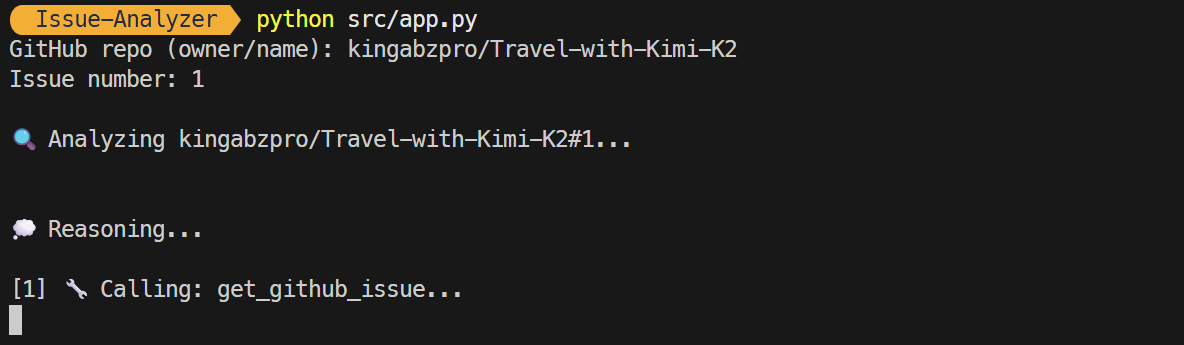
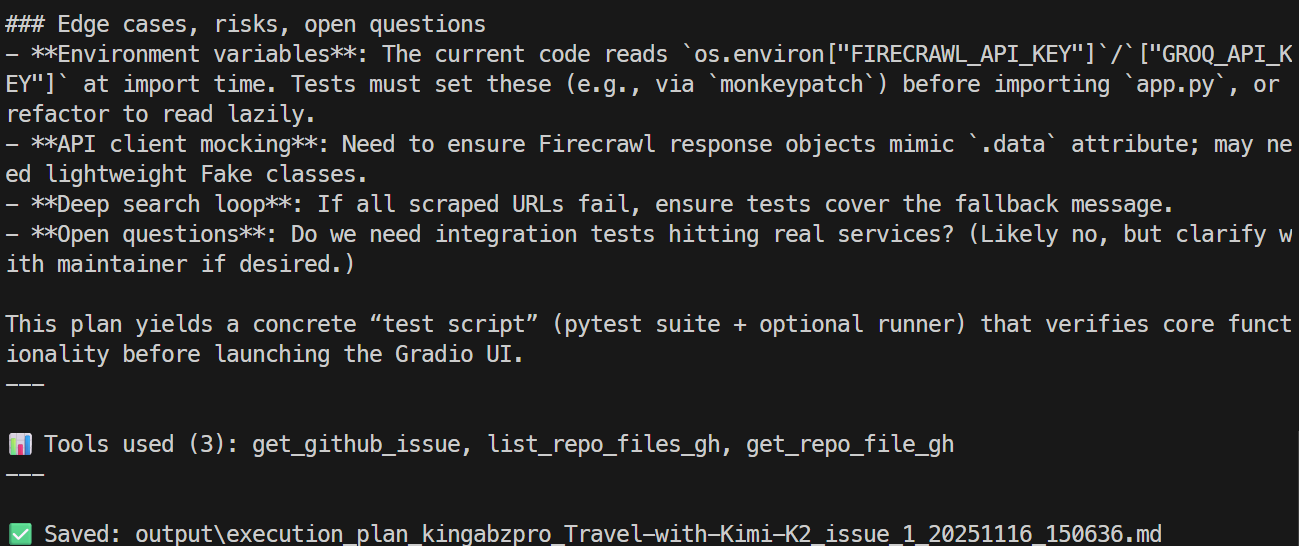
Em poucos segundos, você recebe um resumo da issue e caminhos para resolvê-la. Esse resumo inclui detalhes sobre as ferramentas usadas e o local do arquivo markdown onde a informação foi salva.
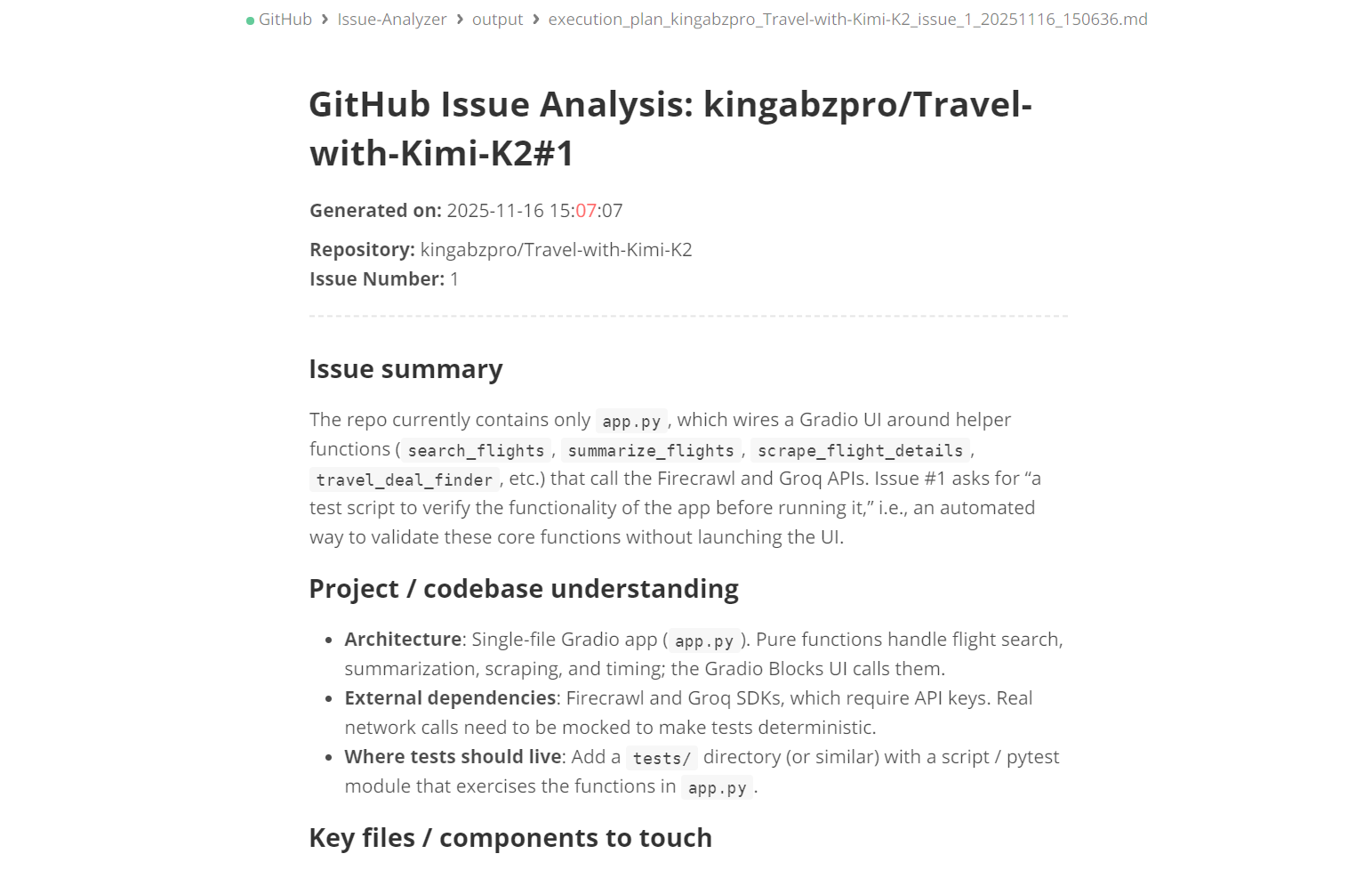
Você pode abrir o arquivo markdown para revisar um plano detalhado da issue.
O modo CLI exige que o nome do repositório e o argumento da issue sejam incluídos diretamente no comando, como abaixo:
python src/app.py --repo kingabzpro/Travel-with-Kimi-K2 --issue 1Todo o processo é transmitido em streaming, ou seja, você vê quais ferramentas o agente está usando e se está raciocinando de forma eficaz. A resposta final também é transmitida.
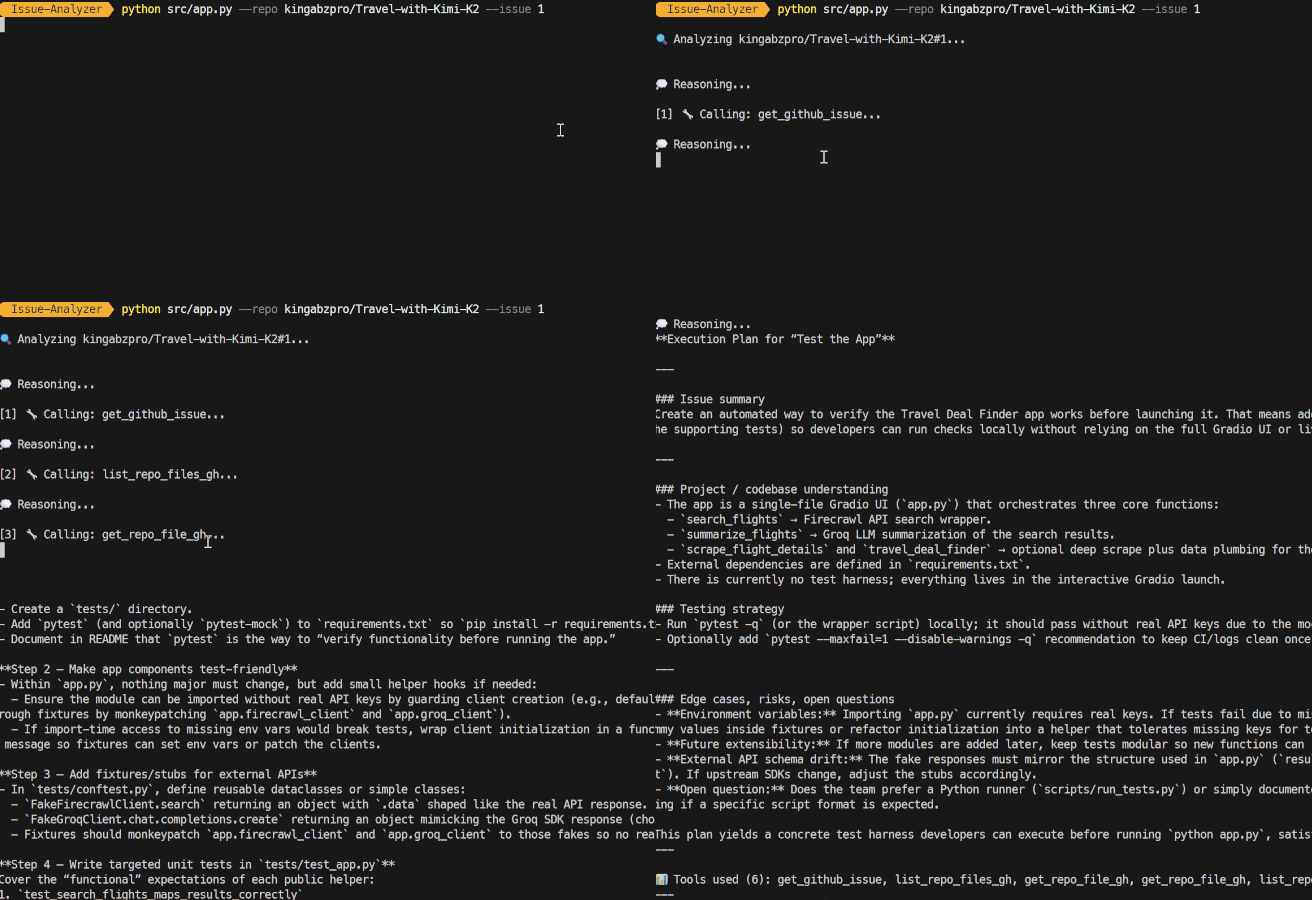
A versão atual do GitHub Issue Analyzer foi projetada para entender issues e gerar planos de execução precisos.
No entanto, o verdadeiro potencial de um fluxo agentivo está em automatizar todas as etapas após a criação do plano. Aqui estão algumas melhorias importantes que você pode implementar no sistema:
O objetivo do projeto é transformar um plano em um pull request funcional automaticamente. Isso vai agilizar o desenvolvimento, permitindo um fluxo mais eficiente.
Esse recurso incluirá a capacidade de criar uma nova branch diretamente pelo agente, facilitando a implementação das mudanças. Além disso, o agente aplicará modificações de código com base no plano gerado e executará fluxos do GitHub CLI, como gh pr create e gh pr view.
Além disso, o sistema vai gerar automaticamente descrições de pull request, changelogs e referências à issue vinculada. Ele também aplicará labels de forma inteligente, categorizando como correções de bug, melhorias ou refatorações.
No geral, essa iniciativa transforma o agente em um sistema autônomo de automação de Issue para Pull Request, elevando bastante a produtividade e a consistência no ciclo de desenvolvimento.
Essa melhoria vai aprimorar a análise de issues ao introduzir capacidades de processamento em lote. Em vez de focar em problemas individuais, as equipes poderão realizar varreduras em várias issues simultaneamente. Isso permite análise paralela ou em fila de backlogs inteiros, facilitando lidar com grandes volumes com eficiência.
Além disso, ficará mais fácil identificar issues duplicadas ou relacionadas, possibilitando melhor organização. As issues podem ser classificadas por critérios como complexidade, subsistema ou impacto.
Para otimizar ainda mais, as equipes poderão rodar ferramentas do GitHub ou Firecrawl em modo batch, melhorando significativamente a eficiência. No fim, essa melhoria oferece um único comando capaz de triagem automática de dezenas ou até centenas de issues de uma vez.
Antes de criar um pull request (PR), é essencial que o agente valide minuciosamente as mudanças propostas, e não apenas as gere. Essa validação deve incluir recursos como rodar testes unitários via GitHub Actions ou runners locais para garantir que o código se comporte como esperado.
A validação de dependências também é crítica: checar imports, identificar módulos ausentes e resolver incompatibilidades de versão que possam afetar o projeto. Além disso, lint, formatação e checagem de tipos são fundamentais para manter a qualidade do código.
É vital garantir que as modificações não quebrem os pipelines de build existentes e detectar mudanças breaking em APIs ou regressões. Seguindo esses passos, asseguramos que o PR fique limpo, seguro e pronto para produção.
Criar agentes avançados e multi-etapas com o GPT-5.1 Codex e o openai-agents é surpreendentemente simples. Basicamente, você define suas próprias ferramentas e dá instruções claras ao modelo sobre quando e como usá-las.
Neste tutorial, usei o GitHub CLI porque é rápido, intuitivo e fácil de integrar, mas você poderia usar o GitHub Python SDK, chamadas diretas à API ou qualquer outro utilitário de CLI ou Bash com a mesma facilidade. A flexibilidade é o verdadeiro poder aqui.
Você pode estender essa configuração o quanto quiser.
Por exemplo, você pode criar:
O objetivo deste tutorial foi mostrar do que o GPT-5.1 Codex é realmente capaz: ele lida com tool-calling sem esforço, entende grandes bases de código, realiza raciocínio estruturado e consegue executar cadeias longas de automação sem exigir input constante do usuário.
Se você quer aprender mais sobre como criar agentes de IA, recomendo conferir nosso curso AI Agents with Google ADK e também nossa lista de projetos de agentes de IA para construir.
Principais cursos da DataCamp
Curso
Curso
Curso
blog
Abid Ali Awan
9 min
blog
Josep Ferrer
8 min
Tutorial
Moez Ali
11 min
Tutorial
Arunn Thevapalan
12 min
Tutorial
Matt Crabtree
6 min
Tutorial
Zoumana Keita
14 min