
Kurs
OpenAI API ile Çalışmak
3 sa
184.5K
OpenAI geliştirici platformunda GPT-5.1-Codex’i sessizce yayınladı ve geliştiriciler şimdiden bunu bugün mevcut en iyi kodlama modeli olarak nitelendiriyor. Önceki Codex sürümlerinden farklı olarak GPT-5.1-Codex, gerçek yazılım mühendisliği, uzun soluklu akıl yürütme ve araç kullanan aracılar için tasarlandı.
Bu eğitimde, GitHub Issue Analiz Aracısı oluşturacağız; bunu OpenAI Agents ve GPT-5.1 Codex ile yapacağız.
Aracımız şunları yapacak:
Bu aracı, bir şey yazmadan önce araştırma yapan, okuyan, akıl yürüten ve planlayan kıdemli bir mühendisin davranışlarını sergiler. Neler yeni olduğunu görmek için ayrı GPT-5.1 rehberimize göz atabilirsiniz.
GPT-5.1 Codex, yalnızca kod tamamlamadan ziyade uzun soluklu, aracısal kodlama görevleri için geliştirilmiş, GPT-5.1’in özelleştirilmiş bir sürümüdür. Gerçek yazılım mühendisliği ve aracısal iş akışları için özel olarak tasarlanmıştır; bu da onu Issue-to-Plan otomasyon iş akışımızın mükemmel motoru yapar.
Genel amaçlı modellerin aksine, Codex kod tabanlarını kıdemli bir mühendis gibi kavrar; sorunları okur, mimari üzerine düşünür, doğru dizinleri belirler ve gerçekten önemli olan dosyaları inceler. Bu da aracıyı daha hızlı, daha akıllı ve çok daha maliyet etkin kılar.
Codex, uzun soluklu, aracısal kodlama görevleri için optimize edilmiştir. GitHub CLI ve Firecrawl API gibi geliştirici araçlarıyla doğal biçimde entegre olur; aracımıza sorunları çekme, proje yapılarını çevrimiçi keşfetme, belirli dosyaları okuma ve gerektiğinde dokümantasyon toplama olanağı sağlar. Talimatları yakından takip eder, temiz ve güvenilir analiz üretir ve muhakeme çabasını uyarlayarak basit görevlerde hızlı hareket ederken karmaşık olanlarda derine iner.
Güçlü kod anlama ile araç farkındalıklı akıl yürütmeyi birleştirerek GPT-5.1 Codex, aracımıza bir GitHub sorununu tüm depoyu taramadan veya hayali kod üretmeden doğru ve uygulanabilir bir mühendislik planına dönüştürme becerisi kazandırır. Mühendislik sezgisi, yapı ve kesinlik getirdiği için iş akışının bel kemiğidir.
Projeye dalmadan önce ortamınızın hazır olduğundan emin olalım. Makinenizde Git kurulu olmalıdır. Emin değilseniz doğrulamak için git --version komutunu çalıştırın. Ayrıca OpenAI Geliştirici Platformu hesabınız olmalı ve API çağrılarının kesintisiz çalışması için en az 6 $ bakiyeniz bulunmalıdır.
Sonrasında ücretsiz Firecrawl hesabını edinin ve API anahtarlarınızı ortam değişkenleri olarak ayarlayın. Analizörünüzün OpenAI ve Firecrawl ile konuşmasını bunlar sağlar:
export OPENAI_API_KEY=sk-...
export FIRECRAWL_API_KEY="fc-..."
Bunlar hazır olduğunda, iş akışını çalıştıran Python paketlerini kurun. İlki, openai-agents, çok aracılı boru hatlarını beklenmedik derecede kolay kurmanızı sağlayan hafif bir çerçevedir. İkincisi, firecrawl-py, depolarınızdan veya dokümantasyonunuzdan yararlı bilgileri taramayı ve çıkarmayı yönetir.
pip install openai-agents
pip install firecrawl-py
Son olarak, GitHub CLI’nizin kurulu ve yapılandırılmış olduğundan emin olun. Aşağıdaki komut GitHub hesabınıza giriş yapmanıza yardımcı olur.
gh auth login
Tüm kod dosyalarını içerecek "src" adlı bir klasör oluşturacağız. "agents_pkg" klasörü tüm aracı dosyalarını, "tools" klasörü ise tüm araç dosyalarını barındıracak.
"app.py" adlı ana uygulama, kullanıcı girdilerine göre GitHub issue raporu üreten planlama aracılarından yararlanan bir komut satırı arayüzü (CLI) sunar.
Proje dizininiz şu şekilde görünmelidir:
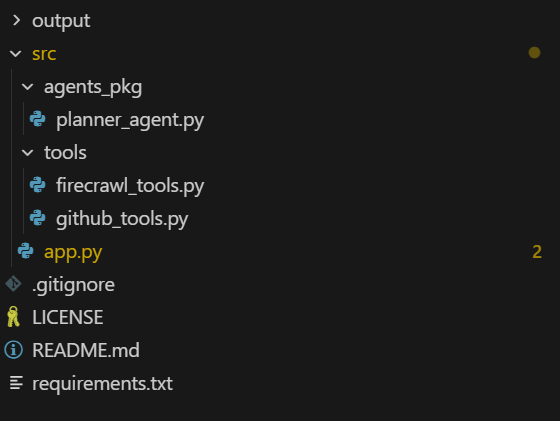
İlk olarak, aracının GitHub ve Firecrawl API’ya basit Python fonksiyonlarıyla erişmesine yardımcı olacak bir aracısal araçlar dosyası oluşturacağız.
Önce araçlarla başlayacağız. src/tools dizininde firecrawl_tools.py adlı bir dosya oluşturun ve aşağıdaki kodu ekleyin.
1. Ortamınızdan FIRECRAWL_API_KEY kullanarak bir Firecrawl istemcisi oluşturur ve anahtar eksikse hata fırlatır.
import json
import os

from agents import function_tool
from firecrawl import firecrawl


def _get_firecrawl_client():
    api_key = os.getenv("FIRECRAWL_API_KEY")
    if not api_key:
        raise RuntimeError("FIRECRAWL_API_KEY is not set")
    return firecrawl(api_key=api_key)
2. Firecrawl kullanarak odaklı bir web araması (ör. dokümanlar, blog yazıları, hatalar) yapar ve sonuçları aracının harici bağlam olarak kullanması için JSON olarak döndürür.
@function_tool
def firecrawl_search(query: str, limit: int = 3) -> str:
    """
    Run a Firecrawl search for docs related to the issue or tech stack.

    Args:
        query: Search query (usually based on issue title / framework / error message).
        limit: Max number of results to return.

    Returns:
        JSON string of Firecrawl search results.
    """
    client = _get_firecrawl_client()
    results = client.search(query=query, limit=limit)
    return json.dumps(results)
3. Firecrawl ile tek bir URL’i (markdown formatında) tarar ve daha derin teknik araştırma için yapılandırılmış sayfa içeriğini JSON olarak döndürür.
@function_tool
def firecrawl_scrape(url: str) -> str:
    """
    Scrape a single URL using Firecrawl for deeper research.

    Args:
        url: URL to scrape (docs, blog, README in another repo, etc.).

    Returns:
        JSON (markdown/structured) content from Firecrawl scrape.
    """
    client = _get_firecrawl_client()
    result = client.scrape(url=url, params={"formats": ["markdown"]})
return json.dumps(result)Ardından, src/tools dizininde github_tools.py adlı bir dosya oluşturacağız ve aşağıdaki kodu ekleyeceğiz.
1. GitHub CLI üzerinden belirli bir GitHub sorununu çeker ve ayrıntılarını aracının okuyabilmesi için JSON olarak döndürür.
import base64
import json
import subprocess
from typing import List, Optional

from agents import function_tool


@function_tool
def get_github_issue(repo: str, issue_number: int) -> str:
    """
    Fetch a GitHub issue using the GitHub CLI.

    Args:
        repo: Repository in 'owner/name' format.
        issue_number: The issue number to fetch.

    Returns:
        A JSON string containing the issue fields (title, body, labels, URL, etc.),
        or an error payload if the command fails.
    """
    try:
        result = subprocess.run(
            [
                "gh",
                "issue",
                "view",
                str(issue_number),
                "--repo",
                repo,
                "--json",
                "number,title,body,labels,url,author,createdAt,state,assignees",
            ],
            capture_output=True,
            text=True,
            check=True,
        )
        return result.stdout
    except subprocess.CalledProcessError as e:
        return json.dumps(
            {
                "error": "Failed to fetch issue via GitHub CLI",
                "stderr": e.stderr,
                "repo": repo,
                "issue_number": issue_number,
            }
        )
2. Uzak bir GitHub deposunda yalnızca ilgili dosyaları listeler (isteğe bağlı olarak yol ve uzantıya göre süzülmüş), böylece aracı tüm projeyi taramaz.
@function_tool
def list_repo_files_gh(
    repo: str,
    max_files: int = 80,
    extensions: Optional[List[str]] = None,
    path_prefixes: Optional[List[str]] = None,
) -> str:
    """
    List *relevant* files in the remote repo using GitHub CLI.

    Uses:
        gh api repos/{repo}/git/trees/HEAD?recursive=1

    The agent is expected to reason first which areas of the codebase are likely relevant
    (e.g. 'src/', 'app/', 'backend/api/', 'cli/'), and then call this tool with a small
    set of path_prefixes instead of scanning the entire project.

    Args:
        repo: Repository in 'owner/name' format (e.g. openai/openai-agents-python).
        max_files: Max number of files to return.
        extensions: Optional list of file extensions to keep (e.g. [".py", ".ts"]).
        path_prefixes: Optional list of path prefixes to include (e.g. ["src/", "app/api/"]).

    Returns:
        JSON string with file paths and filters applied.
    """
    try:
        result = subprocess.run(
            [
                "gh",
                "api",
                f"repos/{repo}/git/trees/HEAD?recursive=1",
            ],
            capture_output=True,
            text=True,
            check=True,
        )
    except subprocess.CalledProcessError as e:
        return json.dumps(
            {
                "error": "Failed to list repo files via GitHub CLI",
                "stderr": e.stderr,
                "repo": repo,
            }
        )

    try:
        data = json.loads(result.stdout)
    except json.JSONDecodeError:
        return json.dumps(
            {
                "error": "Failed to parse JSON from gh api",
                "raw": result.stdout[:2000],
                "repo": repo,
            }
        )

    tree = data.get("tree", [])

    if extensions is not None and not isinstance(extensions, list):
        extensions = [str(extensions)]
    exts = [e.lower() for e in (extensions or [])]

    if path_prefixes is not None and not isinstance(path_prefixes, list):
        path_prefixes = [str(path_prefixes)]
    prefixes = [p.strip() for p in (path_prefixes or []) if p.strip()]

    paths: List[str] = []
    for entry in tree:
        if entry.get("type") != "blob":
            continue  # only files
        path = entry.get("path", "")
        if not path:
            continue

        # If prefixes are provided, only keep files under those subtrees
        if prefixes and not any(path.startswith(pref) for pref in prefixes):
            continue

        if exts:
            suffix = "." + path.split(".")[-1].lower() if "." in path else ""
            if suffix not in exts:
                continue

        paths.append(path)
        if len(paths) >= max_files:
            break

    return json.dumps(
        {
            "repo": repo,
            "count": len(paths),
            "files": paths,
            "filtered_by_extensions": bool(exts),
            "filtered_by_prefixes": bool(prefixes),
        }
    )
3. GitHub CLI kullanarak depodan tek bir dosyanın içeriğini indirir ve kod çözer; metni (gerekirse kısaltılmış) JSON olarak döndürür.
@function_tool
def get_repo_file_gh(
    repo: str,
    path: str,
    ref: str = "",
    max_chars: int = 8000,
) -> str:
    """
    Read a file's contents from the remote repo using GitHub CLI.

    Uses:
        gh api repos/{repo}/contents/{path} [ -F ref=<branch> ]

    Args:
        repo: Repository in 'owner/name' format.
        path: File path in the repo (e.g. 'src/main.py').
        ref: Optional branch / commit / tag ref (default: repo's default branch).
        max_chars: Max characters of decoded content to return.

    Returns:
        JSON with file metadata and decoded content (truncated if needed),
        or an error payload if anything fails.
    """
    cmd = ["gh", "api", f"repos/{repo}/contents/{path}"]
    # Only add ref when explicitly set (GitHub default branch otherwise)
    if ref:
        cmd += ["-F", f"ref={ref}"]

    try:
        result = subprocess.run(
            cmd,
            capture_output=True,
            text=True,
            check=True,
        )
    except subprocess.CalledProcessError as e:
        return json.dumps(
            {
                "error": "Failed to fetch file via GitHub CLI",
                "stderr": e.stderr,
                "repo": repo,
                "path": path,
                "ref": ref or "DEFAULT_BRANCH",
            }
        )

    try:
        data = json.loads(result.stdout)
    except json.JSONDecodeError:
        return json.dumps(
            {
                "error": "Failed to parse JSON from gh api (contents)",
                "raw": result.stdout[:2000],
                "repo": repo,
                "path": path,
            }
        )

    if data.get("type") != "file":
        return json.dumps(
            {
                "error": "Path is not a file",
                "repo": repo,
                "path": path,
                "data_type": data.get("type"),
            }
        )

    encoding = data.get("encoding")
    content_b64 = data.get("content", "")

    if encoding != "base64":
        return json.dumps(
            {
                "error": "Unexpected encoding",
                "repo": repo,
                "path": path,
                "encoding": encoding,
            }
        )

    try:
        # GitHub often includes newlines in base64 payload
        raw_bytes = base64.b64decode(content_b64)
        text = raw_bytes.decode("utf-8", errors="replace")
    except Exception as e:  # noqa: BLE001
        return json.dumps(
            {
                "error": f"Failed to decode file content: {e}",
                "repo": repo,
                "path": path,
                "encoding": encoding,
            }
        )

    truncated = text[:max_chars]
    return json.dumps(
        {
            "repo": repo,
            "path": path,
            "ref": ref or "DEFAULT_BRANCH",
            "truncated": len(text) > max_chars,
            "content": truncated,
        }
)Burada, şunları bilen bir Issue Planner aracısı tanımlıyoruz:
GitHub ve Firecrawl araçlarını bağlıyoruz, aracıya maliyet farkındalığıyla nasıl çalışacağına dair ayrıntılı talimatlar veriyoruz ve gpt-5.1-codex modelinde çalışmasını söylüyoruz.
src/agents_pkg dizininde planner_agent.py dosyasını oluşturun ve aşağıdaki kodu ekleyin:
from agents import Agent

from tools.github_tools import (
    get_github_issue,
    list_repo_files_gh,
    get_repo_file_gh,
)
from tools.firecrawl_tools import (
    firecrawl_search,
    firecrawl_scrape,
)


def build_planner_agent() -> Agent:
    """
    Issue Planner agent that:
    - Reads the GitHub issue
    - Reasons about which parts of the repo are relevant
    - Uses GitHub CLI to inspect a *small* set of files online
    - Uses Firecrawl for external research
    - Outputs a concrete, step-by-step execution plan
    """
    return Agent(
        name="Issue Planner",
        instructions=(
            "You are a senior software engineer.\n"
            "Goal: Given a GitHub issue and the online repo (structure + files), plus optional "
            "external research, produce a clear, step-by-step execution plan to resolve the issue.\n\n"
            "CONTEXT:\n"
            "- All repository interaction must be done *online* via GitHub CLI tools.\n"
            "- You have tools to: read the issue, list files under certain paths, read specific files, "
            "  and call Firecrawl search/scrape for docs.\n\n"
            "IMPORTANT STRATEGY (BE SMART):\n"
            "- Be selective and cost-aware. Do NOT scan the whole project.\n"
            "- First, deeply read the issue and infer which part of the system it affects:\n"
            "  routing layer, CLI, API handlers, DB layer, tests, etc.\n"
            "- Based on this reasoning, decide a small list of path prefixes and file types.\n\n"
            "RECOMMENDED WORKFLOW:\n"
            "1. Call get_github_issue(repo, issue_number) to fully understand the problem.\n"
            "2. From the issue, infer a small list of path prefixes where relevant code likely lives,\n"
            "   e.g. ['src/', 'app/', 'backend/api/', 'cli/'] depending on the project style.\n"
            "3. Call list_repo_files_gh with:\n"
            "   - extensions like ['.py', '.ts', '.js', '.tsx', '.jsx']\n"
            "   - path_prefixes set to that small, targeted list\n"
            "   This keeps the search focused instead of scanning the entire project.\n"
            "4. From the returned file list, pick at most ~5-15 key files that are most likely related\n"
            "   (entrypoints, routers, handlers, services, tests).\n"
            "5. Call get_repo_file_gh(repo, path=...) only on those selected files to inspect the "
            "   actual implementation.\n"
            "6. If you need framework or library context (FastAPI, Click, React, etc.), use\n"
            "   firecrawl_search and firecrawl_scrape to pull official docs or good examples.\n\n"
            "OUTPUT FORMAT (execution plan):\n"
            "After you have enough context from the issue + targeted code inspection (+ optional research), "
            "output a concise but concrete plan with sections:\n"
            "   - Issue summary\n"
            "   - Project/codebase understanding (where this issue lives in the architecture)\n"
            "   - Key files / components to touch (with file paths)\n"
            "   - Step-by-step implementation plan (Step 1, Step 2, ...)\n"
            "   - Testing strategy (unit / integration / manual)\n"
            "   - Edge cases, risks, and any open questions\n\n"
            "The plan must be actionable for a mid-level developer. Avoid generic advice; tie your steps "
            "to the actual files and modules you inspected.\n"
        ),
        tools=[
            get_github_issue,
            list_repo_files_gh,
            get_repo_file_gh,
            firecrawl_search,
            firecrawl_scrape,
        ],
        model="gpt-5.1-codex",
)Bu, bir komut satırı arayüzü (CLI) sağlayan ve tüm mantık, geri çağrılar ve hata işlemlerini tek bir kapsamlı dosyada birleştiren ana Python dosyasıdır. Diğer dosyalardaki araçları ve aracılarımı verimli şekilde kullanır.
1. Önce CLI’ın ihtiyaç duyduğu her şeyi kurup içe aktarıyoruz. Standart kütüphaneleri ekliyor, Windows’ta emojilerin ve sembollerin doğru yazdırılması için uygun Unicode çıktısını sağlıyor ve OpenAI runner’ı ile planlayıcı aracımızı içe aktarıyoruz.
2. Ardından, aracı çalıştırırken GitHub deposu ve issue numarası geçebilmeniz için komut satırı seçeneklerini tanımlıyoruz.
src/app.py:
import argparse
import asyncio
import json
import os
import pathlib
import sys
from datetime import datetime

# Set UTF-8 encoding for stdout to handle Unicode characters
if sys.platform == "win32":
    import codecs
    sys.stdout = codecs.getwriter("utf-8")(sys.stdout.detach())
    sys.stderr = codecs.getwriter("utf-8")(sys.stderr.detach())

from agents import Runner, ItemHelpers
from openai.types.responses import ResponseTextDeltaEvent

from agents_pkg.planner_agent import build_planner_agent


def parse_args() -> argparse.Namespace:
    parser = argparse.ArgumentParser(
        description=(
            "Issue Planner: GPT-5.1-Codex + OpenAI Agents + GitHub CLI + Firecrawl\n"        )
    )
    parser.add_argument(
        "--repo",
        help="GitHub repo in 'owner/name' format (e.g. openai/openai-agents-python).",
    )
    parser.add_argument(
        "--issue",
        type=int,
        help="Issue number to plan for.",
    )
    return parser.parse_args()
3. Sonra girdileri topluyor ve bağlamı hazırlıyoruz. Argümanlardan depoyu ve issue’yu okuyor, OpenAI API anahtarının ayarlı olduğundan emin oluyor, aracıya sorunu adım adım nasıl analiz edeceğini anlatan net bir istem oluşturuyor ve nihai planın kaydedileceği zaman damgalı bir markdown dosyası oluşturuyoruz.
def get_user_input(args: argparse.Namespace) -> tuple[str, int]:
    """Get repository and issue number from arguments or user input."""
    repo = args.repo or input("GitHub repo (owner/name): ").strip()
    issue_number = args.issue or int(input("Issue number: ").strip())
    return repo, issue_number


def validate_environment() -> None:
    """Validate that required environment variables are set."""
    if not os.getenv("OPENAI_API_KEY"):
        raise RuntimeError("OPENAI_API_KEY is not set")


def build_user_prompt(repo: str, issue_number: int) -> str:
    """Build the user prompt for the agent."""
    return (
        f"You are helping me plan how to implement GitHub issue #{issue_number} "
        f"in repo '{repo}'.\n\n"
        "Be selective and cost-aware:\n"
        "1. Use get_github_issue(repo, issue_number) to understand the problem.\n"
        "2. Based on the issue text, first reason about which directories and components "
        "   are likely relevant.\n"
        "3. Call list_repo_files_gh(repo, extensions=['.py', '.ts', '.js', '.tsx', '.jsx'], "
        "   path_prefixes=[<your inferred prefixes>]) to only explore those areas.\n"
        "4. From those results, choose a small set of the most relevant files and call "
        "   get_repo_file_gh(repo, path=...) on them.\n"
        "5. Optionally, use firecrawl_search and firecrawl_scrape if you need external docs.\n"
        "6. Finally, generate the execution plan in the structured format from your instructions."
    )


def setup_output_file(repo: str, issue_number: int) -> pathlib.Path:
    """Create output directory and return the markdown file path."""
    output_dir = pathlib.Path("output")
    output_dir.mkdir(exist_ok=True)
    timestamp = datetime.now().strftime("%Y%m%d_%H%M%S")
    markdown_file = output_dir / f"execution_plan_{repo.replace('/', '_')}_issue_{issue_number}_{timestamp}.md"
    return markdown_file
4. Ardından, aracının düşünme sürecini görünür kılıyoruz. Her olaydan temiz bir muhakeme pasajı çekmeye çalışıyor ve ham iç ayrıntılar yerine modelin arka planda ne üzerinde çalıştığına dair insan tarafından okunabilir bir ipucu sunacak kısa “💭 Akıl yürütme…” satırı yazdırıyoruz.
def extract_reasoning_text(event_item) -> str | None:
    """Extract reasoning text from a reasoning event item."""
    reasoning_text = None

    if hasattr(event_item, 'raw_item'):
        raw = event_item.raw_item
        # Try multiple attribute names
        for attr_name in ['content', 'text', 'reasoning', 'message', 'delta']:
            if hasattr(raw, attr_name):
                val = getattr(raw, attr_name)
                if val and str(val).strip() and str(val) != 'None':
                    reasoning_text = str(val)
                    break

        # If still not found, try to access as dict-like
        if not reasoning_text:
            try:
                if hasattr(raw, '__dict__'):
                    for key, val in raw.__dict__.items():
                        if val and str(val).strip() and str(val) != 'None' and key in ['content', 'text', 'reasoning', 'message', 'delta']:
                            reasoning_text = str(val)
                            break
            except:
                pass

    # Also try direct attributes on event.item
    if not reasoning_text:
        for attr_name in ['content', 'text', 'reasoning', 'message']:
            if hasattr(event_item, attr_name):
                val = getattr(event_item, attr_name)
                if val and str(val).strip() and str(val) != 'None':
                    reasoning_text = str(val)
                    break

    return reasoning_text


def handle_reasoning_event(event_item) -> None:
    """Handle and display reasoning events."""
    reasoning_text = extract_reasoning_text(event_item)

    if reasoning_text and reasoning_text.strip():
        # Show first line or first 100 chars
        first_line = reasoning_text.split('\n')[0].strip()[:100]
        if len(reasoning_text.split('\n')[0].strip()) > 100:
            first_line += "..."
        print(f"\n💭 Reasoning: {first_line}", flush=True)
    else:
        # Don't show "None" - just show that reasoning is happening
        print(f"\n💭 Reasoning...", flush=True)
5. Sonrasında, araç çağrılarını ve takibini ele alıyoruz. Aracının hangi aracı kullandığını tespit ediyor, argümanlarını (depo, yol veya sorgu gibi) kompakt bir dizeye biçimlendiriyor, “🔧 Çağrılıyor…” mesajı yazdırıyor ve daha sonra tamamlandıklarını işaretleyip nelerin çalıştığını özetleyebilmek için etkin araçların dahili bir haritasını tutuyoruz.
def extract_tool_info(event_item) -> tuple[str | None, str | None]:
    """Extract tool name and ID from a tool call event item."""
    tool_name = None
    tool_id = None

    # First try raw_item which contains the actual tool call data
    if hasattr(event_item, 'raw_item'):
        raw = event_item.raw_item
        # Try accessing tool_call through various paths
        tool_call = None
        if hasattr(raw, 'tool_call'):
            tool_call = raw.tool_call
        elif hasattr(raw, 'function_call'):
            tool_call = raw.function_call

        if tool_call:
            # Try to get name from tool_call
            if hasattr(tool_call, 'name'):
                tool_name = tool_call.name
            elif hasattr(tool_call, 'function') and hasattr(tool_call.function, 'name'):
                tool_name = tool_call.function.name
            # Try to get ID
            if hasattr(tool_call, 'id'):
                tool_id = tool_call.id
            elif hasattr(tool_call, 'tool_call_id'):
                tool_id = tool_call.tool_call_id

        # Fallback: try direct attributes on raw
        if not tool_name:
            if hasattr(raw, 'name'):
                tool_name = getattr(raw, 'name')
            elif hasattr(raw, 'function') and hasattr(raw.function, 'name'):
                tool_name = raw.function.name
            # Try using getattr with different possible attribute names
            for attr_name in ['tool_name', 'function_name', 'name']:
                if hasattr(raw, attr_name):
                    tool_name = getattr(raw, attr_name, None)
                    if tool_name:
                        break

    # Fallback to direct attributes
    if not tool_name and hasattr(event_item, 'tool_call'):
        tool_call = event_item.tool_call
        if hasattr(tool_call, 'name'):
            tool_name = tool_call.name
        if hasattr(tool_call, 'id'):
            tool_id = tool_call.id
        elif hasattr(tool_call, 'function') and hasattr(tool_call.function, 'name'):
            tool_name = tool_call.function.name
    if not tool_name and hasattr(event_item, 'name'):
        tool_name = event_item.name
    if not tool_name and hasattr(event_item, 'function'):
        func = event_item.function
        if hasattr(func, 'name'):
            tool_name = func.name

    return tool_name, tool_id


def format_tool_arguments(tool_call_obj) -> str:
    """Format tool arguments for display."""
    if not tool_call_obj or not hasattr(tool_call_obj, 'arguments'):
        return ""

    try:
        args_dict = json.loads(tool_call_obj.arguments) if isinstance(tool_call_obj.arguments, str) else tool_call_obj.arguments
        if 'repo' in args_dict:
            tool_args = f" → {args_dict['repo']}"
            if 'issue_number' in args_dict:
                tool_args += f"#{args_dict['issue_number']}"
            return tool_args
        elif 'path' in args_dict:
            return f" → {args_dict['path']}"
        elif 'query' in args_dict:
            q = str(args_dict['query'])
            return f" → {q[:40]}..." if len(q) > 40 else f" → {q}"
        elif 'url' in args_dict:
            return f" → {args_dict['url']}"
        elif 'extensions' in args_dict or 'path_prefixes' in args_dict:
            parts = []
            if 'extensions' in args_dict:
                parts.append(f"ext={args_dict['extensions']}")
            if 'path_prefixes' in args_dict:
                parts.append(f"paths={args_dict['path_prefixes']}")
            return f" → {', '.join(parts)}"
    except:
        pass

    return ""


def handle_tool_call_event(event_item, active_tools: dict, tool_counter: int) -> tuple[int, bool]:
    """Handle tool call events and return updated tool_counter and whether event was handled."""
    tool_name, tool_id = extract_tool_info(event_item)

    if tool_name:
        tool_counter += 1
        tool_id = tool_id or f"tool_{tool_counter}"
        active_tools[tool_id] = tool_name

        # Get tool arguments if available
        tool_call_obj = None
        if hasattr(event_item, 'raw_item') and hasattr(event_item.raw_item, 'tool_call'):
            tool_call_obj = event_item.raw_item.tool_call
        elif hasattr(event_item, 'tool_call'):
            tool_call_obj = event_item.tool_call

        tool_args = format_tool_arguments(tool_call_obj)
        print(f"\n[{tool_counter}] 🔧 Calling: {tool_name}{tool_args}...", flush=True)
        return tool_counter, True
    else:
        # Still couldn't extract - try to inspect raw_item structure
        if hasattr(event_item, 'raw_item'):
            raw = event_item.raw_item
            try:
                raw_attrs = [attr for attr in dir(raw) if not attr.startswith('_')]
                # Look for attributes that might contain the tool name
                for attr in raw_attrs:
                    try:
                        val = getattr(raw, attr)
                        if isinstance(val, str) and ('get_github' in val.lower() or 'list_repo' in val.lower() or 'firecrawl' in val.lower()):
                            tool_name = val
                            break
                        # Check if it's a dict-like object with name
                        if hasattr(val, 'name'):
                            tool_name = val.name
                            break
                    except:
                        continue

                if tool_name:
                    tool_counter += 1
                    tool_id = tool_id or f"tool_{tool_counter}"
                    active_tools[tool_id] = tool_name
                    print(f"\n[{tool_counter}] 🔧 Calling: {tool_name}...", flush=True)
                    return tool_counter, True
                else:
                    # Print raw_item structure for debugging
                    print(f"\n[DEBUG] raw_item attrs: {raw_attrs[:10]}", flush=True)
            except Exception as e:
                print(f"\n[DEBUG] Error inspecting raw_item: {e}", flush=True)

    return tool_counter, False


def handle_tool_output_event(event_item, active_tools: dict, completed_tools: list) -> None:
    """Handle tool output events and track completed tools."""
    tool_id = None

    # Try raw_item first
    if hasattr(event_item, 'raw_item') and hasattr(event_item.raw_item, 'tool_call_id'):
        tool_id = event_item.raw_item.tool_call_id
    elif hasattr(event_item, 'tool_call_id'):
        tool_id = event_item.tool_call_id
    elif hasattr(event_item, 'raw_item') and hasattr(event_item.raw_item, 'tool_call'):
        if hasattr(event_item.raw_item.tool_call, 'id'):
            tool_id = event_item.raw_item.tool_call.id
    elif hasattr(event_item, 'tool_call'):
        if hasattr(event_item.tool_call, 'id'):
            tool_id = event_item.tool_call.id
        elif hasattr(event_item.tool_call, 'function') and hasattr(event_item.tool_call.function, 'name'):
            # Try to match by name if ID not available
            tool_name_match = event_item.tool_call.function.name
            for tid, tname in active_tools.items():
                if tname == tool_name_match:
                    tool_id = tid
                    break

    if tool_id and tool_id in active_tools:
        tool_name = active_tools.pop(tool_id)
        completed_tools.append(tool_name)
    elif active_tools:
        # Fallback: use the first active tool
        tool_id, tool_name = next(iter(active_tools.items()))
        active_tools.pop(tool_id)
        completed_tools.append(tool_name)
6. Şimdi, akış döngüsünü ve kalıcılığı bağlıyoruz. Aracıdan gelen akış olaylarını işliyor, token’lar gelir gelmez yazdırıyor, akıl yürütme ve araç çağrılarını gerçek zamanlı gösteriyor, bir şeyler ters giderse zarifçe akışsız çalıştırmaya geri dönüyor ve sonunda tamamlanmış uygulama planını yararlı meta verilerle birlikte bir markdown dosyasına yazıyoruz.
async def process_streaming_events(result, repo: str, issue_number: int) -> str:
    """Process streaming events from the agent execution."""
    final_output = ""
    active_tools = {}  # Track active tool calls by ID
    tool_counter = 0
    completed_tools = []
    first_event_received = False

    # Stream the events as they come in
    async for event in result.stream_events():
        # Handle raw response events (token-by-token streaming) - print immediately
        if event.type == "raw_response_event" and isinstance(event.data, ResponseTextDeltaEvent):
            if not first_event_received:
                first_event_received = True
            delta = event.data.delta
            print(delta, end="", flush=True)
            final_output += delta
        # Handle run item events (higher level updates)
        elif event.type == "run_item_stream_event":
            item_type = getattr(event.item, 'type', 'unknown')

            # Show reasoning events
            if item_type == "reasoning_item":
                handle_reasoning_event(event.item)
            elif item_type == "tool_call_item":
                tool_counter, handled = handle_tool_call_event(event.item, active_tools, tool_counter)
                if handled:
                    first_event_received = True
            elif item_type == "tool_call_output_item":
                handle_tool_output_event(event.item, active_tools, completed_tools)
            elif item_type == "message_output_item":
                message_text = ItemHelpers.text_message_output(event.item)
                if message_text and (not final_output or message_text not in final_output):
                    print(f"\n{message_text}", flush=True)
                    final_output += message_text

    print()  # Add newline after streaming

    # Show summary of tools used
    if completed_tools:
        print(f"---\n\n📊 Tools used ({len(completed_tools)}): {', '.join(completed_tools)}", flush=True)

    # If no streaming events occurred, fall back to final output
    if not final_output:
        final_output = result.final_output
        if final_output:
            print(final_output, flush=True)

    return final_output

async def run_agent_with_streaming(agent, user_prompt: str, repo: str, issue_number: int) -> str:
    """Run the agent with streaming support and fallback handling."""
    try:
        # Run agent with streaming (run_streamed is synchronous, returns immediately)
        result = Runner.run_streamed(
            agent,
            input=user_prompt,
            context={"repo": repo, "issue_number": issue_number},
        )

        return await process_streaming_events(result, repo, issue_number)

    except Exception as e:
        print(f"⚠️  Error: {e}", flush=True)
        # Fallback to standard async run
        result = await Runner.run(
            agent,
            input=user_prompt,
            context={"repo": repo, "issue_number": issue_number},
        )
        print(result.final_output, flush=True)
        return result.final_output

def save_output_to_file(markdown_file: pathlib.Path, repo: str, issue_number: int, final_output: str) -> None:
    """Save the final output to a markdown file."""
    with open(markdown_file, 'w', encoding='utf-8') as f:
        f.write(f"# GitHub Issue Analysis: {repo}#{issue_number}\n\n")
        f.write(f"**Generated on:** {datetime.now().strftime('%Y-%m-%d %H:%M:%S')}\n\n")
        f.write(f"**Repository:** {repo}\n")
        f.write(f"**Issue Number:** {issue_number}\n\n")
        f.write("---\n\n")
        f.write(final_output)

    print(f"---\n\n✅ Saved: {markdown_file}", flush=True)
7. Son olarak, her şeyi ana giriş noktasında bir araya getiriyoruz. Argümanları ayrıştırıyor, depoyu ve issue’yu alıyor, ortamı doğruluyor, aracı ve istemini oluşturuyor, planlayıcıyı akışla (gerekirse eşzamanlı çalıştırmaya geri dönerek) çalıştırıyor ve sonucu kaydediyoruz.
async def main() -> None:
    """Main entry point for the application."""
    args = parse_args()
    repo, issue_number = get_user_input(args)
    validate_environment()

    agent = build_planner_agent()
    user_prompt = build_user_prompt(repo, issue_number)
    markdown_file = setup_output_file(repo, issue_number)

    print(f"\n🔍 Analyzing {repo}#{issue_number}...\n")

    # Run the agent with streaming support
    try:
        final_output = await run_agent_with_streaming(agent, user_prompt, repo, issue_number)
    except Exception as e:
        print(f"⚠️  Error: {e}", flush=True)
        # Final fallback to standard sync run
        result = Runner.run_sync(
            agent,
            input=user_prompt,
            context={"repo": repo, "issue_number": issue_number},
        )
        print(result.final_output, flush=True)
        final_output = result.final_output

    # Save output to file
    save_output_to_file(markdown_file, repo, issue_number, final_output)


if __name__ == "__main__":
    asyncio.run(main())
Not: Kaynak kod, yapılandırma ve dokümantasyon GitHub deposunda mevcuttur: kingabzpro/Issue-Analyzer. Lütfen inceleyin ve sonuçları çoğaltırken kılavuz olarak kullanın.
CLI uygulamamızı kullanmanın iki yolu vardır: Etkileşimli mod; uygulama sizden depo adını ve issue numarasını tek tek ister; ve CLI modu; uygulama başlatılırken tüm bilgileri sağlamanız gerekir.
Etkileşimli modu başlatmak için şu komutu yazın:
python src/app.pyBaşladıktan sonra, sizden depo adını ve issue numarasını girmeniz istenecek ve uygulama size yardımcı olmak için araçları ve akıl yürütmeyi kullanmaya başlayacaktır.
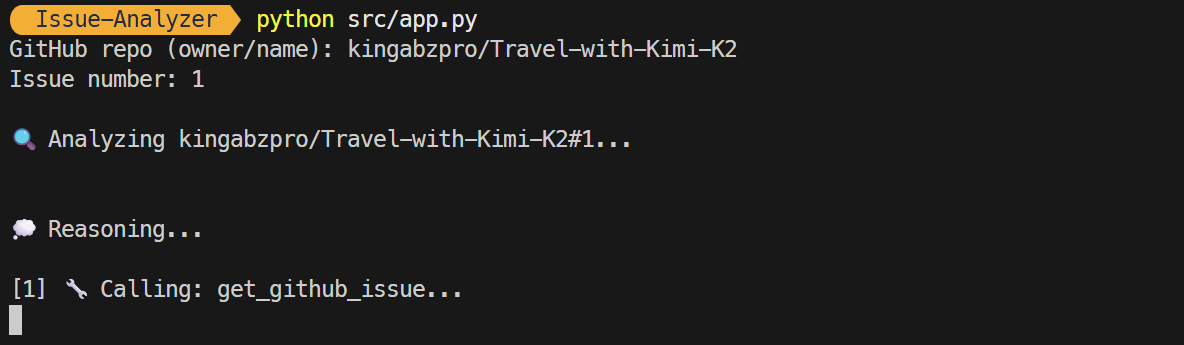
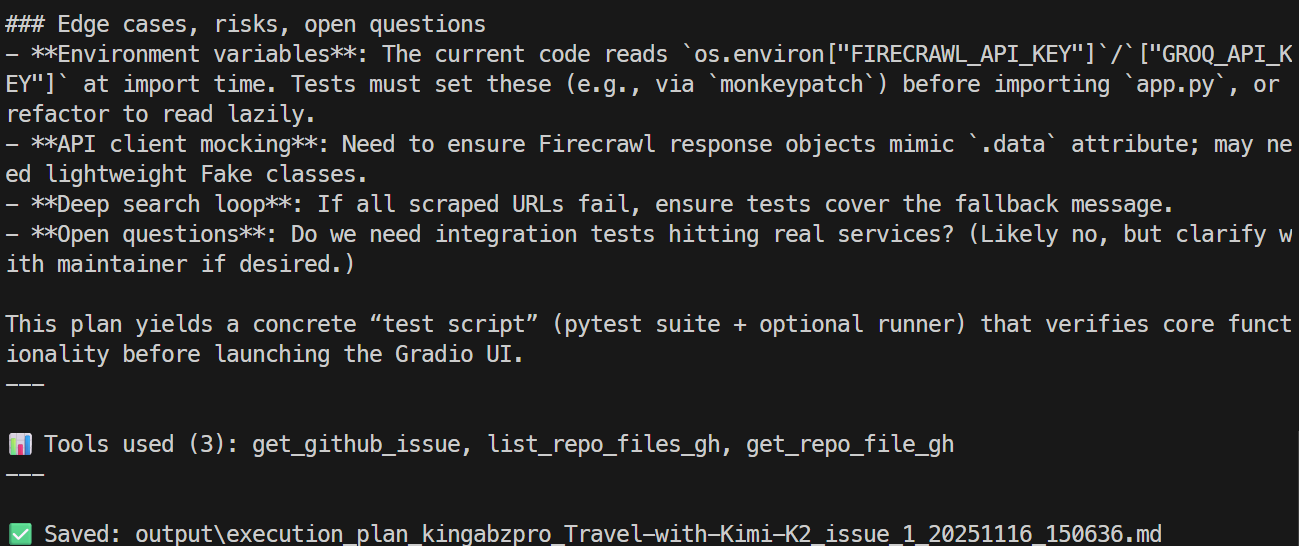
Sonuç olarak, birkaç saniye içinde sorunun bir özetini ve çözüm yollarını alacaksınız. Bu özet, kullanılan araçlarla ilgili ayrıntıları ve bilgilerin kaydedildiği markdown dosyasının konumunu içerir.
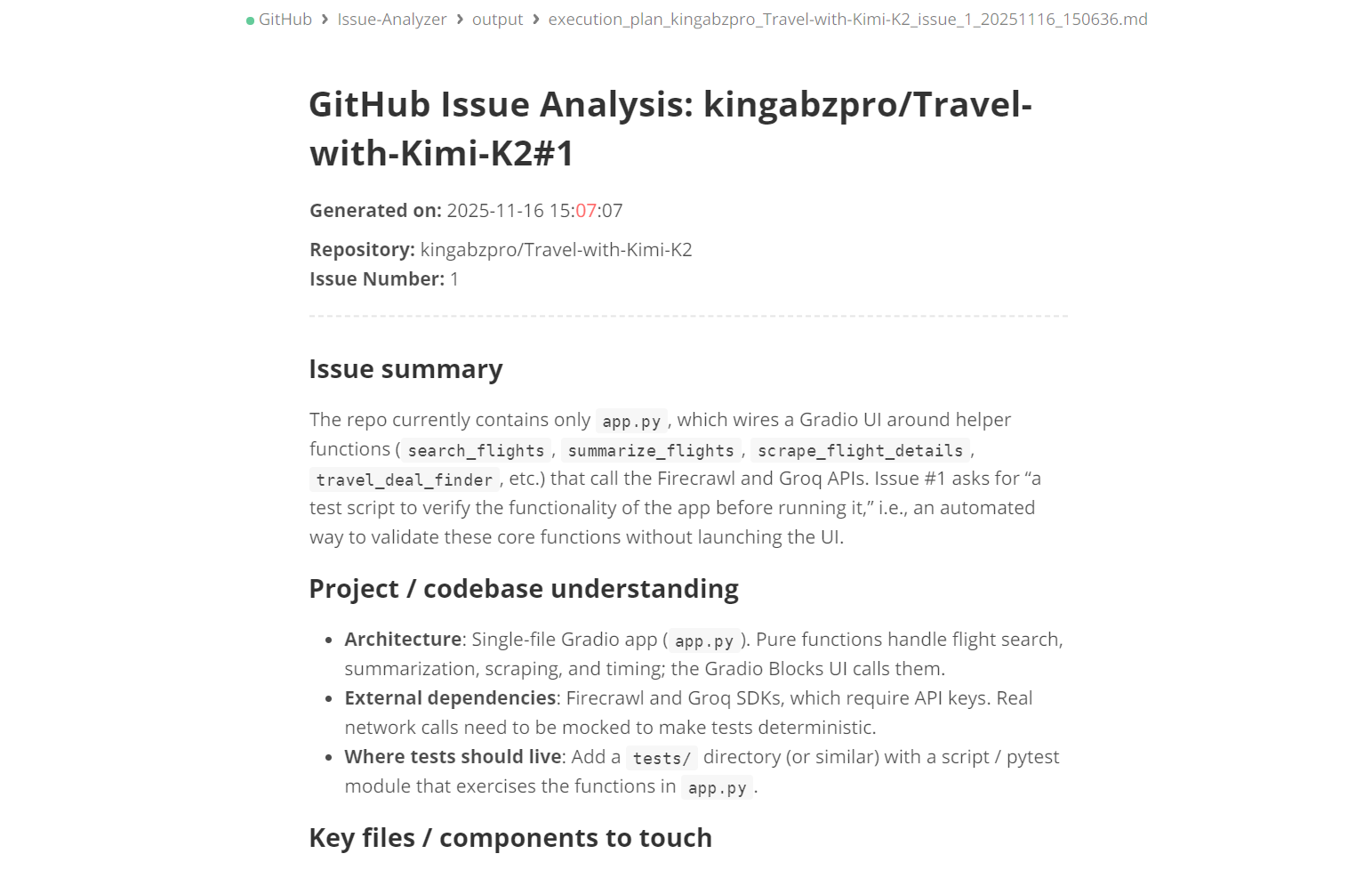
Ayrıntılı bir issue planını incelemek için markdown dosyasını açabilirsiniz.
CLI modu, aşağıda gösterildiği gibi komutta depo adının ve issue argümanının doğrudan eklenmesini gerektirir:
python src/app.py --repo kingabzpro/Travel-with-Kimi-K2 --issue 1Tüm süreç akış halinde gerçekleşir; yani aracının hangi araçları kullandığını ve etkili biçimde akıl yürütüp yürütmediğini görürsünüz. Ayrıca sonunda üretilen yanıt da akış olarak gösterilir.
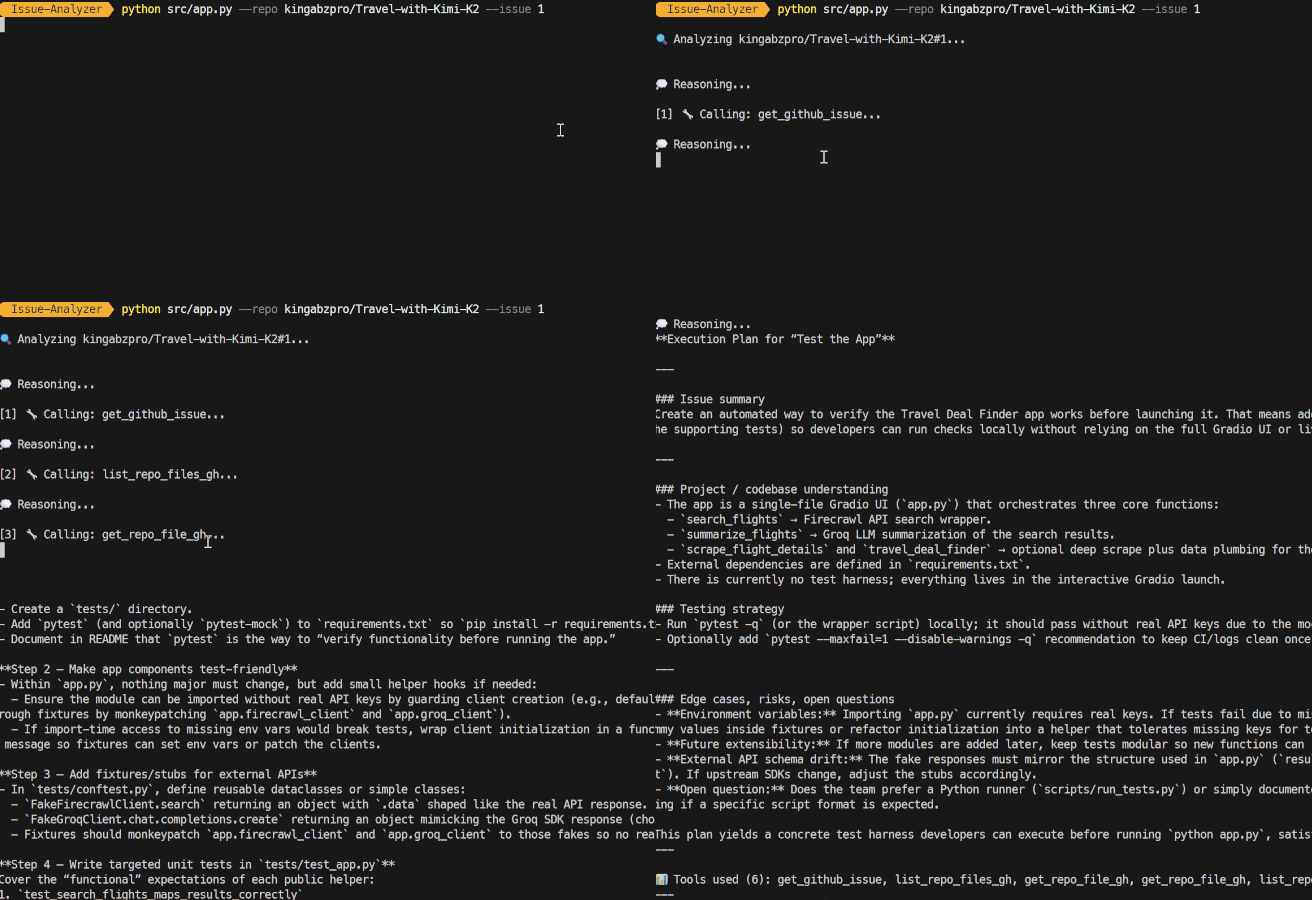
GitHub Issue Analiz Aracısının mevcut sürümü, sorunları anlamak ve doğru uygulama planları üretmek üzere tasarlanmıştır.
Ancak aracısal bir iş akışının gerçek potansiyeli, plan oluşturulduktan sonra gerçekleşen tüm adımların otomatikleştirilmesinde yatar. Sistemde uygulayabileceğiniz bazı büyük yükseltmeler şunlardır:
Projenin amacı, bir planı otomatik olarak çalışan bir pull request’e dönüştürmektir. Bu, geliştirme sürecini düzene sokarak daha verimli bir iş akışı sağlar.
Bu özellik, değişikliklerin uygulanmasını kolaylaştıracak şekilde aracıdan doğrudan yeni bir dal oluşturma yeteneğini içerecektir. Ayrıca aracı, oluşturulan plana göre kod değişikliklerini uygulayacak ve gh pr create ve gh pr view gibi GitHub CLI iş akışlarını çalıştıracaktır.
Ayrıca sistem, pull request açıklamalarını, değişiklik günlüklerini ve bağlantılı issue referanslarını otomatik olarak oluşturacaktır. Etiketleri de akıllıca uygulayarak bunları hata düzeltmeleri, iyileştirmeler veya yeniden düzenlemeler olarak kategorize edecektir.
Genel olarak bu girişim, aracıyı tamamen otonom bir Issue’dan Pull Request’e otomasyon sistemine dönüştürerek geliştirme döngüsünde üretkenliği ve tutarlılığı önemli ölçüde artırır.
Bu yükseltme, GitHub sorunları için toplu yetenekler sunarak sorun analizi sürecini geliştirecek. Tek tek problemlere odaklanmak yerine ekipler aynı anda birden çok issue üzerinde toplu taramalar yapabilecek. Bu yeni özellik, tüm bekleyen işlerin paralel veya kuyruklu analizine olanak tanır, böylece daha büyük hacimlerdeki sorunları etkin biçimde ele almak kolaylaşır.
Buna ek olarak, bu yükseltme yinelenen veya ilişkili sorunların belirlenmesini kolaylaştırarak daha iyi organizasyon sağlar. Sorunlar, karmaşıklık, alt sistem veya etki gibi ölçütlere göre sınıflandırılabilir.
Operasyonları daha da düzenlemek için ekipler GitHub veya Firecrawl araçlarını toplu modda çalıştırabilecek; bu da verimliliği önemli ölçüde artırır. Nihayetinde bu yükseltme, ekiplerin tek bir komutla onlarca hatta yüzlerce issue’yu otomatik olarak önceliklendirmesine olanak tanır.
Bir pull request (PR) oluşturmadan önce, aracının önerilen değişiklikleri yalnızca üretmek yerine kapsamlı biçimde doğrulaması esastır. Bu doğrulama süreci; GitHub Actions veya yerel test çalıştırıcıları aracılığıyla birim testlerini çalıştırmayı, böylece kodun beklendiği gibi davrandığını sağlamayı içeren çeşitli planlı özellikleri kapsamalıdır.
Bağımlılık doğrulaması da kritiktir. İçe aktarmaların doğruluğunun kontrol edilmesini, eksik modüllerin belirlenmesini ve projeyi etkileyebilecek sürüm uyuşmazlıklarının giderilmesini içerir. Ayrıca kod kalitesini korumak için linting, biçimlendirme ve tip kontrolü önemli rol oynar.
Yapılan değişikliklerin mevcut derleme hatlarını bozmadığından emin olmak ve API’lerdeki yıkıcı değişiklikleri veya gerilemeleri tespit etmek hayati önem taşır. Bu adımlara uyarak PR’nin temiz, güvenli ve üretime hazır kalmasını sağlayabiliriz.
GPT-5.1 Codex ve openai-agents ile gelişmiş, çok adımlı aracılar oluşturmak şaşırtıcı derecede basittir. Aslında yapmanız gereken tek şey kendi araçlarınızı tanımlamak ve modele bu araçları ne zaman ve nasıl kullanacağını açıkça anlatmaktır.
Bu eğitimde GitHub CLI’ı kullandım çünkü hızlı, sezgisel ve entegre etmesi kolay; ancak aynı işi GitHub Python SDK’sıyla, doğrudan API çağrılarıyla veya başka herhangi bir CLI ya da Bash yardımcı programıyla da kolayca yapabilirsiniz. Asıl güç esnekliktir.
Bu kurulumu istediğiniz kadar genişletebilirsiniz.
Örneğin şunları oluşturabilirsiniz:
Bu eğitimin amacı, GPT-5.1 Codex’in gerçekten neler yapabildiğini göstermektir: Araç çağırmayı zahmetsizce yönetir, büyük kod tabanlarını anlar, yapılandırılmış akıl yürütme yapar ve sürekli kullanıcı girdisi olmadan uzun otomasyon zincirlerini çalıştırabilir.
Yapay zeka aracılarının oluşturulması hakkında daha fazla bilgi edinmek isterseniz, Google ADK ile AI Agents kursumuza ve ayrıca geliştirebileceğiniz AI aracı projeleri listemize göz atmanızı öneririm.
Öne Çıkan DataCamp Kursları
Kurs
Kurs
Kurs
blog
Abid Ali Awan
14 dk.
blog
Dario Radečić
15 dk.
Eğitim
Kurtis Pykes
8 dk.
Eğitim
Adel Nehme