
Our biggest-ever sale. 60% off AI & data skills
Buy Now
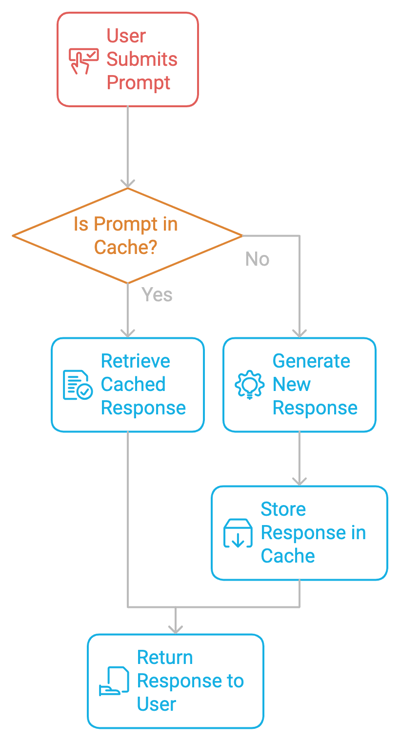
At its core, prompt caching works by storing prompts and their corresponding responses in a cache. When the same or a similar prompt is submitted again, the system retrieves the cached response rather than generating a new one. This avoids repetitive computation, speeds up response times, and reduces costs.
Prompt caching has several benefits:
Before we dive deeper into implementing prompt caching, we need to keep in mind a few considerations.
To ensure data freshness, each cached response should have a Time-to-Live (TTL) in the memory. The TTL determines how long a cached response will be considered valid. Once the TTL expires, the cache entry is either removed or updated, and the corresponding prompt is recomputed the next time it's requested.
This mechanism ensures that the cache doesn’t store outdated information. In case of static or less frequently updated content, such as legal documents or product manuals, a longer TTL can help reduce recomputation without risking data staleness. Thus, properly tuning TTL values is essential for maintaining a balance between data freshness and computational efficiency.
Sometimes, two prompts are similar but not identical. Determining how close a new prompt is to an existing cached one is crucial to effective caching. Implementing prompt similarity requires techniques like fuzzy matching or semantic search, where the system uses vector embeddings to represent prompts and compare their similarity.
By caching responses for similar prompts, systems can reduce recomputation while maintaining high response accuracy. However, setting the similarity threshold too loosely can lead to mismatches, while setting it too strictly may miss caching opportunities.
Strategies like Least Recently Used (LRU) help manage cache size. The LRU method removes the least accessed data when the cache reaches its capacity. This strategy works well in scenarios where certain prompts are more popular and need to stay cached, while less common queries can be removed to make space for newer requests.
Implementing prompt caching is a two-step process.
The first step in implementing prompt caching is identifying frequent repetitive prompts in the system. Whether building a chatbot, coding assistant, or document processor, we need to monitor which prompts are being repeated. Once identified, these can be cached to avoid redundant computation.
Once a prompt is identified, its response is stored in the cache along with metadata like time-to-live (TTL), cache hit/miss rates, and more. Whenever a user submits the same prompt again, the system retrieves the cached response, skipping the expensive generation process.
With all the theoretical knowledge, let’s dive into a practical hands-on example using Ollama to explore the impact of caching versus no caching in a local environment. Here, we use data from a web-hosted deep learning book and local models to summarize the first few pages of the book. We'll experiment with multiple LLMs, including Gemma2, Llama2, and Llama3, to compare their performance.
For this hands-on example, we’ll use BeautifulSoup, a Python package that parses HTML and XML documents, including those with malformed markup. To install BeautifulSoup, run the following:
Another tool that we’ll use is Ollama. It simplifies the installation and management of large language models on local systems.
To get started, download Ollama and install Ollama on your desktop. We can vary the model name according to our requirements. Check out the model library on Ollama's official website to look for different models supported by Ollama. Run the following code in the terminal:
We are all set. Let’s begin!
We start with the following imports:
time to track the inference time for caching and no caching coderequests to make HTTP requests and fetch data from web pagesBeautifulSoup for parsing and cleaning HTML contentOllama for using LLMs locallyIn the code below, we define a function fetch_article_content that retrieves and cleans the text content from a given URL. It attempts to fetch the webpage content using the requests library, with up to three retries in case of failures such as network errors or server issues.
The function uses BeautifulSoup to parse the HTML content and removes unnecessary <script> and <style> tags. The text is further processed by stripping leading and trailing spaces, splitting lines, and recombining them into clean paragraphs. If a content limit is specified, the function trims the text to that limit. If all retries fail, the function raises an exception after a short delay between attempts.
Here are a few key parameters to understand:
BeautifulSoup to remove unnecessary elements like <script> and <style> tags.def fetch_article_content(url, retries=3, content_limit=None):
attempt = 0
while attempt < retries:
try:
response = requests.get(url, timeout=30) # Add timeout to prevent hanging
response.raise_for_status() # Raise an error for bad responses (4xx, 5xx)
soup = BeautifulSoup(response.content, 'html.parser')
# Remove script and style elements
for script in soup(["script", "style"]):
script.decompose()
# Get text
text = soup.get_text()
# Break into lines and remove leading and trailing space on each
lines = (line.strip() for line in text.splitlines())
chunks = (phrase.strip() for line in lines for phrase in line.split(" "))
text = '\n'.join(chunk for chunk in chunks if chunk)
# Limit content if specified
if content_limit:
text = text[:content_limit]
return text
except (requests.exceptions.RequestException, requests.exceptions.ChunkedEncodingError) as e:
attempt += 1
print(f"Attempt {attempt} failed: {e}")
if attempt >= retries:
raise
time.sleep(2) # Wait before retryingNext, we fetch the content from a book for inference. Here, we use a URL for a deep learning book by Ian Goodfellow, Yoshua Bengio, and Aaron Courville using the fetch_article_content function to extract the first 200,000 characters. We print the first 500 characters as a preview.
book_url = "https://www.deeplearningbook.org/contents/intro.html"
book_content = fetch_article_content(book_url, content_limit=200000)
print(f"Fetched {len(book_content)} characters from the book.")
print("First 500 characters:")
print(book_content[:500])Now, we have the data extracted and cleaned. Next, we perform non-cached inference using Llama3 via Ollama. There are a variety of language models available via Ollama to experiment locally.
For non-cached inference, we generate a summary of the book without caching. We start by setting a start time and generate a response using ollama.generate() function. Once the response is generated, then we use response.get() function to check the response and extract the summary.
Note: We only consider the time it takes to generate the response (i.e., before and after the generate() function).
def make_non_cached_inference(prompt):
    start_time = time.time()
    response = ollama.generate(model="llama3", prompt=prompt)
    end_time = time.time()
    # Print the response to inspect its structure
    print(f"Full response: {response}")
    # Access the generated summary
    generated_summary = response.get('response', 'No summary found in response')
return generated_summary, end_time - start_timeHere are a few key points for the code above:
llama3) and gets the response..get() to avoid KeyError).After non-cached inference, we experiment with cached inference. The following function generates a book summary using a cached result if available. Much like the previous step, we produce the response using the same code. The only difference lies in an early check that checks if the prompt is already in the cache. If so, then the model does not perform inference but uses the existing cached response as a response; otherwise, it stores the result in the cache for future use.
def make_cached_inference(prompt, cache):
    if prompt in cache:
        print("Using cached result...")
        return cache[prompt], 0  # Return cached response with 0 latency
    start_time = time.time()
    response = ollama.generate(model="llama3", prompt=prompt)
    end_time = time.time()
    # Print the response to inspect its structure (if needed)
    print(f"Full response (cached call): {response}")
    # Access the generated summary
    generated_summary = response.get('response', 'No summary found in response')
    cache[prompt] = generated_summary  # Store result in cache
return generated_summary, end_time - start_timeHere are a few key points from the above code:
Since all the functions are set, here is a prompt that we’ll work with. Feel free to have fun and experiment with it. It uses the first 10,000 characters of the book and asks the model to generate a summary.
Now, we perform both non-cached and cached inference calls to generate the summary and display the time taken and the summary for each technique. If the result is cached, it returns the cached summary with zero latency; otherwise, it stores the result in the cache for future use.
non_cached_response, non_cached_time = make_non_cached_inference(prompt)
print(f"Non-cached inference time: {non_cached_time:.2f} seconds")
print(f"Non-cached summary: {non_cached_response}")
cache = {}

# Cached inference to generate a summary
cached_response, cached_time = make_cached_inference(prompt, cache)
print(f"Cached inference time: {cached_time:.2f} seconds")
print(f"Cached summary: {cached_response}")The code demonstrates how caching helps avoid redundant computations by storing the result for future queries. Cached results lead to significantly reduced latency for repeated prompts, which we’ll observe in the next section.
With the above code, we experimented with four different models on the above-defined data.
|
Model |
Non-cached inference time |
Cached inference time |
|
Llama2 |
143.98 seconds |
65.84 seconds |
|
Llama3 |
151.79 seconds |
42.48 seconds |
|
Gemma2 |
170.43 seconds |
61.84 seconds |
|
Phi3 |
239.55 seconds |
100.86 seconds |
Building on the inference time from our experiments with these four models, it is evident that cached inference decreases the inference to main folds.
Since caching uses up your system's memory, it becomes important to consider some practices that might help reduce the cost and memory requirements.
Identify areas of application where the same or similar prompts are repeatedly used. This could include common customer service queries like “How to change my ATM PIN?”, frequent coding questions like “How to write Hello World in Python?”, or parts of long documents like “summarize this book/paper” that are revisited often. Caching responses to these prompts will maximize efficiency.
Maintaining a consistent structure when submitting prompts to an LLM helps improve cache hit rates. A proper format structure may consist of concise user input followed by examples. If your instructions are consistent, the likelihood of finding matching or similar cached prompts increases.
A well-managed cache balances memory constraints and performance needs without bloating memory and cost. Depending on the application’s requirements, setting an optimal cache size and eviction policy (like LRU) ensures efficient performance without bloating memory usage.
Monitoring cache hit rates is critical to evaluating the effectiveness of the caching strategy. If the hit rate is low, consider adjusting the similarity thresholds, increasing cache size, or refining prompt consistency to find the perfect fit for the input prompt.
The above caching practices are integrated with some of the best storage practices to run applications at optimum levels. Next, we’ll explore some cache storage and sharing techniques.
Cached prompts can be stored locally (on a single machine) or distributed across multiple servers. Local caches are simpler to manage but may struggle with large-scale applications. In contrast, distributed caches can serve a much larger user base and handle higher loads but come with added complexity and cost factors.
For organizations with multiple users or applications, sharing cached prompts across systems can help reduce costs and improve performance by providing centralized access across devices and users at least cost. By centralizing the cache, all users can benefit from previously stored responses, avoiding redundant computations.
Privacy is a key concern when storing cached data, especially user inputs and responses. Sensitive data should be encrypted, and access controls should be in place to ensure only authorized users can access the cache. Multiple encryption algorithms are used to keep the user's data safe. Another common practice that has come to light recently is to perform the computations on local devices so that the data never leaves the device.
In environments where cached prompts are shared across multiple users or applications, techniques like cache warm-up and keep-alive pings help maintain the availability and freshness of shared data, reducing the chances of cache misses and ensuring a consistent, fast user experience across the network. Let’s understand these techniques better.
One way to ensure that the cache is always populated with relevant data is to "warm up" the cache by pre-populating it with commonly used prompts. This technique is useful for reducing latency in the first few interactions after the system is launched. For example, in an e-commerce chatbot, commonly asked questions like “What are your return policies?” or “Where is my order?” can be pre-cached to provide instant responses from the start. Cache warm-up is also beneficial after system restarts, updates, or deployments, as it helps avoid a cold start where the cache is empty, leading to slower responses initially.
To prevent cache entries from expiring due to inactivity, periodic keep-alive pings can be sent to ensure that popular cached prompts remain fresh and available for longer periods. Keep-alive pings periodically refresh specific cache entries, particularly those tied to high-value or commonly requested prompts, so that the system ensures that these entries remain fresh and available, even if they haven’t been used recently.
This is particularly useful in applications with cyclical traffic patterns, such as a seasonal surge in e-commerce queries or peak-hour customer support interactions.
Cost optimization is at the core of any AI-based application, from the number of API calls to net memory usage.
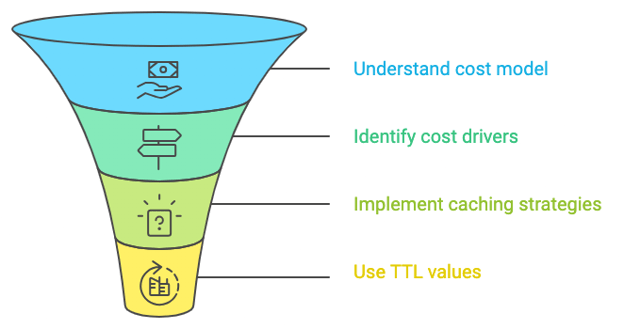
In an attempt to work with numerous caching examples, we may come across some issues that require easy fixes. A few of those issues are as follows:
A cache miss occurs when a prompt isn’t found in the cache. This might happen due to inconsistent prompt structures or overly restrictive similarity thresholds. To fix this, we need to review the prompts for consistency and adjust the similarity threshold to allow for minor variations. Imagine a customer service chatbot frequently receiving the prompt: "What is your refund policy?" and caching the response. However, if a user asks, "Can you tell me about your return policy?" and the system's similarity threshold is too strict, it won't recognize this as a similar prompt, resulting in a cache miss.
Cache invalidation is necessary when the underlying data or model changes. You can set up automatic invalidation policies to refresh cache entries or implement manual invalidation for specific entries when necessary. Suppose a finance application caches responses related to tax regulations. If the tax laws change, the previously cached responses become outdated. The system can be set up with an automatic invalidation policy, which refreshes or clears the cache after a regulatory update.
In this article, we explored the concept of prompt caching and its implementation using Ollama. We demonstrated how prompt caching can significantly reduce inference time and costs associated with LLMs.
I am a Google Developers Expert in ML(Gen AI), a Kaggle 3x Expert, and a Women Techmakers Ambassador with 3+ years of experience in tech. I co-founded a health-tech startup in 2020 and am pursuing a master's in computer science at Georgia Tech, specializing in machine learning.

blog
 Matt David• 3 min

blog
 Dr Ana Rojo-Echeburúa• 10 min

Samouczek
 Bexruz (Bex) Tuychiev• 12 min
Learn AI with these courses!
Ścieżka
Naucz się tworzyć aplikacje oparte na AI z wykorzystaniem najnowszych narzędzi dla deweloperów AI, w tym OpenAI API, Hugging Face i LangChain.
Kurs
Poznaj najnowsze techniki uruchamiania Llama LLM lokalnie i integrowania go ze swoim stosem.
Kurs
Poznaj nowoczesne metody integracji danych zewnętrznych z LLM-ami za pomocą Retrieval Augmented Generation (RAG) z LangChain.







Prompt caching stores responses to frequently asked prompts. This allows language models to skip redundant processing and retrieve pre-generated responses. It not only saves costs and reduces latency but also makes AI-powered interactions faster and more efficient.
In this blog, we'll explore what prompt caching is, how it works, its benefits, and its challenges. We will also explore real-world applications and offer best practices for effective caching strategies.
What Is Prompt Caching?
In this section, we’ll walk through the working mechanism of prompt caching along with some key benefits and considerations that make this technique so useful.