
Differences Between BigQuery and Redshift
After a brief overview of these two cloud data warehouses, let’s closely examine their differences in different areas.
Architecture
The platform architecture outlines how systems should function. Here, I will highlight the distinction between BigQuery's serverless, query-based pricing model and Redshift's cluster-based approach.
BigQuery
If you prefer a hands-off approach with automatic scaling, BigQuery is your go-to for data warehousing.
BigQuery allows you not to manage any infrastructure; Google handles everything from provisioning to scaling. With BigQuery, you only pay for the queries you run and the storage you use. This pay-as-you-go pricing approach is cost-effective and helps you not incur idle resource costs.
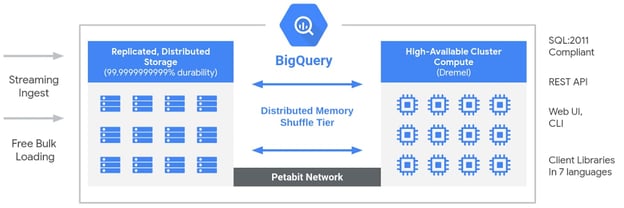
BigQuery architecture (Source: Google Cloud blog).
Redshift
If you need more control over your infrastructure and can manage your clusters effectively, Amazon Redshift will be a better fit for you. Redshift requires you to set up and manage clusters by choosing the instance type, number of nodes, and configuration. This gives you control over the infrastructure, but, in my experience, it also adds complexity.
Redshift offers both a reserved and on-demand pricing approach. With reserved instances, you receive a discount and commit to a specific capacity for a predetermined period (such as one or three years). On-demand pricing allows you to pay for the capacity you use hourly, but improper management can make it more costly.
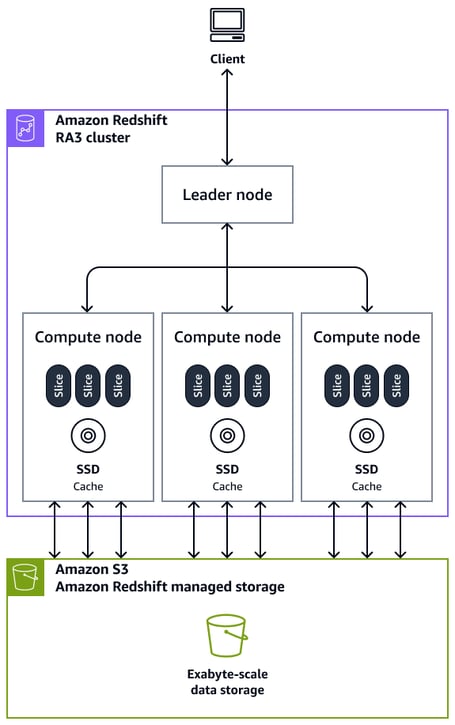
Amazon Redshift architecture (Source: AWS).
Performance
Both Google BigQuery and Amazon Redshift provide impressive performance for large-scale queries, but they perform best in different cases. Let's look at how both platforms manage performance for large-scale queries, highlighting BigQuery's optimized performance for ad-hoc queries and Redshift's control over clusters for predictable workloads.
BigQuery
BigQuery is built to easily handle dynamic workloads due to its serverless architecture. This allows BigQuery to autoscale workloads, enabling high performance for large-scale ad-hoc queries. BigQuery's columnar storage is highly efficient for analytical queries. This format reduces the amount of data read from the disk, speeding up query performance.
Redshift
Redshift can be a better option if you can manage clusters for reliable performance in environments with predictable workloads. You can tune clusters for consistent query performance, ensuring your resources are optimized for your business requirements.
Redshift offers various performance tuning options, such as sort and distribution keys, to optimize query execution. This feature can lead to better performance for predictable workloads, but only if you know what you’re doing! In my experience, the learning curve can be steep.
Cost structure
Understanding price and cost structures is essential when selecting a data warehouse because we want to be responsible for every dollar we spend.
Let’s review how Google BigQuery's pay-per-query model and storage expenses compare to Amazon Redshift's cluster-based pricing with reserved instance savings:
|
Cost Factor |
BigQuery |
Redshift |
|
Free tier |
10GB free per month |
There is no free tier, but it offers a 2-month free trial |
|
Storage costs |
$20 per TB for active logical storage, $10 for long-term |
$0.025 per GB per month for SSD, $0.08 per GB for RA3 |
|
Query costs |
$5 per TB for on-demand queries |
Based on compute instance usage and storage |
|
Compute costs |
Charges based on capacity compute (by slot hour) |
Hourly billing (on-demand or reserved pricing) |
|
Scaling |
Automatic scaling with autoscaler |
Manual scaling with node management |
|
Backup costs |
Charges for long-term storage beyond the free tier |
Included for basic backups, extra costs for more snapshots |
|
Additional costs |
None for backups or scaling |
Charges for concurrency scaling after free trial |
Scalability
One of the most important factors we should consider while selecting our data warehouse is scalability.
Let's examine how BigQuery automatically increases storage and computing capacity in response to demand and how Redshift demands manual cluster scaling, which can take longer.
BigQuery
BigQuery is the preferred platform when you are sure your business will expand along with its workloads and infrastructures. BigQuery's autoscaling functionality relieves you of this burden, saving you time and effort so you can concentrate entirely on data analysis.
Redshift
In ideal circumstances, Redshift will be better if your company has enough data engineers. Although Redshift demands more active management, it might be advantageous for your company, particularly if you need more precise control and wish to manage resources.
The drawback is that management takes a lot of time, even if it gives you freedom. Your workflow may become more complex due to the requirement to plan, track performance, and act when scale is required.
Ecosystem integration
Both Google BigQuery and Amazon Redshift offer benefits specific to their ecosystems when integrating with their cloud computing platforms.
BigQuery
BigQuery works smoothly for teams using GCP and its services, such as Google Compute Engine, Cloud Storage, and Cloud Run; then, it may be beneficial to use BigQuery to keep your data pipelines within the same environment.
This integration with Google's suite of tools and services makes BigQuery the preferred option for data warehousing if your business already uses the Google ecosystem because it offers a smooth workflow with its services.
Redshift
Amazon Redshift will sync well with other services in the AWS ecosystem. It can integrate with Amazon S3, AWS Lambda, and AWS Glue, giving you easy access to other AWS services and resources. In my opinion, this is a great advantage!
Ease of use
The key difference between Google BigQuery and Amazon Redshift is the operational responsibility these services place on their customers.
BigQuery
Since we don’t need to worry about managing underlying infrastructure, Google handles everything from provisioning to scaling using BigQuery. This feature makes BigQuery stand out for businesses with few infrastructure engineers trying to avoid operational responsibilities.
Redshift
Redshift, on the other hand, demands more technical know-how and expertise. If your team has infrastructure engineers, there will be fewer issues handling backups, manual scaling, and provisioning clusters. As a business, this gives you control and flexibility over your infrastructure.
When to Use BigQuery
There are various use cases and scenarios where Google BigQuery becomes the go-to data warehousing solution. Choose BigQuery if you:
- Already use Google Cloud services.
Since it is built on the Google Cloud Platform, BigQuery is more compatible with individuals who are heavily invested in GCP. Suppose you have most of your resources within the Google Cloud Platform, such as Google Compute Engine, Cloud Storage, and Cloud Run. Using your data pipelines within the same environment may be beneficial.
- Require real-time analytics or ad-hoc queries.
BigQuery is a powerful tool for handling large datasets for ad-hoc queries or real-time analytics. Since you don’t need to worry about managing infrastructure, this ensures that your queries are processed fast and efficiently; your workload auto-scales regardless of the size or complexity of your data.
- Lack of DevOps resources to manage infrastructure.
If your team doesn’t have the necessary DevOps resources, BigQuery is a clear winner here. You don’t need to bother yourself with the technicality of managing infrastructures; Google does that for you. This helps you focus solely on the data insights.
When to Use Redshift
There are some scenarios and use cases where Amazon Redshift is the clear choice data warehousing solution. Choose Redshift if you:
- Are heavily invested in the AWS ecosystem.
If your organization has deployed its resources and integrated into the AWS ecosystem, Redshift is a natural fit. Amazon Redshift will work with other AWS services like Amazon S3, AWS Lambda, and AWS Glue, making it possible to rely solely on AWS for data management, such as data storage, processing, and automation needs.
- Require consistent performance for predictable query patterns.
Redshift is compatible with heavy workloads that demand consistent performance for predictable query patterns and a smooth and efficient run. Since Redshift’s clusters are customizable and you can control the infrastructure, you can tune your Redshift to meet any specific performance requirements.
- Have ETL-heavy workflows and strong infrastructure management capabilities.
If your team handles complex ETL workflows with data engineers who manage infrastructure, then Redshift is the right fit. This suits companies with DevOps expertise well for handling heavy workflows; you will have control over scaling, backups, and performance.
BigQuery vs. Redshift: Summary Table
Now that we’ve reviewed some significant components of both tools let's review their key highlights. This should help in deciding which tool to utilize for your specific needs:
|
Features |
BigQuery |
Redshift |
|
Architecture |
Serverless architecture means you don’t need to manage any infrastructure. |
Operates on a cluster-based architecture where you need to manage the clusters manually. |
|
Performance |
Can handle large datasets quickly, especially with real-time analytics or ad-hoc queries. |
Known for its reliable performance with predictable query patterns. |
|
Cost structure |
It uses a pay-per-query model, meaning you pay for the data processed by each query. |
It uses reserved instances for cost discounts, where you pay a specific amount of computing resources upfront. |
|
Scalability |
Automatic scalability is one of BigQuery's strongest features. |
Manual scaling is required, so you must manage cluster resizing, resource allocation, and performance tuning. |
|
Ecosystem integration |
Deep integration with Google Cloud Platform (GCP) services makes it a top choice for teams already working within the Google ecosystem. |
Seamlessly integrates with Amazon Web Services (AWS) environment and its services for teams already using the AWS ecosystem. |
|
Ease of use |
BigQuery's fully managed, serverless architecture simplifies it without requiring deep infrastructure management skills. |
Redshift requires more hands-on management. You need to monitor and manage clusters, scaling, and performance. |
Conclusion
This article explored the key comparisons between BigQuery and Redshift, two cloud data warehousing solutions with unique strengths and trade-offs. The best choice depends on your needs, including data volume, query patterns, and budget.
If you're interested in diving deeper into these platforms, check out Introduction to Redshift and Introduction to BigQuery on DataCamp. These hands-on courses will help you master the fundamentals of each tool and gain practical skills to work effectively with modern data warehouses.
FAQs
Can I use both BigQuery and Redshift in the same data ecosystem?
Yes, you can integrate both platforms into a single data ecosystem depending on your specific use cases. For instance, BigQuery could handle ad-hoc analysis on massive datasets, while Redshift could serve as your primary data warehouse for structured business intelligence tasks. Data integration tools like Apache Airflow, dbt, or Fivetran make it easier to manage workflows between the two.
How do BigQuery and Redshift handle semi-structured data formats like JSON?
Both platforms can process semi-structured data, but their approaches differ. BigQuery has native support for JSON and nested structures, allowing you to query fields directly using SQL. Redshift requires you to use Redshift Spectrum for querying external JSON files or flatten the data into relational tables for better performance.
Are there specific industries or use cases where BigQuery or Redshift is clearly better?
BigQuery is often preferred for industries with fluctuating data volumes, such as media and advertising, due to its serverless and on-demand nature. Redshift shines in industries like finance or healthcare, where predictable workloads and real-time dashboards are critical. However, the choice always depends on your business priorities.
What’s the learning curve for using BigQuery vs. Redshift for a beginner?
BigQuery’s interface and on-demand nature make it beginner-friendly, especially for users familiar with Google Cloud. Redshift may require a steeper learning curve since it involves configuring clusters and managing scaling manually, though tools like Amazon QuickSight can simplify its use for analytics.
How do storage costs evolve as datasets grow in BigQuery vs. Redshift?
BigQuery charges based on the amount of data stored and queried, so costs can rise significantly if you frequently query large datasets. Redshift’s storage costs depend on the cluster size and type you choose, making it more predictable but requiring upfront optimization for cost control.

Emmanuel Akor is a Cloud & DevOps Engineer skilled in leveraging cloud technologies and DevOps tools to drive impactful projects. A First-Class Computer Science graduate from Babcock University and former Cloud Co-Lead for GDSC, Emmanuel combines academic excellence with hands-on experience. As a Technical Content Writer, he excels at sharing knowledge and collaborating with teams.
%22%3E%0A%20%20%20%20%20%20%20%20%3Crect%20fill%3D%22%23EFEBE4%22%20height%3D%22180%22%20width%3D%22336%22%20%2F%3E%0A%20%20%20%20%20%20%20%20%3Crect%0A%20%20%20%20%20%20%20%20%20%20fill%3D%22%23DD3400%22%0A%20%20%20%20%20%20%20%20%20%20height%3D%22106.6%22%0A%20%20%20%20%20%20%20%20%20%20transform%3D%22rotate(-30%20-208.588%20220.18)%22%0A%20%20%20%20%20%20%20%20%20%20width%3D%22456.125%22%0A%20%20%20%20%20%20%20%20%20%20x%3D%22-208.588%22%0A%20%20%20%20%20%20%20%20%20%20y%3D%22220.18%22%0A%20%20%20%20%20%20%20%20%2F%3E%0A%20%20%20%20%20%20%20%20%3Crect%0A%20%20%20%20%20%20%20%20%20%20fill%3D%22%23FFEC3C%22%0A%20%20%20%20%20%20%20%20%20%20height%3D%2235.875%22%0A%20%20%20%20%20%20%20%20%20%20transform%3D%22rotate(-30%20-208.588%20220.18)%22%0A%20%20%20%20%20%20%20%20%20%20width%3D%22347.576%22%0A%20%20%20%20%20%20%20%20%20%20x%3D%22-208.588%22%0A%20%20%20%20%20%20%20%20%20%20y%3D%22220.18%22%0A%20%20%20%20%20%20%20%20%2F%3E%0A%20%20%20%20%20%20%20%20%3Crect%0A%20%20%20%20%20%20%20%20%20%20fill%3D%22%23FF931E%22%0A%20%20%20%20%20%20%20%20%20%20height%3D%2235.875%22%0A%20%20%20%20%20%20%20%20%20%20transform%3D%22rotate(-30%20-226.525%20189.111)%22%0A%20%20%20%20%20%20%20%20%20%20width%3D%22347.576%22%0A%20%20%20%20%20%20%20%20%20%20x%3D%22-226.525%22%0A%20%20%20%20%20%20%20%20%20%20y%3D%22189.111%22%0A%20%20%20%20%20%20%20%20%2F%3E%0A%20%20%20%20%20%20%20%20%3Crect%0A%20%20%20%20%20%20%20%20%20%20fill%3D%22%23DD3400%22%0A%20%20%20%20%20%20%20%20%20%20height%3D%22106.6%22%0A%20%20%20%20%20%20%20%20%20%20transform%3D%22rotate(-30%2085.5879%20256.055)%22%0A%20%20%20%20%20%20%20%20%20%20width%3D%22456.125%22%0A%20%20%20%20%20%20%20%20%20%20x%3D%2285.5879%22%0A%20%20%20%20%20%20%20%20%20%20y%3D%22256.055%22%0A%20%20%20%20%20%20%20%20%2F%3E%0A%20%20%20%20%20%20%20%20%3Crect%0A%20%20%20%20%20%20%20%20%20%20fill%3D%22%23FFEC3C%22%0A%20%20%20%20%20%20%20%20%20%20height%3D%2235.875%22%0A%20%20%20%20%20%20%20%20%20%20transform%3D%22rotate(-30%2085.5879%20256.055)%22%0A%20%20%20%20%20%20%20%20%20%20width%3D%22184.5%22%0A%20%20%20%20%20%20%20%20%20%20x%3D%2285.5879%22%0A%20%20%20%20%20%20%20%20%20%20y%3D%22256.055%22%0A%20%20%20%20%20%20%20%20%2F%3E%0A%20%20%20%20%20%20%20%20%3Crect%0A%20%20%20%20%20%20%20%20%20%20fill%3D%22%23FF931E%22%0A%20%20%20%20%20%20%20%20%20%20height%3D%2235.875%22%0A%20%20%20%20%20%20%20%20%20%20transform%3D%22rotate(-30%20227.432%20132.736)%22%0A%20%20%20%20%20%20%20%20%20%20width%3D%22271.625%22%0A%20%20%20%20%20%20%20%20%20%20x%3D%22227.432%22%0A%20%20%20%20%20%20%20%20%20%20y%3D%22132.736%22%0A%20%20%20%20%20%20%20%20%2F%3E%0A%20%20%20%20%20%20%3C%2Fg%3E%0A%20%20%20%20%20%20%3Cdefs%3E%0A%20%20%20%20%20%20%20%20%3CclipPath%20id%3D%22clip%22%3E%0A%20%20%20%20%20%20%20%20%20%20%3Crect%20fill%3D%22white%22%20height%3D%22180%22%20width%3D%22336%22%20%2F%3E%0A%20%20%20%20%20%20%20%20%3C%2FclipPath%3E%0A%20%20%20%20%20%20%3C%2Fdefs%3E%0A%20%20%20%20%3C%2Fsvg%3E)

%22%3E%0A%20%20%20%20%20%20%20%20%3Crect%20fill%3D%22%23EFEBE4%22%20height%3D%22180%22%20width%3D%22336%22%20%2F%3E%0A%20%20%20%20%20%20%20%20%3Crect%0A%20%20%20%20%20%20%20%20%20%20fill%3D%22%23FF931E%22%0A%20%20%20%20%20%20%20%20%20%20height%3D%22106.6%22%0A%20%20%20%20%20%20%20%20%20%20transform%3D%22rotate(-30%20-208.588%20220.18)%22%0A%20%20%20%20%20%20%20%20%20%20width%3D%22456.125%22%0A%20%20%20%20%20%20%20%20%20%20x%3D%22-208.588%22%0A%20%20%20%20%20%20%20%20%20%20y%3D%22220.18%22%0A%20%20%20%20%20%20%20%20%2F%3E%0A%20%20%20%20%20%20%20%20%3Crect%0A%20%20%20%20%20%20%20%20%20%20fill%3D%22%23F7F3EB%22%0A%20%20%20%20%20%20%20%20%20%20height%3D%2235.875%22%0A%20%20%20%20%20%20%20%20%20%20transform%3D%22rotate(-30%20-208.588%20220.18)%22%0A%20%20%20%20%20%20%20%20%20%20width%3D%22347.576%22%0A%20%20%20%20%20%20%20%20%20%20x%3D%22-208.588%22%0A%20%20%20%20%20%20%20%20%20%20y%3D%22220.18%22%0A%20%20%20%20%20%20%20%20%2F%3E%0A%20%20%20%20%20%20%20%20%3Crect%0A%20%20%20%20%20%20%20%20%20%20fill%3D%22%23000820%22%0A%20%20%20%20%20%20%20%20%20%20height%3D%2235.875%22%0A%20%20%20%20%20%20%20%20%20%20transform%3D%22rotate(-30%20-226.525%20189.111)%22%0A%20%20%20%20%20%20%20%20%20%20width%3D%22347.576%22%0A%20%20%20%20%20%20%20%20%20%20x%3D%22-226.525%22%0A%20%20%20%20%20%20%20%20%20%20y%3D%22189.111%22%0A%20%20%20%20%20%20%20%20%2F%3E%0A%20%20%20%20%20%20%20%20%3Crect%0A%20%20%20%20%20%20%20%20%20%20fill%3D%22%23000820%22%0A%20%20%20%20%20%20%20%20%20%20height%3D%22106.6%22%0A%20%20%20%20%20%20%20%20%20%20transform%3D%22rotate(-30%2085.5879%20256.055)%22%0A%20%20%20%20%20%20%20%20%20%20width%3D%22456.125%22%0A%20%20%20%20%20%20%20%20%20%20x%3D%2285.5879%22%0A%20%20%20%20%20%20%20%20%20%20y%3D%22256.055%22%0A%20%20%20%20%20%20%20%20%2F%3E%0A%20%20%20%20%20%20%20%20%3Crect%0A%20%20%20%20%20%20%20%20%20%20fill%3D%22%23D87300%22%0A%20%20%20%20%20%20%20%20%20%20height%3D%2235.875%22%0A%20%20%20%20%20%20%20%20%20%20transform%3D%22rotate(-30%2085.5879%20256.055)%22%0A%20%20%20%20%20%20%20%20%20%20width%3D%22184.5%22%0A%20%20%20%20%20%20%20%20%20%20x%3D%2285.5879%22%0A%20%20%20%20%20%20%20%20%20%20y%3D%22256.055%22%0A%20%20%20%20%20%20%20%20%2F%3E%0A%20%20%20%20%20%20%20%20%3Crect%0A%20%20%20%20%20%20%20%20%20%20fill%3D%22%23FF931E%22%0A%20%20%20%20%20%20%20%20%20%20height%3D%2235.875%22%0A%20%20%20%20%20%20%20%20%20%20transform%3D%22rotate(-30%20227.432%20132.736)%22%0A%20%20%20%20%20%20%20%20%20%20width%3D%22271.625%22%0A%20%20%20%20%20%20%20%20%20%20x%3D%22227.432%22%0A%20%20%20%20%20%20%20%20%20%20y%3D%22132.736%22%0A%20%20%20%20%20%20%20%20%2F%3E%0A%20%20%20%20%20%20%3C%2Fg%3E%0A%20%20%20%20%20%20%3Cdefs%3E%0A%20%20%20%20%20%20%20%20%3CclipPath%20id%3D%22clip%22%3E%0A%20%20%20%20%20%20%20%20%20%20%3Crect%20fill%3D%22white%22%20height%3D%22180%22%20width%3D%22336%22%20%2F%3E%0A%20%20%20%20%20%20%20%20%3C%2FclipPath%3E%0A%20%20%20%20%20%20%3C%2Fdefs%3E%0A%20%20%20%20%3C%2Fsvg%3E)

%22%3E%0A%20%20%20%20%20%20%20%20%3Crect%20fill%3D%22%2305192D%22%20height%3D%22180%22%20width%3D%22336%22%20%2F%3E%0A%20%20%20%20%20%20%20%20%3Crect%0A%20%20%20%20%20%20%20%20%20%20fill%3D%22%23B08EFF%22%0A%20%20%20%20%20%20%20%20%20%20height%3D%22106.6%22%0A%20%20%20%20%20%20%20%20%20%20transform%3D%22rotate(-30%20-208.588%20220.18)%22%0A%20%20%20%20%20%20%20%20%20%20width%3D%22456.125%22%0A%20%20%20%20%20%20%20%20%20%20x%3D%22-208.588%22%0A%20%20%20%20%20%20%20%20%20%20y%3D%22220.18%22%0A%20%20%20%20%20%20%20%20%2F%3E%0A%20%20%20%20%20%20%20%20%3Crect%0A%20%20%20%20%20%20%20%20%20%20fill%3D%22%237933FF%22%0A%20%20%20%20%20%20%20%20%20%20height%3D%2235.875%22%0A%20%20%20%20%20%20%20%20%20%20transform%3D%22rotate(-30%20-208.588%20220.18)%22%0A%20%20%20%20%20%20%20%20%20%20width%3D%22347.576%22%0A%20%20%20%20%20%20%20%20%20%20x%3D%22-208.588%22%0A%20%20%20%20%20%20%20%20%20%20y%3D%22220.18%22%0A%20%20%20%20%20%20%20%20%2F%3E%0A%20%20%20%20%20%20%20%20%3Crect%0A%20%20%20%20%20%20%20%20%20%20fill%3D%22%2372E5FE%22%0A%20%20%20%20%20%20%20%20%20%20height%3D%2235.875%22%0A%20%20%20%20%20%20%20%20%20%20transform%3D%22rotate(-30%20-226.525%20189.111)%22%0A%20%20%20%20%20%20%20%20%20%20width%3D%22347.576%22%0A%20%20%20%20%20%20%20%20%20%20x%3D%22-226.525%22%0A%20%20%20%20%20%20%20%20%20%20y%3D%22189.111%22%0A%20%20%20%20%20%20%20%20%2F%3E%0A%20%20%20%20%20%20%20%20%3Crect%0A%20%20%20%20%20%20%20%20%20%20fill%3D%22%235EB1FF%22%0A%20%20%20%20%20%20%20%20%20%20height%3D%22106.6%22%0A%20%20%20%20%20%20%20%20%20%20transform%3D%22rotate(-30%2085.5879%20256.055)%22%0A%20%20%20%20%20%20%20%20%20%20width%3D%22456.125%22%0A%20%20%20%20%20%20%20%20%20%20x%3D%2285.5879%22%0A%20%20%20%20%20%20%20%20%20%20y%3D%22256.055%22%0A%20%20%20%20%20%20%20%20%2F%3E%0A%20%20%20%20%20%20%20%20%3Crect%0A%20%20%20%20%20%20%20%20%20%20fill%3D%22%23B08EFF%22%0A%20%20%20%20%20%20%20%20%20%20height%3D%2235.875%22%0A%20%20%20%20%20%20%20%20%20%20transform%3D%22rotate(-30%2085.5879%20256.055)%22%0A%20%20%20%20%20%20%20%20%20%20width%3D%22184.5%22%0A%20%20%20%20%20%20%20%20%20%20x%3D%2285.5879%22%0A%20%20%20%20%20%20%20%20%20%20y%3D%22256.055%22%0A%20%20%20%20%20%20%20%20%2F%3E%0A%20%20%20%20%20%20%20%20%3Crect%0A%20%20%20%20%20%20%20%20%20%20fill%3D%22%2372E5FE%22%0A%20%20%20%20%20%20%20%20%20%20height%3D%2235.875%22%0A%20%20%20%20%20%20%20%20%20%20transform%3D%22rotate(-30%20227.432%20132.736)%22%0A%20%20%20%20%20%20%20%20%20%20width%3D%22271.625%22%0A%20%20%20%20%20%20%20%20%20%20x%3D%22227.432%22%0A%20%20%20%20%20%20%20%20%20%20y%3D%22132.736%22%0A%20%20%20%20%20%20%20%20%2F%3E%0A%20%20%20%20%20%20%3C%2Fg%3E%0A%20%20%20%20%20%20%3Cdefs%3E%0A%20%20%20%20%20%20%20%20%3CclipPath%20id%3D%22clip%22%3E%0A%20%20%20%20%20%20%20%20%20%20%3Crect%20fill%3D%22white%22%20height%3D%22180%22%20width%3D%22336%22%20%2F%3E%0A%20%20%20%20%20%20%20%20%3C%2FclipPath%3E%0A%20%20%20%20%20%20%3C%2Fdefs%3E%0A%20%20%20%20%3C%2Fsvg%3E)

%22%3E%0A%20%20%20%20%20%20%20%20%3Crect%20fill%3D%22%23F7F3EB%22%20height%3D%22180%22%20width%3D%22336%22%20%2F%3E%0A%20%20%20%20%20%20%20%20%3Crect%0A%20%20%20%20%20%20%20%20%20%20fill%3D%22%23000820%22%0A%20%20%20%20%20%20%20%20%20%20height%3D%22106.6%22%0A%20%20%20%20%20%20%20%20%20%20transform%3D%22rotate(-30%20-208.588%20220.18)%22%0A%20%20%20%20%20%20%20%20%20%20width%3D%22456.125%22%0A%20%20%20%20%20%20%20%20%20%20x%3D%22-208.588%22%0A%20%20%20%20%20%20%20%20%20%20y%3D%22220.18%22%0A%20%20%20%20%20%20%20%20%2F%3E%0A%20%20%20%20%20%20%20%20%3Crect%0A%20%20%20%20%20%20%20%20%20%20fill%3D%22%2300C74E%22%0A%20%20%20%20%20%20%20%20%20%20height%3D%2235.875%22%0A%20%20%20%20%20%20%20%20%20%20transform%3D%22rotate(-30%20-208.588%20220.18)%22%0A%20%20%20%20%20%20%20%20%20%20width%3D%22347.576%22%0A%20%20%20%20%20%20%20%20%20%20x%3D%22-208.588%22%0A%20%20%20%20%20%20%20%20%20%20y%3D%22220.18%22%0A%20%20%20%20%20%20%20%20%2F%3E%0A%20%20%20%20%20%20%20%20%3Crect%0A%20%20%20%20%20%20%20%20%20%20fill%3D%22%23FF931E%22%0A%20%20%20%20%20%20%20%20%20%20height%3D%2235.875%22%0A%20%20%20%20%20%20%20%20%20%20transform%3D%22rotate(-30%20-226.525%20189.111)%22%0A%20%20%20%20%20%20%20%20%20%20width%3D%22347.576%22%0A%20%20%20%20%20%20%20%20%20%20x%3D%22-226.525%22%0A%20%20%20%20%20%20%20%20%20%20y%3D%22189.111%22%0A%20%20%20%20%20%20%20%20%2F%3E%0A%20%20%20%20%20%20%20%20%3Crect%0A%20%20%20%20%20%20%20%20%20%20fill%3D%22%23D87300%22%0A%20%20%20%20%20%20%20%20%20%20height%3D%22106.6%22%0A%20%20%20%20%20%20%20%20%20%20transform%3D%22rotate(-30%2085.5879%20256.055)%22%0A%20%20%20%20%20%20%20%20%20%20width%3D%22456.125%22%0A%20%20%20%20%20%20%20%20%20%20x%3D%2285.5879%22%0A%20%20%20%20%20%20%20%20%20%20y%3D%22256.055%22%0A%20%20%20%20%20%20%20%20%2F%3E%0A%20%20%20%20%20%20%20%20%3Crect%0A%20%20%20%20%20%20%20%20%20%20fill%3D%22%23000820%22%0A%20%20%20%20%20%20%20%20%20%20height%3D%2235.875%22%0A%20%20%20%20%20%20%20%20%20%20transform%3D%22rotate(-30%2085.5879%20256.055)%22%0A%20%20%20%20%20%20%20%20%20%20width%3D%22184.5%22%0A%20%20%20%20%20%20%20%20%20%20x%3D%2285.5879%22%0A%20%20%20%20%20%20%20%20%20%20y%3D%22256.055%22%0A%20%20%20%20%20%20%20%20%2F%3E%0A%20%20%20%20%20%20%20%20%3Crect%0A%20%20%20%20%20%20%20%20%20%20fill%3D%22%2300C74E%22%0A%20%20%20%20%20%20%20%20%20%20height%3D%2235.875%22%0A%20%20%20%20%20%20%20%20%20%20transform%3D%22rotate(-30%20227.432%20132.736)%22%0A%20%20%20%20%20%20%20%20%20%20width%3D%22271.625%22%0A%20%20%20%20%20%20%20%20%20%20x%3D%22227.432%22%0A%20%20%20%20%20%20%20%20%20%20y%3D%22132.736%22%0A%20%20%20%20%20%20%20%20%2F%3E%0A%20%20%20%20%20%20%3C%2Fg%3E%0A%20%20%20%20%20%20%3Cdefs%3E%0A%20%20%20%20%20%20%20%20%3CclipPath%20id%3D%22clip%22%3E%0A%20%20%20%20%20%20%20%20%20%20%3Crect%20fill%3D%22white%22%20height%3D%22180%22%20width%3D%22336%22%20%2F%3E%0A%20%20%20%20%20%20%20%20%3C%2FclipPath%3E%0A%20%20%20%20%20%20%3C%2Fdefs%3E%0A%20%20%20%20%3C%2Fsvg%3E)



%22%3E%0A%20%20%20%20%20%20%20%20%3Crect%20fill%3D%22%23EFEBE4%22%20height%3D%22180%22%20width%3D%22336%22%20%2F%3E%0A%20%20%20%20%20%20%20%20%3Crect%0A%20%20%20%20%20%20%20%20%20%20fill%3D%22%2372E5FE%22%0A%20%20%20%20%20%20%20%20%20%20height%3D%22106.6%22%0A%20%20%20%20%20%20%20%20%20%20transform%3D%22rotate(-30%20-208.588%20220.18)%22%0A%20%20%20%20%20%20%20%20%20%20width%3D%22456.125%22%0A%20%20%20%20%20%20%20%20%20%20x%3D%22-208.588%22%0A%20%20%20%20%20%20%20%20%20%20y%3D%22220.18%22%0A%20%20%20%20%20%20%20%20%2F%3E%0A%20%20%20%20%20%20%20%20%3Crect%0A%20%20%20%20%20%20%20%20%20%20fill%3D%22%23000820%22%0A%20%20%20%20%20%20%20%20%20%20height%3D%2235.875%22%0A%20%20%20%20%20%20%20%20%20%20transform%3D%22rotate(-30%20-208.588%20220.18)%22%0A%20%20%20%20%20%20%20%20%20%20width%3D%22347.576%22%0A%20%20%20%20%20%20%20%20%20%20x%3D%22-208.588%22%0A%20%20%20%20%20%20%20%20%20%20y%3D%22220.18%22%0A%20%20%20%20%20%20%20%20%2F%3E%0A%20%20%20%20%20%20%20%20%3Crect%0A%20%20%20%20%20%20%20%20%20%20fill%3D%22%235EB1FF%22%0A%20%20%20%20%20%20%20%20%20%20height%3D%2235.875%22%0A%20%20%20%20%20%20%20%20%20%20transform%3D%22rotate(-30%20-226.525%20189.111)%22%0A%20%20%20%20%20%20%20%20%20%20width%3D%22347.576%22%0A%20%20%20%20%20%20%20%20%20%20x%3D%22-226.525%22%0A%20%20%20%20%20%20%20%20%20%20y%3D%22189.111%22%0A%20%20%20%20%20%20%20%20%2F%3E%0A%20%20%20%20%20%20%20%20%3Crect%0A%20%20%20%20%20%20%20%20%20%20fill%3D%22%23000820%22%0A%20%20%20%20%20%20%20%20%20%20height%3D%22106.6%22%0A%20%20%20%20%20%20%20%20%20%20transform%3D%22rotate(-30%2085.5879%20256.055)%22%0A%20%20%20%20%20%20%20%20%20%20width%3D%22456.125%22%0A%20%20%20%20%20%20%20%20%20%20x%3D%2285.5879%22%0A%20%20%20%20%20%20%20%20%20%20y%3D%22256.055%22%0A%20%20%20%20%20%20%20%20%2F%3E%0A%20%20%20%20%20%20%20%20%3Crect%0A%20%20%20%20%20%20%20%20%20%20fill%3D%22%23D87300%22%0A%20%20%20%20%20%20%20%20%20%20height%3D%2235.875%22%0A%20%20%20%20%20%20%20%20%20%20transform%3D%22rotate(-30%2085.5879%20256.055)%22%0A%20%20%20%20%20%20%20%20%20%20width%3D%22184.5%22%0A%20%20%20%20%20%20%20%20%20%20x%3D%2285.5879%22%0A%20%20%20%20%20%20%20%20%20%20y%3D%22256.055%22%0A%20%20%20%20%20%20%20%20%2F%3E%0A%20%20%20%20%20%20%20%20%3Crect%0A%20%20%20%20%20%20%20%20%20%20fill%3D%22%235646A5%22%0A%20%20%20%20%20%20%20%20%20%20height%3D%2235.875%22%0A%20%20%20%20%20%20%20%20%20%20transform%3D%22rotate(-30%20227.432%20132.736)%22%0A%20%20%20%20%20%20%20%20%20%20width%3D%22271.625%22%0A%20%20%20%20%20%20%20%20%20%20x%3D%22227.432%22%0A%20%20%20%20%20%20%20%20%20%20y%3D%22132.736%22%0A%20%20%20%20%20%20%20%20%2F%3E%0A%20%20%20%20%20%20%3C%2Fg%3E%0A%20%20%20%20%20%20%3Cdefs%3E%0A%20%20%20%20%20%20%20%20%3CclipPath%20id%3D%22clip%22%3E%0A%20%20%20%20%20%20%20%20%20%20%3Crect%20fill%3D%22white%22%20height%3D%22180%22%20width%3D%22336%22%20%2F%3E%0A%20%20%20%20%20%20%20%20%3C%2FclipPath%3E%0A%20%20%20%20%20%20%3C%2Fdefs%3E%0A%20%20%20%20%3C%2Fsvg%3E)

When dealing with large amounts of structured and semi-structured data from various sources, we think of a centralized repository to store them. The perspective on data warehouses constantly changes, and cloud-based solutions provide exceptional performance, flexibility, and scalability. Google BigQuery and Amazon Redshift are the top solutions in this field.
Both cloud-based data warehouses' powerful data processing, analytics, and storage features enable data professionals to manage their data more effectively and efficiently.
In this article, I will thoroughly compare these platforms, including their features, benefits, drawbacks, and best practices. Let's examine the specifics and help you identify the best option for your requirements!
What is BigQuery?
Google BigQuery is a fully managed, serverless data warehouse offered by Google Cloud Platform (GCP). BigQuery is designed to handle massive datasets, enable real-time analysis, and support machine learning workflows with minimal infrastructure management. Its serverless architecture lets you use SQL queries to analyze your data.
BigQuery presents data in tables, rows, and columns, supporting database transaction semantics (ACID). BigQuery storage is automatically replicated across multiple locations to provide high availability.
GCP interface: BigQuery console main interface.
BigQuery core features:
BigQuery use cases:
What is Redshift?
Amazon Redshift is a cloud-based data warehouse solution that forms part of the larger cloud-computing platform, Amazon Web Services (AWS). With Redshift’s cluster-based architecture, users can access and analyze large-scale predictable workloads with the need to manage the infrastructure themselves.
Redshift lets users load data and start querying immediately using the Amazon Redshift query editor v2 or their preferred business intelligence (BI) tool. The service offers the best price-performance ratio and familiar SQL features in an easy-to-use, zero-administration environment.
AWS interface: Amazon Redshift console main interface.
Redshift core features:
Redshift use cases: