Large language model inference can become increasingly expensive as prompts grow.
RAG systems, coding agents, multi-agent workflows, and long conversations often send the same documents, system prompts, tool definitions, or conversation history to the model repeatedly.
Each time this shared context is processed during prefill, the model generates key-value (KV) states that are used during token generation.
Recomputing those states for the same context wastes GPU compute and increases latency.
LMCache addresses this by adding a dedicated KV cache layer to the inference stack.
It can store previously computed KV states and make them reusable across requests and inference workers, while also supporting CPU, local storage, remote backends, and disaggregated serving architectures.
In this tutorial, I will show you how LMCache works, how it differs from vLLM's native KV caching, and where features such as multi-tier storage, shared caching, CacheBlend, and prefill/decode disaggregation fit into modern LLM serving.
You will then connect LMCache to vLLM, serve IBM Granite 4.2 3B, and run a controlled experiment to measure how reusing a large shared prefix affects inference latency.
What is LMCache?
LMCache is an open-source KV cache management layer for LLM inference.
It allows key-value states created during prefill to be stored and reused when future requests share the same prompt prefix.
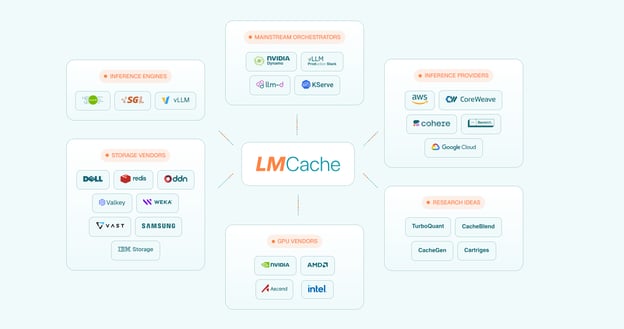
Source: LMCache – Building the foundation of AI memory tensor with KV Cache Infrastructure
This is different from traditional response caching.
A response cache stores the final generated answer and returns it when the same request appears again:
cache = {
    "What is Python?":
        "Python is a general-purpose programming language..."
}
LMCache works earlier in the inference process. Instead of caching the final response, it stores the attention KV states produced while the model processes the prompt.
For example, without reusable KV caching, a long shared prompt must go through prefill again every time a new question is added.
With LMCache, the first request performs the full prefill and stores the resulting KV states. Later requests with the same prefix can load those states and process only the new tokens.
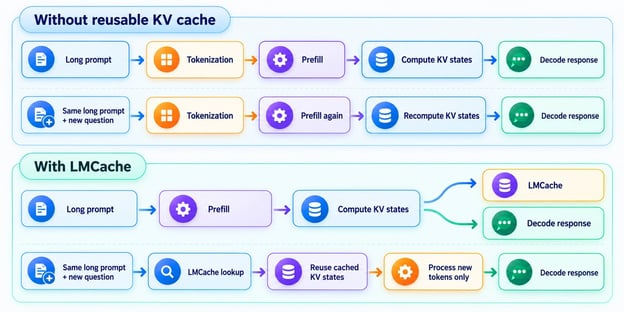
Fig 1: Without a reusable KV cache, the whole prompt gets recomputed for every request; with LMCache, cached KV states are reused and only the new tokens are processed.
This becomes increasingly valuable as context windows grow.
Reprocessing a few hundred tokens may be inexpensive, but repeatedly processing tens of thousands of shared tokens can significantly increase latency and GPU usage.
How LMCache Works
The easiest way to understand LMCache is to follow two requests that share the same prefix.
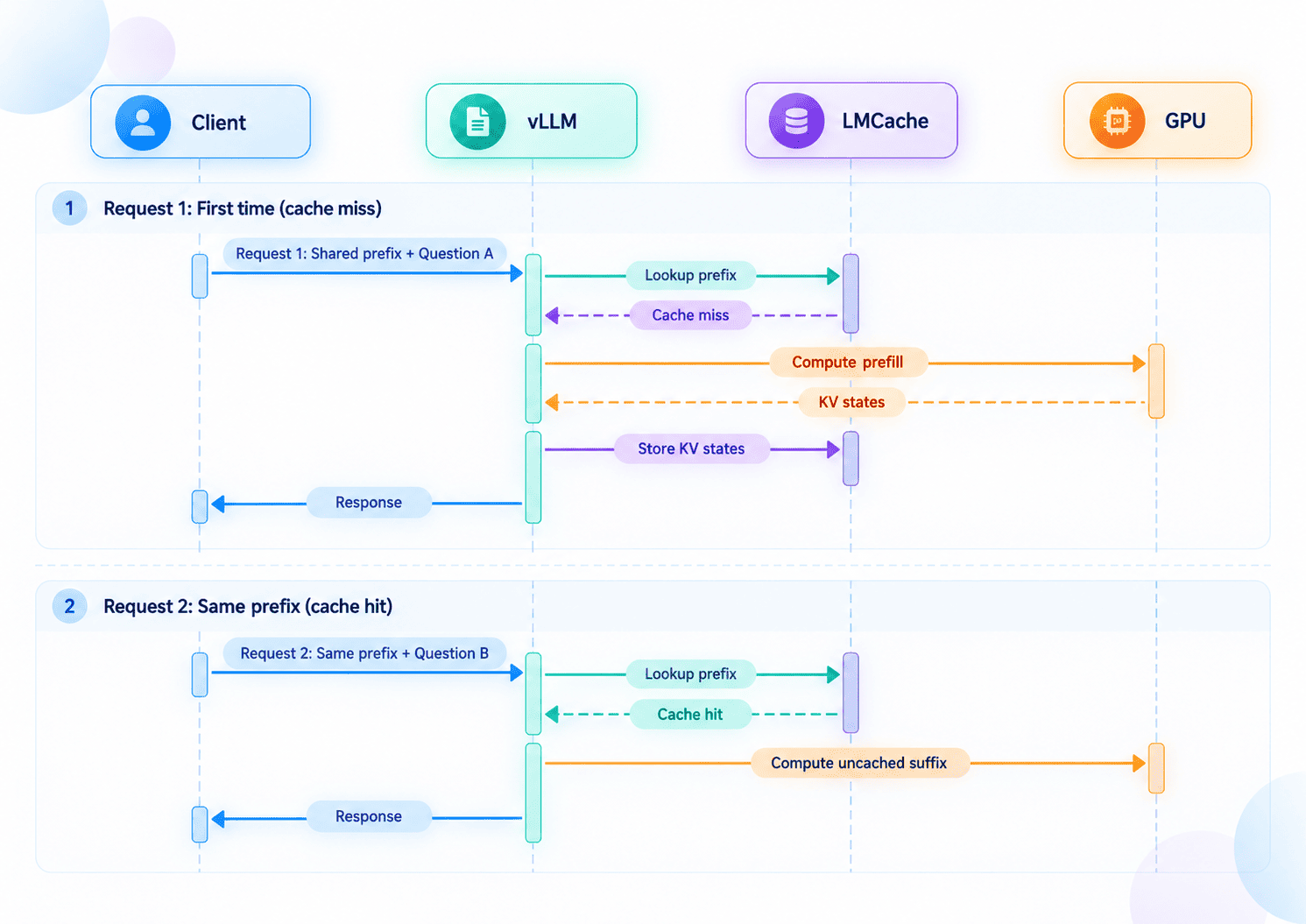
For the first request, LMCache checks whether reusable KV states already exist. Because this is the first time the prompt has been seen, the lookup results in a cache miss.
vLLM then performs prefill on the GPU, creates the KV states, and passes them to LMCache for storage.
For the second request, the shared prefix remains the same, but the question changes.
LMCache performs another lookup. This time, the prefix is already available, resulting in a cache hit. The cached states are reused, and the GPU only needs to process the uncached suffix.
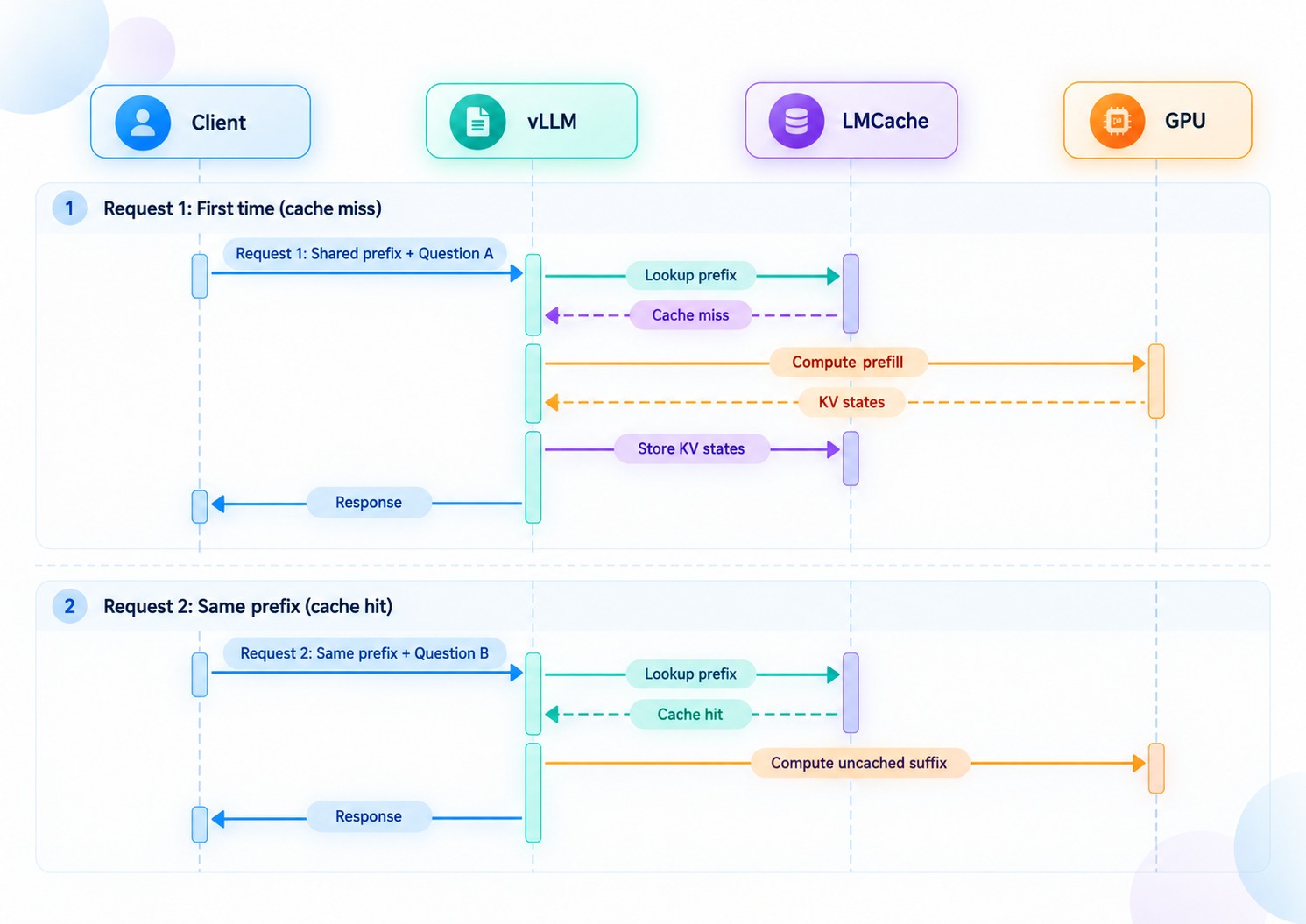
Fig 2: First request with a new prefix misses the cache, so vLLM computes the prefill and stores the KV states in LMCache; a repeat request with the same prefix hits the cache and only computes the new suffix.
The important point is that LMCache does not require the entire request to be identical. It is the reusable prefix that matters.
That makes it well-suited to applications where the background context stays the same while the user query changes.
vLLM Prefix Cache vs LMCache
vLLM already supports automatic prefix caching, so it is reasonable to ask why LMCache is needed at all.
Both approaches try to avoid recomputing KV states for prompt prefixes that the model has already processed.
The main difference is where that cache lives and how broadly it can be reused.
|
Feature
|
vLLM Native KV Caching
|
LMCache
|
|
Prefix KV reuse
|
Yes, through Automatic Prefix Caching
|
Yes
|
|
Non-prefix KV reuse
|
No
|
Yes, through CacheBlend
|
|
GPU KV cache
|
Yes
|
Works alongside vLLM's GPU KV cache
|
|
CPU KV offloading
|
Yes
|
Yes
|
|
SSD / NVMe storage
|
Supported through secondary storage tiers
|
Yes, including local disk, NVMe, and GDS
|
|
Remote storage
|
Supports options such as S3-compatible object storage
|
Supports multiple backends including Redis/Valkey, S3, Mooncake, InfiniStore, NIXL, and others
|
|
Cross-process cache sharing
|
Supported in some configurations, including P2P and shared storage
|
A core feature, with multiple inference workers able to use shared cached KV states
|
|
Standalone cache service
|
No, caching is managed as part of the vLLM serving stack
|
Yes, LMCache MP mode can run independently from vLLM
|
|
Independent cache scaling
|
Cache resources are generally configured with the inference deployment
|
Cache capacity can be scaled separately from the vLLM workers
|
|
Prefill/decode disaggregation
|
Supported through KV connectors
|
Built specifically to support KV transfer between prefill and decode workers
|
|
Best suited for
|
Efficient prefix reuse and KV offloading within vLLM deployments
|
Large-scale, shared, multi-tier, or distributed KV-cache workloads
|
vLLM's built-in prefix caching is the simpler option when repeated requests are handled by the same inference server.
If several requests begin with the same tokens, vLLM can reuse the existing KV blocks rather than performing the entire prefill again.
LMCache extends this idea beyond the inference engine.
Instead of keeping reusable KV states only within vLLM's own cache, LMCache introduces a separate cache layer that can store and move KV states across additional storage tiers and make them available to a broader serving architecture.
A simple way to think about the difference is:
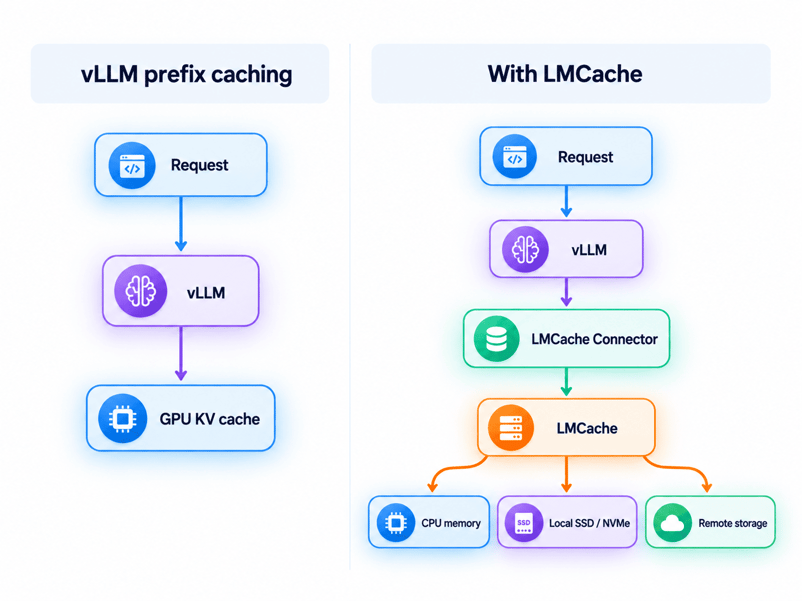
Fig 3: vLLM prefix caching vs LMCache. LMCache adds a caching layer that tiers KV states across CPU memory, local SSD/NVMe, and remote storage instead of just GPU memory.
So LMCache is not replacing the idea of KV caching in vLLM. It extends KV-cache management beyond the normal boundaries of the inference engine.
Key Features of LMCache
LMCache provides more than a simple in-memory cache. It is designed to store, move, and reuse KV states across different storage tiers and inference workers.
1. KV cache reuse
The main feature of LMCache is the ability to reuse previously computed KV states instead of processing the same tokens through the model again.
This is particularly useful when requests repeatedly include the same or similar context, such as:
- Retrieved documents
- Large system prompts
- Repository context
- Conversation history
- Tool definitions
- Shared instructions between agents
By reusing cached KV states, LMCache can reduce repeated prefill computation and improve time to first token.
2. Multi-tier storage
GPU memory is limited and expensive, especially when working with long contexts.
LMCache can move KV states beyond GPU memory and store them across multiple tiers, including CPU memory, local SSD or NVMe storage, and remote or distributed storage.
This makes it possible to keep much more reusable context available than would fit entirely in GPU memory, while still moving frequently used KV states back to the GPU when needed.
3. Shared KV cache across workers
LMCache can make cached KV states available across multiple inference workers instead of keeping them tied to a single model process.
For example, if one vLLM worker processes a long document, another worker can potentially reuse the cached KV states rather than recomputing the same context.
This is particularly useful for distributed serving, multi-GPU deployments, and applications where requests are routed across several inference replicas.
4. vLLM integration
LMCache integrates with vLLM through its KV connector interface.
The application can continue communicating with the normal OpenAI-compatible vLLM endpoint while LMCache operates underneath the inference layer.
This means existing applications do not need to change how they send prompts or receive responses. LMCache handles KV storage and retrieval between vLLM and the configured cache backend.
5. Multiprocess architecture
LMCache can run as a separate process from vLLM.
Instead of keeping cache management inside each inference worker, a dedicated LMCache server can manage KV states independently and serve multiple vLLM processes.
This separates cache management from model serving, allows multiple workers to share the same cache, and makes it easier to scale cache capacity independently from GPU inference resources.
6. CacheBlend
Traditional prefix caching works best when requests share the same beginning of a prompt.
LMCache also provides CacheBlend for workloads where reusable content may appear in different positions.
For example, a RAG application might retrieve the same documents in a different order for different questions.
CacheBlend can reuse parts of previously computed KV states while selectively recomputing the tokens that depend on the new context.
This makes KV reuse more useful for RAG, multi-document applications, and agentic workflows where prompts are frequently rearranged.
7. Prefill and decode disaggregation
LMCache can also help transfer KV states between separate prefill and decode workers.
In this architecture, one group of GPUs handles the compute-intensive prompt processing stage, while another group handles token generation.
LMCache provides the layer used to move the resulting KV states between them.
This allows prefill and decoding resources to be scaled independently and can improve GPU utilization in larger inference deployments.
Getting Started With LMCache
Now that we understand how LMCache works, let's connect it to vLLM, a high-performance LLM inference engine designed for efficient serving and memory management.
For this guide, I will use IBM Granite 4.2 3B, a compact model that delivers strong performance for its size while remaining lightweight enough for practical testing.
We will run LMCache in multiprocess mode alongside vLLM and verify that KV states can be reused across requests.
1. Setting up the environment
For this tutorial, we will use Python 3.12, uv, vLLM, LMCache, the OpenAI Python client, pandas, and matplotlib.
Before starting, make sure you have:
- An NVIDIA GPU with the appropriate drivers installed
- The CUDA 13 toolkit installed and available on your system
- uv installed
You can install uv with:
curl -LsSf https://astral.sh/uv/install.sh | sh
Then create the project:
mkdir lmcache-tutorial
cd lmcache-tutorial
Create and activate a Python 3.12 virtual environment:
uv venv --python 3.12
source .venv/bin/activate
Install the required dependencies:
uv pip install -U \
    "lmcache==0.5.4" \
    "vllm==0.28.0" \
    openai \
    pandas \
    matplotlib \
    --torch-backend=cu130
Here, we use cu130 because our environment is set up with CUDA 13.
If you are using a different CUDA version, change the --torch-backend value to the compatible PyTorch backend for your environment.
Granite 4.2 uses a custom reasoning parser, so download it from Hugging Face:
hf download ibm-granite/granite-4.2-3b \
    granite_thinking_parser.py \
    --local-dir .
Finally, verify that your GPU and CUDA installation are detected:
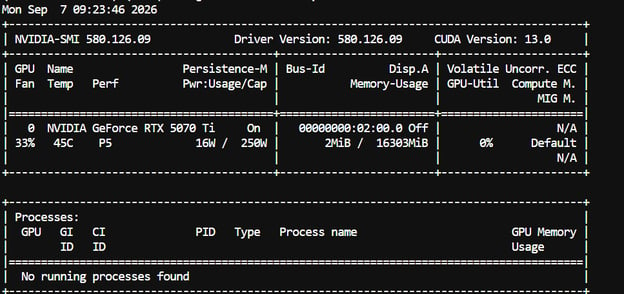
For this tutorial, we are using an NVIDIA GeForce RTX 5070 Ti with 16 GB of VRAM.
The system is running NVIDIA driver 580.126.09, with CUDA 13.0 support.
2. Start vLLM with LMCache
We need two running processes: one for the LMCache server and another for vLLM.
Start LMCache in the first terminal:
lmcache server \
    --host localhost \
    --port 6555 \
    --http-port 8081 \
    --l1-size-gb 20 \
    --eviction-policy LRU

Here, we use:
- port
6555 for communication between vLLM and LMCache
- port
8081 for the LMCache HTTP interface
20 GB for the L1 cacheLRU as the eviction policy
Keep this terminal running.
Open a second terminal, activate the same virtual environment, and unset the expandable CUDA allocator configuration if it is enabled:
cd lmcache-tutorial
source .venv/bin/activate
unset PYTORCH_CUDA_ALLOC_CONF
Now start vLLM with the LMCache connector:
vllm serve ibm-granite/granite-4.2-3b \
  --served-model-name granite-4.2-3b \
  --dtype bfloat16 \
  --max-model-len 65536 \
  --kv-cache-dtype fp8 \
  --gpu-memory-utilization 0.90 \
  --enforce-eager \
  --max-num-seqs 1 \
  --max-num-batched-tokens 2048 \
  --no-enable-prefix-caching \
  --reasoning-parser granite_thinking_parser \
  --reasoning-parser-plugin "$(pwd)/granite_thinking_parser.py" \
  --tool-call-parser qwen3_coder \
  --enable-auto-tool-choice \
  --port 8000 \
  --kv-transfer-config \
  '{
    "kv_connector":"LMCacheMPConnector",
    "kv_connector_module_path":"lmcache.integration.vllm.lmcache_mp_connector",
    "kv_role":"kv_both",
    "kv_connector_extra_config":{
      "lmcache.mp.host":"tcp://localhost",
      "lmcache.mp.port":6555,
      "lmcache.mp.mp_transfer_mode":"lmcache_driven"
    }
  }'
We disable vLLM's built-in prefix caching with:
--no-enable-prefix-caching
This allows the following experiments to focus specifically on KV reuse through LMCache.
Once vLLM finishes loading, the model is available through its OpenAI-compatible endpoint:
3. Verify LMCache with a controlled cache hit
We will now perform a simple controlled experiment to confirm that LMCache is working.
We will create a large shared prefix, clear the cache, send the prefix once to populate LMCache, and then send another request with the same prefix but a different question.
First, create the OpenAI client:
from openai import OpenAI

client = OpenAI(
    base_url="http://localhost:8000/v1",
    api_key="local",
)
Next, create a long shared document:
base_text = """
Large language model inference consists of two main stages:
prefill and decoding.

During prefill, the model processes the input sequence and calculates
the key and value tensors used by the attention mechanism.

During autoregressive decoding, these tensors are reused so the model
does not need to recompute attention states for every previous token.

KV cache management is therefore an important part of modern LLM
serving infrastructure, particularly for long-context applications.
"""

document = base_text * 500

SYSTEM_PROMPT = f"""
You are a technical assistant.

Use only the following document to answer the user's question.

DOCUMENT:

{document}
"""
Repeating the document 500 times gives us a large shared prefix that is expensive enough to make the effect of KV reuse visible.
Before sending the first request, clear LMCache so that we start with an empty cache:
import subprocess
import time

subprocess.run(
    [
        "lmcache",
        "kvcache",
        "clear",
        "--url",
        "http://localhost:8081",
    ],
    check=True,
)

time.sleep(0.5)
This ensures that the first request is a cold-cache request and cannot reuse KV states left over from an earlier test.
Now send the first request:
prompt_1 = SYSTEM_PROMPT + """

Question:
Explain the purpose of the KV cache.
"""

start = time.perf_counter()

client.completions.create(
    model="granite-4.2-3b",
    prompt=prompt_1,
    max_tokens=100,
    temperature=0,
)

latency_1 = time.perf_counter() - start
This is the cache-warming request. vLLM has to process the long shared prefix during prefill, while LMCache stores the resulting KV states.
Next, keep the shared prefix exactly the same and change only the question:
prompt_2 = SYSTEM_PROMPT + """

Question:
Explain what happens during prefill.
"""

start = time.perf_counter()

client.completions.create(
    model="granite-4.2-3b",
    prompt=prompt_2,
    max_tokens=100,
    temperature=0,
)

latency_2 = time.perf_counter() - start
Because the large prefix is unchanged, LMCache can reuse the KV states generated by the first request instead of recomputing the full prefix again.
Finally, compare the two request times:
print(f"Cold request:   {latency_1:.3f}s")
print(f"Warm request:   {latency_2:.3f}s")
print(f"Speedup:        {latency_1 / latency_2:.2f}x")

print(
    f"Latency saved:  "
    f"{((latency_1 - latency_2) / latency_1) * 100:.1f}%"
)
My run produced:
Cold request:   26.276s
Warm request:   4.402s
Speedup:        5.97x
Latency saved:  83.2%
The warm request completed almost 6× faster, reducing end-to-end latency by 83.2%.
The questions are different, so LMCache is not caching the final response. Instead, it is reusing the KV states generated for the shared prefix.
The first request has to process the entire long prefix during prefill and create those KV states from scratch.
On the second request, LMCache retrieves the matching cached states, allowing vLLM to skip most of that repeated prefill work and focus only on the new suffix.
This confirms that LMCache is successfully reusing the shared prefix.
When is LMCache Useful?
LMCache is particularly useful when an application repeatedly sends large amounts of identical context.
A few common examples are:
RAG applications
A user may ask several questions about the same retrieved document.
Instead of processing the entire document from scratch for every question, its KV states can be reused.
Coding agents
Coding assistants frequently send repository files, project instructions, and other large pieces of context with every model call.
Much of that context stays identical while the task changes.
AI agents
Agents often reuse large system prompts, tool definitions, memory, instructions, and environment state across many steps.
Long conversations
A long-running conversation may repeatedly send a substantial portion of its history with each new message.
Multi-agent systems
Several agents may share the same background documents or system context while working on different tasks.
In all of these cases, the model is repeatedly being shown information it has already processed during earlier requests.
LMCache provides a way to reuse that work at the KV-cache level.
Final Thoughts
LMCache addresses a major source of waste in long-context inference by making the KV states created during prefill reusable.
Instead of processing the same shared context again and again, the model can reuse work it has already completed.
We have not included the benchmark code or detailed results in this tutorial, but we did run a separate set of tests using the same setup.
The results were significant. Reusing a large shared prefix reduced total request latency from 26.276 seconds to 4.386 seconds.
Average time to first token dropped from 22.149 seconds to 0.726 seconds, a 30.54× improvement. The gains also grew with context size, from 3.55× with around 12,000 shared characters to 30.22× with roughly 245,000 characters.
In simple terms, the more context that can be reused, the more work LMCache can avoid.
DeepSeek is a good real-world example of why this matters.
Its caching system can reuse matching prompt prefixes, which is especially valuable for coding agents that repeatedly send the same system prompts, tools, conversation history, and code context.
Higher cache-hit rates mean less repeated computation and lower costs for both the provider and the user.
The main takeaway from this guide is that faster LLM inference is not only about better GPUs or faster token generation. It is also about not repeating work unnecessarily.
For RAG systems, coding assistants, agents, and other long-context applications, reusable KV caching can be an important part of improving latency, reducing GPU usage, and lowering inference costs.
%22%3E%3Cpath%20d%3D%22m-369%200h408v79h-408z%22%20fill%3D%22%237933ff%22%2F%3E%3Cpath%20d%3D%22m-148%200h306v45h-306z%22%20fill%3D%22%23974dff%22%2F%3E%3C%2Fg%3E%3C%2Fsvg%3E)
%22%2F%3E%3C%2FclipPath%3E%3Cg%20clip-path%3D%22url(%23a)%22%3E%3Cpath%20d%3D%22m76%200h484v36h-484z%22%20fill%3D%22%23974dff%22%2F%3E%3Cpath%20d%3D%22m0%200h384v24h-384z%22%20fill%3D%22%2306bdfc%22%20transform%3D%22matrix(1%200%200%20-1%200%2060)%22%2F%3E%3C%2Fg%3E%3C%2Fsvg%3E)

%22%3E%0A%20%20%20%20%20%20%20%20%3Crect%20fill%3D%22%23EFEBE4%22%20height%3D%22180%22%20width%3D%22336%22%20%2F%3E%0A%20%20%20%20%20%20%20%20%3Crect%0A%20%20%20%20%20%20%20%20%20%20fill%3D%22%23DD3400%22%0A%20%20%20%20%20%20%20%20%20%20height%3D%22106.6%22%0A%20%20%20%20%20%20%20%20%20%20transform%3D%22rotate(-30%20-208.588%20220.18)%22%0A%20%20%20%20%20%20%20%20%20%20width%3D%22456.125%22%0A%20%20%20%20%20%20%20%20%20%20x%3D%22-208.588%22%0A%20%20%20%20%20%20%20%20%20%20y%3D%22220.18%22%0A%20%20%20%20%20%20%20%20%2F%3E%0A%20%20%20%20%20%20%20%20%3Crect%0A%20%20%20%20%20%20%20%20%20%20fill%3D%22%23FFEC3C%22%0A%20%20%20%20%20%20%20%20%20%20height%3D%2235.875%22%0A%20%20%20%20%20%20%20%20%20%20transform%3D%22rotate(-30%20-208.588%20220.18)%22%0A%20%20%20%20%20%20%20%20%20%20width%3D%22347.576%22%0A%20%20%20%20%20%20%20%20%20%20x%3D%22-208.588%22%0A%20%20%20%20%20%20%20%20%20%20y%3D%22220.18%22%0A%20%20%20%20%20%20%20%20%2F%3E%0A%20%20%20%20%20%20%20%20%3Crect%0A%20%20%20%20%20%20%20%20%20%20fill%3D%22%23FF931E%22%0A%20%20%20%20%20%20%20%20%20%20height%3D%2235.875%22%0A%20%20%20%20%20%20%20%20%20%20transform%3D%22rotate(-30%20-226.525%20189.111)%22%0A%20%20%20%20%20%20%20%20%20%20width%3D%22347.576%22%0A%20%20%20%20%20%20%20%20%20%20x%3D%22-226.525%22%0A%20%20%20%20%20%20%20%20%20%20y%3D%22189.111%22%0A%20%20%20%20%20%20%20%20%2F%3E%0A%20%20%20%20%20%20%20%20%3Crect%0A%20%20%20%20%20%20%20%20%20%20fill%3D%22%23DD3400%22%0A%20%20%20%20%20%20%20%20%20%20height%3D%22106.6%22%0A%20%20%20%20%20%20%20%20%20%20transform%3D%22rotate(-30%2085.5879%20256.055)%22%0A%20%20%20%20%20%20%20%20%20%20width%3D%22456.125%22%0A%20%20%20%20%20%20%20%20%20%20x%3D%2285.5879%22%0A%20%20%20%20%20%20%20%20%20%20y%3D%22256.055%22%0A%20%20%20%20%20%20%20%20%2F%3E%0A%20%20%20%20%20%20%20%20%3Crect%0A%20%20%20%20%20%20%20%20%20%20fill%3D%22%23FFEC3C%22%0A%20%20%20%20%20%20%20%20%20%20height%3D%2235.875%22%0A%20%20%20%20%20%20%20%20%20%20transform%3D%22rotate(-30%2085.5879%20256.055)%22%0A%20%20%20%20%20%20%20%20%20%20width%3D%22184.5%22%0A%20%20%20%20%20%20%20%20%20%20x%3D%2285.5879%22%0A%20%20%20%20%20%20%20%20%20%20y%3D%22256.055%22%0A%20%20%20%20%20%20%20%20%2F%3E%0A%20%20%20%20%20%20%20%20%3Crect%0A%20%20%20%20%20%20%20%20%20%20fill%3D%22%23FF931E%22%0A%20%20%20%20%20%20%20%20%20%20height%3D%2235.875%22%0A%20%20%20%20%20%20%20%20%20%20transform%3D%22rotate(-30%20227.432%20132.736)%22%0A%20%20%20%20%20%20%20%20%20%20width%3D%22271.625%22%0A%20%20%20%20%20%20%20%20%20%20x%3D%22227.432%22%0A%20%20%20%20%20%20%20%20%20%20y%3D%22132.736%22%0A%20%20%20%20%20%20%20%20%2F%3E%0A%20%20%20%20%20%20%3C%2Fg%3E%0A%20%20%20%20%20%20%3Cdefs%3E%0A%20%20%20%20%20%20%20%20%3CclipPath%20id%3D%22clip%22%3E%0A%20%20%20%20%20%20%20%20%20%20%3Crect%20fill%3D%22white%22%20height%3D%22180%22%20width%3D%22336%22%20%2F%3E%0A%20%20%20%20%20%20%20%20%3C%2FclipPath%3E%0A%20%20%20%20%20%20%3C%2Fdefs%3E%0A%20%20%20%20%3C%2Fsvg%3E)

%22%3E%0A%20%20%20%20%20%20%20%20%3Crect%20fill%3D%22%23EFEBE4%22%20height%3D%22180%22%20width%3D%22336%22%20%2F%3E%0A%20%20%20%20%20%20%20%20%3Crect%0A%20%20%20%20%20%20%20%20%20%20fill%3D%22%23FF931E%22%0A%20%20%20%20%20%20%20%20%20%20height%3D%22106.6%22%0A%20%20%20%20%20%20%20%20%20%20transform%3D%22rotate(-30%20-208.588%20220.18)%22%0A%20%20%20%20%20%20%20%20%20%20width%3D%22456.125%22%0A%20%20%20%20%20%20%20%20%20%20x%3D%22-208.588%22%0A%20%20%20%20%20%20%20%20%20%20y%3D%22220.18%22%0A%20%20%20%20%20%20%20%20%2F%3E%0A%20%20%20%20%20%20%20%20%3Crect%0A%20%20%20%20%20%20%20%20%20%20fill%3D%22%23F7F3EB%22%0A%20%20%20%20%20%20%20%20%20%20height%3D%2235.875%22%0A%20%20%20%20%20%20%20%20%20%20transform%3D%22rotate(-30%20-208.588%20220.18)%22%0A%20%20%20%20%20%20%20%20%20%20width%3D%22347.576%22%0A%20%20%20%20%20%20%20%20%20%20x%3D%22-208.588%22%0A%20%20%20%20%20%20%20%20%20%20y%3D%22220.18%22%0A%20%20%20%20%20%20%20%20%2F%3E%0A%20%20%20%20%20%20%20%20%3Crect%0A%20%20%20%20%20%20%20%20%20%20fill%3D%22%23000820%22%0A%20%20%20%20%20%20%20%20%20%20height%3D%2235.875%22%0A%20%20%20%20%20%20%20%20%20%20transform%3D%22rotate(-30%20-226.525%20189.111)%22%0A%20%20%20%20%20%20%20%20%20%20width%3D%22347.576%22%0A%20%20%20%20%20%20%20%20%20%20x%3D%22-226.525%22%0A%20%20%20%20%20%20%20%20%20%20y%3D%22189.111%22%0A%20%20%20%20%20%20%20%20%2F%3E%0A%20%20%20%20%20%20%20%20%3Crect%0A%20%20%20%20%20%20%20%20%20%20fill%3D%22%23000820%22%0A%20%20%20%20%20%20%20%20%20%20height%3D%22106.6%22%0A%20%20%20%20%20%20%20%20%20%20transform%3D%22rotate(-30%2085.5879%20256.055)%22%0A%20%20%20%20%20%20%20%20%20%20width%3D%22456.125%22%0A%20%20%20%20%20%20%20%20%20%20x%3D%2285.5879%22%0A%20%20%20%20%20%20%20%20%20%20y%3D%22256.055%22%0A%20%20%20%20%20%20%20%20%2F%3E%0A%20%20%20%20%20%20%20%20%3Crect%0A%20%20%20%20%20%20%20%20%20%20fill%3D%22%23D87300%22%0A%20%20%20%20%20%20%20%20%20%20height%3D%2235.875%22%0A%20%20%20%20%20%20%20%20%20%20transform%3D%22rotate(-30%2085.5879%20256.055)%22%0A%20%20%20%20%20%20%20%20%20%20width%3D%22184.5%22%0A%20%20%20%20%20%20%20%20%20%20x%3D%2285.5879%22%0A%20%20%20%20%20%20%20%20%20%20y%3D%22256.055%22%0A%20%20%20%20%20%20%20%20%2F%3E%0A%20%20%20%20%20%20%20%20%3Crect%0A%20%20%20%20%20%20%20%20%20%20fill%3D%22%23FF931E%22%0A%20%20%20%20%20%20%20%20%20%20height%3D%2235.875%22%0A%20%20%20%20%20%20%20%20%20%20transform%3D%22rotate(-30%20227.432%20132.736)%22%0A%20%20%20%20%20%20%20%20%20%20width%3D%22271.625%22%0A%20%20%20%20%20%20%20%20%20%20x%3D%22227.432%22%0A%20%20%20%20%20%20%20%20%20%20y%3D%22132.736%22%0A%20%20%20%20%20%20%20%20%2F%3E%0A%20%20%20%20%20%20%3C%2Fg%3E%0A%20%20%20%20%20%20%3Cdefs%3E%0A%20%20%20%20%20%20%20%20%3CclipPath%20id%3D%22clip%22%3E%0A%20%20%20%20%20%20%20%20%20%20%3Crect%20fill%3D%22white%22%20height%3D%22180%22%20width%3D%22336%22%20%2F%3E%0A%20%20%20%20%20%20%20%20%3C%2FclipPath%3E%0A%20%20%20%20%20%20%3C%2Fdefs%3E%0A%20%20%20%20%3C%2Fsvg%3E)

%22%3E%0A%20%20%20%20%20%20%20%20%3Crect%20fill%3D%22%2305192D%22%20height%3D%22180%22%20width%3D%22336%22%20%2F%3E%0A%20%20%20%20%20%20%20%20%3Crect%0A%20%20%20%20%20%20%20%20%20%20fill%3D%22%23B08EFF%22%0A%20%20%20%20%20%20%20%20%20%20height%3D%22106.6%22%0A%20%20%20%20%20%20%20%20%20%20transform%3D%22rotate(-30%20-208.588%20220.18)%22%0A%20%20%20%20%20%20%20%20%20%20width%3D%22456.125%22%0A%20%20%20%20%20%20%20%20%20%20x%3D%22-208.588%22%0A%20%20%20%20%20%20%20%20%20%20y%3D%22220.18%22%0A%20%20%20%20%20%20%20%20%2F%3E%0A%20%20%20%20%20%20%20%20%3Crect%0A%20%20%20%20%20%20%20%20%20%20fill%3D%22%237933FF%22%0A%20%20%20%20%20%20%20%20%20%20height%3D%2235.875%22%0A%20%20%20%20%20%20%20%20%20%20transform%3D%22rotate(-30%20-208.588%20220.18)%22%0A%20%20%20%20%20%20%20%20%20%20width%3D%22347.576%22%0A%20%20%20%20%20%20%20%20%20%20x%3D%22-208.588%22%0A%20%20%20%20%20%20%20%20%20%20y%3D%22220.18%22%0A%20%20%20%20%20%20%20%20%2F%3E%0A%20%20%20%20%20%20%20%20%3Crect%0A%20%20%20%20%20%20%20%20%20%20fill%3D%22%2372E5FE%22%0A%20%20%20%20%20%20%20%20%20%20height%3D%2235.875%22%0A%20%20%20%20%20%20%20%20%20%20transform%3D%22rotate(-30%20-226.525%20189.111)%22%0A%20%20%20%20%20%20%20%20%20%20width%3D%22347.576%22%0A%20%20%20%20%20%20%20%20%20%20x%3D%22-226.525%22%0A%20%20%20%20%20%20%20%20%20%20y%3D%22189.111%22%0A%20%20%20%20%20%20%20%20%2F%3E%0A%20%20%20%20%20%20%20%20%3Crect%0A%20%20%20%20%20%20%20%20%20%20fill%3D%22%235EB1FF%22%0A%20%20%20%20%20%20%20%20%20%20height%3D%22106.6%22%0A%20%20%20%20%20%20%20%20%20%20transform%3D%22rotate(-30%2085.5879%20256.055)%22%0A%20%20%20%20%20%20%20%20%20%20width%3D%22456.125%22%0A%20%20%20%20%20%20%20%20%20%20x%3D%2285.5879%22%0A%20%20%20%20%20%20%20%20%20%20y%3D%22256.055%22%0A%20%20%20%20%20%20%20%20%2F%3E%0A%20%20%20%20%20%20%20%20%3Crect%0A%20%20%20%20%20%20%20%20%20%20fill%3D%22%23B08EFF%22%0A%20%20%20%20%20%20%20%20%20%20height%3D%2235.875%22%0A%20%20%20%20%20%20%20%20%20%20transform%3D%22rotate(-30%2085.5879%20256.055)%22%0A%20%20%20%20%20%20%20%20%20%20width%3D%22184.5%22%0A%20%20%20%20%20%20%20%20%20%20x%3D%2285.5879%22%0A%20%20%20%20%20%20%20%20%20%20y%3D%22256.055%22%0A%20%20%20%20%20%20%20%20%2F%3E%0A%20%20%20%20%20%20%20%20%3Crect%0A%20%20%20%20%20%20%20%20%20%20fill%3D%22%2372E5FE%22%0A%20%20%20%20%20%20%20%20%20%20height%3D%2235.875%22%0A%20%20%20%20%20%20%20%20%20%20transform%3D%22rotate(-30%20227.432%20132.736)%22%0A%20%20%20%20%20%20%20%20%20%20width%3D%22271.625%22%0A%20%20%20%20%20%20%20%20%20%20x%3D%22227.432%22%0A%20%20%20%20%20%20%20%20%20%20y%3D%22132.736%22%0A%20%20%20%20%20%20%20%20%2F%3E%0A%20%20%20%20%20%20%3C%2Fg%3E%0A%20%20%20%20%20%20%3Cdefs%3E%0A%20%20%20%20%20%20%20%20%3CclipPath%20id%3D%22clip%22%3E%0A%20%20%20%20%20%20%20%20%20%20%3Crect%20fill%3D%22white%22%20height%3D%22180%22%20width%3D%22336%22%20%2F%3E%0A%20%20%20%20%20%20%20%20%3C%2FclipPath%3E%0A%20%20%20%20%20%20%3C%2Fdefs%3E%0A%20%20%20%20%3C%2Fsvg%3E)

%22%3E%0A%20%20%20%20%20%20%20%20%3Crect%20fill%3D%22%23F7F3EB%22%20height%3D%22180%22%20width%3D%22336%22%20%2F%3E%0A%20%20%20%20%20%20%20%20%3Crect%0A%20%20%20%20%20%20%20%20%20%20fill%3D%22%23000820%22%0A%20%20%20%20%20%20%20%20%20%20height%3D%22106.6%22%0A%20%20%20%20%20%20%20%20%20%20transform%3D%22rotate(-30%20-208.588%20220.18)%22%0A%20%20%20%20%20%20%20%20%20%20width%3D%22456.125%22%0A%20%20%20%20%20%20%20%20%20%20x%3D%22-208.588%22%0A%20%20%20%20%20%20%20%20%20%20y%3D%22220.18%22%0A%20%20%20%20%20%20%20%20%2F%3E%0A%20%20%20%20%20%20%20%20%3Crect%0A%20%20%20%20%20%20%20%20%20%20fill%3D%22%2300C74E%22%0A%20%20%20%20%20%20%20%20%20%20height%3D%2235.875%22%0A%20%20%20%20%20%20%20%20%20%20transform%3D%22rotate(-30%20-208.588%20220.18)%22%0A%20%20%20%20%20%20%20%20%20%20width%3D%22347.576%22%0A%20%20%20%20%20%20%20%20%20%20x%3D%22-208.588%22%0A%20%20%20%20%20%20%20%20%20%20y%3D%22220.18%22%0A%20%20%20%20%20%20%20%20%2F%3E%0A%20%20%20%20%20%20%20%20%3Crect%0A%20%20%20%20%20%20%20%20%20%20fill%3D%22%23FF931E%22%0A%20%20%20%20%20%20%20%20%20%20height%3D%2235.875%22%0A%20%20%20%20%20%20%20%20%20%20transform%3D%22rotate(-30%20-226.525%20189.111)%22%0A%20%20%20%20%20%20%20%20%20%20width%3D%22347.576%22%0A%20%20%20%20%20%20%20%20%20%20x%3D%22-226.525%22%0A%20%20%20%20%20%20%20%20%20%20y%3D%22189.111%22%0A%20%20%20%20%20%20%20%20%2F%3E%0A%20%20%20%20%20%20%20%20%3Crect%0A%20%20%20%20%20%20%20%20%20%20fill%3D%22%23D87300%22%0A%20%20%20%20%20%20%20%20%20%20height%3D%22106.6%22%0A%20%20%20%20%20%20%20%20%20%20transform%3D%22rotate(-30%2085.5879%20256.055)%22%0A%20%20%20%20%20%20%20%20%20%20width%3D%22456.125%22%0A%20%20%20%20%20%20%20%20%20%20x%3D%2285.5879%22%0A%20%20%20%20%20%20%20%20%20%20y%3D%22256.055%22%0A%20%20%20%20%20%20%20%20%2F%3E%0A%20%20%20%20%20%20%20%20%3Crect%0A%20%20%20%20%20%20%20%20%20%20fill%3D%22%23000820%22%0A%20%20%20%20%20%20%20%20%20%20height%3D%2235.875%22%0A%20%20%20%20%20%20%20%20%20%20transform%3D%22rotate(-30%2085.5879%20256.055)%22%0A%20%20%20%20%20%20%20%20%20%20width%3D%22184.5%22%0A%20%20%20%20%20%20%20%20%20%20x%3D%2285.5879%22%0A%20%20%20%20%20%20%20%20%20%20y%3D%22256.055%22%0A%20%20%20%20%20%20%20%20%2F%3E%0A%20%20%20%20%20%20%20%20%3Crect%0A%20%20%20%20%20%20%20%20%20%20fill%3D%22%2300C74E%22%0A%20%20%20%20%20%20%20%20%20%20height%3D%2235.875%22%0A%20%20%20%20%20%20%20%20%20%20transform%3D%22rotate(-30%20227.432%20132.736)%22%0A%20%20%20%20%20%20%20%20%20%20width%3D%22271.625%22%0A%20%20%20%20%20%20%20%20%20%20x%3D%22227.432%22%0A%20%20%20%20%20%20%20%20%20%20y%3D%22132.736%22%0A%20%20%20%20%20%20%20%20%2F%3E%0A%20%20%20%20%20%20%3C%2Fg%3E%0A%20%20%20%20%20%20%3Cdefs%3E%0A%20%20%20%20%20%20%20%20%3CclipPath%20id%3D%22clip%22%3E%0A%20%20%20%20%20%20%20%20%20%20%3Crect%20fill%3D%22white%22%20height%3D%22180%22%20width%3D%22336%22%20%2F%3E%0A%20%20%20%20%20%20%20%20%3C%2FclipPath%3E%0A%20%20%20%20%20%20%3C%2Fdefs%3E%0A%20%20%20%20%3C%2Fsvg%3E)

%22%3E%0A%20%20%20%20%20%20%20%20%3Crect%20fill%3D%22%2372E5FE%22%20height%3D%22180%22%20width%3D%22336%22%20%2F%3E%0A%20%20%20%20%20%20%20%20%3Crect%0A%20%20%20%20%20%20%20%20%20%20fill%3D%22%237933FF%22%0A%20%20%20%20%20%20%20%20%20%20height%3D%22106.6%22%0A%20%20%20%20%20%20%20%20%20%20transform%3D%22rotate(-30%20-208.588%20220.18)%22%0A%20%20%20%20%20%20%20%20%20%20width%3D%22456.125%22%0A%20%20%20%20%20%20%20%20%20%20x%3D%22-208.588%22%0A%20%20%20%20%20%20%20%20%20%20y%3D%22220.18%22%0A%20%20%20%20%20%20%20%20%2F%3E%0A%20%20%20%20%20%20%20%20%3Crect%0A%20%20%20%20%20%20%20%20%20%20fill%3D%22%235EB1FF%22%0A%20%20%20%20%20%20%20%20%20%20height%3D%2235.875%22%0A%20%20%20%20%20%20%20%20%20%20transform%3D%22rotate(-30%20-208.588%20220.18)%22%0A%20%20%20%20%20%20%20%20%20%20width%3D%22347.576%22%0A%20%20%20%20%20%20%20%20%20%20x%3D%22-208.588%22%0A%20%20%20%20%20%20%20%20%20%20y%3D%22220.18%22%0A%20%20%20%20%20%20%20%20%2F%3E%0A%20%20%20%20%20%20%20%20%3Crect%0A%20%20%20%20%20%20%20%20%20%20fill%3D%22%23000820%22%0A%20%20%20%20%20%20%20%20%20%20height%3D%2235.875%22%0A%20%20%20%20%20%20%20%20%20%20transform%3D%22rotate(-30%20-226.525%20189.111)%22%0A%20%20%20%20%20%20%20%20%20%20width%3D%22347.576%22%0A%20%20%20%20%20%20%20%20%20%20x%3D%22-226.525%22%0A%20%20%20%20%20%20%20%20%20%20y%3D%22189.111%22%0A%20%20%20%20%20%20%20%20%2F%3E%0A%20%20%20%20%20%20%20%20%3Crect%0A%20%20%20%20%20%20%20%20%20%20fill%3D%22%237933FF%22%0A%20%20%20%20%20%20%20%20%20%20height%3D%22106.6%22%0A%20%20%20%20%20%20%20%20%20%20transform%3D%22rotate(-30%2085.5879%20256.055)%22%0A%20%20%20%20%20%20%20%20%20%20width%3D%22456.125%22%0A%20%20%20%20%20%20%20%20%20%20x%3D%2285.5879%22%0A%20%20%20%20%20%20%20%20%20%20y%3D%22256.055%22%0A%20%20%20%20%20%20%20%20%2F%3E%0A%20%20%20%20%20%20%20%20%3Crect%0A%20%20%20%20%20%20%20%20%20%20fill%3D%22%235EB1FF%22%0A%20%20%20%20%20%20%20%20%20%20height%3D%2235.875%22%0A%20%20%20%20%20%20%20%20%20%20transform%3D%22rotate(-30%2085.5879%20256.055)%22%0A%20%20%20%20%20%20%20%20%20%20width%3D%22184.5%22%0A%20%20%20%20%20%20%20%20%20%20x%3D%2285.5879%22%0A%20%20%20%20%20%20%20%20%20%20y%3D%22256.055%22%0A%20%20%20%20%20%20%20%20%2F%3E%0A%20%20%20%20%20%20%20%20%3Crect%0A%20%20%20%20%20%20%20%20%20%20fill%3D%22%23000820%22%0A%20%20%20%20%20%20%20%20%20%20height%3D%2235.875%22%0A%20%20%20%20%20%20%20%20%20%20transform%3D%22rotate(-30%20227.432%20132.736)%22%0A%20%20%20%20%20%20%20%20%20%20width%3D%22271.625%22%0A%20%20%20%20%20%20%20%20%20%20x%3D%22227.432%22%0A%20%20%20%20%20%20%20%20%20%20y%3D%22132.736%22%0A%20%20%20%20%20%20%20%20%2F%3E%0A%20%20%20%20%20%20%3C%2Fg%3E%0A%20%20%20%20%20%20%3Cdefs%3E%0A%20%20%20%20%20%20%20%20%3CclipPath%20id%3D%22clip%22%3E%0A%20%20%20%20%20%20%20%20%20%20%3Crect%20fill%3D%22white%22%20height%3D%22180%22%20width%3D%22336%22%20%2F%3E%0A%20%20%20%20%20%20%20%20%3C%2FclipPath%3E%0A%20%20%20%20%20%20%3C%2Fdefs%3E%0A%20%20%20%20%3C%2Fsvg%3E)



Large language model inference can become increasingly expensive as prompts grow.
RAG systems, coding agents, multi-agent workflows, and long conversations often send the same documents, system prompts, tool definitions, or conversation history to the model repeatedly.
Each time this shared context is processed during prefill, the model generates key-value (KV) states that are used during token generation.
Recomputing those states for the same context wastes GPU compute and increases latency.
LMCache addresses this by adding a dedicated KV cache layer to the inference stack.
It can store previously computed KV states and make them reusable across requests and inference workers, while also supporting CPU, local storage, remote backends, and disaggregated serving architectures.
In this tutorial, I will show you how LMCache works, how it differs from vLLM's native KV caching, and where features such as multi-tier storage, shared caching, CacheBlend, and prefill/decode disaggregation fit into modern LLM serving.
You will then connect LMCache to vLLM, serve IBM Granite 4.2 3B, and run a controlled experiment to measure how reusing a large shared prefix affects inference latency.
What is LMCache?
LMCache is an open-source KV cache management layer for LLM inference.
It allows key-value states created during prefill to be stored and reused when future requests share the same prompt prefix.
Source: LMCache – Building the foundation of AI memory tensor with KV Cache Infrastructure
This is different from traditional response caching.
A response cache stores the final generated answer and returns it when the same request appears again:
LMCache works earlier in the inference process. Instead of caching the final response, it stores the attention KV states produced while the model processes the prompt.
For example, without reusable KV caching, a long shared prompt must go through prefill again every time a new question is added.
With LMCache, the first request performs the full prefill and stores the resulting KV states. Later requests with the same prefix can load those states and process only the new tokens.
Fig 1: Without a reusable KV cache, the whole prompt gets recomputed for every request; with LMCache, cached KV states are reused and only the new tokens are processed.
This becomes increasingly valuable as context windows grow.
Reprocessing a few hundred tokens may be inexpensive, but repeatedly processing tens of thousands of shared tokens can significantly increase latency and GPU usage.
How LMCache Works
The easiest way to understand LMCache is to follow two requests that share the same prefix.
For the first request, LMCache checks whether reusable KV states already exist. Because this is the first time the prompt has been seen, the lookup results in a cache miss.
vLLM then performs prefill on the GPU, creates the KV states, and passes them to LMCache for storage.
For the second request, the shared prefix remains the same, but the question changes.
LMCache performs another lookup. This time, the prefix is already available, resulting in a cache hit. The cached states are reused, and the GPU only needs to process the uncached suffix.
Fig 2: First request with a new prefix misses the cache, so vLLM computes the prefill and stores the KV states in LMCache; a repeat request with the same prefix hits the cache and only computes the new suffix.
The important point is that LMCache does not require the entire request to be identical. It is the reusable prefix that matters.
That makes it well-suited to applications where the background context stays the same while the user query changes.
vLLM Prefix Cache vs LMCache
vLLM already supports automatic prefix caching, so it is reasonable to ask why LMCache is needed at all.
Both approaches try to avoid recomputing KV states for prompt prefixes that the model has already processed.
The main difference is where that cache lives and how broadly it can be reused.
Feature
vLLM Native KV Caching
LMCache
Prefix KV reuse
Yes, through Automatic Prefix Caching
Yes
Non-prefix KV reuse
No
Yes, through CacheBlend
GPU KV cache
Yes
Works alongside vLLM's GPU KV cache
CPU KV offloading
Yes
Yes
SSD / NVMe storage
Supported through secondary storage tiers
Yes, including local disk, NVMe, and GDS
Remote storage
Supports options such as S3-compatible object storage
Supports multiple backends including Redis/Valkey, S3, Mooncake, InfiniStore, NIXL, and others
Cross-process cache sharing
Supported in some configurations, including P2P and shared storage
A core feature, with multiple inference workers able to use shared cached KV states
Standalone cache service
No, caching is managed as part of the vLLM serving stack
Yes, LMCache MP mode can run independently from vLLM
Independent cache scaling
Cache resources are generally configured with the inference deployment
Cache capacity can be scaled separately from the vLLM workers
Prefill/decode disaggregation
Supported through KV connectors
Built specifically to support KV transfer between prefill and decode workers
Best suited for
Efficient prefix reuse and KV offloading within vLLM deployments
Large-scale, shared, multi-tier, or distributed KV-cache workloads
vLLM's built-in prefix caching is the simpler option when repeated requests are handled by the same inference server.
If several requests begin with the same tokens, vLLM can reuse the existing KV blocks rather than performing the entire prefill again.
LMCache extends this idea beyond the inference engine.
Instead of keeping reusable KV states only within vLLM's own cache, LMCache introduces a separate cache layer that can store and move KV states across additional storage tiers and make them available to a broader serving architecture.
A simple way to think about the difference is:
Fig 3: vLLM prefix caching vs LMCache. LMCache adds a caching layer that tiers KV states across CPU memory, local SSD/NVMe, and remote storage instead of just GPU memory.
So LMCache is not replacing the idea of KV caching in vLLM. It extends KV-cache management beyond the normal boundaries of the inference engine.
Key Features of LMCache
LMCache provides more than a simple in-memory cache. It is designed to store, move, and reuse KV states across different storage tiers and inference workers.
1. KV cache reuse
The main feature of LMCache is the ability to reuse previously computed KV states instead of processing the same tokens through the model again.
This is particularly useful when requests repeatedly include the same or similar context, such as:
By reusing cached KV states, LMCache can reduce repeated prefill computation and improve time to first token.
2. Multi-tier storage
GPU memory is limited and expensive, especially when working with long contexts.
LMCache can move KV states beyond GPU memory and store them across multiple tiers, including CPU memory, local SSD or NVMe storage, and remote or distributed storage.
This makes it possible to keep much more reusable context available than would fit entirely in GPU memory, while still moving frequently used KV states back to the GPU when needed.
3. Shared KV cache across workers
LMCache can make cached KV states available across multiple inference workers instead of keeping them tied to a single model process.
For example, if one vLLM worker processes a long document, another worker can potentially reuse the cached KV states rather than recomputing the same context.
This is particularly useful for distributed serving, multi-GPU deployments, and applications where requests are routed across several inference replicas.
4. vLLM integration
LMCache integrates with vLLM through its KV connector interface.
The application can continue communicating with the normal OpenAI-compatible vLLM endpoint while LMCache operates underneath the inference layer.
This means existing applications do not need to change how they send prompts or receive responses. LMCache handles KV storage and retrieval between vLLM and the configured cache backend.
5. Multiprocess architecture
LMCache can run as a separate process from vLLM.
Instead of keeping cache management inside each inference worker, a dedicated LMCache server can manage KV states independently and serve multiple vLLM processes.
This separates cache management from model serving, allows multiple workers to share the same cache, and makes it easier to scale cache capacity independently from GPU inference resources.
6. CacheBlend
Traditional prefix caching works best when requests share the same beginning of a prompt.
LMCache also provides CacheBlend for workloads where reusable content may appear in different positions.
For example, a RAG application might retrieve the same documents in a different order for different questions.
CacheBlend can reuse parts of previously computed KV states while selectively recomputing the tokens that depend on the new context.
This makes KV reuse more useful for RAG, multi-document applications, and agentic workflows where prompts are frequently rearranged.
7. Prefill and decode disaggregation
LMCache can also help transfer KV states between separate prefill and decode workers.
In this architecture, one group of GPUs handles the compute-intensive prompt processing stage, while another group handles token generation.
LMCache provides the layer used to move the resulting KV states between them.
This allows prefill and decoding resources to be scaled independently and can improve GPU utilization in larger inference deployments.
Getting Started With LMCache
Now that we understand how LMCache works, let's connect it to vLLM, a high-performance LLM inference engine designed for efficient serving and memory management.
For this guide, I will use IBM Granite 4.2 3B, a compact model that delivers strong performance for its size while remaining lightweight enough for practical testing.
We will run LMCache in multiprocess mode alongside vLLM and verify that KV states can be reused across requests.
1. Setting up the environment
For this tutorial, we will use Python 3.12, uv, vLLM, LMCache, the OpenAI Python client, pandas, and matplotlib.
Before starting, make sure you have:
You can install
uvwith:Then create the project:
Create and activate a Python 3.12 virtual environment:
Install the required dependencies:
Here, we use
cu130because our environment is set up with CUDA 13.If you are using a different CUDA version, change the
--torch-backendvalue to the compatible PyTorch backend for your environment.Granite 4.2 uses a custom reasoning parser, so download it from Hugging Face:
Finally, verify that your GPU and CUDA installation are detected:
For this tutorial, we are using an NVIDIA GeForce RTX 5070 Ti with 16 GB of VRAM.
The system is running NVIDIA driver 580.126.09, with CUDA 13.0 support.
2. Start vLLM with LMCache
We need two running processes: one for the LMCache server and another for vLLM.
Start LMCache in the first terminal:
Here, we use:
6555for communication between vLLM and LMCache8081for the LMCache HTTP interface20 GBfor the L1 cacheLRUas the eviction policyKeep this terminal running.
Open a second terminal, activate the same virtual environment, and unset the expandable CUDA allocator configuration if it is enabled:
Now start vLLM with the LMCache connector:
We disable vLLM's built-in prefix caching with:
This allows the following experiments to focus specifically on KV reuse through LMCache.
Once vLLM finishes loading, the model is available through its OpenAI-compatible endpoint:
3. Verify LMCache with a controlled cache hit
We will now perform a simple controlled experiment to confirm that LMCache is working.
We will create a large shared prefix, clear the cache, send the prefix once to populate LMCache, and then send another request with the same prefix but a different question.
First, create the OpenAI client:
Next, create a long shared document:
Repeating the document 500 times gives us a large shared prefix that is expensive enough to make the effect of KV reuse visible.
Before sending the first request, clear LMCache so that we start with an empty cache:
This ensures that the first request is a cold-cache request and cannot reuse KV states left over from an earlier test.
Now send the first request:
This is the cache-warming request. vLLM has to process the long shared prefix during prefill, while LMCache stores the resulting KV states.
Next, keep the shared prefix exactly the same and change only the question:
Because the large prefix is unchanged, LMCache can reuse the KV states generated by the first request instead of recomputing the full prefix again.
Finally, compare the two request times:
My run produced:
The warm request completed almost 6× faster, reducing end-to-end latency by 83.2%.
The questions are different, so LMCache is not caching the final response. Instead, it is reusing the KV states generated for the shared prefix.
The first request has to process the entire long prefix during prefill and create those KV states from scratch.
On the second request, LMCache retrieves the matching cached states, allowing vLLM to skip most of that repeated prefill work and focus only on the new suffix.
This confirms that LMCache is successfully reusing the shared prefix.
When is LMCache Useful?
LMCache is particularly useful when an application repeatedly sends large amounts of identical context.
A few common examples are:
RAG applications
A user may ask several questions about the same retrieved document.
Instead of processing the entire document from scratch for every question, its KV states can be reused.
Coding agents
Coding assistants frequently send repository files, project instructions, and other large pieces of context with every model call.
Much of that context stays identical while the task changes.
AI agents
Agents often reuse large system prompts, tool definitions, memory, instructions, and environment state across many steps.
Long conversations
A long-running conversation may repeatedly send a substantial portion of its history with each new message.
Multi-agent systems
Several agents may share the same background documents or system context while working on different tasks.
In all of these cases, the model is repeatedly being shown information it has already processed during earlier requests.
LMCache provides a way to reuse that work at the KV-cache level.
Final Thoughts
LMCache addresses a major source of waste in long-context inference by making the KV states created during prefill reusable.
Instead of processing the same shared context again and again, the model can reuse work it has already completed.
We have not included the benchmark code or detailed results in this tutorial, but we did run a separate set of tests using the same setup.
The results were significant. Reusing a large shared prefix reduced total request latency from 26.276 seconds to 4.386 seconds.
Average time to first token dropped from 22.149 seconds to 0.726 seconds, a 30.54× improvement. The gains also grew with context size, from 3.55× with around 12,000 shared characters to 30.22× with roughly 245,000 characters.
In simple terms, the more context that can be reused, the more work LMCache can avoid.
DeepSeek is a good real-world example of why this matters.
Its caching system can reuse matching prompt prefixes, which is especially valuable for coding agents that repeatedly send the same system prompts, tools, conversation history, and code context.
Higher cache-hit rates mean less repeated computation and lower costs for both the provider and the user.
The main takeaway from this guide is that faster LLM inference is not only about better GPUs or faster token generation. It is also about not repeating work unnecessarily.
For RAG systems, coding assistants, agents, and other long-context applications, reusable KV caching can be an important part of improving latency, reducing GPU usage, and lowering inference costs.