Vector search has become increasingly popular in recent years, thanks to all the progress in the Generative AI and Large Language Model ecosystem.
Vector search is a method of information retrieval in which documents and queries are represented as vectors instead of plain text. This numeric representation is obtained by using a large, trained neural network that can convert unstructured data, such as text, images, and videos, into vectors.
Traditional relational databases are not optimized to handle large volumes of vector data. Hence, many open-source and proprietary exclusive vector databases have emerged in the last few years. However, it may not be ideal for all companies to have a dedicated database just for vectors, separated from the main database.
Enter pgvector, a powerful extension for PostgreSQL that brings vector similarity search capabilities to one of the most popular relational databases.
In this tutorial, we'll explore pgvector's features and demonstrate how it can help you in your work.
What Is pgvector?
pgvector is an open-source extension for PostgreSQL that adds support for vector operations and similarity searches. It lets you store, index, and query vector data directly within your PostgreSQL database.
This integration brings the power of vector operations to your existing PostgreSQL infrastructure, making it an excellent choice for applications involving embeddings, recommendation systems, and similarity searches.
Features of pgvector include:
- Efficient storage of dense vector data
- Fast similarity search using various distance metrics
- Integration with PostgreSQL's existing query planner and indexing mechanisms
- Support for both exact and approximate nearest neighbor searches
The Importance of pgvector and Vector Databases
Vector databases are specialized databases designed to store and query multi-dimensional vector data. This capability is relevant in modern machine learning applications, including recommendation systems, image retrieval, and natural language processing use cases.
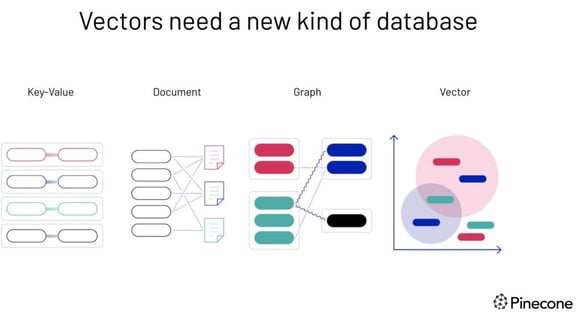
Vectors need a new kind of database—image source.
Traditional relational databases struggle with high-dimensional data and efficiently performing similarity searches. Vector databases, however, are specifically optimized for these tasks, enabling swift and precise retrieval of data based on vector proximity or resemblance.
This approach allows for searches rooted in semantic or contextual relevance, providing more meaningful results compared to the exact match searches of conventional databases.
For example, a vector database can:
- Search for songs that resonate with a particular tune based on melody and rhythm.
- Discover articles that align with another specific article in theme and perspective.
- Identify gadgets that mirror the characteristics and reviews of a particular device.
So how can unstructured data like text or images be converted into numbers? The answer is embeddings.
Embedding is a process that transforms unstructured data into fixed-size numerical vectors, capturing the inherent semantics and relationships within the data. This is achieved through large neural networks that learn to represent the data in a continuous vector space, where similar items are positioned closer together.
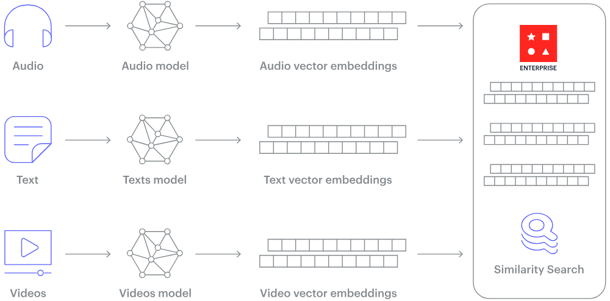
How does a vector database work? Image source.
How to Use pgvector: Step-by-Step
In this section, we'll walk through setting up pgvector, using its basic features, and building a simple application by integrating it with OpenAI.
We'll cover installation, basic operations, indexing, and integration with Python and LangChain.
1. Prerequisites
To follow this tutorial, you should have basic knowledge of SQL and PostgreSQL and be familiar with Python programming.
Before we begin, make sure you have the following:
- PostgreSQL 11 or later installed on your system
- Python 3.7 or later (for the integration section)
- An OpenAI API key (for the semantic search application)
2. How to install pgvector
1. First, ensure you have PostgreSQL development files installed. On Ubuntu or Debian, you can install them with:
sudo apt-get install postgresql-server-dev-all
If you are a Windows user, you can download the PostgreSQL installer from the official website.
2. Clone the pgvector GitHub repository:
git clone https://github.com/pgvector/pgvector.git
3. Build and install the pgvector extension:
cd pgvector
make
sudo make install
If you are a Windows user, ensure you have C++ support in Visual Studio Code installed. The official installation documentation provides a step-by-step process.
4. Connect to your PostgreSQL database:
You have several options for connecting and interacting with the PostgreSQL database: pgAdmin is one of the most commonly used interfaces. Alternatively, you can use pSQL (PostgreSQL command line interface) or even a VS Code extension for PostgreSQL.
5. After connecting to your PostgreSQL database, create the extension:
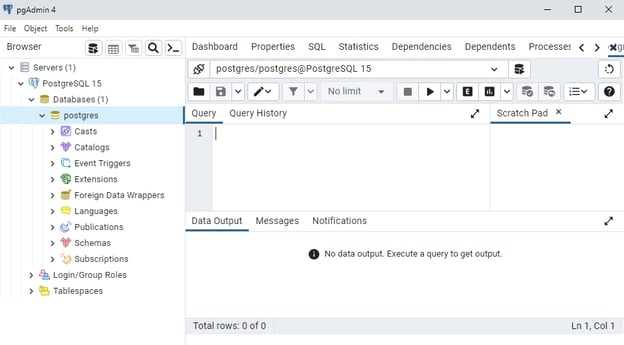
pgAdmin Interface
3. Basic usage of pgvector
Now that we have pgvector installed, let's explore its basic usage.
1. To set up our first vector database in PostgreSQL using pgvector extension, let's create a table to store our vector data:
CREATE TABLE items (
  id SERIAL PRIMARY KEY,
  embedding vector(3)
);
This creates a table named items with an id column and an embedding column of type vector(3), which will store 3-dimensional vectors.
2. Now, let's insert some data into our table:
INSERT INTO items (embedding) VALUES ('[1,2,3]'), ('[4,5,6]'), ('[1,1,1]');
3. Now, we can perform vector operations. For example, to find the nearest neighbor to the vector [2,3,4]:
SELECT * FROM items ORDER BY embedding <-> '[2,3,4]' LIMIT 1;
This query uses the <-> operator, which calculates the Euclidean distance between vectors.
4. We can also use other distance metrics, such as cosine distance:
SELECT * FROM items ORDER BY embedding <=> '[2,3,4]' LIMIT 1;
The <=> operator calculates the cosine distance between vectors.
4. Indexing vector data with pgvector
Indexing in vector databases, including pgvector, is necessary to enhance search performance, particularly as your dataset expands.
The importance of indexing cannot be overstated, as it offers several benefits:
- First, it significantly improves speed. Without an index, each similarity search would require a full table scan, comparing the query vector against every vector in the database. This process becomes increasingly time-consuming as your data grows. Indexes create a structure that enables much faster searches.
- Second, indexing enhances scalability, allowing your database to manage larger datasets efficiently. As you continue to add more vectors, properly indexed searches maintain their performance.
- Third, indexing contributes to resource efficiency by reducing CPU and I/O load during searches. This is especially important for busy systems or those operating with limited resources, ensuring smooth operation even under demanding conditions.
There are two types of indexes available for pgvector: ivfflat and hnsw. They both serve different purposes:
- IVFFlat (Inverted File Flat) index:
- Suitable for exact nearest neighbor searches
- Divides the vector space into clusters, speeding up searches by first identifying relevant clusters
- Good balance of search speed and accuracy
- HNSW (Hierarchical Navigable Small World) index:
- Designed for approximate nearest-neighbor searches
- Creates a graph structure for swift navigation between vectors
- Extremely fast, but may occasionally miss the absolute nearest neighbor
When to use each index:
- Use IVFFlat when you need exact results and can tolerate slightly slower searches
- Use HNSW when you need fast searches and can accept slight inaccuracies
1. Let's create an ivfflat index:
CREATE INDEX ON items USING ivfflat (embedding vector_cosine_ops) WITH (lists = 100);
This creates an index using the IVFFlat algorithm, which is suitable for exact nearest-neighbor searches.
2. For approximate nearest neighbor searches, we can use the hnsw index:
CREATE INDEX ON items USING hnsw (embedding vector_l2_ops) WITH (m = 16, ef_construction = 64);
After creating an index, our queries will automatically use it when appropriate.
Pgvector supports integration with a few frameworks, which makes interacting with our vector database easier. Let’s review two helpful ones: Python and LangChain.
Using pgvector with Python
pgvector can be easily integrated with Python using the psycopg2 library. Let's set up a Python environment and perform some basic operations.
1. First, install the required libraries:
!pip install psycopg2-binary numpy
2. Now, let's create a Python script to interact with our vector database:
import psycopg2
import numpy as np
conn = psycopg2.connect("dbname=your_database user=your_username")
cur = conn.cursor()
embedding = np.array([1.5, 2.5, 3.5])
cur.execute("INSERT INTO items (embedding) VALUES (%s)", (embedding.tolist(),))
query_vector = np.array([2, 3, 4])
cur.execute("SELECT * FROM items ORDER BY embedding <-> %s LIMIT 1", (query_vector.tolist(),))
result = cur.fetchone()
print(f"Nearest neighbor: {result}")
conn.commit()
cur.close()
conn.close()
This script demonstrates how to insert a vector and perform a similarity search using Python.
Using pgvector with LangChain
pgvector can also be integrated with LangChain, a popular framework for developing applications with large language models.
Here's a simple example of how to use pgvector as a vector store in LangChain:
from langchain_postgres.vectorstores import PGVector
from langchain.embeddings.openai import OpenAIEmbeddings
connection_string = "postgresql://user:pass@localhost:5432/db_name"
embedding_function = OpenAIEmbeddings()
vector_store = PGVector.from_documents(
documents,
embedding_function,
connection_string=connection_string
)
query = "Your query here"
results = vector_store.similarity_search(query)
This example assumes you have set up OpenAI embeddings and have a list of documents to embed.
6. Building a sample application with pgvector and OpenAI
Now, let's build a simple semantic search engine using pgvector and OpenAI embeddings!
This application will allow users to search through a collection of text documents using natural language queries.
import openai
import psycopg2
import numpy as np
openai.api_key = "your_openai_api_key"
conn = psycopg2.connect("dbname=your_database user=your_username")
cur = conn.cursor()
cur.execute("""
CREATE TABLE IF NOT EXISTS documents (
id SERIAL PRIMARY KEY,
content TEXT,
embedding vector(1536)
)
""")
def get_embedding(text):
response = openai.embeddings.create(input=text, model="text-embedding-ada-002")
return response['data'][0]['embedding']
def add_document(content):
embedding = get_embedding(content)
cur.execute("INSERT INTO documents (content, embedding) VALUES (%s, %s)", (content, embedding))
conn.commit()
def search_documents(query, limit=5):
query_embedding = get_embedding(query)
cur.execute("""
SELECT content, embedding <-> %s AS distance
FROM documents
ORDER BY distance
LIMIT %s
""", (query_embedding, limit))
return cur.fetchall()
sample_docs = [
"The quick brown fox jumps over the lazy dog.",
"Python is a high-level programming language.",
"Vector databases are essential for modern AI applications.",
"PostgreSQL is a powerful open-source relational database.",
]
for doc in sample_docs:
add_document(doc)
search_query = "Tell me about programming languages"
results = search_documents(search_query)
print(f"Search results for: '{search_query}'")
for i, (content, distance) in enumerate(results, 1):
print(f"{i}. {content} (Distance: {distance:.4f})")
cur.close()
conn.close()
This simple application demonstrates how to use pgvector to create a semantic search engine.
It embeds documents using OpenAI's text embedding model and stores them in a PostgreSQL database with pgvector. The search function finds the most similar documents to a given query using cosine similarity.
Optimizing pgvector for High Traffic
You will want to optimize pgvector as your application scales. Here are some suggestions at a high level:
Connection pooling
Implement connection pooling to reduce overhead. Use PgBouncer or PgPool-II. These tools are good to know because they maintain reusable database connections.
Query performance tuning
Adjust index parameters at runtime. You can balance speed and accuracy based on your needs.
-
For IVFFlat indexes, set the probes parameter. Use 1-5 for speed. Use 10-20 for balanced performance.
-
For HNSW indexes, tune ef_search. Use 20-40 for speed. Use 100-200 for accuracy.
Also, you can use EXPLAIN ANALYZE to verify index usage. Always include LIMIT clauses in queries.
Caching
Implement caching with Redis or Memcached. Cache frequently queried vectors. Use the query vector as the cache key. Set appropriate expiration times.
Read replicas
Set up PostgreSQL read replicas for read-heavy workloads. Route writes to the primary database. Route vector searches to replicas. Use load balancers for automatic distribution.
PostgreSQL configuration
Tune key parameters for vector workloads:
-
shared_buffers: Set to 25% of total RAM
-
work_mem: Set to 64-128MB for vector operations
-
random_page_cost: Lower for SSD storage
-
effective_cache_size: Set to 50-75% of total RAM
Index maintenance
Rebuild indexes periodically during low-traffic periods. Run VACUUM and ANALYZE. Enable autovacuum for automated maintenance.
Monitoring
Track query latency and queries per second. Monitor connection pool utilization. Check cache hit ratios. Watch resource usage. Set up alerts for performance issues. Enable pg_stat_statements to identify slow queries.
pgvector and Its Alternatives
Now, let's compare pgvector with other popular vector databases. This comparison will help you understand the differences in features, deployment options, scalability, integration, and cost between pgvector and other solutions available in the market.
pgvector vs. Pinecone
Pinecone is a fully managed vector database designed for high scalability and ease of use.
|
Feature
|
pgvector
|
Pinecone
|
|
Database type
|
Extension for PostgreSQL
|
Fully managed vector database
|
|
Deployment
|
Self-hosted
|
Cloud-based
|
|
Scalability
|
Limited by PostgreSQL
|
Highly scalable
|
|
Integration
|
Works with existing PostgreSQL stack
|
Requires separate integration
|
|
Cost
|
Free, open-source
|
Pay-as-you-go pricing
|
pgvector is an excellent choice for those who want to leverage their existing PostgreSQL infrastructure without additional costs. At the same time, Pinecone provides a highly scalable, managed solution with pay-as-you-go pricing for ease of use.
pgvector vs. Milvus
Milvus is a dedicated vector database that offers advanced features and high scalability.
|
Feature
|
pgvector
|
Milvus
|
|
Database type
|
Extension for PostgreSQL
|
Dedicated vector database
|
|
Deployment
|
Self-hosted
|
Self-hosted or cloud
|
|
Scalability
|
Limited by PostgreSQL
|
Highly scalable
|
|
Integration
|
Works with existing PostgreSQL stack
|
Requires separate integration
|
|
Feature set
|
Basic vector operations
|
Advanced features like dynamic schema
|
While pgvector provides basic vector operations within the familiar PostgreSQL environment, Milvus offers a more feature-rich and scalable solution specifically for handling large-scale vector data.
pgvector vs. Weaviate
Weaviate is a vector database with integrated object storage, offering flexible data modeling and scalability.
|
Feature
|
pgvector
|
Weaviate
|
|
Database type
|
Extension for PostgreSQL
|
Vector database with object storage
|
|
Deployment
|
Self-hosted
|
Self-hosted or cloud
|
|
Scalability
|
Limited by PostgreSQL
|
Designed for scalability
|
|
Integration
|
Works with existing PostgreSQL stack
|
Requires separate integration
|
|
Data model
|
Vectors only
|
Objects with vectors and properties
|
pgvector's simplicity and integration with PostgreSQL make it a good fit for existing users needing basic vector functionalities. In contrast, Weaviate's more sophisticated data model and scalability are suitable for complex applications requiring object storage along with vectors.
Conclusion
pgvector brings powerful vector similarity search capabilities to PostgreSQL, making it an excellent choice for developers looking to add AI-powered features to their existing PostgreSQL-based applications.
In this tutorial, we've explored its installation, basic usage, indexing capabilities, and integration with Python and LangChain.
While pgvector may not offer the same scalability and specialized features as dedicated vector databases like Pinecone or Milvus, its seamless integration with PostgreSQL makes it an attractive option for many use cases.
It's particularly well-suited for projects that already use PostgreSQL and need to add vector search capabilities without introducing a new database system.
We encourage you to try pgvector in your own projects. Whether you're building a recommendation system, a semantic search engine, or any other application that requires similarity searches, pgvector can be a valuable tool in your data science toolkit.
For further learning, explore our courses:










Vector search has become increasingly popular in recent years, thanks to all the progress in the Generative AI and Large Language Model ecosystem.
Vector search is a method of information retrieval in which documents and queries are represented as vectors instead of plain text. This numeric representation is obtained by using a large, trained neural network that can convert unstructured data, such as text, images, and videos, into vectors.
Traditional relational databases are not optimized to handle large volumes of vector data. Hence, many open-source and proprietary exclusive vector databases have emerged in the last few years. However, it may not be ideal for all companies to have a dedicated database just for vectors, separated from the main database.
Enter pgvector, a powerful extension for PostgreSQL that brings vector similarity search capabilities to one of the most popular relational databases.
In this tutorial, we'll explore pgvector's features and demonstrate how it can help you in your work.
What Is pgvector?
pgvector is an open-source extension for PostgreSQL that adds support for vector operations and similarity searches. It lets you store, index, and query vector data directly within your PostgreSQL database.
This integration brings the power of vector operations to your existing PostgreSQL infrastructure, making it an excellent choice for applications involving embeddings, recommendation systems, and similarity searches.
Features of pgvector include:
The Importance of pgvector and Vector Databases
Vector databases are specialized databases designed to store and query multi-dimensional vector data. This capability is relevant in modern machine learning applications, including recommendation systems, image retrieval, and natural language processing use cases.
Vectors need a new kind of database—image source.
Traditional relational databases struggle with high-dimensional data and efficiently performing similarity searches. Vector databases, however, are specifically optimized for these tasks, enabling swift and precise retrieval of data based on vector proximity or resemblance.
This approach allows for searches rooted in semantic or contextual relevance, providing more meaningful results compared to the exact match searches of conventional databases.
For example, a vector database can:
So how can unstructured data like text or images be converted into numbers? The answer is embeddings.
Embedding is a process that transforms unstructured data into fixed-size numerical vectors, capturing the inherent semantics and relationships within the data. This is achieved through large neural networks that learn to represent the data in a continuous vector space, where similar items are positioned closer together.
How does a vector database work? Image source.
How to Use pgvector: Step-by-Step
In this section, we'll walk through setting up pgvector, using its basic features, and building a simple application by integrating it with OpenAI.
We'll cover installation, basic operations, indexing, and integration with Python and LangChain.
1. Prerequisites
To follow this tutorial, you should have basic knowledge of SQL and PostgreSQL and be familiar with Python programming.
Before we begin, make sure you have the following:
2. How to install pgvector
1. First, ensure you have PostgreSQL development files installed. On Ubuntu or Debian, you can install them with:
If you are a Windows user, you can download the PostgreSQL installer from the official website.
2. Clone the pgvector GitHub repository:
3. Build and install the
pgvectorextension:If you are a Windows user, ensure you have C++ support in Visual Studio Code installed. The official installation documentation provides a step-by-step process.
4. Connect to your PostgreSQL database:
You have several options for connecting and interacting with the PostgreSQL database: pgAdmin is one of the most commonly used interfaces. Alternatively, you can use pSQL (PostgreSQL command line interface) or even a VS Code extension for PostgreSQL.
5. After connecting to your PostgreSQL database, create the extension:
pgAdmin Interface
3. Basic usage of pgvector
Now that we have pgvector installed, let's explore its basic usage.
1. To set up our first vector database in PostgreSQL using pgvector extension, let's create a table to store our vector data:
This creates a table named
itemswith anidcolumn and anembeddingcolumn of typevector(3), which will store 3-dimensional vectors.2. Now, let's insert some data into our table:
3. Now, we can perform vector operations. For example, to find the nearest neighbor to the vector
[2,3,4]:This query uses the
<->operator, which calculates the Euclidean distance between vectors.4. We can also use other distance metrics, such as cosine distance:
The
<=>operator calculates the cosine distance between vectors.4. Indexing vector data with pgvector
Indexing in vector databases, including pgvector, is necessary to enhance search performance, particularly as your dataset expands.
The importance of indexing cannot be overstated, as it offers several benefits:
There are two types of indexes available for pgvector:
ivfflatandhnsw. They both serve different purposes:When to use each index:
1. Let's create an
ivfflatindex:This creates an index using the IVFFlat algorithm, which is suitable for exact nearest-neighbor searches.
2. For approximate nearest neighbor searches, we can use the
hnswindex:After creating an index, our queries will automatically use it when appropriate.
5. pgvector integration with other tools
Pgvector supports integration with a few frameworks, which makes interacting with our vector database easier. Let’s review two helpful ones: Python and LangChain.
Using pgvector with Python
pgvector can be easily integrated with Python using the
psycopg2library. Let's set up a Python environment and perform some basic operations.1. First, install the required libraries:
2. Now, let's create a Python script to interact with our vector database:
This script demonstrates how to insert a vector and perform a similarity search using Python.
Using pgvector with LangChain
pgvector can also be integrated with LangChain, a popular framework for developing applications with large language models.
Here's a simple example of how to use pgvector as a vector store in LangChain:
This example assumes you have set up OpenAI embeddings and have a list of documents to embed.
6. Building a sample application with pgvector and OpenAI
Now, let's build a simple semantic search engine using pgvector and OpenAI embeddings!
This application will allow users to search through a collection of text documents using natural language queries.
This simple application demonstrates how to use pgvector to create a semantic search engine.
It embeds documents using OpenAI's text embedding model and stores them in a PostgreSQL database with pgvector. The search function finds the most similar documents to a given query using cosine similarity.
Optimizing pgvector for High Traffic
You will want to optimize pgvector as your application scales. Here are some suggestions at a high level:
Connection pooling
Implement connection pooling to reduce overhead. Use PgBouncer or PgPool-II. These tools are good to know because they maintain reusable database connections.
Query performance tuning
Adjust index parameters at runtime. You can balance speed and accuracy based on your needs.
For IVFFlat indexes, set the
probesparameter. Use 1-5 for speed. Use 10-20 for balanced performance.For HNSW indexes, tune
ef_search. Use 20-40 for speed. Use 100-200 for accuracy.Also, you can use
EXPLAIN ANALYZEto verify index usage. Always includeLIMITclauses in queries.Caching
Implement caching with Redis or Memcached. Cache frequently queried vectors. Use the query vector as the cache key. Set appropriate expiration times.
Read replicas
Set up PostgreSQL read replicas for read-heavy workloads. Route writes to the primary database. Route vector searches to replicas. Use load balancers for automatic distribution.
PostgreSQL configuration
Tune key parameters for vector workloads:
shared_buffers: Set to 25% of total RAMwork_mem: Set to 64-128MB for vector operationsrandom_page_cost: Lower for SSD storageeffective_cache_size: Set to 50-75% of total RAMIndex maintenance
Rebuild indexes periodically during low-traffic periods. Run
VACUUMandANALYZE. Enable autovacuum for automated maintenance.Monitoring
Track query latency and queries per second. Monitor connection pool utilization. Check cache hit ratios. Watch resource usage. Set up alerts for performance issues. Enable
pg_stat_statementsto identify slow queries.pgvector and Its Alternatives
Now, let's compare pgvector with other popular vector databases. This comparison will help you understand the differences in features, deployment options, scalability, integration, and cost between pgvector and other solutions available in the market.
pgvector vs. Pinecone
Pinecone is a fully managed vector database designed for high scalability and ease of use.
Feature
pgvector
Pinecone
Database type
Extension for PostgreSQL
Fully managed vector database
Deployment
Self-hosted
Cloud-based
Scalability
Limited by PostgreSQL
Highly scalable
Integration
Works with existing PostgreSQL stack
Requires separate integration
Cost
Free, open-source
Pay-as-you-go pricing
pgvector is an excellent choice for those who want to leverage their existing PostgreSQL infrastructure without additional costs. At the same time, Pinecone provides a highly scalable, managed solution with pay-as-you-go pricing for ease of use.
pgvector vs. Milvus
Milvus is a dedicated vector database that offers advanced features and high scalability.
Feature
pgvector
Milvus
Database type
Extension for PostgreSQL
Dedicated vector database
Deployment
Self-hosted
Self-hosted or cloud
Scalability
Limited by PostgreSQL
Highly scalable
Integration
Works with existing PostgreSQL stack
Requires separate integration
Feature set
Basic vector operations
Advanced features like dynamic schema
While pgvector provides basic vector operations within the familiar PostgreSQL environment, Milvus offers a more feature-rich and scalable solution specifically for handling large-scale vector data.
pgvector vs. Weaviate
Weaviate is a vector database with integrated object storage, offering flexible data modeling and scalability.
Feature
pgvector
Weaviate
Database type
Extension for PostgreSQL
Vector database with object storage
Deployment
Self-hosted
Self-hosted or cloud
Scalability
Limited by PostgreSQL
Designed for scalability
Integration
Works with existing PostgreSQL stack
Requires separate integration
Data model
Vectors only
Objects with vectors and properties
pgvector's simplicity and integration with PostgreSQL make it a good fit for existing users needing basic vector functionalities. In contrast, Weaviate's more sophisticated data model and scalability are suitable for complex applications requiring object storage along with vectors.
Conclusion
pgvector brings powerful vector similarity search capabilities to PostgreSQL, making it an excellent choice for developers looking to add AI-powered features to their existing PostgreSQL-based applications.
In this tutorial, we've explored its installation, basic usage, indexing capabilities, and integration with Python and LangChain.
While pgvector may not offer the same scalability and specialized features as dedicated vector databases like Pinecone or Milvus, its seamless integration with PostgreSQL makes it an attractive option for many use cases.
It's particularly well-suited for projects that already use PostgreSQL and need to add vector search capabilities without introducing a new database system.
We encourage you to try pgvector in your own projects. Whether you're building a recommendation system, a semantic search engine, or any other application that requires similarity searches, pgvector can be a valuable tool in your data science toolkit.
For further learning, explore our courses: