Program
AI Temelleri
10 sa
Perplexity Computer, bir görevi atayıp kenara çekildiğiniz bulut tabanlı bir ajandır. Şubat 2026’daki lansmanından bu yana gelen güncellemeler, kimin erişebileceğini, kredilerin nasıl takip edildiğini ve bir çalıştırma başlamadan önce ne kadar kontrol sahibi olduğunuzu değiştirdi. Bu da erken dönem incelemelerin çoğunu eskitti.
Sabit bir istem ve görünür bir kredi toplamı kullanarak sekiz yapay zekâ kodlama aracında paralel bir araştırma iş akışını test ettim. Sonuç, fiyatlandırmayı, sınırları ve plan seçimini birlikte değerlendirmem için yeterli oldu.
Computer, Perplexity’nin bulut tabanlı ajan ürünüdür. Bir cihaz değildir ve Perplexity Ask ile aynı şey değildir. Ask yanıt döndürür. Computer ise eylem alır: web’de gezinir, belgeler ve slaytlar üretir, bir sandbox’ta kod çalıştırır, yüzlerce bağlayıcıya erişir ve bu adımları bitmiş bir çıktıya zincirler.
Ayrıca Mac’te yerel olarak çalışan Personal Computer adında ayrı bir ürün vardır. 2026 Nisan ortasında piyasaya çıktı ve Max’ten Pro’ya yayılıyor. Bu inceleme bulut tabanlı Computer hakkındadır.
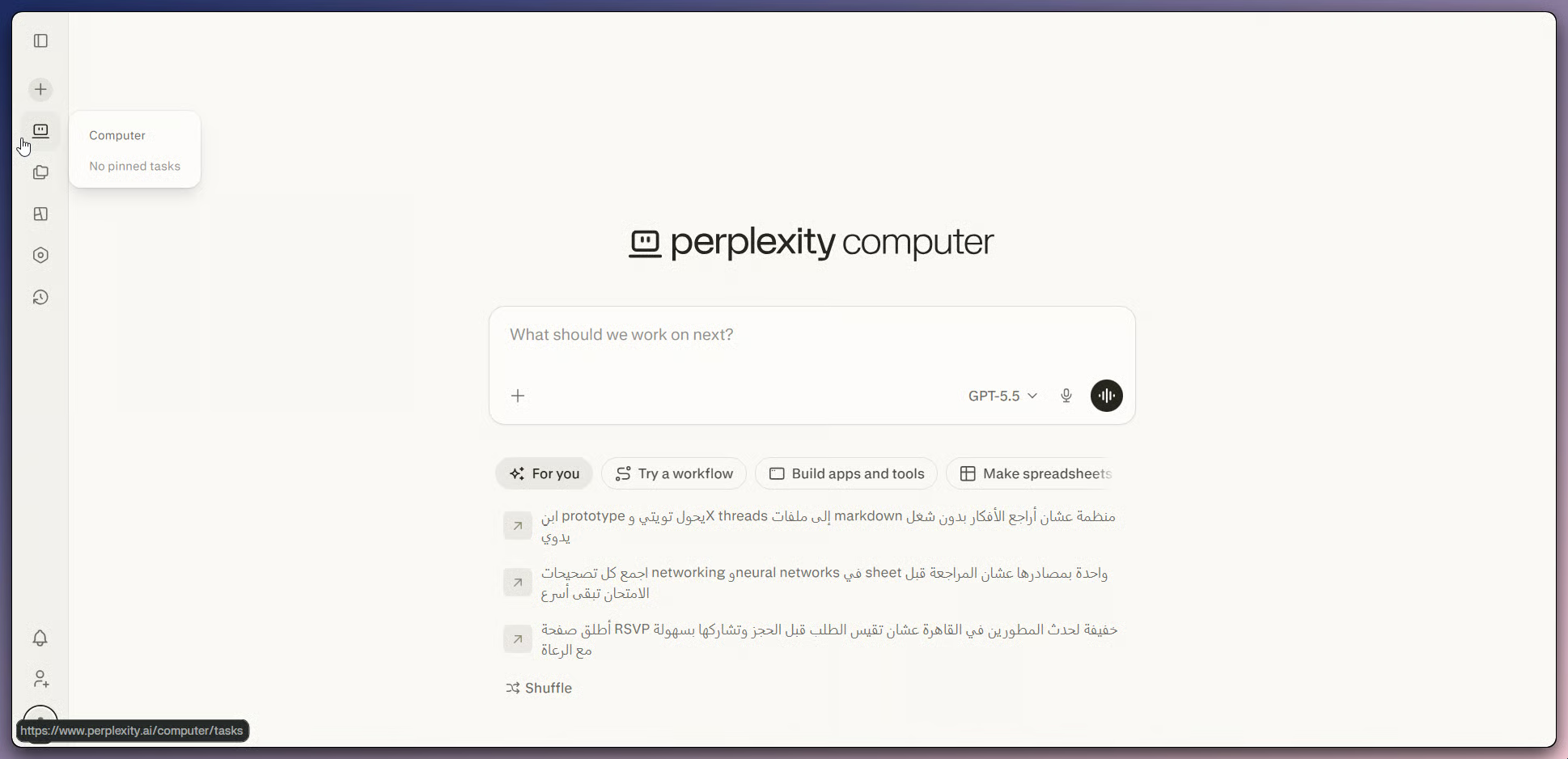
Perplexity web’de Computer görev oluşturucu. Görsel: Yazar.
Mimari önemlidir çünkü maliyet hikâyesini şekillendirir. Computer bir plan taslağı çıkarır, ardından adımları izole bir bulut sandbox’ındaki uzman alt ajanlara yönlendirir. 4 Mayıs 2026 güncellemesine göre, GPT-5.5 Pro ve Max aboneleri için varsayılan orkestratördür, dolayısıyla varsayılan olarak Claude Opus 4.6 referansları artık güncel değildir.
Araştırma görevlerinde “paralel yürütme”, Computer’ın arama yapma ve işi bölme biçimine karşılık gelir. Tek bir araştırma alt ajanı, aynı anda yedi arama türünü çalıştırabilir: web, akademik, kişi, görsel, video, alışveriş ve sosyal; özetler yerine kaynak sayfaların tamamını okur. Bir görevin içinde birden fazla alt ajan da çalışabilir. Max kullanıcıları için Model Council, görüş ayrılığının önemli olduğu sorularda ayrı bir model karşılaştırması ekler.
Bu inceleme için iki sonraki ek önemli: uzun görevlerden önce plan önizlemeleri ve yürütme sırasında canlı maliyet takibi. Bu kontroller, maliyeti sonradan yargılamak yerine çalıştırmayı izlememi sağladı.
Normal Perplexity Ask aramaları ve Deep Research kredi tüketmez. Computer görevleri tüketir.
Computer faturalandırması iki parçadan oluşur: sabit bir abonelik planı ve çalışırken ajanın harcadığı ayrı bir kredi bakiyesi. Gerçek maliyeti değerlendirmek için ikisini birlikte okuyun, aksi halde zorlaşır.
İşte 2026 Mayıs ayı başı itibarıyla güncel bireysel ve kurumsal fiyatlandırma. Rakamları kaydolduğunuz gün doğrulayın; zira fiyatlar ve kredi kuralları bölgeye, plana veya kampanyaya göre değişebilir.
|
Plan |
Aylık fiyat |
Computer erişimi |
Dahil aylık krediler |
|
Free |
$0 |
Hayır |
Yok |
|
Pro |
Ayda $20 veya yılda $200 |
Evet, 13 Mart 2026’dan beri |
Dahil yok; krediler satın alınmalıdır |
|
Max |
Ayda $200 veya yılda $2.000 |
Evet |
10.000 |
|
Enterprise Pro |
Koltuk başına ayda $40 |
Evet |
Koltuk başına 500 |
|
Enterprise Max |
Koltuk başına ayda $325 |
Evet |
Koltuk başına 15.000 |
İki ayrıntı genelde atlanır. Pro erişim sağlar ama aylık Computer kredisi içermez; bu nedenle kullanıcıların kredi satın alması veya otomatik doldurmayı açması gerekir. Max, aylık 10.000 kredi içerir; ayrıca, kredilerle ilgili resmi yardım merkezi sayfasına göre, ücretli Pro ve Max kayıtlarında tek seferlik bonus krediler de bulunmaktadır. Bonusları geçici kabul edin; değişebilir ve süresi dolabilir.
Kredi maliyeti göreve göre değişir ve Perplexity görev başına tablo yayımlamaz. Basit işler onlarca krediye mal olabilir; araştırma ağırlıklı görevler yüzlerce ya da binlere çıkabilir; başarısız kod döngüleri 10.000’i aşmıştır. Otomatik doldurma varsayılan olarak kapalıdır, aylık krediler devretmez ve krediniz biterse aktif görevler duraklar.
İşte gerçek test. Computer’dan sekiz yapay zekâ kodlama aracını araştırmasını, her biri için aynı alanları toplamasını, çelişkileri işaretlemesini ve sonuçları bir karşılaştırma tablosu ile kısa bir not haline getirmesini istedim. Bu senaryoyu, kredi kullanımının kontrolünün daha zor olduğu ucu açık kodlama işlerine kaymadan paralel araştırmayı sınadığı için seçtim.
İsteme geçmeden önce, birkaç ön koşulun hazır olması gerekir.
Kredi kotası nedeniyle test Max üzerinde yapıldı. Önce belirtildiği gibi, Pro kullanıcıları da satın alınan kredilerle aynı iş akışını çalıştırabilir. Yalnızca araştırma odaklı bir görev için özel bağlayıcılara gerek yok. İhtiyacınız olanlar:
Computer paneli web’de ana sayfadan, iOS’ta Computer sekmesinden ve Mac’te Perplexity masaüstü uygulamasından açılır.
İstem tasarımı önemlidir çünkü Computer talimatlarınızı alt ajan işine dönüştürür. Belirsiz bir istem belirsiz bir çalıştırma üretir. Bu istem, hedefleri, alanları, atıf kuralını, notun hedef kitlesini ve duraklama noktasını sabitler.
Research the following 8 AI coding tools in parallel: GitHub Copilot, Cursor,
Claude Code, Windsurf, Aider, Continue.dev, Tabnine, and Cody.

For each tool, collect the same fields:
Pricing for individual paid plansCore features, with a focus on agent behaviorMain use casesTwo main limitationsOne notable update from the past 90 daysA primary source link for every important claim
Then:
Build a single normalized comparison tableFlag any field where two of your sources contradict each otherWrite a 200-word recommendation memo for a senior backend engineer who already pays for one AI coding tool and is considering whether to switch
Before producing the final memo, show the plan, the list of sources you intend to cite, and your credit estimate, then wait for my approval.
İki tasarım tercihi en çok önem taşıyor. Plan önizlemesi, krediler harcanmadan kapsamı daraltma şansı verir. “Çelişkileri işaretle” satırı ise Computer’ın görüş ayrılıklarını tek bir yanıta düzleştirmek yerine görünür kılmasını sağlar.
İstemi gönderdikten sonra Computer, sekiz hedef aracı listeleyen, kullanmayı planladığı veri kaynaklarını, iş sırasını ve kabaca kredi tahminini içeren yazılı bir planda durdu. Planı onaylamak paralel araştırma aşamasını başlattı ve canlı kredi sayacı ileti dizisinde artmaya başladı. 27 Mart 2026 güncellemesiyle eklenen bu sayaç, en yakından takip ettiğim sayı oldu.
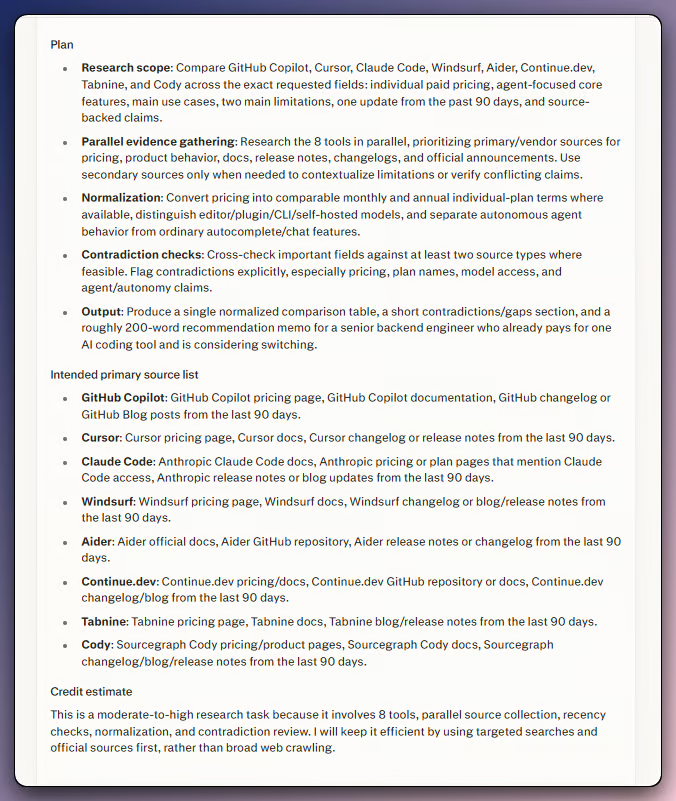
Çalıştırmayı onaylamadan önce plan önizlemesi. Görsel: Yazar.
Alt ajanlar, sekiz araç genelinde aynı anda çalıştı. Etkinlik paneli, hangi sitelerin okunduğuna dair kısa notlarla ilerleme satırlarını gösterdi. Bir alt ajan, bir şirketin açık kaynak CLI’ını ayrı bir ürün sayıp saymama konusunda ortada durup sordu. Bu tür bir araya girme önemlidir çünkü erken incelemeler Computer’ı kara kutu olarak tanımlıyordu. 17 Nisan 2026 güncellemesi itibarıyla, tek bir alt ajanı durdurabilir veya görevin ortasında takip talimatı yazabilirsiniz.
Tüm çalıştırma 7 dakika 59 saniye sürdü ve 225,71 kredi tüketti. Bu sayı sizinkiyle eşleşmeyecektir. Ajan çalıştırmaları deterministik değildir: aynı istem her çalıştırmada farklı bir ayrıştırma, farklı bir model ataması ve biraz farklı bir çıktı üretir. Bir video veya demo kaydı yapıyorsanız, gerçeğinden önce bir deneme çalıştırması yapın.
Çıktı, istenen alanlar genelinde sekiz aracın tamamını kapsayan, hücrelerde satır içi atıfları olan bir Markdown karşılaştırma tablosuydu. Ayrıca çelişkiler-ve-boşluklar tablosu ile kısa bir tavsiye notu da vardı. Computer, 27 Mart güncellemesinden beri varsayılan olarak Markdown’da taslak oluşturuyor; talep üzerine PDF ve DOCX dışa aktarımı mevcut.
Çıktıyı, çalıştırma öncesinde oluşturduğum bir kontrol listesine göre notladım.
|
Kategori |
Hüküm |
Notlar |
|
Zor gerçeklerde doğruluk |
Karışık |
Birkaç fiyatlandırma ve özellik iddiasının, atıf yapılan birincil kaynaklara karşı doğrulanması gerekti |
|
Kaynak kalitesi |
Geçti |
Toplayıcı blog yazıları yerine birincil dokümanlar ve fiyatlandırma sayfaları atıflandı |
|
Yapı |
Geçti |
Normalize tablo yeniden inşa gerektirmedi; sütun sırası istemle eşleşti |
|
Çatışma yönetimi |
Geçti |
Kaynakların uyuşmadığı alanlar işaretlendi ve uyuşmazlık açıkça yazıldı |
|
Temizlik süresi |
Karışık |
Yaklaşık otuz dakika düzenleme; neredeyse tamamı tavsiye notu üzerinde |
|
Kredi kullanımı |
Karışık |
Çalıştırma için 225,71 kredi, ancak yürütmeden önce hâlâ tahmin etmesi zor |
Temizlik işi net bir şekilde bölündü. Tablo neredeyse yayıma hazırdı. Tavsiye notu ise, öte yandan, ihtiyatlı dil kullanan ve tablodaki kanıtlarla tam örtüşmeyen birkaç cümle içeriyordu. Bu not, verilerden ziyade, dikkatli bir insan kontrolüne ihtiyaç duyan kısımdır. Çıktıyı kıdemsiz bir analistin ilk taslağı gibi düşünün: faydalı, çoğunlukla doğru ve elinizden çıkmadan önce bir dikkatli okumayı hak ediyor.
Sonuç, lansmandan bu yana diğer testçilerin bildirdikleriyle örtüşüyor. Kullanım alanı dardır.
İddiayı araştırma ve sentezin ötesine taşımam. Kodlama konusunda yavaşlardım.
Birkaç sınırlama gerçektir ve bazıları lansmandan bu yana değişmiştir. Test sırasında en çok önem taşıyanlar bunlardı.
Bağlayıcı güvenilirliği düzensizdir ve hızla değişir. 2026’nın başlarındaki testler, Vercel OAuth süresinin dolmasını, sığ Ahrefs verilerini ve manuel Personal Access Token kullanarak GitHub geçici çözümlerini buldu. 27 Mart güncellemesi bir Vercel bağlayıcısı, geliştirilmiş bir Box bağlayıcısı ve bağlayıcı performansına dair genel bir not ekledi. Bu, eski şikâyetlerin düzeldiğini kanıtlamaz. Güvendiğiniz herhangi bir bağlayıcıyı önce düşük riskli bir görevde test edin.
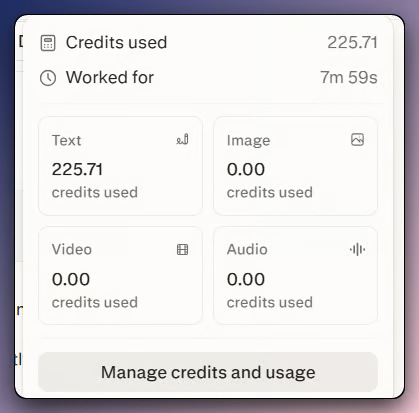
Test çalıştırmasından sonra kredi kullanımı. Görsel: Yazar.
Kodlama iş akışları en yüksek maliyet riskini taşır. Bulut Computer’da hâlâ canlı önizleme, sıcak yeniden yükleme ve sınırlı süreç içi görünürlük vardır. Daha önce bahsedilen Mac ürünü yerel erişim ekler ve *.pplx.app yayınlama, canlıya almadan önce inceleyecek bir şey sunar; ancak bunların hiçbiri bulut Computer’ı sıkı bir kodlama döngüsüne dönüştürmez.
Kredi tüketimini, görev çalışmadan önce tahmin etmek hâlâ zordur. Testte kullanılan kontroller, yürütme sırasında tahmini azaltır; ancak çok sayıda alt ajanı olan geniş görevler hâlâ en değişken olanlardır.
Tekrarlanabilirlik sınırlıdır. Aynı istemin iki çalıştırması farklı alt ajan planları ve biraz farklı çıktılar üretir. Kredi maliyeti çalıştırmaya göre değişir; bu nedenle kaydedilecek her demo öncesinde bir deneme yapın.
Gizlilik ayarları, düzenlemeye tabi ekipler veya hassas iş akışları için dikkat gerektirir. Kurumsal hesaplar varsayılan olarak eğitimden hariç tutulur. Bireysel Pro ve Max kullanıcılarının hesap ayarlarından vazgeçmesi gerekir.
Yanıt, verdiğiniz işe, kullanım sıklığınıza, başladığınız plana ve kredi limitlerinde ne kadar disiplinli olduğunuza bağlıdır.
İşte kullanıcı türüne göre döküm.
|
Kullanıcı türü |
Hüküm |
Neden |
|
Analistler ve araştırmacılar |
Sık kullanım için Max |
Paralel araştırma ana kullanım alanıdır; dâhil aylık krediler düzenli kullanımı karşılayabilir |
|
Teknik yazarlar |
Dikkatle Pro testi |
Sınırları belli araştırma ve sentez görevleri, ürüne ucu açık işlerden daha iyi uyar |
|
Üretim uygulaması geliştiren geliştiriciler |
Her planda yüksek risk |
Kodlama geri bildirim döngüsü hâlâ dolaylı |
|
Gündelik kullanıcılar |
Max’te gerekçelendirmesi zor |
Aylık $200’lük fiyat, başa baş için gerçek iş akışı hacmi gerektirir |
|
Düzenlemeye tabi sektörlerdeki ekipler |
Enterprise Pro veya Max’i değerlendirin |
Denetim günlükleri, eğitime dahil edilmeme garantisi, ağ güvenlik duvarı kontrolleri ve yönetici bağlayıcı kontrolleri ekler |
|
İçerik üreticileri ve stratejistler |
Önce Pro testi |
Rekabet analizi ve yapılandırılmış raporlar, çıktının daha az temizlik gerektirdiği alanlardır |
Sadece bir kez Computer’ı denemek istiyorsanız, küçük bir kredi alımıyla Pro daha düşük riskli bir başlangıç noktasıdır. Haftada birkaç sınırları belirli araştırma görevi yürütürseniz, Max size sabit bir aylık kredi havuzu verir.
Bu kurallar test çalıştırmalarından çıktı.
Herhangi bir görevden önce aylık harcama limiti belirleyin; ilk çalıştırmalarda varsayılan $200 limitini düşürmek, bir görev kontrolden çıkarsa hasarı sınırlar. Bir ajana ihtiyaç duymayan her şey için bunun yerine Perplexity Ask kullanın. Plan önizlemesini zorunlu kılın, ardından yürütmeden önce onaylayın veya düzeltin.
İstemleri dar tutun, hedef listesini sabitleyin ve önemli her iddia için atıflar talep edin. Uzun çalıştırmalarda, testte kullanılan aynı maliyet sayacını izleyin. Planlanandan hızlı yükselirse, çalıştırmayı durdurun ve Computer’a işin nerede takıldığını sorun. Benim çalıştırmalarımda, tavsiye notu tablodan daha fazla kontrol gerektirdi. Kayıt alıyorsanız, izole bir hesap ve sterilize edilmiş bağlayıcılar kullanın; gerçek hesap verileri ekran görüntülerine kolayca sızar.
Computer, görev net bir şekle sahip olduğunda daha iyi çalışır: sabit bir liste, bir şema, kaynak kuralları ve bir durma noktası. Ucu açık bırakırsanız çabucak pahalı hissettirmeye başlar.
Benim testimde tablo, nottan daha az düzenleme gerektirdi ve çalışan maliyet, beklediğimden daha fazla önem taşıdı. Tekrarlanan sınırları belirli araştırmalarda Max, daha basit kredi kurulumu sunar. Gündelik denemeler için küçük bir kredi alımıyla Pro, daha düşük taahhütlü yoldur. Kodlama konusunda ise hâlâ temkinli olurum.
Ajan deseninin kendisi hakkında daha fazla arka plan için, LangChain ile LLM Uygulamaları Geliştirme kursumuz Python’da zincirler, araçlar ve ajanları kapsar.
DataCamp ile Öğrenin
Program
Kurs
Kurs
blog
Abid Ali Awan
14 dk.
blog
Dario Radečić
15 dk.
Eğitim
Adel Nehme
Eğitim
Kurtis Pykes
8 dk.